Passenger side CHRYSLER PACIFICA 2020 Owners Manual
[x] Cancel search | Manufacturer: CHRYSLER, Model Year: 2020, Model line: PACIFICA, Model: CHRYSLER PACIFICA 2020Pages: 516, PDF Size: 28.69 MB
Page 2 of 516
WARNING: Operating, servicing and maintaining a passenger vehicle or off-highway motor vehicle can
expose you to chemicals including engine exhaust, carbon monoxide, phthalates, and lead, which are known to the
State of California to cause cancer and birth defects or other reproductive harm. To minimize exposure, avoid
breathing exhaust, do not idle the engine except as necessary, service your vehicle in a well-ventilated area and
wear gloves or wash your hands frequently when servicing your vehicle. For more information go to
www.P65Warnings.ca.gov/passenger-vehicle.
This Owner’s Manual illustrates and describes the operation of features and equipment that are either standard or optional on this vehicle. This manual may also include a
description of features and equipment that are no longer available or were not ordered on this vehicle. Please disregard any features and equipment described in this manual
that are not on this vehicle. FCA US LLC reserves the right to make changes in design and specifications, and/or make additions to or improvements to its products without
imposing any obligation upon itself to install them on products previously manufactured.
With respect to any vehicles sold in Canada, the name FCA US LLC shall be deemed to be deleted and the name FCA Canada Inc.
used in substitution therefore.
If you are the first registered retail owner of your vehicle, you may obtain a complimentary printed copy of the Warranty Booklet by calling 1-800-247-9753 (U.S.)
or 1-800 -387-1143 (Canada) or by contacting your dealer.
This Owner’s Manual is intended to familiarize you with the important features of your vehicle. Your most up-to-date Owner’s Manual, Navigation/ Uconnect manuals and
Warranty Booklet can be found by visiting the website on the back cover. U.S. residents can purchase replacement kits by visiting www.techauthority.com and Canadian
residents can purchase replacement kits by calling 1-800 -387-1143.
The driver’s primary responsibility is the safe operation of the vehicle. Driving while distracted can result in loss of vehicle control, resulting in an accident and personal
injury. FCA US LLC strongly recommends that the driver use extreme caution when using any device or feature that may take their attention off the road. Use of any
electrical devices, such as cellular telephones, computers, portable radios, vehicle navigation or other devices, by the driver while the vehicle is moving is dangerous and
could lead to a serious accident. Texting while driving is also dangerous and should never be done while the vehicle is moving. If you find yourself unable to devote your
full attention to vehicle operation, pull off the road to a safe location and stop your vehicle. Some states or provinces prohibit the use of cellular telephones or texting
while driving. It is always the driver’s responsibility to comply with all local laws.
This Owner’s Manual has been prepared to help you get acquainted with your new Chrysler brand vehicle and to provide a convenient reference source
for common questions.
Not all features shown in this manual may apply to your vehicle. For additional information, visit www.mopar.com (U.S.), www.mopar.ca (Canada) or your
local Chrysler brand dealer.
Drunk driving is one of the most frequent causes of accidents. Your driving ability can be seriously impaired with blood
alcohol levels far below the legal minimum. If you are drinking, don’t drive. Ride with a designated non-drinking driver,
call a cab, a friend or use public transportation.
DRIVING AND ALCOHOL
Driving after drinking can lead to an accident. Your perceptions are less sharp, your reflexes are slower and your judgment
is impaired when you have been drinking. Never drink and then drive.
WARNING!
Page 6 of 516
4
GETTING TO KNOW YOUR INSTRUMENT PANEL
INSTRUMENT CLUSTER..................................... 125
Instrument Cluster Descriptions ...............126
INSTRUMENT CLUSTER DISPLAY ................... 127
Instrument Cluster Display Location And
Controls ......................................................128 Oil Life Reset ..............................................129
Fuel And Oil Refresh Mode .......................129
KeySense Cluster Messages —
If Equipped .................................................130 Instrument Cluster Display Menu Items ..131
Battery Saver On/Battery Saver Mode
Message — Electrical Load Reduction
Actions — If Equipped ................................138 Instrument Cluster Display Programmable
Features Screen Setup.............................. 139
TRIP COMPUTER ............................................... 140
WARNING LIGHTS AND MESSAGES ............... 141
Red Warning Lights....................................141
Yellow Warning Lights ...............................144
Yellow Indicator Lights...............................147
Green Indicator Lights ...............................148
Blue Indicator Lights ..................................149White Indicator Lights................................149
ONBOARD DIAGNOSTIC SYSTEM — OBD II .... 150
Onboard Diagnostic System (OBD II)
Cybersecurity..............................................150
EMISSIONS INSPECTION AND MAINTENANCE
PROGRAMS ........................................................ 151
SAFETY
SAFETY FEATURES .............................................152 Anti-Lock Brake System (ABS) ................. 152
Electronic Brake Control (EBC) System ... 153
AUXILIARY DRIVING SYSTEMS.........................159 Blind Spot Monitoring (BSM) —
If Equipped ................................................. 159 Forward Collision Warning (FCW) With
Mitigation — If Equipped............................ 164 Tire Pressure Monitoring
System (TPMS) .......................................... 167
OCCUPANT RESTRAINT SYSTEMS .................. 171 Occupant Restraint Systems Features .... 171
Important Safety Precautions ................... 172
Seat Belt Systems ..................................... 172
Supplemental Restraint Systems (SRS)... 184
Child Restraints ......................................... 198
Transporting Pets ...................................... 215
SAFETY TIPS ....................................................... 216 Transporting Passengers .......................... 216Exhaust Gas .............................................. 216
Safety Checks You Should Make Inside
The Vehicle ................................................ 217 Periodic Safety Checks You Should Make
Outside The Vehicle ................................... 218
STARTING AND OPERATING
STARTING THE ENGINE .....................................219 Normal Starting.......................................... 219Cold Weather Operation (Below –22°F
Or −30°C) ................................................. 223 After Starting — Warming Up The
Engine ........................................................ 223 If Engine Fails To Start ............................. 223
To Turn Off The Engine Using ENGINE
START/STOP Button .................................. 223
ENGINE BLOCK HEATER — IF EQUIPPED ....... 224
ENGINE BREAK-IN RECOMMENDATIONS ...... 224
PARK BRAKE...................................................... 225 Electric Park Brake (EPB) ......................... 225
AUTOMATIC TRANSMISSION ........................... 228 Ignition Park Interlock ............................... 229Brake/Transmission Shift Interlock
System........................................................ 229 Nine-Speed Automatic Transmission ...... 230
Gear Ranges .............................................. 230
ACTIVE NOISE CANCELLATION ........................ 234
POWER STEERING............................................. 234
STOP/START SYSTEM — IF EQUIPPED ........... 235
Auto Stop/Start.......................................... 235
Possible Reasons The Engine Does Not
Autostop ..................................................... 235 To Start The Engine While In Auto
Stop/Start .................................................. 236 To Manually Turn Off The Stop/Start
System........................................................ 236 To Manually Turn On The Stop/Start
System........................................................ 237 System Malfunction................................... 237
20_RU_OM_EN_US_t.book Page 4
Page 17 of 516
GETTING TO KNOW YOUR VEHICLE15
acknowledge the unlock signal. The illuminated
entry system will be activated.
This feature lets you program the system to
unlock either the driver's side doors or all doors
on the first push of the unlock button on the key
fob. To change the current setting, refer to
“Uconnect Settings” in “Multimedia” for further
information.
NOTE:
Your vehicle is equipped with Passive Entry;
refer to “Keyless Enter-N-Go — Passive Entry” in
this chapter for further information.
Emergency Key Feature
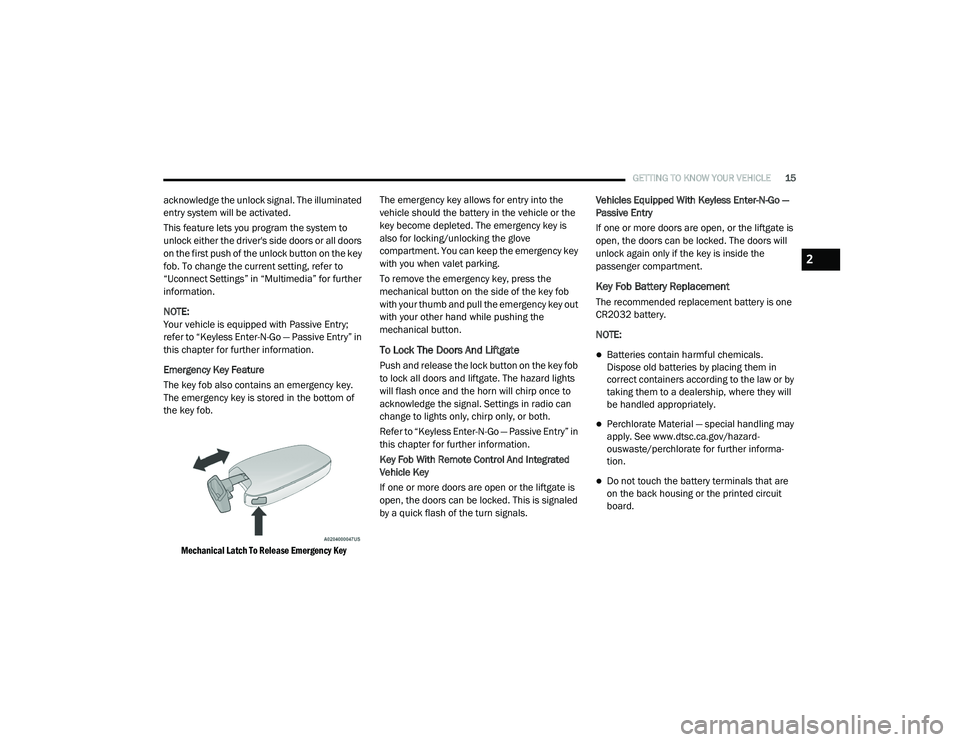
The key fob also contains an emergency key.
The emergency key is stored in the bottom of
the key fob.
Mechanical Latch To Release Emergency Key
The emergency key allows for entry into the
vehicle should the battery in the vehicle or the
key become depleted. The emergency key is
also for locking/unlocking the glove
compartment. You can keep the emergency key
with you when valet parking.
To remove the emergency key, press the
mechanical button on the side of the key fob
with your thumb and pull the emergency key out
with your other hand while pushing the
mechanical button.
To Lock The Doors And Liftgate
Push and release the lock button on the key fob
to lock all doors and liftgate. The hazard lights
will flash once and the horn will chirp once to
acknowledge the signal. Settings in radio can
change to lights only, chirp only, or both.
Refer to “Keyless Enter-N-Go — Passive Entry” in
this chapter for further information.
Key Fob With Remote Control And Integrated
Vehicle Key
If one or more doors are open or the liftgate is
open, the doors can be locked. This is signaled
by a quick flash of the turn signals.
Vehicles Equipped With Keyless Enter-N-Go —
Passive Entry
If one or more doors are open, or the liftgate is
open, the doors can be locked. The doors will
unlock again only if the key is inside the
passenger compartment.
Key Fob Battery Replacement
The recommended replacement battery is one
CR2032 battery.
NOTE:
Batteries contain harmful chemicals.
Dispose old batteries by placing them in
correct containers according to the law or by
taking them to a dealership, where they will
be handled appropriately.
Perchlorate Material — special handling may
apply. See www.dtsc.ca.gov/hazard
-
ouswaste/perchlorate for further informa -
tion.
Do not touch the battery terminals that are
on the back housing or the printed circuit
board.
2
20_RU_OM_EN_US_t.book Page 15
Page 30 of 516
28GETTING TO KNOW YOUR VEHICLE
NOTE:
If “Unlock All Doors 1st Press” is programmed,
all doors and liftgate will unlock when you grab
hold of the driver’s front door handle. To select
between “Unlock Driver Door 1st Press” and
“Unlock All Doors 1st Press,” refer to “Uconnect
Settings” in “Multimedia” for further informa -
tion.
To Unlock From The Passenger Side:
With a valid key fob within 5 ft (1.5 m) of the
passenger door handle, grab the front
passenger door handle to unlock all four doors
and the liftgate automatically. The interior door
panel lock knob will rotate when the door is
unlocked.
NOTE:
All doors will unlock when the front passenger
door handle is grabbed regardless of the
driver’s door unlock preference setting (“Unlock
Driver Door 1st Press” or “Unlock All Doors 1st
Press”). Preventing Inadvertent Locking Of Key Fob In
Vehicle (FOBIK-Safe)
To minimize the possibility of unintentionally
locking a key fob inside your vehicle, the
Passive Entry system is equipped with an
automatic door unlock feature.
FOBIK-Safe only executes in vehicles with
Passive Entry. There are three situations that
trigger a FOBIK-Safe search in any Passive Entry
vehicle:
A lock request is made by a valid key fob
while a door is open.
A lock request is made by the Passive Entry
door handle while a door is open.
A lock request is made by the door panel
switch while the door is open.
When any of these situations occur, after all
open doors are shut, the FOBIK-Safe search will
be executed. If it finds a key fob inside the car,
and it does not find any key fob outside the car,
then the car will unlock and alert the customer.
NOTE:
The vehicle will only unlock the doors when a
valid key fob is detected inside the vehicle, and no valid key fob is detected outside the vehicle.
The vehicle will not unlock the doors when any
of the following conditions are met:
The doors are manually locked using the door
lock knobs.
There is a valid key fob outside the vehicle
and within 5 ft (1.5 m) of either Passive Entry
door handle.
Three attempts are made to lock the doors
using the door panel switch and then close
the doors.
NOTE:
On the third attempt ALL doors will lock and the
key fob can be locked in the vehicle.
To Enter The Liftgate
With a valid key fob within 5 ft (1.5 m) of the
liftgate, cycle the handle to open the liftgate and
pull the liftgate open with one fluid motion.
NOTE:
If “Unlock Driver Door 1st Press” is
programmed, only the liftgate will unlock when
the liftgate release handle is pulled. If “Unlock
All Doors 1st Press” is programmed, all doors
and the liftgate will unlock when the liftgate
20_RU_OM_EN_US_t.book Page 28
Page 33 of 516
GETTING TO KNOW YOUR VEHICLE31
Push the button on the key fob twice
within five seconds to open, close, or
reverse a power sliding door.
The key fob and the overhead console
button will operate the door when the door is
locked. All other ways require the sliding door to
be unlocked. If the vehicle is equipped with
Passive Entry, pressing the button on the
outside handle or Hands-Free feature (if
equipped) will unlock and open the sliding door,
with a valid Passive Entry key fob within 5 ft
(1.5 m) of the door handle.
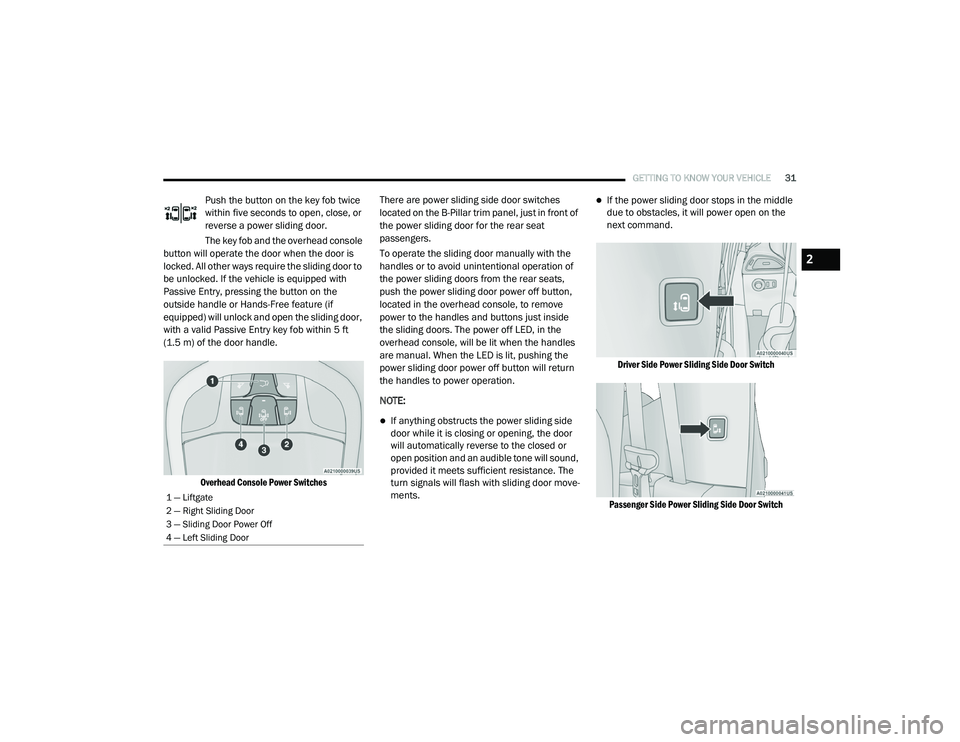
Overhead Console Power Switches
There are power sliding side door switches
located on the B-Pillar trim panel, just in front of
the power sliding door for the rear seat
passengers.
To operate the sliding door manually with the
handles or to avoid unintentional operation of
the power sliding doors from the rear seats,
push the power sliding door power off button,
located in the overhead console, to remove
power to the handles and buttons just inside
the sliding doors. The power off LED, in the
overhead console, will be lit when the handles
are manual. When the LED is lit, pushing the
power sliding door power off button will return
the handles to power operation.
NOTE:
If anything obstructs the power sliding side
door while it is closing or opening, the door
will automatically reverse to the closed or
open position and an audible tone will sound,
provided it meets sufficient resistance. The
turn signals will flash with sliding door move
-
ments.
If the power sliding door stops in the middle
due to obstacles, it will power open on the
next command.
Driver Side Power Sliding Side Door Switch
Passenger Side Power Sliding Side Door Switch
1 — Liftgate
2 — Right Sliding Door
3 — Sliding Door Power Off
4 — Left Sliding Door
2
20_RU_OM_EN_US_t.book Page 31
Page 39 of 516
GETTING TO KNOW YOUR VEHICLE37
Manual Adjustment (Rear Seats) Manual Recline — Quad Seats
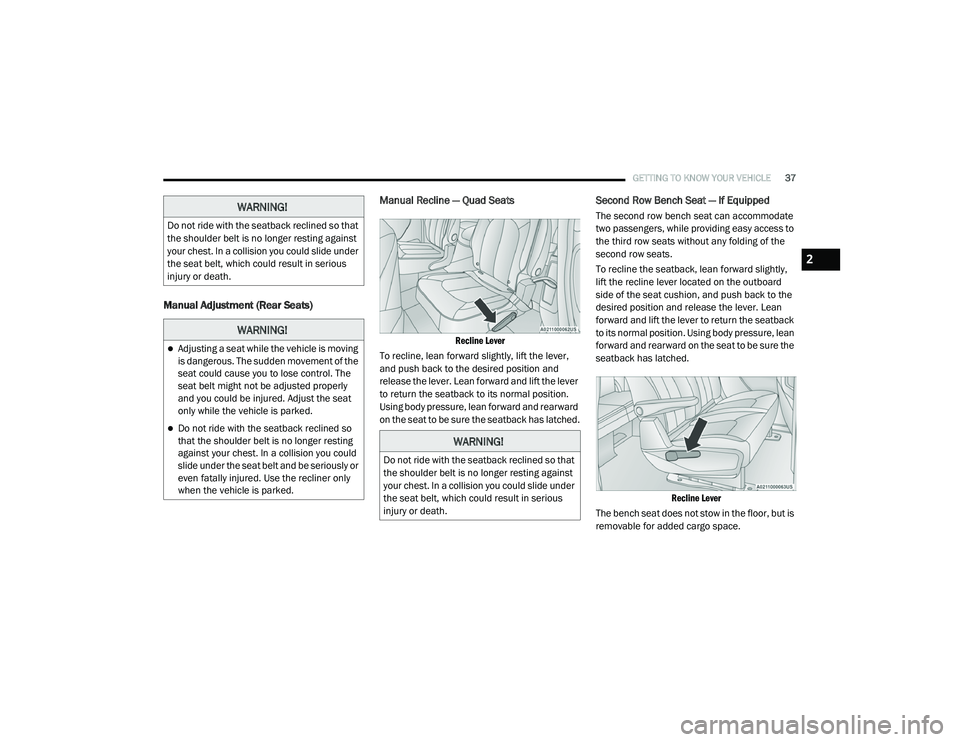
Recline Lever
To recline, lean forward slightly, lift the lever,
and push back to the desired position and
release the lever. Lean forward and lift the lever
to return the seatback to its normal position.
Using body pressure, lean forward and rearward
on the seat to be sure the seatback has latched.
Second Row Bench Seat — If Equipped
The second row bench seat can accommodate
two passengers, while providing easy access to
the third row seats without any folding of the
second row seats.
To recline the seatback, lean forward slightly,
lift the recline lever located on the outboard
side of the seat cushion, and push back to the
desired position and release the lever. Lean
forward and lift the lever to return the seatback
to its normal position. Using body pressure, lean
forward and rearward on the seat to be sure the
seatback has latched.
Recline Lever
The bench seat does not stow in the floor, but is
removable for added cargo space.WARNING!
Do not ride with the seatback reclined so that
the shoulder belt is no longer resting against
your chest. In a collision you could slide under
the seat belt, which could result in serious
injury or death.
WARNING!
Adjusting a seat while the vehicle is moving
is dangerous. The sudden movement of the
seat could cause you to lose control. The
seat belt might not be adjusted properly
and you could be injured. Adjust the seat
only while the vehicle is parked.
Do not ride with the seatback reclined so
that the shoulder belt is no longer resting
against your chest. In a collision you could
slide under the seat belt and be seriously or
even fatally injured. Use the recliner only
when the vehicle is parked.
WARNING!
Do not ride with the seatback reclined so that
the shoulder belt is no longer resting against
your chest. In a collision you could slide under
the seat belt, which could result in serious
injury or death.
2
20_RU_OM_EN_US_t.book Page 37
Page 40 of 516
38GETTING TO KNOW YOUR VEHICLE
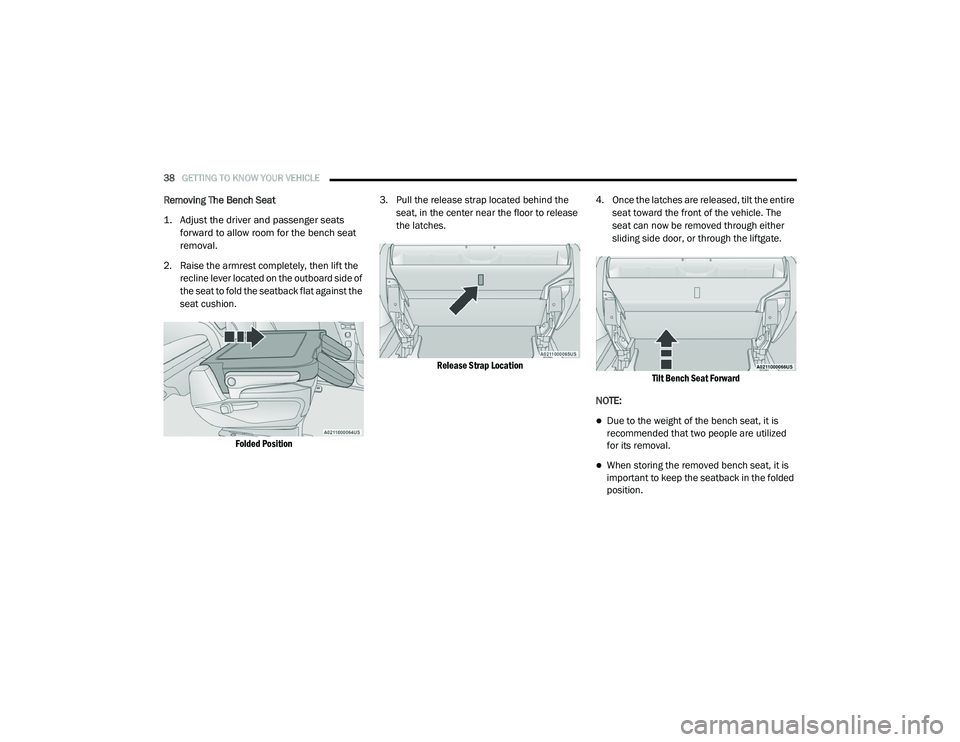
Removing The Bench Seat
1. Adjust the driver and passenger seats
forward to allow room for the bench seat
removal.
2. Raise the armrest completely, then lift the recline lever located on the outboard side of
the seat to fold the seatback flat against the
seat cushion.
Folded Position
3. Pull the release strap located behind the
seat, in the center near the floor to release
the latches.
Release Strap Location
4. Once the latches are released, tilt the entire
seat toward the front of the vehicle. The
seat can now be removed through either
sliding side door, or through the liftgate.
Tilt Bench Seat Forward
NOTE:
Due to the weight of the bench seat, it is
recommended that two people are utilized
for its removal.
When storing the removed bench seat, it is
important to keep the seatback in the folded
position.
20_RU_OM_EN_US_t.book Page 38
Page 44 of 516
42GETTING TO KNOW YOUR VEHICLE
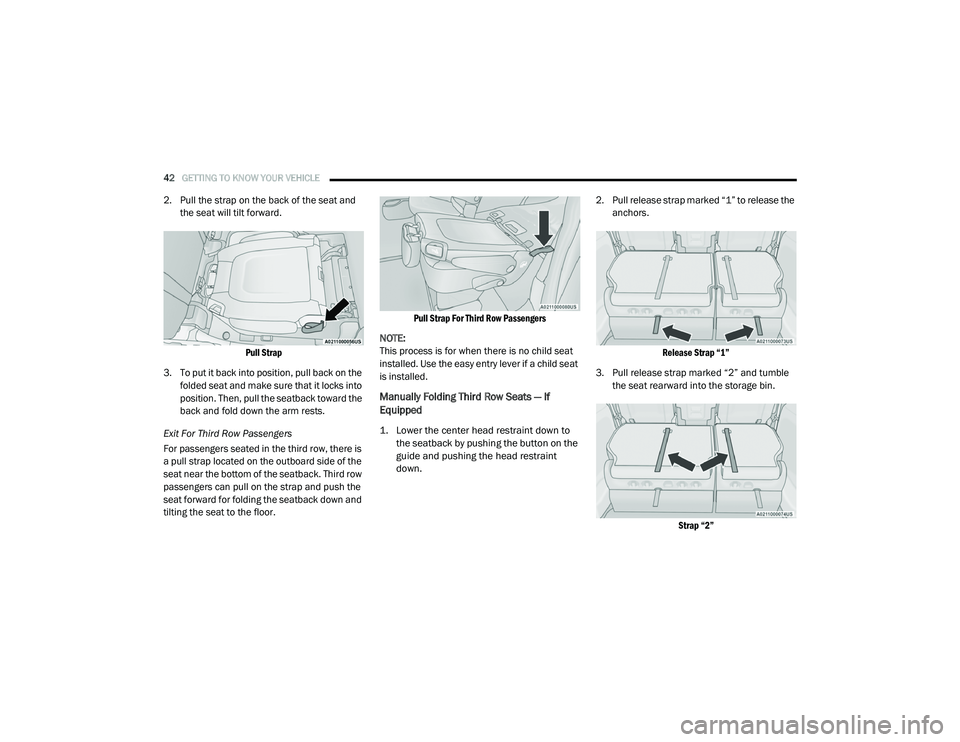
2. Pull the strap on the back of the seat and
the seat will tilt forward.
Pull Strap
3. To put it back into position, pull back on the folded seat and make sure that it locks into
position. Then, pull the seatback toward the
back and fold down the arm rests.
Exit For Third Row Passengers
For passengers seated in the third row, there is
a pull strap located on the outboard side of the
seat near the bottom of the seatback. Third row
passengers can pull on the strap and push the
seat forward for folding the seatback down and
tilting the seat to the floor.
Pull Strap For Third Row Passengers
NOTE:
This process is for when there is no child seat
installed. Use the easy entry lever if a child seat
is installed.
Manually Folding Third Row Seats — If
Equipped
1. Lower the center head restraint down to the seatback by pushing the button on the
guide and pushing the head restraint
down.
2. Pull release strap marked “1” to release the
anchors.
Release Strap “1”
3. Pull release strap marked “2” and tumble the seat rearward into the storage bin.
Strap “2”
20_RU_OM_EN_US_t.book Page 42
Page 50 of 516
48GETTING TO KNOW YOUR VEHICLE
(Continued)
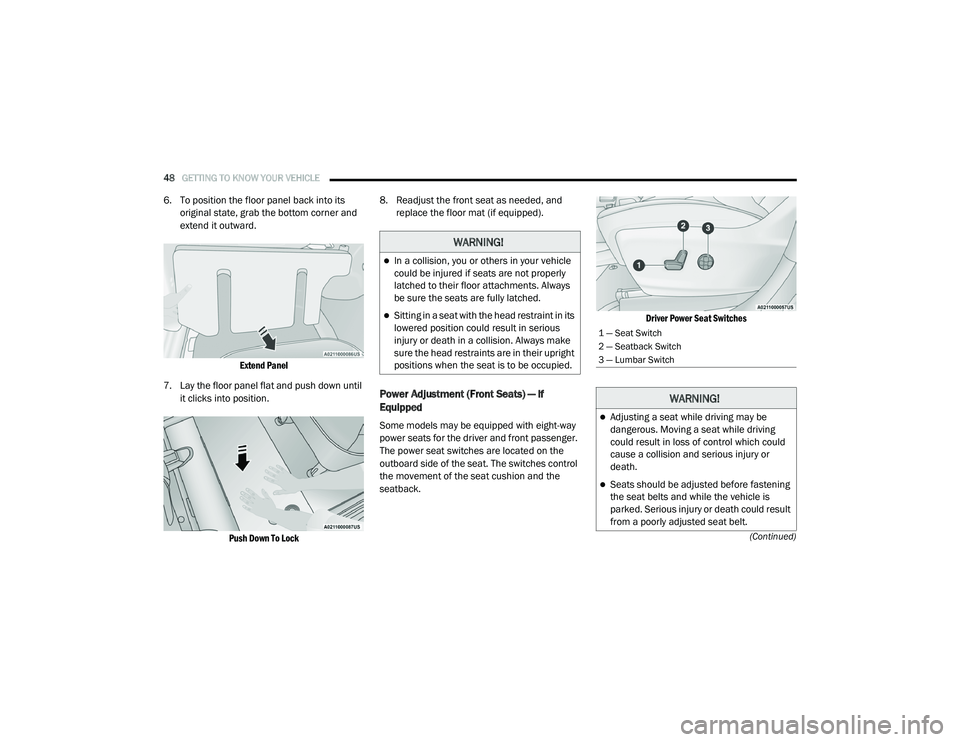
6. To position the floor panel back into its original state, grab the bottom corner and
extend it outward.
Extend Panel
7. Lay the floor panel flat and push down until it clicks into position.
Push Down To Lock
8. Readjust the front seat as needed, and
replace the floor mat (if equipped).
Power Adjustment (Front Seats) — If
Equipped
Some models may be equipped with eight-way
power seats for the driver and front passenger.
The power seat switches are located on the
outboard side of the seat. The switches control
the movement of the seat cushion and the
seatback.
Driver Power Seat Switches
WARNING!
In a collision, you or others in your vehicle
could be injured if seats are not properly
latched to their floor attachments. Always
be sure the seats are fully latched.
Sitting in a seat with the head restraint in its
lowered position could result in serious
injury or death in a collision. Always make
sure the head restraints are in their upright
positions when the seat is to be occupied.
1 — Seat Switch
2 — Seatback Switch
3 — Lumbar Switch
WARNING!
Adjusting a seat while driving may be
dangerous. Moving a seat while driving
could result in loss of control which could
cause a collision and serious injury or
death.
Seats should be adjusted before fastening
the seat belts and while the vehicle is
parked. Serious injury or death could result
from a poorly adjusted seat belt.
20_RU_OM_EN_US_t.book Page 48
Page 52 of 516
50GETTING TO KNOW YOUR VEHICLE
Power Lumbar — If Equipped
Vehicles equipped with power driver or
passenger seats may be equipped with power
lumbar. The power lumbar switch is located on
the outboard side of the power seat. Push the
switch forward or rearward to increase or
decrease the lumbar support. Push the switch
upward or downward to raise or lower the
lumbar support.
Easy Entry/Exit Seat (Available With Memory
Settings Only)
This feature provides automatic driver seat
positioning to enhance driver mobility when
entering and exiting the vehicle.
The distance the driver seat moves depends on
where you have the driver seat positioned when
you place the vehicle’s ignition in the OFF
position.
When the ignition is placed in the OFF posi -
tion, the driver seat will move about
2.4 inches (60 mm) rearward if the driver seat position is greater than or equal to
2.7 inches (67.7 mm) forward of the rear stop. The seat will return to its previously set
position when the ignition is cycled out of the
OFF position.
When the ignition is placed in the OFF posi -
tion, the driver seat will move to a position
0.3 inches (7.7 mm) forward of the rear stop if the driver seat position is between 0.9 –
2.7 inches (22.7 – 67.7 mm) forward of the rear stop. The seat will return to its previously
set position when the ignition is cycled out of
the OFF position.
The Easy Entry/Easy Exit feature is disabled
when the driver seat position is less than
0.9 inches (22.7 mm) forward of the rear stop. At this position, there is no benefit to
the driver by moving the seat for Easy Exit or
Easy Entry.
Each stored memory setting will have an
associated Easy Entry and Easy Exit Position.
NOTE:
The Easy Entry/Easy Exit feature can be
enabled or disabled through the programmable
features in the instrument cluster display. For
further information, refer to “Instrument Cluster
Display” in “Getting To Know Your Instrument
Panel”.
Power Adjustment (Rear Seats) — If
Equipped
WARNING!
Adjusting a seat while driving may be
dangerous. Moving a seat while driving
could result in loss of control which could
cause a collision and serious injury or
death.
Seats should be adjusted before fastening
the seat belts and while the vehicle is
parked. Serious injury or death could result
from a poorly adjusted seat belt.
Do not ride with the seatback reclined so
that the shoulder belt is no longer resting
against your chest. In a collision you could
slide under the seat belt, which could result
in serious injury or death.
Do not place the seat belt webbing behind
the third row stow clip when using the seat
belt to restrain an occupant. The seat belt
will not be positioned properly on the occu -
pant and they could be more seriously
injured in an accident as a result.
20_RU_OM_EN_US_t.book Page 50