charging CHRYSLER PACIFICA 2021 User Guide
[x] Cancel search | Manufacturer: CHRYSLER, Model Year: 2021, Model line: PACIFICA, Model: CHRYSLER PACIFICA 2021Pages: 401, PDF Size: 26.88 MB
Page 125 of 401
GETTING TO KNOW YOUR INSTRUMENT PANEL123
Trip B
Shows the total distance traveled for Trip B
since the last reset.
Shows the Average MPG for Trip B since the last
reset.
Shows the elapsed time traveled for Trip B since
the last reset. Elapsed time will increment when
the ignition switch is in the ON or START posi -
tion.
To Reset A Trip Function
Push and hold the OK button to reset the currently
displayed trip.
WARNING LIGHTS AND MESSAGES
The warning/indicator lights will illuminate in the
instrument panel together with a dedicated
message and/or acoustic signal when applicable.
These indications are indicative and precautionary
and as such must not be considered as exhaustive
and/or alternative to the information contained in
the Owner’s Manual, which you are advised to read
carefully in all cases. Always refer to the
information in this chapter in the event of a failure
indication. All active telltales will display first if
applicable. The system check menu may appear
different based upon equipment options and
current vehicle status. Some telltales are optional
and may not appear.
RED WARNING LIGHTS
Air Bag Warning Light
This warning light will illuminate to
indicate a fault with the air bag, and will
turn on for four to eight seconds as a bulb
check when the ignition is placed in the
ON/RUN or ACC/ON/RUN position. This light will
illuminate with a single chime when a fault with the
air bag has been detected, it will stay on until the
fault is cleared. If the light is either not on during
startup, stays on, or turns on while driving, have
the system inspected at an authorized dealer as
soon as possible.
Battery Charge Warning Light
This warning light will illuminate when the
battery is not charging properly. If it stays
on while the engine is running, there may
be a malfunction with the charging
system. Contact an authorized dealer as soon as
possible.
This indicates a possible problem with the
electrical system or a related component.
Brake Warning Light
This warning light monitors various brake
functions, including brake fluid level and
parking brake application. If the brake
light turns on it may indicate that the
parking brake is applied, that the brake fluid level
is low, or that there is a problem with the Anti-Lock
Brake System reservoir.
If the light remains on when the parking brake has
been disengaged, and the fluid level is at the full
mark on the master cylinder reservoir, it indicates
a possible brake hydraulic system malfunction or
that a problem with the Brake Booster has been
detected by the Anti-Lock Brake System (ABS) /
Electronic Stability Control (ESC) system. In this
case, the light will remain on until the condition has
been corrected. If the problem is related to the
brake booster, the ABS pump will run when
applying the brake, and a brake pedal pulsation
may be felt during each stop.
The dual brake system provides a reserve braking
capacity in the event of a failure to a portion of the
hydraulic system. A leak in either half of the dual
brake system is indicated by the Brake Warning
Light, which will turn on when the brake fluid level
in the master cylinder has dropped below a
specified level.
The light will remain on until the cause is corrected.
3
21_RUP_OM_EN_USC_t.book Page 123
Page 147 of 401
STARTING AND OPERATING145
If the Steering icon is displayed and the “POWER
STEERING SYSTEM OVER TEMP” message is
displayed on the instrument cluster screen, this
indicates an over temperature condition in the
power steering system. Once driving conditions are
safe, pull over and let the vehicle idle for a few
moments until the icon and message turn off
Ú page 123.
If the “SERVICE POWER STEERING" or
"POWER STEERING ASSIST OFF -
SERVICE SYSTEM” message and a
steering wheel icon are displayed on the
instrument cluster screen, it indicates that the
vehicle needs to be taken to the dealer for service.
It is likely the vehicle has lost power steering
assistance Ú page 123.
NOTE:
Even if the power steering assistance is no
longer operational, it is still possible to steer the
vehicle. Under these conditions there will be a
substantial increase in steering effort, espe -
cially at low speeds and during parking
maneuvers.
The power steering system is fully electric; it
requires no power steering fluid.
If the condition persists, see an authorized
dealer for service.
STOP/START SYSTEM — IF EQUIPPED
The Stop/Start function is developed to reduce
fuel consumption. The system will stop the engine
automatically during a vehicle stop if the required
conditions are met. Releasing the brake pedal,
pressing the accelerator pedal or shifting out of
DRIVE (D) will automatically re-start the engine.
This vehicle has been upgraded with a heavy duty
starter, enhanced battery, and other upgraded
engine parts to handle the additional engine starts.
AUTOSTOP MODE
The Stop/Start feature is enabled after every driver
key start. At that time, the system will go into
STOP/START READY and if all other conditions are
met, can go into a STOP/START AUTOSTOP ACTIVE.
To Activate Auto STOP/START, The Following
Must Occur:
The system must be in STOP/START READY
state. A STOP/START READY message will be
displayed in the instrument cluster within the
Stop/Start section Ú page 123.
The vehicle must be completely stopped.
The gear selector must be in a forward gear and
the brake pedal pressed. The engine will shut down, the tachometer will
move to the zero position and the Stop/Start
telltale will illuminate indicating you are in
Autostop. Customer settings will be maintained
throughout the Auto Stop/Start process.
POSSIBLE REASONS THE ENGINE DOES
N
OT AUTOSTOP
Prior to engine shut down, the system will check
many safety and comfort conditions for Stop/Start
and ensure they are fulfilled. Detailed information
about the operation of the Stop/Start system
may be viewed in the instrument cluster display
Stop/Start screen. Situations when the engine will
not stop include (but not limited to):
If Stop/Start is manually disabled by the
Stop/Start OFF button.
Driver’s seat belt is not buckled.
Driver’s door is not closed.
Battery temperature is too warm or cold.
Battery charge is low. During this time a
message will display “Stop/Start Not Ready
Battery Charging”.
The vehicle is on a steep grade.
Cabin heating or cooling is in process and an
acceptable cabin temperature has not been
achieved.
4
21_RUP_OM_EN_USC_t.book Page 145
Page 148 of 401
146STARTING AND OPERATING
HVAC is set to full defrost mode at a high blower
speed.
HVAC is set to MAX A/C.
Engine has not reached normal operating
temperature.
The transmission is not in a forward gear.
Hood is open.
Brake pedal is not pressed with sufficient pres -
sure.
Accelerator pedal input.
Engine temp is too high.
5 mph (8 km/h) threshold has not been
achieved from previous Autostop.
Steering angle is beyond threshold.
Vehicle at too high of an altitude.
Ambient temperature is beyond operating
range.
Stop/Start related system malfunction.
It may be possible for the vehicle to be driven
several times without the Stop/Start system going
into a STOP/START READY state under more
extreme conditions of the items listed above.
TO START THE ENGINE WHILE IN
A
UTOSTOP
While in a forward gear, the engine will start when
the brake pedal is released or the throttle pedal is
pressed. The transmission will automatically
re-engage upon engine restart.
Conditions That Will Cause The Engine To Start
Automatically While In Autostop:
The transmission selector is moved out of
DRIVE.
To maintain cabin temperature comfort.
HVAC is set to full defrost mode.
HVAC system temperature or fan speed is
manually adjusted.
Battery voltage drops too low. During this time a
message will display "Stop/Start Not Ready
Battery Charging".
Stop/Start OFF switch is pushed.
Stop/Start related system malfunction.
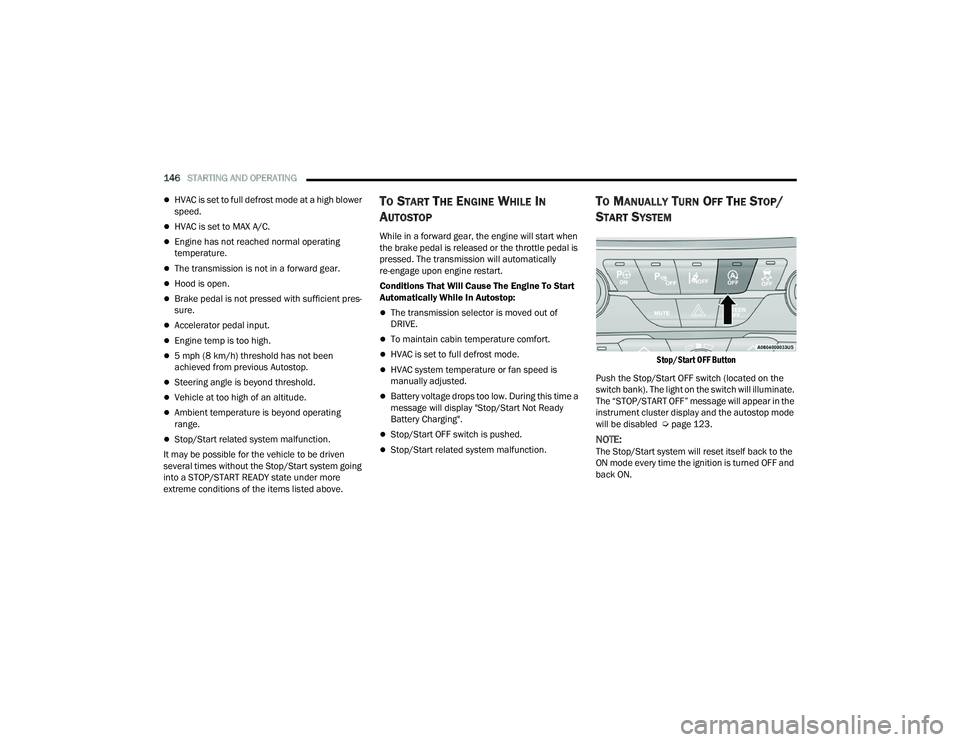
TO MANUALLY TURN OFF THE STOP/
S
TART SYSTEM
Stop/Start OFF Button
Push the Stop/Start OFF switch (located on the
switch bank). The light on the switch will illuminate.
The “STOP/START OFF” message will appear in the
instrument cluster display and the autostop mode
will be disabled Ú page 123.
NOTE:The Stop/Start system will reset itself back to the
ON mode every time the ignition is turned OFF and
back ON.
21_RUP_OM_EN_USC_t.book Page 146
Page 321 of 401
IN CASE OF EMERGENCY319
3. Pull upward and remove the protective cover over the remote positive (+) battery post.
4. If using another vehicle to jump start the battery, park the vehicle within the jumper
cables reach, set the parking brake and make
sure the ignition is OFF.
JUMP STARTING PROCEDURE
Connecting The Jumper Cables
1. Connect the positive
(+) end of the jumper
cable to the remote positive (+)
post of the
vehicle with the discharged battery.
2. Connect the opposite end of the positive (+)
jumper cable to the positive (+) post of the
booster battery.
3. Connect the negative (-) end of the jumper
cable to the negative (-) post of the booster
battery.
4. Connect the opposite end of the negative (-)
jumper cable to the remote negative (-) post
near the windshield cowl (exposed metallic/
unpainted post of the discharge vehicle). 5. Start the engine in the vehicle that has the
booster battery, let the engine idle a few
minutes, and then start the engine in the
vehicle with the discharged battery.
6. Once the engine is started, follow the discon -
necting procedure below.
Disconnecting The Jumper Cables
1. Disconnect the negative
(-)
end of the jumper
cable from the remote negative post of the
vehicle with the discharged battery.
2. Disconnect the opposite end of the negative (-)
jumper cable from the negative (-) post of the
booster battery.
3. Disconnect the positive (+) end of the jumper
cable from the positive (+) post of the booster
battery.
WARNING!
Do not allow vehicles to touch each other as this
could establish a ground connection and
personal injury could result.
WARNING!
Take care to avoid the radiator cooling fan
whenever the hood is raised. It can start
anytime the ignition switch is ON. You can be
injured by moving fan blades.
Remove any metal jewelry such as rings,
watch bands and bracelets that could make
an inadvertent electrical contact. You could be
seriously injured.
Batteries contain sulfuric acid that can burn
your skin or eyes and generate hydrogen gas
which is flammable and explosive. Keep open
flames or sparks away from the battery.
WARNING!
Failure to follow this jump starting procedure
could result in personal injury or property
damage due to battery explosion.
CAUTION!
Failure to follow these procedures could result in
damage to the charging system of the booster
vehicle or the discharged vehicle.
WARNING!
Do not connect the jumper cable to the negative
(-) post of the discharged battery. The resulting
electrical spark could cause the battery to
explode and could result in personal injury.
7
21_RUP_OM_EN_USC_t.book Page 319
Page 322 of 401
320IN CASE OF EMERGENCY
4. Disconnect the opposite end of the positive (+)
jumper cable from the remote positive (+) post
of the vehicle with the discharged battery.
If frequent jump starting is required to start your
vehicle you should have the battery and charging
system inspected at an authorized dealer.
REFUELING IN EMERGENCY – IF EQUIPPED
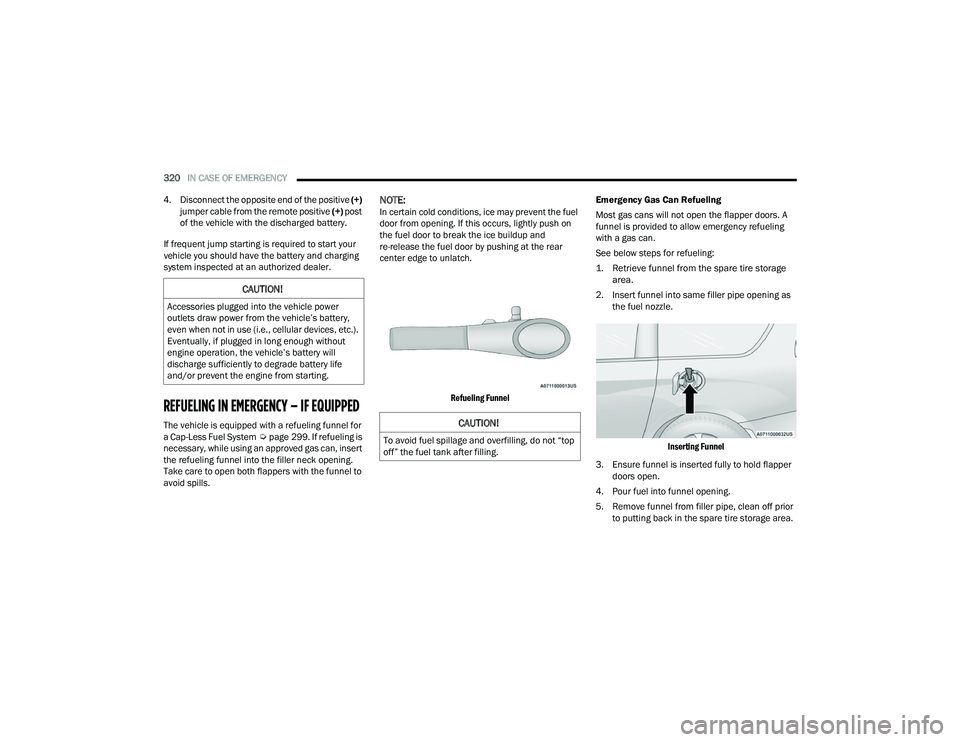
The vehicle is equipped with a refueling funnel for
a Cap-Less Fuel System Úpage 299. If refueling is
necessary, while using an approved gas can, insert
the refueling funnel into the filler neck opening.
Take care to open both flappers with the funnel to
avoid spills.
NOTE:In certain cold conditions, ice may prevent the fuel
door from opening. If this occurs, lightly push on
the fuel door to break the ice buildup and
re-release the fuel door by pushing at the rear
center edge to unlatch.
Refueling Funnel
Emergency Gas Can Refueling
Most gas cans will not open the flapper doors. A
funnel is provided to allow emergency refueling
with a gas can.
See below steps for refueling:
1. Retrieve funnel from the spare tire storage
area.
2. Insert funnel into same filler pipe opening as the fuel nozzle.
Inserting Funnel
3. Ensure funnel is inserted fully to hold flapper doors open.
4. Pour fuel into funnel opening.
5. Remove funnel from filler pipe, clean off prior to putting back in the spare tire storage area.
CAUTION!
Accessories plugged into the vehicle power
outlets draw power from the vehicle’s battery,
even when not in use (i.e., cellular devices, etc.).
Eventually, if plugged in long enough without
engine operation, the vehicle’s battery will
discharge sufficiently to degrade battery life
and/or prevent the engine from starting.
CAUTION!
To avoid fuel spillage and overfilling, do not “top
off” the fuel tank after filling.
21_RUP_OM_EN_USC_t.book Page 320
Page 354 of 401
352SERVICING AND MAINTENANCE
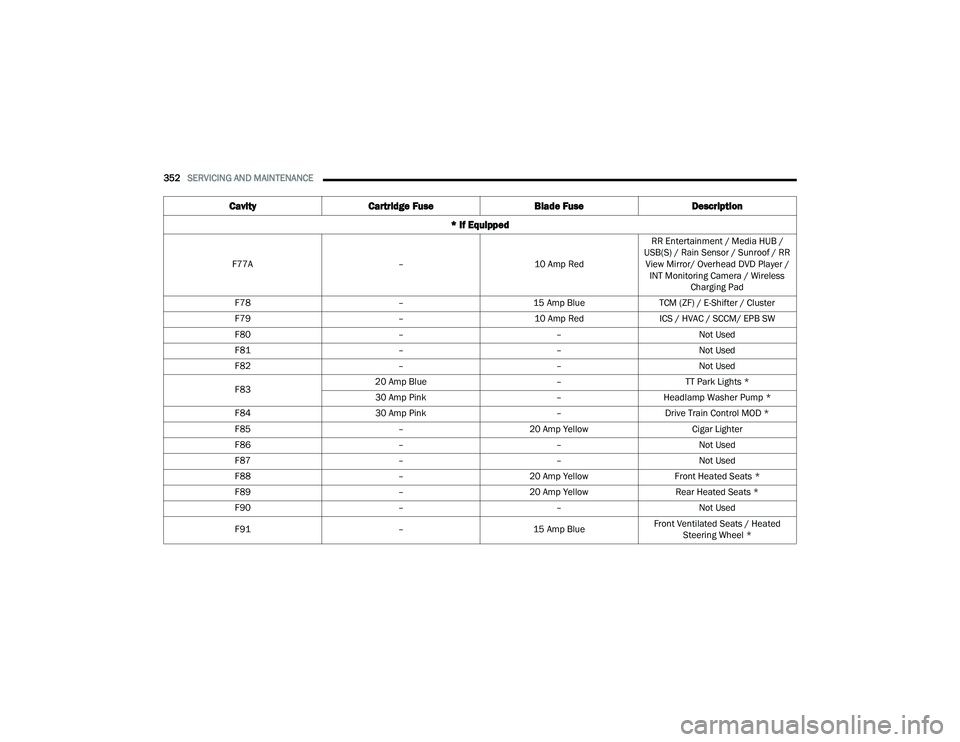
F77A –10 Amp RedRR Entertainment / Media HUB /
USB(S) / Rain Sensor / Sunroof / RR View Mirror/ Overhead DVD Player / INT Monitoring Camera / Wireless Charging Pad
F78 –15 Amp BlueTCM (ZF) / E-Shifter / Cluster
F79 –10 Amp RedICS / HVAC / SCCM/ EPB SW
F80 ––Not Used
F81 ––Not Used
F82 ––Not Used
F83 20 Amp Blue
–TT Park Lights *
30 Amp Pink –Headlamp Washer Pump *
F84 30 Amp Pink –Drive Train Control MOD *
F85 –20 Amp Yellow Cigar Lighter
F86 ––Not Used
F87 ––Not Used
F88 –20 Amp Yellow Front Heated Seats *
F89 –20 Amp Yellow Rear Heated Seats *
F90 ––Not Used
F91 –15 Amp BlueFront Ventilated Seats / Heated
Steering Wheel *
Cavity Cartridge Fuse Blade FuseDescription
* If Equipped
21_RUP_OM_EN_USC_t.book Page 352
Page 390 of 401
388
INDEX
A
About Your Brakes......................................... 377Adaptive Cruise Control (ACC)
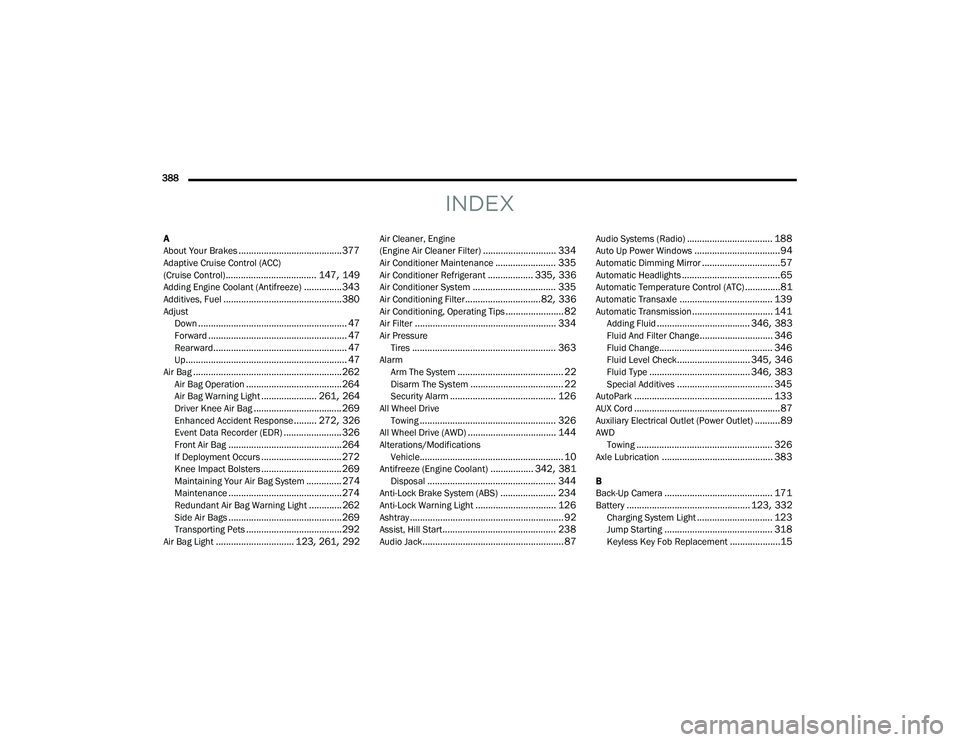
(Cruise Control).................................... 147, 149Adding Engine Coolant (Antifreeze)............... 343Additives, Fuel............................................... 380AdjustDown........................................................... 47Forward....................................................... 47Rearward..................................................... 47Up................................................................ 47Air Bag........................................................... 262Air Bag Operation...................................... 264Air Bag Warning Light...................... 261, 264Driver Knee Air Bag................................... 269Enhanced Accident Response......... 272, 326Event Data Recorder (EDR)....................... 326Front Air Bag............................................. 264If Deployment Occurs................................ 272Knee Impact Bolsters................................ 269Maintaining Your Air Bag System.............. 274Maintenance............................................. 274Redundant Air Bag Warning Light.............262Side Air Bags............................................. 269Transporting Pets...................................... 292Air Bag Light............................... 123, 261, 292
Air Cleaner, Engine
(Engine Air Cleaner Filter)............................. 334Air Conditioner Maintenance........................ 335Air Conditioner Refrigerant.................. 335, 336Air Conditioner System................................. 335Air Conditioning Filter..............................82, 336Air Conditioning, Operating Tips....................... 82Air Filter........................................................ 334Air PressureTires......................................................... 363AlarmArm The System.......................................... 22Disarm The System..................................... 22Security Alarm.......................................... 126All Wheel DriveTowing...................................................... 326All Wheel Drive (AWD)................................... 144Alterations/ModificationsVehicle......................................................... 10Antifreeze (Engine Coolant)................. 342, 381Disposal................................................... 344Anti-Lock Brake System (ABS)...................... 234Anti-Lock Warning Light................................ 126Ashtray............................................................. 92Assist, Hill Start............................................. 238Audio Jack........................................................ 87
Audio Systems (Radio).................................. 188Auto Up Power Windows..................................94Automatic Dimming Mirror...............................57Automatic Headlights.......................................65Automatic Temperature Control (ATC)..............81Automatic Transaxle..................................... 139Automatic Transmission................................ 141Adding Fluid..................................... 346, 383Fluid And Filter Change............................. 346Fluid Change............................................. 346Fluid Level Check............................. 345, 346Fluid Type........................................ 346, 383Special Additives...................................... 345AutoPark....................................................... 133AUX Cord..........................................................87Auxiliary Electrical Outlet (Power Outlet)..........89AWDTowing...................................................... 326Axle Lubrication............................................ 383
B
Back-Up Camera........................................... 171Battery................................................. 123, 332Charging System Light.............................. 123Jump Starting........................................... 318Keyless Key Fob Replacement....................15
21_RUP_OM_EN_USC_t.book Page 388
Page 399 of 401
397
V
Vacuum
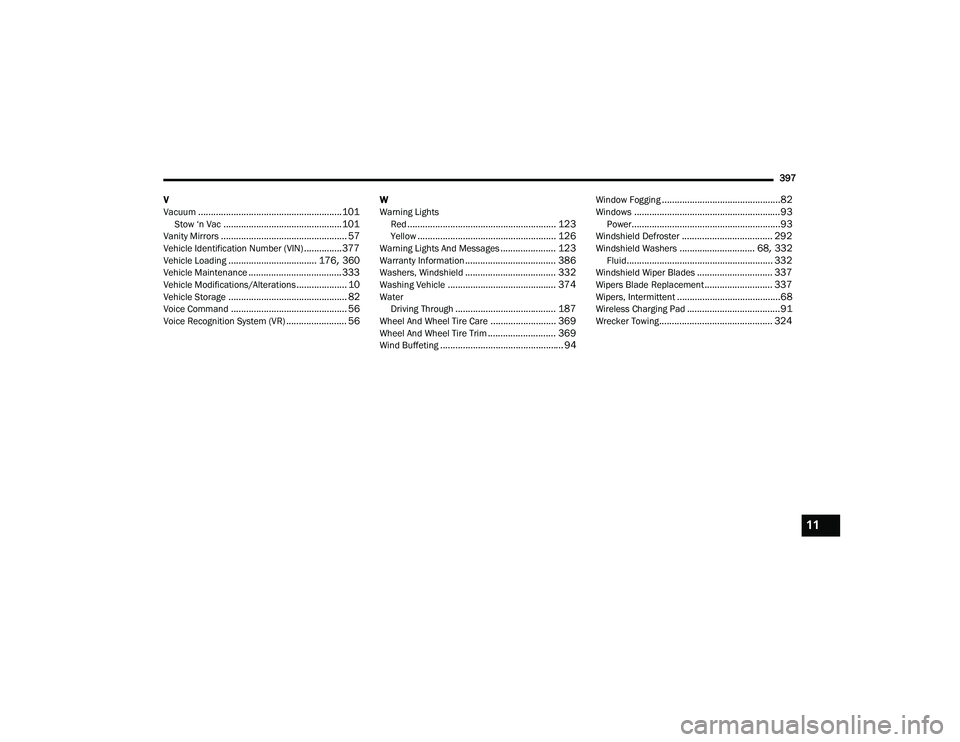
......................................................... 101Stow ‘n Vac............................................... 101Vanity Mirrors.................................................. 57Vehicle Identification Number (VIN)............... 377Vehicle Loading................................... 176, 360Vehicle Maintenance..................................... 333Vehicle Modifications/Alterations.................... 10Vehicle Storage............................................... 82Voice Command.............................................. 56Voice Recognition System (VR)........................ 56
W
Warning Lights Red
........................................................... 123Yellow....................................................... 126Warning Lights And Messages...................... 123Warranty Information.................................... 386Washers, Windshield.................................... 332Washing Vehicle........................................... 374WaterDriving Through........................................ 187Wheel And Wheel Tire Care.......................... 369Wheel And Wheel Tire Trim........................... 369Wind Buffeting................................................. 94
Window Fogging...............................................82Windows..........................................................93Power...........................................................93Windshield Defroster.................................... 292Windshield Washers.............................. 68, 332Fluid.......................................................... 332Windshield Wiper Blades.............................. 337Wipers Blade Replacement........................... 337Wipers, Intermittent.........................................68Wireless Charging Pad.....................................91Wrecker Towing............................................. 324
11
21_RUP_OM_EN_USC_t.book Page 397