heater CHRYSLER PACIFICA 2021 User Guide
[x] Cancel search | Manufacturer: CHRYSLER, Model Year: 2021, Model line: PACIFICA, Model: CHRYSLER PACIFICA 2021Pages: 401, PDF Size: 26.88 MB
Page 137 of 401
STARTING AND OPERATING135
To Turn On The Engine Using ENGINE
START/STOP Button
1. The transmission must be in PARK or NEUTRAL.
2. Press and hold the brake pedal while pushing the ENGINE START/STOP button once.
To release the parking brake manually, the ignition
switch must be in the ON/RUN position. Press on
the brake pedal, then push the parking brake
switch momentarily.
If the driver shifts into PARK while moving, the
vehicle may Park.
PARK will engage ONLY when vehicle speed is
1.2 mph (1.9 km/h) or less.
The message “ Vehicle Speed is Too High to Shift
to P” will display in the instrument cluster display if
vehicle speed is above 1.2 mph (1.9 km/h). The
gear position indicator will blink continuously until
the gear selector is returned to the proper position,
or the requested shift can be completed.
COLD WEATHER OPERATION
(B
ELOW –22°F OR −30°C)
To ensure reliable starting at these temperatures,
use of an externally powered electric engine block
heater (available from an authorized dealer) is
recommended.
AFTER STARTING — WARMING UP THE
E
NGINE
The idle speed is controlled automatically and it
will decrease as the engine warms up.
IF ENGINE FAILS TO START WARNING!
If vehicle speed is not below 1.2 mph (1.9 km/h)
when the driver shifts into PARK, the
transmission will default to NEUTRAL until the
vehicle speed drops below 1.2 mph (1.9 km/h)
and the above conditions are met, enabling
AutoPark. A vehicle left in the NEUTRAL position
can roll. As an added precaution, always apply
the parking brake when exiting the vehicle.WARNING!
Never pour fuel or other flammable liquid into
the throttle body air inlet opening in an
attempt to start the vehicle. This could result
in flash fire causing serious personal injury.
Do not attempt to push or tow your vehicle to
get it started. Vehicles equipped with an auto -
matic transmission cannot be started this
way. Unburned fuel could enter the catalytic
converter and once the engine has started,
ignite and damage the converter and vehicle.
If the vehicle has a discharged battery,
booster cables may be used to obtain a start
from a booster battery or the battery in
another vehicle. This type of start can be
dangerous if done improperly Ú page 318.
4
21_RUP_OM_EN_USC_t.book Page 135
Page 138 of 401
136STARTING AND OPERATING
TO TURN OFF THE ENGINE USING
ENGINE START/STOP B
UTTON
1. Place the gear selector in PARK, then push
and release the ENGINE START/STOP button.
2. The ignition switch will return to the OFF position.
3. If the gear selector is not in PARK, the ENGINE START/STOP button must be held for two
seconds or three short pushes in a row with
the vehicle speed above 5 mph (8 km/h) before the engine will shut off. The ignition
switch position will remain in the ACC position
until the gear selector is in PARK and the
button is pushed twice to the OFF position. If
the gear selector is not in PARK and the
ENGINE START/STOP button is pushed once,
the instrument cluster will display a “Vehicle
Not In Park” message and the engine will
remain running. Never leave a vehicle out of
the PARK position, or it could roll.
NOTE:If the ignition switch is left in the ACC or ON/RUN
(engine not running) position and the transmission
is in PARK, the system will automatically time out
after 30 minutes of inactivity and the ignition will
switch to the OFF position.
ENGINE BLOCK HEATER — IF EQUIPPED
The engine block heater warms the engine and
permits quicker starts in cold weather.
Connect the cord to a 110-115 Volt AC electrical
outlet with a grounded, three-wire extension cord.
For ambient temperatures below 0°F (-18°C), the
engine block heater is recommended. For ambient
temperatures below -20°F (-29°C), the engine
block heater is required.
The engine block heater cord is routed under the
hood, behind to the passenger’s side headlamp.
Follow the steps below to properly use the engine
block heater:
1. Locate the engine block heater cord (behind the passenger’s side headlamp).
2. Undo the hook-and-loop strap that secures the heater cord in place.
3. Pull the cord to the front of the vehicle and plug it into a grounded, three-wire extension
cord.
4. After the vehicle is running, reattach the cord to the hook-and-loop strap and properly stow
away behind the passenger’s side headlamp.
NOTE:
The engine block heater cord is a factory
installed option. If your vehicle is not equipped,
heater cords are available from an authorized
dealer.
The engine block heater will require 110 Volt AC
and 6.5 Amps to activate the heater element.
The engine block heater must be plugged in at
least one hour to have an adequate warming
effect on the engine.
ENGINE BREAK-IN RECOMMENDATIONS
A long break-in period is not required for the engine
and drivetrain (transmission and axle) in your
vehicle.
Drive moderately during the first 300 miles
(500 km). After the initial 60 miles (100 km),
speeds up to 50 or 55 mph (80 or 90 km/h) are
desirable.
WARNING!
Remember to disconnect the engine block
heater cord before driving. Damage to the
110-115 Volt electrical cord could cause
electrocution.
21_RUP_OM_EN_USC_t.book Page 136
Page 213 of 401
MULTIMEDIA211
Accessibility — If Equipped
When pressing the Accessibility button on the touchscreen, the system will display options related to the vehicle’s theater system.
NOTE:Depending on the vehicle’s options, feature settings may vary.
Setting Name Description
Accessibility The Accessibility feature announces a function prior to performing the action
selected when using DVD/Blu-ray™ and USB Video functions, when it is
activated. For example, when activated, and the Play button is selected, the
system will announce “Play button selected”, and then once pressed again
the Play button will perform its action.
Video Button Readback This setting will turn the Video Button Readback feature on or off.
5
21_RUP_OM_EN_USC_t.book Page 211
Page 216 of 401
214MULTIMEDIA
UCONNECT THEATER — UCONNECT 5/5 NAV
WITH 10.1-INCH DISPLAY (IF EQUIPPED)
UCONNECT THEATER OVERVIEW
Your Uconnect Theater is designed to give your
family years of enjoyment.
There are multiple ways to interact with your
Uconnect Theater system:
Play your favorite CDs, DVDs, or Blu-ray™ Discs
Plug and play a variety of standard video games
or devices into the HDMI port
Listen to audio over the wireless headphones
Plug and play a variety of devices into the Video
USB port
Plug in standard headphones to listen to audio
Project your mobile phone or tablet screen onto
the rear Uconnect Theater touchscreens
Please review this Owner's Manual to become
familiar with its features and operation.
GETTING STARTED
Uconnect Theater Screen
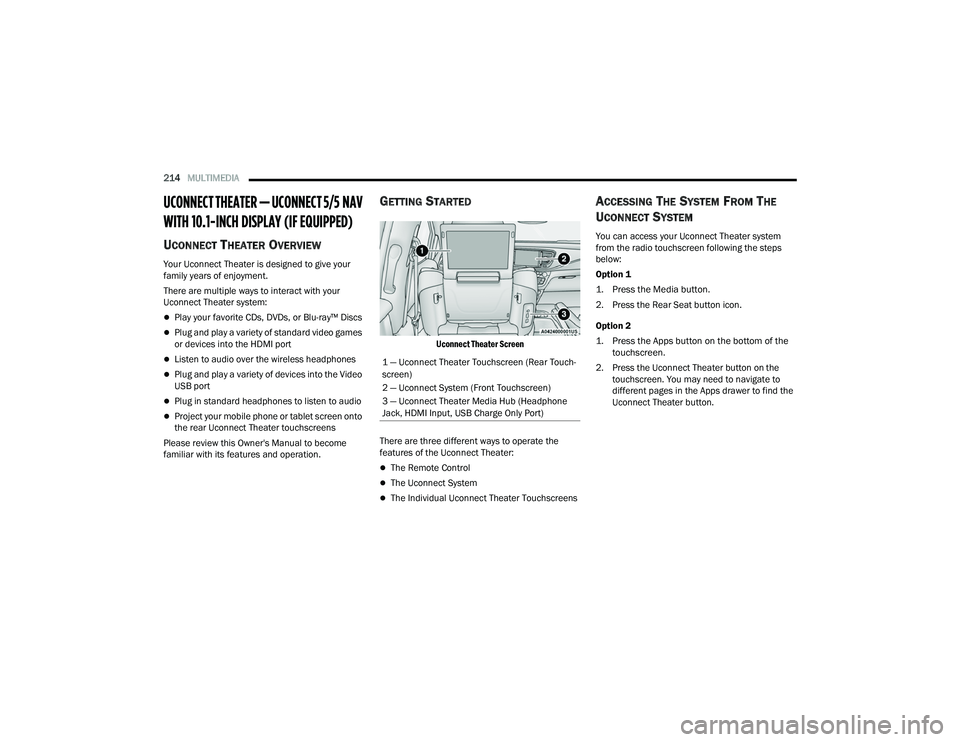
There are three different ways to operate the
features of the Uconnect Theater:
The Remote Control
The Uconnect System
The Individual Uconnect Theater Touchscreens
ACCESSING THE SYSTEM FROM THE
U
CONNECT SYSTEM
You can access your Uconnect Theater system
from the radio touchscreen following the steps
below:
Option 1
1. Press the Media button.
2. Press the Rear Seat button icon.
Option 2
1. Press the Apps button on the bottom of the
touchscreen.
2. Press the Uconnect Theater button on the touchscreen. You may need to navigate to
different pages in the Apps drawer to find the
Uconnect Theater button.
1 — Uconnect Theater Touchscreen (Rear Touch
-
screen)
2 — Uconnect System (Front Touchscreen)
3 — Uconnect Theater Media Hub (Headphone
Jack, HDMI Input, USB Charge Only Port)
21_RUP_OM_EN_USC_t.book Page 214
Page 217 of 401
MULTIMEDIA215
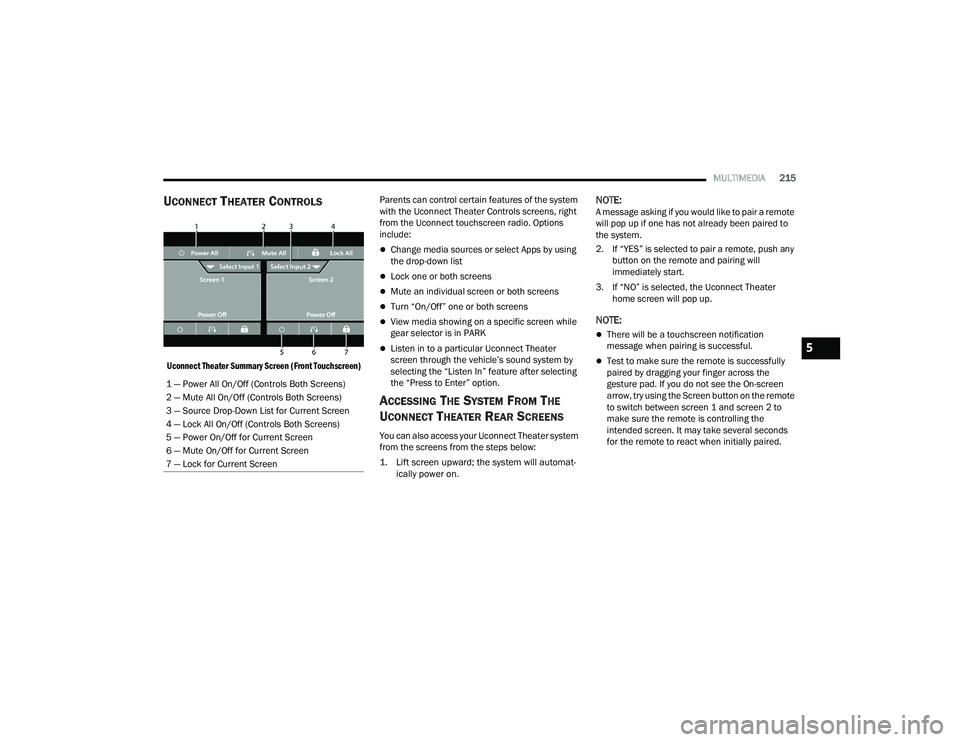
UCONNECT THEATER CONTROLS
Uconnect Theater Summary Screen (Front Touchscreen)
Parents can control certain features of the system
with the Uconnect Theater Controls screens, right
from the Uconnect touchscreen radio. Options
include:
Change media sources or select Apps by using
the drop-down list
Lock one or both screens
Mute an individual screen or both screens
Turn “On/Off” one or both screens
View media showing on a specific screen while
gear selector is in PARK
Listen in to a particular Uconnect Theater
screen through the vehicle’s sound system by
selecting the “Listen In” feature after selecting
the “Press to Enter” option.
ACCESSING THE SYSTEM FROM THE
U
CONNECT THEATER REAR SCREENS
You can also access your Uconnect Theater system
from the screens from the steps below:
1. Lift screen upward; the system will automat-
ically power on.
NOTE:A message asking if you would like to pair a remote
will pop up if one has not already been paired to
the system.
2. If “YES” is selected to pair a remote, push any button on the remote and pairing will
immediately start.
3. If “NO” is selected, the Uconnect Theater home screen will pop up.
NOTE:
There will be a touchscreen notification
message when pairing is successful.
Test to make sure the remote is successfully
paired by dragging your finger across the
gesture pad. If you do not see the On-screen
arrow, try using the Screen button on the remote
to switch between screen 1 and screen 2 to
make sure the remote is controlling the
intended screen. It may take several seconds
for the remote to react when initially paired.
1 — Power All On/Off (Controls Both Screens)
2 — Mute All On/Off (Controls Both Screens)
3 — Source Drop-Down List for Current Screen
4 — Lock All On/Off (Controls Both Screens)
5 — Power On/Off for Current Screen
6 — Mute On/Off for Current Screen
7 — Lock for Current Screen
5
21_RUP_OM_EN_USC_t.book Page 215
Page 218 of 401
216MULTIMEDIA
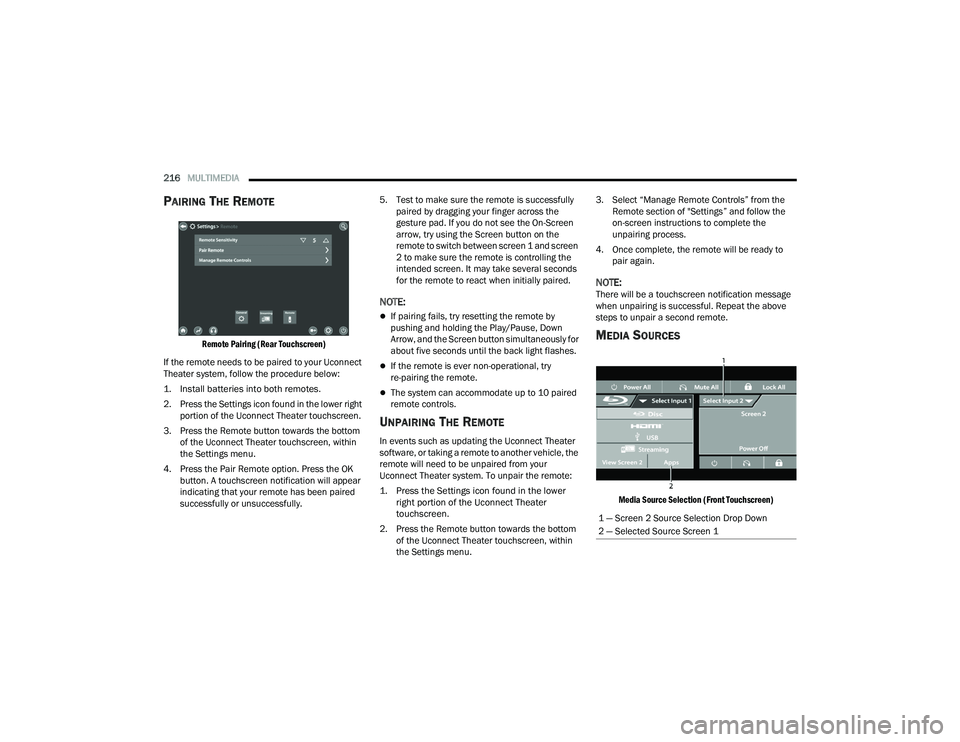
PAIRING THE REMOTE
Remote Pairing (Rear Touchscreen)
If the remote needs to be paired to your Uconnect
Theater system, follow the procedure below:
1. Install batteries into both remotes.
2. Press the Settings icon found in the lower right portion of the Uconnect Theater touchscreen.
3. Press the Remote button towards the bottom of the Uconnect Theater touchscreen, within
the Settings menu.
4. Press the Pair Remote option. Press the OK button. A touchscreen notification will appear
indicating that your remote has been paired
successfully or unsuccessfully. 5. Test to make sure the remote is successfully
paired by dragging your finger across the
gesture pad. If you do not see the On-Screen
arrow, try using the Screen button on the
remote to switch between screen 1 and screen
2 to make sure the remote is controlling the
intended screen. It may take several seconds
for the remote to react when initially paired.
NOTE:
If pairing fails, try resetting the remote by
pushing and holding the Play/Pause, Down
Arrow, and the Screen button simultaneously for
about five seconds until the back light flashes.
If the remote is ever non-operational, try
re-pairing the remote.
The system can accommodate up to 10 paired
remote controls.
UNPAIRING THE REMOTE
In events such as updating the Uconnect Theater
software, or taking a remote to another vehicle, the
remote will need to be unpaired from your
Uconnect Theater system. To unpair the remote:
1. Press the Settings icon found in the lower right portion of the Uconnect Theater
touchscreen.
2. Press the Remote button towards the bottom of the Uconnect Theater touchscreen, within
the Settings menu. 3. Select “Manage Remote Controls” from the
Remote section of "Settings” and follow the
on-screen instructions to complete the
unpairing process.
4. Once complete, the remote will be ready to pair again.
NOTE:There will be a touchscreen notification message
when unpairing is successful. Repeat the above
steps to unpair a second remote.
MEDIA SOURCES
Media Source Selection (Front Touchscreen)
1 — Screen 2 Source Selection Drop Down
2 — Selected Source Screen 1
21_RUP_OM_EN_USC_t.book Page 216
Page 219 of 401
MULTIMEDIA217
Users can select content for each screen from the
front radio touchscreen by choosing desired
content from the “Select Input” drop-down menu.
Options include “Blu-ray™ Disc”, “HDMI”, “USB”,
“Apps”, and “Viewing the other rear screen”.
NOTE:Use the “View Screen” function to pull content
from one screen to the other with a single press of
a button. Doing this however will disable and gray
out certain player controls on the screen viewing
the other screen's content.
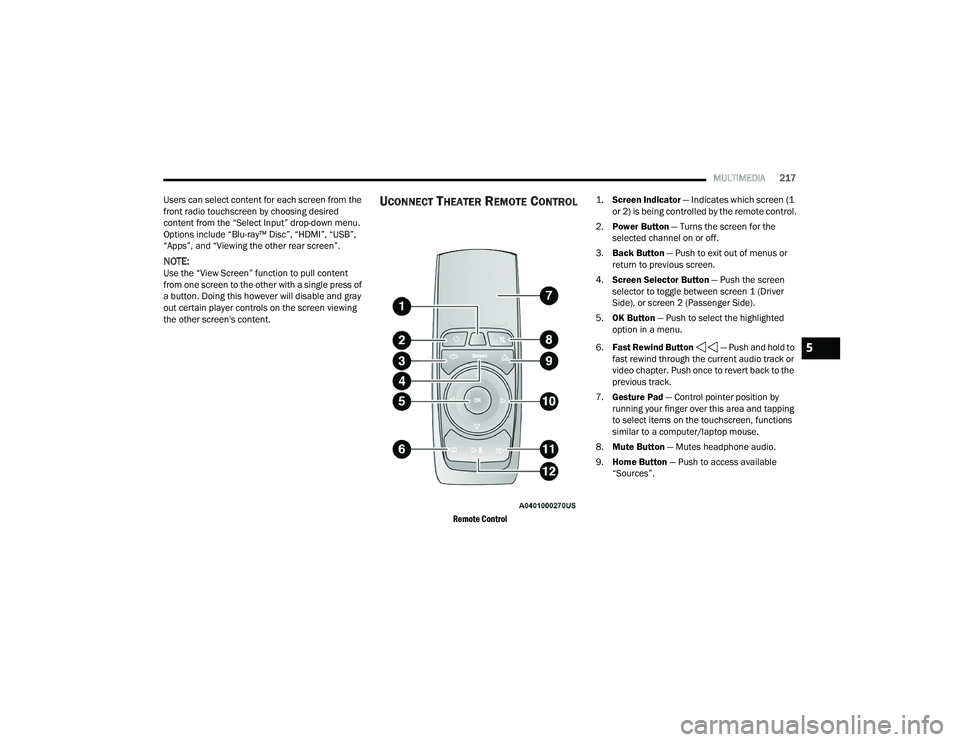
UCONNECT THEATER REMOTE CONTROL
Remote Control
1.
Screen Indicator
— Indicates which screen (1
or 2) is being controlled by the remote control.
2. Power Button — Turns the screen for the
selected channel on or off.
3. Back Button — Push to exit out of menus or
return to previous screen.
4. Screen Selector Button — Push the screen
selector to toggle between screen 1 (Driver
Side), or screen 2 (Passenger Side).
5. OK Button — Push to select the highlighted
option in a menu.
6. Fast Rewind Button — Push and hold to
fast rewind through the current audio track or
video chapter. Push once to revert back to the
previous track.
7. Gesture Pad — Control pointer position by
running your finger over this area and tapping
to select items on the touchscreen, functions
similar to a computer/laptop mouse.
8. Mute Button — Mutes headphone audio.
9. Home Button — Push to access available
“Sources”.
5
21_RUP_OM_EN_USC_t.book Page 217
Page 220 of 401
218MULTIMEDIA
10. Arrow Buttons — Push the Arrow
buttons to highlight an item or scroll through
menus.
11. Fast Forward Button — Push and hold
to fast forward through the current audio track
or video chapter. Push once to skip to the next
track.
12. Play/Pause Button — Begin/resume or pause
disc play.
Replacing The Remote Control Batteries
Each remote control requires two AAA batteries for
operation.
To replace the batteries:
1. Locate the battery compartment on the back of the remote, then slide the battery cover
downward.
2. Remove the old batteries and follow battery recycling procedures for your area.
3. Install new batteries, making sure to orient them according to the polarity diagram shown
inside the battery compartment.
4. Replace the battery compartment cover.
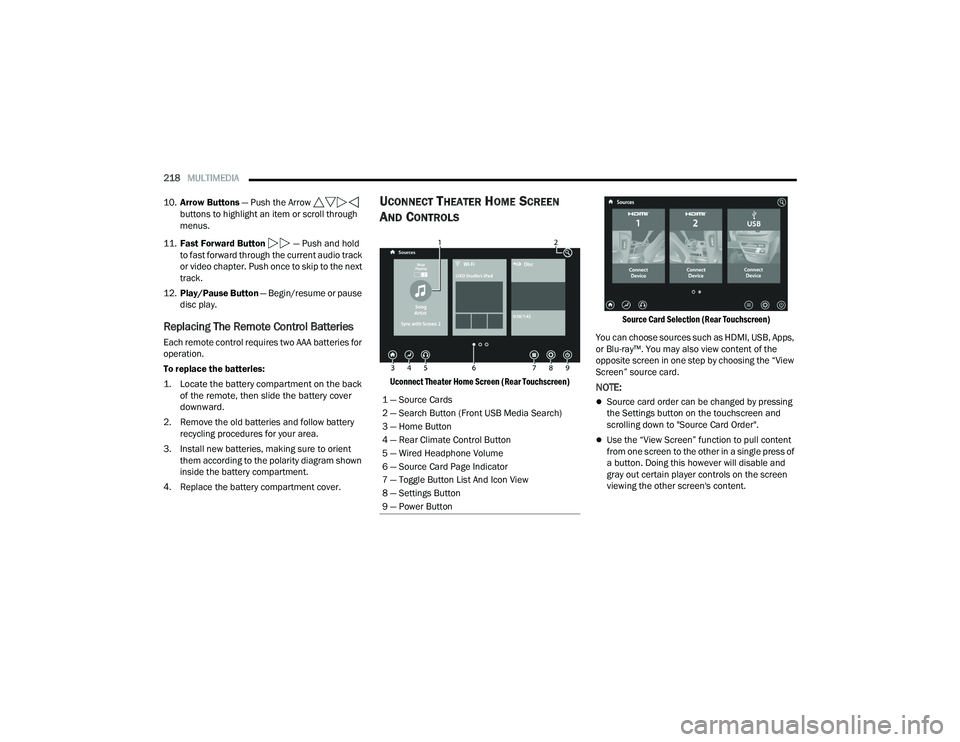
UCONNECT THEATER HOME SCREEN
A
ND CONTROLS
Uconnect Theater Home Screen (Rear Touchscreen) Source Card Selection (Rear Touchscreen)
You can choose sources such as HDMI, USB, Apps,
or Blu-ray™. You may also view content of the
opposite screen in one step by choosing the “View
Screen” source card.NOTE:
Source card order can be changed by pressing
the Settings button on the touchscreen and
scrolling down to "Source Card Order".
Use the “View Screen” function to pull content
from one screen to the other in a single press of
a button. Doing this however will disable and
gray out certain player controls on the screen
viewing the other screen's content.
1 — Source Cards
2 — Search Button (Front USB Media Search)
3 — Home Button
4 — Rear Climate Control Button
5 — Wired Headphone Volume
6 — Source Card Page Indicator
7 — Toggle Button List And Icon View
8 — Settings Button
9 — Power Button
21_RUP_OM_EN_USC_t.book Page 218
Page 221 of 401
MULTIMEDIA219
General Settings
To change source card order, select “Source Card
Reorder”, then press and hold source card on the
touchscreen, and drag and drop in desired order.
You can also adjust settings such as:
Brightness
Media port lighting on and off
Clock on and off
NOTE:System information can also be displayed under
General Settings.
Remote Settings
Under this setting, you can access the following:
Manage Remotes (this allows you to unpair
remotes)
Pair Remote
Remote sensitivity (this adjusts the speed and
sensitivity of cursor on screen when using
gesture pad) Ú page 387.
PLAY A DVD/BLU-RAY™ OR USB
M
EDIA FILE FROM UCONNECT SYSTEM
1. Insert a Blu-ray™ Disc or DVD disc into the
disc player with the label facing up, or insert a
USB drive into rear Video USB port.
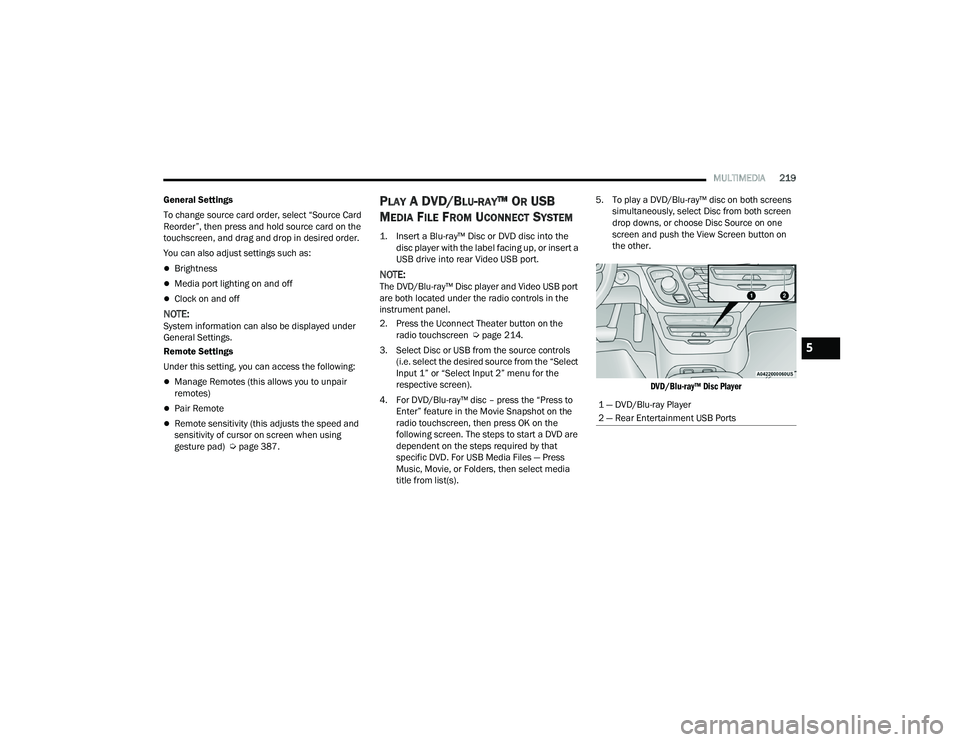
NOTE:The DVD/Blu-ray™ Disc player and Video USB port
are both located under the radio controls in the
instrument panel.
2. Press the Uconnect Theater button on the radio touchscreen Ú page 214.
3. Select Disc or USB from the source controls (i.e. select the desired source from the “Select
Input 1” or “Select Input 2” menu for the
respective screen).
4. For DVD/Blu-ray™ disc – press the “Press to Enter” feature in the Movie Snapshot on the
radio touchscreen, then press OK on the
following screen. The steps to start a DVD are
dependent on the steps required by that
specific DVD. For USB Media Files — Press
Music, Movie, or Folders, then select media
title from list(s). 5. To play a DVD/Blu-ray™ disc on both screens
simultaneously, select Disc from both screen
drop downs, or choose Disc Source on one
screen and push the View Screen button on
the other.
DVD/Blu-ray™ Disc Player
1 — DVD/Blu-ray Player
2 — Rear Entertainment USB Ports
5
21_RUP_OM_EN_USC_t.book Page 219
Page 222 of 401
220MULTIMEDIA
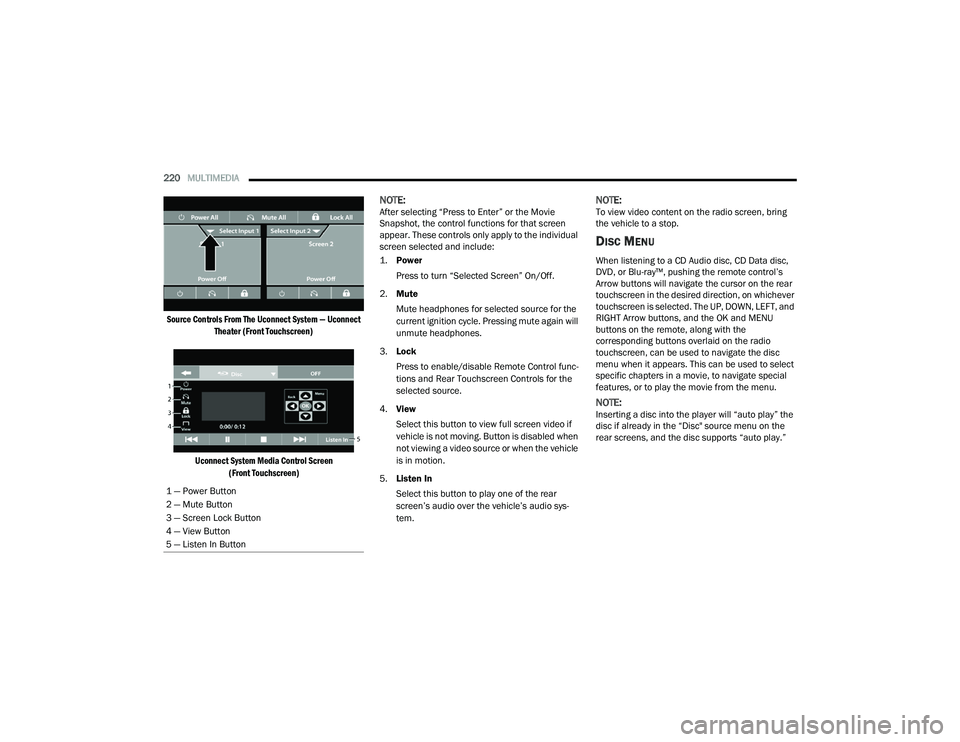
Source Controls From The Uconnect System — Uconnect Theater (Front Touchscreen)
Uconnect System Media Control Screen (Front Touchscreen)
NOTE:After selecting “Press to Enter” or the Movie
Snapshot, the control functions for that screen
appear. These controls only apply to the individual
screen selected and include:
1.
Power
Press to turn “Selected Screen” On/Off.
2. Mute
Mute headphones for selected source for the
current ignition cycle. Pressing mute again will
unmute headphones.
3. Lock
Press to enable/disable Remote Control func -
tions and Rear Touchscreen Controls for the
selected source.
4. View
Select this button to view full screen video if
vehicle is not moving. Button is disabled when
not viewing a video source or when the vehicle
is in motion.
5. Listen In
Select this button to play one of the rear
screen’s audio over the vehicle’s audio sys -
tem.NOTE:To view video content on the radio screen, bring
the vehicle to a stop.
DISC MENU
When listening to a CD Audio disc, CD Data disc,
DVD, or Blu-ray™, pushing the remote control’s
Arrow buttons will navigate the cursor on the rear
touchscreen in the desired direction, on whichever
touchscreen is selected. The UP, DOWN, LEFT, and
RIGHT Arrow buttons, and the OK and MENU
buttons on the remote, along with the
corresponding buttons overlaid on the radio
touchscreen, can be used to navigate the disc
menu when it appears. This can be used to select
specific chapters in a movie, to navigate special
features, or to play the movie from the menu.
NOTE:Inserting a disc into the player will “auto play” the
disc if already in the “Disc" source menu on the
rear screens, and the disc supports “auto play.”
1 — Power Button
2 — Mute Button
3 — Screen Lock Button
4 — View Button
5 — Listen In Button
21_RUP_OM_EN_USC_t.book Page 220