U connect CHRYSLER PACIFICA 2021 Manual PDF
[x] Cancel search | Manufacturer: CHRYSLER, Model Year: 2021, Model line: PACIFICA, Model: CHRYSLER PACIFICA 2021Pages: 401, PDF Size: 26.88 MB
Page 221 of 401
MULTIMEDIA219
General Settings
To change source card order, select “Source Card
Reorder”, then press and hold source card on the
touchscreen, and drag and drop in desired order.
You can also adjust settings such as:
Brightness
Media port lighting on and off
Clock on and off
NOTE:System information can also be displayed under
General Settings.
Remote Settings
Under this setting, you can access the following:
Manage Remotes (this allows you to unpair
remotes)
Pair Remote
Remote sensitivity (this adjusts the speed and
sensitivity of cursor on screen when using
gesture pad) Ú page 387.
PLAY A DVD/BLU-RAY™ OR USB
M
EDIA FILE FROM UCONNECT SYSTEM
1. Insert a Blu-ray™ Disc or DVD disc into the
disc player with the label facing up, or insert a
USB drive into rear Video USB port.
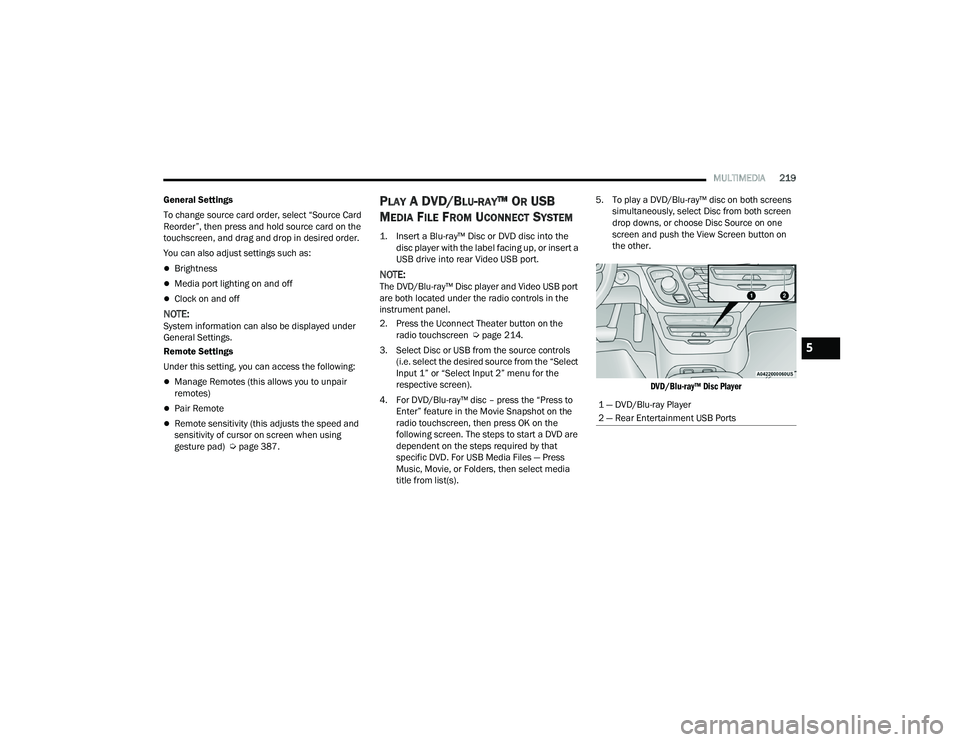
NOTE:The DVD/Blu-ray™ Disc player and Video USB port
are both located under the radio controls in the
instrument panel.
2. Press the Uconnect Theater button on the radio touchscreen Ú page 214.
3. Select Disc or USB from the source controls (i.e. select the desired source from the “Select
Input 1” or “Select Input 2” menu for the
respective screen).
4. For DVD/Blu-ray™ disc – press the “Press to Enter” feature in the Movie Snapshot on the
radio touchscreen, then press OK on the
following screen. The steps to start a DVD are
dependent on the steps required by that
specific DVD. For USB Media Files — Press
Music, Movie, or Folders, then select media
title from list(s). 5. To play a DVD/Blu-ray™ disc on both screens
simultaneously, select Disc from both screen
drop downs, or choose Disc Source on one
screen and push the View Screen button on
the other.
DVD/Blu-ray™ Disc Player
1 — DVD/Blu-ray Player
2 — Rear Entertainment USB Ports
5
21_RUP_OM_EN_USC_t.book Page 219
Page 222 of 401
220MULTIMEDIA
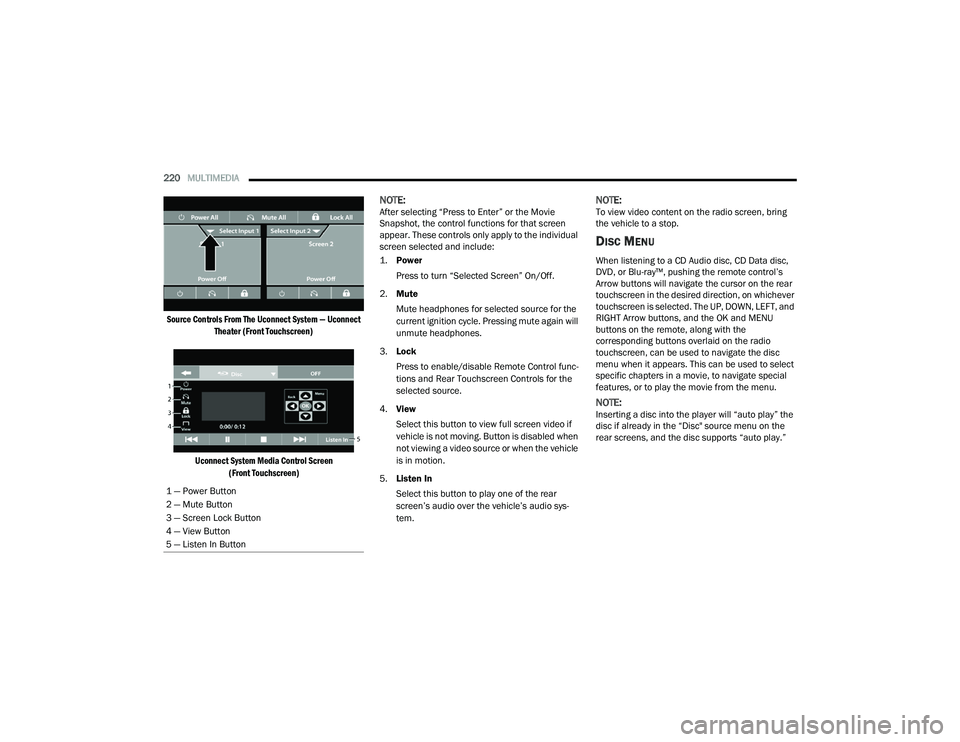
Source Controls From The Uconnect System — Uconnect Theater (Front Touchscreen)
Uconnect System Media Control Screen (Front Touchscreen)
NOTE:After selecting “Press to Enter” or the Movie
Snapshot, the control functions for that screen
appear. These controls only apply to the individual
screen selected and include:
1.
Power
Press to turn “Selected Screen” On/Off.
2. Mute
Mute headphones for selected source for the
current ignition cycle. Pressing mute again will
unmute headphones.
3. Lock
Press to enable/disable Remote Control func -
tions and Rear Touchscreen Controls for the
selected source.
4. View
Select this button to view full screen video if
vehicle is not moving. Button is disabled when
not viewing a video source or when the vehicle
is in motion.
5. Listen In
Select this button to play one of the rear
screen’s audio over the vehicle’s audio sys -
tem.NOTE:To view video content on the radio screen, bring
the vehicle to a stop.
DISC MENU
When listening to a CD Audio disc, CD Data disc,
DVD, or Blu-ray™, pushing the remote control’s
Arrow buttons will navigate the cursor on the rear
touchscreen in the desired direction, on whichever
touchscreen is selected. The UP, DOWN, LEFT, and
RIGHT Arrow buttons, and the OK and MENU
buttons on the remote, along with the
corresponding buttons overlaid on the radio
touchscreen, can be used to navigate the disc
menu when it appears. This can be used to select
specific chapters in a movie, to navigate special
features, or to play the movie from the menu.
NOTE:Inserting a disc into the player will “auto play” the
disc if already in the “Disc" source menu on the
rear screens, and the disc supports “auto play.”
1 — Power Button
2 — Mute Button
3 — Screen Lock Button
4 — View Button
5 — Listen In Button
21_RUP_OM_EN_USC_t.book Page 220
Page 223 of 401
MULTIMEDIA221
BLU-RAY™ CONTROLS – DISC-SPECIFIC
F
UNCTIONS
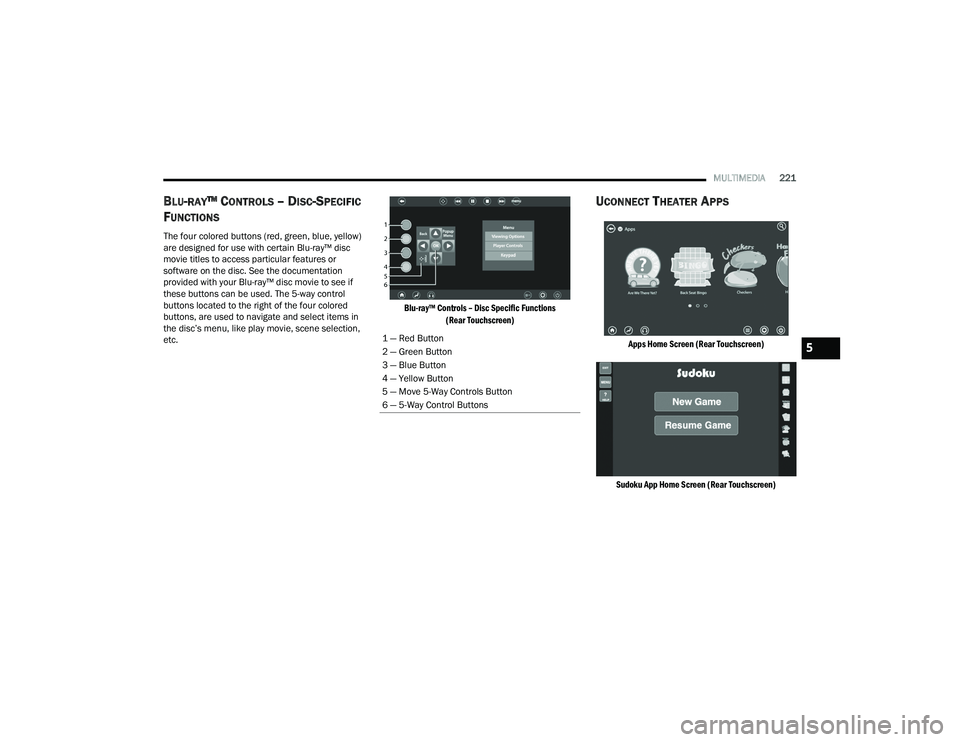
The four colored buttons (red, green, blue, yellow)
are designed for use with certain Blu-ray™ disc
movie titles to access particular features or
software on the disc. See the documentation
provided with your Blu-ray™ disc movie to see if
these buttons can be used. The 5-way control
buttons located to the right of the four colored
buttons, are used to navigate and select items in
the disc’s menu, like play movie, scene selection,
etc.
Blu-ray™ Controls – Disc Specific Functions
(Rear Touchscreen)
UCONNECT THEATER APPS
Apps Home Screen (Rear Touchscreen)
Sudoku App Home Screen (Rear Touchscreen)
1 — Red Button
2 — Green Button
3 — Blue Button
4 — Yellow Button
5 — Move 5-Way Controls Button
6 — 5-Way Control Buttons5
21_RUP_OM_EN_USC_t.book Page 221
Page 224 of 401
222MULTIMEDIA
Select the Apps source card to play preloaded
games. Pressing the Help button teaches users
how to play each game. Pick from games:
Back Seat Bingo
Checkers
Hanging Fruit
License Plate Game
Math Flash Cards
Solitaire
Sudoku
Tic Tac Toe
Chess
Concentration
NOTE:To exit a game, press Exit button then Back Arrow,
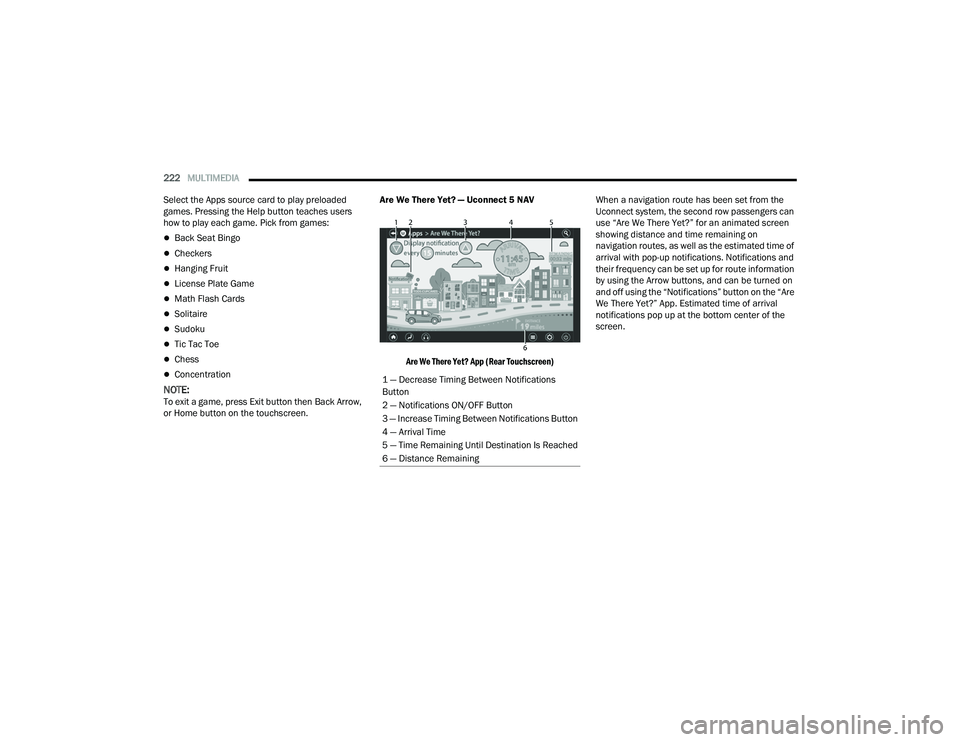
or Home button on the touchscreen. Are We There Yet? — Uconnect 5 NAV
Are We There Yet? App (Rear Touchscreen)
When a navigation route has been set from the
Uconnect system, the second row passengers can
use “Are We There Yet?” for an animated screen
showing distance and time remaining on
navigation routes, as well as the estimated time of
arrival with pop-up notifications. Notifications and
their frequency can be set up for route information
by using the Arrow buttons, and can be turned on
and off using the “Notifications” button on the “Are
We There Yet?” App. Estimated time of arrival
notifications pop up at the bottom center of the
screen.
1 — Decrease Timing Between Notifications
Button
2 — Notifications ON/OFF Button
3 — Increase Timing Between Notifications Button
4 — Arrival Time
5 — Time Remaining Until Destination Is Reached
6 — Distance Remaining
21_RUP_OM_EN_USC_t.book Page 222
Page 225 of 401
MULTIMEDIA223
USING THE REAR VIDEO USB PORT
Plug in a USB drive or mass storage device and
play your favorite music or movies.
NOTE:To view USB media on the rear theater screens,
insert a USB drive into the port next to the DVD/
Blu-ray™ Disc player. The USB drive port is located
under the radio controls in the instrument panel.
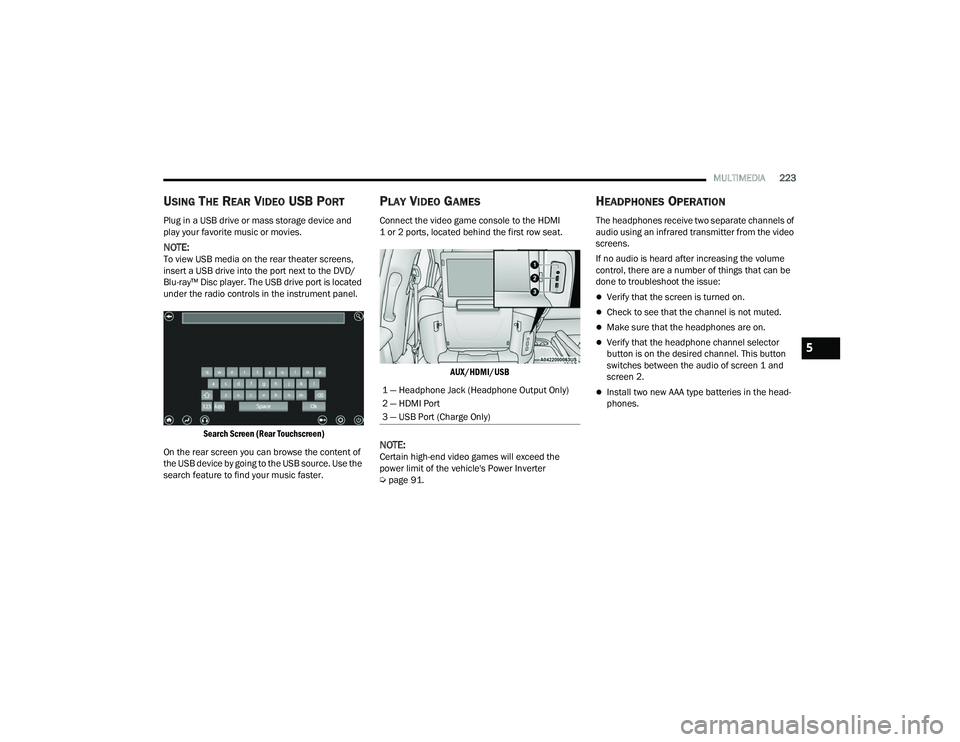
Search Screen (Rear Touchscreen)
On the rear screen you can browse the content of
the USB device by going to the USB source. Use the
search feature to find your music faster.
PLAY VIDEO GAMES
Connect the video game console to the HDMI
1 or 2 ports, located behind the first row seat.
AUX/HDMI/USB
NOTE:Certain high-end video games will exceed the
power limit of the vehicle's Power Inverter
Úpage 91.
HEADPHONES OPERATION
The headphones receive two separate channels of
audio using an infrared transmitter from the video
screens.
If no audio is heard after increasing the volume
control, there are a number of things that can be
done to troubleshoot the issue:
Verify that the screen is turned on.
Check to see that the channel is not muted.
Make sure that the headphones are on.
Verify that the headphone channel selector
button is on the desired channel. This button
switches between the audio of screen 1 and
screen 2.
Install two new AAA type batteries in the head -
phones.1 — Headphone Jack (Headphone Output Only)
2 — HDMI Port
3 — USB Port (Charge Only)
5
21_RUP_OM_EN_USC_t.book Page 223
Page 226 of 401
224MULTIMEDIA
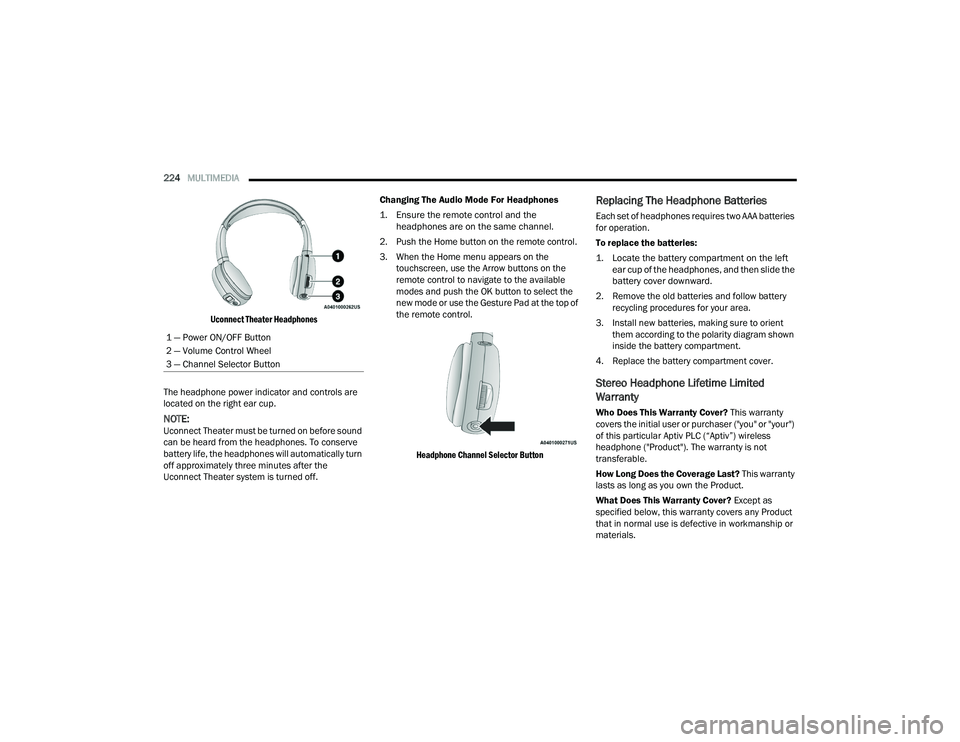
Uconnect Theater Headphones
The headphone power indicator and controls are
located on the right ear cup.
NOTE:Uconnect Theater must be turned on before sound
can be heard from the headphones. To conserve
battery life, the headphones will automatically turn
off approximately three minutes after the
Uconnect Theater system is turned off. Changing The Audio Mode For Headphones
1. Ensure the remote control and the
headphones are on the same channel.
2. Push the Home button on the remote control.
3. When the Home menu appears on the touchscreen, use the Arrow buttons on the
remote control to navigate to the available
modes and push the OK button to select the
new mode or use the Gesture Pad at the top of
the remote control.
Headphone Channel Selector Button
Replacing The Headphone Batteries
Each set of headphones requires two AAA batteries
for operation.
To replace the batteries:
1. Locate the battery compartment on the left ear cup of the headphones, and then slide the
battery cover downward.
2. Remove the old batteries and follow battery recycling procedures for your area.
3. Install new batteries, making sure to orient them according to the polarity diagram shown
inside the battery compartment.
4. Replace the battery compartment cover.
Stereo Headphone Lifetime Limited
Warranty
Who Does This Warranty Cover? This warranty
covers the initial user or purchaser ("you" or "your")
of this particular Aptiv PLC (“Aptiv”) wireless
headphone ("Product"). The warranty is not
transferable.
How Long Does the Coverage Last? This warranty
lasts as long as you own the Product.
What Does This Warranty Cover? Except as
specified below, this warranty covers any Product
that in normal use is defective in workmanship or
materials.
1 — Power ON/OFF Button
2 — Volume Control Wheel
3 — Channel Selector Button
21_RUP_OM_EN_USC_t.book Page 224
Page 227 of 401
MULTIMEDIA225
What Does This Warranty Not Cover? This
warranty does not cover any damage or defect that
results from misuse, abuse or modification of the
Product other than by Aptiv. Foam earpieces,
which will wear over time through normal use, are
specifically not covered (replacement foam is
available for a nominal charge). APTIV IS NOT
LIABLE FOR ANY INJURIES OR DAMAGES TO
PERSONS OR PROPERTY RESULTING FROM THE
USE OF, OR ANY FAILURE OR DEFECT IN, THE
PRODUCT, NOR IS APTIV LIABLE FOR ANY
GENERAL, SPECIAL, DIRECT, INDIRECT,
INCIDENTAL, CONSEQUENTIAL, EXEMPLARY,
PUNITIVE OR OTHER DAMAGES OF ANY KIND OR
NATURE WHATSOEVER. Some states and
jurisdictions may not allow the exclusion or
limitation of incidental or consequential damages,
so the above limitation may not apply to you. This
warranty gives you specific legal rights. You may
also have other rights, which vary from jurisdiction
to jurisdiction.
What Will Aptiv Do? Aptiv, at its option, will repair
or replace any defective Product. Aptiv reserves
the right to replace any discontinued Product with
a comparable model. THIS WARRANTY IS THE
SOLE WARRANTY FOR THIS PRODUCT, SETS
FORTH YOUR EXCLUSIVE REMEDY REGARDING
DEFECTIVE PRODUCTS, AND IS IN LIEU OF ALL
OTHER WARRANTIES (EXPRESS OR IMPLIED), INCLUDING ANY WARRANTY FOR
MERCHANTABILITY OR FITNESS FOR A
PARTICULAR PURPOSE.
If you have any questions or comments regarding
your Aptiv wireless headphones, please email
[email protected] or phone: 888-293-3332.
DISPLAY SETTINGS
When watching a video source, pressing the
Settings icon on the touchscreen activates the
Settings menu. These settings control the
appearance of the video on the screen. The factory
default settings are already set for optimum
viewing, so there is no need to change these
settings under normal circumstances.
To change the settings, use one of the
touchscreens or remote. To reset all values back to
the original settings, select “Reset to Defaults”,
then select “YES.”
LISTENING TO AUDIO WITH THE SCREEN
C
LOSED
To listen to only the audio portion of the channel
with the screen closed:
Set the audio to the desired source and
channel.
Close the video screen.
When the screen is reopened, the video screen
will automatically turn back on and show the
appropriate display menu or media.
If the screen is closed and there is no audio heard,
verify that the headphones are turned on (the ON
indicator is illuminated) and the headphone
selector switch is on the desired channel. If the
headphones are turned on, push the remote
control’s power button to turn audio on. If audio is
still not heard, check that fully charged batteries
are installed in the headphones.
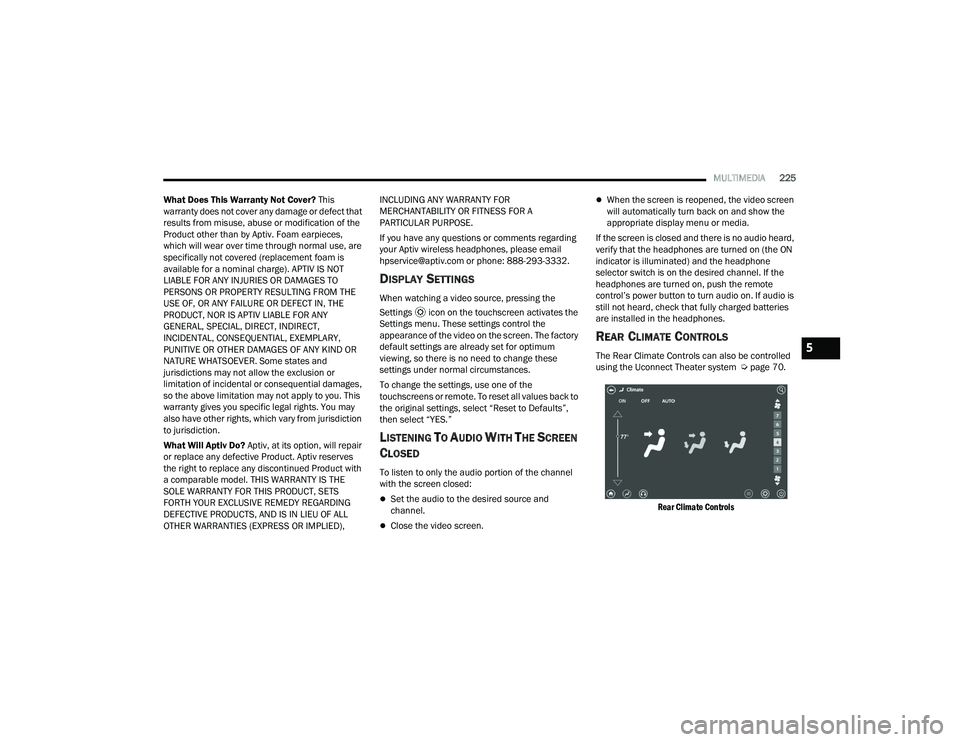
REAR CLIMATE CONTROLS
The Rear Climate Controls can also be controlled
using the Uconnect Theater system Ú page 70.
Rear Climate Controls
5
21_RUP_OM_EN_USC_t.book Page 225
Page 229 of 401
MULTIMEDIA227
ACCESSIBILITY — IF EQUIPPED
Accessibility is a feature of the DVD/Blu-ray™/USB
Video system that announces a function prior to
performing the action.
WIRELESS STREAMING — IF EQUIPPED
Your Uconnect Theater system may be equipped
with Wireless Streaming functionality that allows
you to project your smartphone or tablet onto your
rear Uconnect Theater touchscreens. This Source
Card will allow you to wirelessly link your
compatible Android™ devices to your Uconnect
Theater system and stream your device onto the
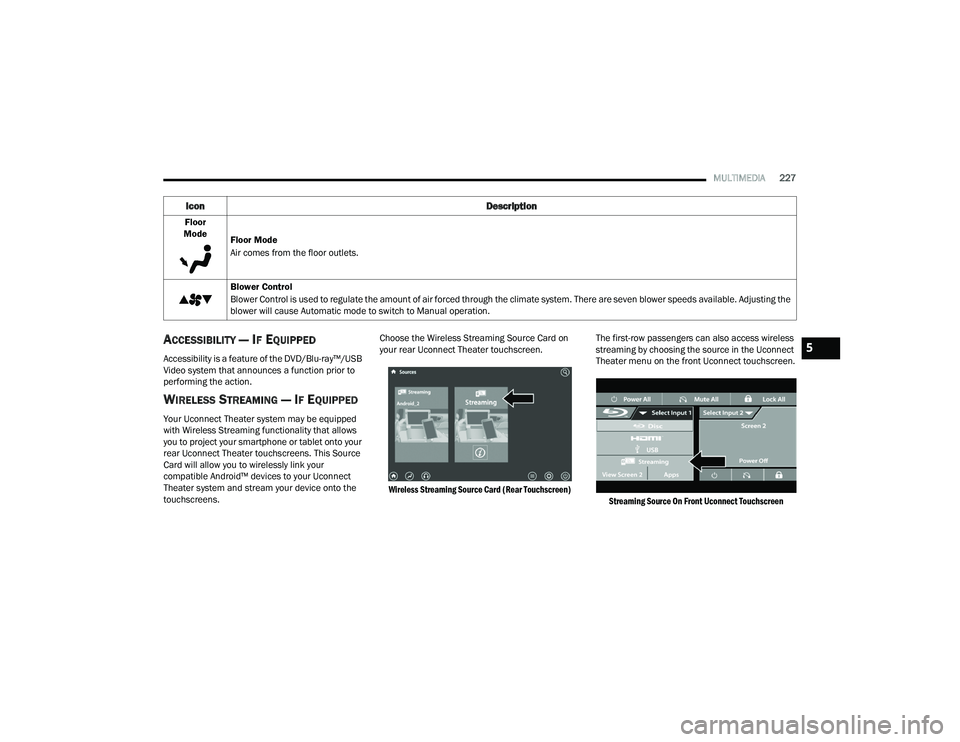
touchscreens. Choose the Wireless Streaming Source Card on
your rear Uconnect Theater touchscreen.
Wireless Streaming Source Card (Rear Touchscreen)
The first-row passengers can also access wireless
streaming by choosing the source in the Uconnect
Theater menu on the front Uconnect touchscreen.
Streaming Source On Front Uconnect Touchscreen
Floor
Mode Floor Mode
Air comes from the floor outlets.
Blower Control
Blower Control is used to regulate the amount of air forced through the climate system. There are seven blower speeds available. Adjusting the
blower will cause Automatic mode to switch to Manual operation.
Icon Description
5
21_RUP_OM_EN_USC_t.book Page 227
Page 230 of 401
228MULTIMEDIA
NOTE:For system compatibility, consult your device's
Owner's Manual or www.uconnectphone.com to
see if your device supports wireless streaming
technology compatibility. Apple® devices do not
support this feature.
To link your device to the rear Uconnect Theater
touchscreens:
1. Enable your device’s Wi-Fi.
2. Select the Wireless Streaming feature on your device. The name of this feature is device
dependent and could include: mirror, cast, or
smart view.
NOTE:Refer to your device's Owner’s Manual or www.uconnectphone.com for further infor -
mation.
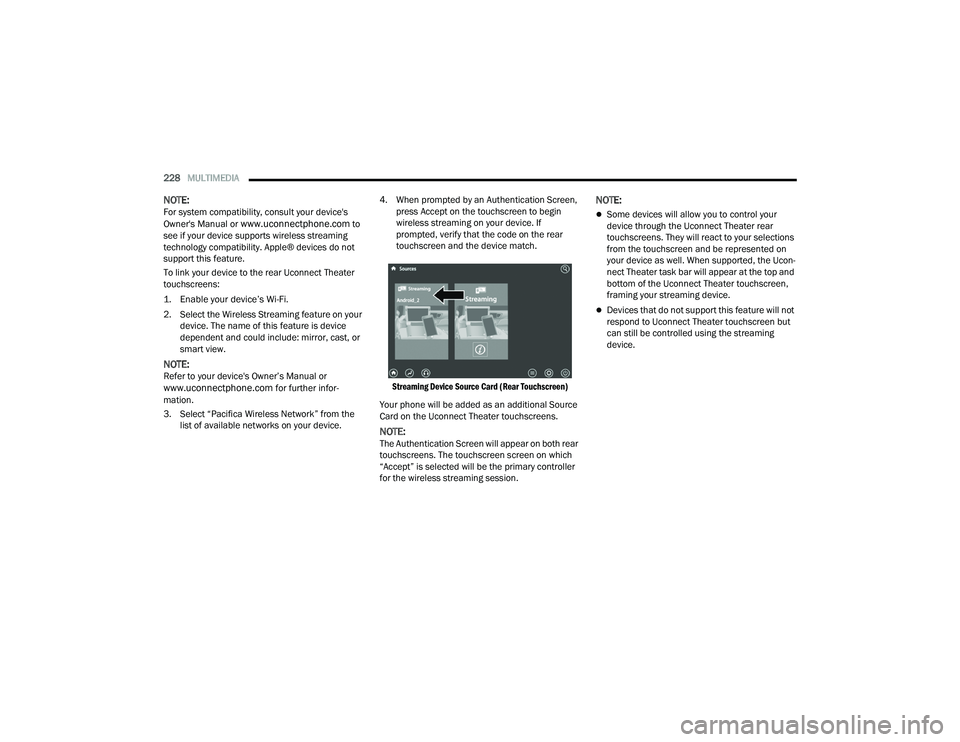
3. Select “Pacifica Wireless Network” from the list of available networks on your device. 4. When prompted by an Authentication Screen,
press Accept on the touchscreen to begin
wireless streaming on your device. If
prompted, verify that the code on the rear
touchscreen and the device match.
Streaming Device Source Card (Rear Touchscreen)
Your phone will be added as an additional Source
Card on the Uconnect Theater touchscreens.
NOTE:The Authentication Screen will appear on both rear
touchscreens. The touchscreen screen on which
“Accept” is selected will be the primary controller
for the wireless streaming session.
NOTE:
Some devices will allow you to control your
device through the Uconnect Theater rear
touchscreens. They will react to your selections
from the touchscreen and be represented on
your device as well. When supported, the Ucon -
nect Theater task bar will appear at the top and
bottom of the Uconnect Theater touchscreen,
framing your streaming device.
Devices that do not support this feature will not
respond to Uconnect Theater touchscreen but
can still be controlled using the streaming
device.
21_RUP_OM_EN_USC_t.book Page 228
Page 231 of 401
MULTIMEDIA229
Settings
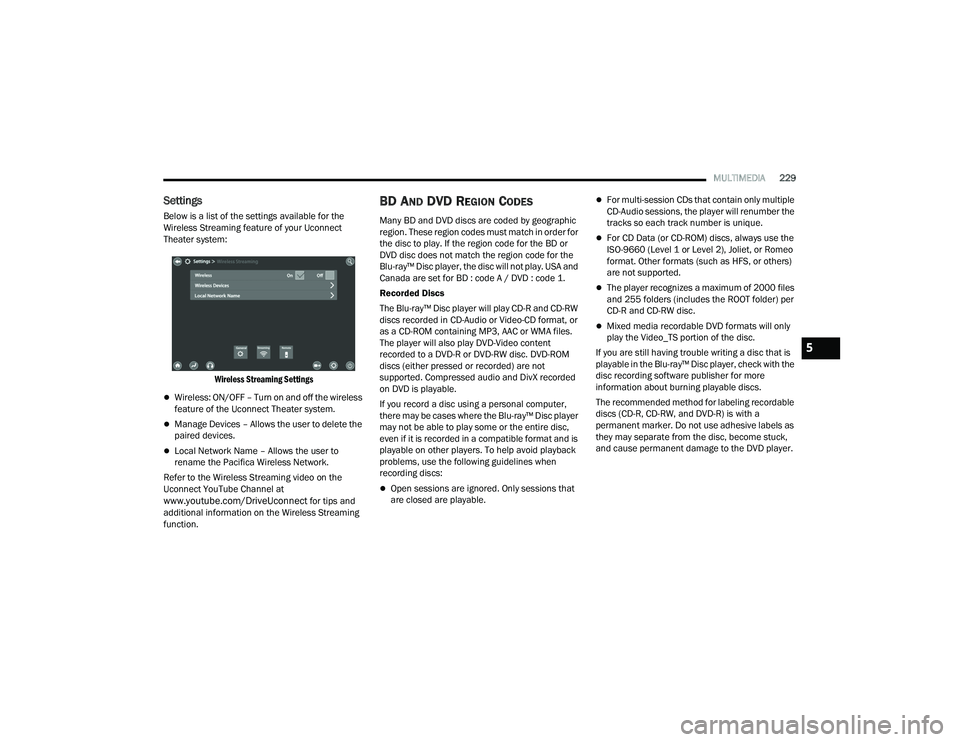
Below is a list of the settings available for the
Wireless Streaming feature of your Uconnect
Theater system:
Wireless Streaming Settings
Wireless: ON/OFF – Turn on and off the wireless
feature of the Uconnect Theater system.
Manage Devices – Allows the user to delete the
paired devices.
Local Network Name – Allows the user to
rename the Pacifica Wireless Network.
Refer to the Wireless Streaming video on the
Uconnect YouTube Channel at
www.youtube.com/DriveUconnect for tips and
additional information on the Wireless Streaming
function.
BD AND DVD REGION CODES
Many BD and DVD discs are coded by geographic
region. These region codes must match in order for
the disc to play. If the region code for the BD or
DVD disc does not match the region code for the
Blu-ray™ Disc player, the disc will not play. USA and
Canada are set for BD : code A / DVD : code 1.
Recorded Discs
The Blu-ray™ Disc player will play CD-R and CD-RW
discs recorded in CD-Audio or Video-CD format, or
as a CD-ROM containing MP3, AAC or WMA files.
The player will also play DVD-Video content
recorded to a DVD-R or DVD-RW disc. DVD-ROM
discs (either pressed or recorded) are not
supported. Compressed audio and DivX recorded
on DVD is playable.
If you record a disc using a personal computer,
there may be cases where the Blu-ray™ Disc player
may not be able to play some or the entire disc,
even if it is recorded in a compatible format and is
playable on other players. To help avoid playback
problems, use the following guidelines when
recording discs:
Open sessions are ignored. Only sessions that
are closed are playable.
For multi-session CDs that contain only multiple
CD-Audio sessions, the player will renumber the
tracks so each track number is unique.
For CD Data (or CD-ROM) discs, always use the
ISO-9660 (Level 1 or Level 2), Joliet, or Romeo
format. Other formats (such as HFS, or others)
are not supported.
The player recognizes a maximum of 2000 files
and 255 folders (includes the ROOT folder) per
CD-R and CD-RW disc.
Mixed media recordable DVD formats will only
play the Video_TS portion of the disc.
If you are still having trouble writing a disc that is
playable in the Blu-ray™ Disc player, check with the
disc recording software publisher for more
information about burning playable discs.
The recommended method for labeling recordable
discs (CD-R, CD-RW, and DVD-R) is with a
permanent marker. Do not use adhesive labels as
they may separate from the disc, become stuck,
and cause permanent damage to the DVD player.
5
21_RUP_OM_EN_USC_t.book Page 229