cruise control CHRYSLER PACIFICA 2021 Owners Manual
[x] Cancel search | Manufacturer: CHRYSLER, Model Year: 2021, Model line: PACIFICA, Model: CHRYSLER PACIFICA 2021Pages: 401, PDF Size: 26.88 MB
Page 7 of 401
5
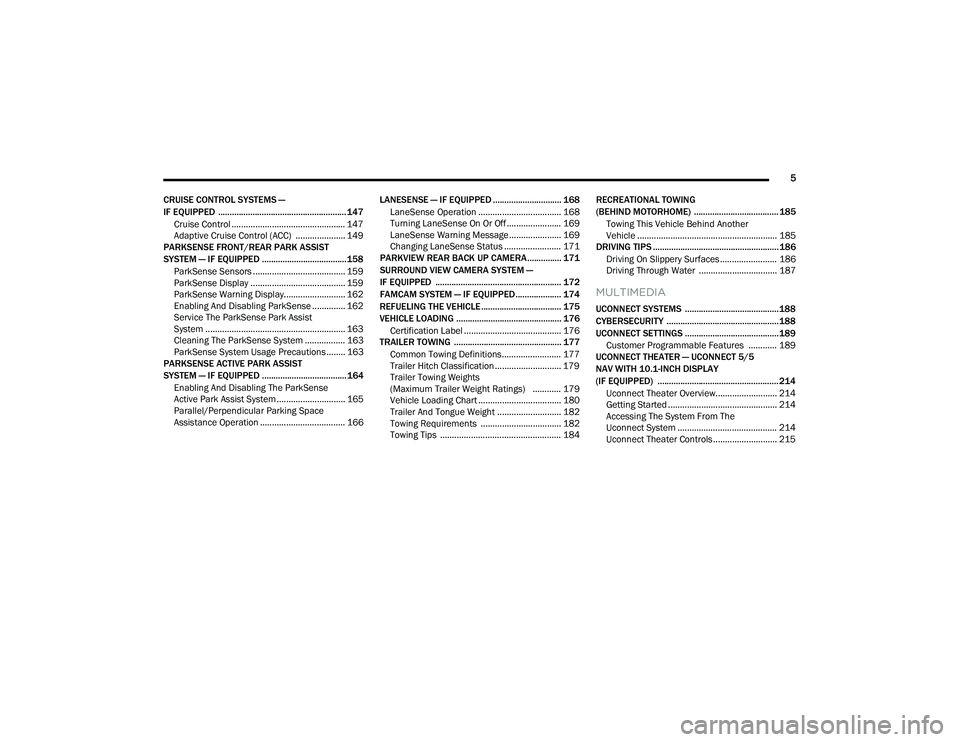
CRUISE CONTROL SYSTEMS —
IF EQUIPPED ........................................................ 147 Cruise Control ................................................ 147
Adaptive Cruise Control (ACC) ..................... 149
PARKSENSE FRONT/REAR PARK ASSIST
SYSTEM — IF EQUIPPED ..................................... 158
ParkSense Sensors ....................................... 159
ParkSense Display ........................................ 159
ParkSense Warning Display.......................... 162
Enabling And Disabling ParkSense .............. 162
Service The ParkSense Park Assist
System ........................................................... 163Cleaning The ParkSense System ................. 163ParkSense System Usage Precautions ........ 163
PARKSENSE ACTIVE PARK ASSIST
SYSTEM — IF EQUIPPED ..................................... 164
Enabling And Disabling The ParkSense
Active Park Assist System ............................. 165
Parallel/Perpendicular Parking Space
Assistance Operation .................................... 166 LANESENSE — IF EQUIPPED .............................. 168
LaneSense Operation ................................... 168Turning LaneSense On Or Off ....................... 169
LaneSense Warning Message ...................... 169Changing LaneSense Status ........................ 171
PARKVIEW REAR BACK UP CAMERA............... 171
SURROUND VIEW CAMERA SYSTEM —
IF EQUIPPED ....................................................... 172
FAMCAM SYSTEM — IF EQUIPPED.................... 174
REFUELING THE VEHICLE ................................... 175
VEHICLE LOADING .............................................. 176 Certification Label ......................................... 176
TRAILER TOWING ............................................... 177
Common Towing Definitions......................... 177
Trailer Hitch Classification ............................ 179
Trailer Towing Weights
(Maximum Trailer Weight Ratings) ............ 179
Vehicle Loading Chart ................................... 180Trailer And Tongue Weight ........................... 182Towing Requirements .................................. 182
Towing Tips ................................................... 184 RECREATIONAL TOWING
(BEHIND MOTORHOME) ..................................... 185
Towing This Vehicle Behind Another
Vehicle ........................................................... 185
DRIVING TIPS ....................................................... 186
Driving On Slippery Surfaces ........................ 186Driving Through Water ................................. 187
MULTIMEDIA
UCONNECT SYSTEMS ......................................... 188
CYBERSECURITY ................................................. 188
UCONNECT SETTINGS ......................................... 189 Customer Programmable Features ............ 189
UCONNECT THEATER — UCONNECT 5/5
NAV WITH 10.1-INCH DISPLAY
(IF EQUIPPED) ..................................................... 214
Uconnect Theater Overview.......................... 214
Getting Started .............................................. 214
Accessing The System From The
Uconnect System .......................................... 214Uconnect Theater Controls ........................... 215
21_RUP_OM_EN_USC_t.book Page 5
Page 13 of 401
11
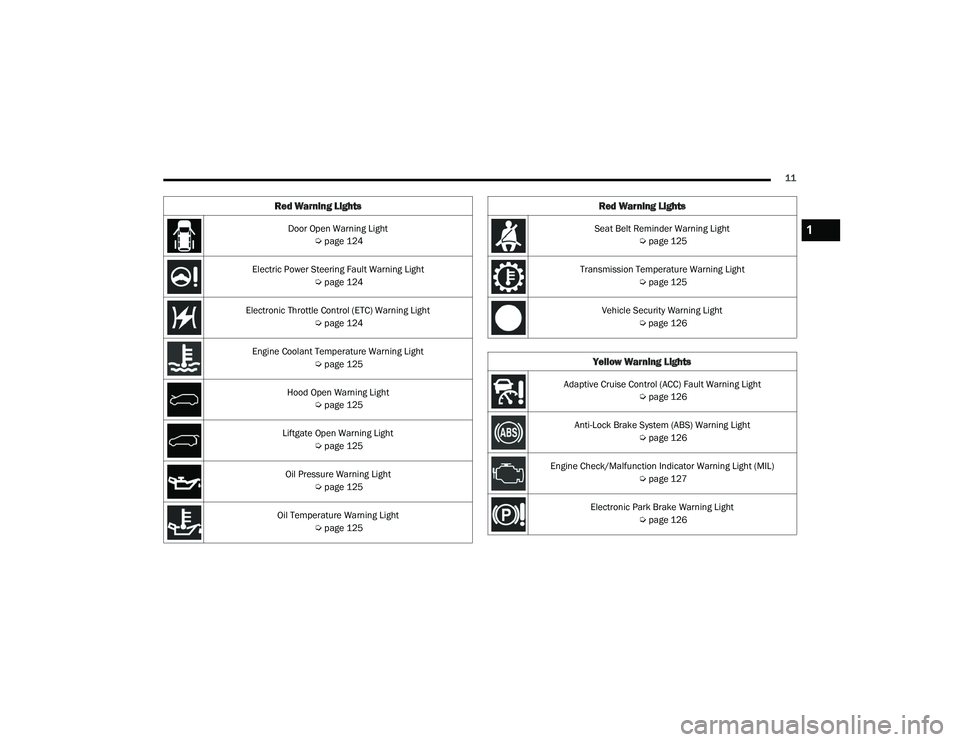
Door Open Warning Light Úpage 124
Electric Power Steering Fault Warning Light Úpage 124
Electronic Throttle Control (ETC) Warning Light Úpage 124
Engine Coolant Temperature Warning Light Úpage 125
Hood Open Warning Light Úpage 125
Liftgate Open Warning Light Úpage 125
Oil Pressure Warning Light Úpage 125
Oil Temperature Warning Light Úpage 125
Red Warning Lights
Seat Belt Reminder Warning Light
Úpage 125
Transmission Temperature Warning Light Úpage 125
Vehicle Security Warning Light Úpage 126
Yellow Warning Lights
Adaptive Cruise Control (ACC) Fault Warning Light
Úpage 126
Anti-Lock Brake System (ABS) Warning Light Úpage 126
Engine Check/Malfunction Indicator Warning Light (MIL) Úpage 127
Electronic Park Brake Warning Light Úpage 126
Red Warning Lights
1
21_RUP_OM_EN_USC_t.book Page 11
Page 14 of 401
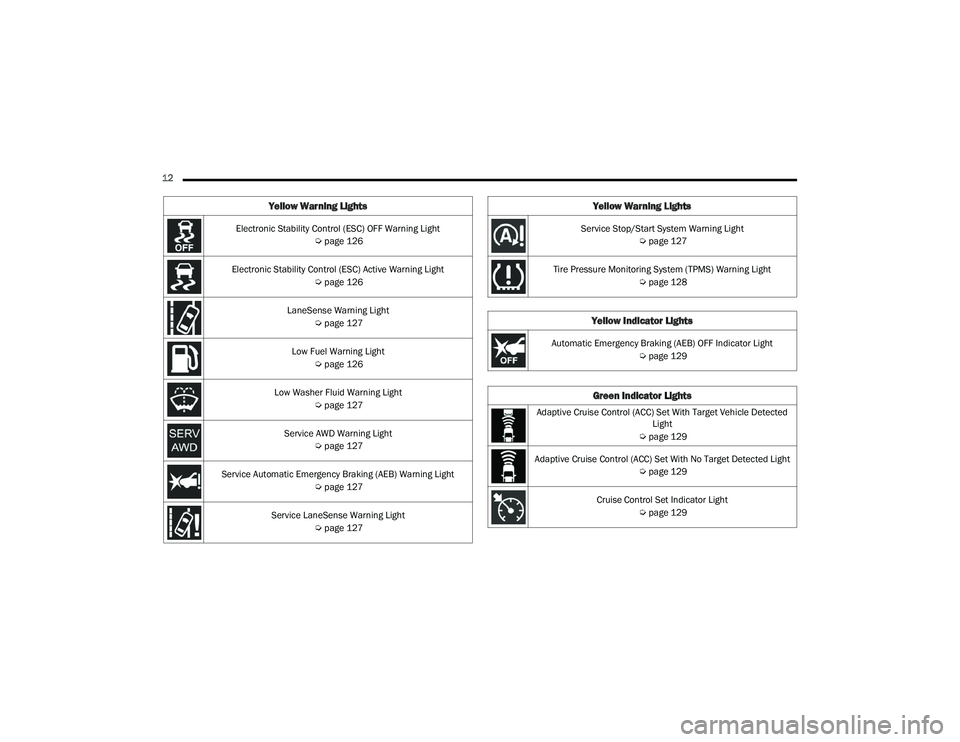
12 Electronic Stability Control (ESC) OFF Warning Light Úpage 126
Electronic Stability Control (ESC) Active Warning Light Úpage 126
LaneSense Warning Light Úpage 127
Low Fuel Warning Light Úpage 126
Low Washer Fluid Warning Light Úpage 127
Service AWD Warning Light Úpage 127
Service Automatic Emergency Braking (AEB) Warning Light Úpage 127
Service LaneSense Warning Light Úpage 127
Yellow Warning Lights
Service Stop/Start System Warning Light
Úpage 127
Tire Pressure Monitoring System (TPMS) Warning Light Úpage 128
Yellow Indicator Lights
Automatic Emergency Braking (AEB) OFF Indicator Light
Úpage 129
Green Indicator Lights
Adaptive Cruise Control (ACC) Set With Target Vehicle Detected
Light
Ú page 129
Adaptive Cruise Control (ACC) Set With No Target Detected Light Úpage 129
Cruise Control Set Indicator Light Úpage 129
Yellow Warning Lights
21_RUP_OM_EN_USC_t.book Page 12
Page 15 of 401
13
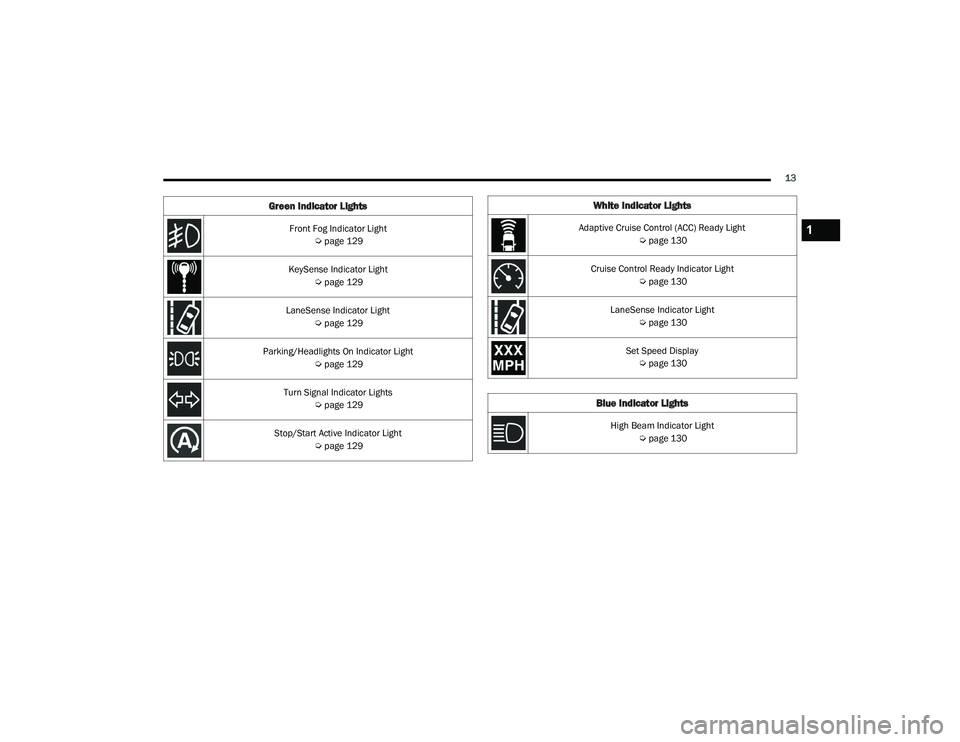
Front Fog Indicator Light Úpage 129
KeySense Indicator Light Úpage 129
LaneSense Indicator Light Úpage 129
Parking/Headlights On Indicator Light Úpage 129
Turn Signal Indicator Lights Úpage 129
Stop/Start Active Indicator Light Úpage 129
Green Indicator LightsWhite Indicator Lights
Adaptive Cruise Control (ACC) Ready Light
Úpage 130
Cruise Control Ready Indicator Light Úpage 130
LaneSense Indicator Light Úpage 130
Set Speed Display Ú page 130
Blue Indicator Lights
High Beam Indicator Light
Úpage 130
1
21_RUP_OM_EN_USC_t.book Page 13
Page 128 of 401
126GETTING TO KNOW YOUR INSTRUMENT PANEL
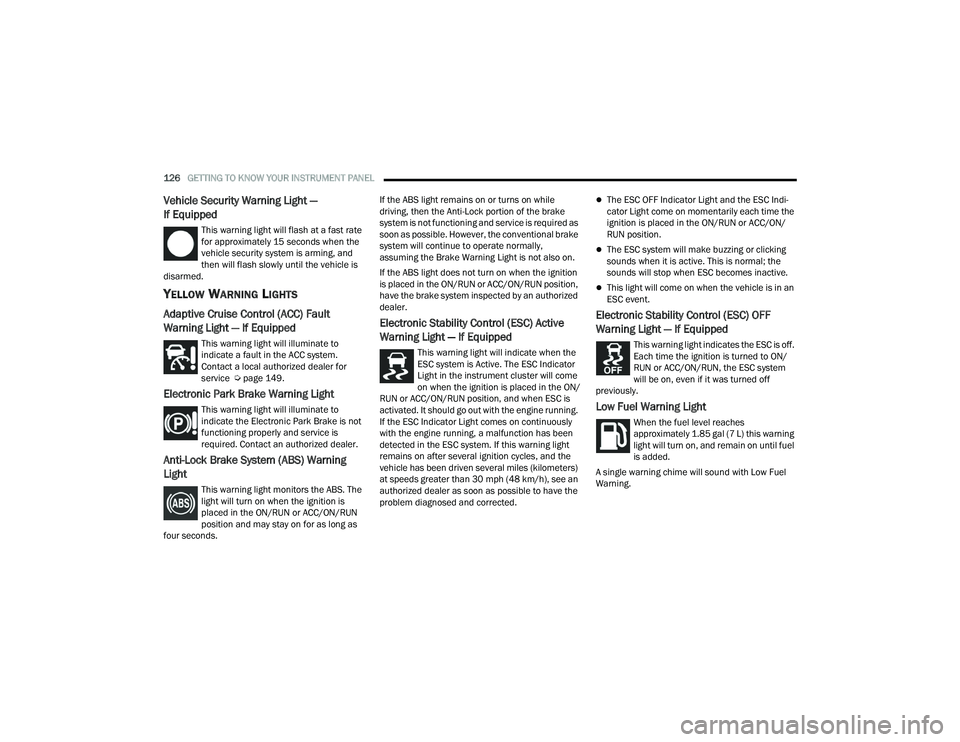
Vehicle Security Warning Light —
If Equipped
This warning light will flash at a fast rate
for approximately 15 seconds when the
vehicle security system is arming, and
then will flash slowly until the vehicle is
disarmed.
YELLOW WARNING LIGHTS
Adaptive Cruise Control (ACC) Fault
Warning Light — If Equipped
This warning light will illuminate to
indicate a fault in the ACC system.
Contact a local authorized dealer for
service Ú page 149.
Electronic Park Brake Warning Light
This warning light will illuminate to
indicate the Electronic Park Brake is not
functioning properly and service is
required. Contact an authorized dealer.
Anti-Lock Brake System (ABS) Warning
Light
This warning light monitors the ABS. The
light will turn on when the ignition is
placed in the ON/RUN or ACC/ON/RUN
position and may stay on for as long as
four seconds. If the ABS light remains on or turns on while
driving, then the Anti-Lock portion of the brake
system is not functioning and service is required as
soon as possible. However, the conventional brake
system will continue to operate normally,
assuming the Brake Warning Light is not also on.
If the ABS light does not turn on when the ignition
is placed in the ON/RUN or ACC/ON/RUN position,
have the brake system inspected by an authorized
dealer.
Electronic Stability Control (ESC) Active
Warning Light — If Equipped
This warning light will indicate when the
ESC system is Active. The ESC Indicator
Light in the instrument cluster will come
on when the ignition is placed in the ON/
RUN or ACC/ON/RUN position, and when ESC is
activated. It should go out with the engine running.
If the ESC Indicator Light comes on continuously
with the engine running, a malfunction has been
detected in the ESC system. If this warning light
remains on after several ignition cycles, and the
vehicle has been driven several miles (kilometers)
at speeds greater than 30 mph (48 km/h), see an
authorized dealer as soon as possible to have the
problem diagnosed and corrected.
The ESC OFF Indicator Light and the ESC Indi -
cator Light come on momentarily each time the
ignition is placed in the ON/RUN or ACC/ON/
RUN position.
The ESC system will make buzzing or clicking
sounds when it is active. This is normal; the
sounds will stop when ESC becomes inactive.
This light will come on when the vehicle is in an
ESC event.
Electronic Stability Control (ESC) OFF
Warning Light — If Equipped
This warning light indicates the ESC is off.
Each time the ignition is turned to ON/
RUN or ACC/ON/RUN, the ESC system
will be on, even if it was turned off
previously.
Low Fuel Warning Light
When the fuel level reaches
approximately 1.85 gal (7 L) this warning
light will turn on, and remain on until fuel
is added.
A single warning chime will sound with Low Fuel
Warning.
21_RUP_OM_EN_USC_t.book Page 126
Page 131 of 401
GETTING TO KNOW YOUR INSTRUMENT PANEL129
YELLOW INDICATOR LIGHTS
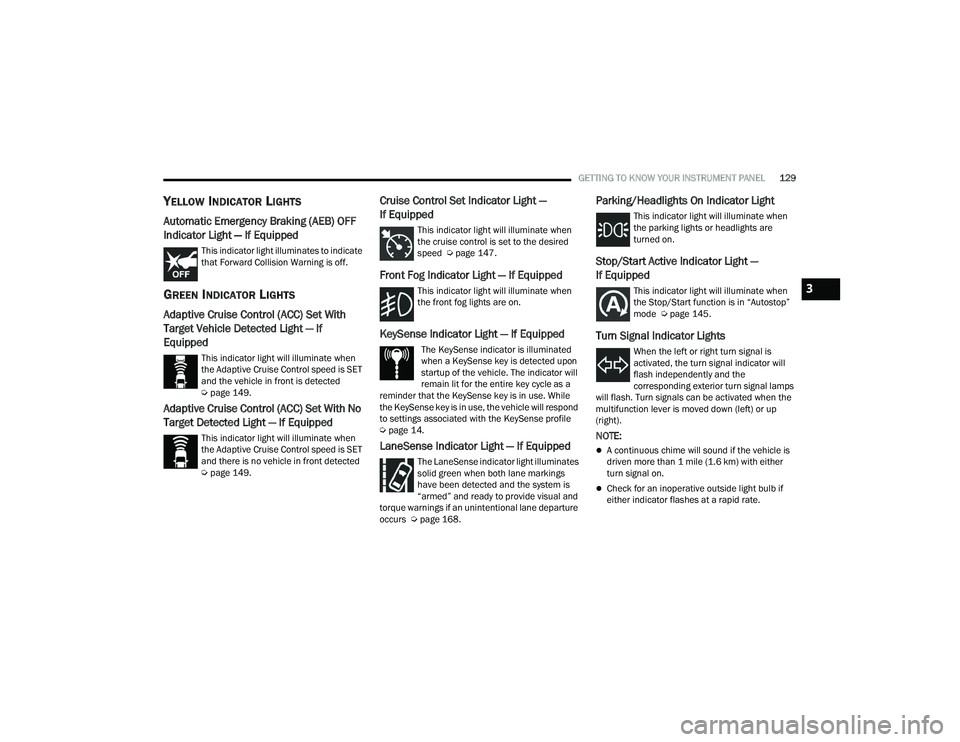
Automatic Emergency Braking (AEB) OFF
Indicator Light — If Equipped
This indicator light illuminates to indicate
that Forward Collision Warning is off.
GREEN INDICATOR LIGHTS
Adaptive Cruise Control (ACC) Set With
Target Vehicle Detected Light — If
Equipped
This indicator light will illuminate when
the Adaptive Cruise Control speed is SET
and the vehicle in front is detected
Úpage 149.
Adaptive Cruise Control (ACC) Set With No
Target Detected Light — If Equipped
This indicator light will illuminate when
the Adaptive Cruise Control speed is SET
and there is no vehicle in front detected
Úpage 149.
Cruise Control Set Indicator Light —
If Equipped
This indicator light will illuminate when
the cruise control is set to the desired
speed Ú page 147.
Front Fog Indicator Light — If Equipped
This indicator light will illuminate when
the front fog lights are on.
KeySense Indicator Light — If Equipped
The KeySense indicator is illuminated
when a KeySense key is detected upon
startup of the vehicle. The indicator will
remain lit for the entire key cycle as a
reminder that the KeySense key is in use. While
the KeySense key is in use, the vehicle will respond
to settings associated with the KeySense profile
Ú page 14.
LaneSense Indicator Light — If Equipped
The LaneSense indicator light illuminates
solid green when both lane markings
have been detected and the system is
“armed” and ready to provide visual and
torque warnings if an unintentional lane departure
occurs Ú page 168.
Parking/Headlights On Indicator Light
This indicator light will illuminate when
the parking lights or headlights are
turned on.
Stop/Start Active Indicator Light —
If Equipped
This indicator light will illuminate when
the Stop/Start function is in “Autostop”
mode Úpage 145.
Turn Signal Indicator Lights
When the left or right turn signal is
activated, the turn signal indicator will
flash independently and the
corresponding exterior turn signal lamps
will flash. Turn signals can be activated when the
multifunction lever is moved down (left) or up
(right).
NOTE:
A continuous chime will sound if the vehicle is
driven more than 1 mile (1.6 km) with either
turn signal on.
Check for an inoperative outside light bulb if
either indicator flashes at a rapid rate.
3
21_RUP_OM_EN_USC_t.book Page 129
Page 132 of 401
130GETTING TO KNOW YOUR INSTRUMENT PANEL
WHITE INDICATOR LIGHTS
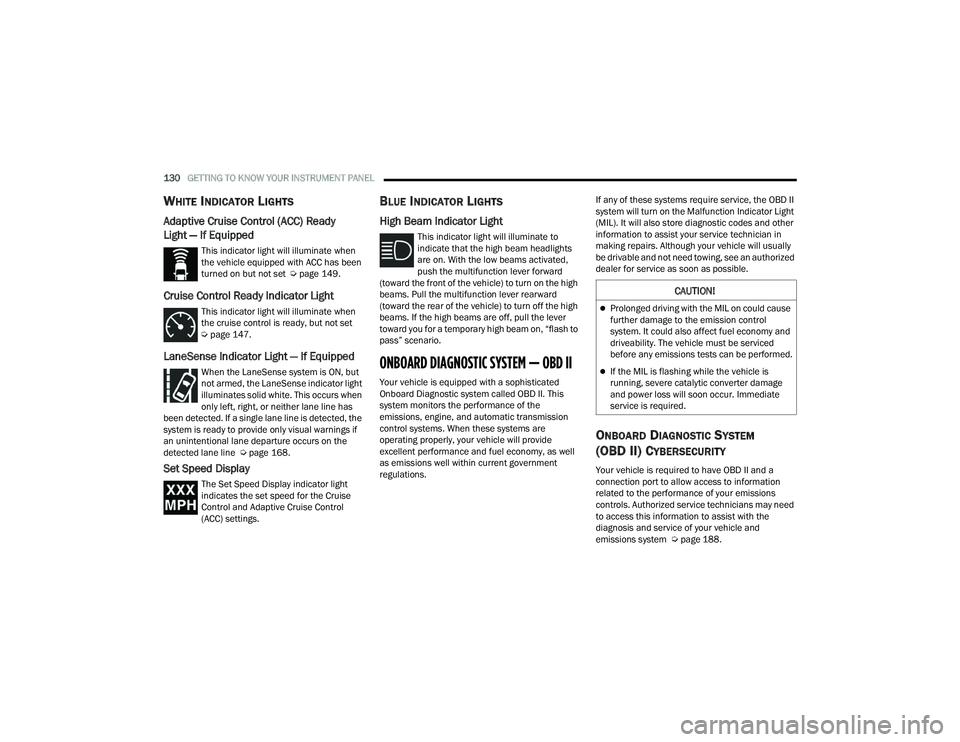
Adaptive Cruise Control (ACC) Ready
Light — If Equipped
This indicator light will illuminate when
the vehicle equipped with ACC has been
turned on but not set Úpage 149.
Cruise Control Ready Indicator Light
This indicator light will illuminate when
the cruise control is ready, but not set
Úpage 147.
LaneSense Indicator Light — If Equipped
When the LaneSense system is ON, but
not armed, the LaneSense indicator light
illuminates solid white. This occurs when
only left, right, or neither lane line has
been detected. If a single lane line is detected, the
system is ready to provide only visual warnings if
an unintentional lane departure occurs on the
detected lane line Ú page 168.
Set Speed Display
The Set Speed Display indicator light
indicates the set speed for the Cruise
Control and Adaptive Cruise Control
(ACC) settings.
BLUE INDICATOR LIGHTS
High Beam Indicator Light
This indicator light will illuminate to
indicate that the high beam headlights
are on. With the low beams activated,
push the multifunction lever forward
(toward the front of the vehicle) to turn on the high
beams. Pull the multifunction lever rearward
(toward the rear of the vehicle) to turn off the high
beams. If the high beams are off, pull the lever
toward you for a temporary high beam on, “flash to
pass” scenario.
ONBOARD DIAGNOSTIC SYSTEM — OBD II
Your vehicle is equipped with a sophisticated
Onboard Diagnostic system called OBD II. This
system monitors the performance of the
emissions, engine, and automatic transmission
control systems. When these systems are
operating properly, your vehicle will provide
excellent performance and fuel economy, as well
as emissions well within current government
regulations. If any of these systems require service, the OBD II
system will turn on the Malfunction Indicator Light
(MIL). It will also store diagnostic codes and other
information to assist your service technician in
making repairs. Although your vehicle will usually
be drivable and not need towing, see an authorized
dealer for service as soon as possible.
ONBOARD DIAGNOSTIC SYSTEM
(OBD II) C
YBERSECURITY
Your vehicle is required to have OBD II and a
connection port to allow access to information
related to the performance of your emissions
controls. Authorized service technicians may need
to access this information to assist with the
diagnosis and service of your vehicle and
emissions system Ú page 188.
CAUTION!
Prolonged driving with the MIL on could cause
further damage to the emission control
system. It could also affect fuel economy and
driveability. The vehicle must be serviced
before any emissions tests can be performed.
If the MIL is flashing while the vehicle is
running, severe catalytic converter damage
and power loss will soon occur. Immediate
service is required.
21_RUP_OM_EN_USC_t.book Page 130
Page 149 of 401
STARTING AND OPERATING147
TO MANUALLY TURN ON THE STOP/
S
TART SYSTEM
After turning off the Stop/Start system, push the
Stop/Start OFF switch again (located on the switch
bank). The light on the switch will turn off.
SYSTEM MALFUNCTION
If there is a malfunction in the Stop/Start system,
the system will not shut down the engine. A
“SERVICE STOP/START SYSTEM” message will
appear in the instrument cluster display and the
Stop/Start telltale will remain yellow Ú page 113.
If the “SERVICE STOP/START SYSTEM” message
appears in the instrument cluster display, have the
system checked by an authorized dealer.
If a malfunction occurs during an autostop, the
vehicle may not auto start and will need a key start.
CRUISE CONTROL SYSTEMS — IF EQUIPPED
Your vehicle may be equipped with the Cruise
Control system, or the Adaptive Cruise Control
(ACC) system:
Cruise Control will keep your vehicle at a
constant preset speed.
Adaptive Cruise Control (ACC) will adjust the
vehicle speed up to the preset speed to main -
tain a distance with the vehicle ahead.
NOTE:
In vehicles equipped with ACC, if ACC is not
enabled, Fixed Speed Cruise Control will not
detect vehicles directly ahead of you. Always be
aware of the feature selected.
Only one Cruise Control feature can operate at a
time. For example, if Fixed Speed Cruise Control
is enabled, Adaptive Cruise Control will be
unavailable, and vice versa.
CRUISE CONTROL
When engaged, the Cruise Control takes over
accelerator operations at speeds greater than
25 mph (40 km/h).
The Cruise Control buttons are located on the right
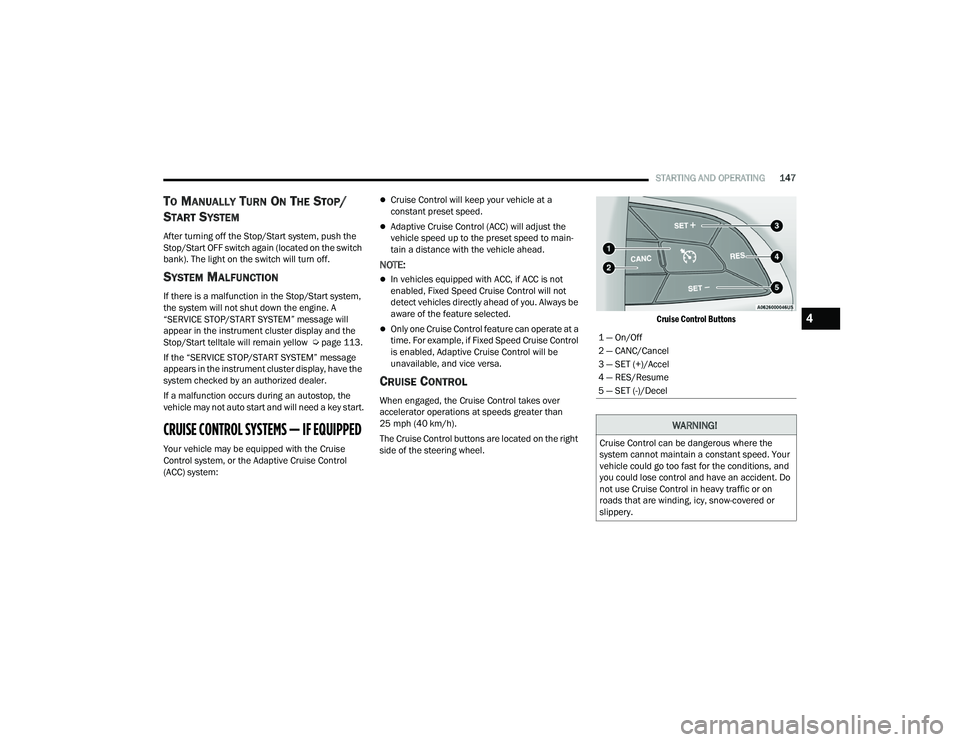
side of the steering wheel.
Cruise Control Buttons
1 — On/Off
2 — CANC/Cancel
3 — SET (+)/Accel
4 — RES/Resume
5 — SET (-)/Decel
WARNING!
Cruise Control can be dangerous where the
system cannot maintain a constant speed. Your
vehicle could go too fast for the conditions, and
you could lose control and have an accident. Do
not use Cruise Control in heavy traffic or on
roads that are winding, icy, snow-covered or
slippery.
4
21_RUP_OM_EN_USC_t.book Page 147
Page 150 of 401
148STARTING AND OPERATING
To Activate
Push the on/off button to activate the Cruise
Control. The cruise indicator light in the instrument
cluster display will illuminate. To turn the system
off, push the on/off button a second time. The
cruise indicator light will turn off. The system
should be turned off when not in use.
To Set A Desired Speed
Turn the Cruise Control on.
NOTE:The vehicle should be traveling at a steady speed
and on level ground before pushing the SET (+) or
SET (-) button.
When the vehicle has reached the desired speed,
push the SET (+) or SET (-) button and release.
Release the accelerator and the vehicle will
operate at the selected speed.
To Vary The Speed Setting
To Increase Or Decrease The Set Speed
When the Cruise Control is set, you can increase
speed by pushing the SET (+) button, or decrease
speed by pushing the SET (-) button.
U.S. Speed (mph)
Pushing the SET (+) , or SET (-) button once will
result in a 1 mph speed adjustment. Each
subsequent tap of the button results in an
adjustment of 1 mph.
If the button is continually pushed, the set
speed will continue to adjust until the button is
released, then the new set speed will be estab -
lished.
Metric Speed (km/h)
Pushing the SET (+) , or SET (-) button once will
result in a 1 km/h speed adjustment. Each
subsequent tap of the button results in an
adjustment of 1 km/h.
If the button is continually pushed, the set
speed will continue to adjust until the button
is released, then the new set speed will be
established.
To Accelerate For Passing
Press the accelerator as you would normally. When
the pedal is released, the vehicle will return to the
set speed.
USING CRUISE CONTROL ON HILLS
The transmission may downshift on hills to
maintain the vehicle set speed.
The Cruise Control system maintains speed up and
down hills. A slight speed change on moderate hills
is normal. On steep hills, a greater speed loss or
gain may occur so it may be preferable to drive
without Cruise Control.
WARNING!
Leaving the Cruise Control system on when not
in use is dangerous. You could accidentally set
the system or cause it to go faster than you
want. You could lose control and have an
accident. Always turn the system off when you
are not using it.
WARNING!
Cruise Control can be dangerous where the
system cannot maintain a constant speed. Your
vehicle could go too fast for the conditions, and
you could lose control and have an accident. Do
not use Cruise Control in heavy traffic or on
roads that are winding, icy, snow-covered or
slippery.
21_RUP_OM_EN_USC_t.book Page 148
Page 151 of 401
STARTING AND OPERATING149
(Continued)
(Continued)
To Resume Speed
To resume a previously set speed, push the RES
button and release. Resume can be used at any
speed above 20 mph (32 km/h).
To Deactivate
A tap on the brake pedal, or pushing the CANC
button, or normal brake pressure will deactivate
the Cruise Control system without erasing the set
speed from memory.
Pushing the on/off button or placing the ignition in
the OFF position erases the set speed from
memory.
ADAPTIVE CRUISE CONTROL (ACC)
Adaptive Cruise Control (ACC) increases the driving
convenience provided by cruise control while
traveling on highways and major roadways.
However, it is not a safety system and not designed
to prevent collisions. The Cruise Control function
performs differently Úpage 147.
ACC will allow you to keep Cruise Control engaged
in light to moderate traffic conditions without the
constant need to reset your Cruise Control. ACC
utilizes a radar sensor and a forward facing
camera designed to detect a vehicle directly ahead
of you.
NOTE:
If the ACC sensor detects a vehicle ahead, ACC
will apply limited braking or accelerate (not to
exceed the original set speed) automatically to
maintain a preset following distance, while
matching the speed of the vehicle ahead.
Any chassis/suspension or tire size modifica -
tions to the vehicle will affect the performance
of the Adaptive Cruise Control and Forward Colli -
sion Warning system.
Fixed Speed Cruise Control (ACC not enabled)
will not detect vehicles directly ahead of you.
Always be aware of the feature selected
Ú page 387.
WARNING!
Adaptive Cruise Control (ACC) is a conve -
nience system. It is not a substitute for active
driver involvement. It is always the driver’s
responsibility to be attentive of road, traffic,
and weather conditions, vehicle speed,
distance to the vehicle ahead and, most
importantly, brake operation to ensure safe
operation of the vehicle under all road condi -
tions. Your complete attention is always
required while driving to maintain safe control
of your vehicle. Failure to follow these warn -
ings can result in a collision and death or
serious personal injury.
The ACC system:
Does not react to pedestrians, oncoming
vehicles, and stationary objects (e.g., a
stopped vehicle in a traffic jam or a
disabled vehicle).
Cannot take street, traffic, and weather
conditions into account, and may be
limited upon adverse sight distance condi -
tions.
Does not always fully recognize complex
driving conditions, which can result in
wrong or missing distance warnings.
Will bring the vehicle to a complete stop
while following a target vehicle and hold
the vehicle for approximately three
minutes in the stop position. If the target
vehicle does not start moving within three
minutes the parking brake will be acti -
vated, and the ACC system will be
cancelled.
WARNING!
4
21_RUP_OM_EN_USC_t.book Page 149