Side mirrors CHRYSLER PACIFICA 2022 User Guide
[x] Cancel search | Manufacturer: CHRYSLER, Model Year: 2022, Model line: PACIFICA, Model: CHRYSLER PACIFICA 2022Pages: 384, PDF Size: 23.92 MB
Page 172 of 384
170STARTING AND OPERATING
NOTE:
If the vehicle speed remains below 8 mph
(13 km/h), the Rear View Camera image will be
displayed continuously until deactivated via the
touchscreen button X, the transmission is
shifted into PARK, or the ignition is placed in the
OFF position.
The touchscreen button X to disable display of
the camera image is made available ONLY when
the vehicle is not in REVERSE.
When enabled, active guidelines are overlaid on
the image to illustrate the width of the vehicle,
including the side view mirrors and its projected
back up path based on the steering wheel position.
Different colored zones indicate the distance to
the rear of the vehicle.
The following table shows the approximate
distances for each zone: Modes Of Operation
Manual activation of the Surround View system is
selected by pressing the Surround View Camera
soft key located in the Controls screen within the
Uconnect system.
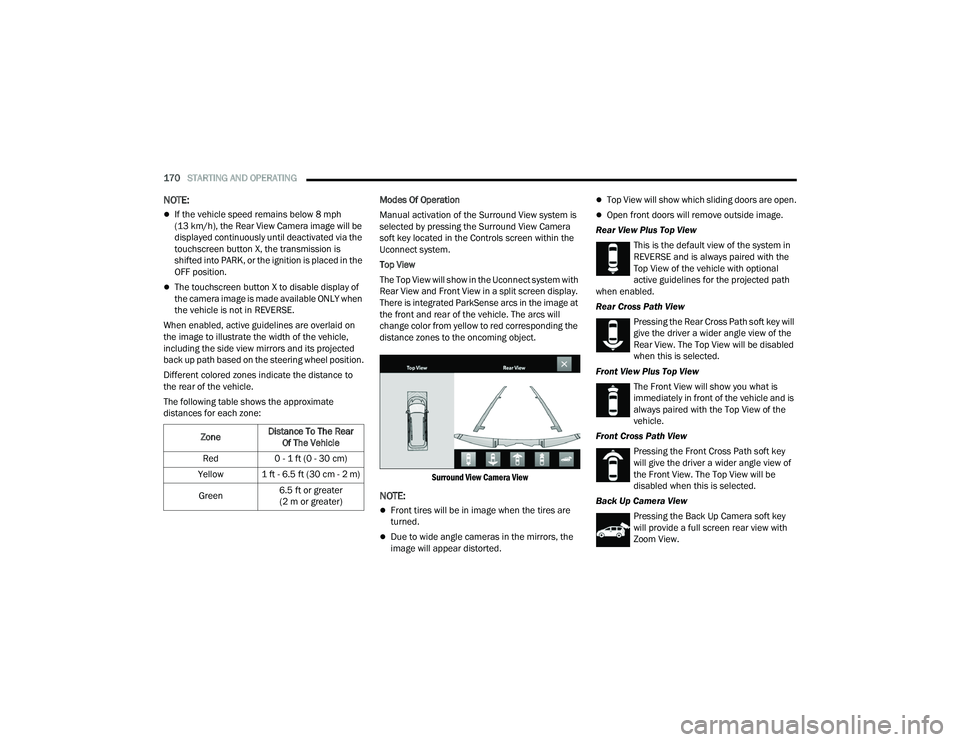
Top View
The Top View will show in the Uconnect system with
Rear View and Front View in a split screen display.
There is integrated ParkSense arcs in the image at
the front and rear of the vehicle. The arcs will
change color from yellow to red corresponding the
distance zones to the oncoming object.
Surround View Camera View
NOTE:
Front tires will be in image when the tires are
turned.
Due to wide angle cameras in the mirrors, the
image will appear distorted.
Top View will show which sliding doors are open.
Open front doors will remove outside image.
Rear View Plus Top View This is the default view of the system in
REVERSE and is always paired with the
Top View of the vehicle with optional
active guidelines for the projected path
when enabled.
Rear Cross Path View
Pressing the Rear Cross Path soft key will
give the driver a wider angle view of the
Rear View. The Top View will be disabled
when this is selected.
Front View Plus Top View The Front View will show you what is
immediately in front of the vehicle and is
always paired with the Top View of the
vehicle.
Front Cross Path View Pressing the Front Cross Path soft key
will give the driver a wider angle view of
the Front View. The Top View will be
disabled when this is selected.
Back Up Camera View Pressing the Back Up Camera soft key
will provide a full screen rear view with
Zoom View.
Zone
Distance To The Rear
Of The Vehicle
Red 0 - 1 ft (0 - 30 cm)
Yellow 1 ft - 6.5 ft (30 cm - 2 m)
Green 6.5 ft or greater
(2 m or greater)
22_RUP_OM_EN_USC_t.book Page 170
Page 192 of 384
190MULTIMEDIA
My Profile
Rear ParkSense Volume This setting adjusts the volume of the Rear ParkSense system. The available
settings are “Low”, “Medium”, and “High”.
Rear ParkSense Braking Assist This setting will turn the Rear ParkSense Braking Assist on or off.
Blind Spot Alert This setting will change the type of alert provided when an object is detected in
a vehicle’s blind spot. The “Lights” setting will activate the Blind Spot Alert
lights on the outside mirrors. The “Lights & Chime” setting will activate both
the lights on the outside mirrors and an audible chime.
Maximum Vehicle Speed This setting adjusts the Maximum Vehicle Speed. This feature can be set to
65, 70, 75, 80, or 85 mph (90, 95, 100, 105 or 110 km/h) by using the “-”
and “+” options.
Start Up Fuel Level Message This setting will turn the Start Up Fuel Level Message on or off.
Earlier Low Fuel Alert This setting will turn the Earlier Low Fuel Alert on or off.
Setting NameDescription
When the My Profile button is pressed on the touchscreen, the system displays options related to the vehicle’s profiles.
NOTE:Depending on the vehicle’s options, feature settings may vary.
Setting NameDescription
Language This setting will change the language of the Uconnect system and Instrument
Cluster Display. The available languages are English, Français, Español, and
Italiano.
Display Mode The setting will adjust the display for the radio to “Auto” or “Manual”.
“Manual” allows for more customization with the radio display.
22_RUP_OM_EN_USC_t.book Page 190
Page 198 of 384
196MULTIMEDIA
Pedestrian Emergency Braking — Located In Automatic Emergency Braking
Submenu This setting will turn the Pedestrian Emergency Braking system “Off” or
“Warning + Active Braking”.
LaneSense Warning — Located In LaneSense Submenu This setting will change the distance at which the steering wheel will provide
lane departure feedback. The available settings are “Early”, “Medium”, and
“Late”.
LaneSense Strength — Located In LaneSense Submenu This setting will change the strength of the steering wheel feedback during a
lane departure. The available settings are “Low”, “Medium”, and “High”.
ParkSense This setting will change the type of ParkSense alert when a close object is
detected. The “Sound Only” setting will provide an audible chime when an
object is detected. The “Sound and Display” setting will provide both an
audible chime and a visual display when an object is detected.
Front ParkSense Volume This setting adjusts the volume of the Front ParkSense system. The available
settings are “Low”, “Medium”, and “High”.
Rear ParkSense Volume This setting adjusts the volume of the Rear ParkSense system. The available
settings are “Low”, “Medium”, and “High”.
Rear ParkSense Braking Assist This setting will turn the Rear ParkSense Braking Assist on or off.
Sliding Door Alert This setting will turn the Sliding Door Alert on and off.
Blind Spot Alert This setting will change the type of alert provided when an object is detected
in a vehicle’s blind spot. The “Off” setting will turn off Blind Spot Alert. The
“Lights” setting will activate the Blind Spot Alert lights on the outside mirrors.
The “Lights + Chime” setting will activate both the lights on the outside
mirrors and an audible chime.
Hill Start Assist This setting will turn the Hill Start Assist system on or off.
KeySense This setting will access KeySense features.
Setting NameDescription
22_RUP_OM_EN_USC_t.book Page 196
Page 203 of 384
MULTIMEDIA201
Mirrors & Wipers
When the Mirrors & Wipers button is pressed on the touchscreen, the system displays the options related to the vehicle’s mirrors and wipers.
NOTE:Depending on the vehicle’s options, feature settings may vary.
Setting Name Description
Tilt Side Mirrors In Reverse This setting will tilt the outside side-view mirrors when the ignition is in the
ON/RUN position and the transmission gear selector is in the REVERSE
position. The mirrors will move back to their previous position when the
transmission is shifted out of REVERSE. The available settings are “On”
and “Off”.
Auto Folding Side Mirrors This setting will automatically fold and unfold the side-view mirrors when the
vehicle is turned off, the doors are locked, or the key fob button is pushed.
The available options are “On” and “Off”.
Rain Sensing Auto Wipers This setting will turn the Rain Sensing Auto Wipers on or off.
Headlights With Wipers This setting will turn the headlights on when the wipers are activated.
5
22_RUP_OM_EN_USC_t.book Page 201
Page 231 of 384

SAFETY229
If one wheel on a driven axle is spinning faster than
the other, the system will apply the brake of the
spinning wheel. This will allow more vehicle torque
to be applied to the wheel that is not spinning. BLD
may remain enabled even if TCS and the Electronic
Stability Control (ESC) are in reduced modes.
Trailer Sway Control (TSC)
TSC uses sensors in the vehicle to recognize an
excessively swaying trailer and will take the
appropriate actions to attempt to stop the sway.
Note that TSC cannot stop all trailers from swaying.
Always use caution when towing a trailer and follow
the trailer tongue weight recommendations
Ú page 174.
When TSC is functioning, the ESC Activation/
Malfunction Indicator Light will flash, the engine
power may be reduced and you may feel the
brakes being applied to individual wheels to
attempt to stop the trailer from swaying. TSC is
disabled when the ESC system is in the “Partial
Off” mode.
AUXILIARY DRIVING SYSTEMS
BLIND SPOT MONITORING (BS M) —
I
F EQUIPPED
The BSM system uses two radar sensors, located
inside the rear fascia/bumper, to detect highway
licensable vehicles (automobiles, trucks,
motorcycles, etc.) that enter the blind spot zones
from the rear/front/side of the vehicle.
Rear Detection Zones
When the vehicle is started, the BSM Warning Light
will momentarily illuminate in both outside
rearview mirrors to let the driver know that the
system is operational. The BSM system sensors
operate when the vehicle is in any forward gear
and enters standby mode when the vehicle is in
PARK (P). The BSM detection zone covers approximately one
lane width on both sides of the vehicle 12 ft
(3.7 m). The zone length starts at the outside
rearview mirror and extends approximately 10 ft
(3 m) beyond the rear fascia/bumper of the
vehicle. The BSM system monitors the detection
zones on both sides of the vehicle when the vehicle
speed reaches approximately 6 mph (10 km/h) or
higher and will alert the driver of vehicles in these
areas.
NOTE:
The BSM system DOES NOT alert the driver
about rapidly approaching vehicles that are
outside the detection zones.
The BSM system detection zone DOES NOT
change if your vehicle is towing a trailer. There
-
fore, visually verify the adjacent lane is clear for
both your vehicle and trailer before making a
lane change. If the trailer or other object
(i.e., bicycle, sports equipment) extends beyond
the side of your vehicle, this may result in false
detections. The BSM Warning Light may even
remain illuminated the entire time the vehicle is
in a forward gear.
WARNING!
If TSC activates while driving, slow the vehicle
down, stop at the nearest safe location, and
adjust the trailer load to eliminate trailer sway.
6
22_RUP_OM_EN_USC_t.book Page 229
Page 232 of 384

230SAFETY
The Blind Spot Monitoring (BSM) system may
experience dropouts (blinking on and off) of the
side mirror warning indicator lamps when a
motorcycle or any small object remains at the
side of the vehicle for extended periods of time
(more than a couple of seconds).
The area on the rear fascia/bumper where the
radar sensors are located must remain free of
snow, ice, and dirt/road contamination so that the
BSM system can function properly. Do not block
the area of the rear fascia/bumper where the
radar sensors are located with foreign objects
(bumper stickers, bicycle racks, etc.).
Sensor Location
If the system detects degraded performance due
to contamination or foreign objects, a message will
warn you of a blocked sensor and the warning
indicators in side view mirrors will be on. The
warning indicators will remain illuminated until
blockage clearing conditions are met. First clear
the fascia/bumper area around the sensors of the
blockage. After removing the blockage, cycle the
ignition from on to off and then back on again to
reset the system.
If the blockage message is still present after
cycling the ignition and driving in traffic, check
again for a blockage.
The BSM system notifies the driver of objects in the
detection zones by illuminating the BSM Warning
Light located in the outside mirrors in addition to
sounding an audible (chime) alert and reducing the
radio volume Ú
page 232.
Warning Light Location
The BSM system monitors the detection zone from
three different entry points (side, rear, front) while
driving to see if an alert is necessary. The BSM
system will issue an alert during these types of
zone entries.
Entering From The Side
Vehicles that move into your adjacent lanes from
either side of the vehicle.
Side Monitoring
22_RUP_OM_EN_USC_t.book Page 230
Page 233 of 384
SAFETY231
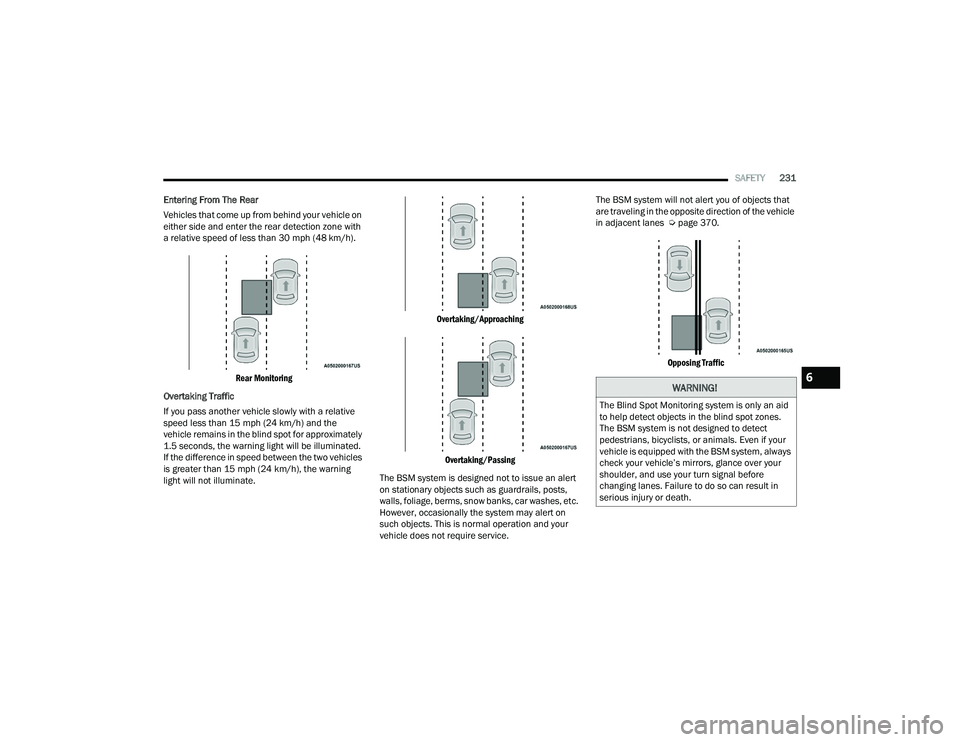
Entering From The Rear
Vehicles that come up from behind your vehicle on
either side and enter the rear detection zone with
a relative speed of less than 30 mph (48 km/h).
Rear Monitoring
Overtaking Traffic
If you pass another vehicle slowly with a relative
speed less than 15 mph (24 km/h) and the
vehicle remains in the blind spot for approximately
1.5 seconds, the warning light will be illuminated.
If the difference in speed between the two vehicles
is greater than 15 mph (24 km/h), the warning
light will not illuminate.
Overtaking/Approaching
Overtaking/Passing
The BSM system is designed not to issue an alert
on stationary objects such as guardrails, posts,
walls, foliage, berms, snow banks, car washes, etc.
However, occasionally the system may alert on
such objects. This is normal operation and your
vehicle does not require service. The BSM system will not alert you of objects that
are traveling in the opposite direction of the vehicle
in adjacent lanes Ú
page 370.
Opposing Traffic
WARNING!
The Blind Spot Monitoring system is only an aid
to help detect objects in the blind spot zones.
The BSM system is not designed to detect
pedestrians, bicyclists, or animals. Even if your
vehicle is equipped with the BSM system, always
check your vehicle’s mirrors, glance over your
shoulder, and use your turn signal before
changing lanes. Failure to do so can result in
serious injury or death.
6
22_RUP_OM_EN_USC_t.book Page 231
Page 377 of 384
375
Heated Mirrors
......................................... 57, 60Heated Seats................................................... 51Heater, Engine Block..................................... 135Hill Start Assist.............................................. 227Hitches Trailer Towing............................................ 176HomeLink (Garage Door Opener).................... 61Hood Prop........................................................ 96Hood Release.................................................. 96
I
Ignition............................................................ 18Switch......................................................... 18Indicator LightsBlue........................................................... 129Green........................................................ 127White......................................................... 128Yellow........................................................ 127Inside Rearview Mirror............................ 57, 282Instrument Cluster............................... 110, 112Display...................................................... 112Display Controls........................................ 113Menu Items............................................... 116Instrument Panel Lens Cleaning.................... 359Interior And Instrument Lights......................... 69Interior Appearance Care............................... 358
Interior Lights................................................... 69Intermittent Wipers (Delay Wipers).................. 70InverterPower.......................................................... 91
J
Jack Location................................................ 287Jack Operation.............................................. 286Jump Starting............................................... 300
K
Key Fob............................................................ 14Arm The System.......................................... 22Disarm The Alarm........................................ 22Programming Additional Key Fobs............... 16Key Fob Battery Service
(Remote Keyless Entry).................................... 15Key Fob Programming
(Remote Keyless Entry).................................... 16Keyless Enter 'n Go™....................................... 24Passive Entry............................................... 24Keys................................................................. 14Keysense...................................................... 115
L
Lane Change And Turn Signals........................65Lane Change Assist................................... 65, 68LaneSense.................................................... 166Lap/Shoulder Belts....................................... 241Latches......................................................... 281Hood............................................................96Lead Free Gasoline....................................... 361Leaks, Fluid................................................... 281Life Of Tires................................................... 349Liftgate.............................................................97Power...........................................................97Light Bulbs........................................... 281, 338Lights............................................................ 281Air Bag.................................... 121, 250, 279Anti Lock Brake System............................ 124Automatic Emergency Braking OFF........... 127Battery Saver...............................................68Brake Assist Warning................................ 227Brake Warning.......................................... 122Bulb Replacement........................... 337, 338Cruise.............................................. 127, 128Daytime Running.........................................65Dimmer Switch, Headlight...........................65Electric Power Steering Fault.................... 122
11
22_RUP_OM_EN_USC_t.book Page 375
Page 378 of 384
376 Electronic Park Brake
................................ 124Electronic Stability Control Active.............. 125Electronic Throttle Control......................... 123Engine Temperature Warning.................... 123Exterior............................................ 281, 338Fog..................................................... 68, 127Headlights............................................ 65, 67High Beam................................................ 129High Beam/Low Beam Select..................... 65Hood Open................................................ 123Instrument Cluster...................................... 65Intensity Control.......................................... 69Interior........................................................ 69KeySense.................................................. 128LaneSense...................................... 125, 128Liftgate Open............................................. 123Lights On Reminder.............................. 65, 67Low Fuel.................................................... 125Low Washer Fluid...................................... 125Malfunction Indicator (Check Engine).......125Oil Pressure............................................... 123Oil Temperature........................................ 123Park........................................................... 128Passing................................................. 65, 67Reading....................................................... 69
Seat Belt Reminder.................................. 124Security Alarm.......................................... 124Service..................................................... 337Service Automatic Emergency Braking..... 126Service AWD............................................. 126Service LaneSense................................... 125Service Stop Start System........................ 126Side Marker.............................................. 338SmartBeams............................................... 66Speed....................................................... 128Stop Start Active....................................... 128Tire Pressure Monitoring (TPMS).............. 126Traction Control........................................ 227Transmission Temperature....................... 124Turn Signals.................... 65, 128, 281, 338Load Floor, Cargo.......................................... 100Load Shed Battery Saver Mode.................... 119Load Shed Battery Saver On......................... 119Load Shed Electrical Load Reduction........... 119Load Shed Intelligent Battery Sensor............ 119Loading Vehicle................................... 100, 173Tires......................................................... 343Low Tire Pressure System............................. 236Lubrication, Body.......................................... 320Lug Nuts....................................................... 360Luggage Carrier............................................ 106
M
Maintenance....................................................96Maintenance Free Battery............................ 314Maintenance Schedule................................. 309Malfunction Indicator Light
(Check Engine)..................................... 125, 130ManualPark Release............................................ 304Service...................................................... 370Map/Reading Lights........................................69Marker Lights, Side....................................... 338Media Hub.......................................................87Memory Feature (Memory Seats).....................33Memory Seat...................................... 32, 33, 59Memory Seats And Radio.................................33Methanol....................................................... 362Mini-Trip Computer....................................... 121Mirrors.............................................................57Automatic Dimming.....................................57Electric Remote...........................................59Exterior Folding............................................60Heated.................................................. 57, 60Memory.......................................................32Outside.................................................57, 58Rearview............................................ 57, 282Vanity...........................................................58
22_RUP_OM_EN_USC_t.book Page 376
Page 379 of 384
377
Modifications/Alterations Vehicle
........................................................ 10Monitor, Tire Pressure System....................... 236Mopar Parts................................................... 369MP3 Control.................................................... 87Multi-Function Control Lever............................ 65
N
New Vehicle Break-In Period.......................... 135
O
Occupant Restraints...................................... 239Octane Rating, Gasoline (Fuel)............ 361, 365Oil Change Indicator...................................... 114Reset......................................................... 114Oil Filter, Change........................................... 316Oil Filter, Selection......................................... 316Oil Pressure Light.......................................... 123Oil, Engine........................................... 315, 365Capacity.................................................... 364Checking................................................... 314Dipstick..................................................... 314Disposal.................................................... 316Filter................................................ 316, 365Filter Disposal........................................... 316Identification Logo..................................... 316
Materials Added To.................................. 316Pressure Warning Light............................ 123Recommendation............................ 315, 364Synthetic.................................................. 316Viscosity................................................... 364Onboard Diagnostic System.......................... 129Operating Precautions.................................. 129Operator ManualOwner's Manual........................................ 370Outside Rearview Mirrors......................... 57, 58Overheating, Engine...................................... 303
P
Paint Care..................................................... 357Parking Brake............................................... 136ParkSense Active Park Assist........................ 162ParkSense System, Rear.............................. 156Passive Entry................................................... 24Pets.............................................................. 279Placard, Tire And Loading Information.......... 343PowerBrakes...................................................... 360Inverter........................................................ 91Mirrors......................................................... 59Outlet (Auxiliary Electrical Outlet)................ 89Seats.................................................... 47, 49Steering.................................................... 143
Power SeatsDown...........................................................47Forward.......................................................47Rearward.....................................................47Up................................................................47Power Sliding DoorOn / Off Switch.....................................28, 97Pregnant Women And Seat Belts.................. 247Preparation For Jacking................................ 286PretensionersSeat Belts................................................. 247
R
Radial Ply Tires.............................................. 347Radiator Cap (Coolant Pressure Cap)............ 326Radio Operation............................................ 222Rear Air Conditioning................................ 76, 81Rear Camera................................................. 169Rear Cross Path............................................ 232Rear ParkSense System................................ 156Rear Seat Entertainment.............................. 213Rear Seat Reminder...................................... 228Rear Seat Removal..........................................35Rear View.........................................................57Reclining Front Seats.......................................34Recreational Towing...................................... 184
11
22_RUP_OM_EN_USC_t.book Page 377