lock CHRYSLER PACIFICA 2022 Owner's Manual
[x] Cancel search | Manufacturer: CHRYSLER, Model Year: 2022, Model line: PACIFICA, Model: CHRYSLER PACIFICA 2022Pages: 384, PDF Size: 23.92 MB
Page 33 of 384
GETTING TO KNOW YOUR VEHICLE31
STEERING WHEEL
TILT/TELESCOPING STEERING COLUMN
This feature allows you to tilt the steering column
upward or downward. It also allows you to lengthen
or shorten the steering column. The tilt/
telescoping lever is located left of the steering
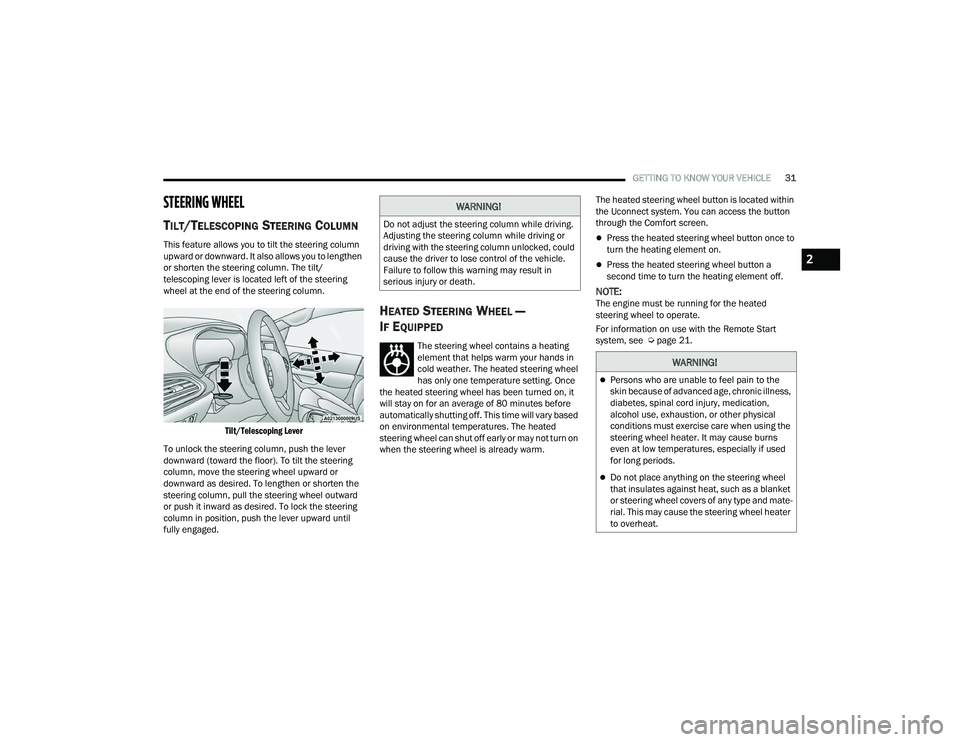
wheel at the end of the steering column.
Tilt/Telescoping Lever
To unlock the steering column, push the lever
downward (toward the floor). To tilt the steering
column, move the steering wheel upward or
downward as desired. To lengthen or shorten the
steering column, pull the steering wheel outward
or push it inward as desired. To lock the steering
column in position, push the lever upward until
fully engaged.
HEATED STEERING WHEEL —
I
F EQUIPPED
The steering wheel contains a heating
element that helps warm your hands in
cold weather. The heated steering wheel
has only one temperature setting. Once
the heated steering wheel has been turned on, it
will stay on for an average of 80 minutes before
automatically shutting off. This time will vary based
on environmental temperatures. The heated
steering wheel can shut off early or may not turn on
when the steering wheel is already warm. The heated steering wheel button is located within
the Uconnect system. You can access the button
through the Comfort screen.
Press the heated steering wheel button once to
turn the heating element on.
Press the heated steering wheel button a
second time to turn the heating element off.
NOTE:The engine must be running for the heated
steering wheel to operate.
For information on use with the Remote Start
system, see Ú
page 21.
WARNING!
Do not adjust the steering column while driving.
Adjusting the steering column while driving or
driving with the steering column unlocked, could
cause the driver to lose control of the vehicle.
Failure to follow this warning may result in
serious injury or death.
WARNING!
Persons who are unable to feel pain to the
skin because of advanced age, chronic illness,
diabetes, spinal cord injury, medication,
alcohol use, exhaustion, or other physical
conditions must exercise care when using the
steering wheel heater. It may cause burns
even at low temperatures, especially if used
for long periods.
Do not place anything on the steering wheel
that insulates against heat, such as a blanket
or steering wheel covers of any type and mate -
rial. This may cause the steering wheel heater
to overheat.
2
22_RUP_OM_EN_USC_t.book Page 31
Page 35 of 384
GETTING TO KNOW YOUR VEHICLE33
4. Push and release button (1) or (2) accordingly. “Memory Profile Set” (1 or 2) will display in the
instrument cluster.
5. Push and release the lock button on the key fob within 10 seconds.
NOTE:Your key fob can be unlinked from your memory
settings by pushing the set (S) button, and then,
within 10 seconds, pushing the unlock button on
the key fob.
MEMORY POSITION RECALL
NOTE:
The vehicle speed must be less than or equal to
5 mph (8 km/h) to recall memory positions. If a
recall is attempted when the vehicle speed is
greater than 5 mph (8 km/h), a message will be
displayed in the instrument cluster display.
Memory settings can be linked to driver profiles
in the Uconnect system. Changing driver profiles
will also recall the linked memory settings if the
conditions are met Ú page 188.
To recall the memory settings for driver one or
two, push the desired memory button (1 or 2) on
the driver's door or the unlock button on the key
fob linked to the desired memory position. A recall can be canceled by pushing any of the
memory buttons on the driver's door during a recall
(S, 1, or 2). When a recall is canceled, the driver's
seat stops moving. A delay of one second will occur
before another recall can be selected.
NOTE:Pushing the mirror adjust switch will cancel the
memory mirror recall.
SEATS
Seats are a part of the Occupant Restraint system
of the vehicle.
MANUAL ADJUSTMENT (FRONT SEATS) —
I
F EQUIPPED
WARNING!
It is dangerous to ride in a cargo area, inside
or outside of a vehicle. In a collision, people
riding in these areas are more likely to be seri -
ously injured or killed.
Do not allow people to ride in any area of your
vehicle that is not equipped with seats and
seat belts. In a collision, people riding in these
areas are more likely to be seriously injured or
killed.
Be sure everyone in your vehicle is in a seat
and using a seat belt properly.
WARNING!
Adjusting a seat while the vehicle is moving is
dangerous. The sudden movement of the seat
could cause you to lose control. The seat belt
might not be adjusted properly and you could
be injured. Adjust the seat only while the
vehicle is parked.
Do not ride with the seatback reclined so that
the shoulder belt is no longer resting against
your chest. In a collision you could slide under
the seat belt and be seriously or even fatally
injured. Use the recliner only when the vehicle
is parked.
2
22_RUP_OM_EN_USC_t.book Page 33
Page 39 of 384
GETTING TO KNOW YOUR VEHICLE37
NOTE:
Due to the weight of the bench seat, it is recom -
mended that two people are utilized for its
removal.
When storing the removed bench seat, it is
important to keep the seatback in the folded
position.
Reinstalling The Bench Seat
1. To reinstall the bench seat, align the seats front attachments into the detent positions
on the floor.
2. Tilt seat rearward to lock the seatback into its original position.
NOTE:Push downward to ensure the rear latches are in
the locked position.
3. Lift the recline handle and return the seatback to the seating position.
Second Row Removable 8th Seat —
If Equipped
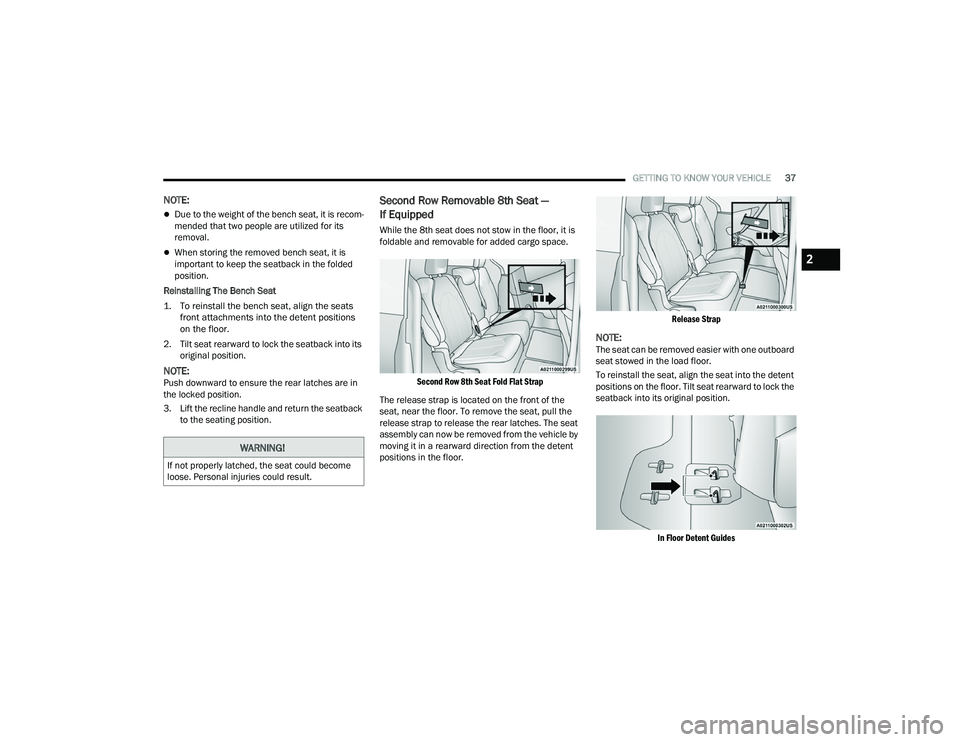
While the 8th seat does not stow in the floor, it is
foldable and removable for added cargo space.
Second Row 8th Seat Fold Flat Strap
The release strap is located on the front of the
seat, near the floor. To remove the seat, pull the
release strap to release the rear latches. The seat
assembly can now be removed from the vehicle by
moving it in a rearward direction from the detent
positions in the floor.
Release Strap
NOTE:The seat can be removed easier with one outboard
seat stowed in the load floor.
To reinstall the seat, align the seat into the detent
positions on the floor. Tilt seat rearward to lock the
seatback into its original position.
In Floor Detent Guides
WARNING!
If not properly latched, the seat could become
loose. Personal injuries could result.
2
22_RUP_OM_EN_USC_t.book Page 37
Page 40 of 384
38GETTING TO KNOW YOUR VEHICLE
Fold-Flat — Quad Seats
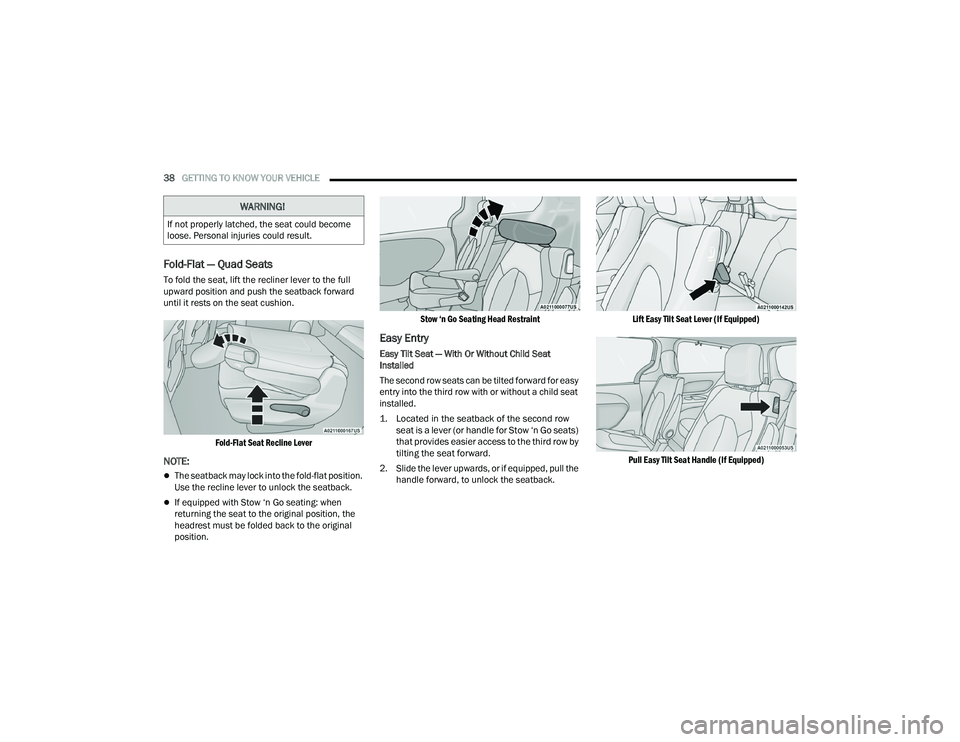
To fold the seat, lift the recliner lever to the full
upward position and push the seatback forward
until it rests on the seat cushion.
Fold-Flat Seat Recline Lever
NOTE:
The seatback may lock into the fold-flat position.
Use the recline lever to unlock the seatback.
If equipped with Stow ‘n Go seating: when
returning the seat to the original position, the
headrest must be folded back to the original
position.
Stow ‘n Go Seating Head Restraint
Easy Entry
Easy Tilt Seat — With Or Without Child Seat
Installed
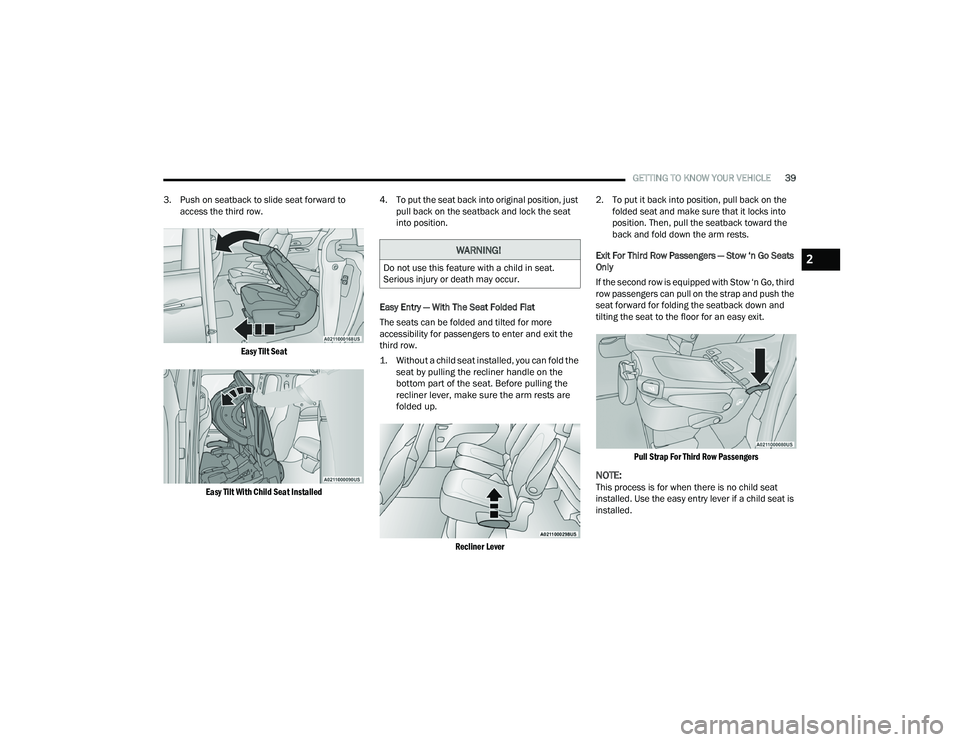
The second row seats can be tilted forward for easy
entry into the third row with or without a child seat
installed.
1. Located in the seatback of the second row
seat is a lever (or handle for Stow ‘n Go seats)
that provides easier access to the third row by
tilting the seat forward.
2. Slide the lever upwards, or if equipped, pull the handle forward, to unlock the seatback.
Lift Easy Tilt Seat Lever (If Equipped)
Pull Easy Tilt Seat Handle (If Equipped)
WARNING!
If not properly latched, the seat could become
loose. Personal injuries could result.
22_RUP_OM_EN_USC_t.book Page 38
Page 41 of 384
GETTING TO KNOW YOUR VEHICLE39
3. Push on seatback to slide seat forward to access the third row.
Easy Tilt Seat
Easy Tilt With Child Seat Installed
4. To put the seat back into original position, just
pull back on the seatback and lock the seat
into position.
Easy Entry — With The Seat Folded Flat
The seats can be folded and tilted for more
accessibility for passengers to enter and exit the
third row.
1. Without a child seat installed, you can fold the seat by pulling the recliner handle on the
bottom part of the seat. Before pulling the
recliner lever, make sure the arm rests are
folded up.
Recliner Lever
2. To put it back into position, pull back on the
folded seat and make sure that it locks into
position. Then, pull the seatback toward the
back and fold down the arm rests.
Exit For Third Row Passengers — Stow ‘n Go Seats
Only
If the second row is equipped with Stow ‘n Go, third
row passengers can pull on the strap and push the
seat forward for folding the seatback down and
tilting the seat to the floor for an easy exit.
Pull Strap For Third Row Passengers
NOTE:This process is for when there is no child seat
installed. Use the easy entry lever if a child seat is
installed.
WARNING!
Do not use this feature with a child in seat.
Serious injury or death may occur.2
22_RUP_OM_EN_USC_t.book Page 39
Page 42 of 384
40GETTING TO KNOW YOUR VEHICLE
Second Row Removable Quad Seat
The second row quad seats, not equipped with the
Stow ‘n Go feature, are removable for added cargo
space.
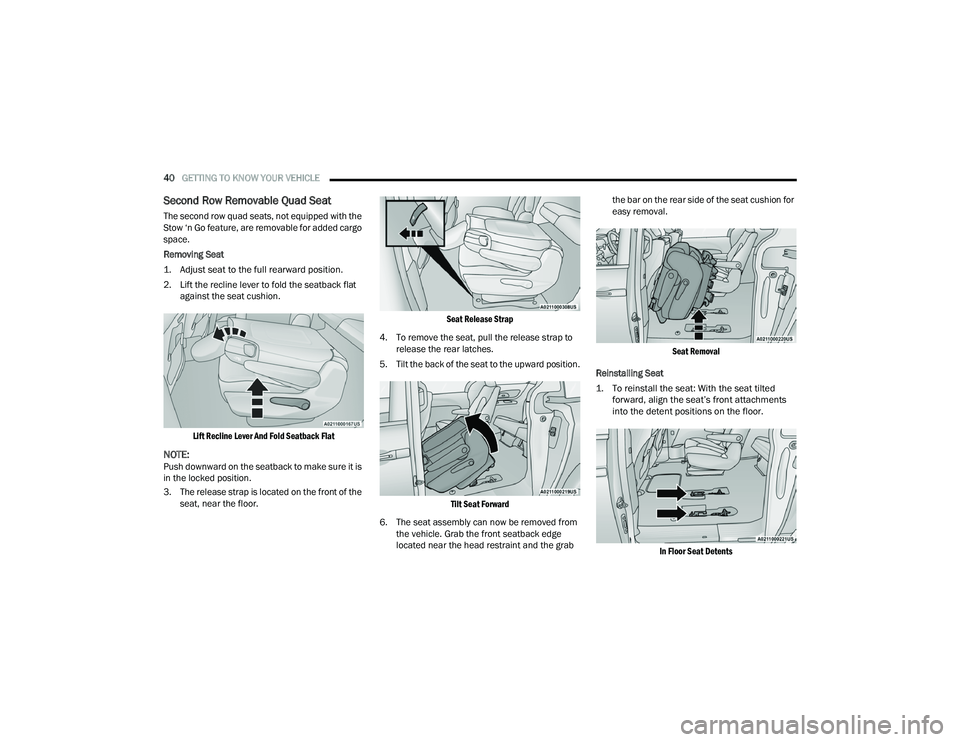
Removing Seat
1. Adjust seat to the full rearward position.
2. Lift the recline lever to fold the seatback flat
against the seat cushion.
Lift Recline Lever And Fold Seatback Flat
NOTE:Push downward on the seatback to make sure it is
in the locked position.
3. The release strap is located on the front of the seat, near the floor.
Seat Release Strap
4. To remove the seat, pull the release strap to release the rear latches.
5. Tilt the back of the seat to the upward position.
Tilt Seat Forward
6. The seat assembly can now be removed from the vehicle. Grab the front seatback edge
located near the head restraint and the grab the bar on the rear side of the seat cushion for
easy removal.
Seat Removal
Reinstalling Seat
1. To reinstall the seat: With the seat tilted forward, align the seat’s front attachments
into the detent positions on the floor.
In Floor Seat Detents
22_RUP_OM_EN_USC_t.book Page 40
Page 43 of 384
GETTING TO KNOW YOUR VEHICLE41
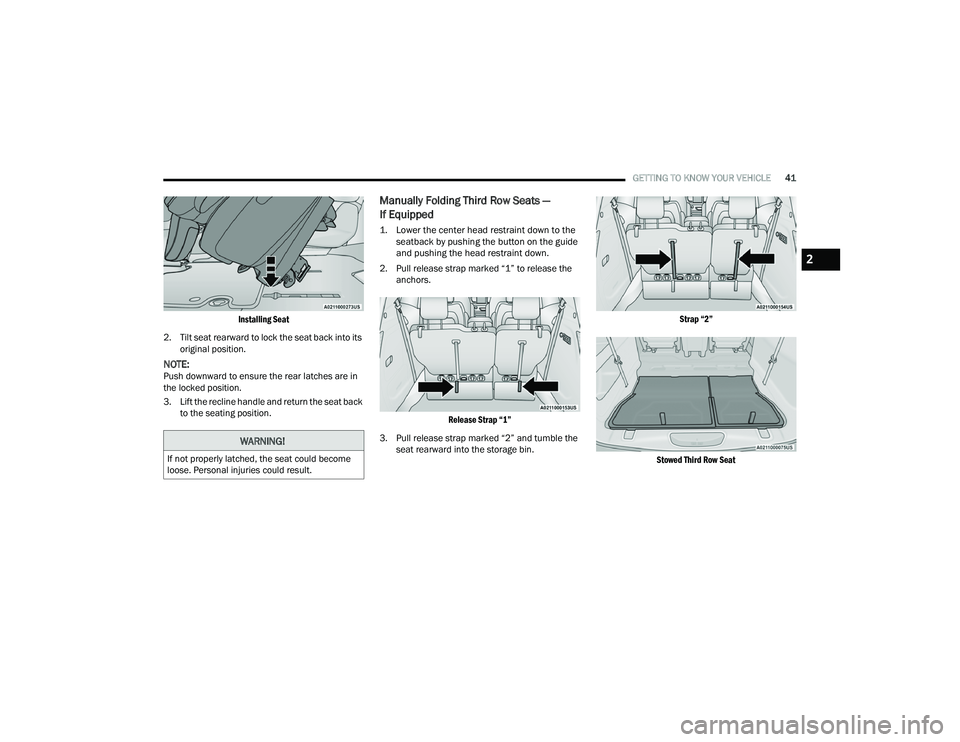
Installing Seat
2. Tilt seat rearward to lock the seat back into its original position.
NOTE:Push downward to ensure the rear latches are in
the locked position.
3. Lift the recline handle and return the seat back to the seating position.
Manually Folding Third Row Seats —
If Equipped
1. Lower the center head restraint down to the seatback by pushing the button on the guide
and pushing the head restraint down.
2. Pull release strap marked “1” to release the anchors.
Release Strap “1”
3. Pull release strap marked “2” and tumble the seat rearward into the storage bin.
Strap “2”
Stowed Third Row Seat
WARNING!
If not properly latched, the seat could become
loose. Personal injuries could result.
2
22_RUP_OM_EN_USC_t.book Page 41
Page 45 of 384
GETTING TO KNOW YOUR VEHICLE43
Using the Auto Advance ‘n Return Feature
NOTE:
The button is only functional when the power
sliding door is open and the vehicle is in PARK.
If the door is not open or the vehicle is not in
PARK when the button is pushed, the front seat
will not move and a message will be displayed in
the instrument cluster display.
If the power sliding door is closing when the
button is pushed, the front seat will not move
and a message will be displayed in the instru -
ment cluster display.
The Auto Advance ‘n Return feature will not
function if the front doors are open.
1. Push and release the Auto Advance ‘n Return button.
2. Perform the second row Stow ‘n Go seat movement Ú page 43.
3. Push and release the Auto Advance ‘n Return button a second time. The front seat cushion
and seatback will return to the original starting
location.
NOTE:
To abort seat operation while seat is in motion,
push the Auto Advance ‘n Return button, or
push the front power seat button to stop the seat movement. Pushing the Auto Advance ‘n
Return button again will return the front seat to
the original starting location.
The Auto Advance ‘n Return system includes
obstacle detection. When the system detects an
obstacle, the seat will stop, reverse direction,
and return to the previous location. A message
will be displayed in the instrument cluster indi
-
cating that an obstacle has been detected.
If the front seat is already in a location that will
allow space for Stow ‘n Go of the second row
seat, the front seat will not move and a message
will be displayed in the instrument cluster.
If calibration of the front seat is lost, the seat will
automatically recalibrate when the Auto
Advance ‘n Return button is pushed. This may
result in the seat cushion moving forward and
downward, before moving to the location that
will allow space for the second row Stow ‘n Go
seat movement.
SECOND ROW STOW 'N GO
For Manual Seats: To stow the seat in the floor, move
the front seat all the way forward using the manual
seat adjustment bar. Move the seatback all the way
forward using the recliner handle located on the
outboard side of the cushion. Move the seat height to
at least mid position using the height adjuster handle
in the outboard side of the cushion.
For Power Seats:
Push the Auto Advance ‘n Return
button located on the B-pillar trim (if equipped)
Ú page 42.
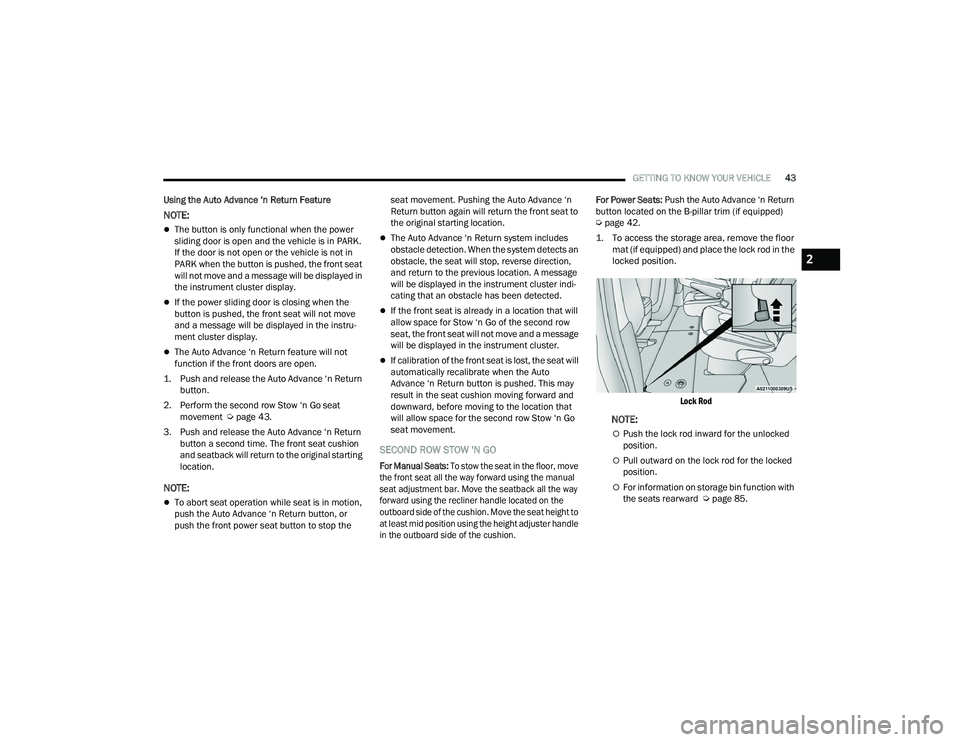
1. To access the storage area, remove the floor mat (if equipped) and place the lock rod in the
locked position.
Lock Rod
NOTE:
Push the lock rod inward for the unlocked
position.
Pull outward on the lock rod for the locked
position.
For information on storage bin function with
the seats rearward Ú page 85.
2
22_RUP_OM_EN_USC_t.book Page 43
Page 46 of 384
44GETTING TO KNOW YOUR VEHICLE
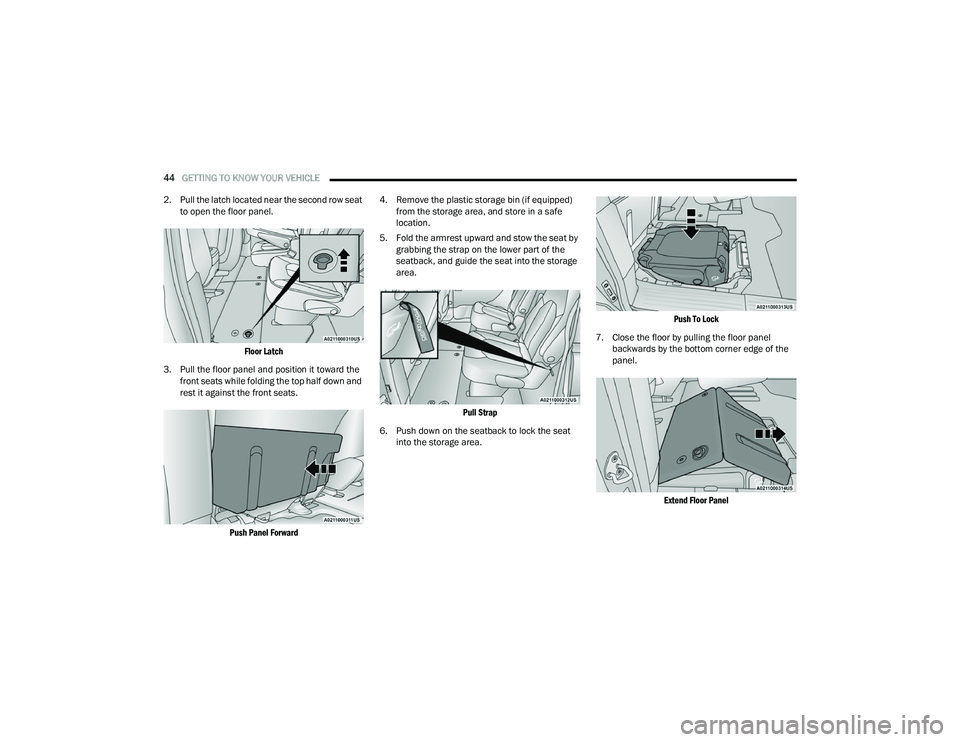
2. Pull the latch located near the second row seat to open the floor panel.
Floor Latch
3. Pull the floor panel and position it toward the front seats while folding the top half down and
rest it against the front seats.
Push Panel Forward
4. Remove the plastic storage bin (if equipped)
from the storage area, and store in a safe
location.
5. Fold the armrest upward and stow the seat by grabbing the strap on the lower part of the
seatback, and guide the seat into the storage
area.
Pull Strap
6. Push down on the seatback to lock the seat into the storage area.
Push To Lock
7. Close the floor by pulling the floor panel backwards by the bottom corner edge of the
panel.
Extend Floor Panel
22_RUP_OM_EN_USC_t.book Page 44
Page 47 of 384
GETTING TO KNOW YOUR VEHICLE45
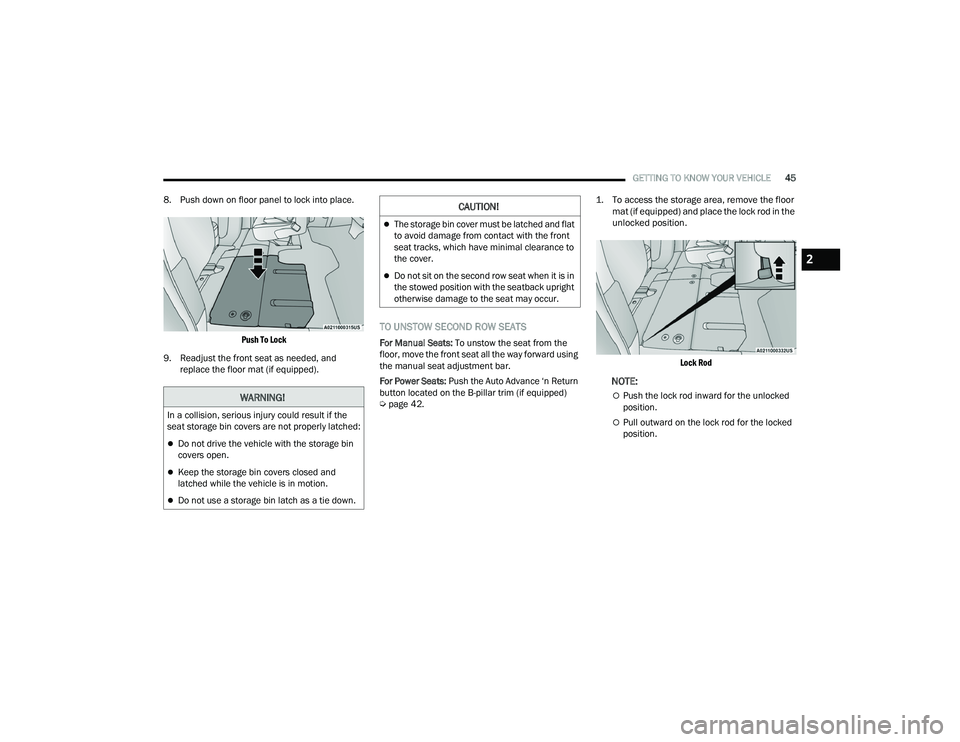
8. Push down on floor panel to lock into place.
Push To Lock
9. Readjust the front seat as needed, and replace the floor mat (if equipped).
TO UNSTOW SECOND ROW SEATS
For Manual Seats: To unstow the seat from the
floor, move the front seat all the way forward using
the manual seat adjustment bar.
For Power Seats: Push the Auto Advance ‘n Return
button located on the B-pillar trim (if equipped)
Ú page 42.
1. To access the storage area, remove the floor
mat (if equipped) and place the lock rod in the
unlocked position.
Lock Rod
NOTE:
Push the lock rod inward for the unlocked
position.
Pull outward on the lock rod for the locked
position.
WARNING!
In a collision, serious injury could result if the
seat storage bin covers are not properly latched:
Do not drive the vehicle with the storage bin
covers open.
Keep the storage bin covers closed and
latched while the vehicle is in motion.
Do not use a storage bin latch as a tie down.
CAUTION!
The storage bin cover must be latched and flat
to avoid damage from contact with the front
seat tracks, which have minimal clearance to
the cover.
Do not sit on the second row seat when it is in
the stowed position with the seatback upright
otherwise damage to the seat may occur.
2
22_RUP_OM_EN_USC_t.book Page 45