phone CHRYSLER PACIFICA 2023 User Guide
[x] Cancel search | Manufacturer: CHRYSLER, Model Year: 2023, Model line: PACIFICA, Model: CHRYSLER PACIFICA 2023Pages: 328, PDF Size: 16.37 MB
Page 80 of 328
78GETTING TO KNOW YOUR VEHICLE
LED Indicator Status:
No Light: Charging pad is idle or searching for a device.
Blue Light: Device is detected and is charging.
Red Light/Flashing: Internal error or foreign object is
detected.
Important Notes Regarding This Vehicle’s Wireless
Charging Pad:
The wireless charging pad will not work if any of the
four doors or the liftgate are open, even if the engine is
running.
Wireless charging is not as fast as when the phone is
connected to a wired charger.
The phone’s protective case must be removed when
placed on the wireless charging pad.
iPhone® 12 (including iPod®) is equipped with soft -
ware to protect the device from overheating. When the
software is active, the rate of charge is slowed down to
protect the device.
Phones must always be placed on the wireless
charging pad within the outline shown on the pad so
that its charging parts connect with the charging coils
of the system. Movement of the phone during charging
may prevent or slow the rate of charge.
Having multiple applications open on the phone while
charging will reduce the charging efficiency, and may
even shut down an application that is actively running
(i.e. Apple CarPlay®). This may also cause the phone to
overheat.
Wireless chargers may implement certain methods to
prevent the phone from overheating during charging
such as slowing down the rate of charge. In certain instances, the device may shut down for a brief period
of time (when the device reaches a certain tempera
-
ture). If this happens, it does not mean there is a fault
with the wireless charing pad. This may just be a
protective measure to prevent damage to the phone.
WINDOWS
POWER WINDOWS
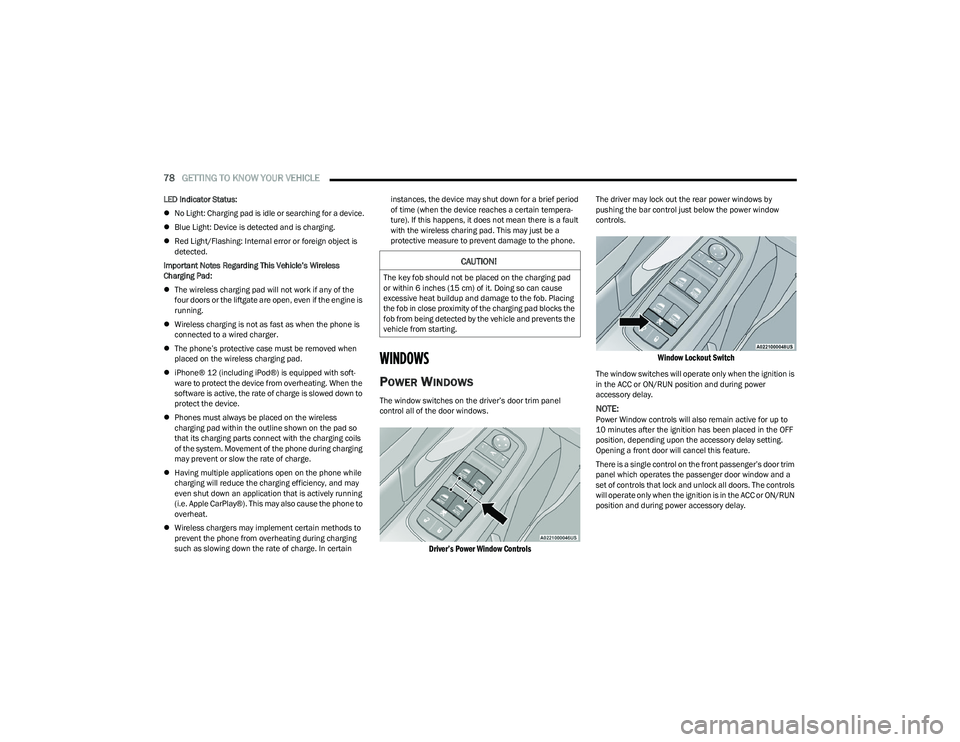
The window switches on the driver’s door trim panel
control all of the door windows.
Driver’s Power Window Controls
The driver may lock out the rear power windows by
pushing the bar control just below the power window
controls.
Window Lockout Switch
The window switches will operate only when the ignition is
in the ACC or ON/RUN position and during power
accessory delay.
NOTE:Power Window controls will also remain active for up to
10 minutes after the ignition has been placed in the OFF
position, depending upon the accessory delay setting.
Opening a front door will cancel this feature.
There is a single control on the front passenger’s door trim
panel which operates the passenger door window and a
set of controls that lock and unlock all doors. The controls
will operate only when the ignition is in the ACC or ON/RUN
position and during power accessory delay.
CAUTION!
The key fob should not be placed on the charging pad
or within 6 inches (15 cm) of it. Doing so can cause
excessive heat buildup and damage to the fob. Placing
the fob in close proximity of the charging pad blocks the
fob from being detected by the vehicle and prevents the
vehicle from starting.
23_RUP_OM_EN_USC_t.book Page 78
Page 103 of 328
GETTING TO KNOW YOUR INSTRUMENT PANEL101
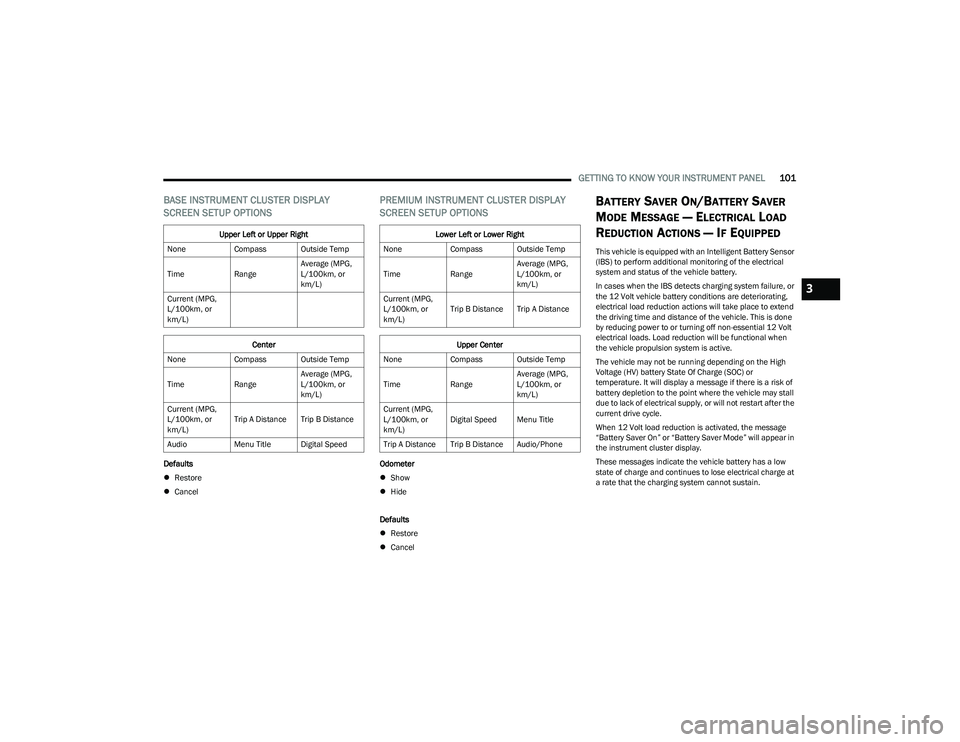
BASE INSTRUMENT CLUSTER DISPLAY
SCREEN SETUP OPTIONS
Defaults
Restore
Cancel
PREMIUM INSTRUMENT CLUSTER DISPLAY
SCREEN SETUP OPTIONS
Odometer
Show
Hide
Defaults
Restore
Cancel
BATTERY SAVER ON/BATTERY SAVER
M
ODE MESSAGE — ELECTRICAL LOAD
R
EDUCTION ACTIONS — IF EQUIPPED
This vehicle is equipped with an Intelligent Battery Sensor
(IBS) to perform additional monitoring of the electrical
system and status of the vehicle battery.
In cases when the IBS detects charging system failure, or
the 12 Volt vehicle battery conditions are deteriorating,
electrical load reduction actions will take place to extend
the driving time and distance of the vehicle. This is done
by reducing power to or turning off non-essential 12 Volt
electrical loads. Load reduction will be functional when
the vehicle propulsion system is active.
The vehicle may not be running depending on the High
Voltage (HV) battery State Of Charge (SOC) or
temperature. It will display a message if there is a risk of
battery depletion to the point where the vehicle may stall
due to lack of electrical supply, or will not restart after the
current drive cycle.
When 12 Volt load reduction is activated, the message
“Battery Saver On” or “Battery Saver Mode” will appear in
the instrument cluster display.
These messages indicate the vehicle battery has a low
state of charge and continues to lose electrical charge at
a rate that the charging system cannot sustain.
Upper Left or Upper Right
None Compass Outside Temp
Time RangeAverage (MPG,
L/100km, or
km/L)
Current (MPG,
L/100km, or
km/L)
Center
None Compass Outside Temp
Time RangeAverage (MPG,
L/100km, or
km/L)
Current (MPG,
L/100km, or
km/L) Trip A Distance Trip B Distance
Audio Menu Title Digital Speed
Lower Left or Lower Right
None Compass Outside Temp
Time RangeAverage (MPG,
L/100km, or
km/L)
Current (MPG,
L/100km, or
km/L) Trip B Distance Trip A Distance
Upper Center
None Compass Outside Temp
Time RangeAverage (MPG,
L/100km, or
km/L)
Current (MPG,
L/100km, or
km/L) Digital Speed Menu Title
Trip A Distance Trip B Distance Audio/Phone
3
23_RUP_OM_EN_USC_t.book Page 101
Page 123 of 328
STARTING AND OPERATING121
ACTIVE NOISE CANCELLATION
Your vehicle is equipped with an Active Noise Cancellation
system. This system is designed to address exhaust and
engine noise. The system relies on four microphones
embedded in the headliner, which monitor exhaust and
engine noise, and assists an onboard frequency
generator, which creates counteracting sound waves in
the audio system’s speakers. This helps keep the vehicle
quiet at idle and during drive.
POWER STEERING
The electric power steering system will provide increased
vehicle response and ease of maneuverability. The power
steering system adapts to different driving conditions. If the Steering icon is displayed and the “Power Steering
System Over Temp” message is displayed on the
instrument cluster screen, this indicates an over
temperature condition in the power steering system. Once
driving conditions are safe, pull over and let the vehicle
idle for a few moments until the icon and message turn off
Úpage 102.
If the “Service Power Steering" or "Power
Steering Assist Off - Service System” message
and a steering wheel icon are displayed on the
instrument cluster screen, it indicates that the
vehicle needs to be taken to an authorized dealer for
service. It is likely the vehicle has lost power steering
assistance
Úpage 102.
NOTE:
Even if the power steering assistance is no longer oper -
ational, it is still possible to steer the vehicle. Under
these conditions there will be a substantial increase in
steering effort, especially at low speeds and during
parking maneuvers.
The power steering system is fully electric; it requires
no power steering fluid.
If the condition persists, see an authorized dealer for
service.
STOP/START SYSTEM — IF EQUIPPED
The Stop/Start function is designed to reduce fuel
consumption. The system will stop the engine
automatically during a vehicle stop if the required
conditions are met. Releasing the brake pedal, pressing
the accelerator pedal or shifting out of DRIVE (D) will
automatically re-start the engine.
This vehicle has been upgraded with a heavy-duty starter,
enhanced battery, and other upgraded engine parts to
handle the additional engine starts.
AUTOSTOP MODE
The Stop/Start feature is enabled after every driver key
start. At that time, the system will go into STOP/START
READY and if all other conditions are met, can go into a
STOP/START AUTOSTOP ACTIVE.
To Activate Auto STOP/START, The Following Must Occur:
The system must be in STOP/START READY state. A
STOP/START READY message will be displayed in the
instrument cluster within the Stop/Start section
Úpage 102.
The vehicle must be completely stopped.
The gear selector must be in a forward gear and the
brake pedal pressed.
The engine will shut down, the tachometer will move to the
zero position and the Stop/Start telltale will illuminate
indicating you are in Autostop. Customer settings will be
maintained throughout the Auto Stop/Start process.
CAUTION!
All wheels must have the same size and type tires.
Unequal tire sizes must not be used. Unequal tire size
may cause premature wear of the driveline
components.
WARNING!
Continued operation with reduced assist could pose a
safety risk to yourself and others. Service should be
obtained as soon as possible.
4
23_RUP_OM_EN_USC_t.book Page 121
Page 163 of 328
MULTIMEDIA161
Theme Mode This setting will allow you to adjust the brightness of your theme. Setting options are
“Light”, “Dark” and “Auto”. Select to show themes in Light or Dark mode. “Auto” changes
the theme with the headlights.
Units This setting changes the “Speed” (MPH or km/h), “Distance” (mi or km), “Fuel
Consumption” (MPG [US], MPG [UK], L/100 km, or km/L), “Pressure” (psi, kPa, or bar),
“Temperature” (°C or °F), and “Current Consumption” (MPG [US], MPG [UK], L/100 km,
or km/L) units of measurement independently.
Touchscreen Beep This setting will allow you to turn the touchscreen beep on or off.
Show Main Category Bar Labels This setting will allow the main category bar labels to be shown on or off.
Navigation Next Turn Displayed in Cluster This setting will display navigation prompts in the Instrument Cluster Display.
Phone Pop-Ups Displayed In Cluster This setting will display smartphone notifications and messages in the Instrument Cluster
Display.
System Text Size This setting will allow you to change the text on the radio to “Standard”, “Large”, and
“Taller”.
Time Format This setting will allow you to set the time format (AM/PM). Sync Time With GPS must be
“Off” for this setting to be available. The “12 hrs” setting will set the time to a 12-hour
format. The “24 hrs” setting will set the time to a 24-hour format.
Voice Options This setting will allow you to change the voice options for the radio to “Male” or “Female”.
Wake Up Word This setting will allow you to turn the voice recognition “Wake Up” word on or off.
Voice Barge-in This setting will allow you to turn the voice recognition barge-in feature on or off.
Show Command List This setting will allow the Command List to be shown on or off.
Key Off Power Delay This setting will keep certain electrical features running after the engine is turned off.
When any door is opened, the electronics will deactivate. The available settings are “0
sec”, “45 sec”, “5 min”, and “10 min”.
Radio Off With Door This setting will turn the radio off when the driver or passenger door is opened. The
available settings are “On” and “Off”.
App Drawer Favoriting Popups This setting will allow you to favorite app drawer pop-ups with “On” and “Off” options.
Setting NameDescription
5
23_RUP_OM_EN_USC_t.book Page 161
Page 165 of 328
MULTIMEDIA163
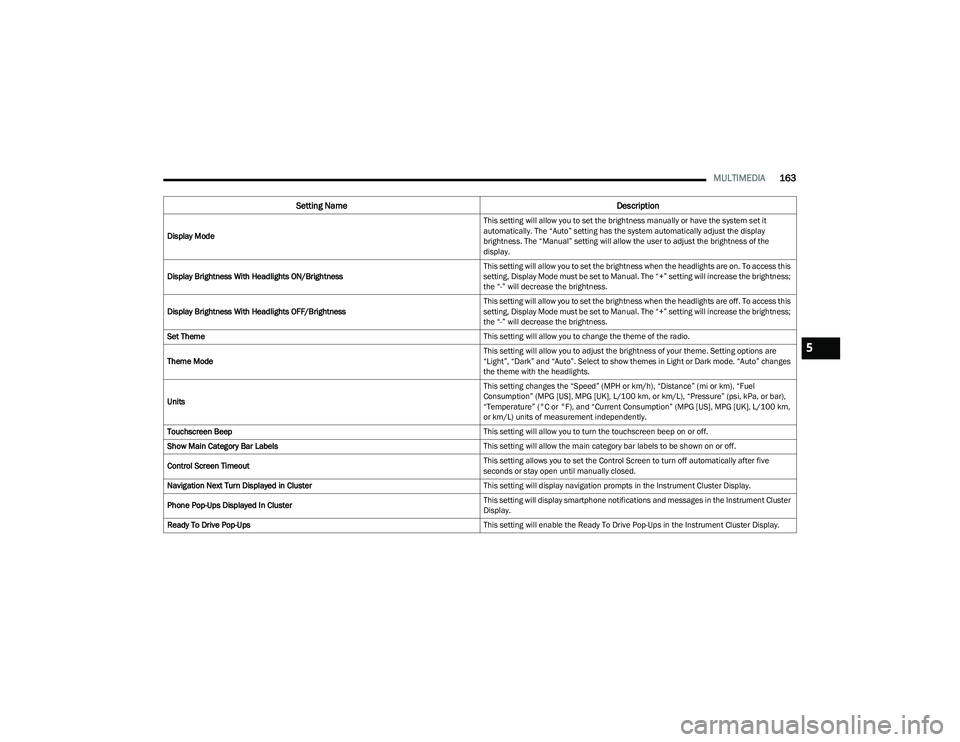
Display Mode This setting will allow you to set the brightness manually or have the system set it
automatically. The “Auto” setting has the system automatically adjust the display
brightness. The “Manual” setting will allow the user to adjust the brightness of the
display.
Display Brightness With Headlights ON/Brightness This setting will allow you to set the brightness when the headlights are on. To access this
setting, Display Mode must be set to Manual. The “+” setting will increase the brightness;
the “-” will decrease the brightness.
Display Brightness With Headlights OFF/Brightness This setting will allow you to set the brightness when the headlights are off. To access this
setting, Display Mode must be set to Manual. The “+” setting will increase the brightness;
the “-” will decrease the brightness.
Set Theme This setting will allow you to change the theme of the radio.
Theme Mode This setting will allow you to adjust the brightness of your theme. Setting options are
“Light”, “Dark” and “Auto”. Select to show themes in Light or Dark mode. “Auto” changes
the theme with the headlights.
Units This setting changes the “Speed” (MPH or km/h), “Distance” (mi or km), “Fuel
Consumption” (MPG [US], MPG [UK], L/100 km, or km/L), “Pressure” (psi, kPa, or bar),
“Temperature” (°C or °F), and “Current Consumption” (MPG [US], MPG [UK], L/100 km,
or km/L) units of measurement independently.
Touchscreen Beep This setting will allow you to turn the touchscreen beep on or off.
Show Main Category Bar Labels This setting will allow the main category bar labels to be shown on or off.
Control Screen Timeout This setting allows you to set the Control Screen to turn off automatically after five
seconds or stay open until manually closed.
Navigation Next Turn Displayed in Cluster This setting will display navigation prompts in the Instrument Cluster Display.
Phone Pop-Ups Displayed In Cluster This setting will display smartphone notifications and messages in the Instrument Cluster
Display.
Ready To Drive Pop-Ups This setting will enable the Ready To Drive Pop-Ups in the Instrument Cluster Display.
Setting NameDescription
5
23_RUP_OM_EN_USC_t.book Page 163
Page 168 of 328
166MULTIMEDIA
Phone/Bluetooth®
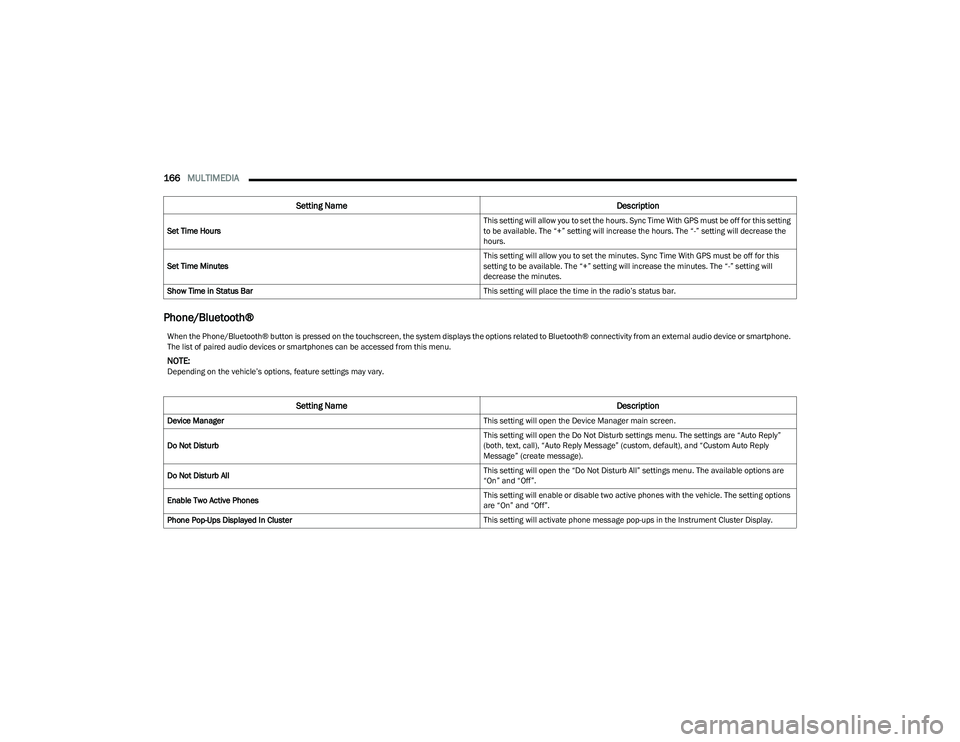
Set Time Hours This setting will allow you to set the hours. Sync Time With GPS must be off for this setting
to be available. The “+” setting will increase the hours. The “-” setting will decrease the
hours.
Set Time Minutes This setting will allow you to set the minutes. Sync Time With GPS must be off for this
setting to be available. The “+” setting will increase the minutes. The “-” setting will
decrease the minutes.
Show Time in Status Bar This setting will place the time in the radio’s status bar.
Setting NameDescription
When the Phone/Bluetooth® button is pressed on the touchscreen, the system displays the options related to Bluetooth® connectivity from an external audio device or smartphone.
The list of paired audio devices or smartphones can be accessed from this menu.
NOTE:Depending on the vehicle’s options, feature settings may vary.
Setting NameDescription
Device Manager This setting will open the Device Manager main screen.
Do Not Disturb This setting will open the Do Not Disturb settings menu. The settings are “Auto Reply”
(both, text, call), “Auto Reply Message” (custom, default), and “Custom Auto Reply
Message” (create message).
Do Not Disturb All This setting will open the “Do Not Disturb All” settings menu. The available options are
“On” and “Off”.
Enable Two Active Phones This setting will enable or disable two active phones with the vehicle. The setting options
are “On” and “Off”.
Phone Pop-Ups Displayed In Cluster This setting will activate phone message pop-ups in the Instrument Cluster Display.
23_RUP_OM_EN_USC_t.book Page 166
Page 175 of 328
MULTIMEDIA173
Audio
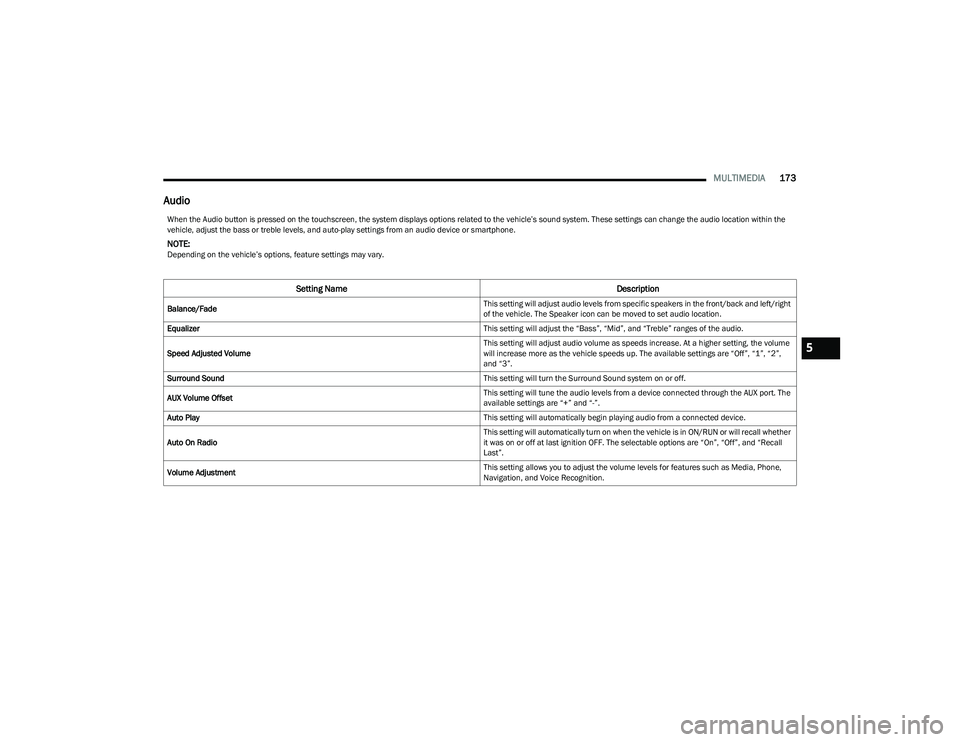
When the Audio button is pressed on the touchscreen, the system displays options related to the vehicle’s sound system. These settings can change the audio location within the
vehicle, adjust the bass or treble levels, and auto-play settings from an audio device or smartphone.
NOTE:Depending on the vehicle’s options, feature settings may vary.
Setting Name Description
Balance/Fade This setting will adjust audio levels from specific speakers in the front/back and left/right
of the vehicle. The Speaker icon can be moved to set audio location.
Equalizer This setting will adjust the “Bass”, “Mid”, and “Treble” ranges of the audio.
Speed Adjusted Volume This setting will adjust audio volume as speeds increase. At a higher setting, the volume
will increase more as the vehicle speeds up. The available settings are “Off”, “1”, “2”,
and “3”.
Surround Sound This setting will turn the Surround Sound system on or off.
AUX Volume Offset This setting will tune the audio levels from a device connected through the AUX port. The
available settings are “+” and “-”.
Auto Play This setting will automatically begin playing audio from a connected device.
Auto On Radio This setting will automatically turn on when the vehicle is in ON/RUN or will recall whether
it was on or off at last ignition OFF. The selectable options are “On”, “Off”, and “Recall
Last”.
Volume Adjustment This setting allows you to adjust the volume levels for features such as Media, Phone,
Navigation, and Voice Recognition.
5
23_RUP_OM_EN_USC_t.book Page 173
Page 176 of 328
174MULTIMEDIA
Notifications
SiriusXM® Setup
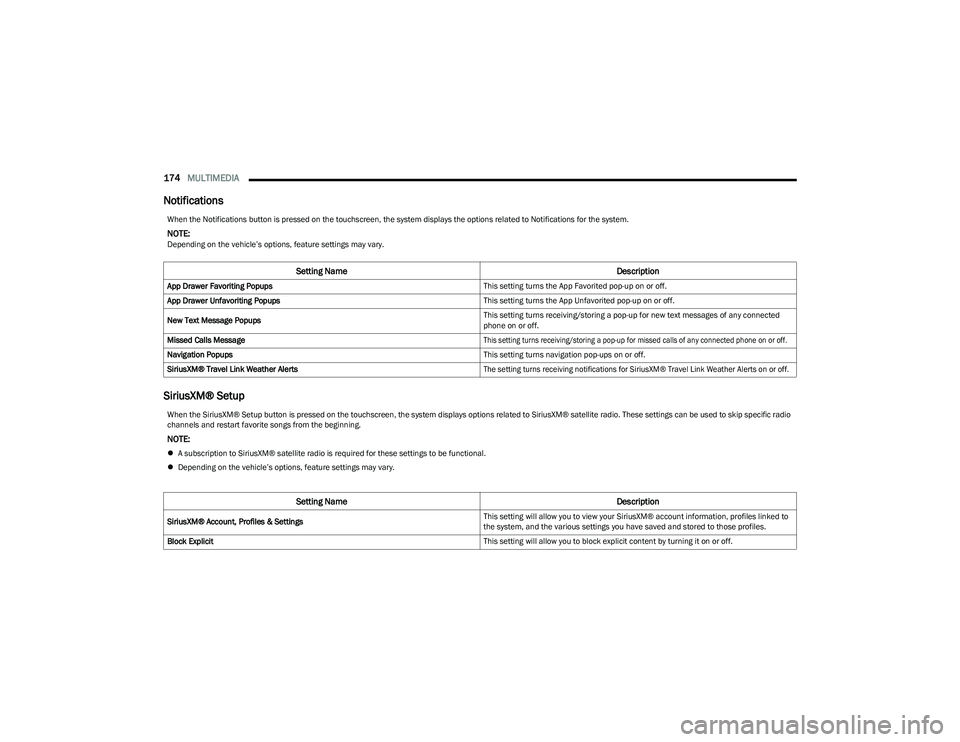
When the Notifications button is pressed on the touchscreen, the system displays the options related to Notifications for the system.
NOTE:Depending on the vehicle’s options, feature settings may vary.
Setting Name Description
App Drawer Favoriting Popups This setting turns the App Favorited pop-up on or off.
App Drawer Unfavoriting Popups This setting turns the App Unfavorited pop-up on or off.
New Text Message Popups This setting turns receiving/storing a pop-up for new text messages of any connected
phone on or off.
Missed Calls Message
This setting turns receiving/storing a pop-up for missed calls of any connected phone on or off.
Navigation Popups This setting turns navigation pop-ups on or off.
SiriusXM® Travel Link Weather Alerts
The setting turns receiving notifications for SiriusXM® Travel Link Weather Alerts on or off.
When the SiriusXM® Setup button is pressed on the touchscreen, the system displays options related to SiriusXM® satellite radio. These settings can be used to skip specific radio
channels and restart favorite songs from the beginning.
NOTE:
A subscription to SiriusXM® satellite radio is required for these settings to be functional.
Depending on the vehicle’s options, feature settings may vary.
Setting Name Description
SiriusXM® Account, Profiles & Settings This setting will allow you to view your SiriusXM® account information, profiles linked to
the system, and the various settings you have saved and stored to those profiles.
Block Explicit This setting will allow you to block explicit content by turning it on or off.
23_RUP_OM_EN_USC_t.book Page 174
Page 179 of 328
MULTIMEDIA177
REAR SEAT ENTERTAINMENT (RSE) WITH
AMAZON FIRE TV BUILT-IN — IF EQUIPPED
OVERVIEW
Rear Seat Entertainment with Fire TV built-in is designed
to give your family years of enjoyment.
Fire TV lets passengers enjoy a wide variety of content
from popular apps (subscriptions may be required).
Stream videos, play games, listen to music, get
information, and watch downloaded programs all while on
the road. Two Voice Remotes with Alexa are included with
the system. Press the Microphone button on the Voice
Remote with Alexa to easily find, launch, and control
content. Check sports scores, play music, control smart
home devices, or see your live camera feeds (compatible
smart home device required and sold separately). In
addition to streaming and downloaded content, changing
the input in Fire TV also enables you to:
Play your favorite CDs, DVDs, or Blu-ray™ Discs.
Mirror what’s on your phone or tablet to Fire TV via
Miracast capable devices.
Plug and play a variety of standard video games or
devices into the HDMI port.
Listen to audio over wired or wireless headphones (not
included, customer will have to provide their own or
play audio through in-cabin speakers with Listen In
feature in front seat).
Plug and play a variety of devices into the front seat
Video USB port. USB ports located under the rear
screens are charge only.
Watch content individually on each rear display or
mirror across both displays to watch together.
NOTE:Vehicle must be in an active and usable cellular range and
properly equipped with a Uconnect 5 NAV system and
Rear Seat Entertainment with Fire TV package. Streaming
requires a Wi-Fi connection and registered Amazon
account to run Fire TV in the vehicle. Streaming service
subscriptions are not included. Services and features are
subject to change or withdrawal at any time, may not be
available in all areas and languages, and may require
separate subscriptions.
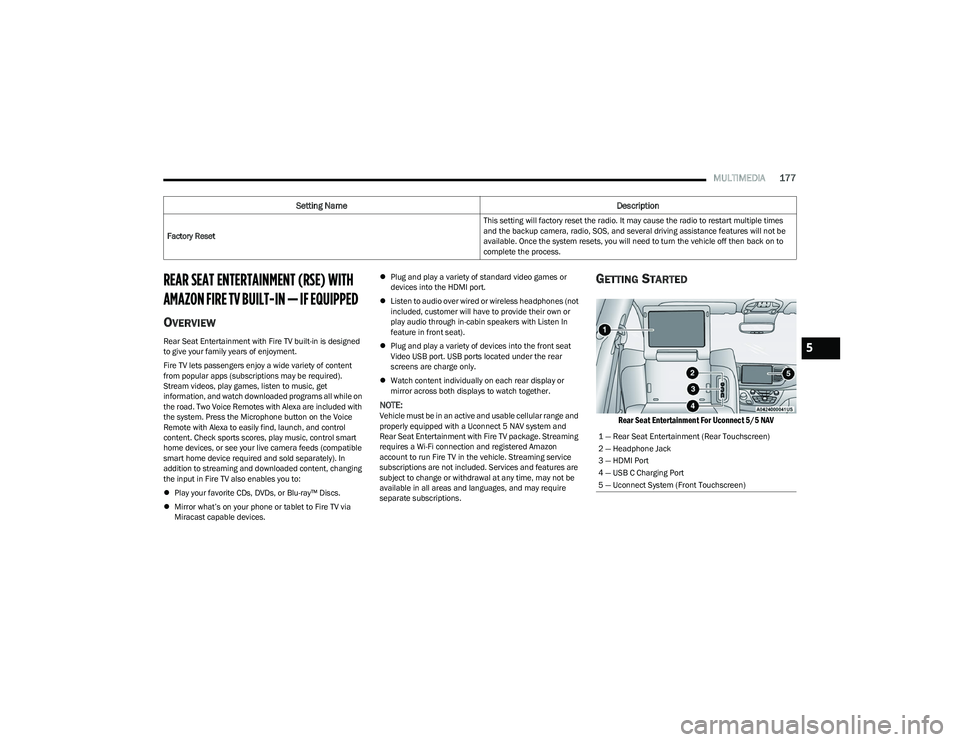
GETTING STARTED
Rear Seat Entertainment For Uconnect 5/5 NAV
Factory Reset This setting will factory reset the radio. It may cause the radio to restart multiple times
and the backup camera, radio, SOS, and several driving assistance features will not be
available. Once the system resets, you will need to turn the vehicle off then back on to
complete the process.
Setting Name
Description
1 — Rear Seat Entertainment (Rear Touchscreen)
2 — Headphone Jack
3 — HDMI Port
4 — USB C Charging Port
5 — Uconnect System (Front Touchscreen)
5
23_RUP_OM_EN_USC_t.book Page 177
Page 180 of 328
178MULTIMEDIA
There are three different ways to operate the features of
Rear Seat Entertainment with Fire TV built-in:
Voice Remote with Alexa
Front radio screen
Individual rear touchscreens for Rear Seat Entertain -
ment with Fire TV built-in touch on each rear screen
ACCESSING REAR SEAT
E
NTERTAINMENT WITH FIRE TV BUILT-IN
FROM THE FRONT RADIO SCREEN
You can access your Rear Seat Entertainment with Fire TV
built-in system by following these steps:
Option 1
1. Press the Media button.
2. Press the Rear Seat button icon.
Option 2
1. Press the Apps button on the bottom of the
touchscreen.
2. Press the Uconnect Theater button on the touchscreen. You may need to navigate to different
pages in the Apps drawer to find the Uconnect
Theater button.
ACCESSING REAR SEAT
E
NTERTAINMENT WITH FIRE TV BUILT-IN
FROM THE REAR SCREENS
You can access your Rear Seat Entertainment with Fire TV
built-in system from the rear screens by just flipping the
screens open. Flipping open the rear screens will
automatically turn the system on. Tapping either rear
screen will also turn on the system for that respective
screen.
NOTE:When using the rear screens, the system will launch with
Fire TV.
FIRST TIME STARTING UP (USING THE
R
EAR SCREENS)
Boot-up Screen
When turning on the system for the first time from the rear
screens, a boot-up screen will appear on the system
displaying the Fire TV logo.
During this boot-up sequence, language options will be
available for the system.
Voice Remote with Alexa Pairing
After the boot-up sequence is complete, the system will
then give the option to pair a Voice Remote with Alexa (two
are included with the system).
Follow the on-screen instructions for how to pair a Voice
Remote with Alexa to the system. Two Voice Remotes with
Alexa are included to be paired with each rear screen. A Voice Remote with Alexa can be paired to each rear
screen. It will function with the rear screen it was paired
with. The pairing steps will need to be done for each rear
screen.
NOTE:If the Voice Remote with Alexa pairing fails, on-screen
instructions will appear for trying to pair again.
Connecting to a Network
During the start-up process, the system will need to be
connected to a network to function. Multiple network
sources can be options for the system.
Some options for a network connection are:
Wi-Fi Hotspot using a capable smartphone (if activated,
it will show as a possible network for the system on the
screen).
Outside connection like a home Wi-Fi network.
In-vehicle Wi-Fi.
NOTE:When a network is connected to the system for the first
time, an over-the-air-software update will take place using
the Wi-Fi connection. It is recommended that an unlimited
Wi-Fi connection, if available, be used during this update.
After this first-time update, updates will only occur when
one is available.
23_RUP_OM_EN_USC_t.book Page 178