steering CHRYSLER PACIFICA HYBRID 2017 2.G Repair Manual
[x] Cancel search | Manufacturer: CHRYSLER, Model Year: 2017, Model line: PACIFICA HYBRID, Model: CHRYSLER PACIFICA HYBRID 2017 2.GPages: 592, PDF Size: 6.73 MB
Page 507 of 592
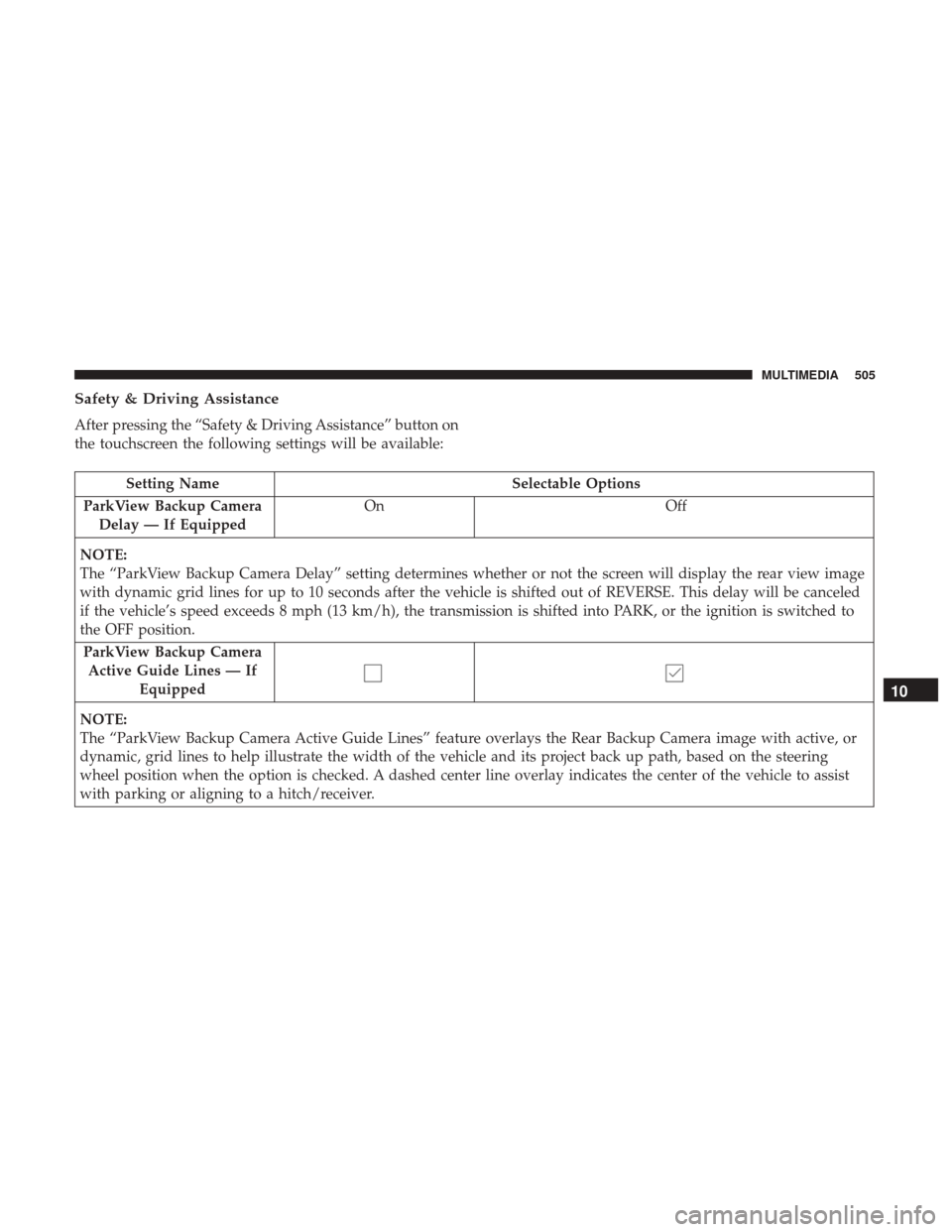
Safety & Driving Assistance
After pressing the “Safety & Driving Assistance” button on
the touchscreen the following settings will be available:
Setting NameSelectable Options
ParkView Backup Camera Delay — If Equipped On
Off
NOTE:
The “ParkView Backup Camera Delay” setting determines whether or not the screen will display the rear view image
with dynamic grid lines for up to 10 seconds after the vehicle is shifted out of REVERSE. This delay will be canceled
if the vehicle’s speed exceeds 8 mph (13 km/h), the transmission is shifted into PARK, or the ignition is switched to
the OFF position. ParkView Backup Camera Active Guide Lines — If Equipped
NOTE:
The “ParkView Backup Camera Active Guide Lines” feature overlays the Rear Backup Camera image with active, or
dynamic, grid lines to help illustrate the width of the vehicle and its project back up path, based on the steering
wheel position when the option is checked. A dashed center line overlay indicates the center of the vehicle to assist
with parking or aligning to a hitch/receiver.
10
MULTIMEDIA 505
Page 510 of 592
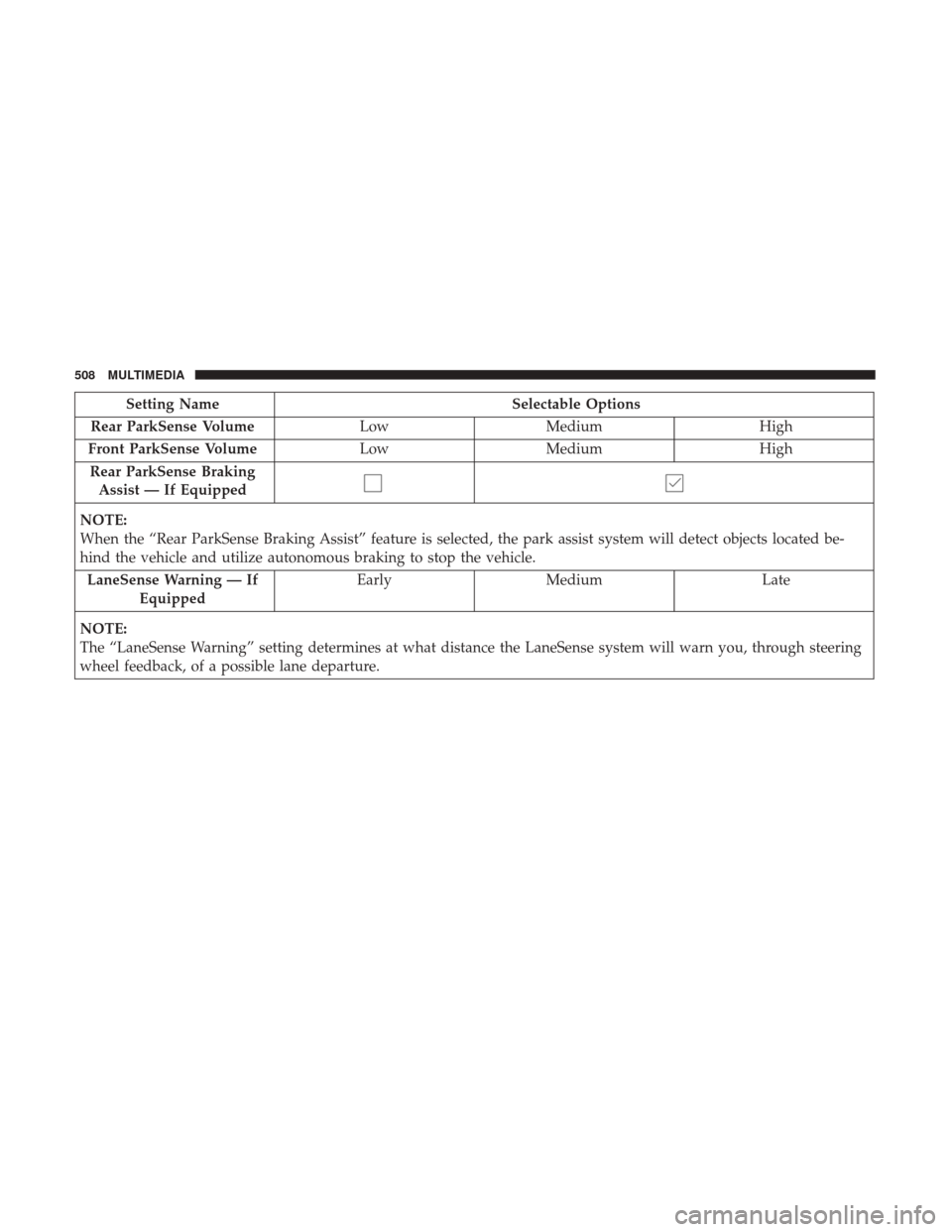
Setting NameSelectable Options
Rear ParkSense Volume LowMedium High
Front ParkSense Volume LowMedium High
Rear ParkSense Braking Assist — If Equipped
NOTE:
When the “Rear ParkSense Braking Assist” feature is selected, the park assist system will detect objects located be-
hind the vehicle and utilize autonomous braking to stop the vehicle. LaneSense Warning — If Equipped Early
Medium Late
NOTE:
The “LaneSense Warning” setting determines at what distance the LaneSense system will warn you, through steering
wheel feedback, of a possible lane departure.
508 MULTIMEDIA
Page 514 of 592
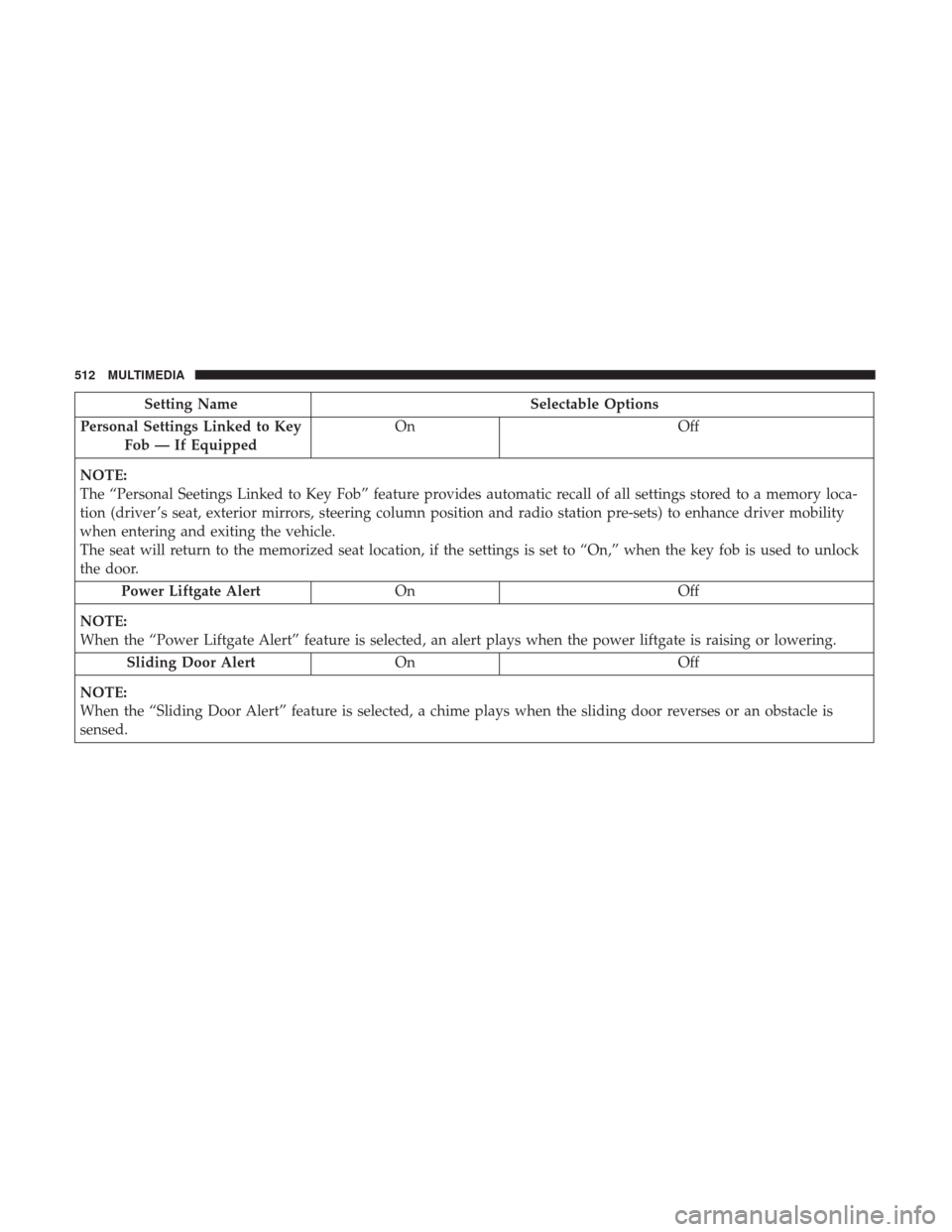
Setting NameSelectable Options
Personal Settings Linked to Key Fob — If Equipped On
Off
NOTE:
The “Personal Seetings Linked to Key Fob” feature provides automatic recall of all settings stored to a memory loca-
tion (driver ’s seat, exterior mirrors, steering column position and radio station pre-sets) to enhance driver mobility
when entering and exiting the vehicle.
The seat will return to the memorized seat location, if the settings is set to “On,” when the key fob is used to unlock
the door. Power Liftgate Alert On Off
NOTE:
When the “Power Liftgate Alert” feature is selected, an alert plays when the power liftgate is raising or lowering. Sliding Door Alert On Off
NOTE:
When the “Sliding Door Alert” feature is selected, a chime plays when the sliding door reverses or an obstacle is
sensed.
512 MULTIMEDIA
Page 516 of 592
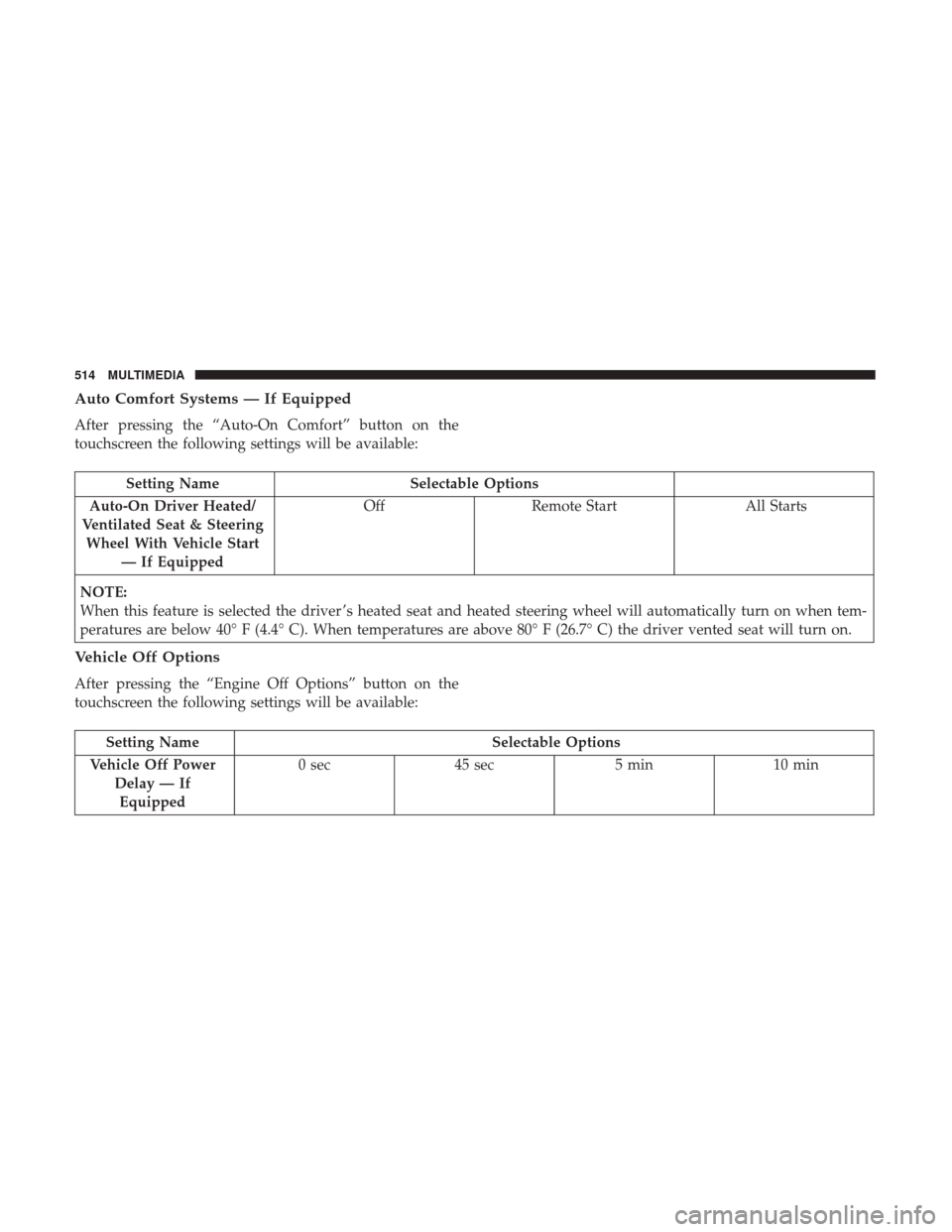
Auto Comfort Systems — If Equipped
After pressing the “Auto-On Comfort” button on the
touchscreen the following settings will be available:
Setting NameSelectable Options
Auto-On Driver Heated/
Ventilated Seat & Steering Wheel With Vehicle Start — If Equipped Off
Remote Start All Starts
NOTE:
When this feature is selected the driver ’s heated seat and heated steering wheel will automatically turn on when tem-
peratures are below 40° F (4.4° C). When temperatures are above 80° F (26.7° C) the driver vented seat will turn on.
Vehicle Off Options
After pressing the “Engine Off Options” button on the
touchscreen the following settings will be available:
Setting Name Selectable Options
Vehicle Off Power Delay — IfEquipped 0 sec
45 sec 5 min10 min
514 MULTIMEDIA
Page 522 of 592
System Information
After pressing the “System Information” button on the
touchscreen, the following settings will be available:
Setting NameSelectable Options
System Information System Software Information Screen
NOTE:
When this feature is selected, a “System Information” screen will appear, displaying the system software version.
STEERING WHEEL AUDIO CONTROLS
The remote sound system controls are located on the rear
surface of the steering wheel at the three and nine o’clock
positions.
Steering Wheel Audio Controls (Back View Of Steering Wheel)
520 MULTIMEDIA
Page 556 of 592
WARNING!
ALWAYS drive safely with your hands on the wheel.
You have full responsibility and assume all risks
related to the use of the Uconnect features and appli-
cations in this vehicle. Only use Uconnect when it is
safe to do so. Failure to do so may result in an accident
involving serious injury or death.
Get Started
All you need to control your Uconnect system with your
voice are the buttons on your steering wheel.
1. Visit UconnectPhone.com to check mobile device andfeature compatibility and to find phone pairing instruc-
tions.
2. Reduce background noise. Wind and passenger conver- sations are examples of noise that may impact recogni-
tion.
3. Speak clearly at a normal pace and volume while facing straight ahead. The microphone is positioned on the
rearview mirror and aimed at the driver. 4. Each time you give a Voice Command, you must first
push either the VR or Phone button, wait until afterthe
beep, then say your Voice Command.
5. You can interrupt the help message or system prompts by pushing the VR or Phone button and saying a Voice
Command from current category.
Uconnect Voice Command Buttons
1 — Push To Initiate Or To Answer A Phone Call, Send Or Receive
A Text
2 — For All Radios: Push To Begin Radio Or Media functions. For
8.4 Only: Push To Begin Navigation, Apps And Climate Functions.
3 — Push To End Call
554 MULTIMEDIA
Page 561 of 592
Climate
Too hot? Too cold? Adjust vehicle temperatures hands-free
and keep everyone comfortable while you keep moving
ahead. (If vehicle is equipped with climate control.)
Push the VR button
. After the beep, say one of the
following commands:
• Set driver temperature to 70degrees
• Set passenger temperature to 70degrees
TIP: Voice Command for Climate may only be used to
adjust the interior temperature of your vehicle. Voice
Command will not work to adjust the heated seats or
steering wheel if equipped.
Navigation
The Uconnect navigation feature helps you save time and
become more productive when you know exactly how to
get to where you want to go. (Navigation is optional on the
Uconnect 8.4 system. See your dealer to activate navigation
at any time.)
1. To enter a destination, push the VR button
. After the
beep, say:
• For the 8.4 Uconnect System, say: “Enter state.”
Uconnect 8.4 Climate
10
MULTIMEDIA 559
Page 567 of 592
Push the VR button. After the beep, say one of the
following commands:
• Show fuel prices
• Show 5 - day weather forecast
• Show extended weather
TIP: Traffic alerts are not accessible with Voice Command.
Siri Eyes Free — If Equipped
Siri lets you use your voice to send text messages, select
media, place phone calls and much more. Siri uses your natural language to understand what you mean and will
respond back to confirm your requests. The system is
designed to keep your eyes on the road and your hands on
the wheel by letting Siri help you perform useful tasks.
To enable Siri push and hold, then release the Uconnect
Voice Recognition (VR) button on the steering wheel. After
you hear a double beep you can ask Siri to play podcasts
and music, get directions, read text messages and many
other useful requests.
SiriusXM Travel LinkSiri Eyes Free Available
10
MULTIMEDIA 565
Page 585 of 592
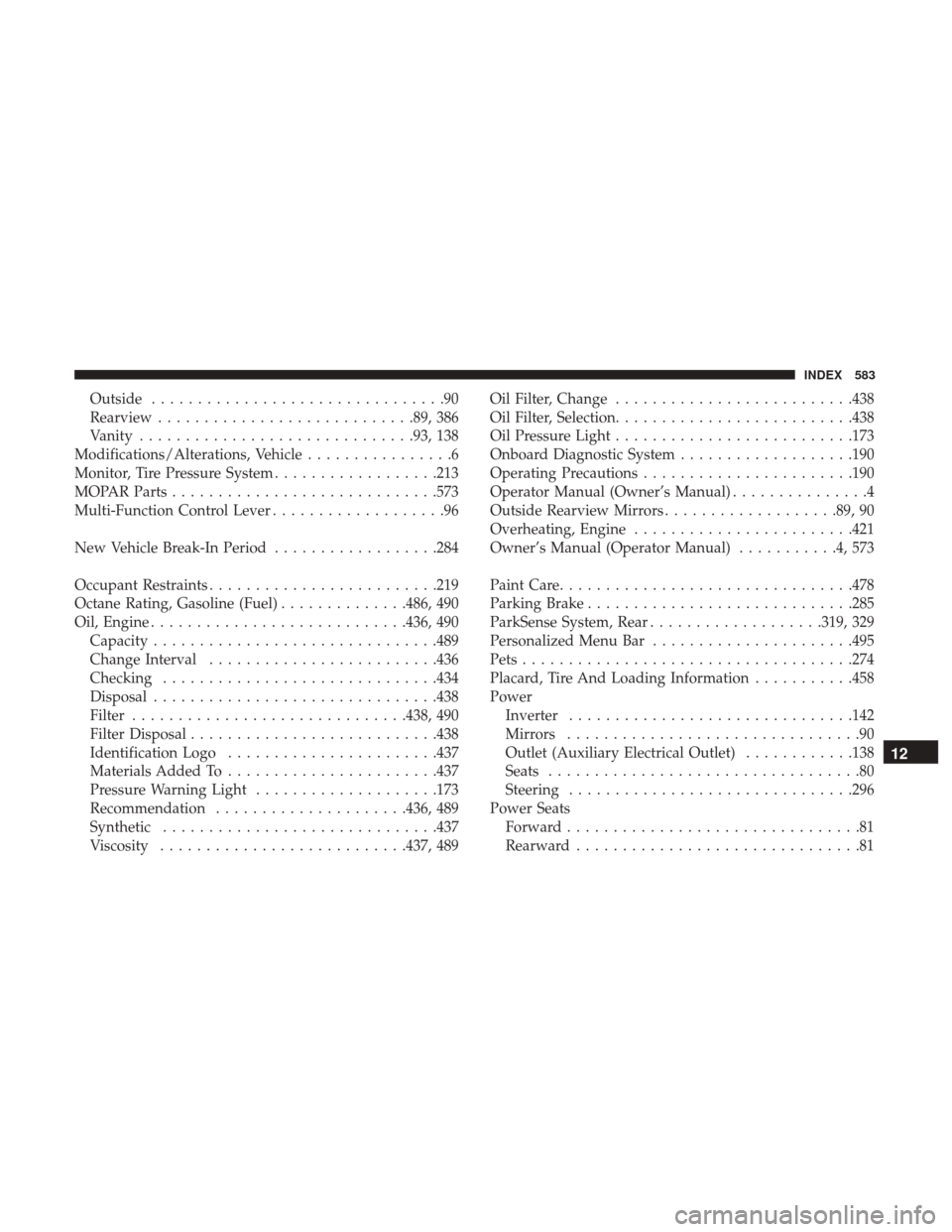
Outside................................90
Rearview ........................... .89, 386
Vanity ............................. .93, 138
Modifications/Alterations, Vehicle ................6
Monitor, Tire Pressure System ..................213
MOPAR Parts ............................ .573
Multi-Function Control Lever ...................96
New Vehicle Break-In Period ..................284
Occupant Restraints ........................ .219
Octane Rating, Gasoline (Fuel) ..............486, 490
Oil, Engine ........................... .436, 490
Capacity .............................. .489
Change Interval ........................ .436
Checking ............................. .434
Disposal .............................. .438
Filter ............................. .438, 490
Filter Disposal .......................... .438
Identification Logo ...................... .437
Materials Added To ...................... .437
Pressure Warning Light ....................173
Recommendation .....................436, 489
Synthetic ............................. .437
Viscosity .......................... .437, 489Oil Filter, Change
......................... .438
Oil Filter, Selection ......................... .438
Oil Pressure Light ......................... .173
Onboard Diagnostic System ...................190
Operating Precautions ...................... .190
Operator Manual (Owner’s Manual) ...............4
Outside Rearview Mirrors ...................89, 90
Overheating, Engine ....................... .421
Owner’s Manual (Operator Manual) ...........4,573
Paint Care ............................... .478
Parking Brake ............................ .285
ParkSense System, Rear ...................319, 329
Personalized Menu Bar ..................... .495
Pets ................................... .274
Placar
d, Tire And Loading Information ...........458
Power Inverter .............................. .142
Mirrors ................................90
Outlet (Auxiliary Electrical Outlet) ............138
Seats ..................................80
Steering .............................. .296
Power Seats Forward ................................81
Rearward ...............................81
12
INDEX 583
Page 588 of 592
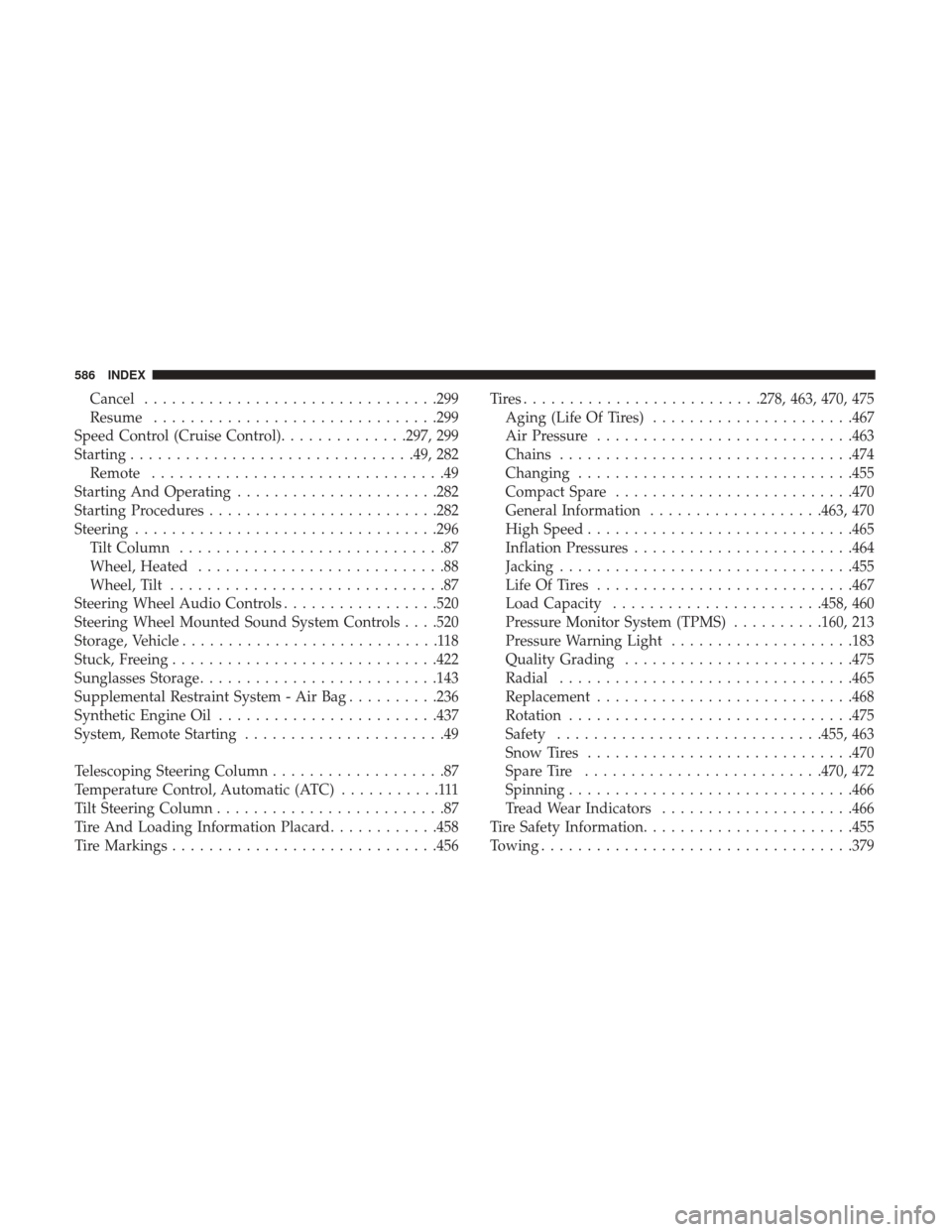
Cancel............................... .299
Resume .............................. .299
Speed Control (Cruise Control) ..............297, 299
Starting .............................. .49, 282
Remote ................................49
Starting And Operating ..................... .282
Starting Procedures ........................ .282
Steering ................................ .296
Tilt Column .............................87
Wheel, Heated ...........................88
Wheel, Tilt ..............................87
Steering Wheel Audio Controls .................520
Steering Wheel Mounted Sound System Controls . . . .520
Storage, Vehicle ............................118
Stuck, Freeing ............................ .422
Sunglasses Storage ......................... .143
Supplemental Restraint System - Air Bag ..........236
Synthetic Engine Oil ....................... .437
System, Remote Starting ......................49
Telescoping Steering Column ...................87
Temperature Control, Automatic (ATC) ...........111
Tilt Steering Column .........................87
Tire And Loading Information Placard ............458
Tire Markings ............................ .456Tires.........................
.278, 463, 470, 475
Aging (Life Of Tires) ..................... .467
Air Pressure ........................... .463
Chains ............................... .474
Changing ............................. .455
Compact Spare ......................... .470
General Information ...................463, 470
High Speed ............................ .465
Inflation Pressures ....................... .464
Jacking ............................... .455
Life Of Tires ........................... .467
Load Capacity ...................... .458, 460
Pressure Monitor System (TPMS) ..........160, 213
Pressure Warning Light ....................183
Quality
Grading ........................ .475
Radial ............................... .465
Replacement ........................... .468
Rotation .............................. .475
Safety ............................ .455, 463
Snow Tires ............................ .470
Spare Tire ......................... .470, 472
Spinning .............................. .466
Tread Wear Indicators .....................466
Tire Safety Information ...................... .455
Towing ................................. .379
586 INDEX