brakes CHRYSLER PACIFICA HYBRID 2019 User Guide
[x] Cancel search | Manufacturer: CHRYSLER, Model Year: 2019, Model line: PACIFICA HYBRID, Model: CHRYSLER PACIFICA HYBRID 2019Pages: 620, PDF Size: 4.92 MB
Page 320 of 620
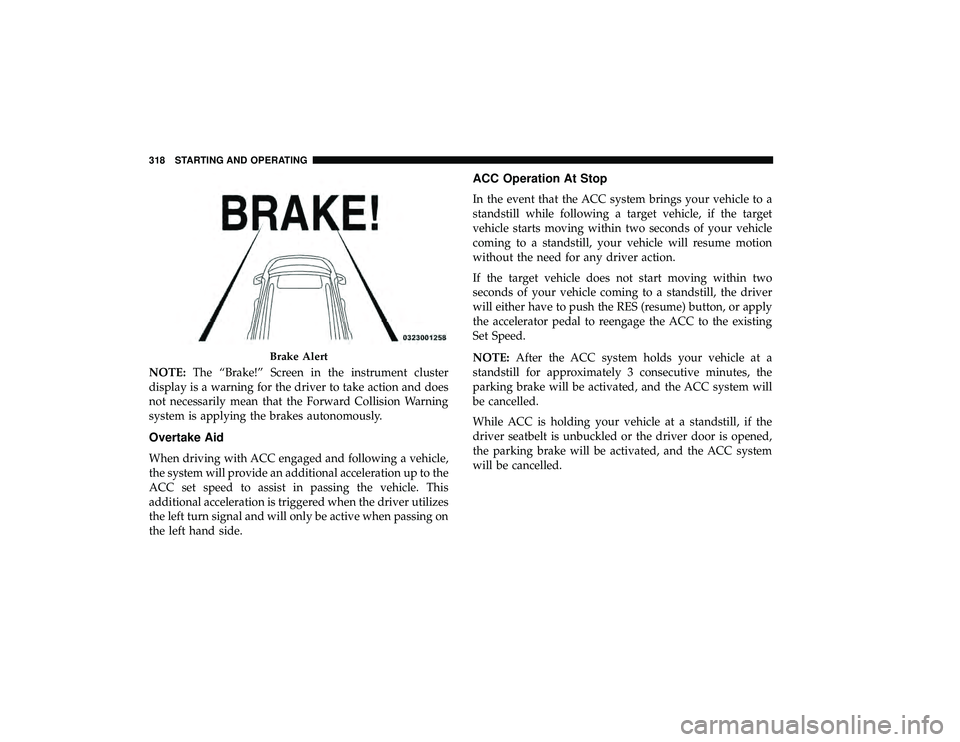
NOTE:The “Brake!” Screen in the instrument cluster
display is a warning for the driver to take action and does
not necessarily mean that the Forward Collision Warning
system is applying the brakes autonomously.
Overtake Aid
When driving with ACC engaged and following a vehicle,
the system will provide an additional acceleration up to the
ACC set speed to assist in passing the vehicle. This
additional acceleration is triggered when the driver utilizes
the left turn signal and will only be active when passing on
the left hand side.
ACC Operation At Stop
In the event that the ACC system brings your vehicle to a
standstill while following a target vehicle, if the target
vehicle starts moving within two seconds of your vehicle
coming to a standstill, your vehicle will resume motion
without the need for any driver action.
If the target vehicle does not start moving within two
seconds of your vehicle coming to a standstill, the driver
will either have to push the RES (resume) button, or apply
the accelerator pedal to reengage the ACC to the existing
Set Speed.
NOTE: After the ACC system holds your vehicle at a
standstill for approximately 3 consecutive minutes, the
parking brake will be activated, and the ACC system will
be cancelled.
While ACC is holding your vehicle at a standstill, if the
driver seatbelt is unbuckled or the driver door is opened,
the parking brake will be activated, and the ACC system
will be cancelled.
Brake Alert
318 STARTING AND OPERATING
Page 326 of 620
Lane Changing
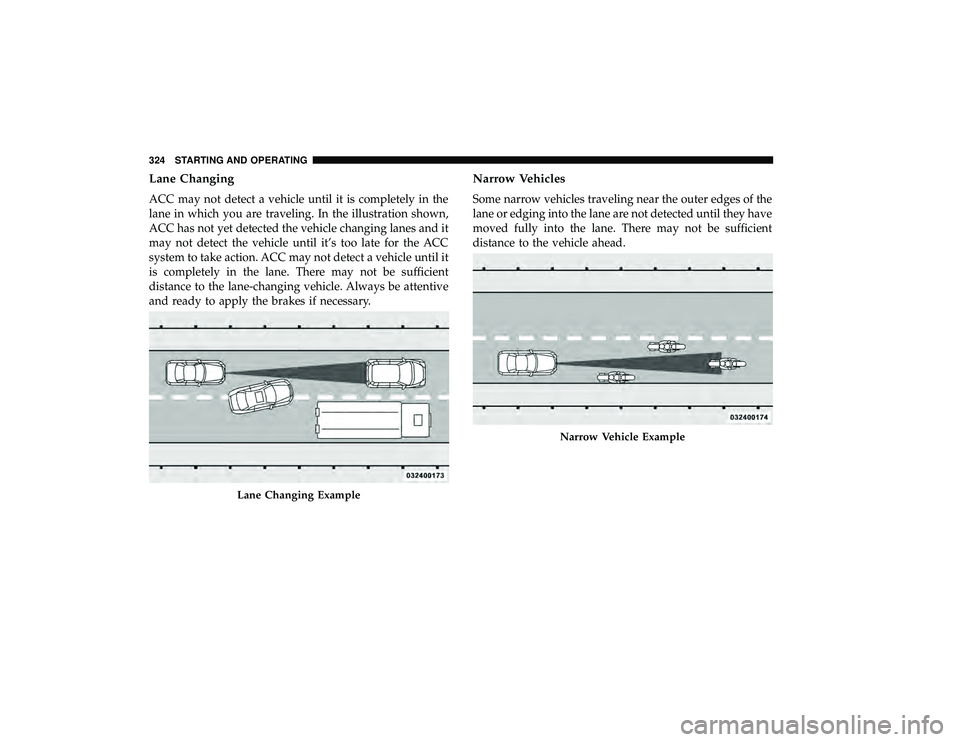
ACC may not detect a vehicle until it is completely in the
lane in which you are traveling. In the illustration shown,
ACC has not yet detected the vehicle changing lanes and it
may not detect the vehicle until it’s too late for the ACC
system to take action. ACC may not detect a vehicle until it
is completely in the lane. There may not be sufficient
distance to the lane-changing vehicle. Always be attentive
and ready to apply the brakes if necessary.
Narrow Vehicles
Some narrow vehicles traveling near the outer edges of the
lane or edging into the lane are not detected until they have
moved fully into the lane. There may not be sufficient
distance to the vehicle ahead.
Lane Changing Example
Narrow Vehicle Example
324 STARTING AND OPERATING
Page 327 of 620
Stationary Objects And Vehicles
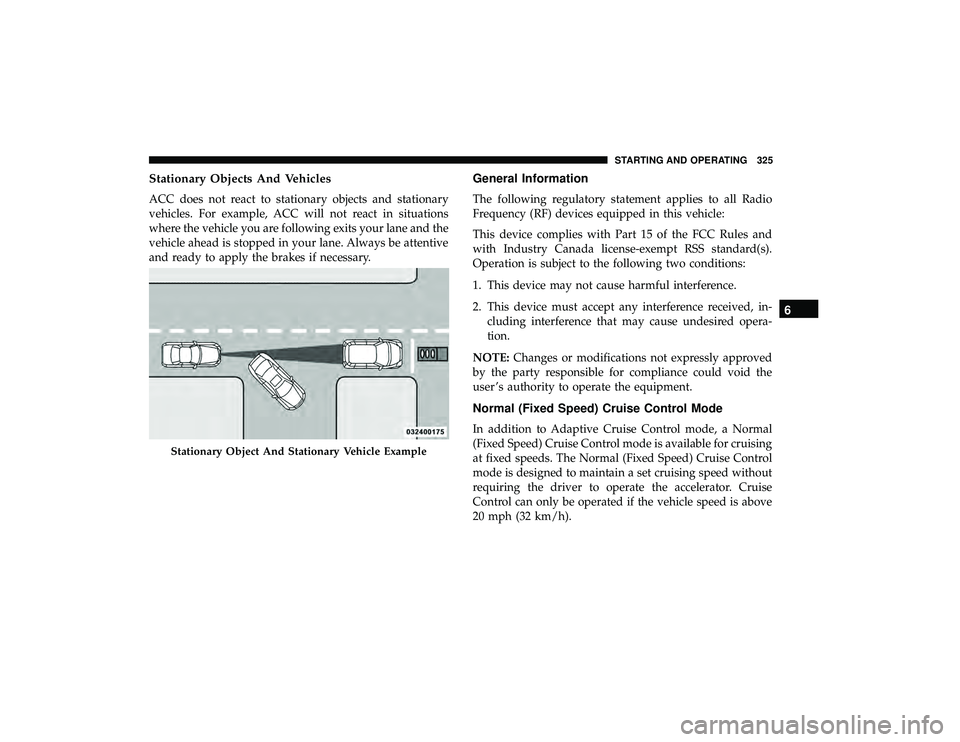
ACC does not react to stationary objects and stationary
vehicles. For example, ACC will not react in situations
where the vehicle you are following exits your lane and the
vehicle ahead is stopped in your lane. Always be attentive
and ready to apply the brakes if necessary.
General Information
The following regulatory statement applies to all Radio
Frequency (RF) devices equipped in this vehicle:
This device complies with Part 15 of the FCC Rules and
with Industry Canada license-exempt RSS standard(s).
Operation is subject to the following two conditions:
1. This device may not cause harmful interference.
2. This device must accept any interference received, in-cluding interference that may cause undesired opera-
tion.
NOTE: Changes or modifications not expressly approved
by the party responsible for compliance could void the
user ’s authority to operate the equipment.
Normal (Fixed Speed) Cruise Control Mode
In addition to Adaptive Cruise Control mode, a Normal
(Fixed Speed) Cruise Control mode is available for cruising
at fixed speeds. The Normal (Fixed Speed) Cruise Control
mode is designed to maintain a set cruising speed without
requiring the driver to operate the accelerator. Cruise
Control can only be operated if the vehicle speed is above
20 mph (32 km/h).
Stationary Object And Stationary Vehicle Example
6
STARTING AND OPERATING 325
Page 330 of 620
•The vehicle parking brake is applied.
• The braking temperature exceeds normal range (over-
heated).
• The gear selector is removed from the DRIVE position.
To Resume Speed
To resume a previously set speed, push the RES button and
release. Resume can be used at any speed above 20 mph
(32 km/h).
To Turn Off
The system will turn off and erase the set speed in memory
if:
•The Normal (Fixed Speed) Cruise Control on/off button
is pushed.
• The ignition is turned OFF.
• The Adaptive Cruise Control (ACC) on/off button is
pushed.
PARKSENSE REAR PARK ASSIST — IF EQUIPPED
The ParkSense Rear Park Assist system provides visual and
audible indications of the distance between the rear fascia
and a detected obstacle when backing up, e.g. during a
parking maneuver. If your vehicle is equipped with an
automatic transmission, the vehicle brakes may be auto-
matically applied and released when performing a reverse
parking maneuver if the system detects a possible collision
with an obstacle.
NOTE:
• The driver can override the automatic braking function
by pressing the gas pedal, turning ParkSense off via
ParkSense switch, or changing the gear while the auto-
matic brakes are being applied.
• Automatic brakes will not be available if ESC is not
available.
• Automatic brakes will not be available if there is a
faulted condition detected with the ParkSense Park
Assist system or the Braking System Module.
328 STARTING AND OPERATING
Page 340 of 620
CAUTION!(Continued)
detected at all. Obstacles located above or below the
sensors will not be detected when they are in close
proximity.
• The vehicle must be driven slowly when using
ParkSense in order to be able to stop in time when an
obstacle is detected. It is recommended that the
driver looks over his/her shoulder when using
ParkSense.
PARKSENSE FRONT AND REAR PARK ASSIST —
IF EQUIPPED
The ParkSense Park Assist system provides visual and
audible indications of the distance between the rear and/or
front fascia and a detected obstacle when backing up or
moving forward, e.g. during a parking maneuver. If your
vehicle is equipped with an automatic transmission, the
vehicle brakes may be automatically applied and released
when performing a reverse parking maneuver if the sys-
tem detects a possible collision with an obstacle.
NOTE:
• The driver can override the automatic braking function
by pressing the gas pedal, turning ParkSense off via ParkSense switch, or changing the gear while the auto-
matic brakes are being applied.
• Automatic brakes will not be available if ESC is not
available.
• Automatic brakes will not be available if there is a
faulted condition detected with the ParkSense Park
Assist system or the Braking System Module.
• The automatic braking function may not provide
enough vehicle deceleration to avoid colliding with a
detected obstacle depending on vehicle speed, road
conditions, and brake capability.
• The automatic braking function may not be applied fast
enough for moving obstacles that approach the rear of
the vehicle from the left and / or right sides.
• The automatic braking function can be enabled/
disabled from the Customer-Programmable Features
section of the Uconnect System.
• ParkSense will retain its last known configuration state
for the automatic braking function through ignition
cycles.
338 STARTING AND OPERATING
Page 354 of 620
PARKSENSE ACTIVE PARK ASSIST SYSTEM —
IF EQUIPPED
The ParkSense Active Park Assist system is intended to
assist the driver during parallel and perpendicular parking
maneuvers by identifying a proper parking space, provid-
ing audible/visual instructions, and controlling the steer-
ing wheel. The ParkSense Active Park Assist system is
defined as “semi-automatic” since the driver maintains
control of the accelerator, gear selector and brakes. De-
pending on the driver’s parking maneuver selection, the
ParkSense Active Park Assist system is capable of maneu-
vering a vehicle into a parallel or a perpendicular parking
space on either side (i.e., driver side or passenger side).
NOTE:
•The driver is always responsible for controlling the
vehicle, responsible for any surrounding objects, and
must intervene as required.
• The system is provided to assist the driver and not to
substitute the driver.
• During a semi-automatic maneuver, if the driver touches
the steering wheel after being instructed to remove their
hands from the steering wheel, the system will cancel,
and the driver will be required to manually complete the
parking maneuver. •
The system may not work in all conditions (e.g. envi-
ronmental conditions such as heavy rain, snow, etc., or if
searching for a parking space that has surfaces that will
absorb the ultrasonic sensor waves).
• New vehicles from the dealership must have at least 30
miles (48 km) accumulated before the ParkSense Active
Park Assist system is fully calibrated and performs
accurately. This is due to the system’s dynamic vehicle
calibration to improve the performance of the feature.
The system will also continuously perform the dynamic
vehicle calibration to account for differences such as
over or under inflated tires and new tires.
Enabling And Disabling The ParkSense Active Park
Assist System
The ParkSense Active Park Assist system can be
enabled and disabled with the ParkSense Active
Park Assist switch, located on the switch panel
below the Uconnect display.
To enable the ParkSense Active Park Assist system, push the
ParkSense Active Park Assist switch once (LED turns on).
To disable the ParkSense Active Park Assist system, push
the ParkSense Active Park Assist switch again (LED turns
off).
352 STARTING AND OPERATING
Page 377 of 620
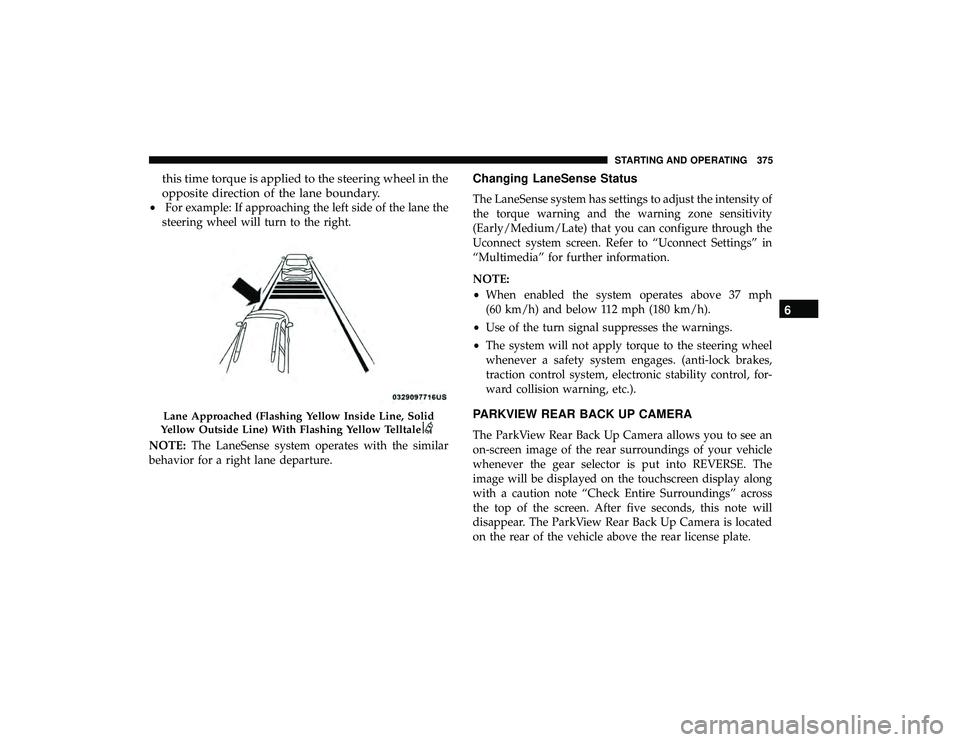
this time torque is applied to the steering wheel in the
opposite direction of the lane boundary.
•For example: If approaching the left side of the lane the
steering wheel will turn to the right.
NOTE: The LaneSense system operates with the similar
behavior for a right lane departure.
Changing LaneSense Status
The LaneSense system has settings to adjust the intensity of
the torque warning and the warning zone sensitivity
(Early/Medium/Late) that you can configure through the
Uconnect system screen. Refer to “Uconnect Settings” in
“Multimedia” for further information.
NOTE:
• When enabled the system operates above 37 mph
(60 km/h) and below 112 mph (180 km/h).
• Use of the turn signal suppresses the warnings.
• The system will not apply torque to the steering wheel
whenever a safety system engages. (anti-lock brakes,
traction control system, electronic stability control, for-
ward collision warning, etc.).
PARKVIEW REAR BACK UP CAMERA
The ParkView Rear Back Up Camera allows you to see an
on-screen image of the rear surroundings of your vehicle
whenever the gear selector is put into REVERSE. The
image will be displayed on the touchscreen display along
with a caution note “Check Entire Surroundings” across
the top of the screen. After five seconds, this note will
disappear. The ParkView Rear Back Up Camera is located
on the rear of the vehicle above the rear license plate.
Lane Approached (Flashing Yellow Inside Line, Solid
Yellow Outside Line) With Flashing Yellow Telltale
6
STARTING AND OPERATING 375
Page 388 of 620
vehicle may show that the GAWR of either the front or rear
axles has been exceeded but the total load is within the
specified GVWR. If so, weight must be shifted from front to
rear or rear to front as appropriate until the specified
weight limitations are met. Store the heavier items down
low and be sure that the weight is distributed equally. Stow
all loose items securely before driving.
Improper weight distributions can have an adverse effect
on the way your vehicle steers and handles and the way
the brakes operate.CAUTION!
Do not load your vehicle any heavier than the GVWR
or the maximum front and rear GAWR. If you do, parts
on your vehicle can break, or it can change the way
your vehicle handles. This could cause you to lose
control. Also overloading can shorten the life of your
vehicle.
TRAILER TOWING
Trailer towing is not permitted with this vehicle.
RECREATIONAL TOWING (BEHIND MOTORHOME, ETC.)
Towing This Vehicle Behind Another Vehicle
Towing ConditionWheel OFF The Ground All Models
Flat Tow NONENOT ALLOWED
Dolly Tow FrontOK
Rear NOT ALLOWED
On Trailer ALLOK
386 STARTING AND OPERATING
Page 391 of 620
•Replace the tires when tread wear indicators first be-
come visible.
• Keep tires properly inflated.
• Maintain sufficient distance between your vehicle and
the vehicle in front of you to avoid a collision in a
sudden stop.
Driving Through Water
Driving through water more than a few inches/centimeters
deep will require extra caution to ensure safety and pre-
vent damage to your vehicle.
Flowing/Rising Water
WARNING!
Do not drive on or across a road or path where water is
flowing and/or rising (as in storm run-off). Flowing
water can wear away the road or path’s surface and
cause your vehicle to sink into deeper water. Further-
more, flowing and/or rising water can carry your ve-
hicle away swiftly. Failure to follow this warning may
result in injuries that are serious or fatal to you, your
passengers, and others around you.
Shallow Standing Water
Although your vehicle is capable of driving through shal-
low standing water, consider the following Cautions and
Warnings before doing so.
WARNING!
• Driving through standing water limits your vehicle’s
traction capabilities. Do not exceed 5 mph (8 km/h)
when driving through standing water.
• Driving through standing water limits your vehicle’s
braking capabilities, which increases stopping dis-
tances. Therefore, after driving through standing
water, drive slowly and lightly press on the brake
pedal several times to dry the brakes.
• Failure to follow these warnings may result in inju-
ries that are serious or fatal to you, your passengers,
and others around you.
6
STARTING AND OPERATING 389
Page 471 of 620
•Keep the front of the radiator clean. If your vehicle is
equipped with air conditioning, keep the front of the
condenser clean.
• Do not change the thermostat for Summer or Winter
operation. If replacement is ever necessary, install ONLY
the correct type thermostat. Other designs may result in
unsatisfactory engine coolant (antifreeze) performance,
poor gas mileage, and increased emissions.
• The coolant freeze point in the battery and power
electronics loop should be checked by an authorized
dealer as a special tool is required to remove the cap
from those expansion bottles.
• Electric/Battery coolant system must be serviced by an
authorized dealer. If the coolant level is below what is
specified on the reservoir, contact an authorized dealer
for service. These systems require the use of high purity
water such as deionized, or distilled water when mixing
the water and coolant (antifreeze) solution. The use of
lower quality water will reduce the amount of corrosion
protection in the cooling systems.Brake System
In order to assure brake system performance, all brake
system components should be inspected periodically. Refer
to the “Maintenance Plan” in this section for the proper
maintenance intervals.
WARNING!
Riding the brakes can lead to brake failure and possi-
bly a collision. Driving with your foot resting or riding
on the brake pedal can result in abnormally high brake
temperatures, excessive lining wear, and possible
brake damage. You would not have your full braking
capacity in an emergency.
Brake Master Cylinder
The fluid in the master cylinder should be checked when
performing under hood services or immediately if the
“Brake Warning Light” is illuminated.
Be sure to clean the top of the master cylinder area before
removing the cap. If necessary, add fluid to bring the fluid
level up to the requirements described on the brake fluid
reservoir. With disc brakes, fluid level can be expected to
fall as the brake pads wear. Brake fluid level should be
8
SERVICING AND MAINTENANCE 469