stop start CHRYSLER PACIFICA HYBRID 2019 Owner's Guide
[x] Cancel search | Manufacturer: CHRYSLER, Model Year: 2019, Model line: PACIFICA HYBRID, Model: CHRYSLER PACIFICA HYBRID 2019Pages: 620, PDF Size: 4.92 MB
Page 303 of 620
WARNING!
•Never use the PARK position as a substitute for the
park brake. Always apply the park brake fully when
exiting the vehicle to guard against vehicle move-
ment and possible injury or damage.
• Your vehicle could move and injure you and others if
it is not in PARK. Check by trying to move the
transmission gear selector out of PARK with the
brake pedal released. Make sure the transmission is
in PARK before exiting the vehicle.
• The transmission may not engage PARK if the ve-
hicle is moving. Always bring the vehicle to a
complete stop before shifting to PARK, and verify
that the transmission gear position indicator solidly
indicates PARK (P) without blinking. Ensure that the
vehicle is completely stopped, and the PARK posi-
tion is properly indicated, before exiting the vehicle.
• It is dangerous to shift out of PARK or NEUTRAL if
your foot is not firmly pressing the brake pedal. The
vehicle could accelerate quickly forward or in re-
verse. You could lose control of the vehicle and hit
someone or something. Only shift into gear when
your foot is firmly pressing the brake pedal.
(Continued)
WARNING! (Continued)
•Unintended movement of a vehicle could injure
those in or near the vehicle. As with all vehicles, you
should never exit a vehicle while the engine is
running or the propulsion system is active. Before
exiting a vehicle, always come to a complete stop,
then apply the park brake, shift the transmission into
PARK, and turn the ignition OFF. When the ignition
is in the OFF mode, the transmission is locked in
PARK, securing the vehicle against unwanted move-
ment.
• When leaving the vehicle, always make sure the
ignition is in the OFF mode, remove the key fob from
the vehicle, and lock the vehicle.
• Never leave children alone in a vehicle, or with
access to an unlocked vehicle. Allowing children to
be in a vehicle unattended is dangerous for a number
of reasons. A child or others could be seriously or
fatally injured. Children should be warned not to
touch the park brake, brake pedal or the transmis-
sion gear selector.
• Do not leave the key fob in or near the vehicle (or in
a location accessible to children), and do not leave
(Continued)
6
STARTING AND OPERATING 301
Page 304 of 620
WARNING!(Continued)
the ignition in the ACC or ON/RUN mode. A child
could operate power windows, other controls, or
move the vehicle.
• Before moving the transmission gear selector out of
PARK, you must turn the ignition to the ON/RUN
mode, and also press the brake pedal. Otherwise, dam-
age to the gear selector could result.
• DO NOT depress the accelerator pedal when shifting
from PARK or NEUTRAL into another gear range, as
this can damage the drivetrain.
The following indicators should be used to ensure that you
have properly engaged the transmission into the PARK
position:
• Look at the transmission gear position display and
verify that it indicates the PARK position (P), and is not
blinking.
• With brake pedal released, verify that the gear selector
will not move out of PARK.
REVERSE (R)
This range is for moving the vehicle backward. Shift into
REVERSE only after the vehicle has come to a complete
stop.
NOTE: Based on the drive gear and/or speed of the
vehicle, the Quiet Vehicle Pedestrian Module (QVPM) will
broadcast a sound to warn nearby pedestrians that a
vehicle is approaching. In addition, the module will indi-
cate change in speed by varying the pitch of sound.
NEUTRAL (N)
Use this range when the vehicle is standing for prolonged
periods with the propulsion system active. The vehicle
may be started in this range. Apply the park brake and
shift the transmission into PARK if you must exit the
vehicle.
NOTE: Based on the drive gear and/or speed of the
vehicle, the Quiet Vehicle Pedestrian Module (QVPM) will
broadcast a sound to warn nearby pedestrians that a
vehicle is approaching. In addition, the module will indi-
cate change in speed by varying the pitch of sound.
302 STARTING AND OPERATING
Page 306 of 620
NOTE:Based on the drive gear and/or speed of the
vehicle, the Quiet Vehicle Pedestrian Module (QVPM) will
broadcast a sound to warn nearby pedestrians that a
vehicle is approaching. In addition, the module will indi-
cate change in speed by varying the pitch of sound.
Transmission Limp Home Mode
Transmission function is monitored electronically for ab-
normal conditions. If a condition is detected that could
result in transmission damage, Transmission Limp Home
Mode is activated. In this mode, vehicle speed is limited to
about 45 mph (72 km/h). In addition to the Malfunction
Indicator Light (MIL), the Service Hybrid System Telltale,
the Red Turtle indication, and a popup message indicating
that vehicle speed may be limited may all be illuminated.
Limp Home Mode allows the vehicle to be driven to an
authorized dealer for service without damaging the trans-
mission.
In the event of a momentary problem, the transmission can
be reset to regain functionality by performing the following
steps:
1. Stop the vehicle.
2. Shift the transmission into PARK, if possible. If not, shift the transmission to NEUTRAL. 3. Push and hold the ignition switch until the vehicle turns
OFF.
4. Wait approximately 30 seconds.
5. Restart the vehicle.
6. Shift into the desired gear range. If the problem is no longer detected, the transmission will return to normal
operation.
NOTE: Even if the transmission can be reset, we recom-
mend that you visit an authorized dealer at your earliest
possible convenience. An authorized dealer has diagnostic
equipment to assess the condition of your transmission. If
the transmission cannot be reset, authorized dealer service
is required.
ACTIVE NOISE CANCELLATION
Your vehicle is equipped with an Active Noise Cancellation
System. This system is designed to address exhaust and
engine noise. The system relies on four microphones
embedded in the headliner, which monitor exhaust and
engine noise, and assists an onboard frequency generator,
which creates counteracting sound waves in the audio
system’s speakers. This helps keep the vehicle quiet at idle
and during drive.
304 STARTING AND OPERATING
Page 312 of 620
WARNING!(Continued)
and, most importantly, brake operation to ensure safe
operation of the vehicle under all road conditions.
Your complete attention is always required while
driving to maintain safe control of your vehicle.
Failure to follow these warnings can result in a
collision and death or serious personal injury.
• The ACC system:
• Does not react to pedestrians, oncoming vehicles,
and stationary objects (e.g., a stopped vehicle in a
traffic jam or a disabled vehicle).
• Cannot take street, traffic, and weather conditions
into account, and may be limited upon adverse
sight distance conditions.
• Does not always fully recognize complex driving
conditions, which can result in wrong or missing
distance warnings.
• Will bring the vehicle to a complete stop while
following a target vehicle and hold the vehicle for
approximately 3 minutes in the stop position. If the
target vehicle does not start moving within 3
minutes the parking brake will be activated, and
the ACC system will be cancelled.
(Continued)
WARNING! (Continued)
You should switch off the ACC system:
•When driving in fog, heavy rain, heavy snow, sleet,
heavy traffic, and complex driving situations (i.e., in
highway construction zones).
• When entering a turn lane or highway off ramp;
when driving on roads that are winding, icy, snow-
covered, slippery, or have steep uphill or downhill
slopes.
• When circumstances do not allow safe driving at a
constant speed.
Adaptive Cruise Control (ACC) Operation
The speed control buttons (located on the right side of the
steering wheel) operates the ACC system.
310 STARTING AND OPERATING
Page 317 of 620
The driver’s preferred units can be selected through the
instrument cluster. Refer to ”Instrument Cluster Display”
in “Getting To Know Your Instrument Panel” for more
information. The speed decrement shown is dependant on
the chosen speed unit of U.S. (mph) or Metric (km/h):
U.S. Speed (mph)
•Pushing the SET (-)button once will result ina1mph
decrease in set speed. Each subsequent tap of the button
results in a decrease of 1 mph.
• If the button is continually pushed, the set speed will
continue to decrease in 5 mph decrements until the
button is released. The decrease in set speed is reflected
in the instrument cluster display.
Metric Speed (km/h)
• Pushing the SET (-)button once will result in a 1 km/h
decrease in set speed. Each subsequent tap of the button
results in a decrease of 1 km/h.
• If the button is continually pushed, the set speed will
continue to decrease in 10 km/h decrements until the
button is released. The decrease in set speed is reflected
in the instrument cluster display. NOTE:
•
When you override and push the SET (+)button or SET
(-) buttons, the new set speed will be the current speed
of the vehicle.
• When you use the SET (-)button to decelerate, if the
powertrain braking power does not slow the vehicle
sufficiently to reach the set speed, the brake system will
automatically slow the vehicle.
• The ACC system decelerates the vehicle to a full stop
when following a target vehicle. If an ACC host vehicle
follows a target vehicle to a standstill, after two seconds
the driver will either have to push the RES (resume)
button, or apply the accelerator pedal to reengage the
ACC to the existing set speed.
• The ACC system maintains set speed when driving up
hill and down hill. However, a slight speed change on
moderate hills is normal. When driving up hill and
down hill, the ACC system will cancel if the braking
temperature exceeds normal range (overheated).
6
STARTING AND OPERATING 315
Page 320 of 620
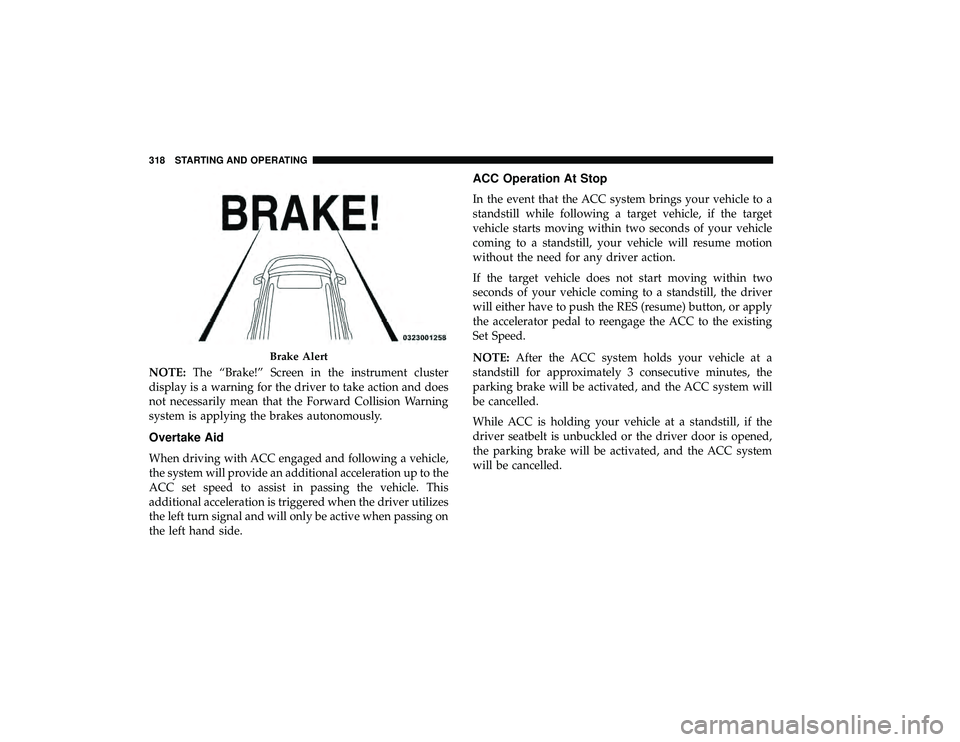
NOTE:The “Brake!” Screen in the instrument cluster
display is a warning for the driver to take action and does
not necessarily mean that the Forward Collision Warning
system is applying the brakes autonomously.
Overtake Aid
When driving with ACC engaged and following a vehicle,
the system will provide an additional acceleration up to the
ACC set speed to assist in passing the vehicle. This
additional acceleration is triggered when the driver utilizes
the left turn signal and will only be active when passing on
the left hand side.
ACC Operation At Stop
In the event that the ACC system brings your vehicle to a
standstill while following a target vehicle, if the target
vehicle starts moving within two seconds of your vehicle
coming to a standstill, your vehicle will resume motion
without the need for any driver action.
If the target vehicle does not start moving within two
seconds of your vehicle coming to a standstill, the driver
will either have to push the RES (resume) button, or apply
the accelerator pedal to reengage the ACC to the existing
Set Speed.
NOTE: After the ACC system holds your vehicle at a
standstill for approximately 3 consecutive minutes, the
parking brake will be activated, and the ACC system will
be cancelled.
While ACC is holding your vehicle at a standstill, if the
driver seatbelt is unbuckled or the driver door is opened,
the parking brake will be activated, and the ACC system
will be cancelled.
Brake Alert
318 STARTING AND OPERATING
Page 327 of 620
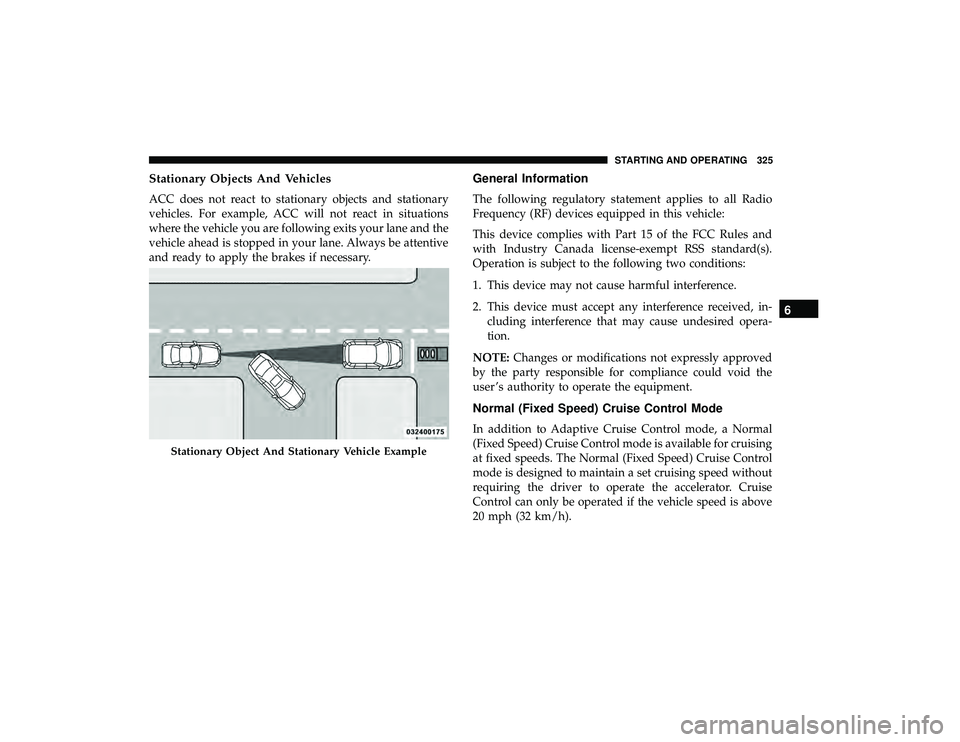
Stationary Objects And Vehicles
ACC does not react to stationary objects and stationary
vehicles. For example, ACC will not react in situations
where the vehicle you are following exits your lane and the
vehicle ahead is stopped in your lane. Always be attentive
and ready to apply the brakes if necessary.
General Information
The following regulatory statement applies to all Radio
Frequency (RF) devices equipped in this vehicle:
This device complies with Part 15 of the FCC Rules and
with Industry Canada license-exempt RSS standard(s).
Operation is subject to the following two conditions:
1. This device may not cause harmful interference.
2. This device must accept any interference received, in-cluding interference that may cause undesired opera-
tion.
NOTE: Changes or modifications not expressly approved
by the party responsible for compliance could void the
user ’s authority to operate the equipment.
Normal (Fixed Speed) Cruise Control Mode
In addition to Adaptive Cruise Control mode, a Normal
(Fixed Speed) Cruise Control mode is available for cruising
at fixed speeds. The Normal (Fixed Speed) Cruise Control
mode is designed to maintain a set cruising speed without
requiring the driver to operate the accelerator. Cruise
Control can only be operated if the vehicle speed is above
20 mph (32 km/h).
Stationary Object And Stationary Vehicle Example
6
STARTING AND OPERATING 325
Page 340 of 620
CAUTION!(Continued)
detected at all. Obstacles located above or below the
sensors will not be detected when they are in close
proximity.
• The vehicle must be driven slowly when using
ParkSense in order to be able to stop in time when an
obstacle is detected. It is recommended that the
driver looks over his/her shoulder when using
ParkSense.
PARKSENSE FRONT AND REAR PARK ASSIST —
IF EQUIPPED
The ParkSense Park Assist system provides visual and
audible indications of the distance between the rear and/or
front fascia and a detected obstacle when backing up or
moving forward, e.g. during a parking maneuver. If your
vehicle is equipped with an automatic transmission, the
vehicle brakes may be automatically applied and released
when performing a reverse parking maneuver if the sys-
tem detects a possible collision with an obstacle.
NOTE:
• The driver can override the automatic braking function
by pressing the gas pedal, turning ParkSense off via ParkSense switch, or changing the gear while the auto-
matic brakes are being applied.
• Automatic brakes will not be available if ESC is not
available.
• Automatic brakes will not be available if there is a
faulted condition detected with the ParkSense Park
Assist system or the Braking System Module.
• The automatic braking function may not provide
enough vehicle deceleration to avoid colliding with a
detected obstacle depending on vehicle speed, road
conditions, and brake capability.
• The automatic braking function may not be applied fast
enough for moving obstacles that approach the rear of
the vehicle from the left and / or right sides.
• The automatic braking function can be enabled/
disabled from the Customer-Programmable Features
section of the Uconnect System.
• ParkSense will retain its last known configuration state
for the automatic braking function through ignition
cycles.
338 STARTING AND OPERATING
Page 353 of 620
12 in (30 cm) from the rear fascia/bumper. Failure to do
so can result in the system misinterpreting a close object
as a sensor problem, causing the “PARKSENSE UN-
AVAILABLE SERVICE REQUIRED” message to be dis-
played in the instrument cluster.
• ParkSense should be disabled when the liftgate is in the
open position.
• There may be a delay in the object detection rate if the
object is moving. This may cause the automatic braking
application to be delayed.
WARNING!
• Drivers must be careful when backing up even when
using ParkSense. Always check carefully behind
your vehicle, look behind you, and be sure to check
for pedestrians, animals, other vehicles, obstructions,
and blind spots before backing up. You are respon-
sible for safety and must continue to pay attention to
your surroundings. Failure to do so can result in
serious injury or death.
• Before using ParkSense, it is strongly recommended
that the ball mount and hitch ball assembly is
(Continued)
WARNING! (Continued)
disconnected from the vehicle when the vehicle is
not used for towing. Failure to do so can result in
injury or damage to vehicles or obstacles because the
hitch ball will be much closer to the obstacle than the
rear fascia when the loudspeaker sounds the con-
tinuous tone. Also, the sensors could detect the ball
mount and hitch ball assembly, depending on its size
and shape, giving a false indication that an obstacle
is behind the vehicle.
CAUTION!
•ParkSense is only a parking aid and it is unable to
recognize every obstacle, including small obstacles.
Parking curbs might be temporarily detected or not
detected at all. Obstacles located above or below the
sensors will not be detected when they are in close
proximity.
•
The vehicle must be driven slowly when using
ParkSense in order to be able to stop in time when an
obstacle is detected. It is recommended that the driver
looks over his/her shoulder when using ParkSense.
6
STARTING AND OPERATING 351
Page 357 of 620
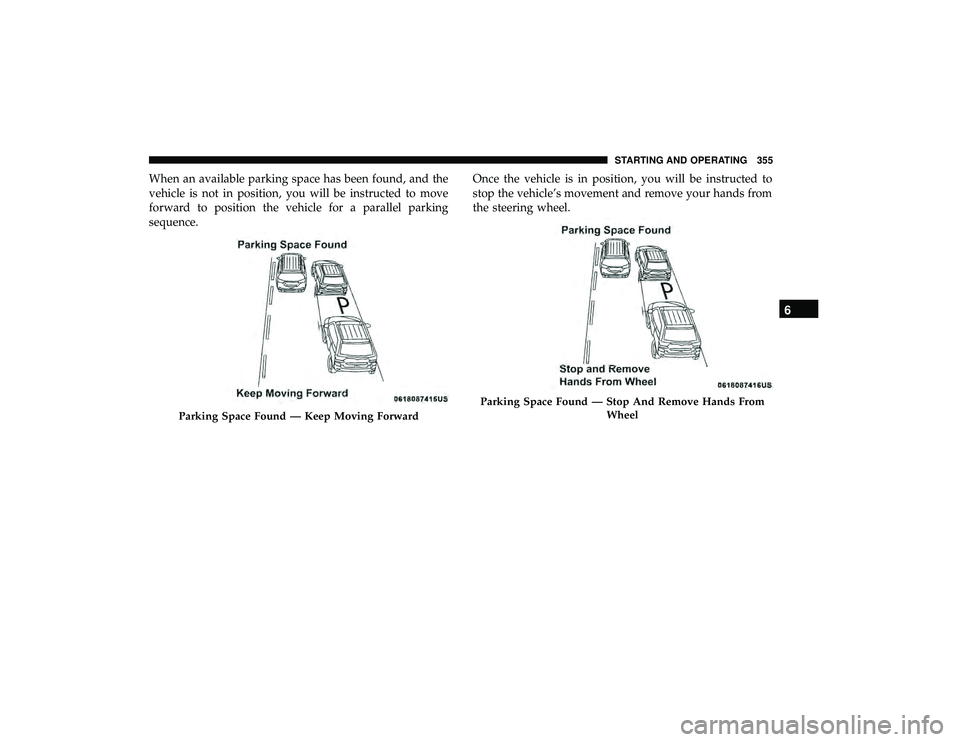
When an available parking space has been found, and the
vehicle is not in position, you will be instructed to move
forward to position the vehicle for a parallel parking
sequence.Once the vehicle is in position, you will be instructed to
stop the vehicle’s movement and remove your hands from
the steering wheel.
Parking Space Found — Keep Moving Forward
Parking Space Found — Stop And Remove Hands From
Wheel
6
STARTING AND OPERATING 355