ECO mode CHRYSLER PT CRUISER 2005 1.G Owner's Manual
[x] Cancel search | Manufacturer: CHRYSLER, Model Year: 2005, Model line: PT CRUISER, Model: CHRYSLER PT CRUISER 2005 1.GPages: 360, PDF Size: 11.21 MB
Page 164 of 360
FF/TUNE/RW
Press FF (Fast Forward) and the CD player will begin to
fast forward until FF is released. The RW ( Reverse)
button works in a similar manner.
Random Play—SET / RND
Press the RND button while the CD is playing to activate
Random Play. This feature plays the tracks on the disc in
random order to provide an interesting change of pace.
Press the SEEK button to move to the next randomly
selected track.
Press TUNE FF to fast forward through the tracks. Press
the FF button a second time to stop the fast forward
feature. If TUNE RW is pressed, the current track will
reverse to the beginning of the track and begin playing.
Press the SET / RND button a second time to stop
Random Play.
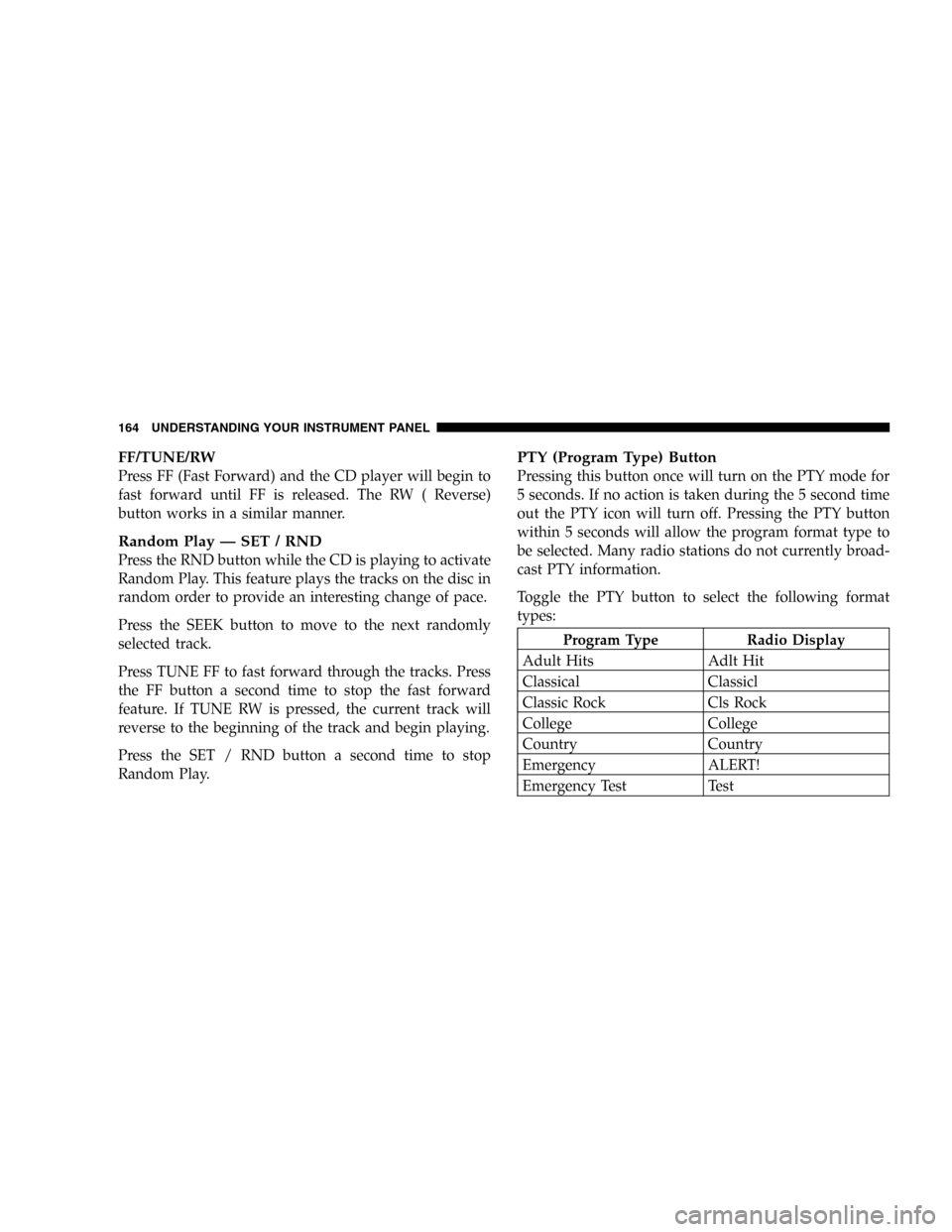
PTY (Program Type) Button
Pressing this button once will turn on the PTY mode for
5 seconds. If no action is taken during the 5 second time
out the PTY icon will turn off. Pressing the PTY button
within 5 seconds will allow the program format type to
be selected. Many radio stations do not currently broad-
cast PTY information.
Toggle the PTY button to select the following format
types:
Program Type Radio Display
Adult Hits Adlt Hit
Classical Classicl
Classic Rock Cls Rock
College College
Country Country
Emergency ALERT!
Emergency Test Test
164 UNDERSTANDING YOUR INSTRUMENT PANEL
Page 169 of 360

CLIMATE CONTROLS
Air Conditioning
The Air Conditioning System allows you to balance the
temperature, amount, and direction of air circulating
throughout the vehicle. The controls are located on the
instrument panel, above the radio.The air conditioning system of your vehicle contains
R-134a, a refrigerant that does not deplete the ozone layer
in the upper atmosphere.
The controls are as follows:
Fan and Air conditioning Control
Use this control to regulate
the amount of air forced
through the system in any
mode you select. The fan
speeds to the left of the OFF
position are for Air Condi-
tioning. Choosing one of
these speeds turns on the air
conditioning compressor. The
fan speed increases as you
move the control to the left from the OFF position.
NOTE:The air conditioning compressor will not engage
until the engine has been running for about 10 seconds.
UNDERSTANDING YOUR INSTRUMENT PANEL 169
4
Page 171 of 360

Mix
Air is directed through the floor, defrost and side
window demist outlets. This setting works best in
cold or snowy conditions that require extra heat at
the windshield. This setting is good for maintaining
comfort while reducing moisture on the windshield.
Defrost
Air is directed through the windshield and side
window demist outlets. Use this mode with maxi-
mum fan and temperature settings for best windshield
and side window defrosting.
NOTE:The air conditioning compressor operates in
both Mix and Defrost or a blend of these modes even if
the fan switch is not in the A/C position. This dehumidi-
fies the air to help dry the windshield. To improve fuel
economy, use these modes only when necessary.Air Outlets
The airflow from each of the instrument panel outlets can
be adjusted for direction and turned on or off to control
air flow.
A knob attached in the center of each instrument panel
outlet is used to adjust the airflow direction, and a knob
on the outer edge of each instrument panel outlet grille
opens or closes a shutter to turn airflow on or off through
that outlet.
NOTE:For maximum airflow to the rear seat passen-
gers, the center instrument panel outlets can be aimed, so
that the left center outlet is directed toward the right rear
passenger and the right center outlet is directed toward
the left rear passenger.
UNDERSTANDING YOUR INSTRUMENT PANEL 171
4
Page 172 of 360

Temperature Control
Use this control to regulate
the temperature of the air in-
side the passenger compart-
ment. The blue area of the
scale indicates cooler tem-
peratures while the red area
indicates warmer tempera-
tures.
NOTE:If your air conditioning performance seems
lower than expected, check the front of the A/C con-
denser: located in front of the radiator, for an accumula-
tion of dirt or insects. Clean with a gentle water spray
from behind the radiator and through the condenser.
Fabric front fascia protectors may reduce air flow to the
condenser, reducing air conditioning performance.
Circulation Control
Use this control to choose be-
tween outside air intake or
recirculation of the air inside
the vehicle. Only use the re-
circulate mode to temporarily
block out any outside odors,
smoke, or dust and to cool the
interior rapidly upon initial
start up in very hot or humid
weather.
This control only operates in the Outside Air and Recir-
culate modes; there is no in between position. Do not
place the control between these positions.
NOTE:Continuous use of the recirculate mode may
make the inside air stuffy and window fogging may
occur. Extended use of this mode is not recommended.
172 UNDERSTANDING YOUR INSTRUMENT PANEL
Page 187 of 360

Reset Mode
The transaxle is monitored electronically for abnormal
conditions. If a condition is detected that could cause
damage, the transaxle shifts automatically into second
gear. The transaxle remains in second gear despite the
forward gear selected. Park (P), Reverse (R), and Neutral
(N) will continue to operate. This second gear limp-in
feature allows the vehicle to be driven to a dealer for
service without damaging the transaxle.
In the event that the problem has been momentary, the
transaxle can be reset to regain all forward gears.
Stop the vehicle and shift into Park (P).
Turn the Key to OFF then restart the engine.
Shift into D and resume driving.NOTE:Even if the transaxle can be reset, it is recom-
mended that you visit a dealer at your earliest possible
convenience. Your dealer has diagnostic equipment to
determine if the problem could recur.
If the transaxle cannot be reset, dealer service is required.
Gear Ranges For Four Speed Automatic
Transaxle
DO NOT race the engine when shifting from PARK or
NEUTRAL positions into another gear range.
“P”Park
Supplements the parking brake by locking the transmis-
sion. The engine can be started in this range. Never use P
(Park) while the vehicle is in motion. Apply the parking
brake when leaving the vehicle in this range. Always
apply the parking brake first, and then place the selector
in P (Park) position.
STARTING AND OPERATING 187
5
Page 190 of 360

AUTOSTICK—IF EQUIPPED
Autostick is a driver-interactive transmission that offers
manual gear shifting capability to provide you with more
control. Autostick allows you to maximize engine brak-
ing, eliminate undesirable upshifts and downshifts, and
improve overall vehicle performance. This system can
also provide you with more control during passing, city
driving, cold slippery conditions, mountain driving,
trailer towing, and many other situations.
Autostick Operation
The Autostick position is just below the Overdrive posi-
tion and is identified by the word“AUTOSTICK”. When
you place the shift lever in the Autostick position, it can
be moved from side to side. Moving the lever to the left
(-) triggers a downshift and to the right (+) an upshift.
The gear position will be shown in the transmission gear
display, located in the instrument cluster.You can shift in or out of the autostick mode at any time
without taking your foot off the accelerator pedal. If you
choose the Overdrive mode, the transmission will oper-
ate automatically; shifting between the four available
gears. When you wish to engage autostick, simply move
the shift lever to the AUTOSTICK position. The transmis-
sion will remain in the current gear until an upshift or
downshift is chosen.
Move the lever back to the Overdrive position to shift out
of the Autostick mode.Autostick General Information
•
The transmission will automatically upshift from first
to second gear and from second to third gear when
engine speed reaches about 6300 RPM.
190 STARTING AND OPERATING
Page 191 of 360

•Downshifts from third to second gear above 74 mph
(119 km/h) and from second to first gear above 41
mph (66 km/h) will be ignored.
•You can start out in first, second, or third gear. Shifting
into fourth gear can occur only after vehicle speed
reaches 15 mph (24 km/h).
•The transmission will automatically downshift to first
gear when coming to a stop.
•Starting out in third gear is helpful in snowy or icy
conditions.
•While in the Autostick mode, Speed Control will only
function in third or fourth gear.
Downshifting out of third gear will turn off the speed
control.
•If the system detects powertrain overheating, the
transmission will revert to the automatic shift mode
and remain in that mode until the powertrain cools off.
•If the system detects a problem it will disable the
Autostick mode and the transmission will return to the
automatic mode until the problem is corrected.
MANUAL TRANSAXLE OPERATION
NOTE:The parking brake should be engaged and the
gear selector placed in REVERSE before leaving the
vehicle, especially on an incline.
STARTING AND OPERATING 191
5
Page 194 of 360
Recommended Shift Speeds
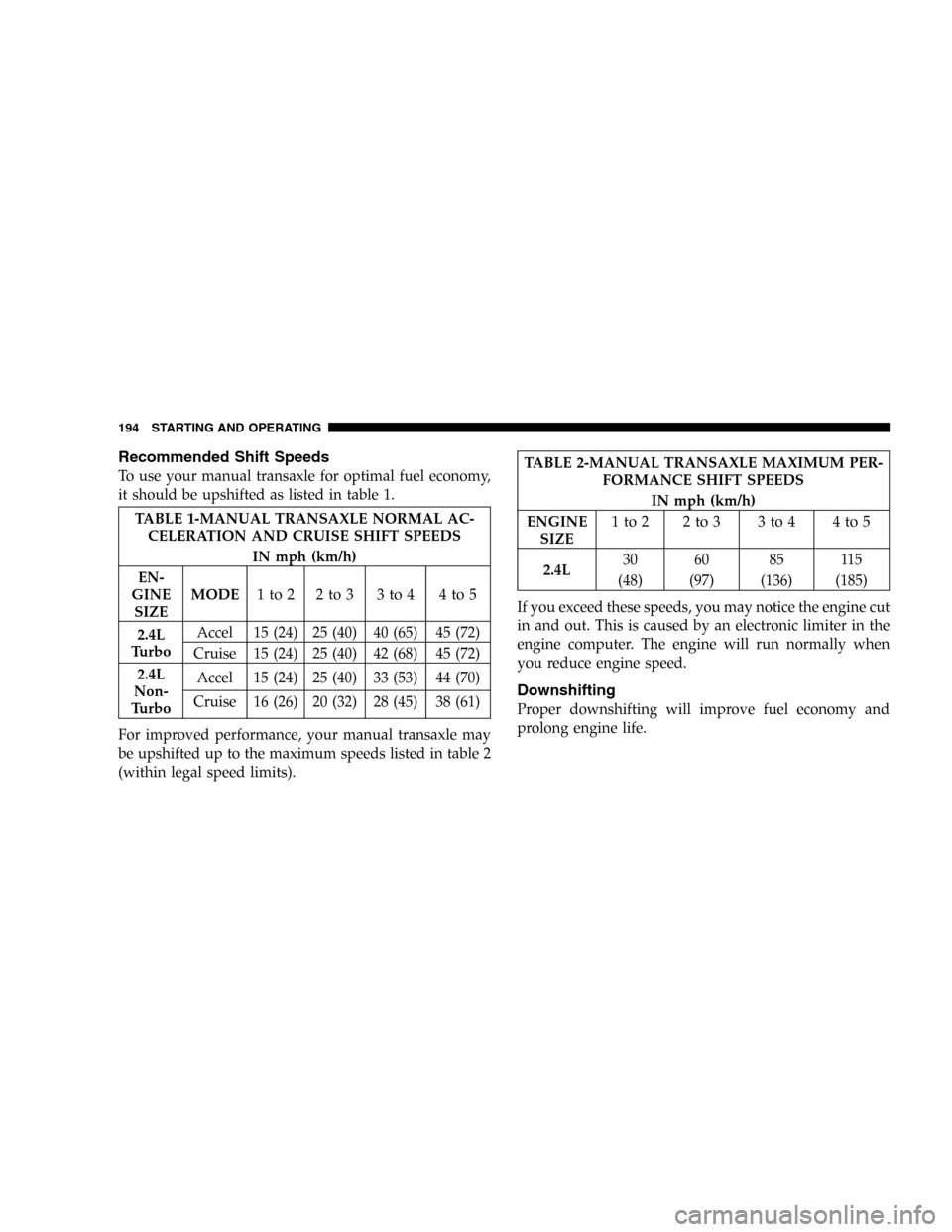
To use your manual transaxle for optimal fuel economy,
it should be upshifted as listed in table 1.
TABLE 1-MANUAL TRANSAXLE NORMAL AC-
CELERATION AND CRUISE SHIFT SPEEDS
IN mph (km/h)
EN-
GINE
SIZEMODE1to2 2to3 3to4 4to5
2.4L
TurboAccel 15 (24) 25 (40) 40 (65) 45 (72)
Cruise 15 (24) 25 (40) 42 (68) 45 (72)
2.4L
Non-
TurboAccel 15 (24) 25 (40) 33 (53) 44 (70)
Cruise 16 (26) 20 (32) 28 (45) 38 (61)
For improved performance, your manual transaxle may
be upshifted up to the maximum speeds listed in table 2
(within legal speed limits).
TABLE 2-MANUAL TRANSAXLE MAXIMUM PER-
FORMANCE SHIFT SPEEDS
IN mph (km/h)
ENGINE
SIZE1to2 2to3 3to4 4to5
2.4L30 60 85 115
(48) (97) (136) (185)
If you exceed these speeds, you may notice the engine cut
in and out. This is caused by an electronic limiter in the
engine computer. The engine will run normally when
you reduce engine speed.
Downshifting
Proper downshifting will improve fuel economy and
prolong engine life.
194 STARTING AND OPERATING
Page 201 of 360

The system is always in the“ON”mode unless:
•The TRAC OFF switch has been used to turn the
system off;
•There is a Anti-Lock Brake System malfunction;
•There is a Traction Control System malfunction;
•The system has been automatically deactivated to
prevent damage to the brake system due to overheated
brake temperatures.
NOTE:Extended heavy use of Traction Control may
cause the system to deactivate and turn on the TRAC
OFF Light located in the instrument cluster.
This is to prevent overheating of the brake system and is
a normal condition. The system will remain disabled for
about 4 minutes until the brakes have cooled. The system
will automatically reactivate and turn off the TRAC OFF
light.If your vehicle becomes stuck in mud, ice, or snow, turn
the Traction Control System Off before attempting to
“rock”the vehicle free.
TIRE SAFETY INFORMATION
Tire Markings
STARTING AND OPERATING 201
5
Page 229 of 360

•Whenever you pull a trailer, regardless of the trailer
size, stop lights and turn signals on the trailer are
recommended for motoring safety.
•The automatic transaxle fluid and filter should be
changed if you REGULARLY tow a trailer for more
than 45 minutes of continuous operation. See Schedule
“B”in section 8 of this manual for transaxle fluid
change intervals.
NOTE:Check the automatic transaxle fluid level before
towing.NOTE:For vehicles equipped with Autostick. By using
the Autostick modes, and selecting a specific gear range,
frequent shifting can be avoided. The highest gear range
should be selected that allows for adequate performance.
For example, choose“4”if the desired speed can be
maintained. Choose“3”or“2”if needed to maintain the
desired speed.
NOTE:Extended driving at high RPM should be
avoided to prevent excess heat generation. A reduction in
vehicle speed may be required to avoid extended driving
at high RPM. Return to a higher gear range or vehicle
speed when road conditions and RPM level allows.
STARTING AND OPERATING 229
5