light CHRYSLER PT CRUISER 2008 1.G Repair Manual
[x] Cancel search | Manufacturer: CHRYSLER, Model Year: 2008, Model line: PT CRUISER, Model: CHRYSLER PT CRUISER 2008 1.GPages: 491, PDF Size: 7.08 MB
Page 229 of 491
5. Tachometer
The white area of the scale shows the permissible engine
revolutions-per-minute (rpm x 1000) for each gear range.
Before reaching the red area, ease up on the accelerator to
prevent engine damage.
6. Transmission Range Indicator
This display indicator shows the automatic transmission
gear selection.
7. Tire Pressure Monitor LightEach tire, including the spare (if provided),
should be checked monthly when cold and
inflated to the inflation pressure recommended
by the vehicle manufacturer on the vehicle
placard or tire inflation pressure label. (If your vehicle
has tires of a different size than the size indicated on the
vehicle placard or tire inflation pressure label, you should
determine the proper tire inflation pressure for those
tires.) As an added safety feature, your vehicle has been
equipped with a Tire Pressure Monitoring System
(TPMS) that illuminates a low tire pressure telltale when
one or more of your tires is significantly under-inflated.
Accordingly, when the low tire pressure telltale illumi-
nates, you should stop and check your tires as soon as
possible, and inflate them to the proper pressure. Driving
on a significantly under-inflated tire causes the tire to
overheat and can lead to tire failure. Under-inflation also
reduces fuel efficiency and tire tread life, and may affect
the vehicle’s handling and stopping ability.
NOTE:
Please note that the TPMS is not a substitute for
proper tire maintenance, and it is the driver ’s responsi-
bility to maintain correct tire pressure, even if under-
inflation has not reached the level to trigger illumination
of the TPMS low tire pressure telltale.
UNDERSTANDING YOUR INSTRUMENT PANEL 227
4
Page 231 of 491
8. Odometer/Trip Odometer
A vacuum fluorescent display indicates the total distance
the vehicle has been driven. Also, the cluster will display,
replacing the odometer/trip odometer, vehicle warning
messages such as: door/deck/hatch/gate ajar and loose
gas cap. Loose gas cap will be displayed from the
Odometer/Trip Odometer on all models.
NOTE:If vehicle is equipped with the optional Elec-
tronic Vehicle Information Center (EVIC) in the instru-
ment cluster, all warnings including “door”, “dECK”,
“hATCh”, and “gATE” will only be displayed in the
EVIC display. For additional information, refer to “Elec-
tronic Vehicle Information Center — If Equipped” in
Section 3.
U.S. federal regulations require that upon transfer of
vehicle ownership, the seller certify to the purchaser the
correct mileage that the vehicle has been driven. There-
fore, if the odometer reading is changed during repair or replacement, be sure to keep a record of the reading
before and after the service so that the correct mileage can
be determined.
9. Cruise Indicator — If Equipped
This indicator shows that the Speed Control
System is ON.
NOTE: The word “SET” will notilluminate when the
Speed Control System is on.
10. Malfunction Indicator Light This light is part of an onboard diagnostic system
called OBD that monitors emissions, engine, and
automatic transmission control systems. The light
will illuminate when the key is in the ON/RUN position
before engine start. If the bulb does not come on when
turning the key from OFF to ON/RUN, have the condi-
tion checked promptly.
UNDERSTANDING YOUR INSTRUMENT PANEL 229
4
Page 232 of 491
Certain conditions such as a loose or missing gas cap,
poor fuel quality, etc. may illuminate the light after
engine start. The vehicle should be serviced if the light
stays on through several of your typical driving cycles. In
most situations the vehicle will drive normally and will
not require towing.
If the Malfunction Indicator Light flashes when the
engine is running, serious conditions may exist that
could lead to immediate loss of power or severe catalytic
converter damage. The vehicle should be serviced as
soon as possible if this occurs.
11. Odometer/Trip Odometer Reset Knob
Press this button to change the display from odometer to
either of the two trip odometer settings. Trip A or Trip B
will appear when in the trip odometer mode. Push in and
hold the button for two seconds to reset the trip odometer
to 0 miles or kilometers. The odometer must be in trip
mode to reset.12. Charging System Light
This light shows the status of the electrical charg-
ing system. The light should come on briefly when
the ignition switch is first turned ON and remain on
briefly as a bulb check. If the light stays on or comes on
while driving, it means that there is a problem with the
charging system. Obtain SERVICE IMMEDIATELY.
13. Turn Signal Indicators The arrows will flash in unison with the exterior
turn signal, when using the turn signal lever.
NOTE: Turn signal bulbs are located in the Instrument
Panel.230 UNDERSTANDING YOUR INSTRUMENT PANEL
Page 233 of 491
14. Electronic Stability Program (ESP) Indicator
Light/Traction Control System (TCS) Indicator Light —
If EquippedIf this indicator light flashes during accelera-
tion, apply as little throttle as possible. While
driving, ease up on the accelerator. Adapt your
speed and driving to the prevailing road con-
ditions, and do not switch off the ESP, or TCS — if
equipped.
15. Brake System Warning Light This light monitors various brake functions,
including brake fluid level and parking brake
application. If the brake light turns on, it may
indicate that the parking brake is applied, there
is a low brake fluid level or there is a problem with the
anti-lock brake system. The dual brake system provides a reserve braking capac-
ity in the event of a failure to a portion of the hydraulic
system. Failure of either half of the dual brake system is
indicated by the Brake Warning Light which will turn on
when the brake fluid level in the master cylinder has
dropped below a specified level.
The light will remain on until the cause is corrected.
NOTE:
The light may flash momentarily during sharp
cornering maneuvers which change fluid level condi-
tions. The vehicle should have service performed, and
the brake fluid level checked.
If brake failure is indicated, immediate repair is neces-
sary.
UNDERSTANDING YOUR INSTRUMENT PANEL 231
4
Page 234 of 491
WARNING!
Driving a vehicle with the brake light on is danger-
ous. Part of the brake system may have failed. It will
take longer to stop the vehicle. You could have an
accident. Have the vehicle checked immediately.
Vehicles equipped with Anti-Lock brakes (ABS), are also
equipped with Electronic Brake Force Distribution (EBD).
In the event of an EBD failure, the Brake Warning Light
will turn on along with the ABS Light. Immediate repair
to the ABS system is required.
The operation of the Brake Warning Light can be checked
by turning the ignition switch from the OFF position to
the ON position. The light should illuminate for approxi-
mately two seconds. The light should then turn off unless the parking brake is applied or a brake fault is detected.
If the light does not illuminate, have the light inspected
by an authorized dealer.
The light also will turn on when the parking brake is
applied with the ignition switch in the ON position.
NOTE:
This light shows only that the parking brake is
applied. It does not show the degree of brake application.
16. Seat Belt Reminder Light When the ignition switch is first turned ON, this
light will come on for about six seconds. A chime
will sound if you have not pulled the shoulder belt
out of the retractor. This is a reminder to “buckle up”. If
you do not buckle up, the light will remain on.
17. Engine Temperature Warning Light This light warns of an overheated engine condi-
tion. If the engine is critically hot, a warning chime232 UNDERSTANDING YOUR INSTRUMENT PANEL
Page 235 of 491
will sound 10 times. After the chime turns off, the engine
will still be critically hot until the light goes out.
18. Low Fuel LightWhen the fuel level drops to 2 gallons, the fuel
symbol will light and a single chime will sound.
19. Theft Alarm Light — If Equipped
This light will flash rapidly for several seconds when the
alarm system is arming. The light will begin to flash
slowly indicating that the system is armed.
20. Front Fog Light Indicator — If Equipped This light shows when the front fog lights are ON.
21. Anti-Lock Warning Light (ABS) — If Equipped This light monitors the Anti-Lock Brake System
(ABS) described elsewhere in this manual. This light will come on when the ignition key is turned to the
ON position and may stay on for as long as four seconds.
If the ABS light remains on or comes on during driving,
it indicates that the Anti-Lock portion of the brake system
is not functioning and that service is required, however,
the conventional brake system will continue to operate
normally provided that the BRAKE warning light is not
on.
If the ABS light is on, the brake system should be serviced
as soon as possible to restore the benefit of Anti-Lock
Brakes.
The warning light should be checked frequently to assure
that it is operating properly. Turn the ignition key to the
on position, but do not start the vehicle. The light should
come on. If the light does not come on, have the system
checked by an authorized dealer.
UNDERSTANDING YOUR INSTRUMENT PANEL 233
4
Page 236 of 491
22. Oil Pressure LightShows low engine oil pressure. The light will come
on and remain on when the ignition switch is
turned from the OFF to the ON position, and the light
will turn off after the engine is started. If the bulb does
not come on during starting, have the system checked by
an authorized dealer.
If the light comes on and remains on while driving, stop
the vehicle and shut off the engine. DO NOT OPERATE
THE VEHICLE UNTIL THE CAUSE IS CORRECTED.
The light does not show the quantity of oil in the engine.
This can be determined using the procedure shown in
Section 7.
23. Airbag Light The light comes on and remains on for 6 to 8
seconds as a bulb check when the ignition
switch is first turned ON. If the light does not come on during starting, stays on, or comes on while
driving, have the system checked by an authorized
dealer.
24. High Beam Indicator
This light shows that the headlights are on high
beam. Pull the turn signal lever toward the steer-
ing wheel to switch the headlights from high or low
beam.
25. Compass Mini-Trip Computer (CMTC) or Electronic
Vehicle Information Center (EVIC) Button—If Equipped
Pushing this button will switch between the different
EVIC functions.
Press the CMTC reset button to scroll through sub menus
(i.e. Trip Functions: AVG. Fuel Economy, DTE, Elapsed
Time, and Units.234 UNDERSTANDING YOUR INSTRUMENT PANEL
Page 247 of 491
Auto Unlock On ExitWhen ON is selected all the vehicle’s doors will unlock
when the driver’s door is opened if the vehicle is stopped
(manual transmissions) or the vehicle is stopped and the
transmission is in PARK or NEUTRAL position (auto-
matic transmissions). Press and hold the EVIC button
when in this display until ON or OFF appears to make
your selection.Remote Unlock Driver’s Door 1stWhenDRIVER’S DOOR 1st is selected only the driver’s
door will unlock on the first press of the remote keyless
entry unlock button and require a second press to unlock
the remaining locked doors. When REMOTE UNLOCK
ALL DOORS is selected all of the doors will unlock at
the first press of the remote keyless entry unlock button.
Press and hold the EVIC button when in this display until
DRIVER’S DOOR 1st or ALL DOORS appears to make
your selection.
Sound Horn with Remote Key LockWhen ON is selected a short horn sound will occur when
the remote keyless entry LOCK button is pressed. This
feature may be selected with or without the flash lights
on LOCK/UNLOCK feature. Press and hold the EVIC
button when in this display until ON or OFF appears to
make your selection.Flash Lights with Remote Key LockWhen ON is selected, the front and rear turn signals will
flash when the doors are locked or unlocked using the
remote keyless entry transmitter. This feature may be
selected with or without the sound horn on lock feature
selected. Press and hold the EVIC button when in this
display until ON or OFF appears to make your selection.Delay Turning Headlamps OffWhen this feature is selected the driver can choose to
have the headlamps remain on for 0, 30, 60, or 90 seconds
UNDERSTANDING YOUR INSTRUMENT PANEL 245
4
Page 248 of 491
when exiting the vehicle. Press and hold the EVIC button
when in this display until 0, 30, 60, or 90 appears to make
your selection.Headlamps On With Wipers (Available with Auto
Headlights Only)When ON is selected and the headlight switch is in the
AUTO position, the headlights will turn on approxi-
mately 10 seconds after the wipers are turned on. The
headlights will also turn off when the wipers are turned
off if they were turned on by this feature. Press and hold
the EVIC button when in this display until ON or OFF
appears to make your selection.
NOTE:Turning the headlights on during the daytime
causes the instrument panel lights to dim. To increase the
brightness, refer to “Lights” in this section.Delay Power Off to Accessories Until ExitWhen this feature is selected, the power window
switches, radio, hands–free system, DVD video system, power sunroof, and power outlets will remain active for
up to 60 minutes after the ignition switch has been turned
off. Opening a vehicle door will cancel this feature. Press
and hold the EVIC button when in this display until
“Off”, “45 sec.”, “5 min.”, or “10 min.” appears to make
your selection.
Turn Headlamps on with Remote Key UnlockWhen this feature is selected the headlamps will activate
and remain on for up to 90 seconds when the doors are
unlocked using the remote keyless entry transmitter.
Press and hold the EVIC button when in this display until
“OFF”, “30 sec.”, “60 sec.”, or “90 sec.” appears to make
your selection.Confirmation of Voice Commands — If EquippedWhen ON is selected all voice commands from the
U-Connect™ system are confirmed. Press and hold the
EVIC button when in this display until ON or OFF
appears to make your selection.
246 UNDERSTANDING YOUR INSTRUMENT PANEL
Page 253 of 491
Electrical DisturbancesRadio waves may pick up electrical disturbances during
transmission. They mainly affect the wave amplitude, and
thus remain a part of the AM reception. They interfere very
little with the frequency variations that carry the FM signal.AM ReceptionAM sound is based on wave amplitude, so AM reception can
be disrupted by such things as lightning, power lines and
neon signs.FM ReceptionBecause FM transmission is based on frequency variations,
interference that consists of amplitude variations can be
filtered out, leaving the reception relatively clear, which is the
major feature of FM radio.NOTE:
The radio, steering wheel radio controls (if
equipped), and six-disc CD/DVD changer (if equipped)
will remain active for up to 10 minutes after the ignition
switch has been turned OFF. Opening a vehicle front door
will cancel this feature.
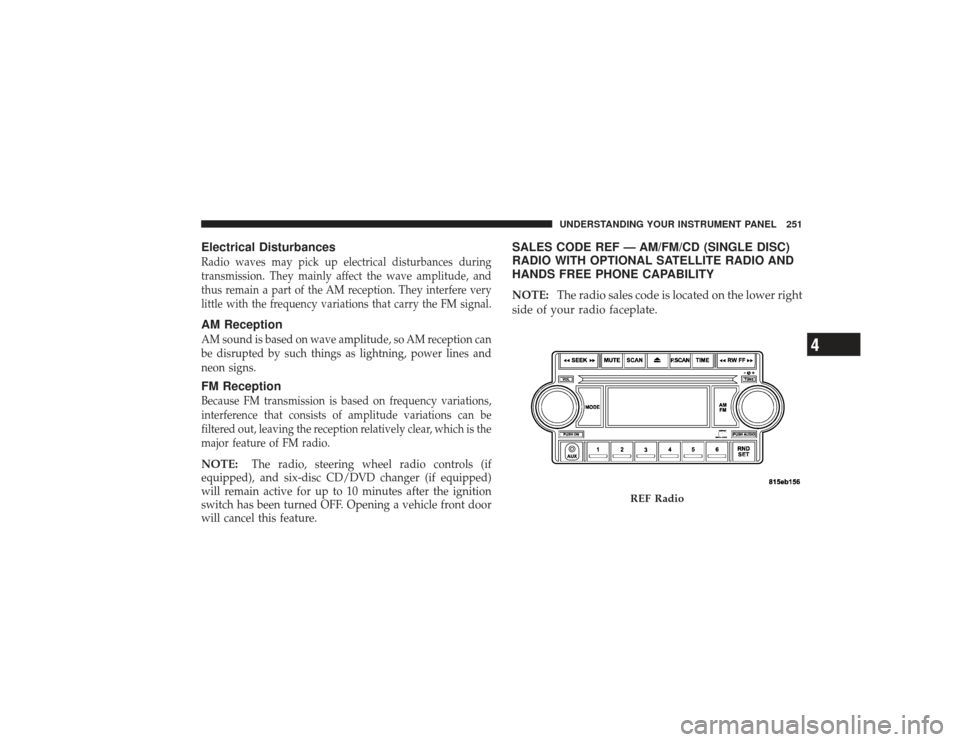
SALES CODE REF — AM/FM/CD (SINGLE DISC)
RADIO WITH OPTIONAL SATELLITE RADIO AND
HANDS FREE PHONE CAPABILITYNOTE: The radio sales code is located on the lower right
side of your radio faceplate.
REF Radio
UNDERSTANDING YOUR INSTRUMENT PANEL 251
4