start stop button CHRYSLER PT CRUISER 2008 1.G Owners Manual
[x] Cancel search | Manufacturer: CHRYSLER, Model Year: 2008, Model line: PT CRUISER, Model: CHRYSLER PT CRUISER 2008 1.GPages: 491, PDF Size: 7.08 MB
Page 52 of 491
WARNING!
•A lap belt worn too high can increase the risk of
internal injury in a collision. The belt forces won’t be
at the strong hip and pelvic bones, but across your
abdomen. Always wear the lap belt as low as pos-
sible and keep it snug.
• A twisted belt can’t do its job as well. In a collision
it could even cut into you. Be sure the belt is straight.
If you can’t straighten a belt in your vehicle, take it to
your dealer and have it fixed.
5. Position the shoulder belt on your chest so that it is
comfortable and not resting on your neck. The retractor
will withdraw any slack in the belt.
WARNING!
• A belt that is buckled into the wrong buckle will
not protect you properly. The lap portion could ride
too high on your body, possibly causing internal
injuries. Always buckle your belt into the buckle
nearest you.
• A belt that is too loose will not protect you as well.
In a sudden stop you could move too far forward,
increasing the possibility of injury. Wear your seat
belt snugly.
6. To release the belt, push the red button on the buckle.
The belt will automatically retract to its stowed position.
If necessary, slide the latch plate down the webbing to
allow the belt to retract fully.
50 THINGS TO KNOW BEFORE STARTING YOUR VEHICLE
Page 78 of 491
If the seat belt has a switchable retractor, please refer to
Automatic-Locking Retractor (ALR) in this section.•
In the rear seat, you may have trouble tightening the
lap/shoulder belt on the child restraint because the
buckle or latch plate is too close to the belt path
opening on the restraint. Disconnect the latch plate
from the buckle and twist the short buckle end of the
belt several times to shorten it. Insert the latch plate
into the buckle with the release button facing out.
•
If the belt still can’t be tightened, or if by pulling and
pushing on the restraint loosens the belt, disconnect
the latch plate from the buckle, turn the latch plate
around, and insert the latch plate into the buckle
again. If you still can’t make the child restraint secure,
try a different seating position.
•
Buckle the child into the seat according to the child
restraint manufacturer’s directions.
•
When your child restraint is not in use, secure it in the
vehicle with the seat belt or remove it from the vehicle.
Don’t leave it loose in the vehicle. In a sudden stop or
collision, it could strike the occupants or seat backs
and cause serious personal injury.
Automatic-Locking Retractor (ALR)To operate the switchable retractor, pull the belt from the
retractor until there is enough to allow you to pass
through the child restraint and slide the latch plate into
the buckle. Then pull on the belt until it is all removed
from the retractor. Allow the belt to return into the
retractor, pulling on the excess webbing to tighten the lap
portion about the child restraint. Follow the instructions
of the child restraint manufacture.
NOTE:To reset this feature you must let all of the belt
webbing return into the retractor. You will not be able to
pull out more webbing until all of the webbing has been
returned back into the retractor.
76 THINGS TO KNOW BEFORE STARTING YOUR VEHICLE
Page 236 of 491
22. Oil Pressure LightShows low engine oil pressure. The light will come
on and remain on when the ignition switch is
turned from the OFF to the ON position, and the light
will turn off after the engine is started. If the bulb does
not come on during starting, have the system checked by
an authorized dealer.
If the light comes on and remains on while driving, stop
the vehicle and shut off the engine. DO NOT OPERATE
THE VEHICLE UNTIL THE CAUSE IS CORRECTED.
The light does not show the quantity of oil in the engine.
This can be determined using the procedure shown in
Section 7.
23. Airbag Light The light comes on and remains on for 6 to 8
seconds as a bulb check when the ignition
switch is first turned ON. If the light does not come on during starting, stays on, or comes on while
driving, have the system checked by an authorized
dealer.
24. High Beam Indicator
This light shows that the headlights are on high
beam. Pull the turn signal lever toward the steer-
ing wheel to switch the headlights from high or low
beam.
25. Compass Mini-Trip Computer (CMTC) or Electronic
Vehicle Information Center (EVIC) Button—If Equipped
Pushing this button will switch between the different
EVIC functions.
Press the CMTC reset button to scroll through sub menus
(i.e. Trip Functions: AVG. Fuel Economy, DTE, Elapsed
Time, and Units.234 UNDERSTANDING YOUR INSTRUMENT PANEL
Page 246 of 491
Elapsed TimeShows the total elapsed time of travel since the last reset
when the ignition switch is in the ACC position. Elapsed
time will increment when the ignition switch is in the ON
or START position.Tire Pressure Monitor (TPM)Refer to Section 5, “Tire Pressure Monitoring System
(TPMS) for system operation.Personal Settings (Customer Programmable
Features)This allows the driver to set and recall features when the
transmission is in PARK (automatic transmission) or the
vehicle is stopped (manual transmissions).
Press and release the EVIC button until Personal Settings
is displayed in the EVIC.Use the EVIC button to display one of the following
choices:
LanguageWhen in this display you may select different languages
for all display nomenclature, including the trip functions.
Pressing the EVIC button while in this display selects
English, Espanol, Deutsch, Italiano, or Francais depend-
ing on availability. As you continue the displayed infor-
mation will be shown in the selected language.
NOTE:
UConnect™ language will not change using the
EVIC. Please refer to “Language Selection” in the
HANDS–FREE COMMUNICATION (UConnect™) — IF
EQUIPPED section of this manual for details.Lock Doors Automatically at 15 MPH (24 Km/h)When ON is selected all doors lock automatically when
the speed of the vehicle reaches 15 mph (24 km/h). Press
and hold the EVIC button when in this display until ON
or OFF appears to make your selection.
244 UNDERSTANDING YOUR INSTRUMENT PANEL
Page 296 of 491
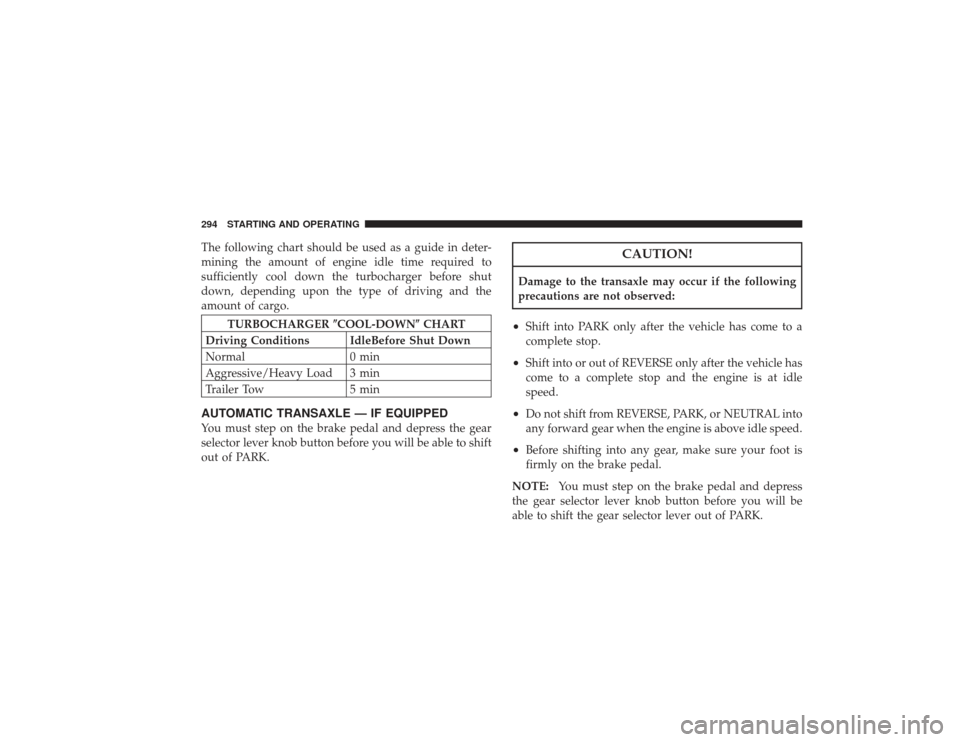
The following chart should be used as a guide in deter-
mining the amount of engine idle time required to
sufficiently cool down the turbocharger before shut
down, depending upon the type of driving and the
amount of cargo.
TURBOCHARGER COOL-DOWN CHART
Driving Conditions IdleBefore Shut Down
Normal 0 min
Aggressive/Heavy Load 3 min
Trailer Tow 5 min
AUTOMATIC TRANSAXLE — IF EQUIPPEDYou must step on the brake pedal and depress the gear
selector lever knob button before you will be able to shift
out of PARK.
CAUTION!
Damage to the transaxle may occur if the following
precautions are not observed:•
Shift into PARK only after the vehicle has come to a
complete stop.
•
Shift into or out of REVERSE only after the vehicle has
come to a complete stop and the engine is at idle
speed.
•
Do not shift from REVERSE, PARK, or NEUTRAL into
any forward gear when the engine is above idle speed.
•
Before shifting into any gear, make sure your foot is
firmly on the brake pedal.
NOTE: You must step on the brake pedal and depress
the gear selector lever knob button before you will be
able to shift the gear selector lever out of PARK.
294 STARTING AND OPERATING
Page 300 of 491
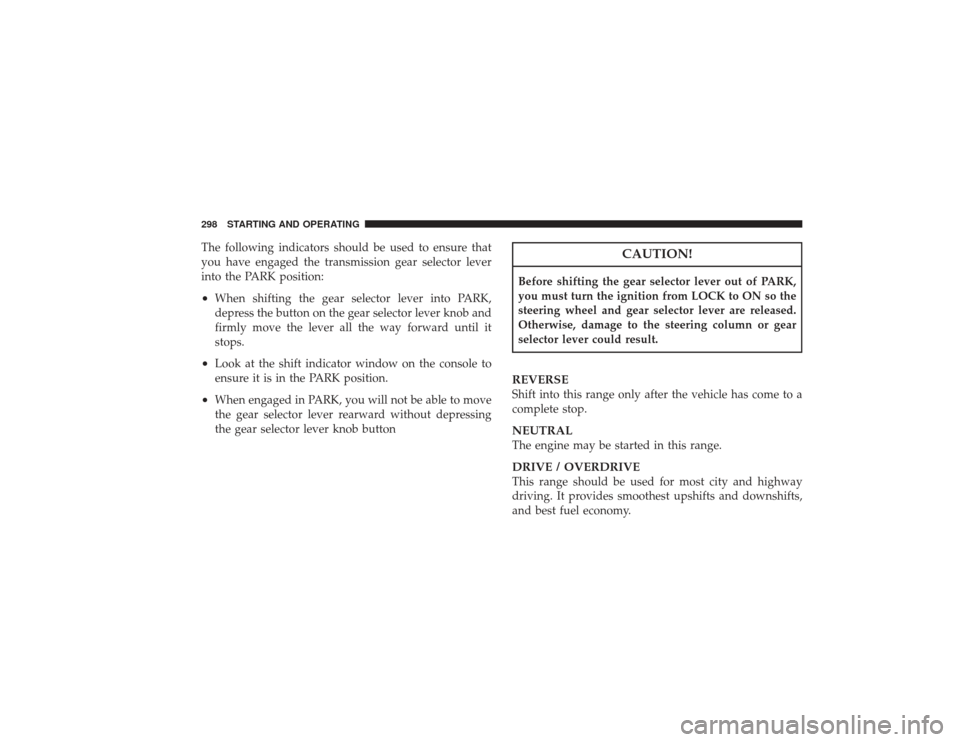
The following indicators should be used to ensure that
you have engaged the transmission gear selector lever
into the PARK position:•
When shifting the gear selector lever into PARK,
depress the button on the gear selector lever knob and
firmly move the lever all the way forward until it
stops.
•
Look at the shift indicator window on the console to
ensure it is in the PARK position.
•
When engaged in PARK, you will not be able to move
the gear selector lever rearward without depressing
the gear selector lever knob button
CAUTION!
Before shifting the gear selector lever out of PARK,
you must turn the ignition from LOCK to ON so the
steering wheel and gear selector lever are released.
Otherwise, damage to the steering column or gear
selector lever could result.REVERSEShift into this range only after the vehicle has come to a
complete stop.NEUTRALThe engine may be started in this range.DRIVE / OVERDRIVEThis range should be used for most city and highway
driving. It provides smoothest upshifts and downshifts,
and best fuel economy.
298 STARTING AND OPERATING
Page 307 of 491
To maintain a safe speed and prolong brake life, shift
down to SECOND or FIRST gear when descending a
steep grade.
When turning a corner, or driving up a steep grade,
downshift early so that the engine will not be overbur-
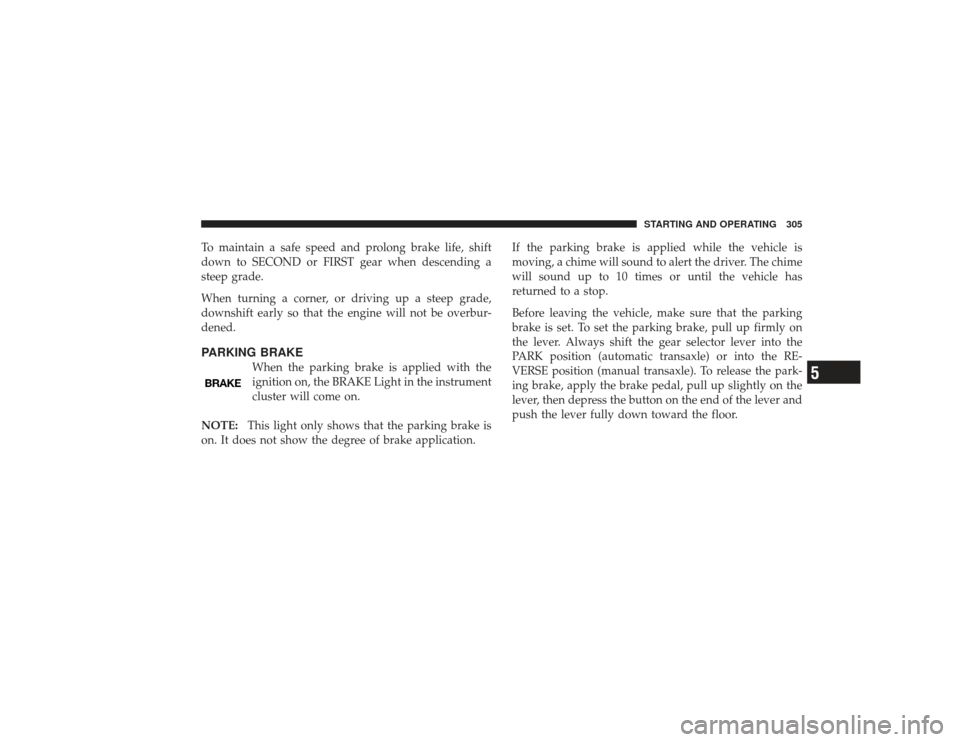
dened.PARKING BRAKE
When the parking brake is applied with the
ignition on, the BRAKE Light in the instrument
cluster will come on.
NOTE: This light only shows that the parking brake is
on. It does not show the degree of brake application. If the parking brake is applied while the vehicle is
moving, a chime will sound to alert the driver. The chime
will sound up to 10 times or until the vehicle has
returned to a stop.
Before leaving the vehicle, make sure that the parking
brake is set. To set the parking brake, pull up firmly on
the lever. Always shift the gear selector lever into the
PARK position (automatic transaxle) or into the RE-
VERSE position (manual transaxle). To release the park-
ing brake, apply the brake pedal, pull up slightly on the
lever, then depress the button on the end of the lever and
push the lever fully down toward the floor.
STARTING AND OPERATING 305
5