brake CHRYSLER PT CRUISER 2010 1.G Owner's Manual
[x] Cancel search | Manufacturer: CHRYSLER, Model Year: 2010, Model line: PT CRUISER, Model: CHRYSLER PT CRUISER 2010 1.GPages: 368, PDF Size: 5.61 MB
Page 208 of 368
If necessary, add fluid to restore to the proper indicated
level. With a clean cloth, wipe any spilled fluid from all
surfaces. Refer to “Fluids, Lubricants, and Genuine
Parts” in “Maintaining Your Vehicle” for further
information.
PARKING BRAKE
Before leaving the vehicle, make sure that the parking
brake is fully applied. Also, be certain to leave the
transmission in PARK.
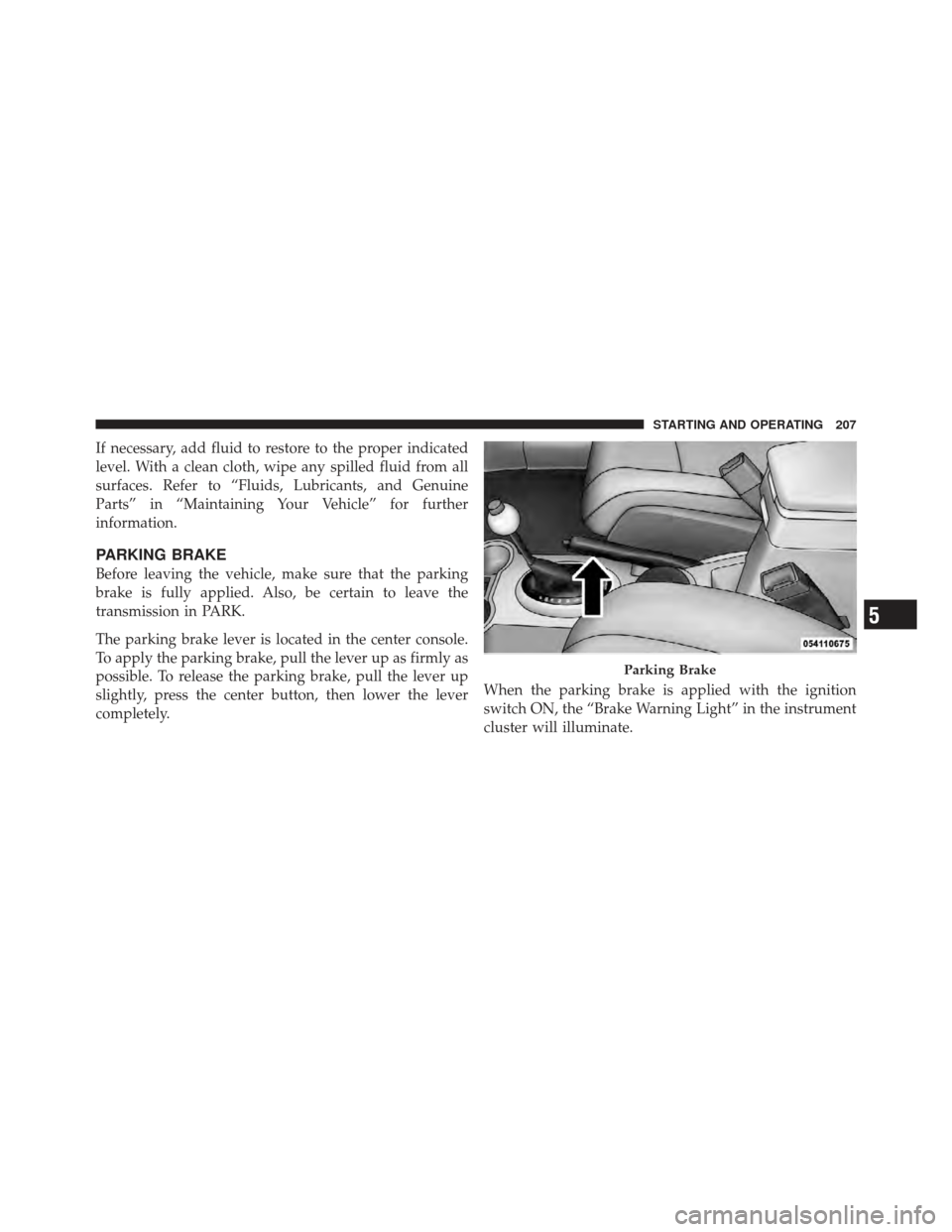
The parking brake lever is located in the center console.
To apply the parking brake, pull the lever up as firmly as
possible. To release the parking brake, pull the lever up
slightly, press the center button, then lower the lever
completely.When the parking brake is applied with the ignition
switch ON, the “Brake Warning Light” in the instrument
cluster will illuminate.
Parking Brake
5
STARTING AND OPERATING 207
Page 209 of 368
NOTE:
•When the parking brake is applied and the transmis-
sion is placed in gear, the “Brake Warning Light” will
flash. If vehicle speed is detected, a chime will sound
to alert the driver. Fully release the parking brake
before attempting to move the vehicle.
•This light only shows that the parking brake is ap-
plied. It does not show the degree of brake application.
When parking on a hill, it is important to turn the front
wheels toward the curb on a downhill grade and away
from the curb on an uphill grade. Apply the parking
brake before placing the shift lever in PARK, otherwise
the load on the transmission locking mechanism may
make it difficult to move the shift lever out of PARK. The
parking brake should always be applied whenever the
driver is not in the vehicle.
WARNING!
•Never use the PARK position as a substitute for
the parking brake. Always apply the parking
brake fully when parked to guard against vehicle
movement and possible injury or damage.
•Never leave children alone in a vehicle. Leaving
unattended children in a vehicle is dangerous for a
number of reasons. A child or others could be
seriously or fatally injured.
•Do not leave the key in the ignition. A child could
operate power windows, other controls, or move
the vehicle.
•Be sure the parking brake is fully disengaged
before driving; failure to do so can lead to brake
failure and an accident. (Continued)
208 STARTING AND OPERATING
Page 210 of 368
WARNING! (Continued)
•Always fully apply the parking brake when leav-
ing your vehicle or it may roll and cause damage or
injury. Also, be certain to leave the transmission in
PARK. Failure to do so may cause the vehicle to
roll and cause damage or injury.
CAUTION!
If the “Brake Warning Light” remains on with the
parking brake released, a brake system malfunction
is indicated. Have the brake system serviced by an
authorized dealer immediately.
BRAKE SYSTEM
Your vehicle is equipped with power-assisted brakes as
standard equipment. In the event power-assist is lost for
any reason (for example, repeated brake applicationswith the engine off), the brakes will still function. How-
ever, the effort required to brake the vehicle will be much
greater than that required with the power system oper-
ating.
WARNING!
Riding the brakes can lead to brake failure and
possibly an accident. Driving with your foot resting
or riding on the brake pedal can result in abnormally
high brake temperatures, excessive lining wear, and
possible brake damage. You would not have your full
braking capacity in an emergency.
If either of the two hydraulic systems lose normal capa-
bility, the remaining system will still function with some
loss of overall braking effectiveness. This will be evident
by increased pedal travel during application and greater
pedal force required to slow or stop. In addition, if the
5
STARTING AND OPERATING 209
Page 211 of 368
malfunction is caused by an internal leak, as the brake
fluid in the master cylinder drops, the “Brake Warning
Light” will illuminate.
WARNING!
Driving a vehicle with the brake light on is danger-
ous. A significant decrease in braking performance or
vehicle stability during braking may occur. It will
take you longer to stop the vehicle or will make your
vehicle harder to control. You could have an accident.
Have the vehicle checked immediately.
Anti-Lock Brake System (ABS) — If Equipped
The ABS provides increased vehicle stability and brake
performance under most braking conditions. The system
automatically “pumps” the brakes during severe braking
conditions to prevent wheel lock-up.
WARNING!
•Pumping of the ABS will diminish their effective-
ness and may lead to an accident. Pumping makes
the stopping distance longer. Just press firmly on
your brake pedal when you need to slow down or
stop.
•The ABS cannot prevent the natural laws of phys-
ics from acting on the vehicle, nor can it increase
braking or steering efficiency beyond that af-
forded by the condition of the vehicle brakes and
tires or the traction afforded.
•The ABS cannot prevent accidents, including
those resulting from excessive speed in turns,
following another vehicle too closely, or hydro-
planing. Only a safe, attentive, and skillful driver
can prevent accidents.(Continued)
210 STARTING AND OPERATING
Page 212 of 368
WARNING! (Continued)
•The capabilities of an ABS-equipped vehicle must
never be exploited in a reckless or dangerous
manner that could jeopardize the user’s safety or
the safety of others.The ABS Telltale Light monitors the Anti-Lock
Brake System. The light will come on when the
ignition switch is turned to the ON position
and may stay on for as long as four seconds.
If the ABS light remains on or comes on while driving, it
indicates that the anti-lock portion of the brake system is
not functioning and that service is required. However,
the conventional brake system will continue to operate
normally if the “Brake Warning Light” is not on.
If the ABS light is on, the brake system should be serviced
as soon as possible to restore the benefits of anti-lock brakes. If the ABS light does not come on when the
ignition switch is turned to the ON position, have the
bulb repaired as soon as possible.
If both the “Brake Warning Light” and the “ABS Light”
remain on, the Anti-Lock Brake (ABS) and Electronic
Brake Force Distribution (EBD) Systems are not function-
ing properly. Immediate repair to the ABS system at an
authorized dealer is required.
When the vehicle is driven over 7 mph (11 km/h), you
may also hear a slight clicking sound as well as some
related motor noises. These noises are the system per-
forming its self-check cycle to ensure that the ABS system
is working properly. This self-check occurs each time the
vehicle is started and accelerated past 7 mph (11 km/h).
ABS is activated during braking under certain road or
stopping conditions. ABS-inducing conditions can in-
clude ice, snow, gravel, bumps, railroad tracks, loose
debris, or panic stops.
5
STARTING AND OPERATING 211
Page 213 of 368
You also may experience the following when the brake
system goes into anti-lock:
•The ABS motor running (it may continue to run for a
short time after the stop),
•A clicking sound of solenoid valves,
•Brake pedal pulsations,
•A slight drop or fall away of the brake pedal at the end
of the stop.
These are all normal characteristics of ABS.
WARNING!
The ABS contains sophisticated electronic equip-
ment that may be susceptible to interference caused
by improperly-installed or high-output radio trans-
mitting equipment. This interference can cause pos-
sible loss of anti-lock braking capability. Installation
of such equipment should be performed by qualified
dealership professionals.
All vehicle wheels and tires must be the same size and
type and tires must be properly inflated to produce
accurate signals for the computer.
TRACTION CONTROL SYSTEM — IF EQUIPPED
The Traction Control System (TCS) will improve accel-
eration and steering on slippery surfaces by reducing tire
spin. The system reduces wheel slip and maintains
traction at the driving (front) wheels by engaging the
brake on the wheel that is losing traction. When this
212 STARTING AND OPERATING
Page 214 of 368

occurs the “TCS Indicator Light” located above the
instrument cluster odometer will flash. The system oper-
ates at speeds below 35 mph (56 km/h).
A pushbutton at the center of the instrument panel,
below the radio, turns the Traction Control System ON or
OFF.
The system is always in the “ON” mode unless:
•The TCS OFF switch has been used to turn the system
off;
•There is a Anti-Lock Brake System malfunction;
•There is a Traction Control System malfunction;
•The system has been automatically deactivated to
prevent damage to the brake system due to overheated
brake temperatures.
NOTE: Extended heavy use of Traction Control may
cause the system to deactivate and turn on the “TCS
Indicator Light” located in the instrument cluster.
This is to prevent overheating of the brake system and is
a normal condition. The system will remain disabled for
about four minutes until the brakes have cooled. The
system will automatically reactivate and turn off the
“TCS Indicator Light.”
If your vehicle becomes stuck in mud, ice, or snow, turn
the Traction Control System off before attempting to
“rock” the vehicle free.
TCS OFF Switch5
STARTING AND OPERATING 213
Page 246 of 368
Curb Weight
The curb weight of a vehicle is defined as the total weight
of the vehicle with all fluids, including vehicle fuel, at full
capacity conditions, and with no occupants or cargo
loaded into the vehicle. The front and rear curb weight
values are determined by weighing your vehicle on a
commercial scale before any occupants or cargo are
added.
Overloading
The load carrying components (springs, tires, wheels,
etc.) of your vehicle will provide satisfactory service as
long as you do not exceed the GVWR.
The best way to figure out the total weight of your
vehicle is to weigh it when it is fully loaded and ready for
operation. Weigh it on a commercial scale to ensure that
it is not over the GVWR.Overloading can cause potential safety hazards and
shorten useful service life. Heavier suspension compo-
nents do not necessarily increase the vehicle’s GVWR.
Loading
To load your vehicle properly, first figure out its empty
weight. Store heavier items down low and be sure you
distribute their weight as evenly as possible. Stow all
loose items securely before driving. Improper weight
distribution can have an adverse effect on the way your
vehicle steers and handles, and the way the brakes
operate.
CAUTION!
Do not load your vehicle any heavier than the
GVWR. If you do, parts on your vehicle can break, or
it can change the way your vehicle handles. This
could cause you to lose control. Also, overloading can
shorten the life of your vehicle.
5
STARTING AND OPERATING 245
Page 249 of 368
Weight-Distributing Hitch
A weight-distributing hitch system works by applying
leverage through spring (load) bars. They are typically
used for heavier loads, to distribute trailer tongue weight
to the tow vehicle’s front axle and the trailer axle(s).
When used in accordance with the manufacturer’s direc-
tions, it provides for a more level ride, offering more
consistent steering and brake control thereby enhancing
towing safety. The addition of a friction/hydraulic sway
control also dampens sway caused by traffic and cross-
winds and contributes positively to tow vehicle and
trailer stability. Trailer sway control and a weight-
distributing (load equalizing) hitch are recommended for
heavier tongue weights (TW) and may be required de-
pending on Vehicle and Trailer configuration/loading to
comply with gross axle weight rating GAWR require-
ments.WARNING!
An improperly adjusted Weight-Distributing Hitch
system may reduce handling, stability, braking per-
formance, and could result in an accident.
Weight-Distributing Systems may not be compatible with
surge brake couplers. Consult with your hitch and trailer
manufacturer or a reputable recreational vehicle dealer
for additional information.
Trailer Hitch Classification
Your vehicle may be factory equipped for safe towing of
trailers weighing over 1,000 lbs (454 kg) with the optional
Trailer Tow Prep Package. See your authorized dealer
service center for package content.
248 STARTING AND OPERATING
Page 253 of 368
CAUTION!
•Do not tow a trailer at all during the first 500 miles
(805 km) the new vehicle is driven. The engine,
axle or other parts could be damaged.
•Then, during the first 500 miles (805 km) that a
trailer is towed, do not drive over 50 mph
(80 km/h) and do not make starts at full throttle.
This helps the engine and other parts of the
vehicle wear in at the heavier loads.
Perform the maintenance listed in the “Maintenance
Schedule.” When towing a trailer, never exceed the
GAWR, or GCWR ratings. Refer to “Maintenance Sched-
ule” for further information.
WARNING!
•Improper towing can lead to an injury accident.
•Make certain that the load is secured in the trailer
and will not shift during travel. When trailering
cargo that is not fully secured, dynamic load shifts
can occur that may be difficult for the driver to
control. You could lose control of your vehicle and
have an accident.
•When hauling cargo or towing a trailer, do not over-
load your vehicle or trailer. Overloading can cause a
loss of control, poor performance or damage to brakes,
axle, engine, transmission, steering, suspension, chas-
sis structure or tires.
•Safety chains must always be used between your
vehicle and trailer. Always connect the chains to the
252 STARTING AND OPERATING