ESP CHRYSLER PT CRUISER 2010 1.G Owners Manual
[x] Cancel search | Manufacturer: CHRYSLER, Model Year: 2010, Model line: PT CRUISER, Model: CHRYSLER PT CRUISER 2010 1.GPages: 368, PDF Size: 5.61 MB
Page 26 of 368
General Information
This device complies with Part 15 of the FCC rules and
RSS 210 of Industry Canada. Operation is subject to the
following conditions:
•This device may not cause harmful interference.
•This device must accept any interference received,
including interference that may cause undesired
operation.
NOTE: Changes or modifications not expressly ap-
proved by the party responsible for compliance could
void the user’s authority to operate the equipment. If your RKE transmitter fails to operate from a normal
distance, check for these two conditions:
1. A weak battery in the transmitter. The expected life of
the battery is a minimum of three years.
2. Closeness to a radio transmitter such as a radio station
tower, airport transmitter, and some mobile or CB radios.
Transmitter Battery Replacement
NOTE:Perchlorate Material – special handling may ap-
ply. See www.dtsc.ca.gov/hazardouswaste/perchlorate.
The recommended replacement battery is CR2032.
2
THINGS TO KNOW BEFORE STARTING YOUR VEHICLE 25
Page 57 of 368
determine whether the front passenger airbag should
be turned off. It also determines the rate of airbag
inflation during a collision.
•Your vehicle has fourWeight Sensorslocated between
the seat and the floor pan. The weight sensors measure
applied weight and transfers that information to the
OCM.
•The Side Impact (SRS) Seat Mounted Side Airbags
(If equipped) are designed to activate only in certain
side collisions.
The ORC module determines if a side collision is
severe enough to require the side airbags to inflate.
The side airbag control module will not detect roll
over, front or rear collisions. The ORC Module monitors the readiness of the electronic
parts of the system whenever the ignition switch is in the
START or ON positions. These include all of the items
previously mentioned.
In moderate to severe side collisions, the side airbag
inflator on the crash side of the vehicle is triggered,
releasing a quantity of nontoxic gas. The inflating side
airbag exits through the seat seam into the space between
the occupant and the door. The side airbag moves at a
very high speed and with such a high force, that it could
injure you if you are not seated properly, or if items are
positioned in the area where the side airbag inflates. This
especially applies to children.
NOTE:
If your vehicle is equipped with left and right
side curtain air bags, do not install a clothing bar
mounted to the coat hooks (or similarly mounted). A
clothing bar will impede the proper performance of the
bags.
56 THINGS TO KNOW BEFORE STARTING YOUR VEHICLE
Page 91 of 368
Heated Seats — If Equipped
The heaters provide the same heat level for both cushion
and seatback. The driver and front passenger seats are
heated. The controls for each heater are located near the
bottom center of the instrument panel.
After turning the ignition ON, you can choose from High,
Low, or Off heat settings. Amber indicator lights in each
switch indicate the level of heat in use. Two indicator
lights will illuminate for High, one for Low, and none for
Off.Press the switch once to select High-level heat-
ing. Press the switch a second time to select
Low-level heating. Press the switch a third time
to shut Off the heating elements.
If High-level heating is selected, the system automatically
switches to Low-level heating and turns one indicator
light off after 30 minutes of continuous operation. It will
turn the heater and the remaining indicator light off after an additional 30 minutes of continuous operation. If
Low-level heating is selected, the system automatically
turns the heater and the indicator light off after 30 min-
utes of continuous operation.
NOTE:
Once a heat setting is selected, heat will be felt
within two to five minutes.
WARNING!
•Persons who are unable to feel pain to the skin
because of advanced age, chronic illness, diabetes,
spinal cord injury, medication, alcohol use, ex-
haustion or other physical condition must exercise
care when using the seat heater. It may cause burns
even at low temperatures, especially if used for
long periods of time.
(Continued)
90 UNDERSTANDING THE FEATURES OF YOUR VEHICLE
Page 122 of 368
2. This device must accept any interference that may be
received including interference that may cause undesired
operation.
NOTE:
•The transmitter has been tested and it complies with
FCC and IC rules. Changes or modifications not
expressly approved by the party responsible for com-
pliance could void the user ’s authority to operate the
device.
•The term IC before the certification/registration num-
ber only signifies that Industry Canada technical
specifications were met.
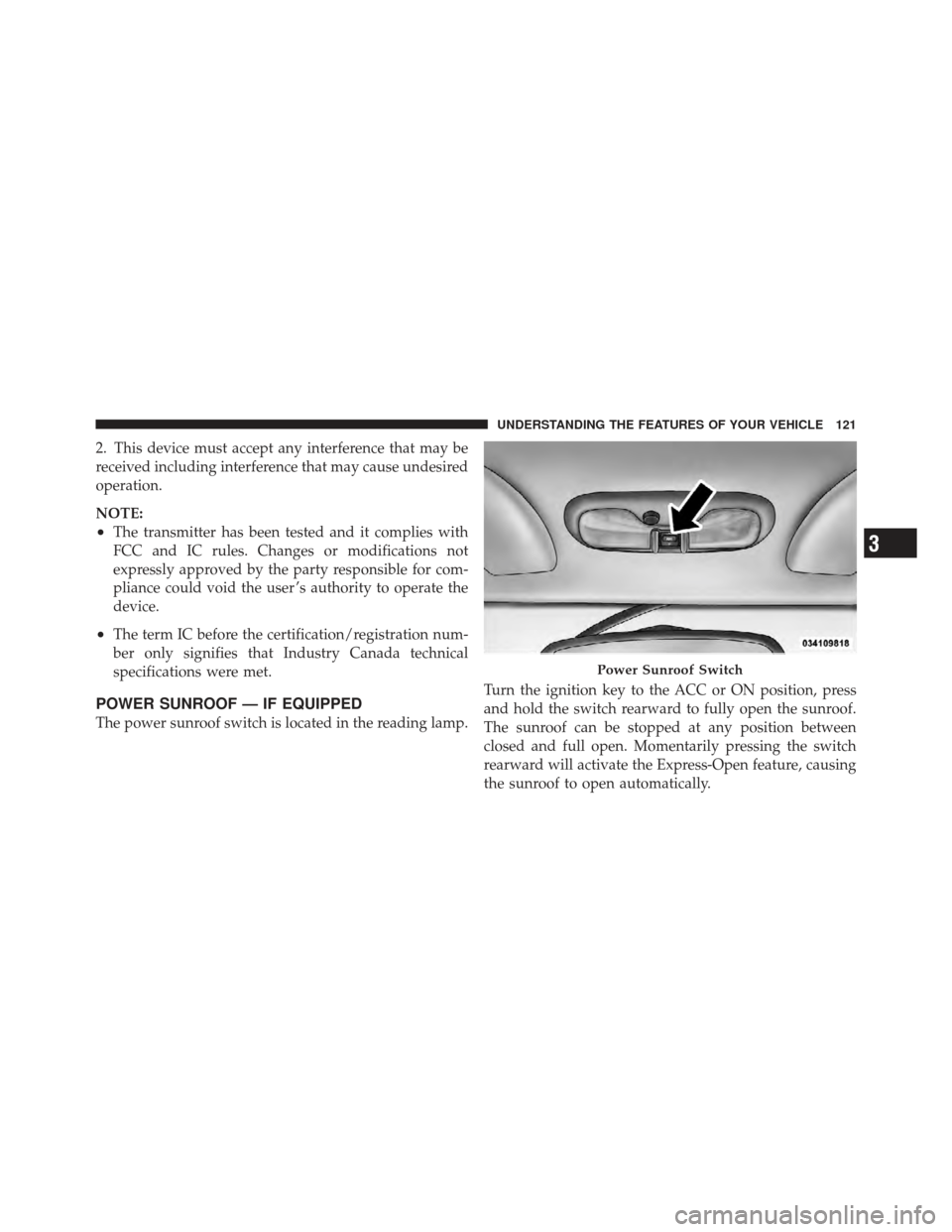
POWER SUNROOF — IF EQUIPPED
The power sunroof switch is located in the reading lamp.Turn the ignition key to the ACC or ON position, press
and hold the switch rearward to fully open the sunroof.
The sunroof can be stopped at any position between
closed and full open. Momentarily pressing the switch
rearward will activate the Express-Open feature, causing
the sunroof to open automatically.
Power Sunroof Switch
3
UNDERSTANDING THE FEATURES OF YOUR VEHICLE 121
Page 146 of 368
As an added safety feature, your vehicle has been
equipped with a Tire Pressure Monitoring System
(TPMS) that illuminates a low tire pressure telltale when
one or more of your tires is significantly under-inflated.
Accordingly, when the low tire pressure telltale illumi-
nates, you should stop and check your tires as soon as
possible, and inflate them to the proper pressure. Driving
on a significantly under-inflated tire causes the tire to
overheat and can lead to tire failure. Under-inflation also
reduces fuel efficiency and tire tread life, and may affect
the vehicle’s handling and stopping ability.
Please note that the TPMS is not a substitute for proper
tire maintenance, and it is the driver ’s responsibility to
maintain correct tire pressure, even if under-inflation has
not reached the level to trigger illumination of the TPMS
low tire pressure telltale.Your vehicle has also been equipped with a TPMS
malfunction indicator to indicate when the system is not
operating properly. The TPMS malfunction indicator is
combined with the low tire pressure telltale. When the
system detects a malfunction, the telltale will flash for
approximately one minute and then remain continuously
illuminated. This sequence will continue upon subse-
quent vehicle start-ups as long as the malfunction exists.
When the malfunction indicator is illuminated, the sys-
tem may not be able to detect or signal low tire pressure
as intended. TPMS malfunctions may occur for a variety
of reasons, including the installation of replacement or
alternate tires or wheels on the vehicle that prevent the
TPMS from functioning properly. Always check the
TPMS malfunction telltale after replacing one or more
tires or wheels on your vehicle, to ensure that the
replacement or alternate tires and wheels allow the TPMS
to continue to function properly.
4
UNDERSTANDING YOUR INSTRUMENT PANEL 145
Page 151 of 368
14. Electronic Stability Program (ESP) Indicator Light
/ Traction Control System (TCS) Indicator LightIf this indicator light flashes during accelera-
tion, apply as little throttle as possible. While
driving, ease up on the accelerator. Adapt your
speed and driving to the prevailing road con-
ditions, and do not switch off the Electronic Stability
Program (ESP), or Traction Control System (TCS).
15. Brake Warning Light This light monitors various brake functions,
including brake fluid level and parking brake
application. If the brake light turns on, it may
indicate that the parking brake is applied, that
the brake fluid level is low, or that there is a problem with
the anti-lock brake system reservoir.
If the light remains on when the parking brake has been
disengaged, and the fluid level is at the full mark on the
master cylinder reservoir, it indicates a possible brake hydraulic system malfunction or that a problem with the
Brake Booster has been detected by the Anti-Lock Brake
System (ABS) / Electronic Stability Program (ESP) sys-
tem. In this case, the light will remain on until the
condition has been corrected. If the problem is related to
the brake booster, the ABS pump will run when applying
the brake and a brake pedal pulsation may be felt during
each stop.
The dual brake system provides a reserve braking capac-
ity in the event of a failure to a portion of the hydraulic
system. A leak in either half of the dual brake system is
indicated by the Brake Warning Light, which will turn on
when the brake fluid level in the master cylinder has
dropped below a specified level.
The light will remain on until the cause is corrected.
150 UNDERSTANDING YOUR INSTRUMENT PANEL
Page 165 of 368
Personal Settings (Customer-Programmable
Features)
This allows the driver to set and recall features when the
shift lever is in PARK (automatic transmission) or the
vehicle is stopped (manual transmission).
Press and release the EVIC button until “Personal Set-
tings” is displayed in the EVIC.
Use the EVIC button to display one of the following
choices:
Language
When in this display you may select different languages
for all display nomenclature, including the trip functions.
Pressing the EVIC button while in this display selects
English, Espanol, Deutsch, Italiano, or Francais depend-
ing on availability. As you continue, the displayed infor-
mation will be shown in the selected language.NOTE:
Uconnect™ language will not change using the
EVIC. Please refer to “Language Selection” in
“Uconnect™ — If Equipped” for details.
Lock Doors Automatically at 15 MPH (24 km/h)
When ON is selected, all doors lock automatically when
the speed of the vehicle reaches 15 mph (24 km/h). Press
and hold the EVIC button when in this display until ON
or OFF appears, to make your selection.
Auto Unlock On Exit
When ON is selected all the vehicle’s doors will unlock
when the driver’s door is opened if the vehicle is stopped
(manual transmission) or the vehicle is stopped and the
shift lever is in PARK or NEUTRAL position (automatic
transmission). Press and hold the EVIC button when in
this display until ON or OFF appears to make your
selection.
164 UNDERSTANDING YOUR INSTRUMENT PANEL
Page 173 of 368
selected within five seconds after pressing the SET but-
ton, the station will continue to play but will not be
stored into pushbutton memory.
You may add a second station to each pushbutton by
repeating the above procedure with this exception: Press
the SET button twice and “SET 2” will show in the
display window. Each button can be set for SET 1 and
SET 2 in both AM and FM. This allows a total of 12 AM,
12 FM, and 12 Satellite (if equipped) stations to be stored
into pushbutton memory. The stations stored in SET 2
memory can be selected by pressing the pushbutton
twice.
Every time a preset button is used, a corresponding
button number will display.
Preset Buttons1-6(Radio Mode)
These buttons tune the Radio to the stations that you
commit to pushbutton memory, 12 AM, 12 FM, and 12
Satellite (if equipped) stations.
Operating Instructions — CD Mode
NOTE:The ignition switch must be in the ON or ACC
position to operate the radio.
Inserting The Compact Disc (Single CD Player)
Gently insert one CD into the CD player with the CD
label facing up. The CD will automatically be pulled into
the CD player and the CD icon will illuminate on the
radio display.
If the volume control is ON, the unit will switch to CD
mode and begin to play. The display will show the track
number and play time in minutes and seconds. Play will
begin at the start of track one.
NOTE:
•On some vehicles, you may insert or eject a disc with
the radio or ignition switch OFF.
172 UNDERSTANDING YOUR INSTRUMENT PANEL
Page 198 of 368
RESET Mode
The transmission is monitored electronically for abnor-
mal conditions. If a condition is detected that could cause
damage, the transmission shifts automatically into sec-
ond gear. The transmission remains in second gear
despite the forward gear selected. PARK, REVERSE, and
NEUTRAL will continue to operate. This second gear
limp-in feature allows the vehicle to be driven to an
authorized dealer for service without damaging the
transmission.
In the event that the problem has been momentary, the
transmission can be reset to regain all forward gears:
1. Stop the vehicle and move the shift lever into PARK.
2. Turn the ignition to OFF then restart the engine.
3. Move the shift lever into DRIVE and resume driving.
4. If the transmission cannot be reset, authorized dealer
service is required.NOTE:
Even if the transmission can be reset, it is
recommended that you visit an authorized dealer at your
earliest possible convenience. Your authorized dealer has
diagnostic equipment to determine if the problem could
recur.
Gear Ranges
DO NOT race the engine when shifting from PARK or
NEUTRAL positions into another gear range.
PARK
This range supplements the parking brake by locking the
transmission. The engine can be started in this range.
Never use PARK while the vehicle is in motion. Apply
the parking brake when leaving the vehicle in this range.
Always apply the parking brake first, and then move the
shift lever into the PARK position.
5
STARTING AND OPERATING 197
Page 200 of 368
NEUTRAL
This range is used when vehicle is standing for pro-
longed periods with engine running. Engine may be
started in this range. Set the parking brake if you must
leave the vehicle.
WARNING!
Do not coast in NEUTRAL and never turn off the
ignition to coast down a hill. These are unsafe
practices that limit your response to changing traffic
or road conditions. You might lose control of the
vehicle and have an accident.
DRIVE/OVERDRIVE
This range should be used for most city and highway
driving. It provides smoothest upshifts and downshifts,
and best fuel economy.When frequent transmission shifting occurs while using
the DRIVE/OVERDRIVE range, such as when operating
the vehicle under heavy loading conditions (in hilly
terrain, traveling into strong head winds, or while towing
trailers), use third gear.
DRIVE — 3rd
This range eliminates shifts into OVERDRIVE. The trans-
mission will operate normally in first and second gear
while in this range.
NOTE:
Using third gear while operating the vehicle
under heavy operating conditions will improve perfor-
mance, fuel economy, and extend transmission life by
reducing excessive shifting and heat build up.
Use third gear when descending steep grades to prevent
brake system distress.
5
STARTING AND OPERATING 199