steering CHRYSLER SEBRING COUPE 2004 2.G User Guide
[x] Cancel search | Manufacturer: CHRYSLER, Model Year: 2004, Model line: SEBRING COUPE, Model: CHRYSLER SEBRING COUPE 2004 2.GPages: 382, PDF Size: 2.23 MB
Page 139 of 382

STARTING AND DRIVING
CONTENTS
mBreak-in recommendations................142
mFuel selection.........................142
NGasoline additives.....................143
NOctane requirement....................143
NReformulated gasoline..................143
NGasoline/Oxygenate blends..............144
NMMT in gasoline......................144
NSulfur in gasoline......................144
NMaterials added to fuel..................145
NAdding fuel..........................145
mFuel economy.........................147
mIgnition switch........................147
mKey reminder chime....................148
mTheft protection........................149
mSteering lock..........................149
mStarting..............................149
NTips for starting.......................149
NNormal conditions.....................150
NFlooded engine.......................151
NAt extremely cold ambient temperature......151
mAutomatic transaxle (if so equipped)........151
NSelector lever operation.................152
5
Page 140 of 382

NGear positions........................154
NDriving speed
(Vehicles with automatic transaxle).........155
NHolding on an upgrade.................155
NTransaxle reset mode...................156
mAutomatic transaxle Autostick
(if so equipped)
........................156
NSelector lever operation.................157
NIndicator lights.......................159
NSelector positions (Main gate).............160
NSelector positions Manual gate Autostick.....161
NHolding on an upgrade.................163
NTransaxle reset mode...................164
mManual transaxle (if so equipped)..........164
NTo start.............................165
NProper shift points.....................165NRecommended downshifting speed.........167
NDriving precautions....................167
mParking brake.........................167
mBrake pedal...........................169
mPower brakes.........................170
mBrake pad wear alarm...................170
mAnti-lock braking (ABS) system
(if so equipped)
........................171
NGeneral driving hints
(standard/anti-lock brakes)...............171
mSteering wheel tilt lock lever..............173
mPower steering........................174
mInside Day/Night rearview mirrors.........175
NElectrochromic inside rearview mirror
(if so equipped).......................176
NElectrochromic mirror operation
(if so equipped).......................177
140 STARTING AND DRIVING
Page 148 of 382

NOTE: For vehicles with an automatic transaxle, the key
cannot be removed unless the selector lever is set to the
ªPº (PARK) position.
ACC
Allows operation of electrical accessories with the engine
off.
START
Engages the starter. After the engine starts, release the
key and it will return automatically to the ªONº position.
ON
The engine runs and all accessories can be used.
NOTE:Do not use the ªONº position to operate acces-
sories.
CAUTION!
²Do not remove the ignition key from the ignition
switch while driving. The steering wheel will
lock, causing loss of control.
²If the engine is turned off while driving, the
power brake servomechanism will cease to func-
tion and braking efficiency will deteriorate. Also,
the power steering system will not function and it
will require greater effort to operate the steering.
²Do not leave the key in the ªONº position for a
long time when the engine is not running; doing
so will cause the battery to discharge.
²Do not turn the key to the ªSTARTº position
when the engine is running; doing so could dam-
age the starter motor.
KEY REMINDER CHIME
If the driver's door is opened while the ignition key is in
the ªLOCKº or ªACCº position, a warning chime
sounds.
148 STARTING AND DRIVING
Page 149 of 382

THEFT PROTECTION
CAUTION!
Always remove the key from the ignition switch and
lock all doors when leaving the vehicle unattended.
Always try to park your vehicle in a well lighted
area.
The ignition key can only be removed in the ªLOCKº
position. If the key is left in the lock cylinder, a warning
chime sounds when the driver's door is opened.
NOTE: If your vehicle is equipped with a Theft-alarm
system, refer to ªTheft-alarm systemº.
STEERING LOCK
Withdraw the key and the steering wheel will be locked.
Turn the steering wheel to confirm that it is locked.
CAUTION!
If your vehicle needs to be towed, turn the key to the
(ACC(position to unlock the steering wheel.
STARTING
Tips for starting
1. Do not operate the starter motor continuously for
longer than 15 seconds at a time; doing so could run
down the battery. If the engine does not start, turn the
ignition switch back to ªLOCKº, wait a few seconds, and
then try again.
2. If the engine will not start because the battery is weak
or dead, refer to ªJump-starting the engineº section (page
273) for instructions on starting the engine.
3. The engine is well warmed up if the pointer of the
coolant temperature gauge starts to move. Extended
warm up operation will result in excessive fuel consump-
tion.
STARTING AND DRIVING 149
5
Page 171 of 382

WARNING!
Driving on worn brake pads can reduce your ability
to stop, and can result in an accident.
ANTI-LOCK BRAKING (ABS) SYSTEM (IF SO
EQUIPPED)
The ABS gives increased vehicle stability and brake
performance under most braking conditions. The system
automatically ªpumpsº the brakes during severe braking
conditions to prevent wheel lock up.
All vehicle wheels and tires must be the same size and
tires must be properly inflated to produce optimal signals
for the computer. However, the system will compensate
when the compact spare is in use.
During stops where ABS is activated, a vibration of the
brake pedal may be felt and associated system noises
may be heard.
NOTE:Pumping of the brake pedal will diminish the
effectiveness of Anti-lock brakes and may lead to anaccident. Pumping makes the stopping distance longer.
Just press firmly on your brake pedal when you need to
slow down or stop.
General driving hints (standard/anti-lock brakes)
1. During anti-lock braking, steering differs slightly from
normal driving conditions. Be sure to operate steering
wheel carefully.
2. The anti-lock braking system is not restricted to situ-
ations where brakes are applied suddenly. This system
may also operate to prevent wheel lock when driving
over manholes, steel roadwork plates, road markings, or
any uneven road surface.
3. Always maintain a safe distance from vehicles in front
of you. If your vehicle is equipped with Anti-lock braking
system, allow for a greater braking distance when:
·Driving on gravel or snow-covered roads.
·Driving with tire chains installed.
·Driving on uneven road surfaces.
STARTING AND DRIVING 171
5
Page 173 of 382

6 mph (10 km/h). It stops operating when the vehicle
decelerates to a speed below approximately 3 mph (5
km/h).
3. After driving on snow or icy roads, remove any snow
and ice that may have adhered to the wheel areas. When
doing this be careful not to damage the wheel speed
sensors and cables located at each wheel on vehicles
equipped with an anti-lock braking system.STEERING WHEEL TILT LOCK LEVER
To adjust the steering wheel height, release the tilt lock
lever while raising or lowering the steering wheel to the
desired height.
After adjustment, securely lock the lever by pulling it
downward.
I24A0060
Wheel speed
sensorG09A0270
Unlock
Lock
STARTING AND DRIVING 173
5
Page 174 of 382

WARNING!
²After adjustment, to the desired height, check to
be sure that the lever is locked.
²Do not attempt to adjust the steering wheel while
driving. This can be dangerous.
POWER STEERING
Your vehicle is equipped with power assisted steering as
standard equipment. The power assisted steering system
of your vehicle provides mechanical steering capability
in the event power assist is lost.
If for some reason the hydraulic pressure is interrupted,
it will still be possible to steer your vehicle. Under these
conditions you will observe a substantial increase in
steering effort. Should loss of hydraulic pressure occur
take your vehicle to an authorized dealer.
WARNING!
Never turn off the engine while the vehicle is
moving. Your ability to control the vehicle may be
seriously reduced.
CAUTION!
Do not leave the steering wheel in the fully turned
position. This can cause the power steering pump to
be damaged due to poor lubrication.
174 STARTING AND DRIVING
Page 197 of 382

8. Stop driving the vehicle if you think the performance
is noticeably less, or that there is unnecessary engine
miss, or any other engine trouble, such as with the
ignition, etc. If it is impractical to stop driving immedi-
ately, reduce the speed and drive for only a short time.
Have an inspection made by an authorized dealer as
soon as possible.
9. In an unusual event of a severe engine malfunction, a
scorching odor may indicate severe and abnormal cata-
lytic converter overheating. If this occurs, the vehicle
should be stopped in a safe place, the engine shut off and
the vehicle allowed to cool. Once the engine is cool, the
vehicle should immediately be taken to a dealer for
service.
VEHICLE PREPARATION BEFORE DRIVING
Before starting on a trip, perform the following checks to
obtain the greatest possible enjoyment and safety from
your vehicle:
Seat belts and seats
1. Before starting the vehicle, make certain that you and
all your passengers are seated and properly wearing the
seat belts (with children in the rear seat, in appropriate
restraints), and that all doors are locked.
2.
Adjust the driver's seat as far back as possible, while still
maintaining good visibility, and good control of the steering
wheel, brakes, accelerator, and controls. Examine the instru-
ment panel indicators for any possible malfunction.
3. Have the front passenger adjust their seat as far
rearward as possible.
Defrosters
Check operation by selecting the defroster mode and set
the blower switch for high speed operation. You should
be able to feel the air directed against the windshield.
(See ªHeater /Air conditioningº page 232.)
Tires
Examine all tires for excessive tread wear or uneven wear
patterns. Check for stones, nails, glass, or other objects
lodged in the tread. Inspect for tread cuts or sidewall
cracks.
STARTING AND DRIVING 197
5
Page 205 of 382

NTuning.............................224
NBalance............................224
NFade..............................224
NTone Control........................224
NMODE Selection......................224
NPTY (Program Type) Selection.............224
NScan Button.........................224
NTo Set The Pushbutton Memory...........225
NTo Change From Clock To Radio Mode......225
NGeneral Information...................225
NOperating Instructions Ð CD Changer......225
NInserting the Compact Disc..............225
NSeek Button.........................226
NFF /Tune/ RW Button..................226
NRandom Play........................226
NRadio/CD Button.....................226NTime Button.........................226
NScan Button.........................226
NLoading The CD Changer...............226
NPlaying Discs........................227
NRemoving Discs From The CD Changer.....227
mSteering wheel remote control switches (if so
equipped)
...........................227
NHow to adjust the volume...............228
NTo listen to the audio system..............228
NTo listen to the radio...................228
NAutomatic tuning the radio...............228
NTo select the preset memory..............228
NTo listen to a tape.....................229
NTo listen to a CD......................229
NHandling of compact discs...............230
mRadio operation and cellular phones........232
FOR PLEASANT DRIVING 205
6
Page 227 of 382
Playing Discs
The radio display indicates the CD number (the slot
where the CD is loaded), and the current track being
played at the time.
If more than one CD is loaded in the CD changer, it
automatically plays the next CD after playing the last
track of the current CD. If there is only one CD loaded, it
will automatically return to the first track of the CD. To
play any available disc select the desired disc position
button.
Removing Discs from the CD Changer
1. Press the load/eject button then press the desired disc
position button to eject that CD.
2. The display will flash the disc number that is being
ejected.
3. If the disc is not removed from the unit within 15
seconds the disc will automatically re-load.
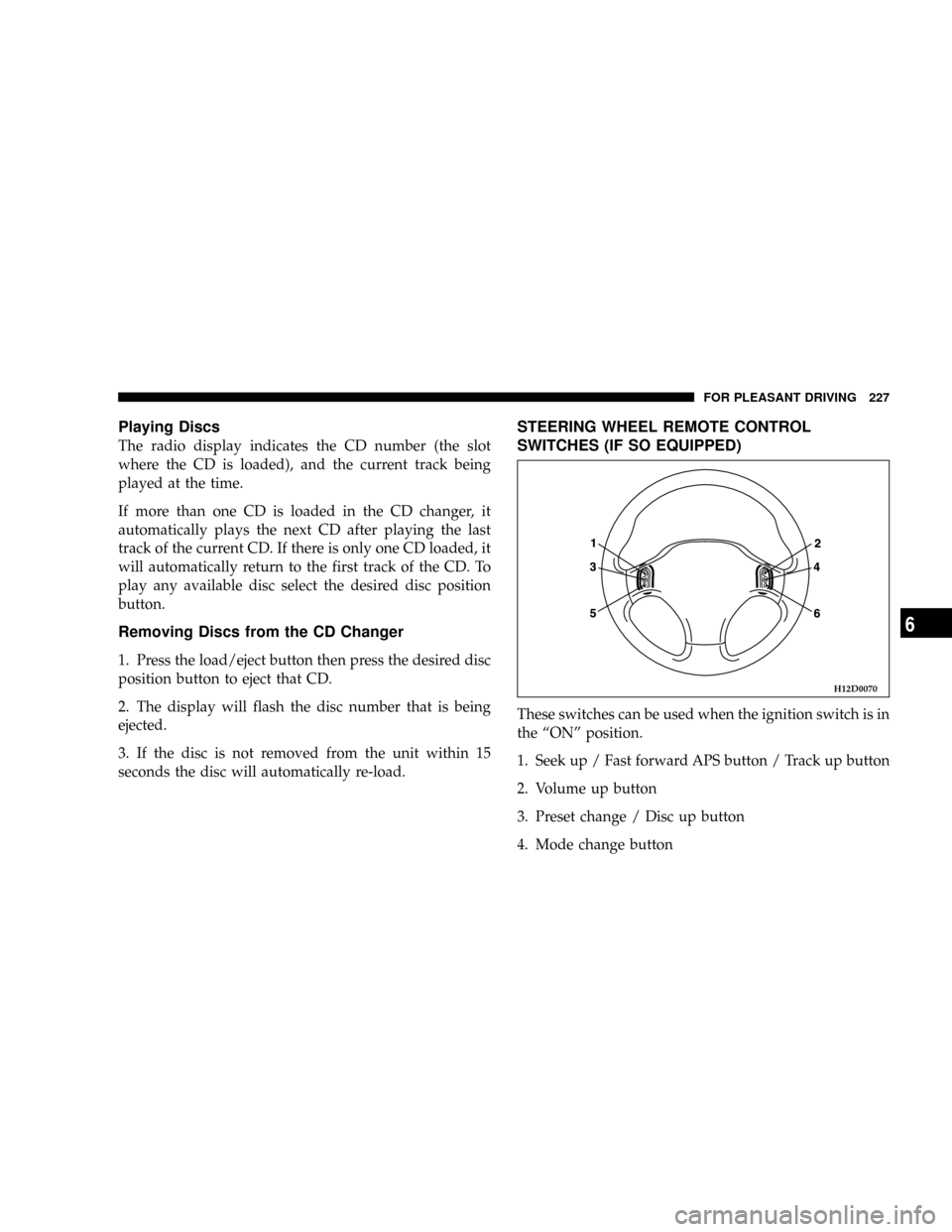
STEERING WHEEL REMOTE CONTROL
SWITCHES (IF SO EQUIPPED)
These switches can be used when the ignition switch is in
the ªONº position.
1. Seek up / Fast forward APS button / Track up button
2. Volume up button
3. Preset change / Disc up button
4. Mode change button
H12D0070
FOR PLEASANT DRIVING 227
6