remove CHRYSLER TOWN AND COUNTRY 2005 4.G Owner's Guide
[x] Cancel search | Manufacturer: CHRYSLER, Model Year: 2005, Model line: TOWN AND COUNTRY, Model: CHRYSLER TOWN AND COUNTRY 2005 4.GPages: 472
Page 182 of 472
To reinstall the console, remove the rubber mat and
relocate to the alternate floor tray, slide the console
forward to engage the front of the console into the floor
tray. Rapidly push down on the rear of the console with
enough force to engage the latch, you should hear the
latch“snap”into place. Pull up on the console to be sure
it is firmly attached.
WARNING!
In an accident, serious injury could result if the
removable floor console is not properly installed.
Always be sure the removable floor console is fully
latched.
NOTE:When the removable floor console is located
between the middle seats, the power outlet only has
power supplied to it when the ignition switch is ON.
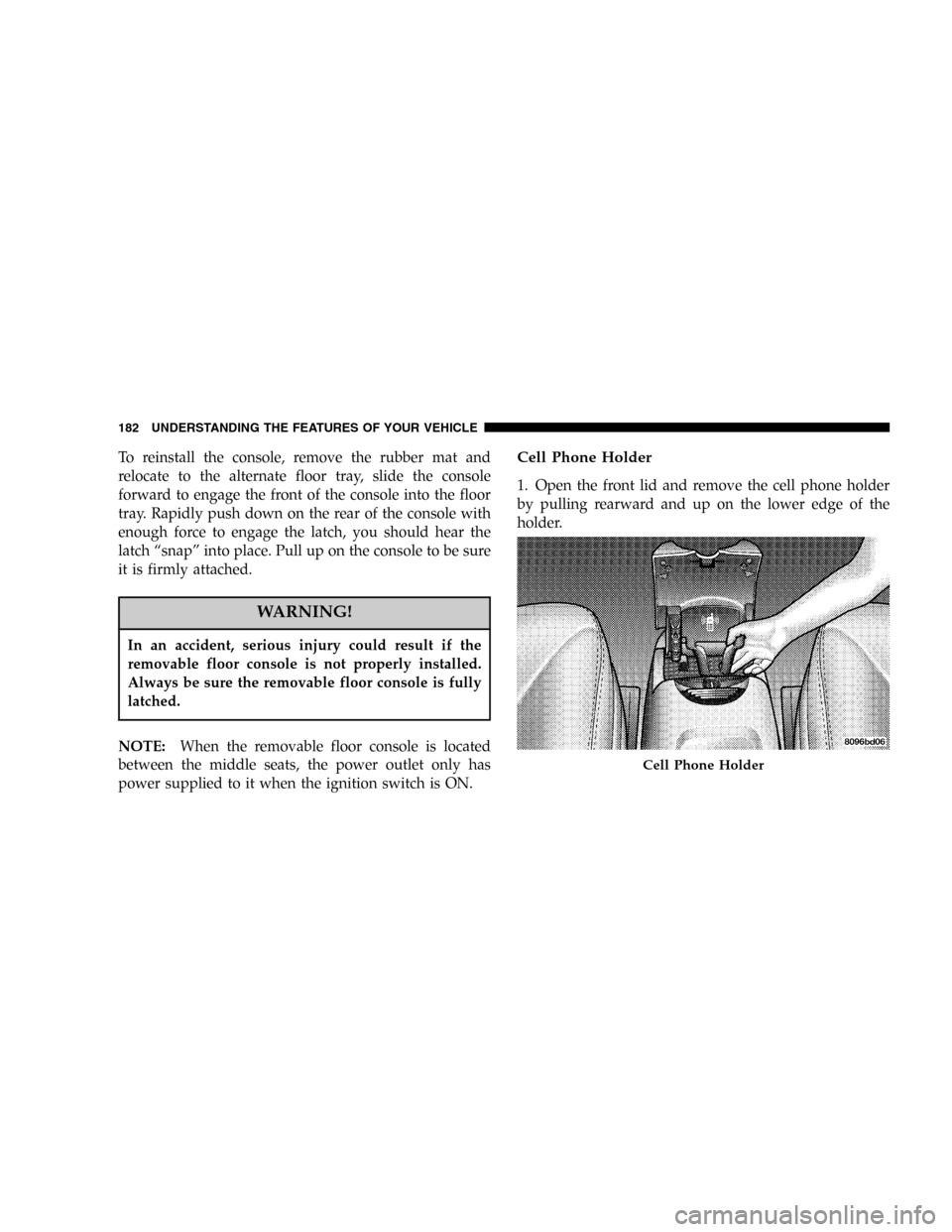
Cell Phone Holder
1. Open the front lid and remove the cell phone holder
by pulling rearward and up on the lower edge of the
holder.
Cell Phone Holder
182 UNDERSTANDING THE FEATURES OF YOUR VEHICLE
Page 184 of 472

Rear Compartment Storage Bins
Your vehicle may be equipped with open storage bins
located in each rear trim panel or your vehicle may be
equipped with storage bins located under the armrest in
each rear trim panel.
Cargo/Tub Nets
Two cargo/tub nets are available on vehicles equipped
with Fold-in-Floor Seating. The cargo nets fit in the
second row storage bin and the third row tub. The nets
are supported by hooks located in these areas. Refer to
instructions provided in the net kit.
Cargo Area Storage
The seats in your vehicle are in-line which enables you to
stow long objects, such as lumber or skis, on the floor
without moving the seats.
NOTE:With all rear seat backs folded, a 4x8 foot sheet
of building material may be stored in the long-wheelbase
body style on top of the folded seats with the liftgate
closed. The front seats must be moved slightly forward of
the rearmost position. If the rear seats are removed no
front seat adjustment is needed and more than one 4x8
sheet of building material may be stored.
The liftgate sill plate has a raised line with the statement
“Load To This Line”. This line indicates how far rearward
cargo can be placed without interfering with liftgate
closing.
184 UNDERSTANDING THE FEATURES OF YOUR VEHICLE
Page 216 of 472

Inserting The Compact Disc
The CD player contained within the radio is not a
multi-disc changer, and will only accept one CD. Gently
insert one CD into the CD player with the CD label facing
up. The CD will automatically be pulled into the CD
Player.
If the volume control is ON, the unit will switch from
radio to CD mode and begin to play. The display will
show the track number and index time in minutes and
seconds. Play will begin at the start of track one.
NOTE:
•You may eject a disc with the radio OFF. The ignition
switch must be in the ON or ACC position to insert a
disc with the radio OFF.
•If you insert a disc with the ignition ON and the radio
OFF, the CD will automatically be pulled into the CD
Player and the display will show the time of day. Ifyou insert a disc with the ignition OFF, the display will
show the time of day for about 5 seconds, then go out.
Seek Button
Press the top of the SEEK button for the next selection on
the CD. Press the bottom of the button to return to the
beginning of the current selection, or return to the
beginning of the previous selection if the CD is within the
first 10 seconds of the current selection.
EJT CD (Eject) Button
Press this button and the disc will unload and move to
the entrance for easy removal. The unit will switch to the
radio mode.
If you do not remove the disc within 15 seconds, it will be
reloaded. The radio mode will continue to appear.
The disc can be ejected with the radio OFF.
216 UNDERSTANDING YOUR INSTRUMENT PANEL
Page 226 of 472

CD Player Operation
NOTE:The ignition switch must be in the ON or ACC
position and the volume control ON before the CD player
will operate.
Inserting The Compact Disc
You may either insert or eject a disc with the radio OFF.
If you insert a disc with the ignition ON and the radio off,
the display will show CD and the time of day will be
displayed.
If the power is on, the unit will switch from radio to CD
mode and begin to play when you insert the disc. The
display will show the track number and index time in
minutes and seconds. Play will begin at the start of track
one.
Seek
Press the top of the SEEK button for the next selection on
the CD. Press the bottom of the button to return to thebeginning of the current selection, or return to the
beginning of the previous selection if the CD is within the
first second of the current selection.
Scan
Press the SCAN button to play 10 seconds of each
selection. Press the SCAN button a second time to cancel
this feature.
EJT CD
Press the EJT CD button and the disc will unload and
move to the entrance for easy removal. The unit will
switch to the radio mode.
If you do not remove the disc within 15 seconds, it will be
reloaded. The unit will continue in radio mode.
The disc can be ejected with the radio and ignition off.
226 UNDERSTANDING YOUR INSTRUMENT PANEL
Page 233 of 472

Radio display will show“ejecting”when it is being
ejected.
If you have ejected a disc and have not removed it within
15 seconds, it will be reloaded. If the CD is not removed,
the radio will continue to play the non-removed CD. If
the CD is removed and there are other CD’s in the radio,
the radio will play the next CD. If the CD is removed and
there are no other CD’s in the radio, the radio will return
to the last selected AM or FM mode.
The disc can be ejected with the radio and ignition OFF.
Seek
Press the top of the SEEK button for the next selection on
the CD. Press the bottom of the button to return to the
beginning of the current selection, or return to the
beginning of the previous selection if the CD is within the
first second of the current selection.
Scan
Press the Scan button to scan through each track on the
CD currently playing.
FF/TUNE/RW
Press FF (Fast Forward) and the CD player will begin to
fast forward until FF is released. The RW ( Reverse)
button works in a similar manner.
Random Play—SET / RND
Press the RND button while the CD is playing to activate
Random Play. This feature plays the tracks on the disc in
random order to provide an interesting change of pace.
Press the SEEK button to move to the next randomly
selected track.
Press the SET / RND button a second time to stop
Random Play.
UNDERSTANDING YOUR INSTRUMENT PANEL 233
4
Page 240 of 472

Seek
Press the top of the SEEK button for the next selection on
the CD. Press the bottom of the button to return to the
beginning of the current selection, or return to the
beginning of the previous selection if the CD is within the
first second of the current selection.
EJT—Eject
Press the EJT button and the disc will unload and move
to the entrance for easy removal. The unit will switch to
the radio mode.
If you do not remove the disc within 15 seconds, it will be
reloaded. The unit will continue in radio mode.
The disc can be ejected with the radio and ignition OFF
(except on convertibles).
FF/TUNE/RW
Press FF (Fast Forward) and the CD player will begin to
fast forward until FF is released. The RW ( Reverse)
button works in a similar manner.
Random Play—RND/Program Button 4
Press the RND (button 4) button while the CD is playing
to activate Random Play. This feature plays the tracks on
the selected disc in random order to provide an interest-
ing change of pace.
Press the SEEK button to move to the next randomly
selected track.
Press the RND (button 4) button a second time to stop
Random Play.
Mode
Press the MODE button repeatedly to select between the
CD player, the optional remote CD changer and the
240 UNDERSTANDING YOUR INSTRUMENT PANEL
Page 243 of 472

SALES CODE RB1—AM/FM STEREO RADIO
WITH DVD/GPS NAVIGATION SYSTEMThe navigation system provides maps, turn identifica-
tion, selection menus and instructions for selecting a
variety of destinations and routes. Refer to your“Navi-
gation User’s Manual”for detailed operating instruc-
tions.
NOTE:If your vehicle is not equipped with the CD
Changer option, you will not be able to use the Naviga-
tion system and the CD Player simultaneously. Always
remove the Navigation DVD before inserting another
disc.
RB1 Radio
UNDERSTANDING YOUR INSTRUMENT PANEL 243
4
Page 246 of 472

Program Button 5
Press this button to play the previous disc.
Time Button
Press this button to switch between time of day and CD
track time.
Changing Modes
While in the radio mode, if a cassette is loaded, press the
Mode button to switch to the tape mode. If a CD is
loaded, press the Mode button to select the CD mode. If
neither a tape nor CD is loaded, the radio will ignore the
command.
•Inserting either a tape or CD automatically starts that
mode of play.
•Pressing the AM/FM button while in the tape or CD
mode will select the radio mode.
•If in the CD mode and the last CD is ejected, the radio
will tune to the last station selected.
Removing Discs from the CD Changer
If there is a single CD in the changer, press the EJT button
and the CD will eject. If the CD is not removed within 15
seconds, it will automatically reload into the CD changer.
To eject additional CDs from the changer, first select the
numbered button where the CD is located and then press
the EJT button.
CD Changer Operation with the Changer Off
The CD changer is able to load and eject discs with the
ignition power off. However, while the ignition is off, one
of the six numbered buttons must be pressed first.
6 DISC CD/DVD CHANGER (RDV)—IF EQUIPPED
The Rear Seat Audio/Video System allows passengers to
listen to a CD or DVD from the 6 disc CD/DVD changer
through wireless headphones, while the front seat pas-
sengers listen to either AM/FM, Cassette or CDs from the
radio speakers. A remote control is provided for func-
tions such as changing tracks or DVD functions, as well
246 UNDERSTANDING YOUR INSTRUMENT PANEL
Page 249 of 472

•If you insert a disc with the ignition ON and the radio
OFF, the DVD will automatically be pulled into the
DVD changer and the display will show the time of
day.
•It is recommended to label home made burned discs
with a permanent marker instead of adhesive labels.
These types of labels may become loose and cause the
disc to be stuck in the DVD player. This may cause
permanent damage to the DVD mechanism.
EJECT (EJT) Button
If there is a disc in the changer, press the EJT button and
the disc will eject. If you do not remove the disc within 10
seconds, it will be reloaded and the display will show
PAUSE. The radio mode will continue to operate.
To eject additional discs from the premium version
multi-disc changer, first select the numbered button
where the disc is located and then press the EJT button.
The disc can be ejected with the radio OFF.
UNDERSTANDING YOUR INSTRUMENT PANEL 249
4
Page 265 of 472

turned all the way down. To prevent this, you should
periodically clean the head with a commercially available
WET cleaning cassette.
As preventive maintenance, clean the head about every
30 hours of use. If you wait until the head becomes very
dirty (noticeably poor sound), it may not be possible to
remove all deposits with a simple WET cleaning cassette.
CD/DVD DISC MAINTENANCE
To keep the CD/DVD discs in good condition, take the
following precautions:
1. Handle the disc by its edge; avoid touching the
surface.
2. If the disc is stained, clean the surface with a soft cloth,
wiping from center to edge.
3. Do not apply paper, paper CD labels, or tape to the
disc; avoid scratching the disc.4. Do not use solvents such as benzine, thinner, cleaners,
or antistatic sprays.
5. Store the disc in its case after playing.
6. Do not expose the disc to direct sunlight.
7. Do not store the disc where temperatures may become
too high.
RADIO OPERATION AND CELLULAR PHONES
Under certain conditions, the cellular phone being On in
your vehicle can cause erratic or noisy performance from
your radio. This condition may be lessened or eliminated
by relocating the cellular phone antenna. This condition
is not harmful to the radio. If your radio performance
does not satisfactorily“clear”by the repositioning of the
antenna, it is recommended that the radio volume be
turned down or off during cellular phone operation.
UNDERSTANDING YOUR INSTRUMENT PANEL 265
4