uconnect CHRYSLER TOWN AND COUNTRY 2014 5.G Owner's Manual
[x] Cancel search | Manufacturer: CHRYSLER, Model Year: 2014, Model line: TOWN AND COUNTRY, Model: CHRYSLER TOWN AND COUNTRY 2014 5.GPages: 148, PDF Size: 4.26 MB
Page 82 of 148
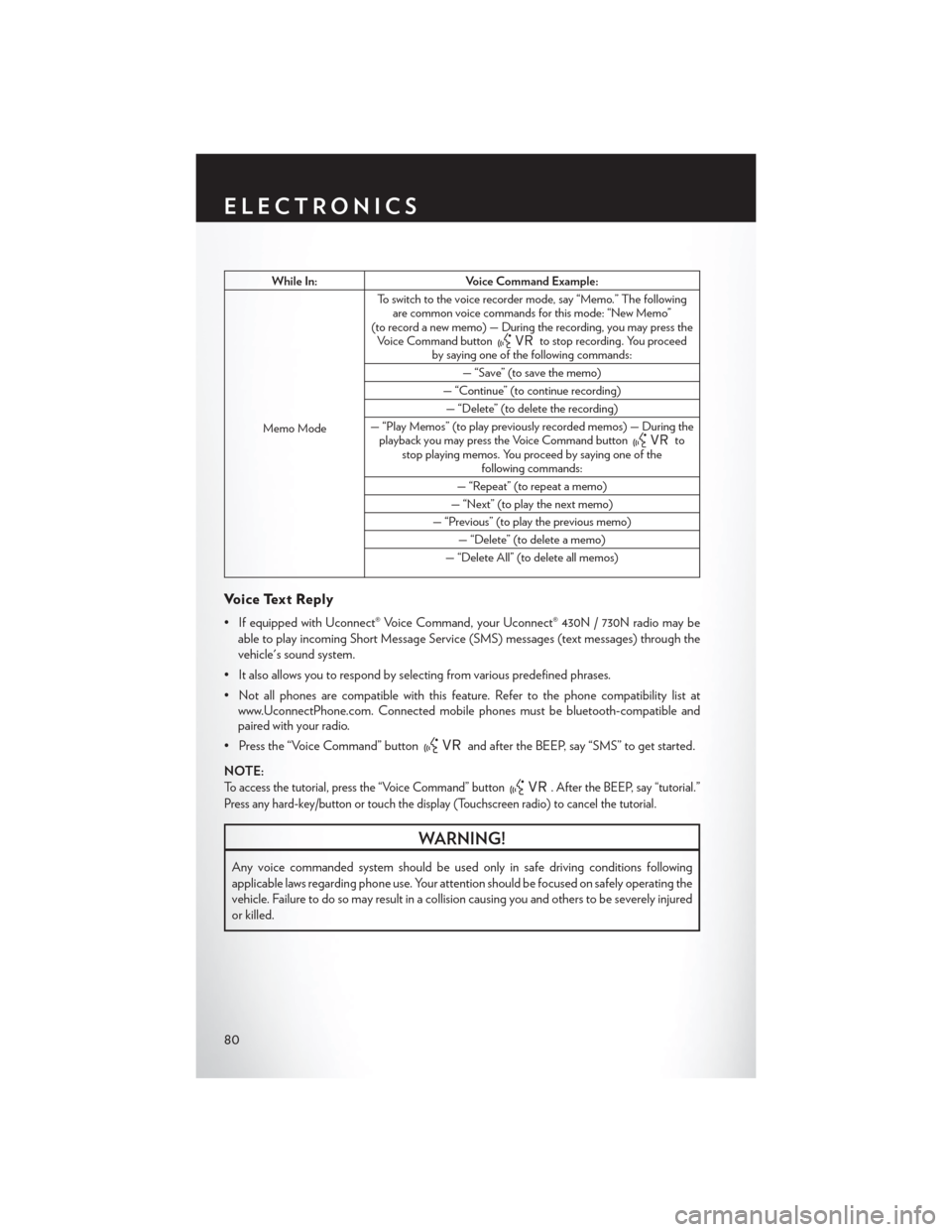
While In:Voice Command Example:
Memo Mode To switch to the voice recorder mode, say “Memo.” The following
are common voice commands for this mode: “New Memo”
(to record a new memo) — During the recording, you may press the Voice Command button
to stop recording. You proceed
by saying one of the following commands:
— “Save” (to save the memo)
— “Continue” (to continue recording) — “Delete” (to delete the recording)
— “Play Memos” (to play previously recorded memos) — During the playback you may press the Voice Command button
to
stop playing memos. You proceed by saying one of the following commands:
— “Repeat” (to repeat a memo)
— “Next” (to play the next memo)
— “Previous” (to play the previous memo) — “Delete” (to delete a memo)
— “Delete All” (to delete all memos)
Voice Text Reply
• If equipped with Uconnect® Voice Command, your Uconnect® 430N / 730N radio may be able to play incoming Short Message Service (SMS) messages (text messages) through the
vehicle's sound system.
• It also allows you to respond by selecting from various predefined phrases.
• Not all phones are compatible with this feature. Refer to the phone compatibility list at www.UconnectPhone.com. Connected mobile phones must be bluetooth-compatible and
paired with your radio.
• Press the “Voice Command” button
and after the BEEP, say “SMS” to get started.
NOTE:
To access the tutorial, press the “Voice Command” button. After the BEEP, say “tutorial.”
Press any hard-key/button or touch the display (Touchscreen radio) to cancel the tutorial.
WARNING!
Any voice commanded system should be used only in safe driving conditions following
applicable laws regarding phone use. Your attention should be focused on safely operating the
vehicle. Failure to do so may result in a collision causing you and others to be severely injured
or killed.
ELECTRONICS
80
Page 83 of 148
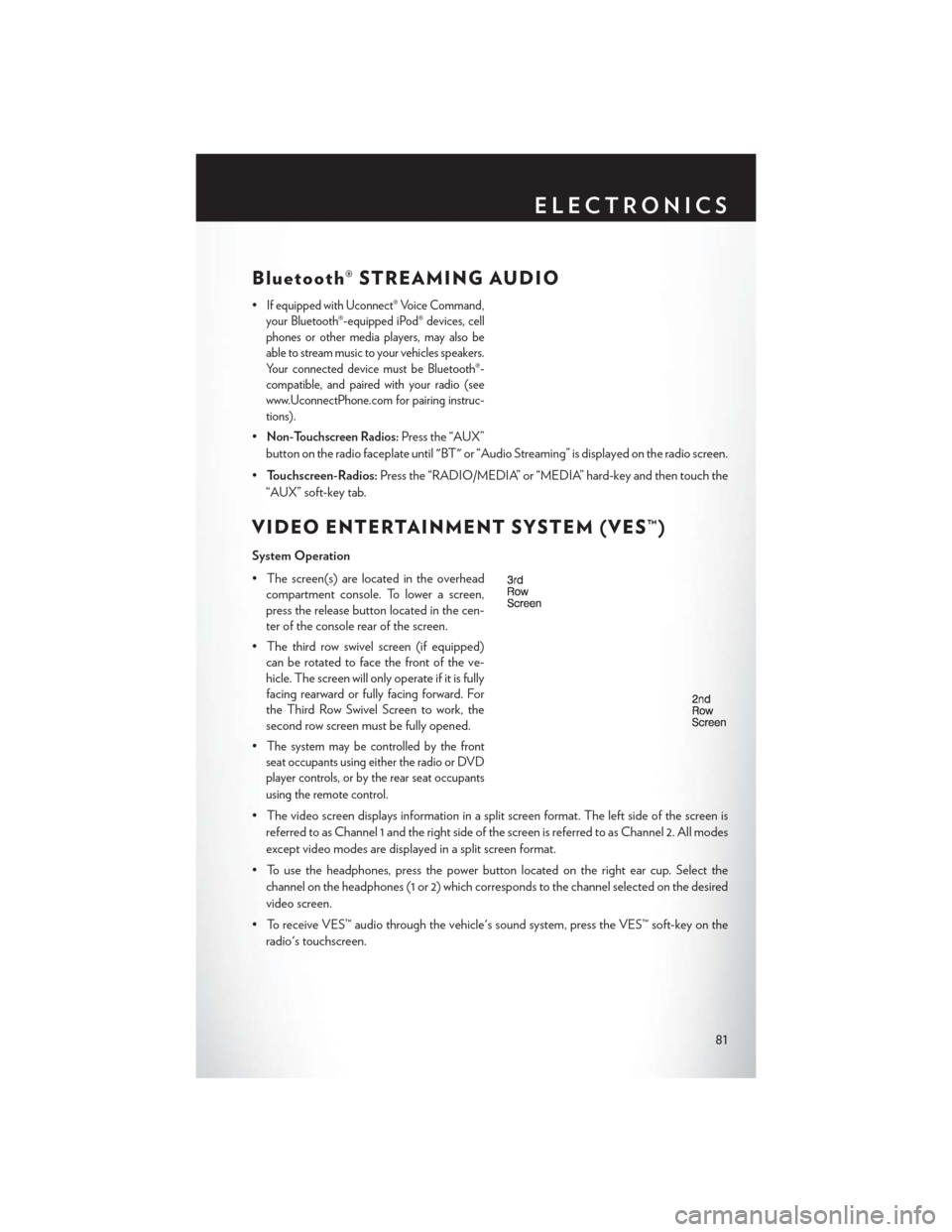
Bluetooth® STREAMING AUDIO
•If equipped with Uconnect® Voice Command,
your Bluetooth®-equipped iPod® devices, cell
phones or other media players, may also be
able to stream music to your vehicles speakers.
Your connected device must be Bluetooth®-
compatible, and paired with your radio (see
www.UconnectPhone.com for pairing instruc-
tions).
•Non-Touchscreen Radios:Press the “AUX”
button on the radio faceplate until "BT" or “Audio Streaming” is displayed on the radio screen.
• Touchscreen-Radios: Press the “RADIO/MEDIA” or “MEDIA” hard-key and then touch the
“AUX” soft-key tab.
VIDEO ENTERTAINMENT SYSTEM (VES™)
System Operation
• The screen(s) are located in the overhead compartment console. To lower a screen,
press the release button located in the cen-
ter of the console rear of the screen.
• The third row swivel screen (if equipped) can be rotated to face the front of the ve-
hicle. The screen will only operate if it is fully
facing rearward or fully facing forward. For
the Third Row Swivel Screen to work, the
second row screen must be fully opened.
•
The system may be controlled by the front
seat occupants using either the radio or DVD
player controls, or by the rear seat occupants
using the remote control.
• The video screen displays information in a split screen format. The left side of the screen is
referred to as Channel 1 and the right side of the screen is referred to as Channel 2. All modes
except video modes are displayed in a split screen format.
• To use the headphones, press the power button located on the right ear cup. Select the channel on the headphones (1 or 2) which corresponds to the channel selected on the desired
video screen.
• To receive VES™ audio through the vehicle's sound system, press the VES™ soft-key on the radio's touchscreen.
ELECTRONICS
81
Page 84 of 148
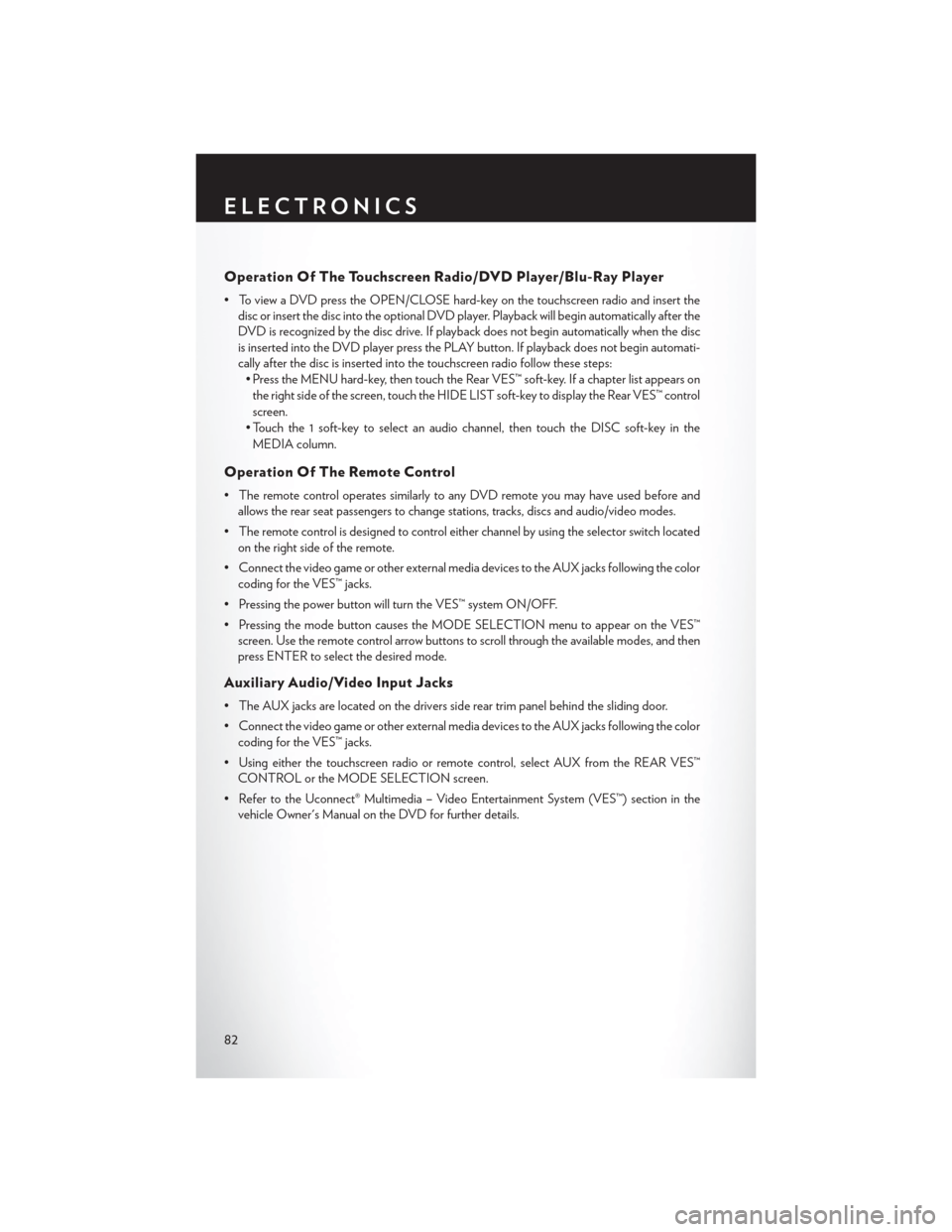
Operation Of The Touchscreen Radio/DVD Player/Blu-Ray Player
• To view a DVD press the OPEN/CLOSE hard-key on the touchscreen radio and insert thedisc or insert the disc into the optional DVD player. Playback will begin automatically after the
DVD is recognized by the disc drive. If playback does not begin automatically when the disc
is inserted into the DVD player press the PLAY button. If playback does not begin automati-
cally after the disc is inserted into the touchscreen radio follow these steps:• Press the MENU hard-key, then touch the Rear VES™ soft-key. If a chapter list appears on
the right side of the screen, touch the HIDE LIST soft-key to display the Rear VES™ control
screen.
• Touch the 1 soft-key to select an audio channel, then touch the DISC soft-key in the MEDIA column.
Operation Of The Remote Control
• The remote control operates similarly to any DVD remote you may have used before and allows the rear seat passengers to change stations, tracks, discs and audio/video modes.
• The remote control is designed to control either channel by using the selector switch located on the right side of the remote.
• Connect the video game or other external media devices to the AUX jacks following the color coding for the VES™ jacks.
• Pressing the power button will turn the VES™ system ON/OFF.
• Pressing the mode button causes the MODE SELECTION menu to appear on the VES™ screen. Use the remote control arrow buttons to scroll through the available modes, and then
press ENTER to select the desired mode.
Auxiliary Audio/Video Input Jacks
• The AUX jacks are located on the drivers side rear trim panel behind the sliding door.
• Connect the video game or other external media devices to the AUX jacks following the colorcoding for the VES™ jacks.
• Using either the touchscreen radio or remote control, select AUX from the REAR VES™ CONTROL or the MODE SELECTION screen.
• Refer to the Uconnect® Multimedia – Video Entertainment System (VES™) section in the vehicle Owner's Manual on the DVD for further details.
ELECTRONICS
82
Page 135 of 148
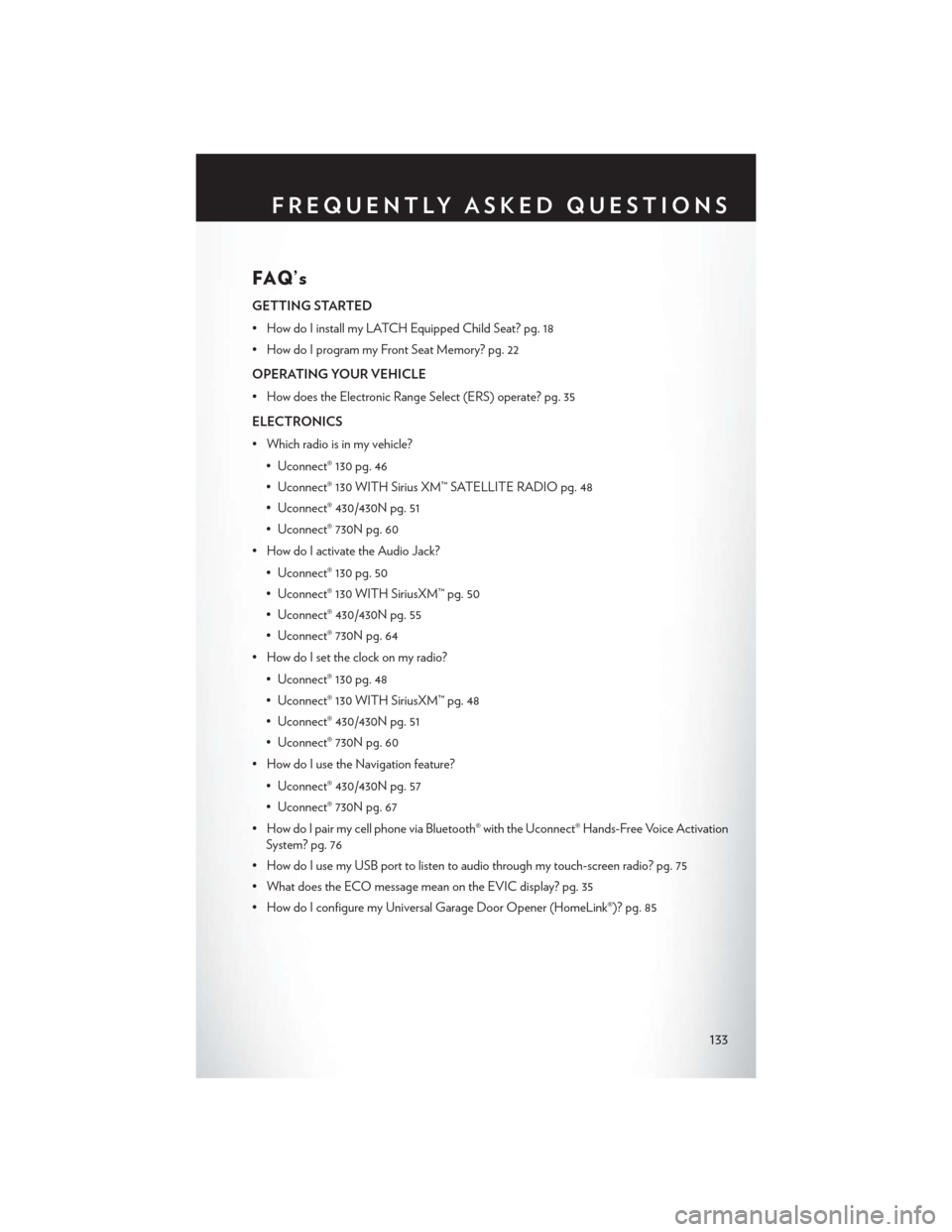
FAQ’s
GETTING STARTED
• How do I install my LATCH Equipped Child Seat? pg. 18
• How do I program my Front Seat Memory? pg. 22
OPERATING YOUR VEHICLE
• How does the Electronic Range Select (ERS) operate? pg. 35
ELECTRONICS
• Which radio is in my vehicle?• Uconnect® 130 pg. 46
• Uconnect® 130 WITH Sirius XM™ SATELLITE RADIO pg. 48
• Uconnect® 430/430N pg. 51
• Uconnect® 730N pg. 60
• How do I activate the Audio Jack?
• Uconnect® 130 pg. 50
• Uconnect® 130 WITH SiriusXM™ pg. 50
• Uconnect® 430/430N pg. 55
• Uconnect® 730N pg. 64
• How do I set the clock on my radio?
• Uconnect® 130 pg. 48
• Uconnect® 130 WITH SiriusXM™ pg. 48
• Uconnect® 430/430N pg. 51
• Uconnect® 730N pg. 60
• How do I use the Navigation feature?
• Uconnect® 430/430N pg. 57
• Uconnect® 730N pg. 67
• How do I pair my cell phone via Bluetooth® with the Uconnect® Hands-Free Voice Activation System? pg. 76
• How do I use my USB port to listen to audio through my touch-screen radio? pg. 75
• What does the ECO message mean on the EVIC display? pg. 35
• How do I configure my Universal Garage Door Opener (HomeLink®)? pg. 85
FREQUENTLY ASKED QUESTIONS
133
Page 138 of 148
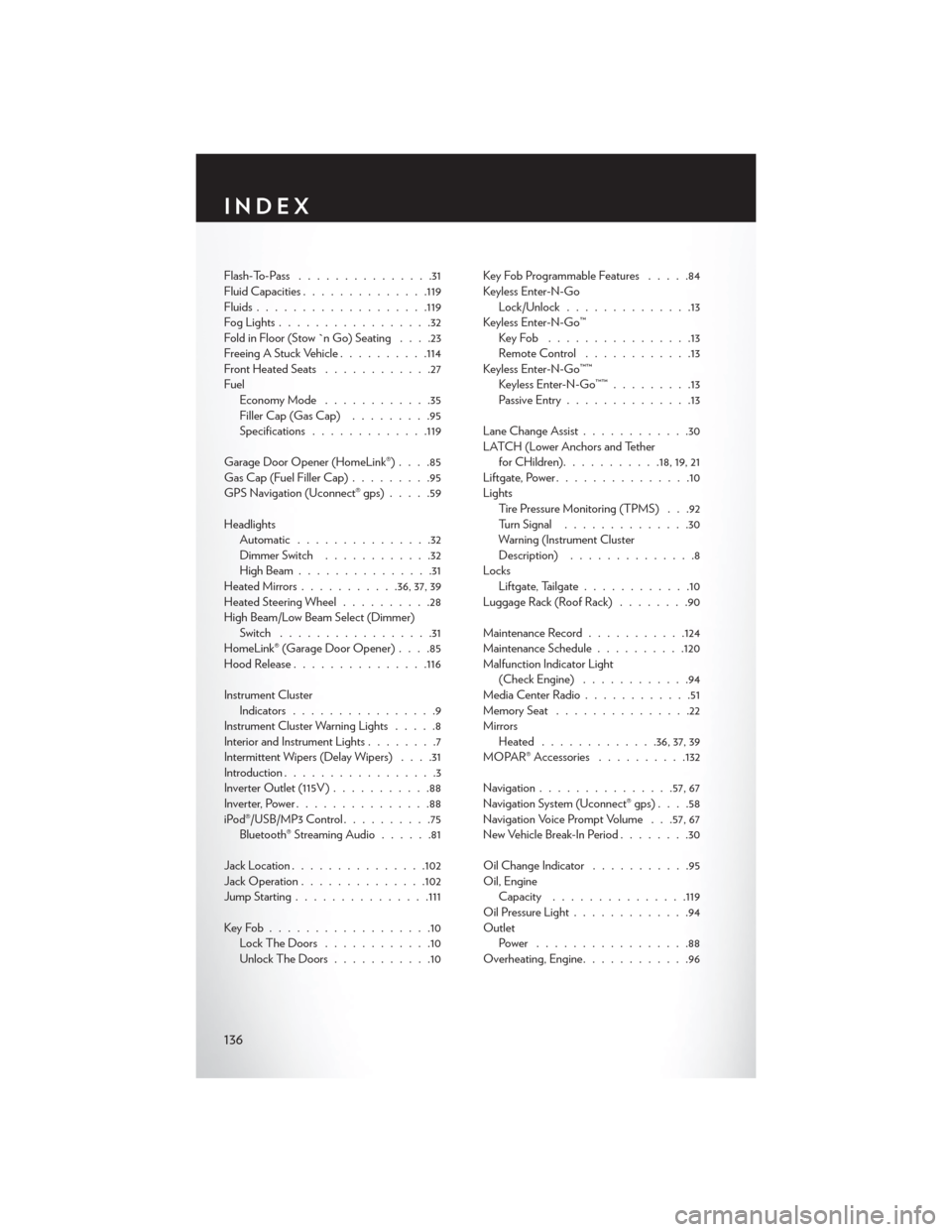
Flash-To-Pass...............31
Fluid Capacities ............. .119
Fluids .................. .119
FogLights.................32
Fold in Floor (Stow `n Go) Seating ....23
Freeing A Stuck Vehicle ..........114
Front Heated Seats ............27
Fuel EconomyMode ............35
Filler Cap (Gas Cap) .........95
Specifications ............ .119
Garage Door Opener (HomeLink®) ....85
Gas Cap (Fuel Filler Cap) .........95
GPS Navigation (Uconnect® gps) .....59
Headlights Automatic ...............32
Dimmer Switch ............32
HighBeam...............31
Heated Mirrors ...........36, 37, 39
Heated Steering Wheel ..........28
High Beam/Low Beam Select (Dimmer) Switch .................31
HomeLink® (Garage Door Opener) ....85
Hood Release .............. .116
Instrument Cluster Indicators ................9
Instrument Cluster Warning Lights .....8
Interior and Instrument Lights ........7
Intermittent Wipers (Delay Wipers) ....31
Introduction .................3
Inverter Outlet (115V) ...........88
Inverter, Power ...............88
iPod®/USB/MP3 Control ..........75
Bluetooth® Streaming Audio ......81
Jack Location .............. .102
Jack Operation ............. .102
Jump Starting .............. .111
KeyFob..................10 LockTheDoors ............10
Unlock The Doors ...........10 Key Fob Programmable Features
.....84
Keyless Enter-N-Go Lock/Unlock ..............13
Keyless Enter-N-Go™ KeyFob ................13
RemoteControl ............13
Keyless Enter-N-Go™™ Keyless Enter-N-Go™™ .........13
Passive Entry ..............13
Lane Change Assist ............30
LATCH (Lower Anchors and Tether for CHildren) ...........18,19,21
Liftgate, Power ...............10
Lights Tire Pressure Monitoring (TPMS) . . .92
Turn Signal ..............30
Warning (Instrument Cluster
Description) ..............8
Locks Liftgate
, Tailgate............10
Luggage Rack (Roof Rack) ........90
Maintenance Record ...........124
Maintenance Schedule ..........120
Malfunction Indicator Light (Check Engine) ............94
Media Center Radio ............51
Memory Seat ...............22
Mirrors Heated ............ .36, 37, 39
MOPAR® Accessories ..........132
Navigation .............. .57, 67
Navigation System (Uconnect® gps) ....58
Navigation Voice Prompt Volume . . .57, 67
New Vehicle Break-In Period ........30
Oil Change Indicator ...........95
Oil, Engine Capacity .............. .119
Oil Pressure Light .............94
Outlet Power .................88
Overheating, Engine ............96
INDEX
136
Page 139 of 148
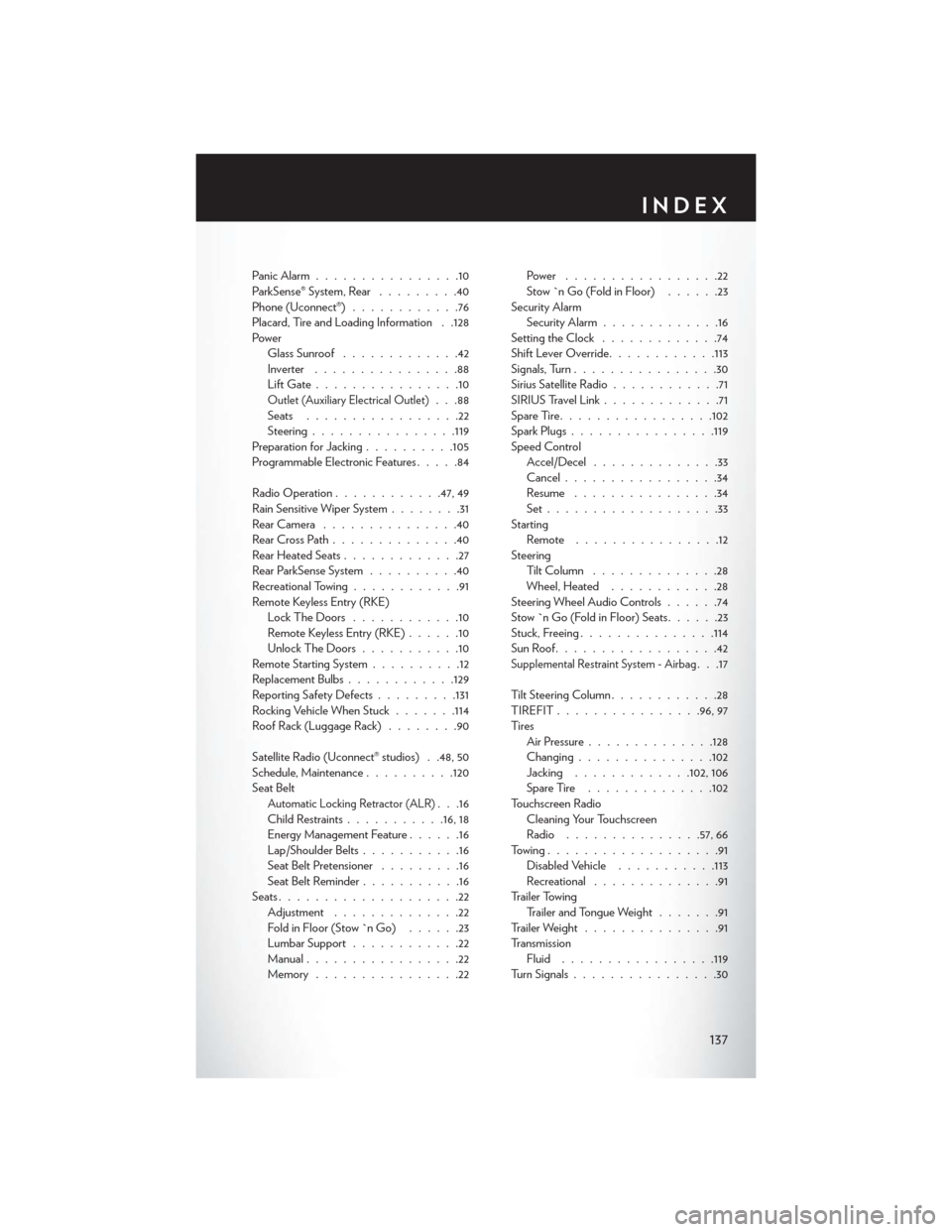
Panic Alarm................10
ParkSense® System, Rear .........40
Phone (Uconnect®) ............76
Placard, Tire and Loading Information . .128
Power Glass Sunroof .............42
Inverter ................88
LiftGate................10
Outlet (Auxiliary Electrical Outlet). . .88
Seats .................22
Steering ............... .119
Preparation for Jacking ..........105
Programmable Electronic Features .....84
Radio Operation ............47, 49
Rain Sensitive Wiper System ........31
RearCamera ...............40
RearCrossPath..............40
Rear Heated Seats .............27
Rear ParkSense System ..........40
Recreational Towing ............91
Remote Keyless Entry (RKE) Lock The Doors ............10
Remote Keyless Entry (RKE) ......10
Unlock The Doors ...........10
Remote Starting System ..........12
Replacement Bulbs ............129
Reporting Safety Defects .........131
Rocking Vehicle When Stuck .......114
Roof Rack (Luggage Rack) ........90
Satellite Radio (Uconnect® studios) . .48, 50
Schedule, Maintenance ..........120
Seat Belt
Automatic Locking Retractor (ALR). . .16
Child Restraints ...........16, 18
Energy Management Feature ......16
Lap/Shoulder Belts ...........16
Seat Belt Pretensioner .........16
SeatBeltReminder...........16
Seats ....................22
Adjustment ..............22
Fold in Floor (Stow `n Go) ......23
LumbarSupport ............22
Manual .................22
Memory ................22 Power .................22
Stow `n Go (Fold in Floor)
......23
Security Alarm Security Alarm .............16
Setting the Clock .............74
Shift Lever Override ............113
Signals, Turn ................30
Sirius Satellite Radio ............71
SIRIUSTravelLink.............71
SpareTire.................102
Spark Plugs ............... .119
Speed Control Accel/Decel ..............33
Cancel .................34
Resume ................34
Set...................33
Starting Remote ................12
Steering TiltColumn ..............28
Wheel, Heated ............28
Steering Wheel Audio Controls ......74
Stow `n Go (Fold in Floor) Seats ......23
Stuck, Freeing .............. .114
SunRoof..................42
Supplemental Restraint System - Airbag. . .17
Tilt Steering Column ............28
TIREFIT ............... .96, 97
Ti re s Air Pressure ............. .128
Changing .............. .102
Jacking .............102,106
SpareTire ..............102
Touchscreen Radio Cleaning Your Touchscreen
Radio .............. .57, 66
Towing...................91 Disabled Vehicle ...........113
Recreational ..............91
Trailer Towing Trailer and Tongue Weight .......91
Trailer Weight ...............91
Transmission Fluid ................ .119
Turn Signals ................30
INDEX
137
Page 140 of 148

Uconnect® Voice Command........78
Video Entertainment System™ (Rear Seat Video System) ........81
Voice Command ..............78
Voice Prompt Volume Navigation .............57, 67
Volume Navigation Voice Prompt ......57, 67Washer
Rear ..................31
Washers, Windshield ............31
Wheel and Wheel Trim ..........129
Wheel and Wheel Trim Care .......129
Wind Buffeting ..............43
Windshield Washers ............31
Windshield Wipers .............31
Wiper,Rear ................31
INDEX
138
Page 147 of 148
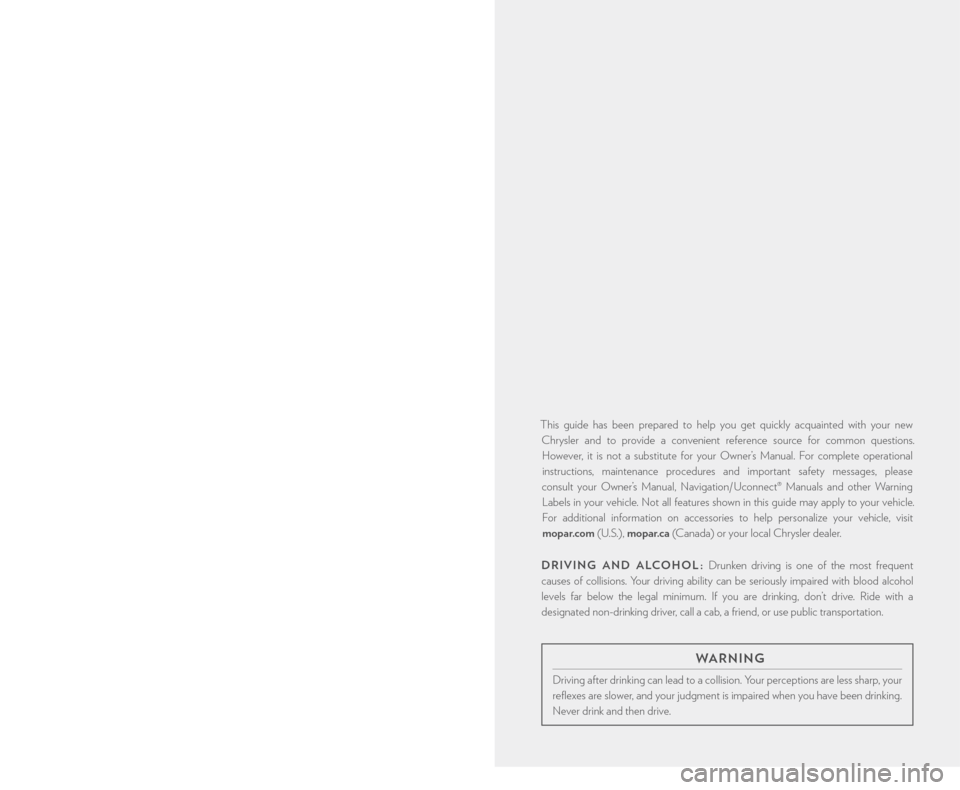
This guide has been prepared to help you get quickly acquainted with your new
Chrysler and to provide a convenient reference source for common questions. However, it is not a substitute for your Owner’s Manual. For complete operational
instructions, maintenance procedures and important safety messages, please
consult your Owner’s Manual, Navigation/ Uconnect® Manuals and other Warning
Labels in your vehicle. Not all features shown in this guide may apply to your vehicle.
For additional information on accessories to help personalize your vehicle, visit
mopar.com (U.S.), mopar.ca (Canada) or your local Chrysler dealer.
DRIVING AND ALCOHOL : Drunken driving is one of the most frequent
causes of collisions. Your driving ability can be seriously impaired with blood alcohol
levels far below the legal minimum. If you are drinking, don’t drive. Ride with a
designated non-drinking driver, call a cab, a friend, or use public transportation.
IF YOU ARE THE FIRST REGISTERED RETAIL OWNER OF YOUR
VEHICLE, YOU MAY OBTAIN A COMPLIMENTARY PRINTED COPY
OF THE OWNER’S MANUAL, NAVIGATION/ UCONNECT® MANUALS
OR WARRANTY BOOKLET BY CALLING 1-800-247-9753 (U.S.) OR
1-800-387-1143 (CANADA) OR BY CONTACTING YOUR DEALER.
The driver’s primary responsibility is the safe operation of the vehicle. Driving while distracted can
result in loss of vehicle control, resulting in a collision and personal injury. Chrysler Group LLC
strongly recommends that the driver use extreme caution when using any device or feature that
may take their attention off the road. Use of any electrical devices such as cell phones, computers,
portable radios, vehicle navigation or other devices by the driver while the vehicle is moving is
dangerous and could lead to a serious collision. Texting while driving is also dangerous and should
never be done while the vehicle is moving. If you find yourself unable to devote your full attention
to vehicle operation, pull off the road to a safe location and stop your vehicle. Some States or
Provinces prohibit the use of cellular telephones or texting while driving. It is always the driver’s
responsibility to comply with all local laws.
IMPORTANT: This User Guide is intended to familiarize you with the important features of
your vehicle. The DVD enclosed contains your Owner’s Manual, Navigation/ Uconnect®
Manuals, Warranty Booklets, Tire Warranty and Roadside Assistance (new vehicles
purchased in the U.S.) or Roadside Assistance (new vehicles purchased in Canada) in
electronic format. We hope you find it useful. Replacement DVD kits may be purchased by
visiting www.techauthority.com. Copyright 2014 Chrysler Group LLC.
WARNING
Driving after drinking can lead to a collision. Your perceptions are less sharp, your
reflexes are slower, and your judgment is impaired when you have been drinking.
Never drink and then drive.
1638537_14d_TownCountry_UG_021014.indd 22/10/14 11:08 AM