instrument panel CHRYSLER VOYAGER 1996 Service Manual
[x] Cancel search | Manufacturer: CHRYSLER, Model Year: 1996, Model line: VOYAGER, Model: CHRYSLER VOYAGER 1996Pages: 1938, PDF Size: 55.84 MB
Page 499 of 1938

SERVICE PROCEDURES
CLEANUP PROCEDURE
Roll or fold the passenger airbag towards the
instrument panel surface and close the door over the
folded bag. Then tape the door shut.
Use a vacuum cleaner to remove any residual pow-
der from the vehicle interior. Work from the outside
in to avoid kneeling or sitting in a contaminated
area. Vacuum the heater and A/C outlets as well (Fig.
2). If HVAC was in RECIRC mode at time of airbag
deployment, operate HVAC blower on low speed/heat
and vacuum powder residue expelled from the heat
outlets. Multiple vacuum cleaning may to necessary
to decontaminate the interior of the vehicle.
NOTE: Dispose deployed airbag properly, contact
dealer or government agency for disposal recom-
mendations.
SERVICE OF DEPLOYED AIRBAG MODULE
DRIVER AIRBAG
If a Driver Airbag Module has been deployed, but
not due to a collision, replace the following:
²Driver Airbag Module
²Clockspring assembly
²Driver airbag cover/horn switch
The components above must be replaced because
they cannot be reused. Replace any other driver air-
bag system components if damaged.
PASSENGER AIRBAG
If a Passenger Airbag Module has been deployed,
but not due to a collision, replace the following:
²Passenger Airbag Module
²Upper instrument panel with pad
The component above must be replaced because
they cannot be reused. Inspect the heat duct near the
passenger airbag for any damage replace as neces-sary. Replace any other passenger airbag system
components if damaged.
HANDLING AIRBAG MODULE
DEPLOYED MODULE
The vehicle interior may contain a very small
amount of sodium hydroxide powder, a by-product of
airbag deployment. Sodium hydroxide powder can
irritate the skin, eyes, nose and throat. Wear safety
glasses, rubber gloves, and long sleeved clothing
when cleaning any of the powder residue from the
vehicle.
If you find that the cleanup is irritating your skin,
run cool water over the affected area. Also, if you
experience nasal or throat irritation, exit the vehicle
for fresh air until the irritation ceases. If irritation
continues, see a physician.
UNDEPLOYED
The airbag modules must be stored in its original
special container until used for service. At no time
should a source of electricity be permitted near the
inflator on the back of an airbag module. When car-
rying or handling an undeployed airbag module, the
trim side of the airbag should be pointing away from
the body to minimize possibility of injury if acciden-
tal deployment occurs. Do not place undeployed air-
bag face down on a solid surface, the airbag will
propel into the air if accidentally deployment occurs.
REMOVAL AND INSTALLATION
AIRBAG CONTROL MODULE
WARNING: THE ACM CONTAINS THE IMPACT
SENSOR WHICH ENABLES THE SYSTEM TO
DEPLOY THE AIRBAGS. TO AVOID ACCIDENTAL
DEPLOYMENT, NEVER CONNECT ACM ELECTRI-
CALLY TO THE SYSTEM WHILE VEHICLE BATTERY
IS CONNECTED. DISCONNECT AND ISOLATE THE
BATTERY NEGATIVE CABLE BEFORE BEGINNING
ANY AIRBAG SYSTEM COMPONENT SERVICE PRO-
CEDURES. THIS WILL DISABLE THE AIRBAG SYS-
TEM. FAILURE TO DISCONNECT THE BATTERY
COULD RESULT IN ACCIDENTAL AIRBAG DEPLOY-
MENT AND POSSIBLE PERSONAL INJURY. ALLOW
SYSTEM CAPACITOR TO DISCHARGE FOR TWO
MINUTES BEFORE REMOVING AIRBAG COMPO-
NENTS.
REMOVAL
(1) Disconnect and isolate battery negative cable.
Allow at least two minutes for the reserve capacitor
in the Airbag Control Module (ACM) to discharge.
Fig. 2 Vacuum Heater and A/C Outlets
NSRESTRAINT SYSTEM 8M - 3
Page 500 of 1938
(2) Remove forward lower console from instrument
panel, refer to Group 8E, Instrument Panel and Sys-
tems for proper procedures.
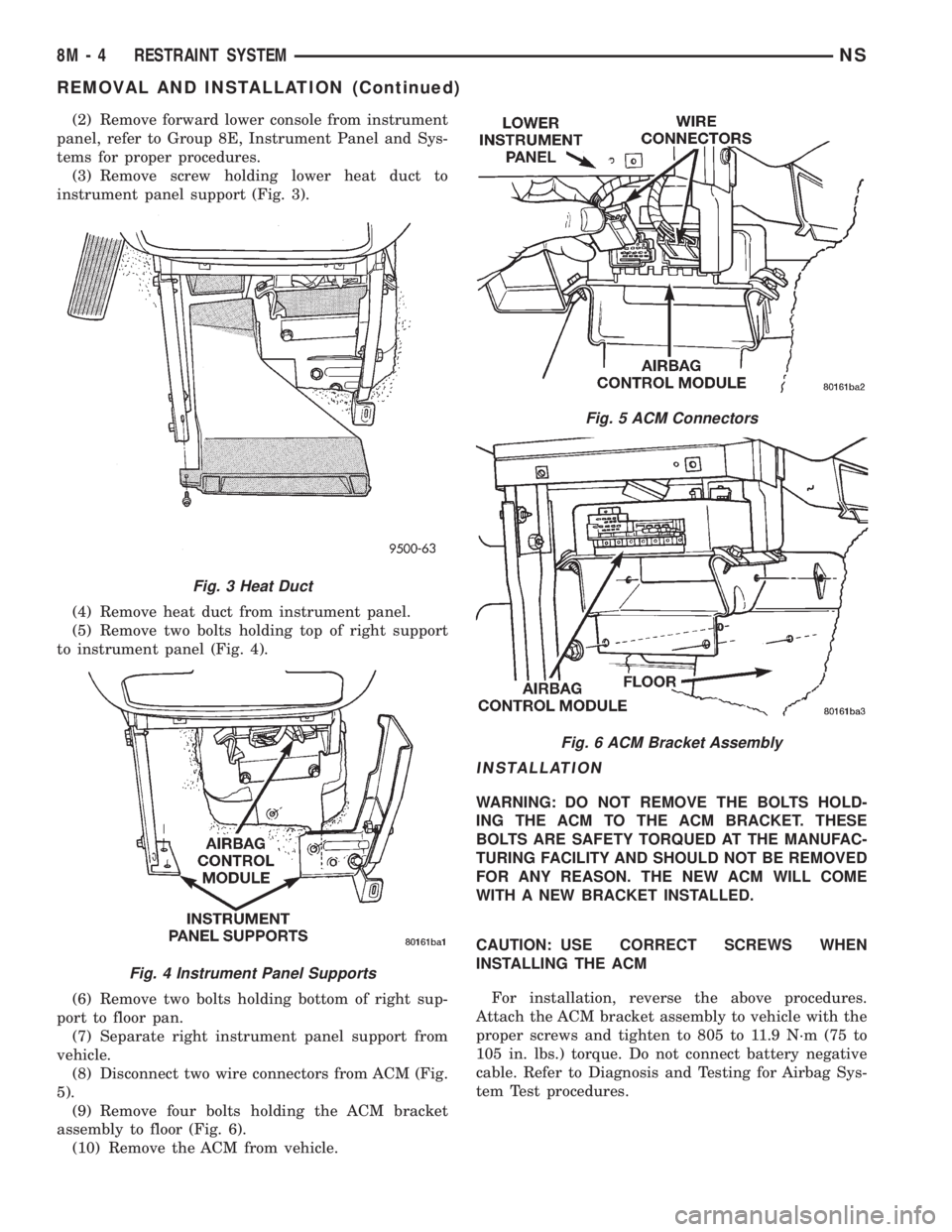
(3) Remove screw holding lower heat duct to
instrument panel support (Fig. 3).
(4) Remove heat duct from instrument panel.
(5) Remove two bolts holding top of right support
to instrument panel (Fig. 4).
(6) Remove two bolts holding bottom of right sup-
port to floor pan.
(7) Separate right instrument panel support from
vehicle.
(8) Disconnect two wire connectors from ACM (Fig.
5).
(9) Remove four bolts holding the ACM bracket
assembly to floor (Fig. 6).
(10) Remove the ACM from vehicle.
INSTALLATION
WARNING: DO NOT REMOVE THE BOLTS HOLD-
ING THE ACM TO THE ACM BRACKET. THESE
BOLTS ARE SAFETY TORQUED AT THE MANUFAC-
TURING FACILITY AND SHOULD NOT BE REMOVED
FOR ANY REASON. THE NEW ACM WILL COME
WITH A NEW BRACKET INSTALLED.
CAUTION: USE CORRECT SCREWS WHEN
INSTALLING THE ACM
For installation, reverse the above procedures.
Attach the ACM bracket assembly to vehicle with the
proper screws and tighten to 805 to 11.9 N´m (75 to
105 in. lbs.) torque. Do not connect battery negative
cable. Refer to Diagnosis and Testing for Airbag Sys-
tem Test procedures.
Fig. 3 Heat Duct
Fig. 4 Instrument Panel Supports
Fig. 5 ACM Connectors
Fig. 6 ACM Bracket Assembly
8M - 4 RESTRAINT SYSTEMNS
REMOVAL AND INSTALLATION (Continued)
Page 501 of 1938
CLOCKSPRING
WARNING: DISCONNECT AND ISOLATE THE BAT-
TERY NEGATIVE CABLE BEFORE BEGINNING AIR-
BAG SYSTEM COMPONENT SERVICE
PROCEDURES. THIS WILL DISABLE THE AIRBAG
SYSTEM. FAILURE TO DISCONNECT THE BATTERY
COULD RESULT IN ACCIDENTAL AIRBAG DEPLOY-
MENT AND POSSIBLE PERSONAL INJURY. ALLOW
SYSTEM CAPACITOR TO DISCHARGE FOR TWO
MINUTES BEFORE REMOVING AIRBAG COMPO-
NENTS.
REMOVAL
(1) Position steering wheel and front wheels
straight ahead.
(2) Release hood latch and open hood.
(3) Disconnect and isolate battery negative cable.
Allow at least two minutes for the reserve capacitor
in the ACM to discharge.
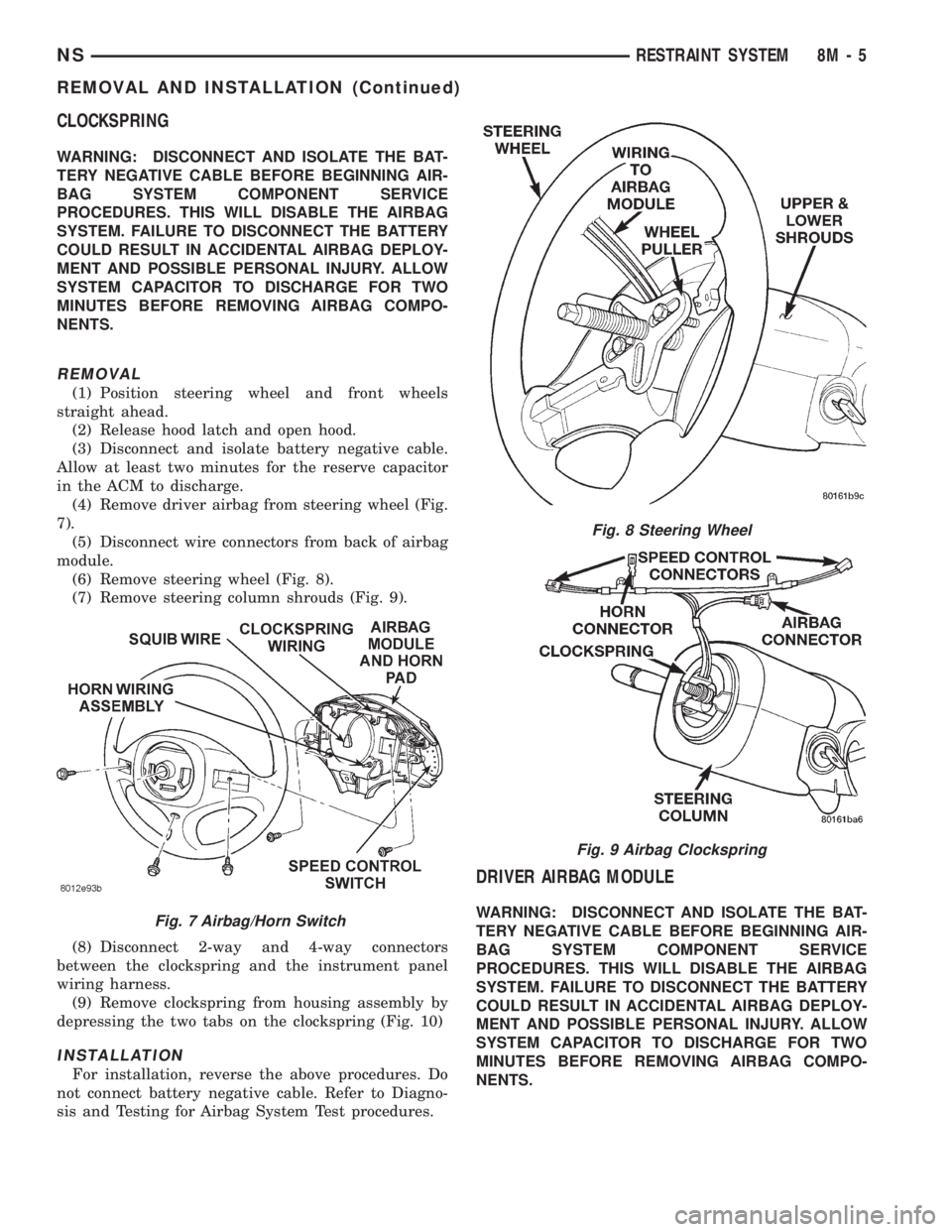
(4) Remove driver airbag from steering wheel (Fig.
7).
(5) Disconnect wire connectors from back of airbag
module.
(6) Remove steering wheel (Fig. 8).
(7) Remove steering column shrouds (Fig. 9).
(8) Disconnect 2-way and 4-way connectors
between the clockspring and the instrument panel
wiring harness.
(9) Remove clockspring from housing assembly by
depressing the two tabs on the clockspring (Fig. 10)
INSTALLATION
For installation, reverse the above procedures. Do
not connect battery negative cable. Refer to Diagno-
sis and Testing for Airbag System Test procedures.
DRIVER AIRBAG MODULE
WARNING: DISCONNECT AND ISOLATE THE BAT-
TERY NEGATIVE CABLE BEFORE BEGINNING AIR-
BAG SYSTEM COMPONENT SERVICE
PROCEDURES. THIS WILL DISABLE THE AIRBAG
SYSTEM. FAILURE TO DISCONNECT THE BATTERY
COULD RESULT IN ACCIDENTAL AIRBAG DEPLOY-
MENT AND POSSIBLE PERSONAL INJURY. ALLOW
SYSTEM CAPACITOR TO DISCHARGE FOR TWO
MINUTES BEFORE REMOVING AIRBAG COMPO-
NENTS.Fig. 7 Airbag/Horn Switch
Fig. 8 Steering Wheel
Fig. 9 Airbag Clockspring
NSRESTRAINT SYSTEM 8M - 5
REMOVAL AND INSTALLATION (Continued)
Page 502 of 1938
DEPLOYED MODULE
The Driver Airbag Module and Driver Airbag Cov-
er/Horn Pad are serviced separately from eachother.
REMOVAL
(1) Disconnect battery negative cable. Allow at
least two minutes for the reserve capacitor in the
ACM to discharge.
(2) Clean powder residue from interior of vehicle,
refer to Cleanup Procedure.
(3) Remove three screws attaching Driver Airbag
Module to steering wheel (Fig. 7).
(4) Remove airbag module from steering wheel.
(5) Disconnect wire connectors from Airbag Mod-
ule, horn switch, and speed control switches.
(6) Adjust the steering wheel so that the tires are
in a straight ahead position. Remove steering wheel
(Fig. 8), refer to Group 19, Steering for proper proce-
dure.
(7) Disconnect the 2-way and 4-way connectors
between the clockspring and the instrument panel
wiring harness.
(8) Remove upper and lower steering column
shrouds.
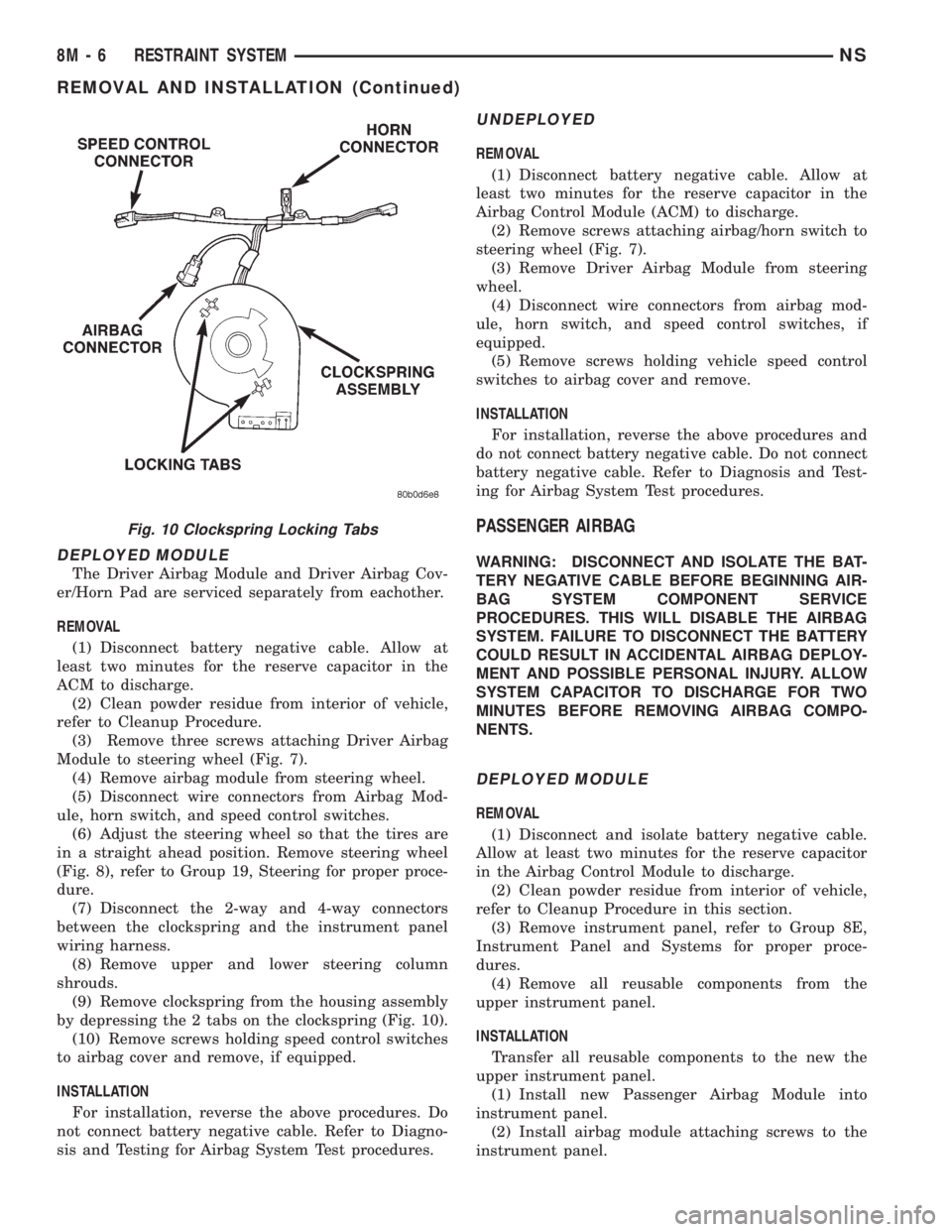
(9) Remove clockspring from the housing assembly
by depressing the 2 tabs on the clockspring (Fig. 10).
(10) Remove screws holding speed control switches
to airbag cover and remove, if equipped.
INSTALLATION
For installation, reverse the above procedures. Do
not connect battery negative cable. Refer to Diagno-
sis and Testing for Airbag System Test procedures.
UNDEPLOYED
REMOVAL
(1) Disconnect battery negative cable. Allow at
least two minutes for the reserve capacitor in the
Airbag Control Module (ACM) to discharge.
(2) Remove screws attaching airbag/horn switch to
steering wheel (Fig. 7).
(3) Remove Driver Airbag Module from steering
wheel.
(4) Disconnect wire connectors from airbag mod-
ule, horn switch, and speed control switches, if
equipped.
(5) Remove screws holding vehicle speed control
switches to airbag cover and remove.
INSTALLATION
For installation, reverse the above procedures and
do not connect battery negative cable. Do not connect
battery negative cable. Refer to Diagnosis and Test-
ing for Airbag System Test procedures.
PASSENGER AIRBAG
WARNING: DISCONNECT AND ISOLATE THE BAT-
TERY NEGATIVE CABLE BEFORE BEGINNING AIR-
BAG SYSTEM COMPONENT SERVICE
PROCEDURES. THIS WILL DISABLE THE AIRBAG
SYSTEM. FAILURE TO DISCONNECT THE BATTERY
COULD RESULT IN ACCIDENTAL AIRBAG DEPLOY-
MENT AND POSSIBLE PERSONAL INJURY. ALLOW
SYSTEM CAPACITOR TO DISCHARGE FOR TWO
MINUTES BEFORE REMOVING AIRBAG COMPO-
NENTS.
DEPLOYED MODULE
REMOVAL
(1) Disconnect and isolate battery negative cable.
Allow at least two minutes for the reserve capacitor
in the Airbag Control Module to discharge.
(2) Clean powder residue from interior of vehicle,
refer to Cleanup Procedure in this section.
(3) Remove instrument panel, refer to Group 8E,
Instrument Panel and Systems for proper proce-
dures.
(4) Remove all reusable components from the
upper instrument panel.
INSTALLATION
Transfer all reusable components to the new the
upper instrument panel.
(1) Install new Passenger Airbag Module into
instrument panel.
(2) Install airbag module attaching screws to the
instrument panel.
Fig. 10 Clockspring Locking Tabs
8M - 6 RESTRAINT SYSTEMNS
REMOVAL AND INSTALLATION (Continued)
Page 503 of 1938
(3) Install Instrument panel. Refer to Group 8E,
Instrument Panel and Systems for installation proce-
dures.
(4) Through access holes in instrument panel
above glove box opening, install screws holding air-
bag to back of panel.
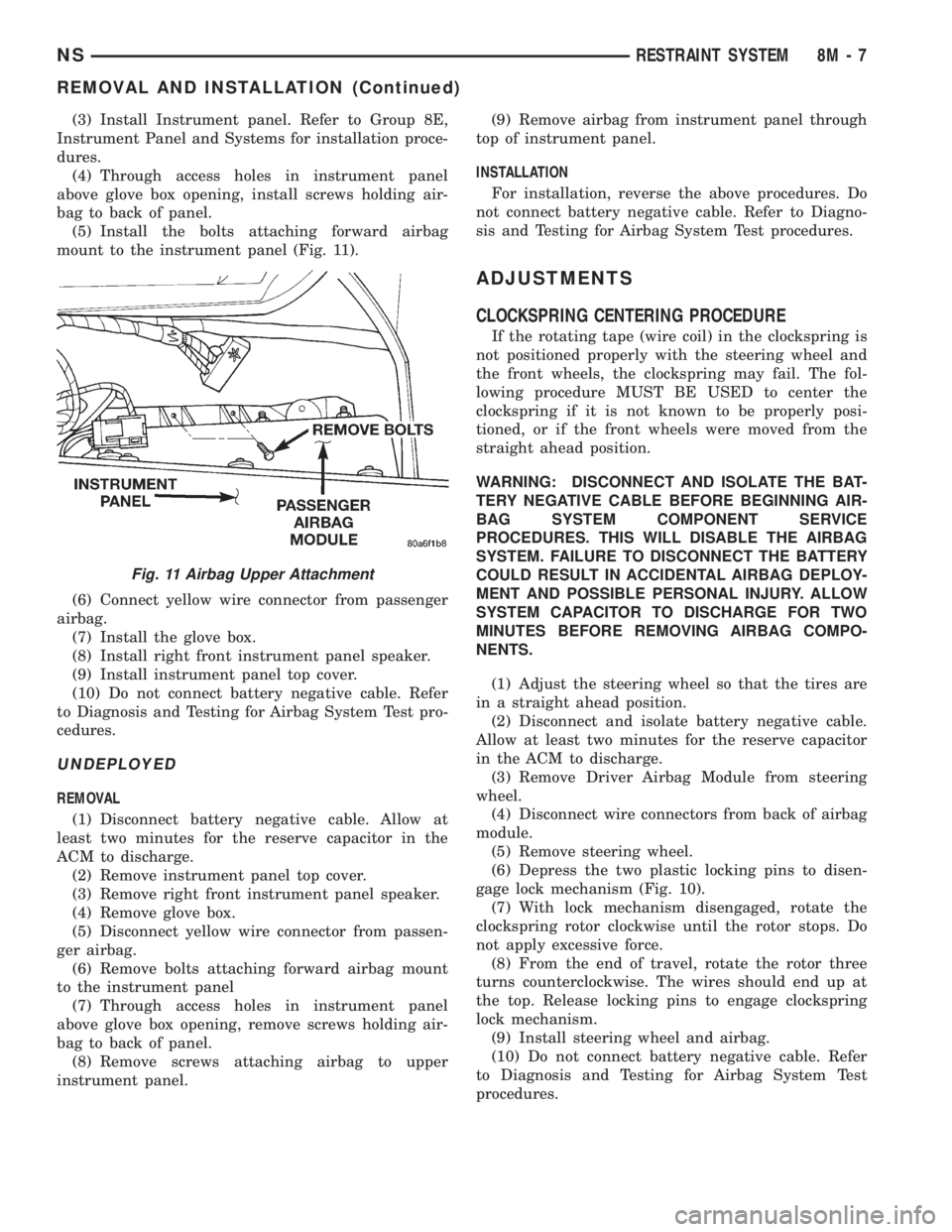
(5) Install the bolts attaching forward airbag
mount to the instrument panel (Fig. 11).
(6) Connect yellow wire connector from passenger
airbag.
(7) Install the glove box.
(8) Install right front instrument panel speaker.
(9) Install instrument panel top cover.
(10) Do not connect battery negative cable. Refer
to Diagnosis and Testing for Airbag System Test pro-
cedures.
UNDEPLOYED
REMOVAL
(1) Disconnect battery negative cable. Allow at
least two minutes for the reserve capacitor in the
ACM to discharge.
(2) Remove instrument panel top cover.
(3) Remove right front instrument panel speaker.
(4) Remove glove box.
(5) Disconnect yellow wire connector from passen-
ger airbag.
(6) Remove bolts attaching forward airbag mount
to the instrument panel
(7) Through access holes in instrument panel
above glove box opening, remove screws holding air-
bag to back of panel.
(8) Remove screws attaching airbag to upper
instrument panel.(9) Remove airbag from instrument panel through
top of instrument panel.
INSTALLATION
For installation, reverse the above procedures. Do
not connect battery negative cable. Refer to Diagno-
sis and Testing for Airbag System Test procedures.
ADJUSTMENTS
CLOCKSPRING CENTERING PROCEDURE
If the rotating tape (wire coil) in the clockspring is
not positioned properly with the steering wheel and
the front wheels, the clockspring may fail. The fol-
lowing procedure MUST BE USED to center the
clockspring if it is not known to be properly posi-
tioned, or if the front wheels were moved from the
straight ahead position.
WARNING: DISCONNECT AND ISOLATE THE BAT-
TERY NEGATIVE CABLE BEFORE BEGINNING AIR-
BAG SYSTEM COMPONENT SERVICE
PROCEDURES. THIS WILL DISABLE THE AIRBAG
SYSTEM. FAILURE TO DISCONNECT THE BATTERY
COULD RESULT IN ACCIDENTAL AIRBAG DEPLOY-
MENT AND POSSIBLE PERSONAL INJURY. ALLOW
SYSTEM CAPACITOR TO DISCHARGE FOR TWO
MINUTES BEFORE REMOVING AIRBAG COMPO-
NENTS.
(1) Adjust the steering wheel so that the tires are
in a straight ahead position.
(2) Disconnect and isolate battery negative cable.
Allow at least two minutes for the reserve capacitor
in the ACM to discharge.
(3) Remove Driver Airbag Module from steering
wheel.
(4) Disconnect wire connectors from back of airbag
module.
(5) Remove steering wheel.
(6) Depress the two plastic locking pins to disen-
gage lock mechanism (Fig. 10).
(7) With lock mechanism disengaged, rotate the
clockspring rotor clockwise until the rotor stops. Do
not apply excessive force.
(8) From the end of travel, rotate the rotor three
turns counterclockwise. The wires should end up at
the top. Release locking pins to engage clockspring
lock mechanism.
(9) Install steering wheel and airbag.
(10) Do not connect battery negative cable. Refer
to Diagnosis and Testing for Airbag System Test
procedures.
Fig. 11 Airbag Upper Attachment
NSRESTRAINT SYSTEM 8M - 7
REMOVAL AND INSTALLATION (Continued)
Page 514 of 1938
SERVICE PROCEDURES
HORN CHIRP DISABLE OR ENABLE
The horn chirp can be DISABLED or ENABLED
using the following procedure.
To DISABLE (cancelling) the horn chirp feature,
press and hold the transmitter LOCK button for a
minimum four seconds. While pressing LOCK button
in, press the UNLOCK button. The horn chirp fea-
ture will not function until the above procedure is
repeated. To ENABLE (reinstate) the horn chirp fea-
ture, use any one of the four key fob transmitters
and reverse the above procedures. It will ENABLE
the horn chirp feature for all transmitters.
REMOVAL AND INSTALLATION
RKE MODULE
REMOVAL
(1) Remove instrument panel top cover. Refer to
Group 8E, Instrument Panel and Gauges for proper
procedures.
(2) Remove screws holding RKE module to instru-
ment panel.
(3) Disconnect wire connector from RKE module
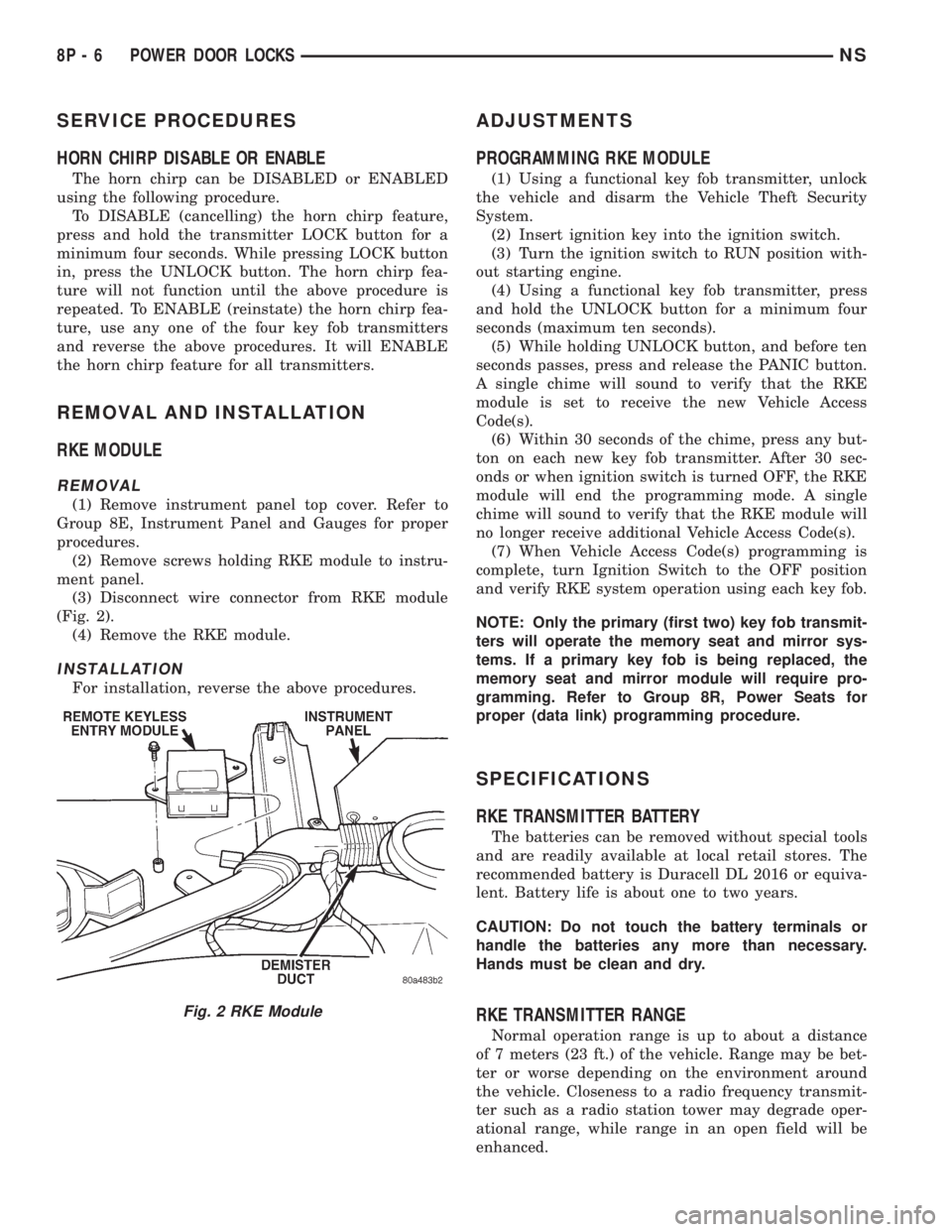
(Fig. 2).
(4) Remove the RKE module.
INSTALLATION
For installation, reverse the above procedures.
ADJUSTMENTS
PROGRAMMING RKE MODULE
(1) Using a functional key fob transmitter, unlock
the vehicle and disarm the Vehicle Theft Security
System.
(2) Insert ignition key into the ignition switch.
(3) Turn the ignition switch to RUN position with-
out starting engine.
(4) Using a functional key fob transmitter, press
and hold the UNLOCK button for a minimum four
seconds (maximum ten seconds).
(5) While holding UNLOCK button, and before ten
seconds passes, press and release the PANIC button.
A single chime will sound to verify that the RKE
module is set to receive the new Vehicle Access
Code(s).
(6) Within 30 seconds of the chime, press any but-
ton on each new key fob transmitter. After 30 sec-
onds or when ignition switch is turned OFF, the RKE
module will end the programming mode. A single
chime will sound to verify that the RKE module will
no longer receive additional Vehicle Access Code(s).
(7) When Vehicle Access Code(s) programming is
complete, turn Ignition Switch to the OFF position
and verify RKE system operation using each key fob.
NOTE: Only the primary (first two) key fob transmit-
ters will operate the memory seat and mirror sys-
tems. If a primary key fob is being replaced, the
memory seat and mirror module will require pro-
gramming. Refer to Group 8R, Power Seats for
proper (data link) programming procedure.
SPECIFICATIONS
RKE TRANSMITTER BATTERY
The batteries can be removed without special tools
and are readily available at local retail stores. The
recommended battery is Duracell DL 2016 or equiva-
lent. Battery life is about one to two years.
CAUTION: Do not touch the battery terminals or
handle the batteries any more than necessary.
Hands must be clean and dry.
RKE TRANSMITTER RANGE
Normal operation range is up to about a distance
of 7 meters (23 ft.) of the vehicle. Range may be bet-
ter or worse depending on the environment around
the vehicle. Closeness to a radio frequency transmit-
ter such as a radio station tower may degrade oper-
ational range, while range in an open field will be
enhanced.
Fig. 2 RKE Module
8P - 6 POWER DOOR LOCKSNS
Page 521 of 1938
determine whether a valid key is in the ignition lock
cylinder.
The Smart Key transponder cannot be repaired
and, if faulty or damaged, it must be replaced.
SMART KEY IMMOBILIZER SYSTEM INDICATOR
LAMP
The Smart Key Immobilizer System (SKIS) indica-
tor lamp gives an indication when the SKIS is faulty
or when the vehicle has been immobilized due to the
use of an invalid ignition key. The lamp is controlled
by the instrument cluster circuitry based upon mes-
sages received from the Smart Key Immobilizer Mod-
ule (SKIM) on the Chrysler Collision Detection (CCD)
data bus.
The SKIM sends messages to the instrument clus-
ter to turn the lamp on for about three seconds when
the ignition switch is turned to the On position as a
bulb test. After completion of the bulb test, the SKIM
sends bus messages to keep the lamp off for a dura-
tion of about one second. Then the SKIM sends mes-
sages to the instrument cluster circuitry to turn the
lamp on or off based upon the results of the SKIS
self-tests. If the SKIS indicator lamp comes on and
stays on after the bulb test, it indicates that the
SKIM has detected a system malfunction and/or that
the SKIS has become inoperative. If the SKIM
detects an invalid key when the ignition switch is
turned to the On position, it sends messages to the
instrument cluster to flash the SKIS indicator lamp.
The SKIM can also send messages to the instru-
ment cluster to flash the lamp and to generate a sin-
gle audible chime tone. These functions serve as an
indication to the customer that the SKIS has been
placed in its ªCustomer Learnº programming mode.
See Smart Key Immobilizer System Transponder Pro-
gramming in this group for more information on the
ªCustomer Learnº programming mode.
The SKIS indicator lamp uses a replaceable incan-
descent bulb and bulb holder on the instrument clus-
ter electronic circuit board. Refer to Group 8E -
Instrument Panel Systems for diagnosis and service
of a faulty SKIS indicator lamp. If the SKIS indicator
lamp comes on and stays on after the bulb test func-
tion, diagnosis of the SKIS should be performed with
a DRB scan tool and the proper Diagnostic Proce-
dures manual.
DIAGNOSIS AND TESTING
SMART KEY IMMOBILIZER SYSTEM
WARNING: ON VEHICLES EQUIPPED WITH AIR-
BAGS, REFER TO GROUP 8M - PASSIVE
RESTRAINT SYSTEMS BEFORE ATTEMPTING ANY
STEERING WHEEL, STEERING COLUMN, OR
INSTRUMENT PANEL COMPONENT DIAGNOSIS OR
SERVICE. FAILURE TO TAKE THE PROPER PRE-
CAUTIONS COULD RESULT IN ACCIDENTAL AIR-
BAG DEPLOYMENT AND POSSIBLE PERSONAL
INJURY.
NOTE: The following tests may not prove conclu-
sive in the diagnosis of this system. The most reli-
able, efficient, and accurate means to diagnose the
Smart Key Immobilizer System involves the use of a
DRB scan tool. Refer to the proper Diagnostic Pro-
cedures manual for the procedures.
The Smart Key Immobilizer System (SKIS) and the
Chrysler Collision Detection (CCD) data bus network
should be diagnosed using a DRB scan tool. The DRB
will allow confirmation that the CCD data bus is
functional, that the Smart Key Immobilizer Module
(SKIM) is placing the proper messages on the CCD
data bus, and that the Powertrain Control Module
(PCM) and the instrument cluster are receiving the
CCD data bus messages. Refer to the proper Diag-
nostic Procedures manual for the procedures. Refer
to 8W-30 - Fuel/Ignition System in Group 8W - Wir-
ing Diagrams for complete circuit descriptions and
diagrams.
(1) Check the fuses in the fuseblock module. If OK,
go to Step 2. If not OK, repair the shorted circuit or
component as required and replace the faulty fuse.
(2) Disconnect and isolate the battery negative
cable. Unplug the wire harness connector at the
SKIM. Check for continuity between the ground cir-
cuit cavity of the SKIM wire harness connector and a
good ground. There should be continuity. If OK, go to
Step 3. If not OK, repair the open circuit to ground
as required.
(3) Connect the battery negative cable. Check for
battery voltage at the fused B(+) circuit cavity of the
SKIM wire harness connector. If OK, go to Step 4. If
not OK, repair the open circuit to the fuse in the
fuseblock module as required.
NS/GSVEHICLE THEFT/SECURITY SYSTEMS 8Q - 3
DESCRIPTION AND OPERATION (Continued)
Page 522 of 1938
(4) Turn the ignition switch to the On position.
Check for battery voltage at the fused ignition switch
output (run/start) circuit cavity of the SKIM wire
harness connector. If OK, use a DRB scan tool and
the proper Diagnostic Procedures manual to complete
the diagnosis of the SKIS. If not OK, repair the open
circuit to the fuse in the fuseblock module as
required.
SERVICE PROCEDURES
SMART KEY IMMOBILIZER SYSTEM
TRANSPONDER PROGRAMMING
Two programmed Smart Key transponders are
included with the Smart Key Immobilizer System
(SKIS) when it is shipped from the factory. The
Smart Key Immobilizer Module (SKIM) can be pro-
grammed to recognize up to six additional transpon-
ders, for a total of eight Smart Keys. The following
ªCustomer Learnº programming procedure for the
programming of additional transponders requires
access to at least two of the valid Smart Keys. If two
valid Smart Keys are not available, Smart Key pro-
gramming will require the use of a DRB scan tool
and the proper Diagnostic Procedures manual.
PROGRAMMING THE SKIM MODULE WITH
THE DRBIII
(1) Turn the ignition on. Transmission must be in
park or neutral. Alarm set lamp will flash.
(2) Use the DRBIII and select ªSKIMº under the
ªMISCELLANEOUSº menu.
(3) Select ªPROGRAM PINº and enter the cus-
tomer 4±digit PIN number.
(4) Select ªUPDATE VINº. The SKIM module will
learn the VIN from the PCM in gasoline engine vehi-
cles, and from the BCM in diesel engine vehicles.
(5) Select ªCOUNTRY CODEº and enter the cor-
rect country.
(6) Select ªPROGRAM NEW EMSº. The SKIM
module will send the ªsecret keyº data to the PCM.
(7) Program ignition keys to the SKIM module.
PROGRAMMING IGNITION KEYS WITH THE
DRBIII
(1) Turn ignition on. Transmission must be in park
or neutral. Alarm set lamp will flash.
(2) Use the DRBIII and select ªSKIMº under the
ªMISCELLANEOUSº menu.
(3) Select ªLEARN NEW KEYº. Alarm Set lamp
will begin flashing.
NOTE: The PIN must be re-entered each time an
additional key is learned.(4) Insert key into ignition switch. Once the key
has been learned, the Alarm Set lamp will turn off.
REMOVAL AND INSTALLATION
SMART KEY IMMOBILIZER MODULE
WARNING: ON VEHICLES EQUIPPED WITH AIR-
BAGS, REFER TO GROUP 8M - PASSIVE
RESTRAINT SYSTEMS BEFORE ATTEMPTING ANY
STEERING WHEEL, STEERING COLUMN, OR
INSTRUMENT PANEL COMPONENT DIAGNOSIS OR
SERVICE. FAILURE TO TAKE THE PROPER PRE-
CAUTIONS COULD RESULT IN ACCIDENTAL AIR-
BAG DEPLOYMENT AND POSSIBLE PERSONAL
INJURY.
(1) Disconnect and isolate the battery negative
cable.
(2) Remove the knee blocker from the instrument
panel. See Knee Blocker in Group 8E - Instrument
Panel Systems for the procedures.
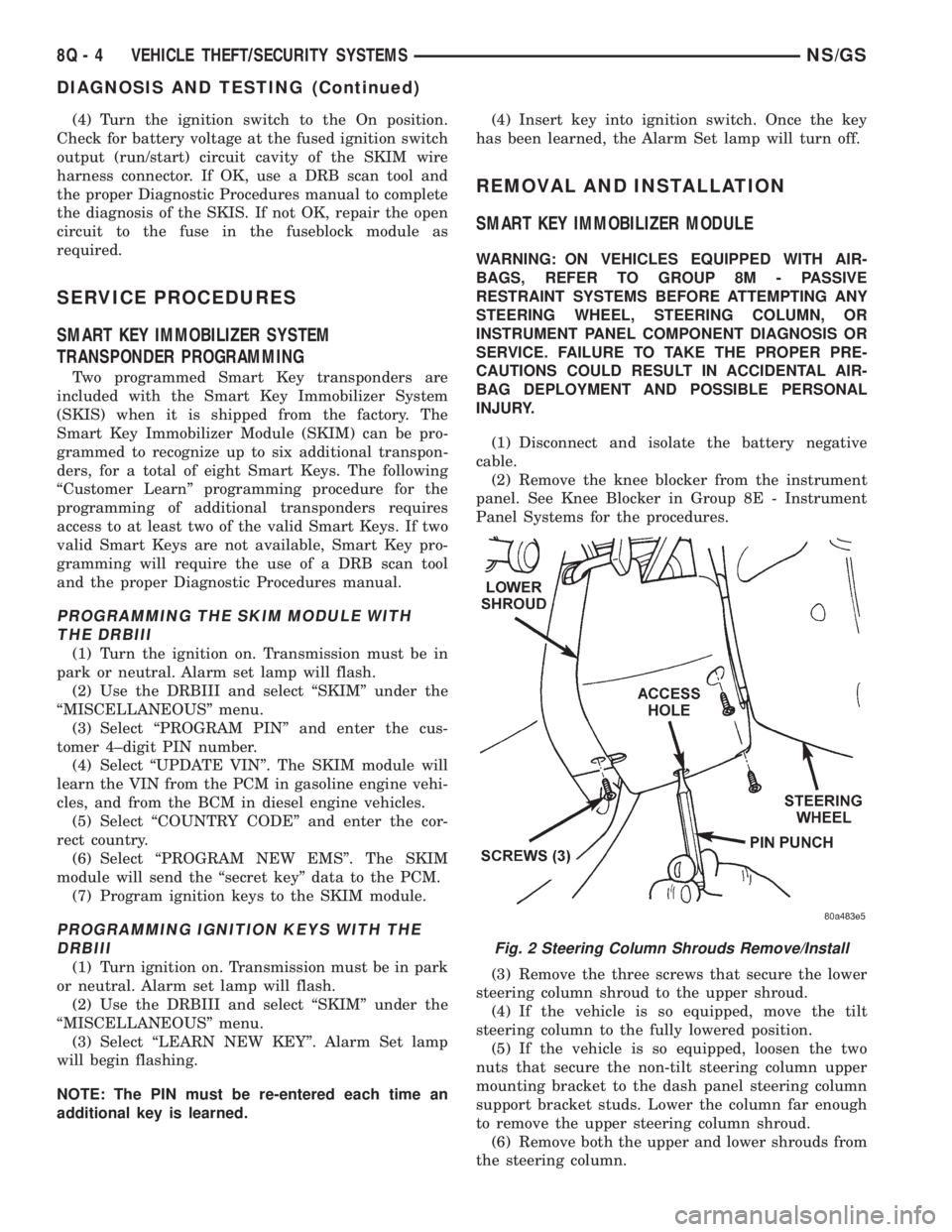
(3) Remove the three screws that secure the lower
steering column shroud to the upper shroud.
(4) If the vehicle is so equipped, move the tilt
steering column to the fully lowered position.
(5) If the vehicle is so equipped, loosen the two
nuts that secure the non-tilt steering column upper
mounting bracket to the dash panel steering column
support bracket studs. Lower the column far enough
to remove the upper steering column shroud.
(6) Remove both the upper and lower shrouds from
the steering column.
Fig. 2 Steering Column Shrouds Remove/Install
8Q - 4 VEHICLE THEFT/SECURITY SYSTEMSNS/GS
DIAGNOSIS AND TESTING (Continued)
Page 531 of 1938

MEMORY SEAT AND MIRROR SYSTEM
INDEX
page page
GENERAL INFORMATION
INTRODUCTION......................... 3
DESCRIPTION AND OPERATION
MEMORY SELECTOR SWITCHES............ 3
POSITION SENSING SEAT AND RECLINER
POTENTIOMETERS..................... 4
POWER SIDE VIEW MIRROR POSITION
SENSING............................. 3
SEAT AND RECLINER SWITCHES............ 4
DIAGNOSIS AND TESTING
CIRCUIT DESCRIPTION.................... 7DIAGNOSTIC MODE...................... 5
MEMORY SELECTOR SWITCHES............ 4
SEAT AND RECLINER POSITION SENSING.... 9
SIDE VIEW MIRROR SWITCH STUCK......... 4
SERVICE PROCEDURES
REMOTE KEYLESS ENTRY (RKE) DATA LINK . . . 9
REMOVAL AND INSTALLATION
MEMORY SWITCHES..................... 10
SEAT TRACK ASSEMBLY.................. 10
GENERAL INFORMATION
INTRODUCTION
Memory Seat and Mirrors system is available only
on Town and Country (Luxury Class) vehicles.
Refer to Group 8W, Wiring Diagrams for circuit
information and component locations. Refer to the
proper Body Diagnostic Procedures manual for addi-
tional diagnostic information.
The Memory Seat/Mirror Module (MSM Module) is
mounted under the driver's seat, on the inboard
upper track with Torx head screws. The MSM Mod-
ule provides the driver with an adjustable seat,
recliner, and power side view mirror positioning con-
troller that remembers stored positions and will
recall those positions on command.
The Memory Seat/Mirror Module reads all seat and
recliner switch inputs and operates the seat and
recliner motors in response to switch actuation. The
MSM Module monitors position sensing potentiome-
ters (mounted on the motors) for seat and recliner
positioning.
The MSM Module operates the power side view
mirror motors through solid state drivers (electronic
switches) in the recall mode only, and follows the
glass face position by means of rheostats built into
the motor pack assembly of the mirrors. Normal elec-
trical operation of the mirrors is accomplished by
actuation of the power mirror switch.
The Memory Seat/Mirror Module monitors the mem-
ory switches and has the capability to store desired
positions in non-volatile memory in response to a valid
input sequence. Refer to Memory Selector Switches (1,
2, and S) and Remote Keyless Entry (RKE) Data Link.
The memory seat/mirror module also can activate the
previously described motors in response to a recall
request from an individual memory switch.
The Memory Seat/Mirror Module monitors a data
link between the RKE receiver and the Body Control
Module (BCM) and will respond to stored information
or modify stored information when requested by a
valid data stream.
The Memory Seat/Mirror Module is connected to
the system through a seat wiring harness that inter-
faces will all of the components within the seat struc-
ture, and with electrical distribution wiring harness
connections to the non-seat mounted components.
The module operates the seat and recliner motors
through relays: four dedicated to track forward/rear-
ward, track front up/down, track rear up/down, and
recliner forward/rearward. A fifth relay controls the
direction of operation of those motors.
DESCRIPTION AND OPERATION
POWER SIDE VIEW MIRROR POSITION SENSING
The mirror switch on the instrument panel oper-
ates the outside rear view mirrors independently of
the memory seat/mirror module. The module acti-
vates the mirror motors only when in its recall mode.
The side view mirrors have position sensing rheo-
stats built into each side view mirror vertical and
horizontal motor assembly. These rheostats provide a
sense voltage to the memory seat/mirror module that
indicates where the mirror is moving to or where its
position is at when the module is activated but the
mirror motor is not moving.
MEMORY SELECTOR SWITCHES
The memory selector switches are mounted on the
driver's door trim panel within easy reach of the
driver. They provide a means to set or recall either of
NSPOWER SEATS 8R - 3
Page 532 of 1938
two positions of seat and recliner, and the side view
mirrors as chosen by the driver.
The inputs from these switches to the memory
seat/mirror module is a ground level signal.
(1) Adjust the seat, recliner and side view mirrors
to the desired position.
(2)
Press momentarily and release memory switch S.
(3) Press momentarily and release memory switch
1 or 2. Do NOT press any switches for 10 seconds.
(4) To program the second driver's position, follow
the above sequence.
(5) To recall either of the programmed positions
momentarily press and release either memory selec-
tor switch 1 or 2.
DEFINITION OF: MOMENTARILY AND
RELEASE
The memory seat/mirror module has switch input
timing requirements of a minimum press momen-
tarily time of 250 milliseconds followed by a maxi-
mum hold time of 5 seconds, followed by a maximum
release time between steps of 5 seconds that must be
met for proper operation of the system.
SEAT AND RECLINER SWITCHES
The seat and recliner switch assembly is mounted
outboard on the seat side-shield. Press and hold the
desired seat or recliner switch to effect movement.
The Memory Seat/Mirror Module (MSM Module) will
drive a maximum of 2 motors at a time in a given
direction. If conflicting directions are requested, the
priority for response will be as follows:
²Seat Track Rearward
²Seat Front Down
²Seat Rear Down
²Recliner Rearward
²Seat Track Forward
²Seat Front Up
²Seat Rear Up
²Recliner Forward
The inputs from these switches to the MSM Mod-
ule is a current limited battery source fed by the
MSM Module. This protects the MSM Module printed
circuit board traces from acting as fuses. All of these
switch contact inputs to the module are normally
closed to ground, except when actuated.
POSITION SENSING SEAT AND RECLINER
POTENTIOMETERS
A potentiometer is mounted to each seat track and
recliner motor end-bell to provide a sense voltage to
the Memory Seat/Mirror Module that will indicate to
the module where the seat track or recliner is posi-
tioned.
This sense voltage is derived from a 5 volt source
provided by the module to the potentiometer. Thesense voltage is input into the module and stored by
the Memory Seat/Mirror Module.
DIAGNOSIS AND TESTING
MEMORY SELECTOR SWITCHES
To test the memory selector switch:
(1) Remove the memory selector switch. Refer to
removal procedure.
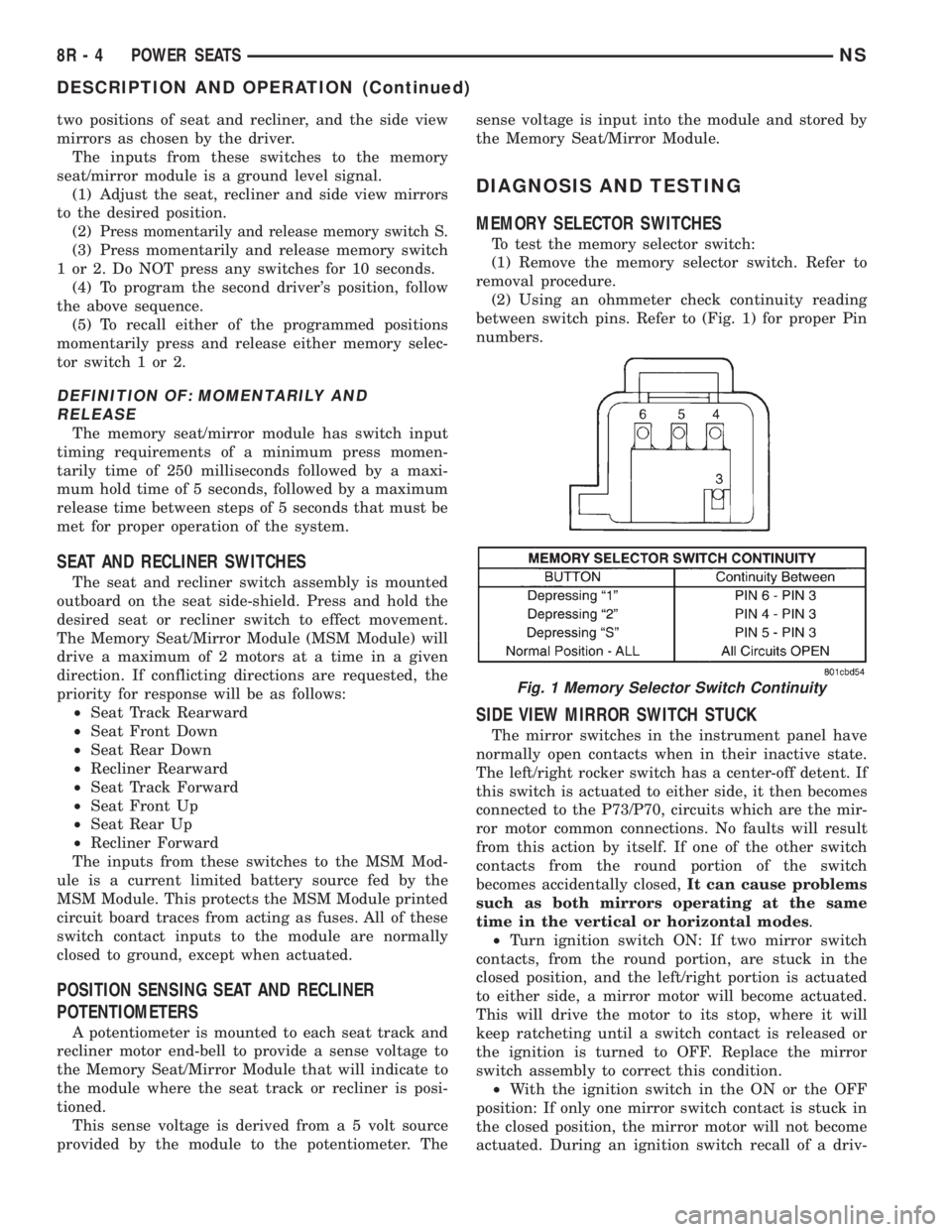
(2) Using an ohmmeter check continuity reading
between switch pins. Refer to (Fig. 1) for proper Pin
numbers.
SIDE VIEW MIRROR SWITCH STUCK
The mirror switches in the instrument panel have
normally open contacts when in their inactive state.
The left/right rocker switch has a center-off detent. If
this switch is actuated to either side, it then becomes
connected to the P73/P70, circuits which are the mir-
ror motor common connections. No faults will result
from this action by itself. If one of the other switch
contacts from the round portion of the switch
becomes accidentally closed,It can cause problems
such as both mirrors operating at the same
time in the vertical or horizontal modes.
²Turn ignition switch ON: If two mirror switch
contacts, from the round portion, are stuck in the
closed position, and the left/right portion is actuated
to either side, a mirror motor will become actuated.
This will drive the motor to its stop, where it will
keep ratcheting until a switch contact is released or
the ignition is turned to OFF. Replace the mirror
switch assembly to correct this condition.
²With the ignition switch in the ON or the OFF
position: If only one mirror switch contact is stuck in
the closed position, the mirror motor will not become
actuated. During an ignition switch recall of a driv-
Fig. 1 Memory Selector Switch Continuity
8R - 4 POWER SEATSNS
DESCRIPTION AND OPERATION (Continued)