brake light CHRYSLER VOYAGER 1996 Owner's Manual
[x] Cancel search | Manufacturer: CHRYSLER, Model Year: 1996, Model line: VOYAGER, Model: CHRYSLER VOYAGER 1996Pages: 1938, PDF Size: 55.84 MB
Page 212 of 1938
friction area should be slightly concave, with the
inner diameter 0.02 mm to 0.1 mm (.0008 in. to .0039
in.) below the outer diameter. It should also be free
from discoloration, burned areas, cracks, grooves, or
ridges.
Using a surface plate, test cover for flatness. All
sections around attaching bolt holes should be in con-
tact with surface plate within .015 inch.
The cover should be a snug fit on flywheel dowels.
If the clutch assembly does not meet these require-
ments, it should be replaced.
INSTALLATION
(1) Position the clutch and pressure plate onto the
flywheel.
(2) Insert the universal clutch alignment tool into
the clutch disc.
(3) To avoid distortion of the pressure plate, bolts
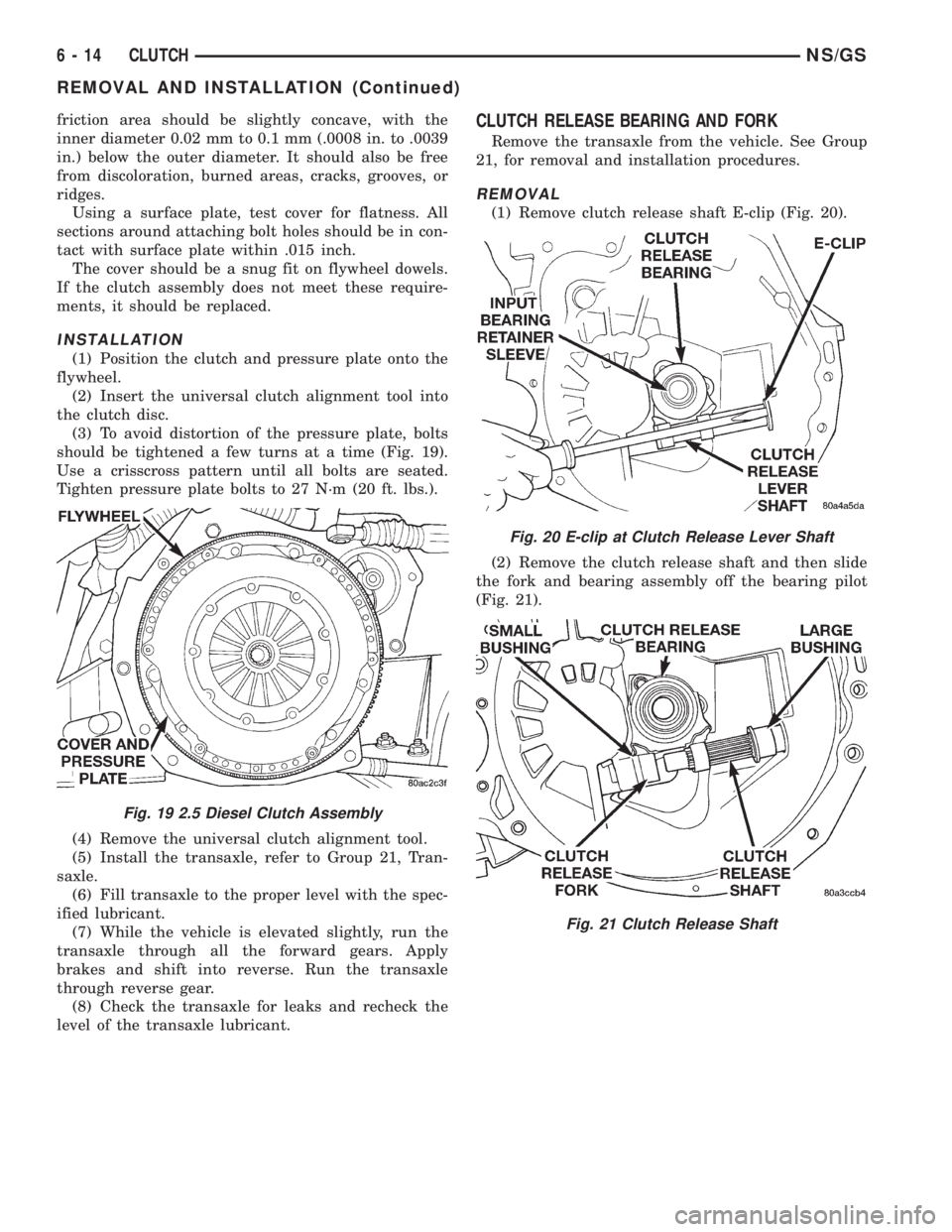
should be tightened a few turns at a time (Fig. 19).
Use a crisscross pattern until all bolts are seated.
Tighten pressure plate bolts to 27 N´m (20 ft. lbs.).
(4) Remove the universal clutch alignment tool.
(5) Install the transaxle, refer to Group 21, Tran-
saxle.
(6) Fill transaxle to the proper level with the spec-
ified lubricant.
(7) While the vehicle is elevated slightly, run the
transaxle through all the forward gears. Apply
brakes and shift into reverse. Run the transaxle
through reverse gear.
(8) Check the transaxle for leaks and recheck the
level of the transaxle lubricant.
CLUTCH RELEASE BEARING AND FORK
Remove the transaxle from the vehicle. See Group
21, for removal and installation procedures.
REMOVAL
(1) Remove clutch release shaft E-clip (Fig. 20).
(2) Remove the clutch release shaft and then slide
the fork and bearing assembly off the bearing pilot
(Fig. 21).
Fig. 19 2.5 Diesel Clutch Assembly
Fig. 20 E-clip at Clutch Release Lever Shaft
Fig. 21 Clutch Release Shaft
6 - 14 CLUTCHNS/GS
REMOVAL AND INSTALLATION (Continued)
Page 255 of 1938

use. Refer to Causes of Battery Discharging in this
Group for more information.
NOTE: CLEAR COLOR = Replace Battery
WARNING: DO NOT CHARGE, ASSIST BOOST,
LOAD TEST, OR ADD WATER TO THE BATTERY
WHEN CLEAR COLOR DOT IS VISIBLE. PERSONAL
INJURY MAY OCCUR.
A clear color dot shows electrolyte level in battery
is below the test indicator (Fig. 1). Water cannot be
added to a maintenance free battery. The battery
must be replaced. A low electrolyte level may be
caused by an over charging condition. Refer to Gen-
erator Test Procedures on Vehicle.
CAUSES OF BATTERY DISCHARGING
It is normal to have a small 5 to 25 milliamperes
continuous electrical draw from the battery. This
draw will take place with the ignition in the OFF
position, and the courtesy, dome, storage compart-
ments, and engine compartment lights OFF. The con-
tinuous draw is due to various electronic features or
accessories that require electrical current with the
ignition OFF to function properly. When a vehicle is
not used over an extended period of approximately 20
days the IOD fuse should be pulled. The fuse is
located in the power distribution center. Disconnec-
tion of this fuse will reduce the level of battery dis-
charge. Refer to Battery Diagnosis and Testing table
and to the proper procedures.
ABNORMAL BATTERY DISCHARGING
²Corroded battery posts, cables or terminals.
²Loose or worn generator drive belt.
²Electrical loads that exceed the output of the
charging system due to equipment or accessories
installed after delivery.
²Slow driving speeds in heavy traffic conditions
or prolonged idling with high-amperage electrical
systems in use.²Defective electrical circuit or component causing
excess Ignition Off Draw (IOD). Refer to Battery
Ignition Off Draw (IOD).
²Defective charging system.
²Defective battery.
BATTERY IGNITION OFF DRAW (IOD)
High current draw on the battery with the ignition
OFF will discharge a battery. After a dead battery is
serviced the vehicle Ignition Off Draw (IOD) should
be checked. Determine if a high current draw condi-
tion exists first check the vehicle with a test lamp.
(1) Verify that all electrical accessories are OFF.
²Remove key from ignition switch
²Turn off all lights
²Liftgate and glove box door is closed
²Sun visor vanity lights are OFF
²All doors are closed
²Allow the Illuminated Entry System to time out
in approximately 30 seconds, if equipped.
²During Transmission Control Module (TCM)
power down there will be 500 milliamperes present
for 20 minutes. Afterwards less than 1.0 milliampere.
(2) Disconnect battery negative cable (Fig. 4).
CAUTION: Always disconnect the meter before
opening a door.
(3) Using an multimeter, that has least a milliam-
pere range of 200 mA. Set meter to the highest mA
range. Install meter between the battery negative
cable and battery negative post (Fig. 5). Carefully
remove the test lamp without disconnecting the
meter. After all modules time-out the total vehicle
IOD should be less than 25 milliamperes. If ignition
off draw is more than 25 milliamperes go to Step 4.
(4) Each time the test lamp or milliampere meter
is disconnected and connected, all electronic timer
functions will be activated for approximately one
minute. The Body Control Module (BCM) ignition off
draw can reach 90 milliamperes.
(5) Remove the PDC fuses:
²Interior lamps
²Brake lamp
²IOD
(6) If there is any reading, with fuses removed
there is a short circuit in the wiring. Refer to Group
8W, wiring diagrams. If reading is less than 25 mA
go to Step 8.
(7) Install all fuses. After installing fuse, the cur-
rent can reach 90 mA. After time-out the reading
should not exceed 25 mA. If OK go to. If not, discon-
nect:
²Radio
²Body Control Module
²Remote Keyless Entry Module
Fig. 3 Test Indicator
NSBATTERY 8A - 3
DIAGNOSIS AND TESTING (Continued)
Page 267 of 1938

²Body Control Module
²Remote Keyless Entry Module
(8) Disconnect one component at time, to see if any
component is at fault. If the high reading is not elim-
inated there is a short circuit in the wiring. Refer to
Group 8W, wiring diagrams.
(9) Remove interior and brake lamp fuses. Install
the fuses. The milliampere reading should be 2-4 mA.
If reading is higher than 4 mA:
(a) Disconnect PCM.
(b) If reading is OK, replace PCM.
(c) If reading does not change there is a short
circuit to the PCM. Refer to Group 8W, Wiring Dia-
grams.
BATTERY LOAD TEST
A fully charged battery must have cranking capac-
ity, to provide the starter motor and ignition system
enough power to start the engine over a broad range
of ambient temperatures. A battery load test will ver-
ify the actual cranking capability of the battery.
WARNING: IF BATTERY SHOWS SIGNS OF FREEZ-
ING, LEAKING, LOOSE POSTS, OR EXCESSIVELY
LOW ELECTROLYTE LEVEL, DO NOT TEST. ACID
BURNS OR AN EXPLOSIVE CONDITION MAY
RESULT.
(1) Remove both battery cables, negative cable
first. The battery top, cables and posts should be
clean. Test battery with a hydrometer. If battery
charge is low the charge battery. Refer to Battery
Charging Procedures.(2) Connect a Volt/Ammeter/Load tester to the bat-
tery posts (Fig. 6). Rotate the load control knob of the
Carbon pile rheostat to apply a 300 amp load. Apply
this load for 15 seconds to remove the surface charge
from the battery, and return the control knob to off
(Fig. 7).
(3) Allow the battery to stabilize for 2 minutes,
and then verify open circuit voltage.
(4) Rotate the load control knob on the tester to
maintain 50% of the battery cold crank rating for 15
seconds (Fig. 8). Record the loaded voltage reading
and return the load control to off. Refer to the Bat-
tery Specifications at the rear of this Group.
(5) Voltage drop will vary according to battery
temperature at the time of the load test. Battery
temperature can be estimated by the temperature of
exposure over the preceding several hours. If the bat-
tery has been charged or boosted a few minutes prior
to the test, the battery would be slightly warmer.
Refer to Load Test Voltage Chart for proper loaded
voltage reading.
Fig. 5 Milliampere Meter ConnectionFig. 6 Volt-Ammeter Load Tester Connections
Fig. 7 Remove Surface Charge From Battery
NS/GSBATTERY 8A - 5
DIAGNOSIS AND TESTING (Continued)
Page 277 of 1938
CAUTION: Before performing any starter tests, the
ignition and fuel systems must be disabled.
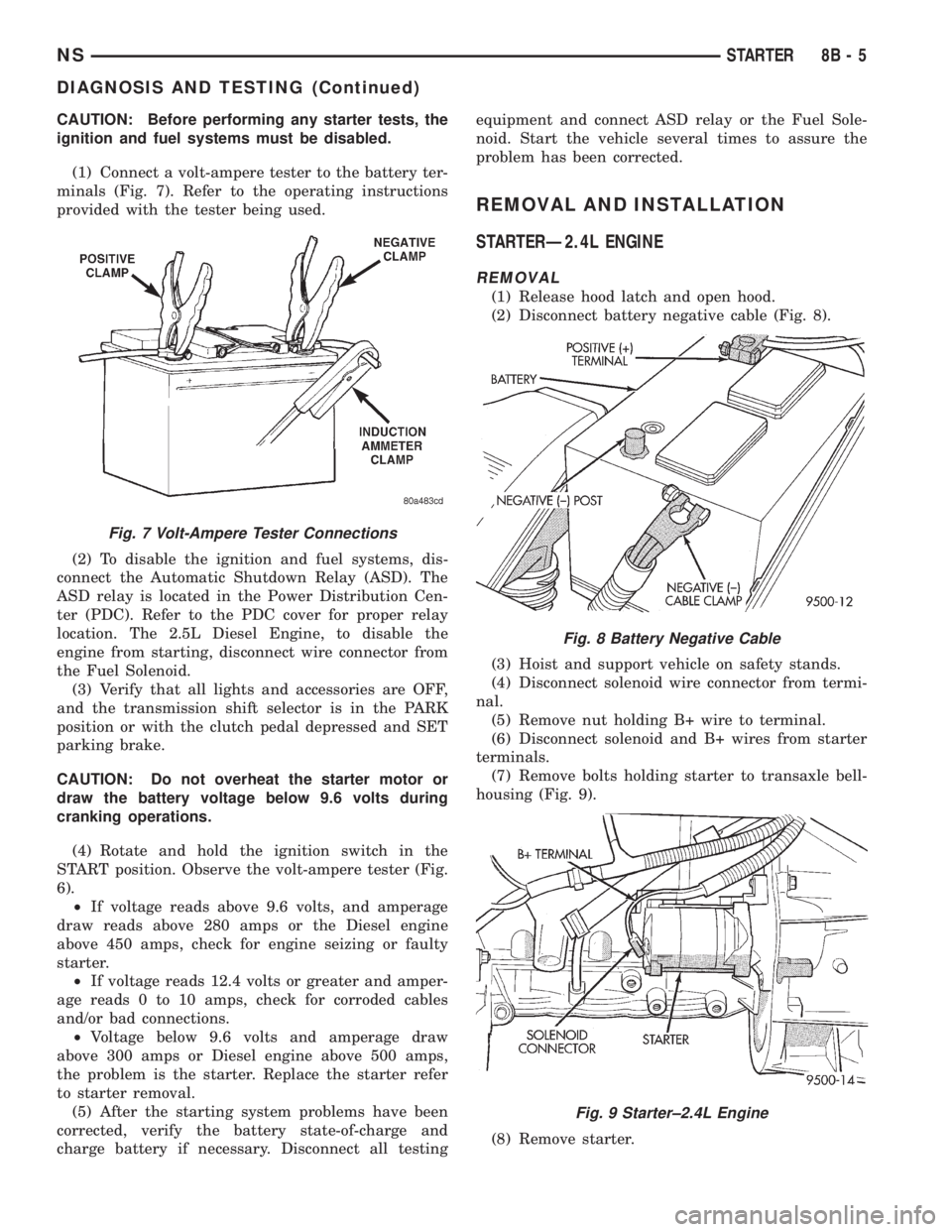
(1) Connect a volt-ampere tester to the battery ter-
minals (Fig. 7). Refer to the operating instructions
provided with the tester being used.
(2) To disable the ignition and fuel systems, dis-
connect the Automatic Shutdown Relay (ASD). The
ASD relay is located in the Power Distribution Cen-
ter (PDC). Refer to the PDC cover for proper relay
location. The 2.5L Diesel Engine, to disable the
engine from starting, disconnect wire connector from
the Fuel Solenoid.
(3) Verify that all lights and accessories are OFF,
and the transmission shift selector is in the PARK
position or with the clutch pedal depressed and SET
parking brake.
CAUTION: Do not overheat the starter motor or
draw the battery voltage below 9.6 volts during
cranking operations.
(4) Rotate and hold the ignition switch in the
START position. Observe the volt-ampere tester (Fig.
6).
²If voltage reads above 9.6 volts, and amperage
draw reads above 280 amps or the Diesel engine
above 450 amps, check for engine seizing or faulty
starter.
²If voltage reads 12.4 volts or greater and amper-
age reads 0 to 10 amps, check for corroded cables
and/or bad connections.
²Voltage below 9.6 volts and amperage draw
above 300 amps or Diesel engine above 500 amps,
the problem is the starter. Replace the starter refer
to starter removal.
(5) After the starting system problems have been
corrected, verify the battery state-of-charge and
charge battery if necessary. Disconnect all testingequipment and connect ASD relay or the Fuel Sole-
noid. Start the vehicle several times to assure the
problem has been corrected.
REMOVAL AND INSTALLATION
STARTERÐ2.4L ENGINE
REMOVAL
(1) Release hood latch and open hood.
(2) Disconnect battery negative cable (Fig. 8).
(3) Hoist and support vehicle on safety stands.
(4) Disconnect solenoid wire connector from termi-
nal.
(5) Remove nut holding B+ wire to terminal.
(6) Disconnect solenoid and B+ wires from starter
terminals.
(7) Remove bolts holding starter to transaxle bell-
housing (Fig. 9).
(8) Remove starter.
Fig. 7 Volt-Ampere Tester Connections
Fig. 8 Battery Negative Cable
Fig. 9 Starter±2.4L Engine
NSSTARTER 8B - 5
DIAGNOSIS AND TESTING (Continued)
Page 290 of 1938
CHARGING SYSTEM RESISTANCE TESTS
These tests will show the amount of voltage drop
across the generator output wire from the generator
output (B+) terminal to the battery positive post.
They will also show the amount of voltage drop from
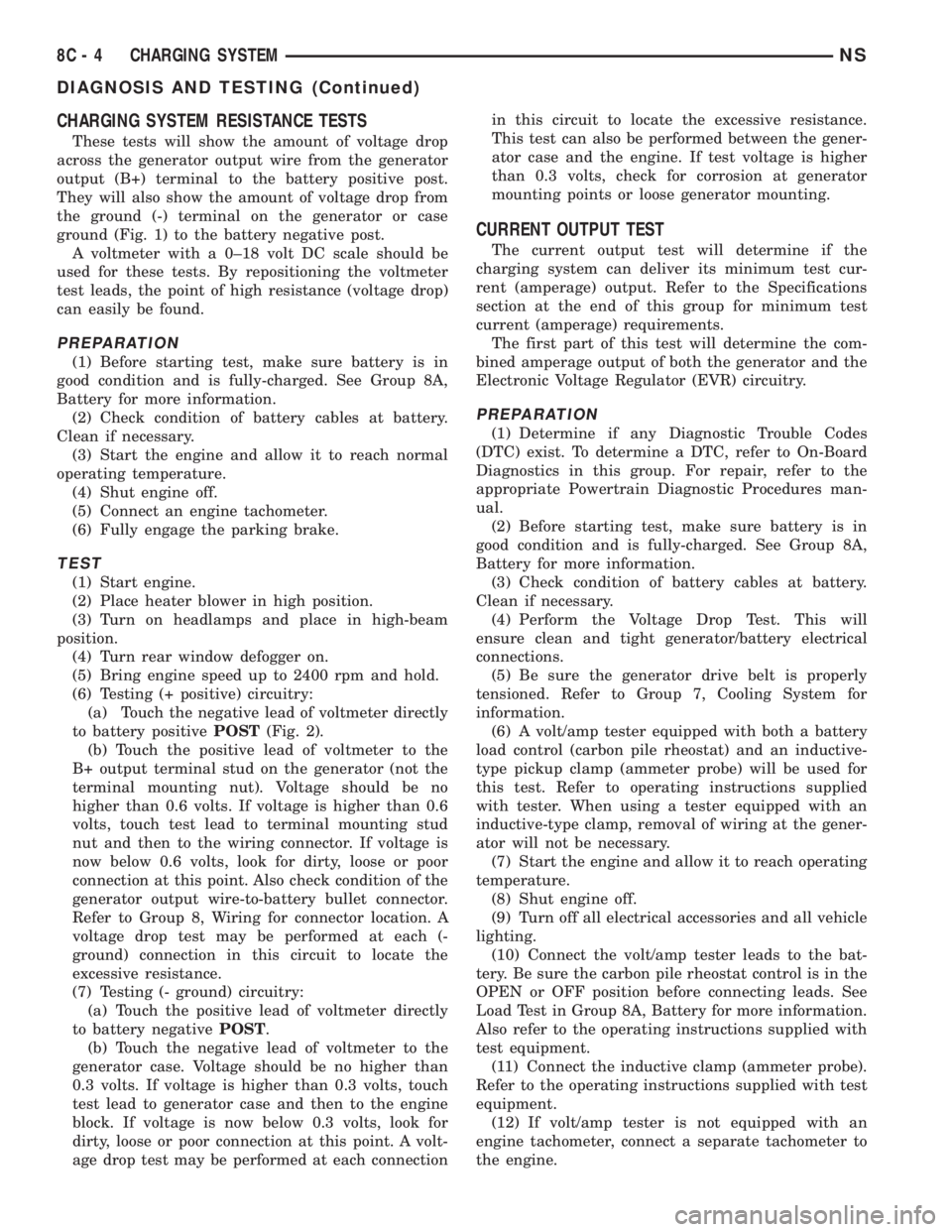
the ground (-) terminal on the generator or case
ground (Fig. 1) to the battery negative post.
A voltmeter with a 0±18 volt DC scale should be
used for these tests. By repositioning the voltmeter
test leads, the point of high resistance (voltage drop)
can easily be found.
PREPARATION
(1) Before starting test, make sure battery is in
good condition and is fully-charged. See Group 8A,
Battery for more information.
(2) Check condition of battery cables at battery.
Clean if necessary.
(3) Start the engine and allow it to reach normal
operating temperature.
(4) Shut engine off.
(5) Connect an engine tachometer.
(6) Fully engage the parking brake.
TEST
(1) Start engine.
(2) Place heater blower in high position.
(3) Turn on headlamps and place in high-beam
position.
(4) Turn rear window defogger on.
(5) Bring engine speed up to 2400 rpm and hold.
(6) Testing (+ positive) circuitry:
(a) Touch the negative lead of voltmeter directly
to battery positivePOST(Fig. 2).
(b) Touch the positive lead of voltmeter to the
B+ output terminal stud on the generator (not the
terminal mounting nut). Voltage should be no
higher than 0.6 volts. If voltage is higher than 0.6
volts, touch test lead to terminal mounting stud
nut and then to the wiring connector. If voltage is
now below 0.6 volts, look for dirty, loose or poor
connection at this point. Also check condition of the
generator output wire-to-battery bullet connector.
Refer to Group 8, Wiring for connector location. A
voltage drop test may be performed at each (-
ground) connection in this circuit to locate the
excessive resistance.
(7) Testing (- ground) circuitry:
(a) Touch the positive lead of voltmeter directly
to battery negativePOST.
(b) Touch the negative lead of voltmeter to the
generator case. Voltage should be no higher than
0.3 volts. If voltage is higher than 0.3 volts, touch
test lead to generator case and then to the engine
block. If voltage is now below 0.3 volts, look for
dirty, loose or poor connection at this point. A volt-
age drop test may be performed at each connectionin this circuit to locate the excessive resistance.
This test can also be performed between the gener-
ator case and the engine. If test voltage is higher
than 0.3 volts, check for corrosion at generator
mounting points or loose generator mounting.
CURRENT OUTPUT TEST
The current output test will determine if the
charging system can deliver its minimum test cur-
rent (amperage) output. Refer to the Specifications
section at the end of this group for minimum test
current (amperage) requirements.
The first part of this test will determine the com-
bined amperage output of both the generator and the
Electronic Voltage Regulator (EVR) circuitry.
PREPARATION
(1) Determine if any Diagnostic Trouble Codes
(DTC) exist. To determine a DTC, refer to On-Board
Diagnostics in this group. For repair, refer to the
appropriate Powertrain Diagnostic Procedures man-
ual.
(2) Before starting test, make sure battery is in
good condition and is fully-charged. See Group 8A,
Battery for more information.
(3) Check condition of battery cables at battery.
Clean if necessary.
(4) Perform the Voltage Drop Test. This will
ensure clean and tight generator/battery electrical
connections.
(5) Be sure the generator drive belt is properly
tensioned. Refer to Group 7, Cooling System for
information.
(6) A volt/amp tester equipped with both a battery
load control (carbon pile rheostat) and an inductive-
type pickup clamp (ammeter probe) will be used for
this test. Refer to operating instructions supplied
with tester. When using a tester equipped with an
inductive-type clamp, removal of wiring at the gener-
ator will not be necessary.
(7) Start the engine and allow it to reach operating
temperature.
(8) Shut engine off.
(9) Turn off all electrical accessories and all vehicle
lighting.
(10) Connect the volt/amp tester leads to the bat-
tery. Be sure the carbon pile rheostat control is in the
OPEN or OFF position before connecting leads. See
Load Test in Group 8A, Battery for more information.
Also refer to the operating instructions supplied with
test equipment.
(11) Connect the inductive clamp (ammeter probe).
Refer to the operating instructions supplied with test
equipment.
(12) If volt/amp tester is not equipped with an
engine tachometer, connect a separate tachometer to
the engine.
8C - 4 CHARGING SYSTEMNS
DIAGNOSIS AND TESTING (Continued)
Page 293 of 1938
TEST
(1) Perform the previous test Preparation.
(2) Fully engage the parking brake.
(3) Start engine.
(4) Bring engine speed to 2500 rpm.
(5) With engine speed held at 2500 rpm, slowly
adjust the rheostat control (load) on the tester to
obtain the highest amperage reading. Do not allow
voltage to drop below 12 volts. Record the reading.
This load test must be performed within 15 sec-
onds to prevent damage to test equipment.On
certain brands of test equipment, this load will be
applied automatically. Refer to the operating manual
supplied with test equipment.
(6) The ammeter reading must meet the Minimum
Test Amps specifications as displayed in the Genera-tor Ratings chart. This can be found in the Specifica-
tions section at the end of this group. A label stating
a part reference number is attached to the generator
case. On some engines this label may be located on
the bottom of the case. Compare this reference num-
ber to the Generator Ratings chart.
(7) Rotate the load control to the OFF position.
(8) Continue holding engine speed at 2500. If EVR
circuitry is OK, amperage should drop below 15±20
amps. With all electrical accessories and vehicle
lighting off, this could take several minutes of engine
operation. If amperage did not drop, refer to the
appropriate Powertrain Diagnostic Procedures man-
ual for testing.
(9) Remove volt/amp tester.
If minimum amperage could not be met, refer to
the appropriate Powertrain Diagnostic Procedures
manual for testing.
ON-BOARD DIAGNOSTIC SYSTEM TEST
GENERAL INFORMATION
The Powertrain Control Module (PCM) monitors
critical input and output circuits of the charging sys-
tem, making sure they are operational. A Diagnostic
Trouble Code (DTC) is assigned to each input and
output circuit monitored by the OBD system. Some
circuits are checked continuously and some are
checked only under certain conditions.
If the OBD system senses that a monitored circuit
is bad, it will put a DTC into electronic memory. The
DTC will stay in electronic memory as long as the
circuit continues to be bad. The PCM is programmed
to clear the memory after 50 engine starts if the
problem does not occur again.
DIAGNOSTIC TROUBLE CODES
Refer to Group 25, On Board Diagnostic for more
information. A DTC description can be read using the
DRB scan tool. Refer to the appropriate Powertrain
Diagnostic Procedures manual for information.
A DTC does not identify which component in a cir-
cuit is bad. Thus, a DTC should be treated as a
symptom, not as the cause for the problem. In some
cases, because of the design of the diagnostic test
procedure, a DTC can be the reason for another DTC
to be set. Therefore, it is important that the test pro-
cedures be followed in sequence, to understand what
caused a DTC to be set.
ERASING DIAGNOSTIC TROUBLE CODES
The DRB Scan Tool must be used to erase a DTC.
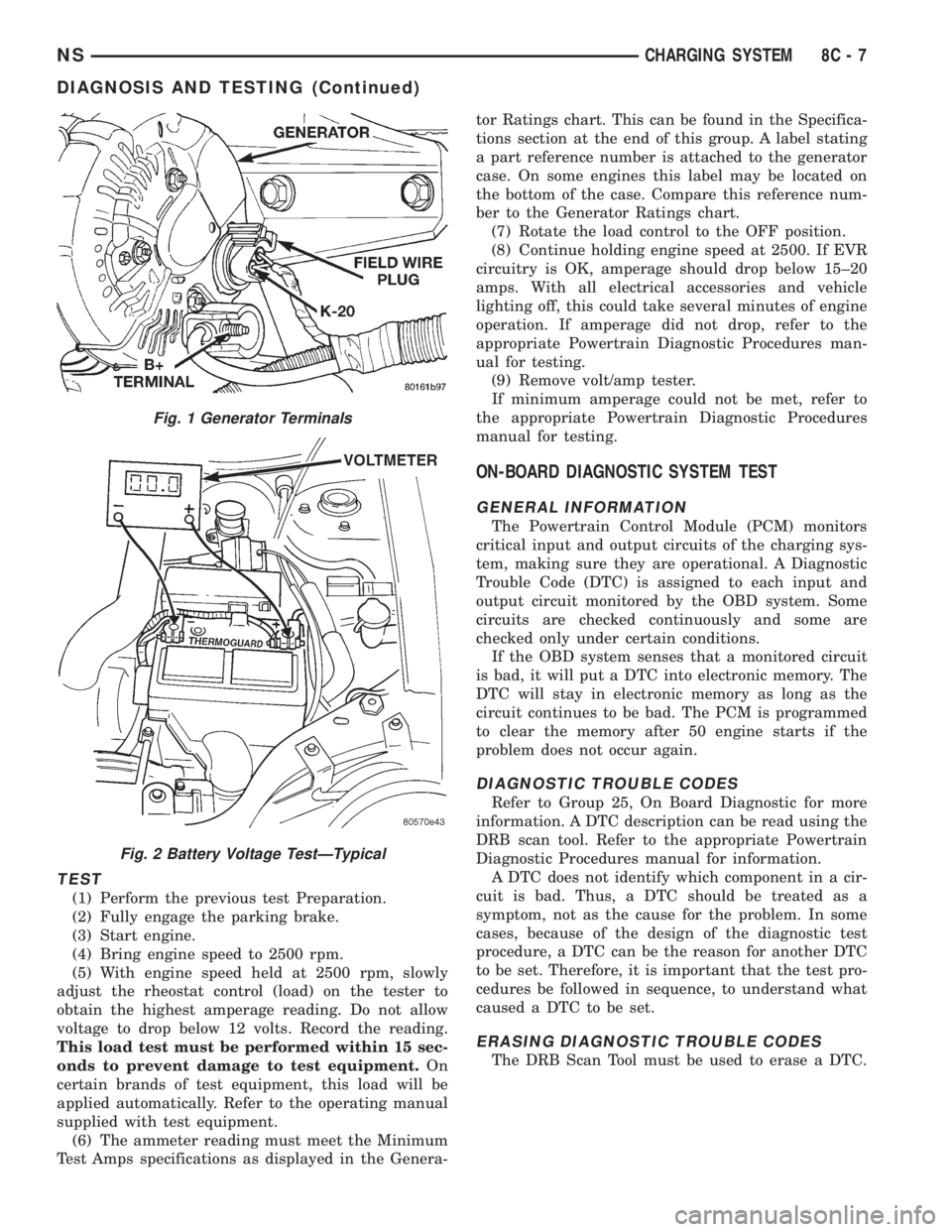
Fig. 1 Generator Terminals
Fig. 2 Battery Voltage TestÐTypical
NSCHARGING SYSTEM 8C - 7
DIAGNOSIS AND TESTING (Continued)
Page 368 of 1938
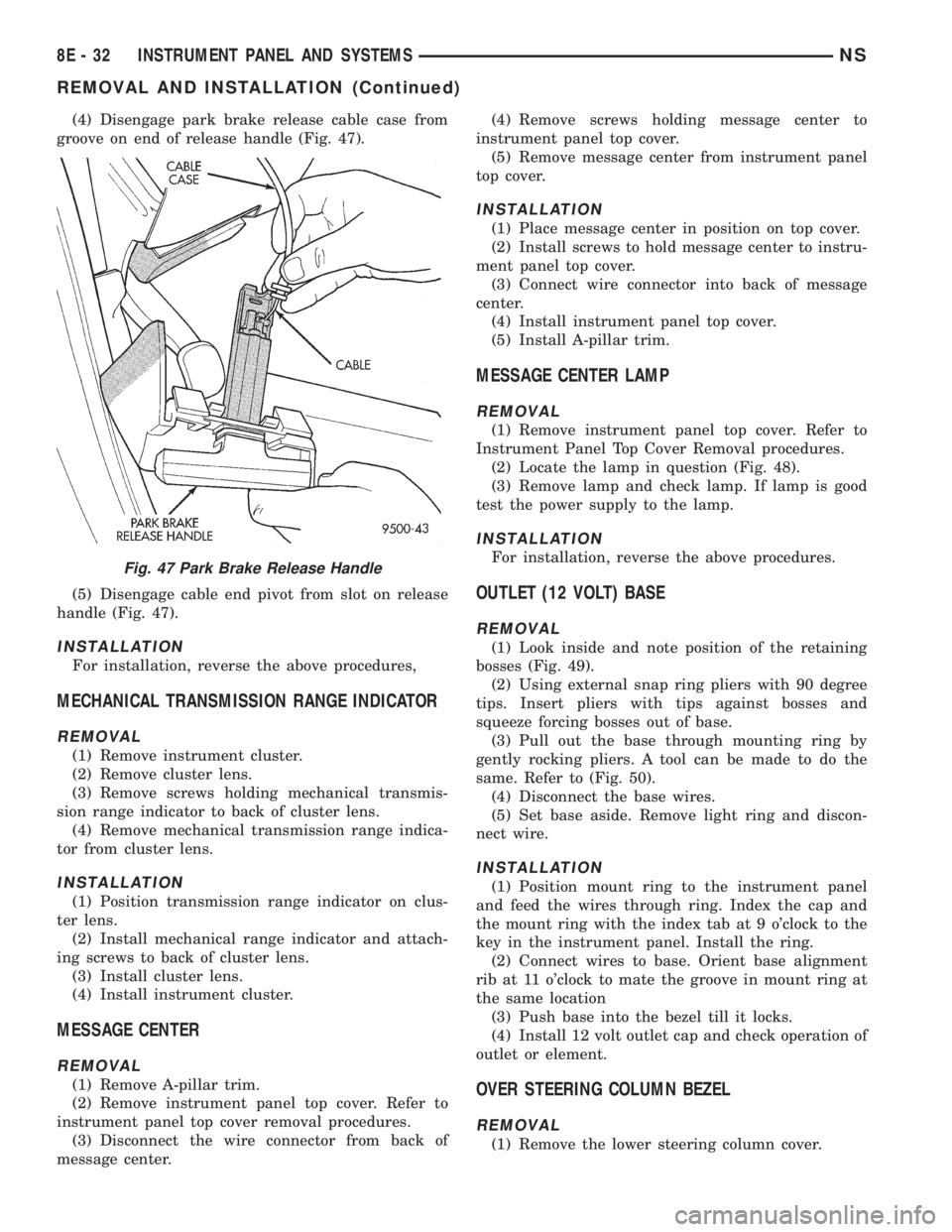
(4) Disengage park brake release cable case from
groove on end of release handle (Fig. 47).
(5) Disengage cable end pivot from slot on release
handle (Fig. 47).
INSTALLATION
For installation, reverse the above procedures,
MECHANICAL TRANSMISSION RANGE INDICATOR
REMOVAL
(1) Remove instrument cluster.
(2) Remove cluster lens.
(3) Remove screws holding mechanical transmis-
sion range indicator to back of cluster lens.
(4) Remove mechanical transmission range indica-
tor from cluster lens.
INSTALLATION
(1) Position transmission range indicator on clus-
ter lens.
(2) Install mechanical range indicator and attach-
ing screws to back of cluster lens.
(3) Install cluster lens.
(4) Install instrument cluster.
MESSAGE CENTER
REMOVAL
(1) Remove A-pillar trim.
(2) Remove instrument panel top cover. Refer to
instrument panel top cover removal procedures.
(3) Disconnect the wire connector from back of
message center.(4) Remove screws holding message center to
instrument panel top cover.
(5) Remove message center from instrument panel
top cover.
INSTALLATION
(1) Place message center in position on top cover.
(2) Install screws to hold message center to instru-
ment panel top cover.
(3) Connect wire connector into back of message
center.
(4) Install instrument panel top cover.
(5) Install A-pillar trim.
MESSAGE CENTER LAMP
REMOVAL
(1) Remove instrument panel top cover. Refer to
Instrument Panel Top Cover Removal procedures.
(2) Locate the lamp in question (Fig. 48).
(3) Remove lamp and check lamp. If lamp is good
test the power supply to the lamp.
INSTALLATION
For installation, reverse the above procedures.
OUTLET (12 VOLT) BASE
REMOVAL
(1) Look inside and note position of the retaining
bosses (Fig. 49).
(2) Using external snap ring pliers with 90 degree
tips. Insert pliers with tips against bosses and
squeeze forcing bosses out of base.
(3) Pull out the base through mounting ring by
gently rocking pliers. A tool can be made to do the
same. Refer to (Fig. 50).
(4) Disconnect the base wires.
(5) Set base aside. Remove light ring and discon-
nect wire.
INSTALLATION
(1) Position mount ring to the instrument panel
and feed the wires through ring. Index the cap and
the mount ring with the index tab at 9 o'clock to the
key in the instrument panel. Install the ring.
(2) Connect wires to base. Orient base alignment
rib at 11 o'clock to mate the groove in mount ring at
the same location
(3) Push base into the bezel till it locks.
(4) Install 12 volt outlet cap and check operation of
outlet or element.
OVER STEERING COLUMN BEZEL
REMOVAL
(1) Remove the lower steering column cover.
Fig. 47 Park Brake Release Handle
8E - 32 INSTRUMENT PANEL AND SYSTEMSNS
REMOVAL AND INSTALLATION (Continued)
Page 419 of 1938

STEP IS NOT DONE A DIAGONSTIC TROUBLE
CODE (DTC) MAY BE SET.
VACUUM RESERVOIR
The reservoir contains a one-way check valve to
trap engine vacuum in the reservoir. When engine
vacuum drops, as in climbing a grade while driving,
the reservoir supplies the vacuum needed to main-
tain proper speed control operation. The vacuum res-
ervoir cannot be repaired and must be replaced if
faulty.
VEHICLE SPEED AND DISTANCE
The 4 speed automatic Transmission Control Mod-
ule (TCM) supplies the speed input to the PCM. The
PCM determines acceleration rates. The speed con-
trol software in the PCM uses vehicle speed and
acceleration to control to the set speed.
Vehicles with a 3 speed automatic or manual trans-
mission have a vehicle speed sensor (VSS) mounted
to an adapter near the transmission output shaft.
The sensor is driven through the adapter by a speed-
ometer pinion gear. The VSS pulse signal is moni-
tored by the PCM to determine vehicle speed and to
maintain speed control set speed. Refer to the appro-
priate Powertrain Diagnostic Procedures manual for
diagnosis and testing of this component. Refer to
group 14, Fuel System for Removal/Installation
DIAGNOSIS AND TESTING
ROAD TEST
Perform a vehicle road test to verify reports of
speed control system malfunction. The road test
should include attention to the speedometer. Speed-
ometer operation should be smooth and without flut-
ter at all speeds.
Flutter in the speedometer indicates a problem
which might cause surging in the speed control sys-
tem. The cause of any speedometer problems should
be corrected before proceeding. Refer to Group 8E,
Instrument Panel and Gauges for speedometer diag-
nosis.
If a road test verifies a surge following a set and
the speedometer operates properly see ªOvershoot/
Undershoot on speed control setº.
If a road test verifies an inoperative system, and
the speedometer operates properly, check for:
²A Diagnostic Trouble Code (DTC). If a DTC
exists, conduct tests per the Powertrain Diagnostic
Procedures service manual.
²A misadjusted brake (stop) lamp switch. This
could also cause an intermittent problem.
²Loose or corroded electrical connections at the
servo. Corrosion should be removed from electricalterminals and a light coating of Mopar Multipurpose
Grease, or equivalent, applied.
²Leaking vacuum reservoir.
²Loose or leaking vacuum hoses or connections.
²Defective one-way vacuum check valve.
²Secure attachment at both ends of the speed
control servo cable.
²Smooth operation of throttle linkage and throttle
body air valve.
²Conduct electrical test at PCM.
²Failed speed control servo. Do the servo vacuum
test.
CAUTION: When test probing for voltage or conti-
nuity at electrical connectors, care must be taken
not to damage connector, terminals or seals. If
these components are damaged, intermittent or
complete system failure may occur.
OVERSHOOT/UNDERSHOOT FOLLOWING SPEED
CONTROL SET
If the operator repeatedly presses and releases the
set button with their foot off of the accelerator (a ªlift
foot setº to begin speed control operation), the vehicle
may accelerate and exceed the desired set speed by
up to 5 MPH (8 km/h) and then decelerate to less
than the desired set speed before finally achieving
the desired set speed.
The Speed Control has an adaptive strategy that
compensates for vehicle-to-vehicle variations in speed
control cable lengths. When the speed control is set
with the vehicle operators foot off of the accelerator
pedal, the speed control thinks there is excessive
speed control cable slack and adapts. If the lift foot
sets are continually used, the speed control over-
shoot/undershoot condition will develop.
To ªunlearnº the overshoot/undershoot condition,
the vehicle operator has to press and release the set
button while maintaining the desired set speed with
the accelerator pedal (not decelerating or accelerat-
ing), and then turn the cruise control switch to the
OFF position (or press the CANCEL button if
equipped) after waiting 10 seconds. This procedure
must be performed approximately 10±15 times to
completely unlearn the overshoot/undershoot condi-
tion.
CHECKING FOR DIAGNOSTIC CODES
When trying to verify a speed control system elec-
tronic malfunction: Connect a DRB scan tool if avail-
able to the data link connector. The connector is
located at left side of the steering column, and at
lower edge of the panel.
(1) A speed control malfunction may occur without
a diagnostic code being indicated.
NSVEHICLE SPEED CONTROL SYSTEM 8H - 3
DESCRIPTION AND OPERATION (Continued)
Page 430 of 1938

take advantage of low current switching require-
ments in the vehicle. It is plugged into the Junction
Block at positions 4 (Fig. 1) where all wiring associ-
ated with its operation is terminated. The Junction
Block is adjacent to and left of the steering column of
the vehicle.
To gain access to the device, remove the lower
steering column cover and knee blocker, refer to
Group 8E, Instrument Panel and Systems.
The combination flasher may be operated in its
hazard warning mode either with or without the igni-
tion circuit being active. However, in order to operate
in the turn signal mode, the ignition circuit must be
completed to the module.
While the combination flasher is idle, there is no
current drawn through the module. The device does
not become active until a signal ground circuit is
supplied to either of the turn signal inputs or the
hazard warning input.
Typical flash rate for the flasher is 90 flashes per
minute.
When a lamp is burnt out for a given side of the
vehicle or a wire is open to a lamp, the flash rate will
increase to 180 flashes per minute when in the turn
signal mode. When in the hazard warning signal
mode the flash rate remains at 90 flashes per
minute.
Turn signal inputs that actuate the flasher are low
current grounds, each drawing a maximum of 300
mA., and are provided to the flasher through the
Junction Block from the multi-function switch that is
mounted to the steering column. The hazard warning
signal input is a low current ground drawing a max-
imum of 600 mA. through the multi-function switch.
COMBINATION FLASHER / DAYTIME RUNNING
LAMPS (DRL) MODULE
The Combination Flasher/DRL is a module provid-
ing turn signal, hazard warning, and daytime run-
ning light functions, and has been designed with
internal relays to take advantage of low current
switching requirements in the vehicle. It is plugged
into the junction block at positions 3 AND 4 (Fig. 2)
where all wiring associated with its operation is ter-
minated. The Junction Block is adjacent to and left of
the steering column of the vehicle.
To gain access to the device, remove the lower
steering column cover and knee blocker, refer to
Group 8E, Instrument Panel and Gauges.
The combination flasher/DRL may be operated in
its hazard warning mode either with or without the
ignition circuit being active. However, in order to
operate in the turn signal mode or the DRL mode,
the ignition circuit must be completed to the module.
While the combination flasher portion is idle, there
is no current drawn through the module. The devicedoes not become active in the turn signal or hazard
warning modes until a signal ground circuit is sup-
plied to either of the turn signal inputs or the hazard
warning input. With the ignition OFF, there is no
current drawn through the module.
While the ignition is ON, the front turn signal fil-
aments are illuminated steadily thus providing the
DRL function. The DRL function may be inhibited by
applying a signal ground input from either the park
brake circuit or the headlamp relay activation circuit.
Typical flash rate for the flasher is 90 flashes per
minute.
When a lamp is burnt out for a given side of the
vehicle or a wire is open to a lamp, the flash rate will
increase to 180 flashes per minute when in the turn
signal mode. When in the hazard warning signal
mode the flash rate remains at 90 flashes per
minute.
Turn signal inputs that actuate the flasher are low
current grounds, each could draw a maximum of 300
mA., and are provided to the flasher through the
Junction Block from the multi-function switch that is
mounted to the steering column. The hazard warning
signal input is a low current ground that could draw
a maximum of 600 mA. through the multi-function
switch.
DIAGNOSIS AND TESTING
TURN SIGNAL MULTI-FUNCTION SWITCH
To test turn signal, headlamp beam select and opti-
cal horn portion of the multi-function switch:
(1) Remove the multi-function switch, refer to
removal procedures.
(2) Using an ohmmeter check continuity reading
between multi-function switch pins. Refer to (Fig. 3)
for proper pin numbers and Turn Signal Multi-Func-
tion Switch Test chart.
Fig. 2 Junction Block Terminal Pins
8J - 2 TURN SIGNAL AND FLASHERSNS
DESCRIPTION AND OPERATION (Continued)
Page 438 of 1938
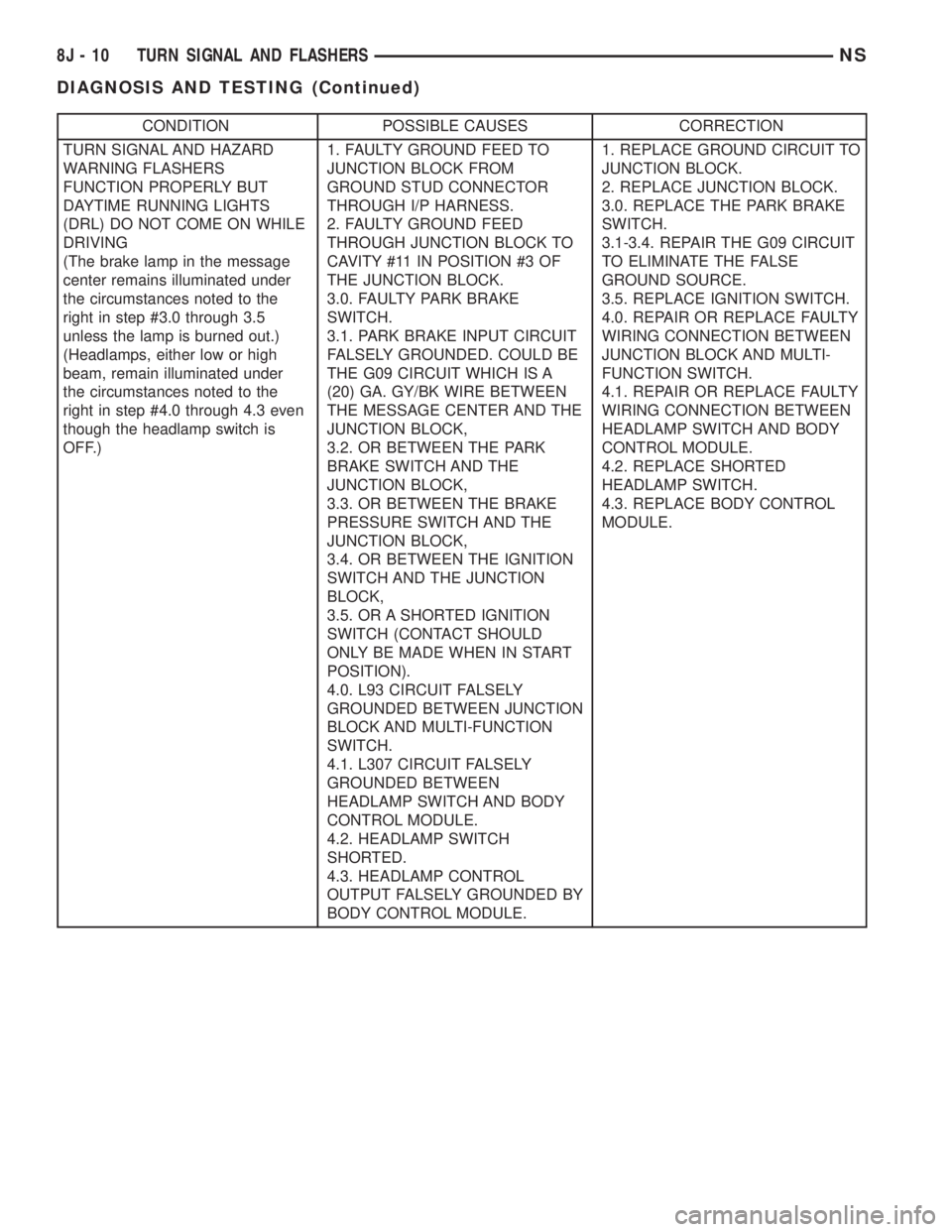
CONDITION POSSIBLE CAUSES CORRECTION
TURN SIGNAL AND HAZARD
WARNING FLASHERS
FUNCTION PROPERLY BUT
DAYTIME RUNNING LIGHTS
(DRL) DO NOT COME ON WHILE
DRIVING
(The brake lamp in the message
center remains illuminated under
the circumstances noted to the
right in step #3.0 through 3.5
unless the lamp is burned out.)
(Headlamps, either low or high
beam, remain illuminated under
the circumstances noted to the
right in step #4.0 through 4.3 even
though the headlamp switch is
OFF.)1. FAULTY GROUND FEED TO
JUNCTION BLOCK FROM
GROUND STUD CONNECTOR
THROUGH I/P HARNESS.
2. FAULTY GROUND FEED
THROUGH JUNCTION BLOCK TO
CAVITY #11 IN POSITION #3 OF
THE JUNCTION BLOCK.
3.0. FAULTY PARK BRAKE
SWITCH.
3.1. PARK BRAKE INPUT CIRCUIT
FALSELY GROUNDED. COULD BE
THE G09 CIRCUIT WHICH IS A
(20) GA. GY/BK WIRE BETWEEN
THE MESSAGE CENTER AND THE
JUNCTION BLOCK,
3.2. OR BETWEEN THE PARK
BRAKE SWITCH AND THE
JUNCTION BLOCK,
3.3. OR BETWEEN THE BRAKE
PRESSURE SWITCH AND THE
JUNCTION BLOCK,
3.4. OR BETWEEN THE IGNITION
SWITCH AND THE JUNCTION
BLOCK,
3.5. OR A SHORTED IGNITION
SWITCH (CONTACT SHOULD
ONLY BE MADE WHEN IN START
POSITION).
4.0. L93 CIRCUIT FALSELY
GROUNDED BETWEEN JUNCTION
BLOCK AND MULTI-FUNCTION
SWITCH.
4.1. L307 CIRCUIT FALSELY
GROUNDED BETWEEN
HEADLAMP SWITCH AND BODY
CONTROL MODULE.
4.2. HEADLAMP SWITCH
SHORTED.
4.3. HEADLAMP CONTROL
OUTPUT FALSELY GROUNDED BY
BODY CONTROL MODULE.1. REPLACE GROUND CIRCUIT TO
JUNCTION BLOCK.
2. REPLACE JUNCTION BLOCK.
3.0. REPLACE THE PARK BRAKE
SWITCH.
3.1-3.4. REPAIR THE G09 CIRCUIT
TO ELIMINATE THE FALSE
GROUND SOURCE.
3.5. REPLACE IGNITION SWITCH.
4.0. REPAIR OR REPLACE FAULTY
WIRING CONNECTION BETWEEN
JUNCTION BLOCK AND MULTI-
FUNCTION SWITCH.
4.1. REPAIR OR REPLACE FAULTY
WIRING CONNECTION BETWEEN
HEADLAMP SWITCH AND BODY
CONTROL MODULE.
4.2. REPLACE SHORTED
HEADLAMP SWITCH.
4.3. REPLACE BODY CONTROL
MODULE.
8J - 10 TURN SIGNAL AND FLASHERSNS
DIAGNOSIS AND TESTING (Continued)