key CHRYSLER VOYAGER 1996 Owner's Manual
[x] Cancel search | Manufacturer: CHRYSLER, Model Year: 1996, Model line: VOYAGER, Model: CHRYSLER VOYAGER 1996Pages: 1938, PDF Size: 55.84 MB
Page 334 of 1938
REMOVAL
(1) Disconnect negative cable from battery.
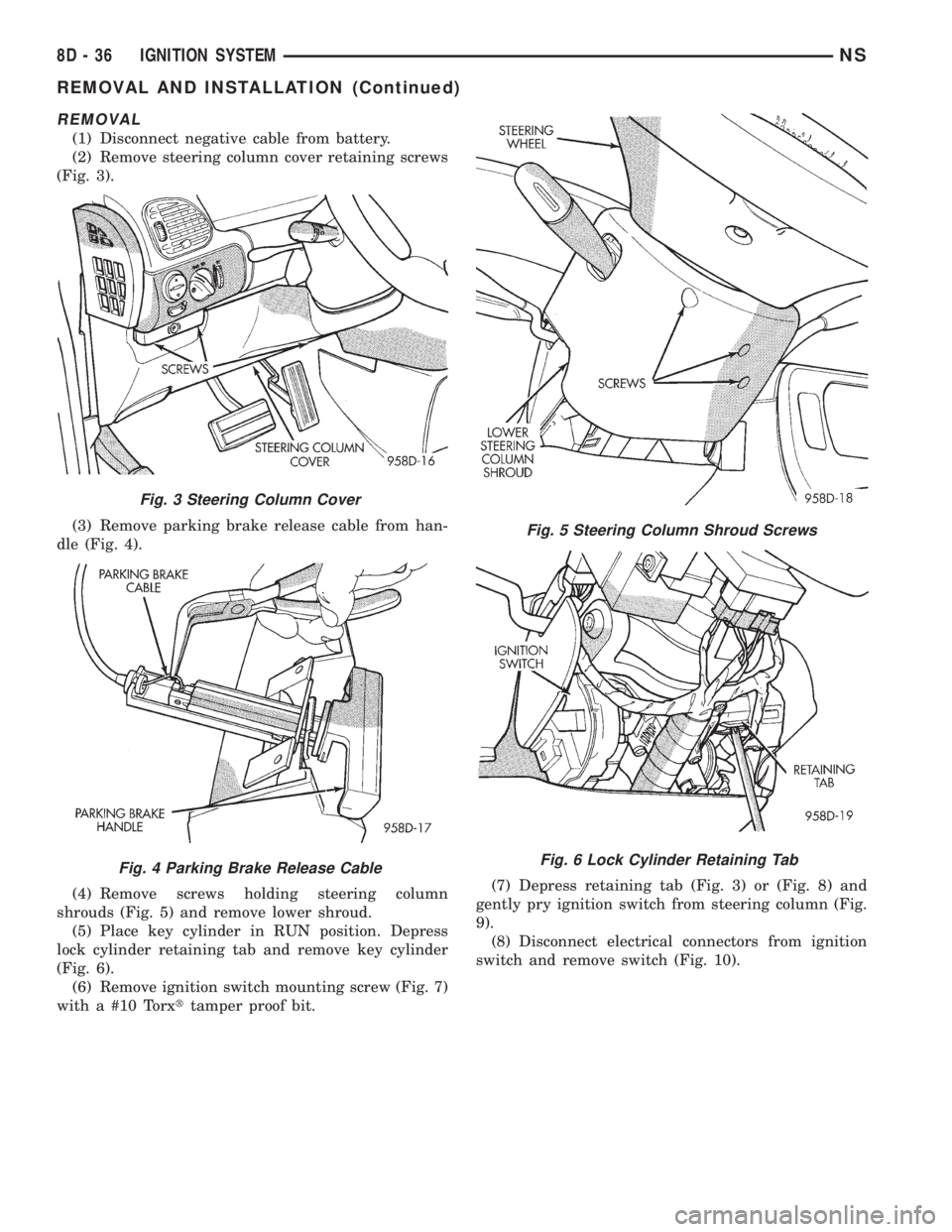
(2) Remove steering column cover retaining screws
(Fig. 3).
(3) Remove parking brake release cable from han-
dle (Fig. 4).
(4) Remove screws holding steering column
shrouds (Fig. 5) and remove lower shroud.
(5) Place key cylinder in RUN position. Depress
lock cylinder retaining tab and remove key cylinder
(Fig. 6).
(6) Remove ignition switch mounting screw (Fig. 7)
with a #10 Torxttamper proof bit.(7) Depress retaining tab (Fig. 3) or (Fig. 8) and
gently pry ignition switch from steering column (Fig.
9).
(8) Disconnect electrical connectors from ignition
switch and remove switch (Fig. 10).
Fig. 3 Steering Column Cover
Fig. 4 Parking Brake Release Cable
Fig. 5 Steering Column Shroud Screws
Fig. 6 Lock Cylinder Retaining Tab
8D - 36 IGNITION SYSTEMNS
REMOVAL AND INSTALLATION (Continued)
Page 335 of 1938
INSTALLATION
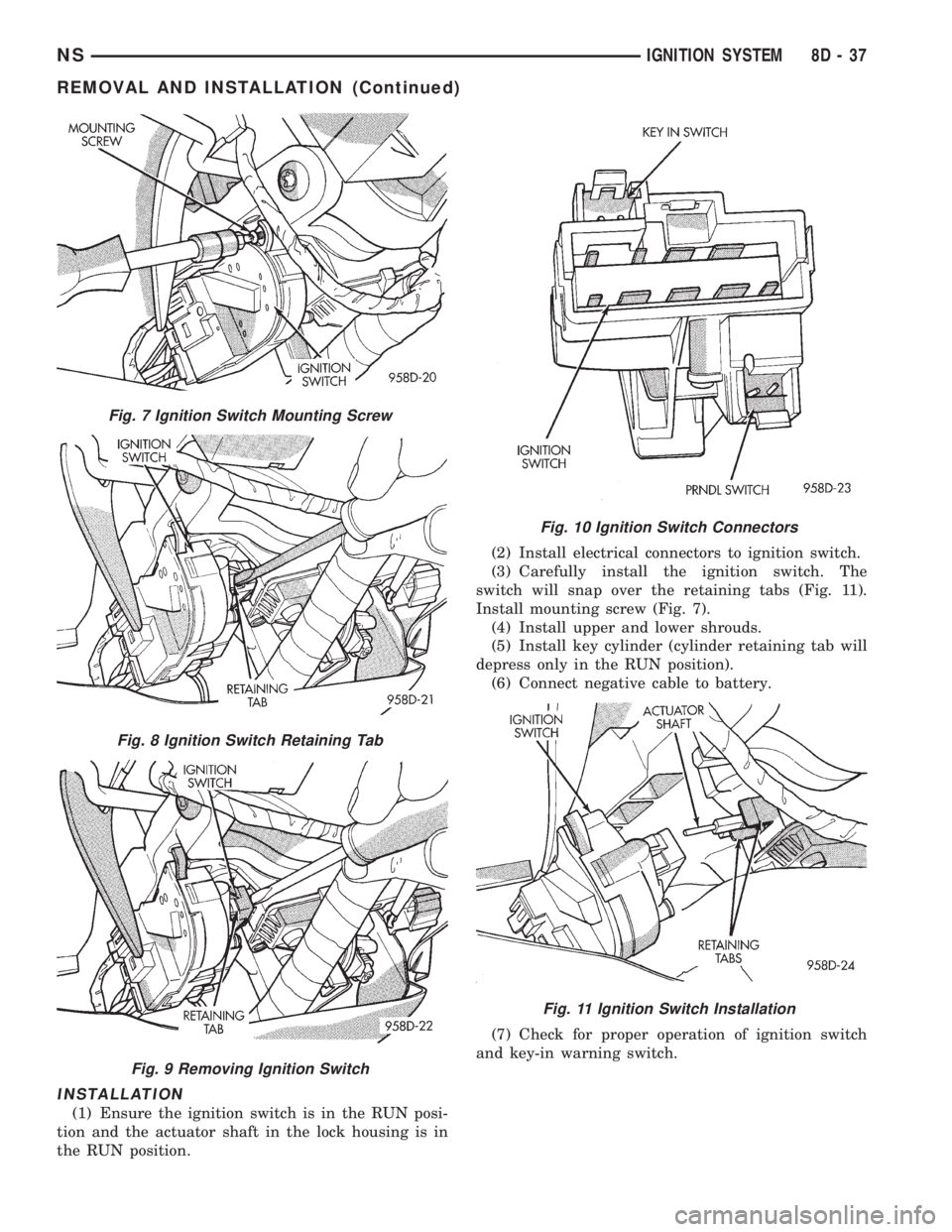
(1) Ensure the ignition switch is in the RUN posi-
tion and the actuator shaft in the lock housing is in
the RUN position.(2) Install electrical connectors to ignition switch.
(3) Carefully install the ignition switch. The
switch will snap over the retaining tabs (Fig. 11).
Install mounting screw (Fig. 7).
(4) Install upper and lower shrouds.
(5) Install key cylinder (cylinder retaining tab will
depress only in the RUN position).
(6) Connect negative cable to battery.
(7) Check for proper operation of ignition switch
and key-in warning switch.
Fig. 7 Ignition Switch Mounting Screw
Fig. 8 Ignition Switch Retaining Tab
Fig. 9 Removing Ignition Switch
Fig. 10 Ignition Switch Connectors
Fig. 11 Ignition Switch Installation
NSIGNITION SYSTEM 8D - 37
REMOVAL AND INSTALLATION (Continued)
Page 336 of 1938
LOCK KEY CYLINDER
REMOVAL
(1) Disconnect negative cable from battery.
(2) Remove steering column cover retaining screws
(Fig. 3).
(3) Remove screws holding steering column
shrouds (Fig. 5) and remove lower shroud.
(4) Place key cylinder in RUN position. Depress
lock cylinder retaining tab and remove key cylinder
(Fig. 6).
INSTALLATION
(1) Install key in lock cylinder. Turn key to run
position (retaining tab on lock cylinder can be
depressed).
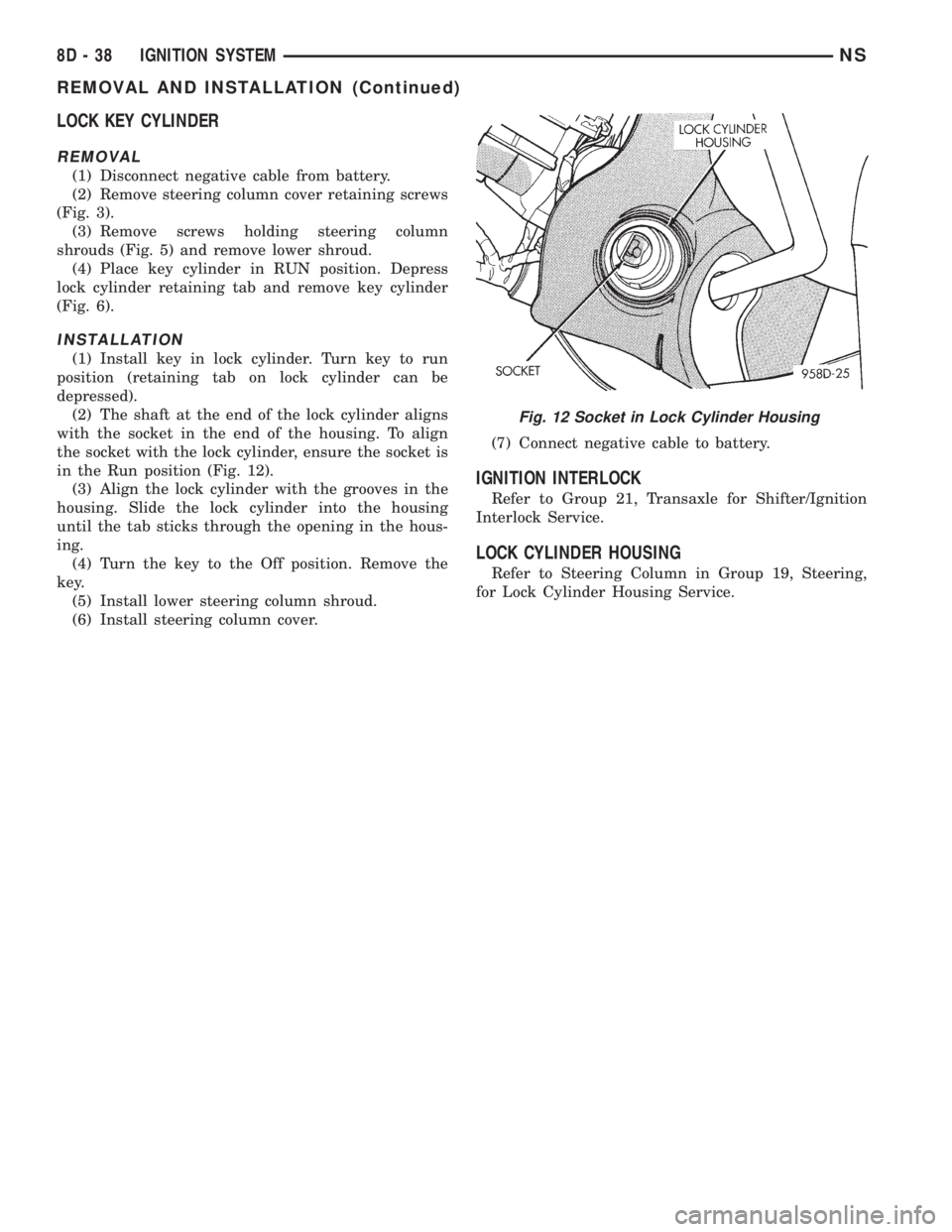
(2) The shaft at the end of the lock cylinder aligns
with the socket in the end of the housing. To align
the socket with the lock cylinder, ensure the socket is
in the Run position (Fig. 12).
(3) Align the lock cylinder with the grooves in the
housing. Slide the lock cylinder into the housing
until the tab sticks through the opening in the hous-
ing.
(4) Turn the key to the Off position. Remove the
key.
(5) Install lower steering column shroud.
(6) Install steering column cover.(7) Connect negative cable to battery.
IGNITION INTERLOCK
Refer to Group 21, Transaxle for Shifter/Ignition
Interlock Service.
LOCK CYLINDER HOUSING
Refer to Steering Column in Group 19, Steering,
for Lock Cylinder Housing Service.
Fig. 12 Socket in Lock Cylinder Housing
8D - 38 IGNITION SYSTEMNS
REMOVAL AND INSTALLATION (Continued)
Page 368 of 1938
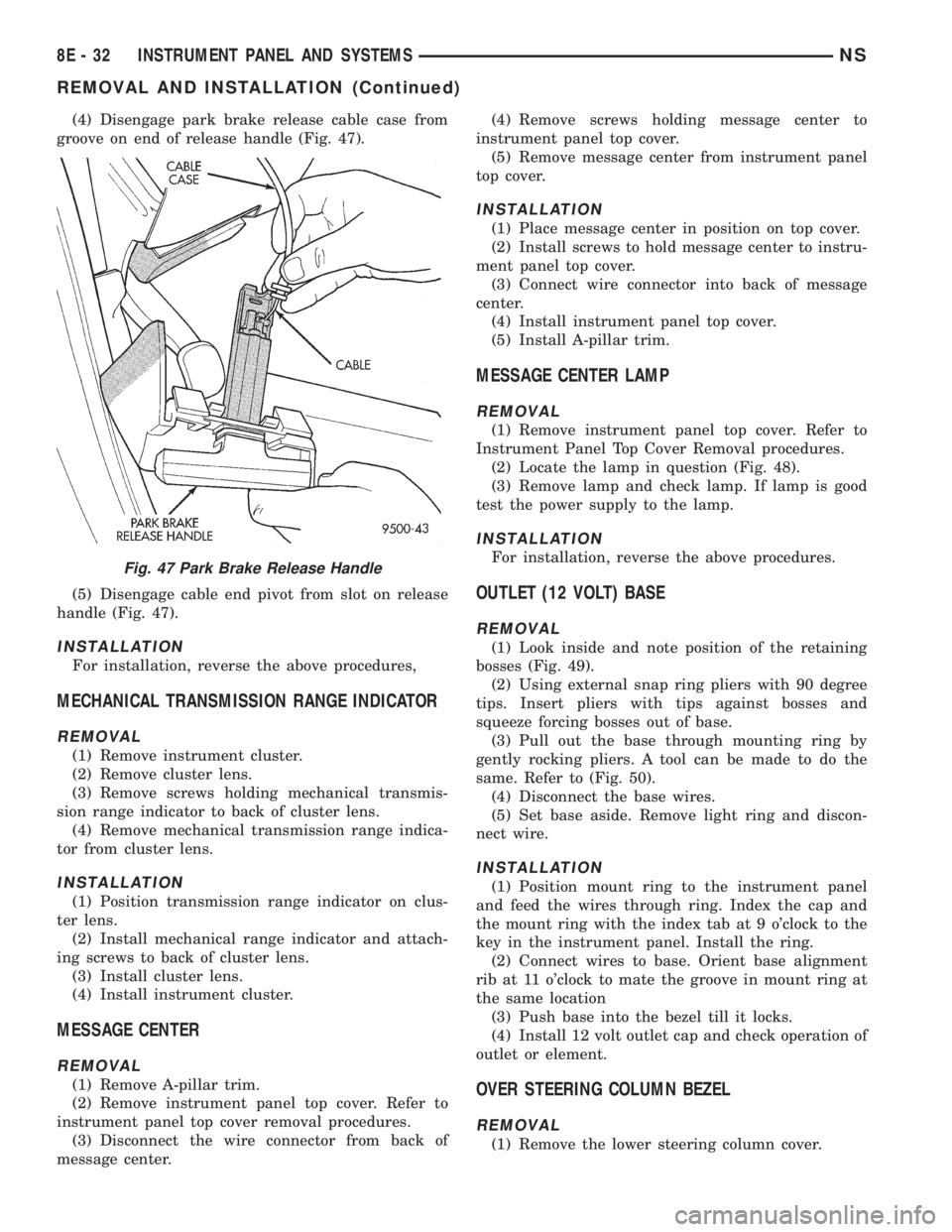
(4) Disengage park brake release cable case from
groove on end of release handle (Fig. 47).
(5) Disengage cable end pivot from slot on release
handle (Fig. 47).
INSTALLATION
For installation, reverse the above procedures,
MECHANICAL TRANSMISSION RANGE INDICATOR
REMOVAL
(1) Remove instrument cluster.
(2) Remove cluster lens.
(3) Remove screws holding mechanical transmis-
sion range indicator to back of cluster lens.
(4) Remove mechanical transmission range indica-
tor from cluster lens.
INSTALLATION
(1) Position transmission range indicator on clus-
ter lens.
(2) Install mechanical range indicator and attach-
ing screws to back of cluster lens.
(3) Install cluster lens.
(4) Install instrument cluster.
MESSAGE CENTER
REMOVAL
(1) Remove A-pillar trim.
(2) Remove instrument panel top cover. Refer to
instrument panel top cover removal procedures.
(3) Disconnect the wire connector from back of
message center.(4) Remove screws holding message center to
instrument panel top cover.
(5) Remove message center from instrument panel
top cover.
INSTALLATION
(1) Place message center in position on top cover.
(2) Install screws to hold message center to instru-
ment panel top cover.
(3) Connect wire connector into back of message
center.
(4) Install instrument panel top cover.
(5) Install A-pillar trim.
MESSAGE CENTER LAMP
REMOVAL
(1) Remove instrument panel top cover. Refer to
Instrument Panel Top Cover Removal procedures.
(2) Locate the lamp in question (Fig. 48).
(3) Remove lamp and check lamp. If lamp is good
test the power supply to the lamp.
INSTALLATION
For installation, reverse the above procedures.
OUTLET (12 VOLT) BASE
REMOVAL
(1) Look inside and note position of the retaining
bosses (Fig. 49).
(2) Using external snap ring pliers with 90 degree
tips. Insert pliers with tips against bosses and
squeeze forcing bosses out of base.
(3) Pull out the base through mounting ring by
gently rocking pliers. A tool can be made to do the
same. Refer to (Fig. 50).
(4) Disconnect the base wires.
(5) Set base aside. Remove light ring and discon-
nect wire.
INSTALLATION
(1) Position mount ring to the instrument panel
and feed the wires through ring. Index the cap and
the mount ring with the index tab at 9 o'clock to the
key in the instrument panel. Install the ring.
(2) Connect wires to base. Orient base alignment
rib at 11 o'clock to mate the groove in mount ring at
the same location
(3) Push base into the bezel till it locks.
(4) Install 12 volt outlet cap and check operation of
outlet or element.
OVER STEERING COLUMN BEZEL
REMOVAL
(1) Remove the lower steering column cover.
Fig. 47 Park Brake Release Handle
8E - 32 INSTRUMENT PANEL AND SYSTEMSNS
REMOVAL AND INSTALLATION (Continued)
Page 425 of 1938
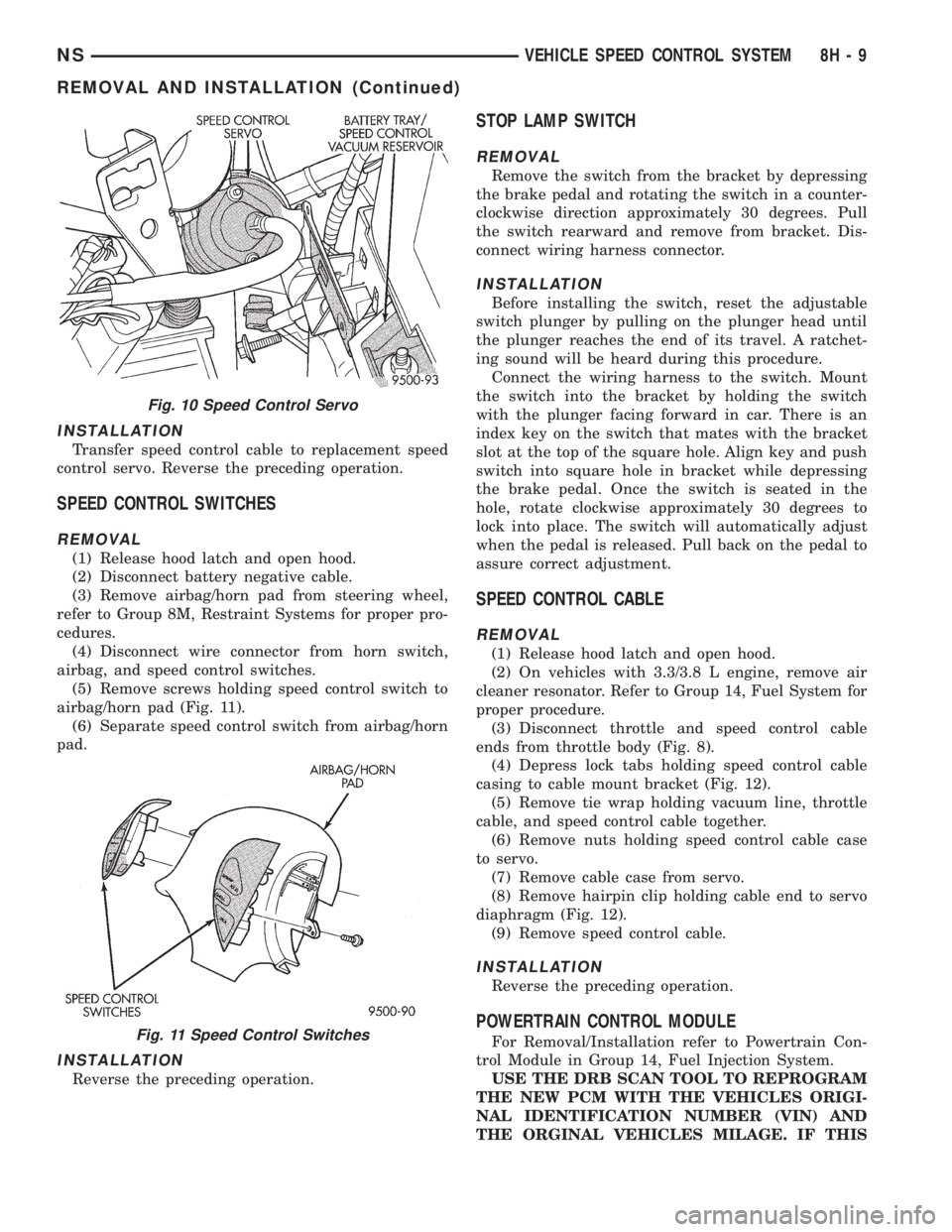
INSTALLATION
Transfer speed control cable to replacement speed
control servo. Reverse the preceding operation.
SPEED CONTROL SWITCHES
REMOVAL
(1) Release hood latch and open hood.
(2) Disconnect battery negative cable.
(3) Remove airbag/horn pad from steering wheel,
refer to Group 8M, Restraint Systems for proper pro-
cedures.
(4) Disconnect wire connector from horn switch,
airbag, and speed control switches.
(5) Remove screws holding speed control switch to
airbag/horn pad (Fig. 11).
(6) Separate speed control switch from airbag/horn
pad.
INSTALLATION
Reverse the preceding operation.
STOP LAMP SWITCH
REMOVAL
Remove the switch from the bracket by depressing
the brake pedal and rotating the switch in a counter-
clockwise direction approximately 30 degrees. Pull
the switch rearward and remove from bracket. Dis-
connect wiring harness connector.
INSTALLATION
Before installing the switch, reset the adjustable
switch plunger by pulling on the plunger head until
the plunger reaches the end of its travel. A ratchet-
ing sound will be heard during this procedure.
Connect the wiring harness to the switch. Mount
the switch into the bracket by holding the switch
with the plunger facing forward in car. There is an
index key on the switch that mates with the bracket
slot at the top of the square hole. Align key and push
switch into square hole in bracket while depressing
the brake pedal. Once the switch is seated in the
hole, rotate clockwise approximately 30 degrees to
lock into place. The switch will automatically adjust
when the pedal is released. Pull back on the pedal to
assure correct adjustment.
SPEED CONTROL CABLE
REMOVAL
(1) Release hood latch and open hood.
(2) On vehicles with 3.3/3.8 L engine, remove air
cleaner resonator. Refer to Group 14, Fuel System for
proper procedure.
(3) Disconnect throttle and speed control cable
ends from throttle body (Fig. 8).
(4) Depress lock tabs holding speed control cable
casing to cable mount bracket (Fig. 12).
(5) Remove tie wrap holding vacuum line, throttle
cable, and speed control cable together.
(6) Remove nuts holding speed control cable case
to servo.
(7) Remove cable case from servo.
(8) Remove hairpin clip holding cable end to servo
diaphragm (Fig. 12).
(9) Remove speed control cable.
INSTALLATION
Reverse the preceding operation.
POWERTRAIN CONTROL MODULE
For Removal/Installation refer to Powertrain Con-
trol Module in Group 14, Fuel Injection System.
USE THE DRB SCAN TOOL TO REPROGRAM
THE NEW PCM WITH THE VEHICLES ORIGI-
NAL IDENTIFICATION NUMBER (VIN) AND
THE ORGINAL VEHICLES MILAGE. IF THIS
Fig. 10 Speed Control Servo
Fig. 11 Speed Control Switches
NSVEHICLE SPEED CONTROL SYSTEM 8H - 9
REMOVAL AND INSTALLATION (Continued)
Page 463 of 1938
(1) Connect wire connector into fog lamp wire har-
ness.
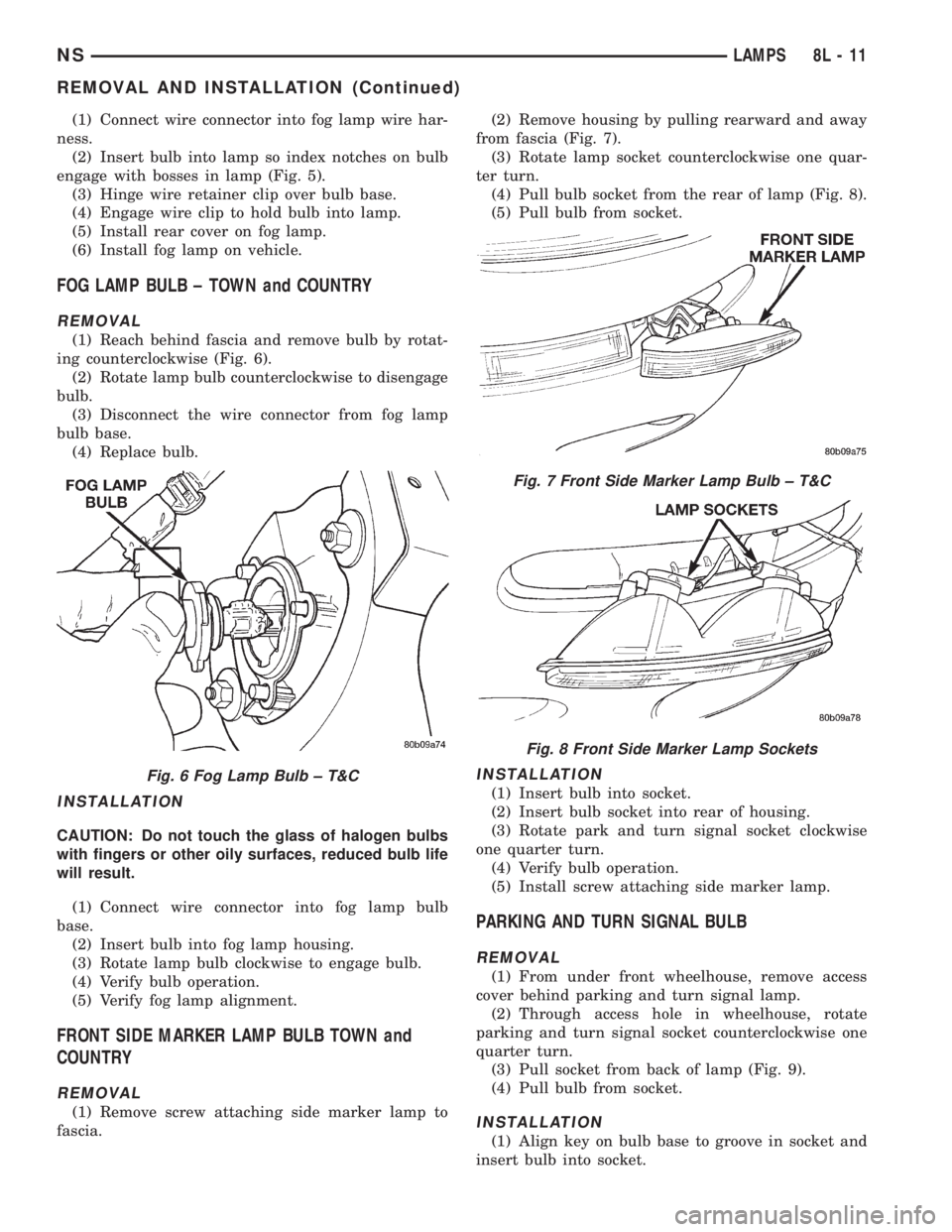
(2) Insert bulb into lamp so index notches on bulb
engage with bosses in lamp (Fig. 5).
(3) Hinge wire retainer clip over bulb base.
(4) Engage wire clip to hold bulb into lamp.
(5) Install rear cover on fog lamp.
(6) Install fog lamp on vehicle.
FOG LAMP BULB ± TOWN and COUNTRY
REMOVAL
(1) Reach behind fascia and remove bulb by rotat-
ing counterclockwise (Fig. 6).
(2) Rotate lamp bulb counterclockwise to disengage
bulb.
(3) Disconnect the wire connector from fog lamp
bulb base.
(4) Replace bulb.
INSTALLATION
CAUTION: Do not touch the glass of halogen bulbs
with fingers or other oily surfaces, reduced bulb life
will result.
(1) Connect wire connector into fog lamp bulb
base.
(2) Insert bulb into fog lamp housing.
(3) Rotate lamp bulb clockwise to engage bulb.
(4) Verify bulb operation.
(5) Verify fog lamp alignment.
FRONT SIDE MARKER LAMP BULB TOWN and
COUNTRY
REMOVAL
(1) Remove screw attaching side marker lamp to
fascia.(2) Remove housing by pulling rearward and away
from fascia (Fig. 7).
(3) Rotate lamp socket counterclockwise one quar-
ter turn.
(4) Pull bulb socket from the rear of lamp (Fig. 8).
(5) Pull bulb from socket.
INSTALLATION
(1) Insert bulb into socket.
(2) Insert bulb socket into rear of housing.
(3) Rotate park and turn signal socket clockwise
one quarter turn.
(4) Verify bulb operation.
(5) Install screw attaching side marker lamp.
PARKING AND TURN SIGNAL BULB
REMOVAL
(1) From under front wheelhouse, remove access
cover behind parking and turn signal lamp.
(2) Through access hole in wheelhouse, rotate
parking and turn signal socket counterclockwise one
quarter turn.
(3) Pull socket from back of lamp (Fig. 9).
(4) Pull bulb from socket.
INSTALLATION
(1) Align key on bulb base to groove in socket and
insert bulb into socket.
Fig. 6 Fog Lamp Bulb ± T&C
Fig. 7 Front Side Marker Lamp Bulb ± T&C
Fig. 8 Front Side Marker Lamp Sockets
NSLAMPS 8L - 11
REMOVAL AND INSTALLATION (Continued)
Page 464 of 1938
(2) Through access hole in wheelhouse, insert
socket into back of lamp.
(3) Rotate parking and turn signal socket clock-
wise one quarter turn.
(4) Install access cover and verify lamp operation.
FRONT PARKING AND TURN SIGNAL LAMP BULB
± TOWN and COUNTRY
REMOVAL
(1) Remove screw attaching side marker lamp to
fascia.
(2) Remove housing by pulling outward and away
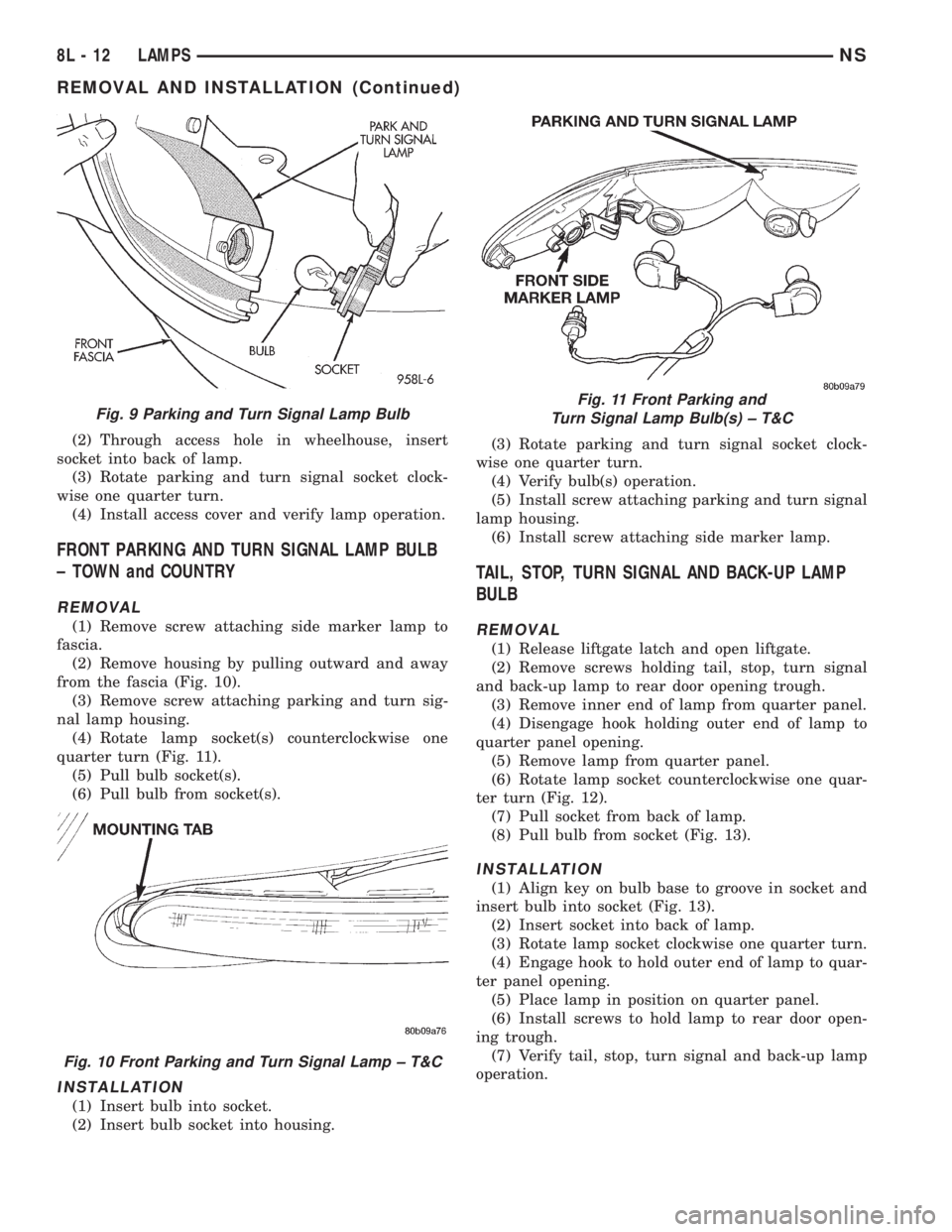
from the fascia (Fig. 10).
(3) Remove screw attaching parking and turn sig-
nal lamp housing.
(4) Rotate lamp socket(s) counterclockwise one
quarter turn (Fig. 11).
(5) Pull bulb socket(s).
(6) Pull bulb from socket(s).
INSTALLATION
(1) Insert bulb into socket.
(2) Insert bulb socket into housing.(3) Rotate parking and turn signal socket clock-
wise one quarter turn.
(4) Verify bulb(s) operation.
(5) Install screw attaching parking and turn signal
lamp housing.
(6) Install screw attaching side marker lamp.
TAIL, STOP, TURN SIGNAL AND BACK-UP LAMP
BULB
REMOVAL
(1) Release liftgate latch and open liftgate.
(2) Remove screws holding tail, stop, turn signal
and back-up lamp to rear door opening trough.
(3) Remove inner end of lamp from quarter panel.
(4) Disengage hook holding outer end of lamp to
quarter panel opening.
(5) Remove lamp from quarter panel.
(6) Rotate lamp socket counterclockwise one quar-
ter turn (Fig. 12).
(7) Pull socket from back of lamp.
(8) Pull bulb from socket (Fig. 13).
INSTALLATION
(1) Align key on bulb base to groove in socket and
insert bulb into socket (Fig. 13).
(2) Insert socket into back of lamp.
(3) Rotate lamp socket clockwise one quarter turn.
(4) Engage hook to hold outer end of lamp to quar-
ter panel opening.
(5) Place lamp in position on quarter panel.
(6) Install screws to hold lamp to rear door open-
ing trough.
(7) Verify tail, stop, turn signal and back-up lamp
operation.
Fig. 9 Parking and Turn Signal Lamp Bulb
Fig. 10 Front Parking and Turn Signal Lamp ± T&C
Fig. 11 Front Parking and
Turn Signal Lamp Bulb(s) ± T&C
8L - 12 LAMPSNS
REMOVAL AND INSTALLATION (Continued)
Page 487 of 1938
(2) Rotate front turn signal lamp socket one quar-
ter turn counterclockwise.
(3) Pull socket from back of lamp.
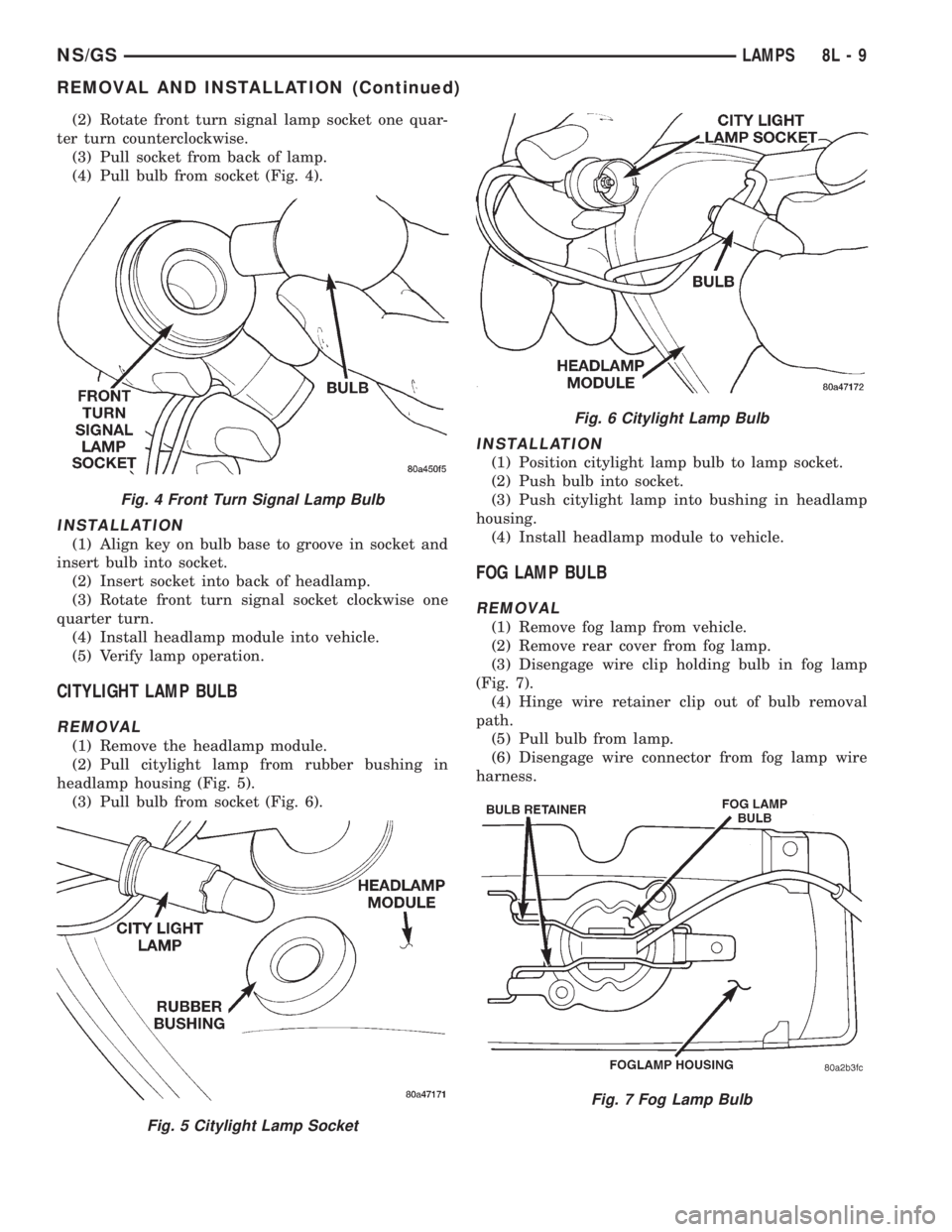
(4) Pull bulb from socket (Fig. 4).
INSTALLATION
(1) Align key on bulb base to groove in socket and
insert bulb into socket.
(2) Insert socket into back of headlamp.
(3) Rotate front turn signal socket clockwise one
quarter turn.
(4) Install headlamp module into vehicle.
(5) Verify lamp operation.
CITYLIGHT LAMP BULB
REMOVAL
(1) Remove the headlamp module.
(2) Pull citylight lamp from rubber bushing in
headlamp housing (Fig. 5).
(3) Pull bulb from socket (Fig. 6).
INSTALLATION
(1) Position citylight lamp bulb to lamp socket.
(2) Push bulb into socket.
(3) Push citylight lamp into bushing in headlamp
housing.
(4) Install headlamp module to vehicle.
FOG LAMP BULB
REMOVAL
(1) Remove fog lamp from vehicle.
(2) Remove rear cover from fog lamp.
(3) Disengage wire clip holding bulb in fog lamp
(Fig. 7).
(4) Hinge wire retainer clip out of bulb removal
path.
(5) Pull bulb from lamp.
(6) Disengage wire connector from fog lamp wire
harness.
Fig. 4 Front Turn Signal Lamp Bulb
Fig. 5 Citylight Lamp Socket
Fig. 6 Citylight Lamp Bulb
Fig. 7 Fog Lamp Bulb
NS/GSLAMPS 8L - 9
REMOVAL AND INSTALLATION (Continued)
Page 489 of 1938
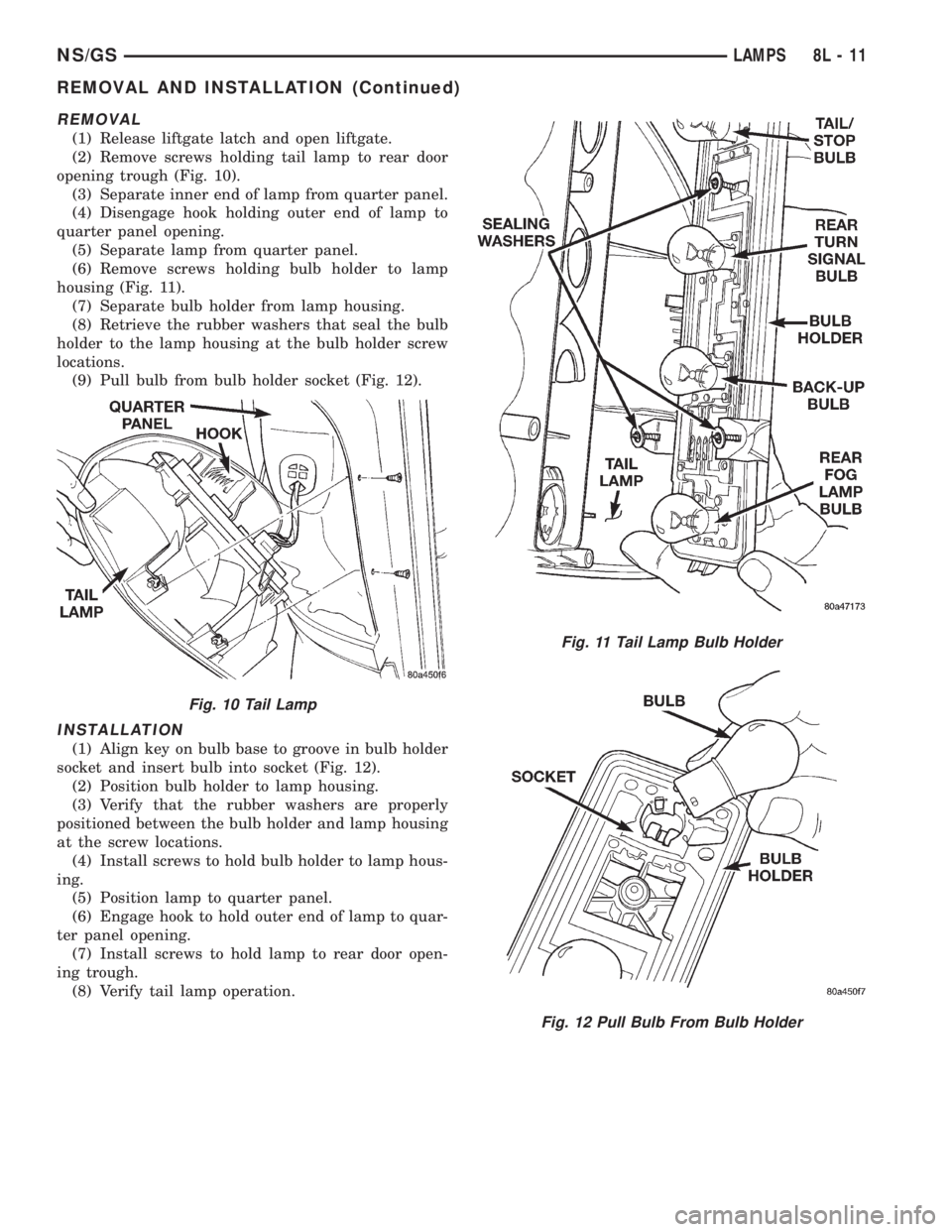
REMOVAL
(1) Release liftgate latch and open liftgate.
(2) Remove screws holding tail lamp to rear door
opening trough (Fig. 10).
(3) Separate inner end of lamp from quarter panel.
(4) Disengage hook holding outer end of lamp to
quarter panel opening.
(5) Separate lamp from quarter panel.
(6) Remove screws holding bulb holder to lamp
housing (Fig. 11).
(7) Separate bulb holder from lamp housing.
(8) Retrieve the rubber washers that seal the bulb
holder to the lamp housing at the bulb holder screw
locations.
(9) Pull bulb from bulb holder socket (Fig. 12).
INSTALLATION
(1) Align key on bulb base to groove in bulb holder
socket and insert bulb into socket (Fig. 12).
(2) Position bulb holder to lamp housing.
(3) Verify that the rubber washers are properly
positioned between the bulb holder and lamp housing
at the screw locations.
(4) Install screws to hold bulb holder to lamp hous-
ing.
(5) Position lamp to quarter panel.
(6) Engage hook to hold outer end of lamp to quar-
ter panel opening.
(7) Install screws to hold lamp to rear door open-
ing trough.
(8) Verify tail lamp operation.
Fig. 10 Tail Lamp
Fig. 11 Tail Lamp Bulb Holder
Fig. 12 Pull Bulb From Bulb Holder
NS/GSLAMPS 8L - 11
REMOVAL AND INSTALLATION (Continued)
Page 498 of 1938

ACM monitors the system to determine the system
readiness. The ACM contains on-board diagnostics
and will light the AIRBAG warning lamp in the mes-
sage center when a problem occurs.
The driver and passenger airbag system is a safety
device designed to reduce the risk of fatality or seri-
ous injury, caused by a frontal impact of the vehicle.
The impact sensor provides verification of the
direction and severity of the impact. One impact sen-
sor is used. It is located inside the Airbag Control
Module (ACM) which is mounted on a bracket, just
forward of the center console. The impact sensor is
an accelerometer that senses deceleration. The decel-
eration pulses are sent to a microprocessor which
contains a decision algorithm. When an impact is
severe enough to require airbag protection, the ACM
micro processor sends a signal that completes the
electrical circuit to the driver and passenger airbags.
The sensor is calibrated for the specific vehicle and
reacts to the severity and direction of the impact.
CLOCKSPRING
The clockspring is snapped into a plastic mounting
platform on the steering column behind the steering
wheel. The clockspring is used to maintain a contin-
uous electrical circuit between the wiring harness
and the driver's airbag module. This assembly con-
sists of a flat ribbon like electrically conductive tape
which winds and unwinds with the steering wheel
rotation.
DRIVER AND PASSENGER AIRBAG MODULES
The Driver Airbag Module is located in the center
of the steering wheel. The Passenger Airbag Module
is located in the instrument panel above the glove
box (Fig. 1). The Driver Airbag Module cover contains
the horn switch, inflator device, and a fabric bag. The
airbag cover/horn switch is serviced separately from
the inflator and bag components. Refer to Group 8G,
Horns for proper service procedure for horn switch.
The Passenger Airbag Module is serviced as an
assembly.
WARNING: WHEN THE AIRBAG SYSTEM IS
DEPLOYED BECAUSE OF A COLLISION, THE FOL-
LOWING MUST BE REPLACED:
²COMPLETE STEERING COLUMN ASSEMBLY
²LOWER STEERING COUPLER
²STEERING WHEEL
²STEERING COLUMN CLOCKSPRING
²DRIVER AIRBAG COVER/HORN SWITCH
²DRIVER AIRBAG MODULE
²PASSENGER AIRBAG MODULE
²UPPER INSTRUMENT PANEL WITH PAD
DIAGNOSIS AND TESTING
AIRBAG SYSTEM TEST
(1) Disconnect and isolate the battery negative
cable.
WARNING: DISCONNECT AND ISOLATE THE BAT-
TERY NEGATIVE CABLE BEFORE BEGINNING AIR-
BAG SYSTEM COMPONENT SERVICE
PROCEDURES. THIS WILL DISABLE THE AIRBAG
SYSTEM. FAILURE TO DISCONNECT THE BATTERY
COULD RESULT IN ACCIDENTAL AIRBAG DEPLOY-
MENT AND POSSIBLE PERSONAL INJURY. ALLOW
SYSTEM CAPACITOR TO DISCHARGE FOR TWO
MINUTES BEFORE REMOVING AIRBAG COMPO-
NENTS.
(2) Connect scan tool (DRB) to Data Link connec-
tor, located at left side of the steering column and at
the lower edge of the lower instrument panel.
(3) Turn the ignition key to ON position. Exit vehi-
cle with scan tool. Use the latest version of the
proper cartridge.
(4) After checking that no one is inside the vehicle,
connect the battery negative terminal.
(5) Using the scan tool, read and record active
diagnostic code data.
(6) Read and record any stored diagnostic codes.
(7) Refer to the proper Body Diagnostic Procedures
Manual if any diagnostic codes are found in Step 5 or
Step 6.
(8) Erase stored diagnostic codes if there are no
active diagnostic codes. If problems remain, diagnos-
tic codes will not erase. Refer to the Passive
Restraint Diagnostic Test Manual to diagnose the
problem.If airbag warning lamp either fails to
light, or goes on and stays on, there is a system
malfunction. Refer to the proper Body Diagnos-
tic Procedures Manual to diagnose the problem.
Fig. 1 Airbag Module Locations
8M - 2 RESTRAINT SYSTEMNS
DESCRIPTION AND OPERATION (Continued)