warning CHRYSLER VOYAGER 1996 Repair Manual
[x] Cancel search | Manufacturer: CHRYSLER, Model Year: 1996, Model line: VOYAGER, Model: CHRYSLER VOYAGER 1996Pages: 1938, PDF Size: 55.84 MB
Page 318 of 1938

(1) Install target magnet in end of camshaft.
Tighten mounting screw to 5.65 N´m (50 in. lbs.)
torque.
(2) Install a new O-ring on sensor.
(3) Install camshaft position sensor. Tighten sensor
mounting screws to 9.6 N´m (85 in. lbs.) torque.
(4) Attach engine harness connector to camshaft
position sensor.
(5) Install air cleaner inlet tube and filtered air
tube.
MANIFOLD ABSOLUTE PRESSURE (MAP)
SENSORÐ2.4/3.3/3.8L
REMOVAL
(1) Disconnect electrical connector from MAP sen-
sor (Fig. 12).
(2) Remove two screws holding sensor to the
intake manifold.
INSTALLATION
(1) Reverse the above procedure for installation.
THROTTLE POSITION SENSOR
Refer to Group 14, Fuel Injection Section, for
Removal/Installation.
ENGINE COOLANT TEMPERATURE SENSORÐ2.4L
The coolant sensor threads into the top of the ther-
mostat housing (Fig. 13). New sensors have sealant
applied to the threads.
WARNING: HOT, PRESSURIZED COOLANT CAN
CAUSE INJURY BY SCALDING. COOLING SYSTEM
MUST BE PARTIALLY DRAINED BEFORE REMOV-
ING THE COOLANT TEMPERATURE SENSOR.
REFER TO GROUP 7- COOLING.
Fig. 10 Target Magnet
Fig. 11 Target Magnet Installation
Fig. 12 Map Absolute Pressure Sensor
Fig. 13 Engine Coolant Temperature SensorÐ2.4L
8D - 20 IGNITION SYSTEMNS
REMOVAL AND INSTALLATION (Continued)
Page 323 of 1938

INSTALLATION
(1) Reverse the above procedure for installation.
ENGINE COOLANT TEMPERATURE SENSORÐ3.0L
The sensor is installed next to the thermostat
housing (Fig. 3).
WARNING: HOT, PRESSURIZED COOLANT CAN
CAUSE INJURY BY SCALDING. COOLING SYSTEM
MUST BE PARTIALLY DRAINED BEFORE REMOV-
ING THE COOLANT TEMPERATURE SENSOR.
REFER TO GROUP 7- COOLING.
REMOVAL
(1) With the engine cold, drain coolant until level
drops below cylinder head. Refer to Group 7, Cooling
System.
(2) Disconnect coolant sensor electrical connector.
(3) Remove coolant sensor.
INSTALLATION
(1) Install coolant sensor. Tighten sensor to 7 N´m
(60 in. lbs.) torque.
(2) Attach electrical connector to sensor.
(3) Fill cooling system. Refer to Group 7, Cooling
System.
CRANKSHAFT POSITION SENSOR
REMOVAL
(1) Raise and support vehicle.
(2) Disconnect crankshaft position sensor electrical
connector from the wiring harness connector (Fig. 4).
(3) Remove crankshaft position sensor retaining
bolt.
(4) Pull crankshaft position sensor straight up out
of the transaxle housing.
INSTALLATION
NOTE: If the removed sensor is to be reinstalled,
clean off the old spacer on the sensor face. A NEW
SPACER must be attached to the sensor face before
installation. If the sensor is being replaced, confirm
that the paper spacer is attached to the face of the
new sensor (Fig. 5).
(1) Install sensor in transaxle and push sensor
down until contact is made with the drive plate.
While holding the sensor in this position, and install
and tighten the retaining bolt to 11.9 N´m (105 in.
lbs.) torque.
(2) Raise and support vehicle.
(3) Connect crankshaft position sensor electrical
connector to the wiring harness connector.
THROTTLE POSITION SENSOR
Refer to Group 14, Fuel Injection Section, for
Removal/Installation.
Fig. 3 Manifold Absolute Pressure Sensor
Fig. 4 Crankshaft Position Sensor Connector
Fig. 5 Crankshaft Position Sensor and Spacer
NSIGNITION SYSTEM 8D - 25
REMOVAL AND INSTALLATION (Continued)
Page 326 of 1938
3.3/3.8L ENGINE
INDEX
page page
DESCRIPTION AND OPERATION
FIRING ORDERÐ3.3/3.8L................. 28
REMOVAL AND INSTALLATION
CAMSHAFT POSITION SENSOR............ 31
CRANKSHAFT POSITION SENSOR.......... 30
ENGINE COOLANT TEMPERATURE SENSOR . . 32
IGNITION COIL......................... 30
KNOCK SENSORÐ3.3/3.8L................ 32
MANIFOLD ABSOLUTE PRESSURE (MAP)
SENSOR............................. 32SPARK PLUG CABLE SERVICEÐ3.3/3.8L
ENGINES............................ 28
SPARK PLUG SERVICEÐ3.3/3.8L ENGINES . . . 29
THROTTLE POSITION SENSOR............ 32
SPECIFICATIONS
IGNITION COIL......................... 33
SPARK PLUG CABLE RESISTANCEÐ3.3/3.8L . . 34
SPARK PLUG........................... 33
TORQUE.............................. 34
DESCRIPTION AND OPERATION
FIRING ORDERÐ3.3/3.8L
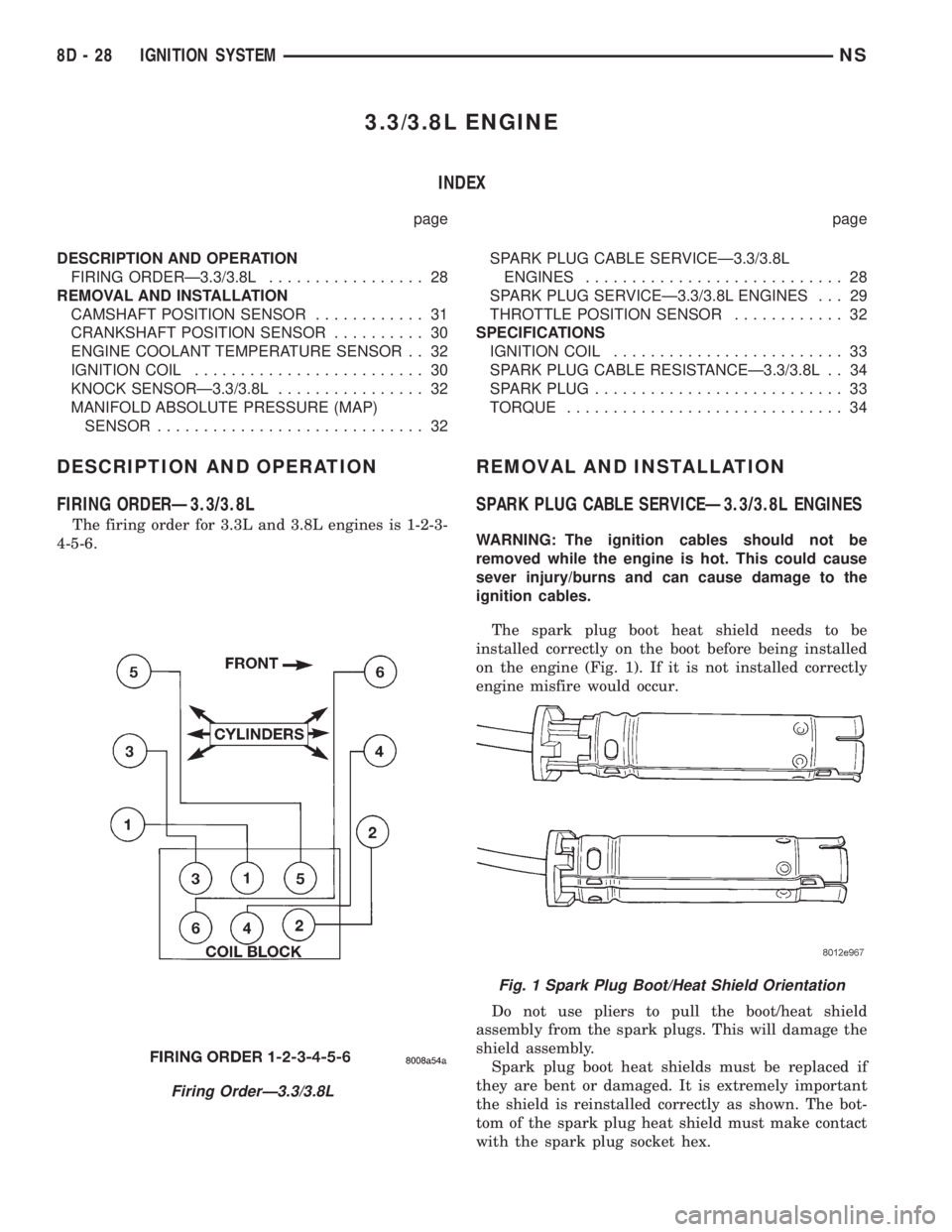
The firing order for 3.3L and 3.8L engines is 1-2-3-
4-5-6.
REMOVAL AND INSTALLATION
SPARK PLUG CABLE SERVICEÐ3.3/3.8L ENGINES
WARNING: The ignition cables should not be
removed while the engine is hot. This could cause
sever injury/burns and can cause damage to the
ignition cables.
The spark plug boot heat shield needs to be
installed correctly on the boot before being installed
on the engine (Fig. 1). If it is not installed correctly
engine misfire would occur.
Do not use pliers to pull the boot/heat shield
assembly from the spark plugs. This will damage the
shield assembly.
Spark plug boot heat shields must be replaced if
they are bent or damaged. It is extremely important
the shield is reinstalled correctly as shown. The bot-
tom of the spark plug heat shield must make contact
with the spark plug socket hex.
Firing OrderÐ3.3/3.8L
Fig. 1 Spark Plug Boot/Heat Shield Orientation
8D - 28 IGNITION SYSTEMNS
Page 327 of 1938
CAUTION: Never coat the inside of spark plug
boots with silicone grease. Some types of silicone
grease can damage the ignition cable conductor.
SPARK PLUG CABLES #3 AND #5
REMOVAL
(1) Remove the resonator.
(2) Grasp the spark plug boot/heat shield as close
as possible to the spark plug.Twist the boot
slightly to break its seal with the plug and pull
straight back. Do not use pliers, pull on the
ignition cable, or pull the spark plug boot at an
angle.This could damage the spark plug insulator,
terminal, or the cable insulation. Wipe spark plug
insulator clean with a dry cloth before installation.
(3) Remove the cable from the retaining bracket.
Make sure that they are also detached from the rear
retaining clip mounted on the rear of the intake
manifold.
INSTALLATION
(1) When installing the spark plug cables, make
sure the coil and spark plug insulator and terminals
are fully seated. Aclick sound should be heard or
terminal engagement is felt when the terminals
are properly attached.
(2) Install the cable into the retaining bracket.
Make sure that they are also attached to the rear
retaining clip mounted on the rear of the intake
manifold.
(3) Install the resonator.
SPARK PLUG CABLE #1
REMOVAL
(1) Remove the accessory drive belt, refer to Group
7, Cooling.
(2) Remove the four bolts from the upper half of
the generator bracket.
(3) Push the Generator rearward.
(4) Grasp the spark plug boot/shield assembly as
close as possible to the spark plug.Twist the boot
slightly to break its seal with the plug and pull
straight back. Do not use pliers, pull on the
ignition cable, or pull the spark plug boot at an
angle.This could damage the spark plug insulator,
terminal, or the cable insulation. Wipe spark plug
insulator clean with a dry cloth before installation.
(5) Remove the cable from the retaining bracket.
INSTALLATION
(1) When installing the spark plug cables, make
sure the coil and spark plug insulator and terminals
are fully seated. Aclick sound should be heard orterminal engagement is felt when the terminals
are properly attached.
(2) Rotate Generator back into place.
(3) Install upper Generator bracket with the four
bolts.
(4) Install the accessory drive belt, refer to Group
7, Cooling.
SPARK PLUG SERVICEÐ3.3/3.8L ENGINES
WARNING: The ignition cables should not be
removed while the engine is hot. This could cause
server injury/burns and can cause damage to the
ignition cables.
Use extreme care when removing and installing
the spark plug cables.
The spark plug boot heat shield needs to be
installed correctly on the boot before being installed
on the engine (Fig. 1). If it is not installed correctly
engine misfire would occur.
Do not use pliers to pull the boot/heat shield
assembly from the spark plugs. This will damage the
shield assembly.
SPARK PLUG #3 AND #5
REMOVAL
(1) Remove the resonator.
(2) Remove intake strut to cylinder head bolt at
cylinder head.
(3) Loosen bolt for intake strut at intake.
(4) Swing strut away.
(5) Grasp the spark plug boot/shield assembly as
close as possible to the spark plug.Twist the boot/
shield assembly slightly to break the seal with
the plug and pull straight out. Do not use pli-
ers, pull on the ignition cable, or pull the spark
plug boot at an angle.This could damage the
spark plug insulator, terminal, heat shield or the
insulation. Wipe spark plug insulator clean with a
dry cloth before installation.
(6) Remove spark plug
INSTALLATION
(1) Install spark plug and tighten to 28 N´m (20 ft.
lbs.).
(2) When installing the spark plug cables, make
sure spark plug insulator and terminals are fully
seated. Aclick sound should be heard or felt
when the terminals are properly attached.
(3) Install the cable into the retaining bracket.
Make sure that they are also attached to the rear
retaining clip mounted on the rear of the intake
manifold.
(4) Swing strut back into place.
NSIGNITION SYSTEM 8D - 29
REMOVAL AND INSTALLATION (Continued)
Page 335 of 1938
INSTALLATION
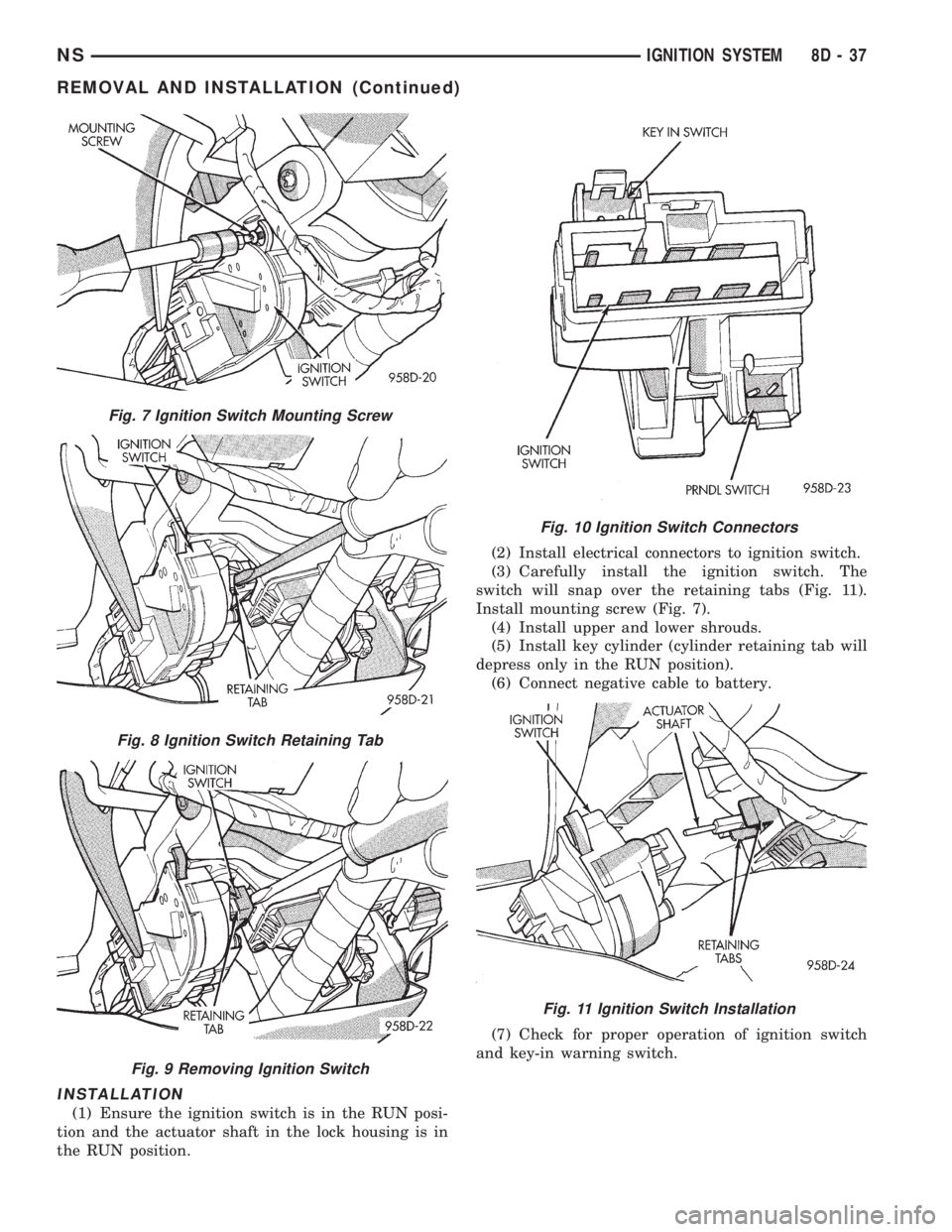
(1) Ensure the ignition switch is in the RUN posi-
tion and the actuator shaft in the lock housing is in
the RUN position.(2) Install electrical connectors to ignition switch.
(3) Carefully install the ignition switch. The
switch will snap over the retaining tabs (Fig. 11).
Install mounting screw (Fig. 7).
(4) Install upper and lower shrouds.
(5) Install key cylinder (cylinder retaining tab will
depress only in the RUN position).
(6) Connect negative cable to battery.
(7) Check for proper operation of ignition switch
and key-in warning switch.
Fig. 7 Ignition Switch Mounting Screw
Fig. 8 Ignition Switch Retaining Tab
Fig. 9 Removing Ignition Switch
Fig. 10 Ignition Switch Connectors
Fig. 11 Ignition Switch Installation
NSIGNITION SYSTEM 8D - 37
REMOVAL AND INSTALLATION (Continued)
Page 338 of 1938
The instrument cluster is equipped with the follow-
ing warning lamps.
²Lift Gate Ajar
²Low Fuel Level
²Low Windshield Washer Fluid Level
²Cruise
²Battery Voltage
²Fasten Seat Belt
²Door Ajar
DIAGNOSIS AND TESTING
DIAGNOSTIC PROCEDURES
NS vehicle instrument clusters are equipped with a
self diagnostic test feature to help identify electronic
problems. Prior to any test, perform Self Diagnostic
Test. The self diagnostic system monitors the CCD
bus messages. If an electronic problem occurs, a
Diagnostic Trouble Code (DTC) will be displayed in
the odometer window of the cluster.
The following CCD bus messages are continuously
monitored by the diagnostic system:
²Body Control Module
²Powertrain Control Module
²Transmission Control Module, if equipped
HEADLAMP SWITCH
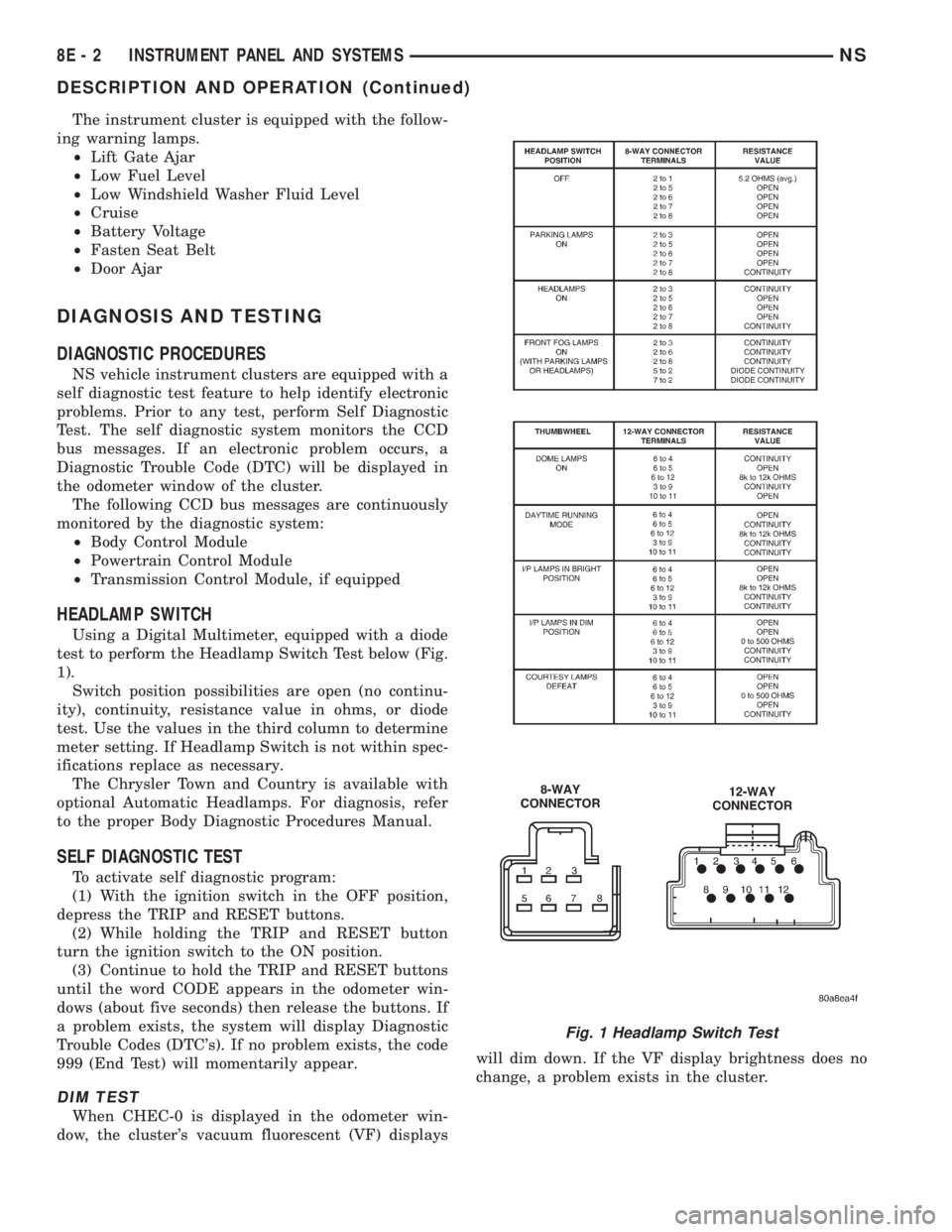
Using a Digital Multimeter, equipped with a diode
test to perform the Headlamp Switch Test below (Fig.
1).
Switch position possibilities are open (no continu-
ity), continuity, resistance value in ohms, or diode
test. Use the values in the third column to determine
meter setting. If Headlamp Switch is not within spec-
ifications replace as necessary.
The Chrysler Town and Country is available with
optional Automatic Headlamps. For diagnosis, refer
to the proper Body Diagnostic Procedures Manual.
SELF DIAGNOSTIC TEST
To activate self diagnostic program:
(1) With the ignition switch in the OFF position,
depress the TRIP and RESET buttons.
(2) While holding the TRIP and RESET button
turn the ignition switch to the ON position.
(3) Continue to hold the TRIP and RESET buttons
until the word CODE appears in the odometer win-
dows (about five seconds) then release the buttons. If
a problem exists, the system will display Diagnostic
Trouble Codes (DTC's). If no problem exists, the code
999 (End Test) will momentarily appear.
DIM TEST
When CHEC-0 is displayed in the odometer win-
dow, the cluster's vacuum fluorescent (VF) displayswill dim down. If the VF display brightness does no
change, a problem exists in the cluster.
Fig. 1 Headlamp Switch Test
8E - 2 INSTRUMENT PANEL AND SYSTEMSNS
DESCRIPTION AND OPERATION (Continued)
Page 374 of 1938
INSTRUMENT CLUSTER
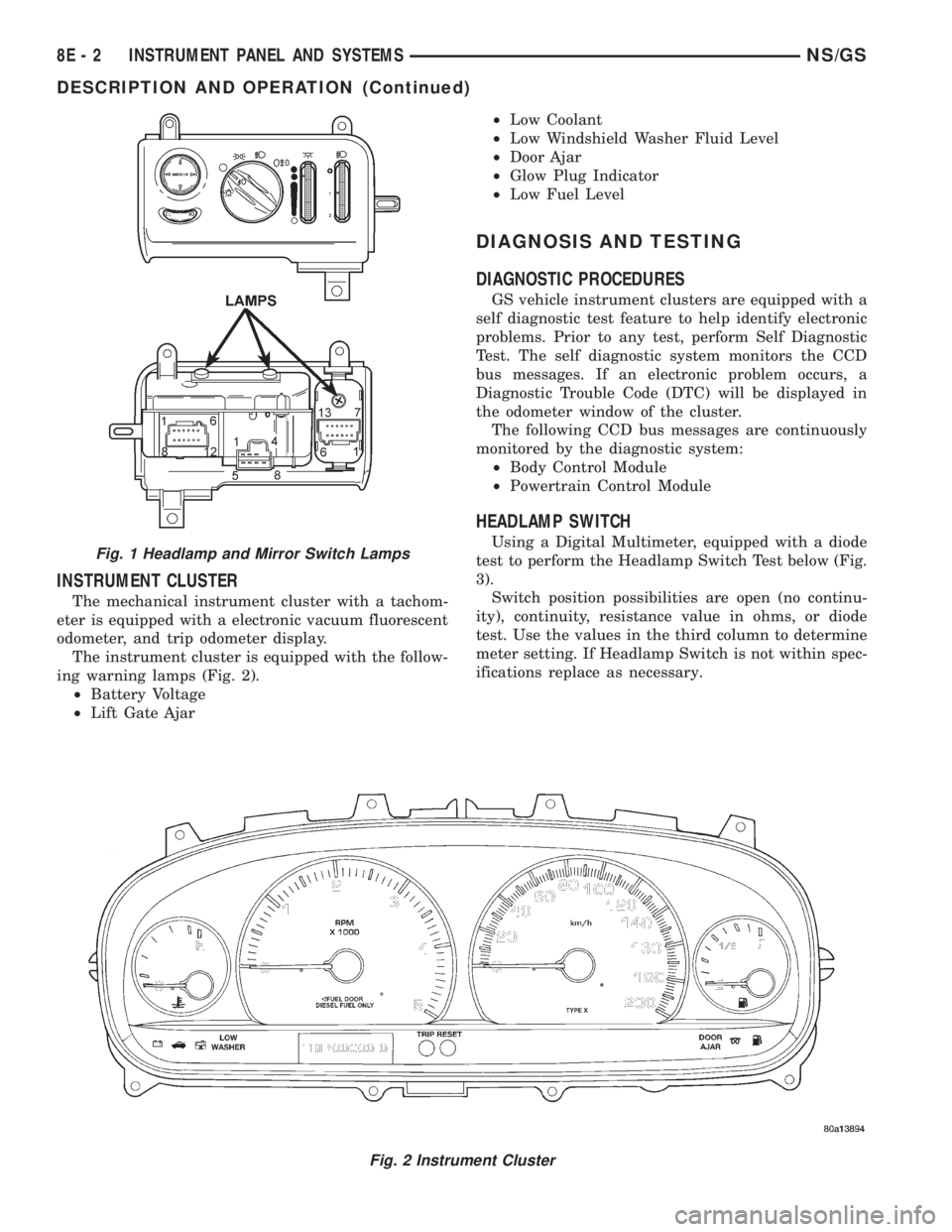
The mechanical instrument cluster with a tachom-
eter is equipped with a electronic vacuum fluorescent
odometer, and trip odometer display.
The instrument cluster is equipped with the follow-
ing warning lamps (Fig. 2).
²Battery Voltage
²Lift Gate Ajar²Low Coolant
²Low Windshield Washer Fluid Level
²Door Ajar
²Glow Plug Indicator
²Low Fuel Level
DIAGNOSIS AND TESTING
DIAGNOSTIC PROCEDURES
GS vehicle instrument clusters are equipped with a
self diagnostic test feature to help identify electronic
problems. Prior to any test, perform Self Diagnostic
Test. The self diagnostic system monitors the CCD
bus messages. If an electronic problem occurs, a
Diagnostic Trouble Code (DTC) will be displayed in
the odometer window of the cluster.
The following CCD bus messages are continuously
monitored by the diagnostic system:
²Body Control Module
²Powertrain Control Module
HEADLAMP SWITCH
Using a Digital Multimeter, equipped with a diode
test to perform the Headlamp Switch Test below (Fig.
3).
Switch position possibilities are open (no continu-
ity), continuity, resistance value in ohms, or diode
test. Use the values in the third column to determine
meter setting. If Headlamp Switch is not within spec-
ifications replace as necessary.
Fig. 2 Instrument Cluster
Fig. 1 Headlamp and Mirror Switch Lamps
8E - 2 INSTRUMENT PANEL AND SYSTEMSNS/GS
DESCRIPTION AND OPERATION (Continued)
Page 405 of 1938

bracket behind the junction block/body control mod-
ule (Fig. 5).
REMOTE RADIO SWITCHES
A remote radio control switch option is available on
LXI models sold in North America with the AM/FM/
cassette/5-band graphic equalizer with CD changer
control feature (RBN sales code), or the AM/FM/CD/
cassette/3-band graphic equalizer (RAZ sales code)
radio receivers. Two rocker-type switches are
mounted on the back (instrument panel side) of the
steering wheel spokes. The switch on the left spoke is
the seek switch and has seek up, seek down, and pre-
set station advance functions. The switch on the
right spoke is the volume control switch and has vol-
ume up, and volume down functions (Fig. 6).
These switches are resistor multiplexed units that
are hard-wired to the Body Control Module (BCM)
through the clockspring. The BCM sends the propermessages on the Chrysler Collision Detection (CCD)
data bus network to the radio receiver. For diagnosis
of the BCM or the CCD data bus, the use of a DRB
scan tool and the proper Diagnostic Procedures man-
ual are recommended. For more information on the
operation of the remote radio switch controls, refer to
the owner's manual in the vehicle glove box.
NAME BRAND SPEAKER RELAY
Relay is located in the junction block. To test relay
refer to the Audio Diagnostic Test Procedures or use
a known good relay.
DIAGNOSIS AND TESTING
ANTENNA
WARNING: ON VEHICLES EQUIPPED WITH AIR-
BAGS, REFER TO GROUP 8M - PASSIVE
RESTRAINT SYSTEMS BEFORE ATTEMPTING ANY
STEERING WHEEL, STEERING COLUMN, OR
INSTRUMENT PANEL COMPONENT DIAGNOSIS OR
SERVICE. FAILURE TO TAKE THE PROPER PRE-
CAUTIONS COULD RESULT IN ACCIDENTAL AIR-
BAG DEPLOYMENT AND POSSIBLE PERSONAL
INJURY.
The following four tests are used to diagnose the
antenna with an ohmmeter:
²Test 1- Mast to ground test
²Test 2- Tip-of-mast to tip-of-conductor test
²Test 3- Body ground to battery ground test
²Test 4- Body ground to coaxial shield test.
The ohmmeter test lead connections for each test
are shown in Antenna Tests (Fig. 7).
NOTE: This model has a two-piece antenna coaxial
cable. Tests 2 and 4 must be conducted in two
steps to isolate a coaxial cable problem; from the
coaxial cable connection under the right end of the
instrument panel near the right cowl side panel to
the antenna base, and then from the coaxial cable
connection to the radio chassis connection.
TEST 1
Test 1 determines if the antenna mast is insulated
from the base. Proceed as follows:
(1) Unplug the antenna coaxial cable connector
from the radio chassis and isolate.
(2) Connect one ohmmeter test lead to the tip of
the antenna mast. Connect the other test lead to the
antenna base. Check for continuity.
(3) There should be no continuity. If continuity is
found, replace the faulty or damaged antenna base
and cable assembly.
Fig. 5 Choke Location
Fig. 6 Remote Radio Switch Operational View
NSAUDIO SYSTEMS 8F - 3
DESCRIPTION AND OPERATION (Continued)
Page 406 of 1938
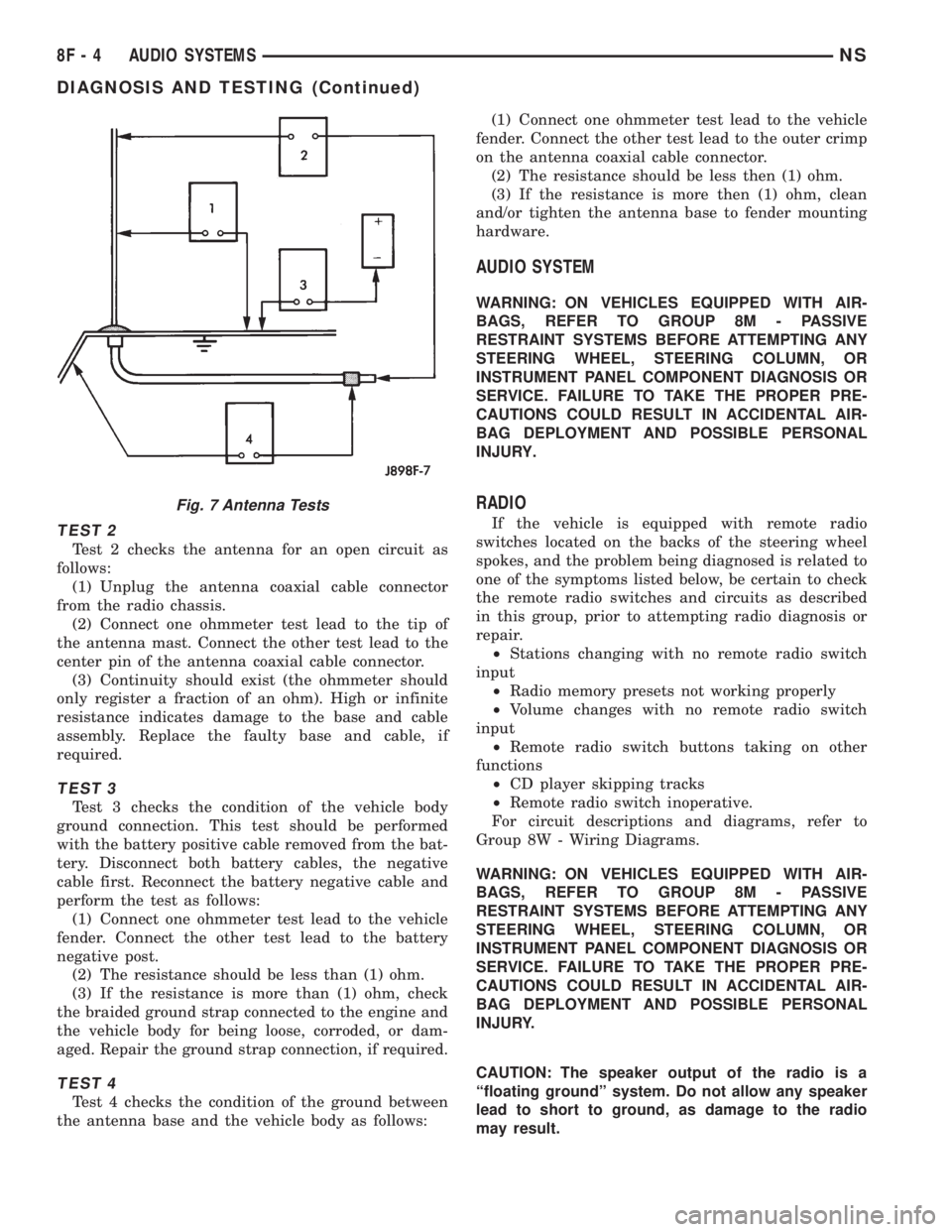
TEST 2
Test 2 checks the antenna for an open circuit as
follows:
(1) Unplug the antenna coaxial cable connector
from the radio chassis.
(2) Connect one ohmmeter test lead to the tip of
the antenna mast. Connect the other test lead to the
center pin of the antenna coaxial cable connector.
(3) Continuity should exist (the ohmmeter should
only register a fraction of an ohm). High or infinite
resistance indicates damage to the base and cable
assembly. Replace the faulty base and cable, if
required.
TEST 3
Test 3 checks the condition of the vehicle body
ground connection. This test should be performed
with the battery positive cable removed from the bat-
tery. Disconnect both battery cables, the negative
cable first. Reconnect the battery negative cable and
perform the test as follows:
(1) Connect one ohmmeter test lead to the vehicle
fender. Connect the other test lead to the battery
negative post.
(2) The resistance should be less than (1) ohm.
(3) If the resistance is more than (1) ohm, check
the braided ground strap connected to the engine and
the vehicle body for being loose, corroded, or dam-
aged. Repair the ground strap connection, if required.
TEST 4
Test 4 checks the condition of the ground between
the antenna base and the vehicle body as follows:(1) Connect one ohmmeter test lead to the vehicle
fender. Connect the other test lead to the outer crimp
on the antenna coaxial cable connector.
(2) The resistance should be less then (1) ohm.
(3) If the resistance is more then (1) ohm, clean
and/or tighten the antenna base to fender mounting
hardware.
AUDIO SYSTEM
WARNING: ON VEHICLES EQUIPPED WITH AIR-
BAGS, REFER TO GROUP 8M - PASSIVE
RESTRAINT SYSTEMS BEFORE ATTEMPTING ANY
STEERING WHEEL, STEERING COLUMN, OR
INSTRUMENT PANEL COMPONENT DIAGNOSIS OR
SERVICE. FAILURE TO TAKE THE PROPER PRE-
CAUTIONS COULD RESULT IN ACCIDENTAL AIR-
BAG DEPLOYMENT AND POSSIBLE PERSONAL
INJURY.
RADIO
If the vehicle is equipped with remote radio
switches located on the backs of the steering wheel
spokes, and the problem being diagnosed is related to
one of the symptoms listed below, be certain to check
the remote radio switches and circuits as described
in this group, prior to attempting radio diagnosis or
repair.
²Stations changing with no remote radio switch
input
²Radio memory presets not working properly
²Volume changes with no remote radio switch
input
²Remote radio switch buttons taking on other
functions
²CD player skipping tracks
²Remote radio switch inoperative.
For circuit descriptions and diagrams, refer to
Group 8W - Wiring Diagrams.
WARNING: ON VEHICLES EQUIPPED WITH AIR-
BAGS, REFER TO GROUP 8M - PASSIVE
RESTRAINT SYSTEMS BEFORE ATTEMPTING ANY
STEERING WHEEL, STEERING COLUMN, OR
INSTRUMENT PANEL COMPONENT DIAGNOSIS OR
SERVICE. FAILURE TO TAKE THE PROPER PRE-
CAUTIONS COULD RESULT IN ACCIDENTAL AIR-
BAG DEPLOYMENT AND POSSIBLE PERSONAL
INJURY.
CAUTION: The speaker output of the radio is a
ªfloating groundº system. Do not allow any speaker
lead to short to ground, as damage to the radio
may result.
Fig. 7 Antenna Tests
8F - 4 AUDIO SYSTEMSNS
DIAGNOSIS AND TESTING (Continued)
Page 408 of 1938
(1) Check the fuse(s) in the junction block and the
Power Distribution Center (PDC). If OK, go to Step
2. If not OK, repair the shorted circuit or component
as required and replace the faulty fuse(s).
(2) Check for battery voltage at the fuse in the
PDC. If OK, go to Step 3. If not OK, repair the open
circuit to the battery as required.
(3) Turn the ignition switch to the ON position.
Check for battery voltage at the fuse in the junction
block. If OK, go to Step 4. If not OK, repair the open
circuit to the ignition switch as required.
(4) Turn the ignition switch to the OFF position.
Disconnect and isolate the battery negative cable.
Remove the instrument cluster center bezel. Remove
the radio, but do not unplug the wire harness connec-
tors. Check for continuity between the radio chassis
and a good ground. There should be continuity. If
OK, go to Step 5. If not OK, repair the open radio
chassis ground circuit as required.
(5) Connect the battery negative cable. Turn the
ignition switch to the ON position. Check for battery
voltage at the fused ignition switch output circuit
cavity of the left (gray) radio wire harness connector.
If OK, go to Step 6. If not OK, repair the open circuit
as required.
(6) Turn the ignition switch to the OFF position.
Check for battery voltage at the fused B(+) circuit
cavity of the left (gray) radio wire harness connector.
If OK, replace the faulty radio. If not OK, repair the
open circuit to the Ignition-Off Draw (IOD) fuse as
required.
REMOTE RADIO SWITCHES
WARNING: ON VEHICLES EQUIPPED WITH AIR-
BAGS, REFER TO GROUP 8M - PASSIVE
RESTRAINT SYSTEMS BEFORE ATTEMPTING ANY
STEERING WHEEL, STEERING COLUMN, OR
INSTRUMENT PANEL COMPONENT DIAGNOSIS OR
SERVICE. FAILURE TO TAKE THE PROPER PRE-
CAUTIONS COULD RESULT IN ACCIDENTAL AIR-
BAG DEPLOYMENT AND POSSIBLE PERSONAL
INJURY.
(1) Disconnect and isolate the battery negative
cable. Wait two minutes for the airbag system capac-
itor to discharge before further service.
(2) Remove the remote radio switch(es) from the
steering wheel.
(3) Use an ohmmeter to check the switch resis-
tance as shown in the Remote Radio Switch Test
table (Fig. 8).
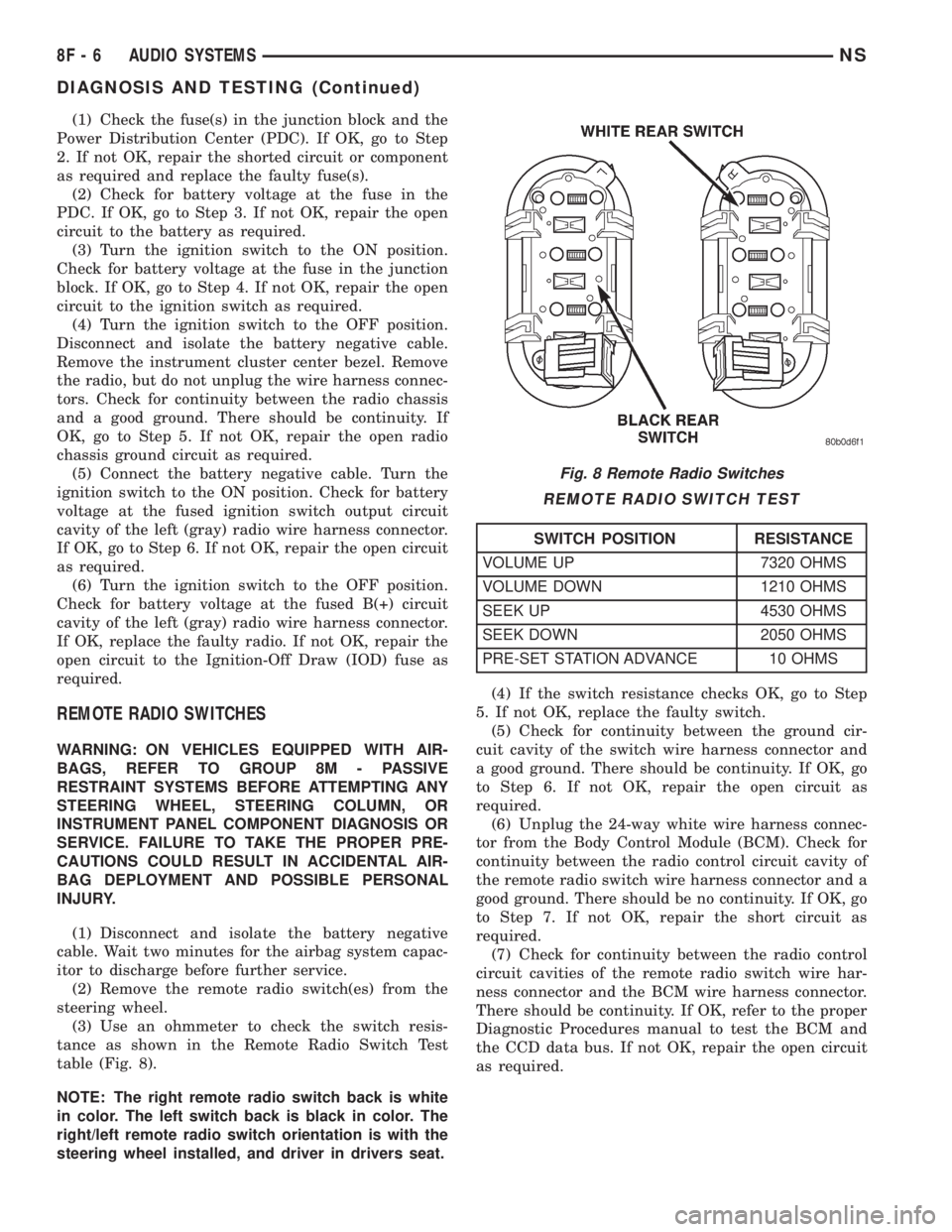
NOTE: The right remote radio switch back is white
in color. The left switch back is black in color. The
right/left remote radio switch orientation is with the
steering wheel installed, and driver in drivers seat.(4) If the switch resistance checks OK, go to Step
5. If not OK, replace the faulty switch.
(5) Check for continuity between the ground cir-
cuit cavity of the switch wire harness connector and
a good ground. There should be continuity. If OK, go
to Step 6. If not OK, repair the open circuit as
required.
(6) Unplug the 24-way white wire harness connec-
tor from the Body Control Module (BCM). Check for
continuity between the radio control circuit cavity of
the remote radio switch wire harness connector and a
good ground. There should be no continuity. If OK, go
to Step 7. If not OK, repair the short circuit as
required.
(7) Check for continuity between the radio control
circuit cavities of the remote radio switch wire har-
ness connector and the BCM wire harness connector.
There should be continuity. If OK, refer to the proper
Diagnostic Procedures manual to test the BCM and
the CCD data bus. If not OK, repair the open circuit
as required.
Fig. 8 Remote Radio Switches
REMOTE RADIO SWITCH TEST
SWITCH POSITION RESISTANCE
VOLUME UP 7320 OHMS
VOLUME DOWN 1210 OHMS
SEEK UP 4530 OHMS
SEEK DOWN 2050 OHMS
PRE-SET STATION ADVANCE 10 OHMS
8F - 6 AUDIO SYSTEMSNS
DIAGNOSIS AND TESTING (Continued)