center console CHRYSLER VOYAGER 2001 Service Manual
[x] Cancel search | Manufacturer: CHRYSLER, Model Year: 2001, Model line: VOYAGER, Model: CHRYSLER VOYAGER 2001Pages: 4284, PDF Size: 83.53 MB
Page 5 of 4284
TABLE OF CONTENTS - Continued
3.9.2.1SYSTEM AVAILABILITY....................................17
3.9.2.2CABIN HEATER..........................................17
3.9.2.3ZONE CONTROL ± SINGLE-ZONE...........................17
3.9.2.4ZONE CONTROL ± DUAL-ZONE.............................17
3.9.2.5AIR DISTRIBUTION.......................................17
3.9.2.6DOOR ACTUATORS.......................................17
3.9.2.7DOOR ACTUATOR CONTROL..............................17
3.9.2.8HVAC SYSTEM RELAYS...................................18
3.9.2.9EVAPORATOR TEMPERATURE SENSOR.....................18
3.9.2.10A/C ± HEATER CONTROL MODULE, SWITCH OPERATION......18
3.9.2.11HVAC DIAGNOSTICS.....................................19
3.10CABIN HEATER...................................................19
3.10.1GENERAL SAFETY INFORMATION..........................19
3.10.2COMPONENT DESCRIPTION AND OPERATION...............19
3.10.2.1DCHA ASSEMBLY.........................................19
3.10.2.2COMBUSTION AIR FAN...................................20
3.10.2.3BURNER HOUSING.......................................20
3.10.2.4BURNER INSERT.........................................20
3.10.2.5CONTROL UNIT/HEAT EXCHANGER.........................20
3.10.2.6DOSING PUMP...........................................20
3.10.3OPERATION.............................................20
3.10.3.1ACTIVATION.............................................20
3.10.3.2HEATING................................................21
3.10.3.3DEACTIVATION...........................................21
3.10.4DIAGNOSTICS...........................................21
3.11INSTRUMENT CLUSTER............................................21
3.11.1INSTRUMENT CLUSTER SELF TEST........................22
3.11.2MESSAGE CENTER.......................................22
3.12INTERIOR LIGHTING...............................................22
3.12.1COURTESY LAMP CONTROL...............................22
3.12.2ILLUMINATED ENTRY.....................................22
3.12.3INTERIOR LIGHTING BATTERY SAVER......................22
3.13MEMORY SYSTEM.................................................22
3.13.1POWER SEAT............................................22
3.13.2MEMORY MIRRORS.......................................23
3.14OVERHEAD CONSOLE.............................................23
3.14.1COMPASS/MINI-TRIP COMPUTER (CMTC)....................23
3.14.2ELECTRONIC VEHICLE INFORMATION CENTER (EVIC)........23
3.14.3SETTING THE COMPASS..................................23
3.14.4SETTING THE VARIANCE..................................23
3.15POWER DOOR LOCK SYSTEM......................................24
3.15.1SLIDING DOOR MEMORY LOCK............................24
3.15.2DOOR LOCK INHIBIT......................................24
3.15.3AUTOMATIC DOOR LOCKS................................24
3.15.4REMOTE KEYLESS ENTRY (RKE)...........................24
3.16POWER FOLDING MIRRORS........................................24
3.17POWER LIFTGATE SYSTEM.........................................25
3.17.1POWER LIFTGATE........................................25
3.17.2DIAGNOSTIC FEATURES..................................25
3.17.3SYSTEM INHIBITORS.....................................25
3.18POWER SLIDING DOOR SYSTEM....................................25
3.18.1POWER SLIDING DOOR...................................25
3.18.2DIAGNOSTIC FEATURES..................................26
ii
Page 27 of 4284
TABLE OF CONTENTS - Continued
RIGHT SLIDING DOOR CONTROL MODULE C1 (POWER SLIDING DOOR) - BLACK
8 WAY ..............................................................1082
RIGHT SLIDING DOOR CONTROL MODULE C2 (POWER SLIDING DOOR) -
BLACK/RED 20 WAY..................................................1082
RIGHT SLIDING DOOR LATCH SENSING SWITCH (POWER SLIDING DOOR) -
BLACK 6 WAY........................................................1082
RIGHT SLIDING DOOR LOCK MOTOR (POWER SLIDING DOOR) - BLACK 4
WAY................................................................1083
RIGHT SLIDING DOOR LOCK MOTOR/AJAR SWITCH (MANUAL SLIDING DOOR) -
BLACK 4 WAY........................................................1083
RIGHT SLIDING DOOR MOTOR (POWER SLIDING DOOR) - BLACK 8 WAY. . . .1083
SENTRY KEY IMMOBILIZER MODULE - BLACK 6 WAY.....................1083
SIREN (UNITED KINGDOM) - BLACK 4 WAY..............................1083
THATCHAM ALARM MODULE C1 (UNITED KINGDOM) - BLACK 16 WAY.......1084
THATCHAM ALARM MODULE C2 (UNITED KINGDOM) - WHITE 4 WAY........1084
TRANSMISSION CONTROL MODULE (EATX) - BLACK 60 WAY..............1085
TXV SOLENOID (ATC)-2WAY.........................................1086
10.0 SCHEMATIC DIAGRAMS...............................................1087
10.1AIRBAG SYSTEM................................................1087
10.2AUDIO SYSTEM.................................................1088
10.2.1PREMIUM.............................................1088
10.2.2BASE.................................................1089
10.2.3CD CHANGER.........................................1090
10.2.4REMOTE RADIO CONTROLS.............................1091
10.3CABIN HEATER.................................................1092
10.4AUTOMATIC TEMPERATURE CONTROL SYSTEM....................1093
10.4.1FRONT ATC............................................1093
10.4.2REAR ATC.............................................1094
10.5COMMUNICATION...............................................1095
10.5.1PCM COMMUNICATION.................................1096
10.5.2ECM & CABIN HEATER ASSIST COMMUNICATION - DIESEL
ONLY.................................................1096
10.6DOOR AJAR WITH POWER SLIDING DOORS........................1097
10.7DOOR AJAR WITHOUT POWER SLIDING DOORS....................1098
10.8EXTERIOR LIGHTING............................................1099
10.9IGNITION SWITCH...............................................1100
10.10INSTRUMENT CLUSTER Ð BASE..................................1101
10.11INSTRUMENT CLUSTER & MESSAGE CENTER......................1102
10.12INTELLIGENT POWER MODULE/BODY CONTROL MODULE POWER AND
GROUNDS......................................................1103
10.13INTERIOR LIGHTING.............................................1104
10.14MANUAL TEMPERATURE CONTROLS..............................1105
10.14.1BASE MANUAL TEMPERATURE CONTROL SYSTEM LHD.....1105
10.14.2BASE MANUAL TEMPERATURE CONTROL SYSTEM RHD....1106
10.14.3DUAL-ZONE MANUAL TEMPERATURE CONTROL SYSTEM
LHD ..................................................1107
10.14.4DUAL-ZONE MANUAL TEMPERATURE CONTROL SYSTEM
RHD..................................................1108
10.14.5BLOWER MOTOR.......................................1109
10.15MEMORY SYSTEM...............................................1110
10.16OVERHEAD CONSOLE...........................................1111
xxiv
Page 52 of 4284
contains a potentiometer to monitor the seat posi-
tion. To monitor the position of the motor, the
MSMM sends out a 5-volt reference on the sensor
supply circuit. The sensor is grounded back to the
module on a common ground circuit. Based on the
position of the sensor, the MSMM monitors the
voltage change through the sensor on a separate
signal circuit.
The MSMM stores the input value of each of the
four seat potentiometers in memory when the sys-
tem requests a set. The driver can initiate a mem-
ory recall, using either the door mounted memory
switch or the RKE transmitter (if the remote linked
to memory feature is enabled via the EVIC). When
initiated, the MSMM adjusts the four seat sensors
(by using the motors) to match the memorized seat
position data.
For safety, the memory seat recall is disabled by
the MSMM when the vehicle is out of park position
or if the speed is not zero. Any obstruction to seat
movement over a 2-second delay will cause the seat
to stop moving in which case a stalled motor would
be detected by the MSMM and the corresponding
seat output would be deactivated. However, if the
object obstructing the seat is removed, the seat will
function normally again.
3.13.2 MEMORY MIRRORS
Each outside mirror contains vertical and hori-
zontal bi-directional drive positioning motors and
position sensors. The MSMM provides a 5-volt
reference on the signal circuit to each position
sensor. The sensors share a common ground circuit.
The MSMM monitors the position of the mirror
motors by measuring the voltage on each signal
circuit. When a memory position is set, the MSMM
monitors and stores the position of the outside
mirrors. The MSMM adjusts the mirrors to the
appropriate positions when a memory recall mes-
sage is received from the RKE or is requested from
the memory set switch.
The power mirror switch during non-memory
operation operates both mirrors independently of
the MSMM.
3.14 OVERHEAD CONSOLE
3.14.1 COMPASS/MINI-TRIP COMPUTER
(CMTC)
The compass/mini-trip computer is located in the
overhead console. It displays to the driver the
direction the vehicle is traveling and the current
outside temperature, as well as the following trav-
eler navigational information: average fuel econ-
omy (AVG ECO), distance to empty (DTE), instan-
taneous fuel economy (ECO), elapsed time (ET),and trip odometer (ODO). The information needed
for the CMTC functions is received over the PCI bus
from other modules.
3.14.2 ELECTRONIC VEHICLE
INFORMATION CENTER (EVIC)
The Electronic Vehicle Information Center
(EVIC) includes all the same functions and is lo-
cated in the same area as the Compass/Mini-Trip
Computer, but it adds a number of warning mes-
sages. Also, the EVIC messages are spelled out on
the screen, for example, DISTANCE TO EMPTY,
where the Mini-Trip Computer displays only shows
DTE.
If the compass/mini-trip computer or EVIC has
been replaced, it may be necessary to reset the
calibration.
3.14.3 SETTING THE COMPASS
The compass/mini-trip computer and EVIC are
self-calibrated and requires no adjustment. The
word CAL will be displayed to indicate that the
compass is in the fast calibrating mode. CAL will
turn off after the vehicle has gone in three complete
circles without stopping, in an area free of magnetic
disturbance.
If the module displays the temperature while the
compass is blank or shows a false reading, the
vehicle must be demagnetized. See the service man-
ual for the proper procedure.
If the compass still goes blank after the vehicle is
demagnetized, the compass/mini-trip/EVIC module
must be replaced.
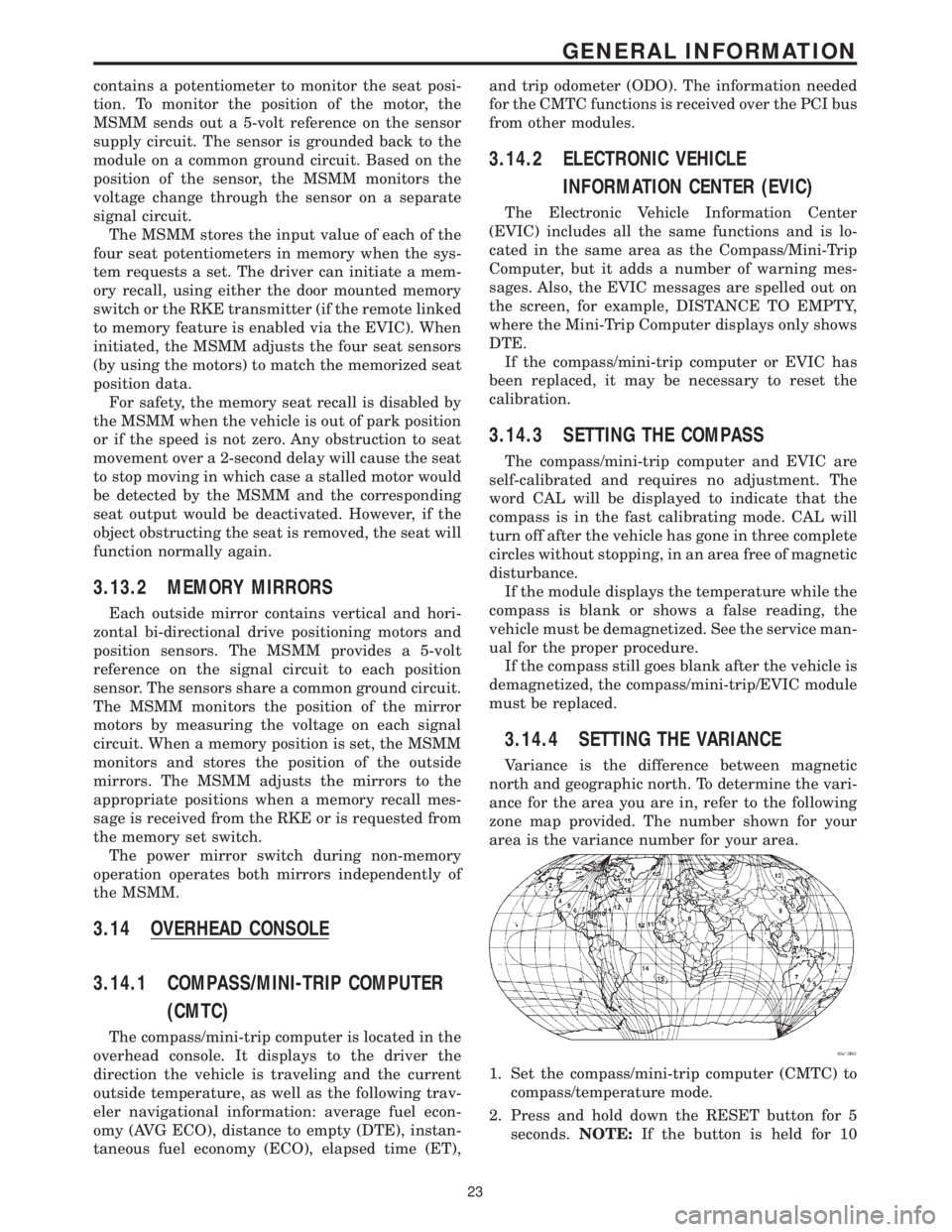
3.14.4 SETTING THE VARIANCE
Variance is the difference between magnetic
north and geographic north. To determine the vari-
ance for the area you are in, refer to the following
zone map provided. The number shown for your
area is the variance number for your area.
1. Set the compass/mini-trip computer (CMTC) to
compass/temperature mode.
2. Press and hold down the RESET button for 5
seconds.NOTE:If the button is held for 10
23
GENERAL INFORMATION
Page 743 of 4284
Symptom:
EVIC INTERNAL FAILURE
When Monitored and Set Condition:
EVIC INTERNAL FAILURE
When Monitored: When a SELF TEST command is received from the DRBIII, the EVIC
performs a series of tests on the microprocessor, compass coil, and internal circuitry.
Set Condition: The code will be set, if during the self test the EVIC detects a problem the
microprocessor, compass coil, and internal circuitry.
POSSIBLE CAUSES
EVIC INTERNAL FAILURE
TEST ACTION APPLICABILITY
1 Turn the ignition on.
With the DRBIIIt, erase the DTC.
Cycle the ignition on and off several times leaving the ignition in the on position for
at least 15 second each time.
With the DRBIIIt, read DTCs.
Does the DTC reset?All
Ye s®Replace Electronic Vehicle Information Center.
Perform BODY VERIFICATION TEST - VER 1.
No®Test Complete.
714
OVERHEAD CONSOLE
Page 1904 of 4284
²Remote Keyless Entry Module (RKE)- Refer
toRemote Keyless Entry Modulein Power Locks
for more information.
²Electronic Vehicle Information Center
(EVIC)- Refer toElectronic Vehicle Information
Centerin Overhead Console for more information.
²Heated Seat Module (HSM)- Refer toHeated
Seat Modulein Electronic Control Modules for more
information.
²Memory Heated Seat Module (MHSM)-If
the vehicle is equipped with the Memory System,
refer toMemory Seat Mirror Module (MSMM)in
Electronic Control Modules for more information.
Refer toWiring Diagramsfor complete circuit
diagrams. Following are general descriptions of the
major components in the heated seat system.
OPERATION
The heated seat system will only operate when the
ignition switch is in the On position, and the surface
temperature at the front seat heating element sen-
sors is below the designed temperature set points of
the system. The heated seat system will not operate
in ambient temperatures greater than about 41É C
(105É F). The front seat heating elements and sensors
are hard wired to the Heated Seat Module (HSM) or
the Memory Heated Seat Module (MHSM).
The heated seat switches are hard wired to the
Body Control Module (BCM). The BCM monitors the
heated seat switch inputs, then sends heated seat
switch status messages to the HSM or MHSM over
the Programmable Communications Interface J1850
(PCI) data bus. The HSM or MHSM contains the con-
trol logic for the heated seat system. The HSM or
MHSM responds to the heated seat switch status
messages, ignition switch status messages, and the
front seat heating element sensor inputs by control-
ling the output to the front seat heating elements
through integral solid-state relays.
When a seat heater is turned on, the sensor
located on the seat cushion electric heater element
provides the HSM or MHSM with an input indicating
the surface temperature of the seat cushion. If the
surface temperature input is below the temperature
set point for the selected Low or High heated seat
switch position, the HSM or MHSM energizes the
integral solid-state relay, which supplies battery cur-
rent to the heating elements in the seat cushion and
back. When the sensor input indicates the correct
temperature set point has been achieved, the HSM or
MHSM de-energizes the solid-state relay. The HSM
or MHSM will continue to cycle the solid-state relay
as needed to maintain the temperature set point.
The HSM or MHSM and the seat heater elements
operate on non-switched battery current supplied
through the power seat fuse in the intelligent powermodule. However, the HSM or MHSM will automati-
cally turn off the heating elements if it detects an
open in the sensor circuit, a short in the heating ele-
ment circuit causing an excessive current draw, or
when the ignition switch is turned to the Off posi-
tion.
See the owner's manual in the vehicle glove box for
more information on the features, use and operation
of the heated seat system.
DRIVER HEATED SEAT
SWITCH
DESCRIPTION
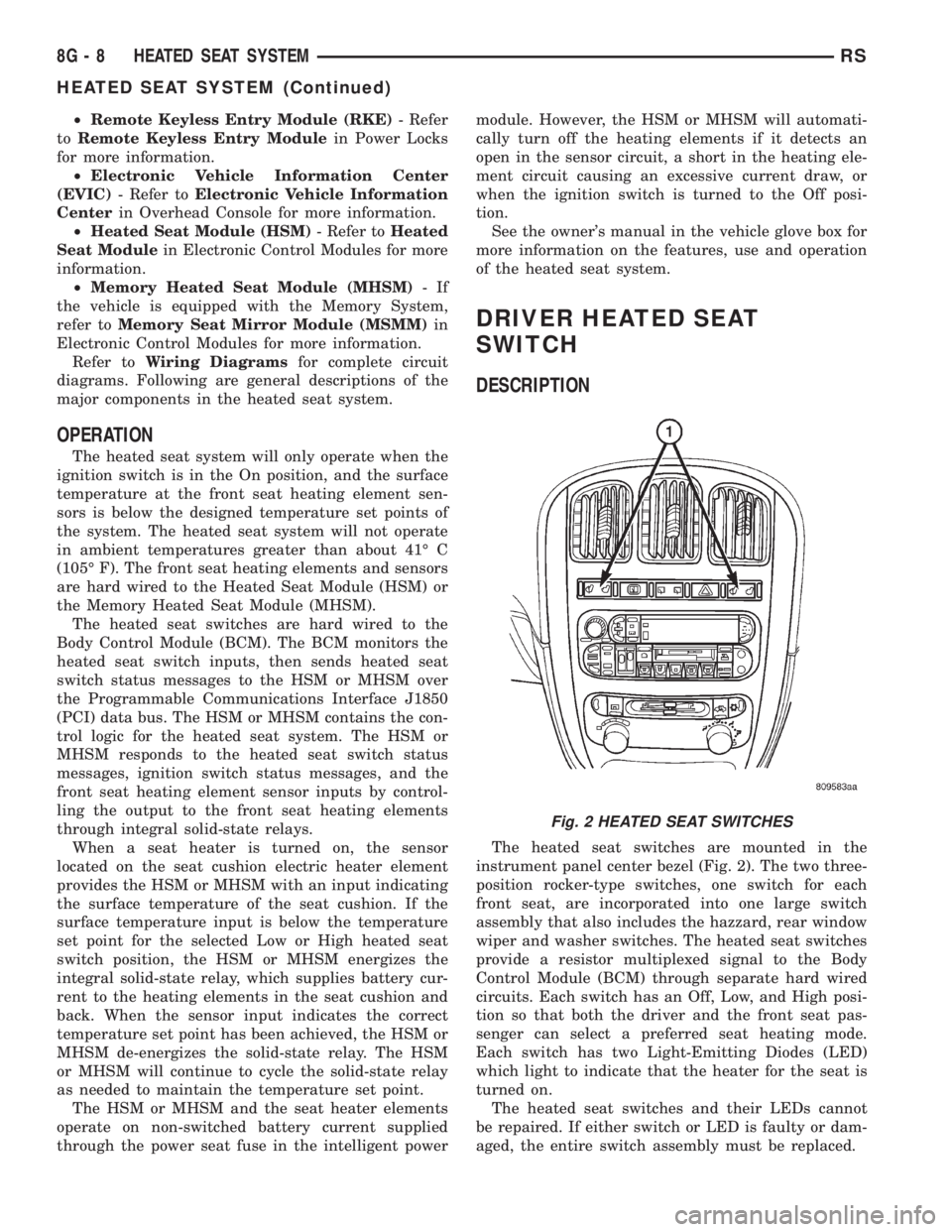
The heated seat switches are mounted in the
instrument panel center bezel (Fig. 2). The two three-
position rocker-type switches, one switch for each
front seat, are incorporated into one large switch
assembly that also includes the hazzard, rear window
wiper and washer switches. The heated seat switches
provide a resistor multiplexed signal to the Body
Control Module (BCM) through separate hard wired
circuits. Each switch has an Off, Low, and High posi-
tion so that both the driver and the front seat pas-
senger can select a preferred seat heating mode.
Each switch has two Light-Emitting Diodes (LED)
which light to indicate that the heater for the seat is
turned on.
The heated seat switches and their LEDs cannot
be repaired. If either switch or LED is faulty or dam-
aged, the entire switch assembly must be replaced.
Fig. 2 HEATED SEAT SWITCHES
8G - 8 HEATED SEAT SYSTEMRS
HEATED SEAT SYSTEM (Continued)
Page 1957 of 4284
LAMPS/LIGHTING - INTERIOR
TABLE OF CONTENTS
page page
LAMPS/LIGHTING - INTERIOR
SPECIFICATIONS........................17
CENTER CONSOLE LAMP SWITCH
REMOVAL..............................18
INSTALLATION...........................18
CLUSTER ILLUMINATION LAMPS
REMOVAL..............................18
INSTALLATION...........................18
COURTESY LAMP
REMOVAL..............................18
INSTALLATION...........................18
DOME LAMP
REMOVAL..............................18INSTALLATION...........................18
GLOVE BOX LAMP SWITCH
REMOVAL..............................18
INSTALLATION...........................19
LIFTGATE LAMP
REMOVAL..............................19
INSTALLATION...........................19
READING LAMP
REMOVAL..............................19
INSTALLATION...........................20
VANITY LAMP
REMOVAL..............................20
INSTALLATION...........................20
LAMPS/LIGHTING - INTERIOR
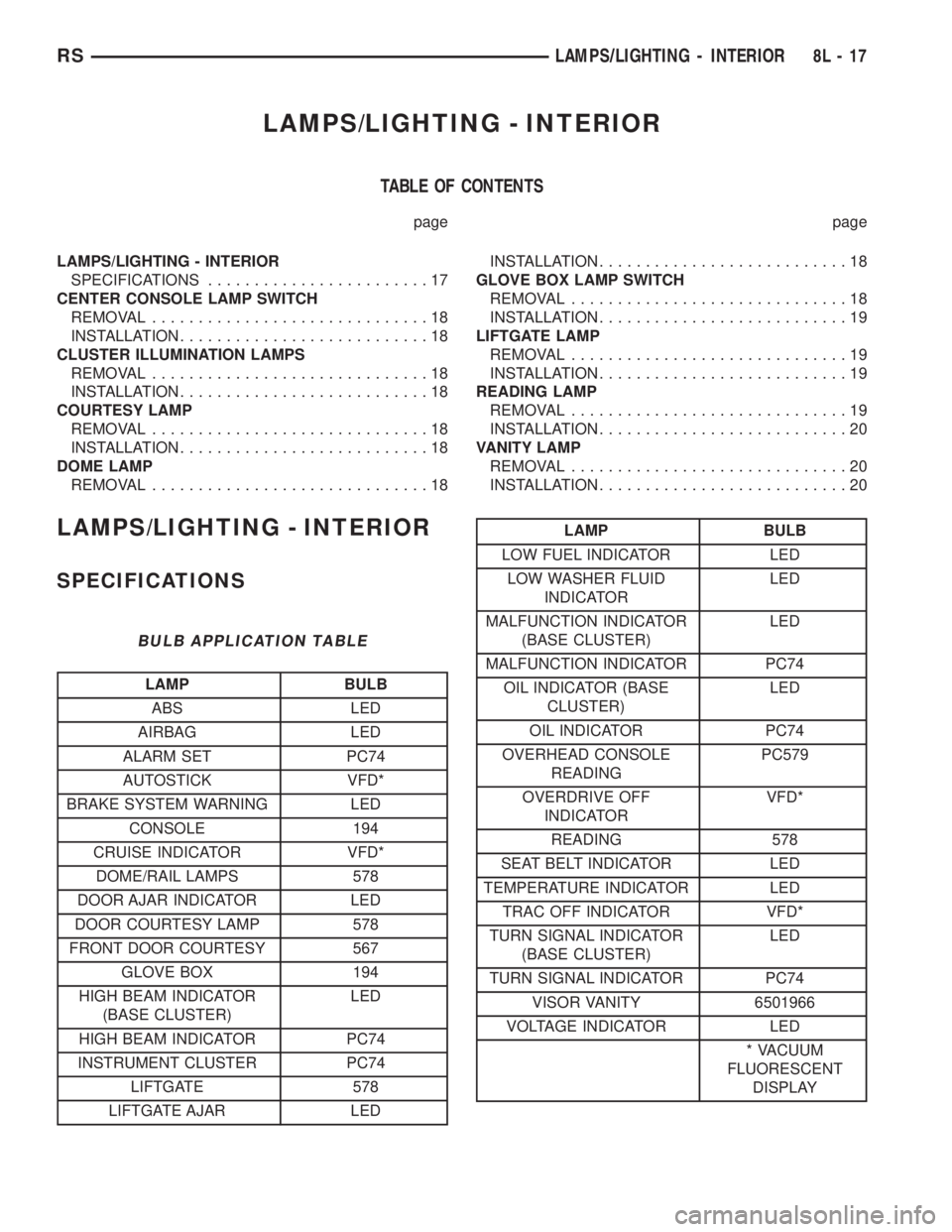
SPECIFICATIONS
BULB APPLICATION TABLE
LAMP BULB
ABS LED
AIRBAG LED
ALARM SET PC74
AUTOSTICK VFD*
BRAKE SYSTEM WARNING LED
CONSOLE 194
CRUISE INDICATOR VFD*
DOME/RAIL LAMPS 578
DOOR AJAR INDICATOR LED
DOOR COURTESY LAMP 578
FRONT DOOR COURTESY 567
GLOVE BOX 194
HIGH BEAM INDICATOR
(BASE CLUSTER)LED
HIGH BEAM INDICATOR PC74
INSTRUMENT CLUSTER PC74
LIFTGATE 578
LIFTGATE AJAR LED
LAMP BULB
LOW FUEL INDICATOR LED
LOW WASHER FLUID
INDICATORLED
MALFUNCTION INDICATOR
(BASE CLUSTER)LED
MALFUNCTION INDICATOR PC74
OIL INDICATOR (BASE
CLUSTER)LED
OIL INDICATOR PC74
OVERHEAD CONSOLE
READINGPC579
OVERDRIVE OFF
INDICATORVFD*
READING 578
SEAT BELT INDICATOR LED
TEMPERATURE INDICATOR LED
TRAC OFF INDICATOR VFD*
TURN SIGNAL INDICATOR
(BASE CLUSTER)LED
TURN SIGNAL INDICATOR PC74
VISOR VANITY 6501966
VOLTAGE INDICATOR LED
* VACUUM
FLUORESCENT
DISPLAY
RSLAMPS/LIGHTING - INTERIOR8L-17
Page 1958 of 4284
CENTER CONSOLE LAMP
SWITCH
REMOVAL
(1) Disconnect and isolate the battery negative
cable.
(2) Open console lid and remove tray.
(3) Using a flat bladed tool, pry up on the switch.
(4) Remove bulb from switch.
INSTALLATION
(1) Install bulb into switch.
(2) Push switch into console opening.
(3) Install tray and close lid.
(4) Connect battery negative cable.
CLUSTER ILLUMINATION
LAMPS
REMOVAL
(1) Remove the Instrument Cluster. Refer to Elec-
trical, Instrument Cluster, Removal.
(2) Turn over cluster and expose the illumination
bulb sockets.
(3) Identify which bulb is defective and twist it out
of the cluster using a counterclockwise motion.
INSTALLATION
(1) Install the new bulb socket into the cluster
using a clockwise motion.
(2) Install the Instrument Cluster. Refer to Electri-
cal, Instrument Cluster, Installation.
COURTESY LAMP
REMOVAL
(1) Disconnect and isolate the battery negative
cable.
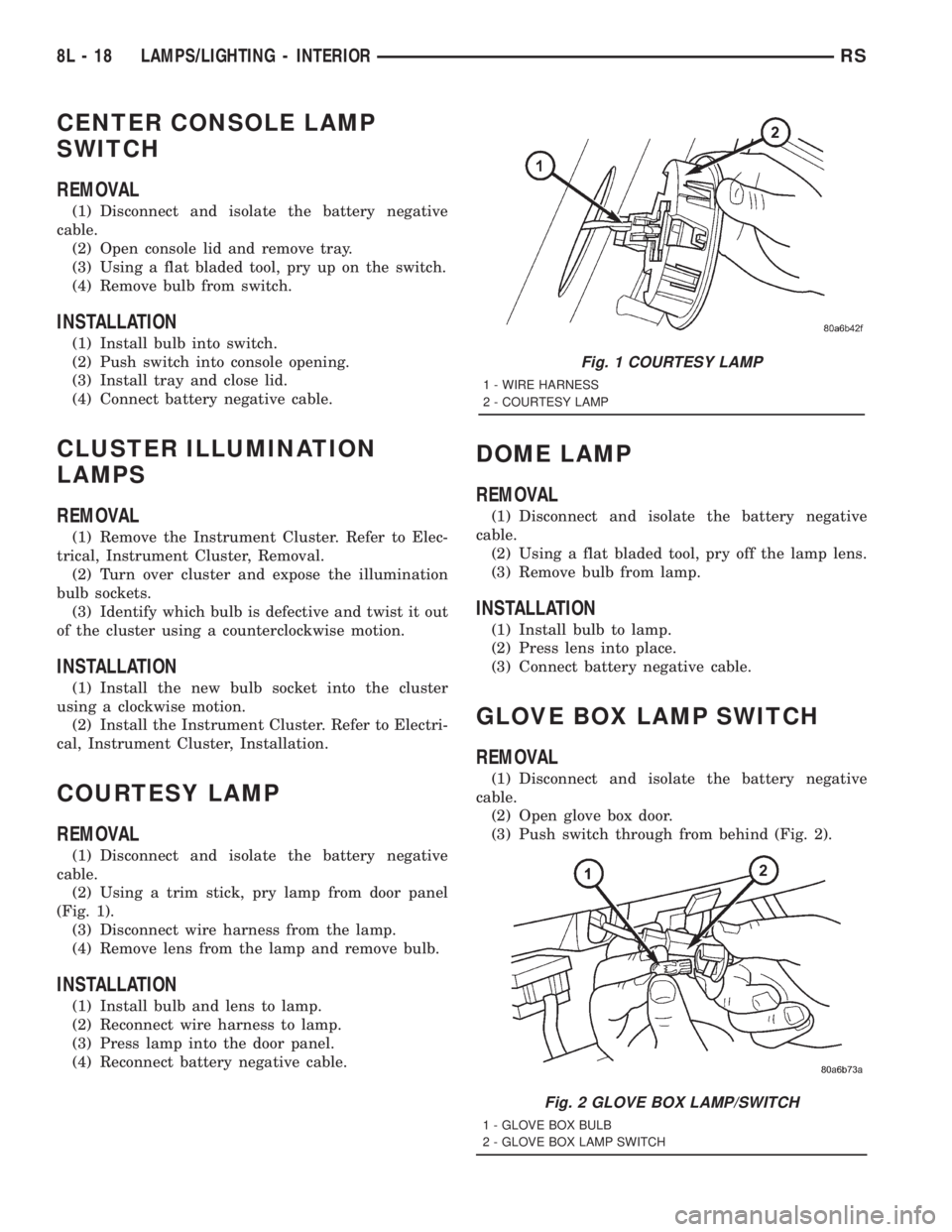
(2) Using a trim stick, pry lamp from door panel
(Fig. 1).
(3) Disconnect wire harness from the lamp.
(4) Remove lens from the lamp and remove bulb.
INSTALLATION
(1) Install bulb and lens to lamp.
(2) Reconnect wire harness to lamp.
(3) Press lamp into the door panel.
(4) Reconnect battery negative cable.
DOME LAMP
REMOVAL
(1) Disconnect and isolate the battery negative
cable.
(2) Using a flat bladed tool, pry off the lamp lens.
(3) Remove bulb from lamp.
INSTALLATION
(1) Install bulb to lamp.
(2) Press lens into place.
(3) Connect battery negative cable.
GLOVE BOX LAMP SWITCH
REMOVAL
(1) Disconnect and isolate the battery negative
cable.
(2) Open glove box door.
(3) Push switch through from behind (Fig. 2).
Fig. 1 COURTESY LAMP
1 - WIRE HARNESS
2 - COURTESY LAMP
Fig. 2 GLOVE BOX LAMP/SWITCH
1 - GLOVE BOX BULB
2 - GLOVE BOX LAMP SWITCH
8L - 18 LAMPS/LIGHTING - INTERIORRS
Page 1969 of 4284
MESSAGE SYSTEMS
TABLE OF CONTENTS
page page
MESSAGE CENTER......................... 1OVERHEAD CONSOLE....................... 2
MESSAGE CENTER
TABLE OF CONTENTS
page page
MESSAGE CENTER
REMOVAL...............................1INSTALLATION............................1
MESSAGE CENTER
REMOVAL
(1) Disconnect and isolate the battery negative
cable.
(2) Using a trim stick (special tool #C-4755) or
equivalent, gently pry up on the front side of the
message center and lift out of instrument panel open-
ing.
(3) Disconnect the wire connector from the back of
message center.
(4) Remove message center from vehicle.NOTE: If the message center lamp needs replacing,
twist out defective bulb socket and replace with a
known good bulb and socket.
INSTALLATION
(1) Connect the wiring connector to message cen-
ter.
(2) Place message center in position on instrument
panel and firmly snap into place.
(3) Connect battery negative cable.
RSMESSAGE SYSTEMS8M-1
Page 1970 of 4284
OVERHEAD CONSOLE
TABLE OF CONTENTS
page page
OVERHEAD CONSOLE
DESCRIPTION............................2
OPERATION.............................3
DIAGNOSIS AND TESTING..................3
DIAGNOSIS & TESTING...................3
STANDARD PROCEDURE...................4
COURTESY LAMP REPLACEMENT..........4
COMPASS CALIBRATION..................4
COMPASS DEMAGNETIZING...............4
COMPASS VARIATION ADJUSTMENT........5
REMOVAL...............................6
INSTALLATION............................6
ELECTRONIC VEHICLE INFO CENTER
DESCRIPTION............................6
OPERATION.............................7
DIAGNOSIS AND TESTING..................7
TRAVELER MESSAGES...................7
STANDARD PROCEDURE...................8
EVIC PROGRAMMING....................8
REMOVAL...............................9
INSTALLATION............................9COMPASS/MINI-TRIP COMPUTER
DESCRIPTION............................9
OPERATION.............................10
DIAGNOSIS AND TESTING.................10
DIAGNOSIS AND TESTING...............10
REMOVAL..............................10
INSTALLATION...........................10
UNIVERSAL TRANSMITTER
DESCRIPTION...........................10
OPERATION.............................10
DIAGNOSIS AND TESTING.................11
UNIVERSAL GARAGE DOOR OPENER......11
AMBIENT TEMP SENSOR
DESCRIPTION...........................11
OPERATION.............................11
DIAGNOSIS AND TESTING.................11
AMBIENT TEMPERATURE SENSOR.........11
AMBIENT TEMPERATURE SENSOR
CIRCUIT..............................11
REMOVAL..............................12
INSTALLATION...........................12
OVERHEAD CONSOLE
DESCRIPTION
The available overhead consoles on RS models can
include the Electronic Vehicle Information Center
(EVIC), Compass Mini-Trip Computer (CMTC) or a
Compass Temperature Computer (CT). All consoles
are equipped with two reading/courtesy lamps and if
the vehicle is equipped with a power liftgate or
power sliding door(s) the overhead console will also
include command switches for these features. The
overhead console is mounted with one screw and two
snap clips to a molded plastic retainer bracket
located above the headliner.
DESCRIPTION - COMPASS
All the available overhead consoles on this model
include Compass information. While in the compass/
thermometer mode, the compass will display the
direction in which the vehicle is pointed using the
eight major compass headings (Examples: north is N,
northeast is NE). The self-calibrating compass unit
requires no adjusting in normal use. The only cali-
bration that may prove necessary is to drive the vehi-
cle in three complete circles at 5 to 8 kilometers-per-
hour (3 to 5 miles-per-hour), on level ground, in notless than forty-eight seconds. This will reorient the
compass unit to its vehicle.
The compass unit also will compensate for magne-
tism the body of the vehicle may acquire during nor-
mal use. However, avoid placing anything magnetic
directly on the roof of the vehicle. Magnetic mounts
for an antenna, a repair order hat, or a funeral pro-
cession flag can exceed the compensating ability of
the compass unit if placed on the roof panel. Mag-
netic bit drivers used on the fasteners that hold the
overhead console assembly to the roof header can
also affect compass operation. If the vehicle roof
should become magnetized, the demagnetizing and
calibration procedures found in this section may be
required to restore proper compass operation.DESCRIPTION - THERMOMETER
All the available overhead consoles on this model
include Temperature information. The thermometer
displays the outside ambient temperature in whole
degrees. The temperature display can be toggled
from Fahrenheit to Celsius by selecting the desired
U.S./Metric option from the customer programmable
features. The displayed temperature is not an instant
reading of conditions, but an average temperature. It
may take the thermometer display several minutes
to respond to a major temperature change, such as
8M - 2 OVERHEAD CONSOLERS
Page 1971 of 4284
driving out of a heated garage into winter tempera-
tures.
When the ignition switch is turned to the Off posi-
tion, the last displayed temperature reading stays in
the electronic control modules (CT, CMTC, EVIC)
memory. When the ignition switch is turned to the
On position again, the electronic module will display
the memory temperature for one minute; then update
the display to the current average temperature read-
ing within five minutes.
The thermometer function is supported by an
ambient temperature sensor. The sensor is mounted
outside the passenger compartment near the front
and center of the vehicle, and is hard wired to the
Front Control Module (FCM). The FCM sends tem-
perature status messages to the module over the
J1850 PCI data bus circuit.
Following are general descriptions of the major
components used in the overhead console. Refer to
Wiring Diagrams for complete circuit schematics.
OPERATION
Refer to the vehicle Owner's Manual for specific
operation of each overhead console and its systems.
DIAGNOSIS & TESTING - OVERHEAD
CONSOLE
If the problem with the overhead console is an
inaccurate or scrambled display, refer toSelf-Diag-
nostic Testlater in this group. If the problem with
the overhead console is incorrect Vacuum Fluorescent
Display (VFD) dimming levels, use a DRB IIItscan
tool and the proper Diagnostic Procedures manual to
test for the correct dimming message inputs being
received from the Body Control Module (BCM) or
Front Control Module (FCM) over the J1850 Pro-
grammable Communications Interface (PCI) data bus
circuit. If the problem is a no-display condition, use
the following procedures. For complete circuit dia-
grams, refer toOverhead Consolein the Wiring
Diagrams section of the service manual.
(1) Check the fused B(+) fuse in the intelligent
power module. If OK, go to Step 2. If not OK, repair
the shorted circuit or component as required and
replace the faulty fuse.
(2) Check for battery voltage at the fused B(+) fuse
in the intelligent power module. If OK, go to Step 3.
If not OK, repair the open fused B(+) circuit to the
fused B(+) fuse in the intelligent power module as
required.
(3) Check the fused ignition switch output (run/
start) fuse in the intelligent power module. If OK, go
to Step 4. If not OK, repair the shorted circuit or
component as required and replace the faulty fuse.
(4) Turn the ignition switch to the On position.
Check for battery voltage at the fused ignition switchoutput (run/start) fuse in the intelligent power mod-
ule. If OK, go to Step 5. If not OK, repair the open
fused ignition switch output (run/start) circuit to the
ignition switch as required.
(5) Turn the ignition switch to the Off position.
Disconnect and isolate the battery negative cable.
Remove the overhead console. Check for continuity
between the ground circuit cavity of the roof wire
harness connector for the electronics module and a
good ground. There should be continuity. If OK, go to
Step 6. If not OK, repair the open ground circuit to
ground as required.
(6) Connect the battery negative cable. Check for
battery voltage at the fused B(+) circuit cavity of the
roof wire harness connector for the electronics mod-
ule. If OK, go to Step 7. If not OK, repair the open
fused B(+) circuit to the fused B(+) fuse in the intel-
ligent power module as required.
(7) Turn the ignition switch to the On position.
Check for battery voltage at the fused ignition switch
output (run/start) circuit cavity of the roof wire har-
ness connector for the electronics module. If OK,
refer toSelf-Diagnostic Testlater this group for
further diagnosis of the electronics module and the
J1850 PCI data bus circuit. If not OK, repair the
open fused ignition switch output (run/start) circuit
to the fuse in the intelligent power module as
required.
SELF-DIAGNOSTIC TEST
A self-diagnostic test is used to determine that the
electronics module is operating properly, and that all
the J1850 PCI data bus messages are being received
for initial operation. Initiate the self-diagnostic test
as follows:
(1) With the ignition switch in the Off position, on
Electronic Vehicle Information Center (EVIC) and
Compass Mini-Trip Computer (CMTC) equipped vehi-
cles simultaneously depress and hold theSTEP and
the RESET buttons. On Compass Temperature
Module (CT) equipped vehicles depress theC/T and
the US/M push buttons.
(2) Turn the ignition switch to the On position.
(3) Following completion of these tests, the elec-
tronics module will display one of the following mes-
sages:
²Pass Self Test (EVIC only), PASS (CT,
CMTC)- The electronics module is working properly.
²Failed Self Test (EVIC only), FAIL (CT,
CMTC)- The electronics module has an internal fail-
ure. The electronics module is faulty and must be
replaced.
²Failed J1850 Communication (EVIC only),
BUS (CT, CMTC)- The electronics module is not
receiving proper message input through the J1850
PCI data bus circuit. This can result from one or
RSOVERHEAD CONSOLE8M-3
OVERHEAD CONSOLE (Continued)