charging CHRYSLER VOYAGER 2004 Workshop Manual
[x] Cancel search | Manufacturer: CHRYSLER, Model Year: 2004, Model line: VOYAGER, Model: CHRYSLER VOYAGER 2004Pages: 2585, PDF Size: 62.54 MB
Page 473 of 2585
(2) Remove the nut with washer that secures the
battery hold down bracket to the battery tray and
support unit. (3) Remove the battery hold down bracket from
the battery tray and support unit.
INSTALLATION
(1) Install the battery hold down bracket in the
battery tray and support unit. (2) Install the nut with washer that secures the
battery hold down bracket to the battery tray and
support unit. Torque to 20 N´m (180 in. lbs.).
BATTERY CABLES
DESCRIPTION
The battery cables are large gauge, stranded cop-
per wires sheathed within a heavy plastic or syn-
thetic rubber insulating jacket. The wire used in the
battery cables combines excellent flexibility and reli-
ability with high electrical current carrying capacity.
Refer to Wiring Diagrams in the index of this ser-
vice manual for the location of the proper battery
cable wire gauge information. A clamping type female battery terminal made of
stamped metal is attached to one end of the battery
cable wire. A square headed pinch-bolt and hex nut
are installed at the open end of the female battery
terminal clamp. Large eyelet type terminals are
crimped onto the opposite end of the battery cable
wire and then solder-dipped. The battery positive
cable wires have a red insulating jacket to provide
visual identification and feature a larger female bat-
tery terminal clamp to allow connection to the larger
battery positive terminal post. The battery negative
cable wires have a black insulating jacket and a
smaller female battery terminal clamp. The battery cables cannot be repaired and, if dam-
aged or faulty they must be replaced. Both the bat-
tery positive and negative cables are available for
service replacement only as a unit with the battery
wire harness, which may include portions of the wir-
ing circuits for the generator and other components
on some models. Refer to Wiring Diagramsin the
index of this service manual for the location of more
information on the various wiring circuits included in
the battery wire harness for the vehicle being ser-
viced.
OPERATION
The battery cables connect the battery terminal
posts to the vehicle electrical system. These cables
also provide a path back to the battery for electrical
current generated by the charging system for restor-
ing the voltage potential of the battery. The female battery terminal clamps on the ends of the battery
cable wires provide a strong and reliable connection
of the battery cable to the battery terminal posts.
The terminal pinch bolts allow the female terminal
clamps to be tightened around the male terminal
posts on the top of the battery. The eyelet terminals
secured to the opposite ends of the battery cable
wires from the female battery terminal clamps pro-
vide secure and reliable connection of the battery
cables to the vehicle electrical system.
The battery positive cable terminal clamp is
attached to the ends of two wires. One wire has an
eyelet terminal that connects the battery positive
cable to the B(+) terminal stud of the Integrated
Power Module (IPM), and the other wire has an eye-
let terminal that connects the battery positive cable
to the B(+) terminal stud of the engine starter motor
solenoid. The battery negative cable terminal clamp
is also attached to the ends of two wires. One wire
has an eyelet terminal that connects the battery neg-
ative cable to the vehicle powertrain through a stud
on the left side of the engine cylinder block. The
other wire has an eyelet terminal that connects the
battery negative cable to the vehicle body through a
ground screw on the left front fender inner shield,
near the battery.
DIAGNOSIS AND TESTING - BATTERY CABLE
A voltage drop test will determine if there is exces-
sive resistance in the battery cable terminal connec-
tions or the battery cable. If excessive resistance is
found in the battery cable connections, the connec-
tion point should be disassembled, cleaned of all cor-
rosion or foreign material, then reassembled.
Following reassembly, check the voltage drop for the
battery cable connection and the battery cable again
to confirm repair. When performing the voltage drop test, it is impor-
tant to remember that the voltage drop is giving an
indication of the resistance between the two points at
which the voltmeter probes are attached. EXAM-
PLE: When testing the resistance of the battery pos-
itive cable, touch the voltmeter leads to the battery
positive cable terminal clamp and to the battery pos-
itive cable eyelet terminal at the starter solenoid
B(+) terminal stud. If you probe the battery positive
terminal post and the battery positive cable eyelet
terminal at the starter solenoid B(+) terminal stud,
you are reading the combined voltage drop in the
battery positive cable terminal clamp-to-terminal
post connection and the battery positive cable.
VOLTAGE DROP TEST
The following operation will require a voltmeter
accurate to 1/10 (0.10) volt. Before performing this
8Fs - 16 BATTERY SYSTEMRS
BATTERY HOLDDOWN (Continued)
Page 474 of 2585
test, be certain that the following procedures are
accomplished:² The battery is fully-charged and load tested.
Refer to Standard Procedures for the proper battery
charging and load test procedures. ² Fully engage the parking brake.
² If the vehicle is equipped with an automatic
transmission, place the gearshift selector lever in the
Park position. If the vehicle is equipped with a man-
ual transmission, place the gearshift selector lever in
the Neutral position and block the clutch pedal in the
fully depressed position. ² Verify that all lamps and accessories are turned
off. ² To prevent the engine from starting, remove the
Automatic Shut Down (ASD) relay. The ASD relay is
located in the Intelligent Power Module (IPM), in the
engine compartment. See the fuse and relay layout
label affixed to the underside of the IPM cover for
ASD relay identification and location. (1) Connect the positive lead of the voltmeter to
the battery negative terminal post. Connect the neg-
ative lead of the voltmeter to the battery negative
cable terminal clamp (Fig. 13). Rotate and hold the
ignition switch in the Start position. Observe the
voltmeter. If voltage is detected, correct the poor con-
nection between the battery negative cable terminal
clamp and the battery negative terminal post.
(2) Connect the positive lead of the voltmeter to
the battery positive terminal post. Connect the nega-
tive lead of the voltmeter to the battery positive cable
terminal clamp (Fig. 14). Rotate and hold the ignition
switch in the Start position. Observe the voltmeter. If
voltage is detected, correct the poor connection
between the battery positive cable terminal clamp
and the battery positive terminal post. (3) Connect the voltmeter to measure between the
battery positive cable terminal clamp and the starter
solenoid B(+) terminal stud (Fig. 15). Rotate and hold
the ignition switch in the Start position. Observe the
voltmeter. If the reading is above 0.2 volt, clean and
tighten the battery positive cable eyelet terminal con-
nection at the starter solenoid B(+) terminal stud.
Repeat the test. If the reading is still above 0.2 volt,
replace the faulty battery positive cable.
(4) Connect the voltmeter to measure between the
battery negative cable terminal clamp and a good
clean ground on the engine block (Fig. 16). Rotate
and hold the ignition switch in the Start position.
Observe the voltmeter. If the reading is above 0.2
volt, clean and tighten the battery negative cable
Fig. 13 Test Battery Negative Connection Resistance - Typical
1 - VOLTMETER
2 - BATTERY
Fig. 14 Test Battery Positive Connection Resistance - Typical
1 - VOLTMETER
2 - BATTERY
Fig. 15 Test Battery Positive Cable Resistance -Typical
1 - BATTERY
2 - VOLTMETER
3 - STARTER MOTOR
RS BATTERY SYSTEM8Fs-17
BATTERY CABLES (Continued)
Page 477 of 2585
CHARGING
TABLE OF CONTENTS
page page
CHARGING DESCRIPTION - CHARGING SYSTEM .......20
OPERATION - CHARGING SYSTEM .........20
DIAGNOSIS AND TESTING - ON-BOARD DIAGNOSTIC SYSTEM .................21
SPECIFICATIONS GENERATOR ........................22
TORQUE ............................22
SPECIFICATIONS - BATTERY TEMPERATURE SENSOR ...............22
SPECIAL TOOLS .......................23
BATTERY TEMPERATURE SENSOR DESCRIPTION .........................23
OPERATION ...........................23
REMOVAL .............................23
GENERATOR DESCRIPTION .........................23
OPERATION ...........................23 REMOVAL
REMOVAL - 2.4L ......................23
REMOVAL - 2.5L ......................24
REMOVAL - 3.3/3.8L ...................25
INSTALLATION INSTALLATION - 2.4L ..................26
INSTALLATION - 2.5L ..................26
INSTALLATION - 3.3/3.8L ................26
GENERATOR DECOUPLER PULLEY DESCRIPTION .........................27
OPERATION ...........................27
DIAGNOSIS AND TESTING - GENERATOR DECOUPLER PULLEY ..................27
REMOVAL .............................28
INSTALLATION .........................28
VOLTAGE REGULATOR DESCRIPTION .........................29
OPERATION ...........................29
CHARGING
DESCRIPTION - CHARGING SYSTEM
The charging system consists of:
²Generator
² Decoupler Pulley (If equipped)
² Electronic Voltage Regulator (EVR) circuitry
within the Powertrain Control Module (PCM) ² Ignition switch (refer to the Ignition System sec-
tion for information) ² Battery (refer to the Battery section for informa-
tion) ² Ambient Air Temperature (If equipped)
² Inlet Air Temperature (calculated battery tem-
perature)(If equipped) ² Voltmeter (refer to the Instrument Cluster sec-
tion for information if equipped) ² Wiring harness and connections (refer to the
Wiring section for information) ² Accessory drive belt (refer to the Cooling section
for more information) ² Battery Temperature sensor (if equipped)
OPERATION - CHARGING SYSTEM
The charging system is turned on and off with the
ignition switch. The system is on when the engine is
running and the ASD relay is energized. The ASD
relay is energized when the PCM grounds the ASD
control circuit. This voltage is connected through the PCM or IPM (intelligent power module) (if equipped)
and supplied to one of the generator field terminals
(Gen. Source +) at the back of the generator.
The generator is driven by the engine through a
serpentine belt and pulley or decoupler pulley
arrangement. The amount of DC current produced by the gener-
ator is controlled by the EVR (field control) circuitry
contained within the PCM. This circuitry is con-
nected in series with the second rotor field terminal
and ground. An Ambient air temperature sensor is used to cal-
culate the temperature near the battery. This tem-
perature data, along with data from monitored line
voltage (battery voltage sense circuit), is used by the
PCM to vary the battery charging rate. This is done
by cycling the ground path to control the strength of
the rotor magnetic field. The PCM then compensates
and regulates generator current output accordingly
to maintain system voltage at the targeted system
voltage based on battery temperature. All vehicles are equipped with On-Board Diagnos-
tics (OBD). All OBD-sensed systems, including EVR
(field control) circuitry, are monitored by the PCM.
Each monitored circuit is assigned a Diagnostic Trou-
ble Code (DTC). The PCM will store a DTC in elec-
tronic memory for certain failures it detects and
illuminate the (MIL) lamp. Refer to On-Board Diag-
nostics in the Electronic Control Modules(Refer to 8 -
ELECTRICAL/ELECTRONIC CONTROL MOD-
8Fs - 20 CHARGINGRS
Page 478 of 2585
ULES/POWERTRAIN CONTROL MODULE -
DESCRIPTION) section for more DTC information.The Charging system ªBatteryº light indicates
problems with the charging system (voltage too high/
low, generator failure, etc.). If an extreme condition is
indicated, the lamp will be illuminated. The signal to
activate the lamp is sent via the PCI bus circuits.
The lamp is located on the instrument panel. Refer
to the Instrument Cluster section for additional infor-
mation. The PCM uses the ambient air temperature sensor
to control the charge system voltage. This tempera-
ture, along with data from monitored line voltage, is
used by the PCM to vary the battery charging rate.
The system voltage is higher at cold temperatures
and is gradually reduced as the calculated battery
temperature increases. The ambient temperature sensor is used to control
the battery voltage based upon ambient temperature
(approximation of battery temperature). The PCM
maintains the optimal output of the generator by
monitoring battery voltage and controlling it to a
range of 13.5 - 14.7 volts based on battery tempera-
ture.
DIAGNOSIS AND TESTING - ON-BOARD
DIAGNOSTIC SYSTEM
The Powertrain Control Module (PCM) monitors
critical input and output circuits of the charging sys-
tem, making sure they are operational. A Diagnostic
Trouble Code (DTC) is assigned to each input and
output circuit monitored by the OBD system. Some
circuits are checked continuously and some are
checked only under certain conditions. If the OBD system senses that a monitored circuit
is bad, it will put a DTC into electronic memory. The
DTC will stay in electronic memory as long as the
circuit continues to be bad. The PCM is programmed
to clear the memory after 40 good trip if the problem
does not occur again.
DIAGNOSTIC TROUBLE CODES
A DTC description can be read using the DRBIII t
scan tool. Refer to the appropriate Powertrain Diag-
nostic Procedures manual for information. A DTC does not identify which component in a cir-
cuit is bad. Thus, a DTC should be treated as a
symptom, not as the cause for the problem. In some
cases, because of the design of the diagnostic test
procedure, a DTC can be the reason for another DTC
to be set. Therefore, it is important that the test pro-
cedures be followed in sequence, to understand what
caused a DTC to be set. ERASING DIAGNOSTIC TROUBLE CODES
The DRBIII tScan Tool must be used to erase a
DTC. The following procedures may be used to diagnose
the charging system if: ² the check gauges lamp or battery lamp is illumi-
nated with the engine running ² the voltmeter (if equipped) does not register
properly ² an undercharged or overcharged battery condi-
tion occurs. Remember that an undercharged battery is often
caused by: ² accessories being left on with the engine not
running ² a faulty or improperly adjusted switch that
allows a lamp to stay on. Refer to Ignition-Off Draw
Test (Refer t o 8 - ELECTRICAL/BATTERY SYSTEM/
BATTERY - STANDARD PROCEDURE) ² loose generator belt.
INSPECTION The Powertrain Control Module (PCM) monitors
critical input and output circuits of the charging sys-
tem, making sure they are operational. A Diagnostic
Trouble Code (DTC) is assigned to each input and
output circuit monitored by the On-Board Diagnostic
(OBD) system. Some charging system circuits are
checked continuously, and some are checked only
under certain conditions. Refer to Diagnostic Trouble Codes in; Powertrain
Control Module; Electronic Control Modules for more
DTC information. This will include a complete list of
DTC's including DTC's for the charging system. To perform a complete test of the charging system,
refer to the appropriate Powertrain Diagnostic Proce-
dures service manual and the DRBIII tscan tool.
Perform the following inspections before attaching
the scan tool. (1) Inspect the battery condition. Refer to the Bat-
tery section (Refer t o 8 - ELECTRICAL/BATTERY
SYSTEM - DIAGNOSIS AND TESTING) for proce-
dures. (2) Inspect condition of battery cable terminals,
battery posts, connections at engine block, starter
solenoid and relay. They should be clean and tight.
Repair as required. (3) Inspect all fuses in both the fuseblock and
Power Distribution Center (PDC) or IPM (if
equipped) for tightness in receptacles. They should be
properly installed and tight. Repair or replace as
required. (4) Inspect generator mounting bolts for tightness.
Replace or tighten bolts if required. Refer to the Gen-
erator Removal/Installation section of this group for
RS CHARGING8Fs-21
CHARGING (Continued)
Page 479 of 2585

torque specifications (Refer to 8 - ELECTRICAL/
CHARGING - SPECIFICATIONS). (5) Inspect generator drive belt condition and ten-
sion. Tighten or replace belt as required. Refer to
Belt Tension Specifications(Refer t o 7 - COOLING/
ACCESSORY DRIVE - SPECIFICATIONS). (6) Inspect decoupler pulley (if equipped). Ensure
decoupler pulley is driving the alternator rotor. (7) Inspect automatic belt tensioner (if equipped).
Refer to the Cooling System for more information. (8) Inspect generator electrical connections at gen-
erator field, battery output, and ground terminal (if
equipped). Also check generator ground wire connec-
tion at engine (if equipped). They should all be clean
and tight. Repair as required.SPECIFICATIONS
GENERATOR
Type Engine Minimun Test Amperage
Denso 2.4 L 80 Amp (HOT)
Denso 3.3/3.8L 100 Amp or 115 Amp (HOT)
Test Specification:
1. Engine RPM : 2500 RPM 20 RPM (HOT)
2. Voltage Output : 14. 0 V 0.5 V
3. Field Curren t : 5 amps 0.1 amps
Part number is located on the side of the generator.
TORQUE
DESCRIPTION N´m Ft. Lbs. In. Lbs.
Battery Hold Down Clamp Bolt 20 14.7 180
Generator B+ Nut 12.4 9.2 110
Battery Terminal Nut 4 35
Generator Mounting Bolt 2.4L 28.2 20.8 250
Generator Mounting Bolts 3.3/3.8L 54.2 40
Starter Solenoid Battery Nut 3.3/3.8L 11.3 8.3 100
Generator Decoupler 109.8 81
SPECIFICATIONS - BATTERY TEMPERATURE
SENSOR
ÉC ÉF K-Ohms Min. K-Ohms Max.
(40) (40) 291.4 381.7
(20) (4) 85.8 108.4 20 68 11.4 13.6
25 77 9.1 10.9
120 248 0.37 0.41
130 266 0.28 0.32
8Fs - 22 CHARGINGRS
CHARGING (Continued)
Page 480 of 2585
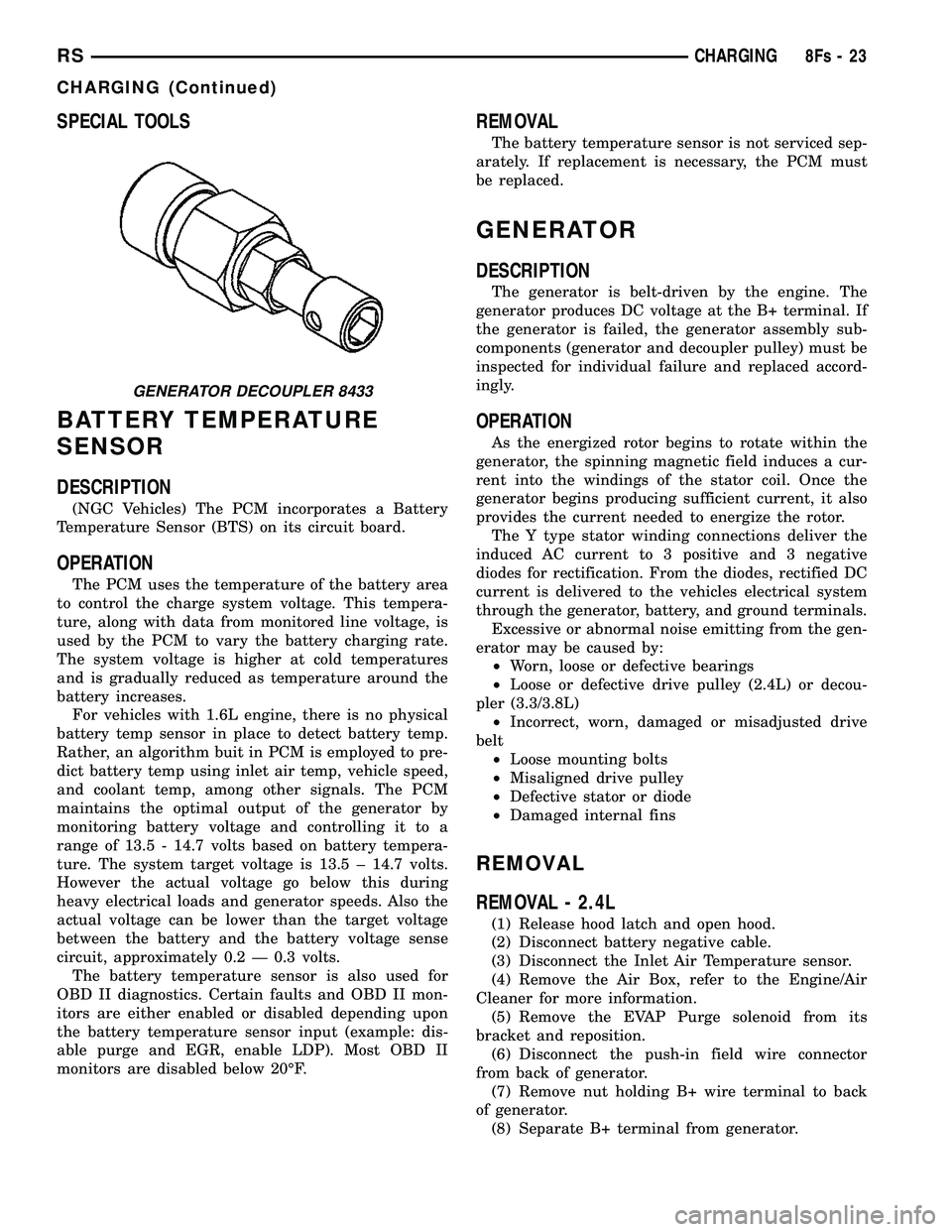
SPECIAL TOOLS
BATTERY TEMPERATURE
SENSOR
DESCRIPTION
(NGC Vehicles) The PCM incorporates a Battery
Temperature Sensor (BTS) on its circuit board.
OPERATION
The PCM uses the temperature of the battery area
to control the charge system voltage. This tempera-
ture, along with data from monitored line voltage, is
used by the PCM to vary the battery charging rate.
The system voltage is higher at cold temperatures
and is gradually reduced as temperature around the
battery increases. For vehicles with 1.6L engine, there is no physical
battery temp sensor in place to detect battery temp.
Rather, an algorithm buit in PCM is employed to pre-
dict battery temp using inlet air temp, vehicle speed,
and coolant temp, among other signals. The PCM
maintains the optimal output of the generator by
monitoring battery voltage and controlling it to a
range of 13.5 - 14.7 volts based on battery tempera-
ture. The system target voltage is 13.5 ± 14.7 volts.
However the actual voltage go below this during
heavy electrical loads and generator speeds. Also the
actual voltage can be lower than the target voltage
between the battery and the battery voltage sense
circuit, approximately 0.2 Ð 0.3 volts. The battery temperature sensor is also used for
OBD II diagnostics. Certain faults and OBD II mon-
itors are either enabled or disabled depending upon
the battery temperature sensor input (example: dis-
able purge and EGR, enable LDP). Most OBD II
monitors are disabled below 20ÉF.
REMOVAL
The battery temperature sensor is not serviced sep-
arately. If replacement is necessary, the PCM must
be replaced.
GENERATOR
DESCRIPTION
The generator is belt-driven by the engine. The
generator produces DC voltage at the B+ terminal. If
the generator is failed, the generator assembly sub-
components (generator and decoupler pulley) must be
inspected for individual failure and replaced accord-
ingly.
OPERATION
As the energized rotor begins to rotate within the
generator, the spinning magnetic field induces a cur-
rent into the windings of the stator coil. Once the
generator begins producing sufficient current, it also
provides the current needed to energize the rotor. The Y type stator winding connections deliver the
induced AC current to 3 positive and 3 negative
diodes for rectification. From the diodes, rectified DC
current is delivered to the vehicles electrical system
through the generator, battery, and ground terminals. Excessive or abnormal noise emitting from the gen-
erator may be caused by: ² Worn, loose or defective bearings
² Loose or defective drive pulley (2.4L) or decou-
pler (3.3/3.8L) ² Incorrect, worn, damaged or misadjusted drive
belt ² Loose mounting bolts
² Misaligned drive pulley
² Defective stator or diode
² Damaged internal fins
REMOVAL
REMOVAL - 2.4L
(1) Release hood latch and open hood.
(2) Disconnect battery negative cable.
(3) Disconnect the Inlet Air Temperature sensor.
(4) Remove the Air Box, refer to the Engine/Air
Cleaner for more information. (5) Remove the EVAP Purge solenoid from its
bracket and reposition. (6) Disconnect the push-in field wire connector
from back of generator. (7) Remove nut holding B+ wire terminal to back
of generator. (8) Separate B+ terminal from generator.
GENERATOR DECOUPLER 8433
RS CHARGING8Fs-23
CHARGING (Continued)
Page 481 of 2585

(9) Remove accessory drive belt, refer to the Cool-
ing System section for proper procedures. (10) Remove the generator.
REMOVAL - 2.5L
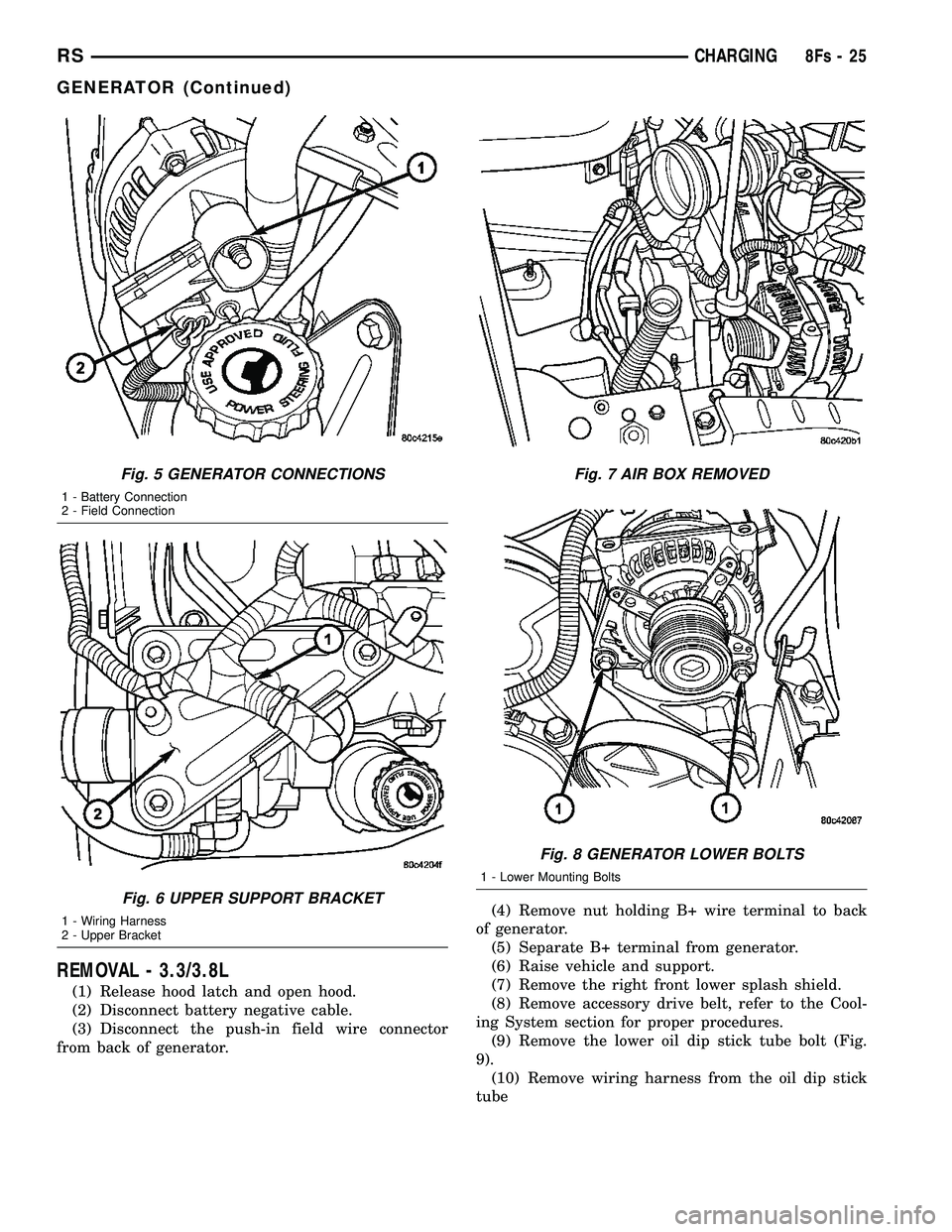
(1) Disconnect the negative battery cable (Fig. 1).
(2) Remove the engine cover (Fig. 2).
(3) Raise vehicle and support.
(4) Turn wheels to the right. Remove the right
front splash shield (Fig. 3). (5) Remove the generator drive belt (Fig. 4).
(6) Lower vehicle.
(7) Disconnect the generator battery connection
(Fig. 5). (8) Disconnect the field connection (Fig. 5).
(9) Relocate the wiring harness on upper generator
bracket (Fig. 6). (10) Remove the Air Cleaner Box (Fig. 7).
(11) Remove the 2 lower mounting Bolts (Fig. 8).
(12) Remove generator.
Fig. 1 BATTERY CONNECTION
Fig. 2 ENGINE COVER
Fig. 3 SPLASH SHIELD
Fig. 4 GENERATOR BELT
8Fs - 24 CHARGINGRS
GENERATOR (Continued)
Page 482 of 2585
REMOVAL - 3.3/3.8L
(1) Release hood latch and open hood.
(2) Disconnect battery negative cable.
(3) Disconnect the push-in field wire connector
from back of generator. (4) Remove nut holding B+ wire terminal to back
of generator. (5) Separate B+ terminal from generator.
(6) Raise vehicle and support.
(7) Remove the right front lower splash shield.
(8) Remove accessory drive belt, refer to the Cool-
ing System section for proper procedures. (9) Remove the lower oil dip stick tube bolt (Fig.
9). (10) Remove wiring harness from the oil dip stick
tube
Fig. 5 GENERATOR CONNECTIONS
1 - Battery Connection
2 - Field Connection
Fig. 6 UPPER SUPPORT BRACKET
1 - Wiring Harness
2 - Upper Bracket
Fig. 7 AIR BOX REMOVED
Fig. 8 GENERATOR LOWER BOLTS
1 - Lower Mounting Bolts
RS CHARGING8Fs-25
GENERATOR (Continued)
Page 483 of 2585
(11) Remove the 3 mounting bolts.
(12) Lower vehicle.
(13) Remove oil dip stick tube from vehicle.
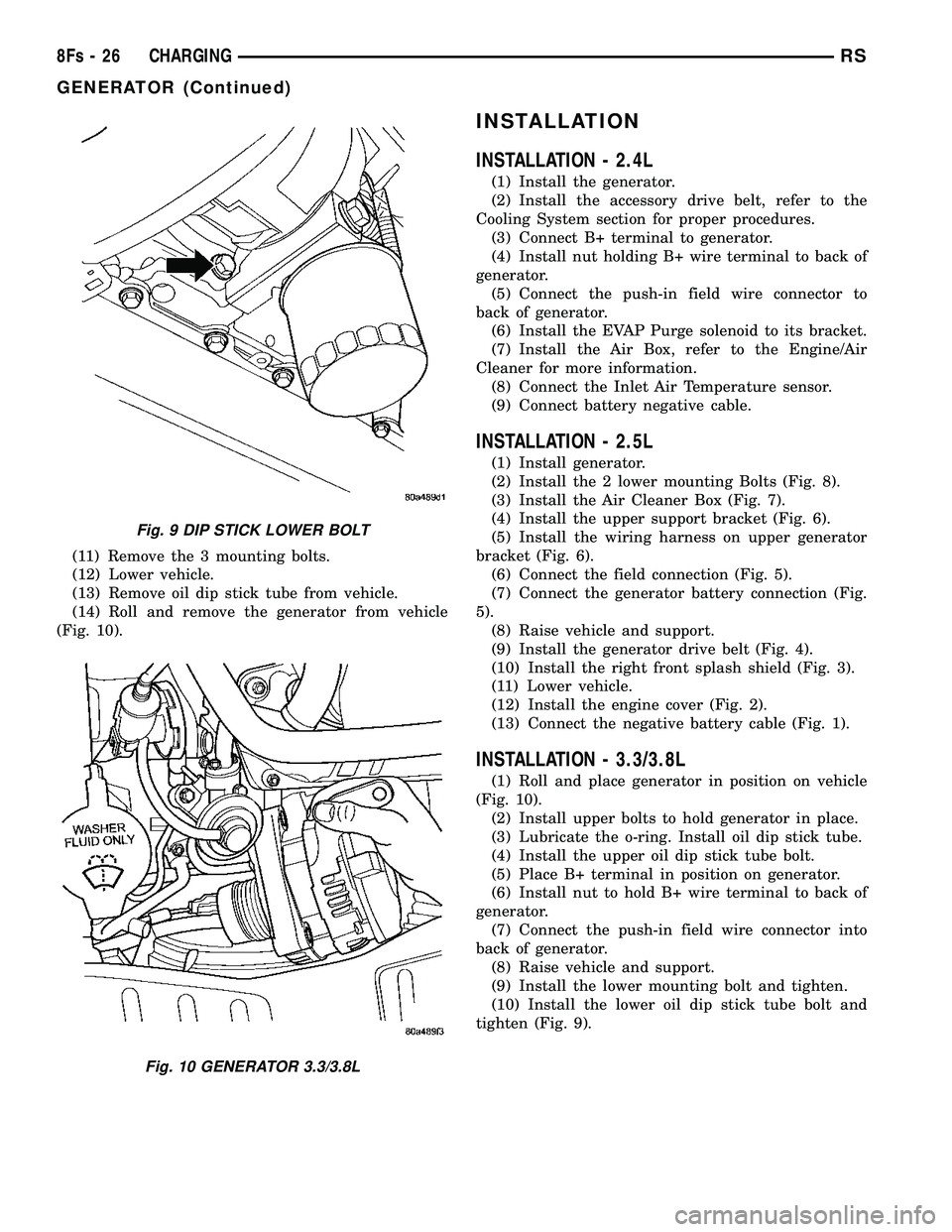
(14) Roll and remove the generator from vehicle
(Fig. 10).
INSTALLATION
INSTALLATION - 2.4L
(1) Install the generator.
(2) Install the accessory drive belt, refer to the
Cooling System section for proper procedures. (3) Connect B+ terminal to generator.
(4) Install nut holding B+ wire terminal to back of
generator. (5) Connect the push-in field wire connector to
back of generator. (6) Install the EVAP Purge solenoid to its bracket.
(7) Install the Air Box, refer to the Engine/Air
Cleaner for more information. (8) Connect the Inlet Air Temperature sensor.
(9) Connect battery negative cable.
INSTALLATION - 2.5L
(1) Install generator.
(2) Install the 2 lower mounting Bolts (Fig. 8).
(3) Install the Air Cleaner Box (Fig. 7).
(4) Install the upper support bracket (Fig. 6).
(5) Install the wiring harness on upper generator
bracket (Fig. 6). (6) Connect the field connection (Fig. 5).
(7) Connect the generator battery connection (Fig.
5). (8) Raise vehicle and support.
(9) Install the generator drive belt (Fig. 4).
(10) Install the right front splash shield (Fig. 3).
(11) Lower vehicle.
(12) Install the engine cover (Fig. 2).
(13) Connect the negative battery cable (Fig. 1).
INSTALLATION - 3.3/3.8L
(1) Roll and place generator in position on vehicle
(Fig. 10). (2) Install upper bolts to hold generator in place.
(3) Lubricate the o-ring. Install oil dip stick tube.
(4) Install the upper oil dip stick tube bolt.
(5) Place B+ terminal in position on generator.
(6) Install nut to hold B+ wire terminal to back of
generator. (7) Connect the push-in field wire connector into
back of generator. (8) Raise vehicle and support.
(9) Install the lower mounting bolt and tighten.
(10) Install the lower oil dip stick tube bolt and
tighten (Fig. 9).
Fig. 9 DIP STICK LOWER BOLT
Fig. 10 GENERATOR 3.3/3.8L
8Fs - 26 CHARGINGRS
GENERATOR (Continued)
Page 484 of 2585

(11) Install accessory drive belt, refer to the Cool-
ing System section for proper procedures. (12) Install the right front lower splash shield.
(13) Lower vehicle.
(14) Install wiring harness to the oil dip stick tube
(15) Connect battery negative cable.
(16) Verify generator output rate.
GENERATOR DECOUPLER
PULLEY
DESCRIPTION
The Generator Decoupler is a one way clutch (Fig.
11). It is attached to the generator and replaces the
standard pulley. It is a non-serviceable item and is to
be replaced as an assembly. It is a dry operation (no
grease or lubricants). The operation of it is not tem-
perature sensitive and has a low sensitivity to elec-
trical load.
OPERATION
The generator decoupler is a one way clutch and
should be replaced as an assembly. It is designed to help reduce belt tension fluctuation, reduce fatigue
loads, improve belt life, reduce hubloads on compo-
nents, and reduce noise.
DIAGNOSIS AND TESTING - GENERATOR DECOUPLER PULLEY
CONDITION VERIFICATION PROCEDURE POSSIBLE
CAUSESCORRECTION
Does not drive generator
(Generator not Charging) 1. Start engine and allow engine to idle. Clutch failure Replace Decoupler
2.Verify generator pulley is rotating.
3. View generator internal fins thru
generator housing.
4. Fins either do not rotate or rotate very
erratic.
5. Rotate decoupler pulley in clockwise
direction then quickly rotate in
counterclockwise direction to see if clutch
engages.
Noise from
generator at engine
shut down. 1. Start engine and allow engine to idle. Defective decoupler
pulley bearing.Replace decoupler
pulley.
2. Shutdown engine and listen to generator.
3. Noise heard just as engine stops.
Sounds like a click.
4. Remove accessory drive belt.
5. Verify rotation in counterclock wise
direction is rough.
Fig. 11 GENERATOR DECOUPLER 3.3/3.8L
RS CHARGING8Fs-27
GENERATOR (Continued)