belt CHRYSLER VOYAGER 2004 Workshop Manual
[x] Cancel search | Manufacturer: CHRYSLER, Model Year: 2004, Model line: VOYAGER, Model: CHRYSLER VOYAGER 2004Pages: 2585, PDF Size: 62.54 MB
Page 479 of 2585

torque specifications (Refer to 8 - ELECTRICAL/
CHARGING - SPECIFICATIONS). (5) Inspect generator drive belt condition and ten-
sion. Tighten or replace belt as required. Refer to
Belt Tension Specifications(Refer t o 7 - COOLING/
ACCESSORY DRIVE - SPECIFICATIONS). (6) Inspect decoupler pulley (if equipped). Ensure
decoupler pulley is driving the alternator rotor. (7) Inspect automatic belt tensioner (if equipped).
Refer to the Cooling System for more information. (8) Inspect generator electrical connections at gen-
erator field, battery output, and ground terminal (if
equipped). Also check generator ground wire connec-
tion at engine (if equipped). They should all be clean
and tight. Repair as required.SPECIFICATIONS
GENERATOR
Type Engine Minimun Test Amperage
Denso 2.4 L 80 Amp (HOT)
Denso 3.3/3.8L 100 Amp or 115 Amp (HOT)
Test Specification:
1. Engine RPM : 2500 RPM 20 RPM (HOT)
2. Voltage Output : 14. 0 V 0.5 V
3. Field Curren t : 5 amps 0.1 amps
Part number is located on the side of the generator.
TORQUE
DESCRIPTION N´m Ft. Lbs. In. Lbs.
Battery Hold Down Clamp Bolt 20 14.7 180
Generator B+ Nut 12.4 9.2 110
Battery Terminal Nut 4 35
Generator Mounting Bolt 2.4L 28.2 20.8 250
Generator Mounting Bolts 3.3/3.8L 54.2 40
Starter Solenoid Battery Nut 3.3/3.8L 11.3 8.3 100
Generator Decoupler 109.8 81
SPECIFICATIONS - BATTERY TEMPERATURE
SENSOR
ÉC ÉF K-Ohms Min. K-Ohms Max.
(40) (40) 291.4 381.7
(20) (4) 85.8 108.4 20 68 11.4 13.6
25 77 9.1 10.9
120 248 0.37 0.41
130 266 0.28 0.32
8Fs - 22 CHARGINGRS
CHARGING (Continued)
Page 480 of 2585
SPECIAL TOOLS
BATTERY TEMPERATURE
SENSOR
DESCRIPTION
(NGC Vehicles) The PCM incorporates a Battery
Temperature Sensor (BTS) on its circuit board.
OPERATION
The PCM uses the temperature of the battery area
to control the charge system voltage. This tempera-
ture, along with data from monitored line voltage, is
used by the PCM to vary the battery charging rate.
The system voltage is higher at cold temperatures
and is gradually reduced as temperature around the
battery increases. For vehicles with 1.6L engine, there is no physical
battery temp sensor in place to detect battery temp.
Rather, an algorithm buit in PCM is employed to pre-
dict battery temp using inlet air temp, vehicle speed,
and coolant temp, among other signals. The PCM
maintains the optimal output of the generator by
monitoring battery voltage and controlling it to a
range of 13.5 - 14.7 volts based on battery tempera-
ture. The system target voltage is 13.5 ± 14.7 volts.
However the actual voltage go below this during
heavy electrical loads and generator speeds. Also the
actual voltage can be lower than the target voltage
between the battery and the battery voltage sense
circuit, approximately 0.2 Ð 0.3 volts. The battery temperature sensor is also used for
OBD II diagnostics. Certain faults and OBD II mon-
itors are either enabled or disabled depending upon
the battery temperature sensor input (example: dis-
able purge and EGR, enable LDP). Most OBD II
monitors are disabled below 20ÉF.
REMOVAL
The battery temperature sensor is not serviced sep-
arately. If replacement is necessary, the PCM must
be replaced.
GENERATOR
DESCRIPTION
The generator is belt-driven by the engine. The
generator produces DC voltage at the B+ terminal. If
the generator is failed, the generator assembly sub-
components (generator and decoupler pulley) must be
inspected for individual failure and replaced accord-
ingly.
OPERATION
As the energized rotor begins to rotate within the
generator, the spinning magnetic field induces a cur-
rent into the windings of the stator coil. Once the
generator begins producing sufficient current, it also
provides the current needed to energize the rotor. The Y type stator winding connections deliver the
induced AC current to 3 positive and 3 negative
diodes for rectification. From the diodes, rectified DC
current is delivered to the vehicles electrical system
through the generator, battery, and ground terminals. Excessive or abnormal noise emitting from the gen-
erator may be caused by: ² Worn, loose or defective bearings
² Loose or defective drive pulley (2.4L) or decou-
pler (3.3/3.8L) ² Incorrect, worn, damaged or misadjusted drive
belt ² Loose mounting bolts
² Misaligned drive pulley
² Defective stator or diode
² Damaged internal fins
REMOVAL
REMOVAL - 2.4L
(1) Release hood latch and open hood.
(2) Disconnect battery negative cable.
(3) Disconnect the Inlet Air Temperature sensor.
(4) Remove the Air Box, refer to the Engine/Air
Cleaner for more information. (5) Remove the EVAP Purge solenoid from its
bracket and reposition. (6) Disconnect the push-in field wire connector
from back of generator. (7) Remove nut holding B+ wire terminal to back
of generator. (8) Separate B+ terminal from generator.
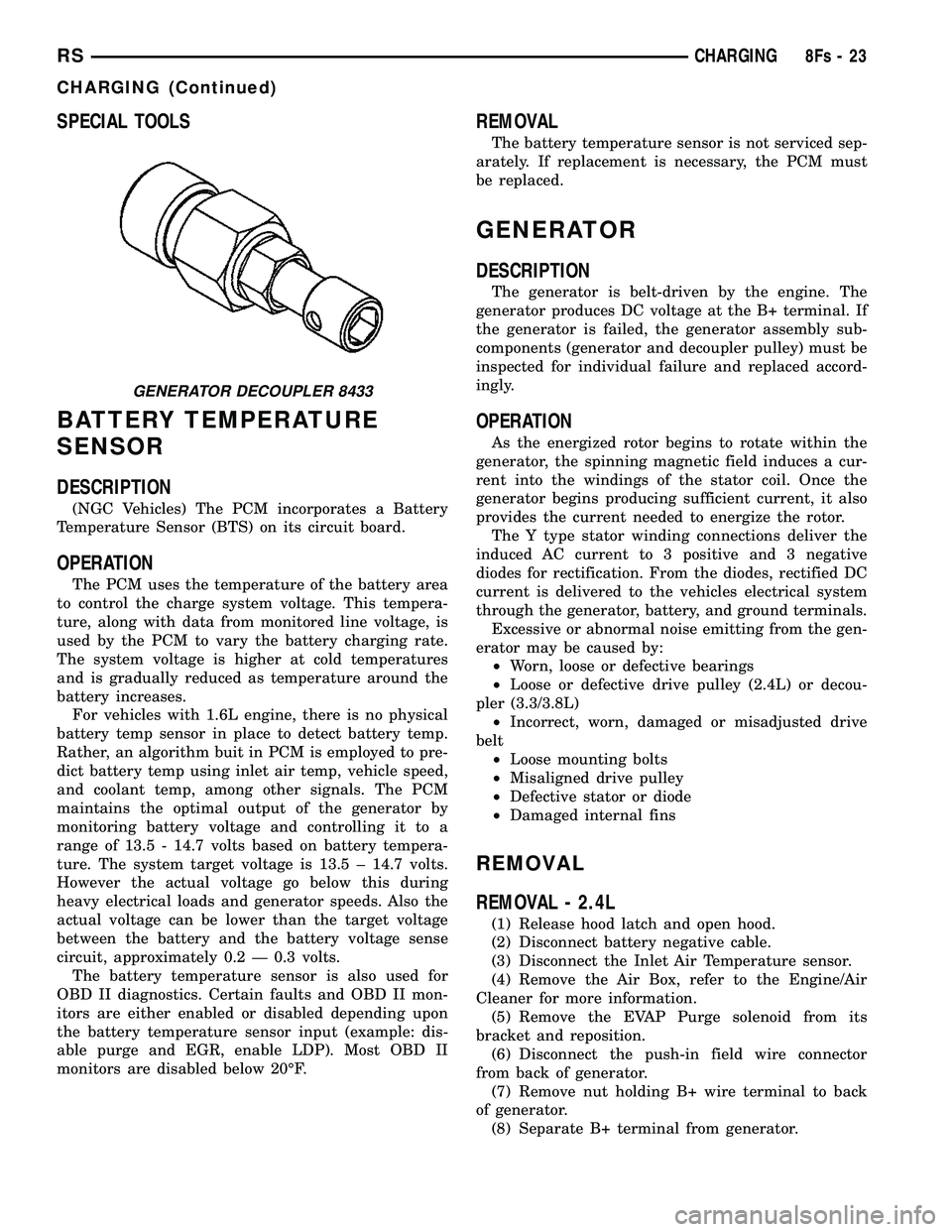
GENERATOR DECOUPLER 8433
RS CHARGING8Fs-23
CHARGING (Continued)
Page 481 of 2585

(9) Remove accessory drive belt, refer to the Cool-
ing System section for proper procedures. (10) Remove the generator.
REMOVAL - 2.5L
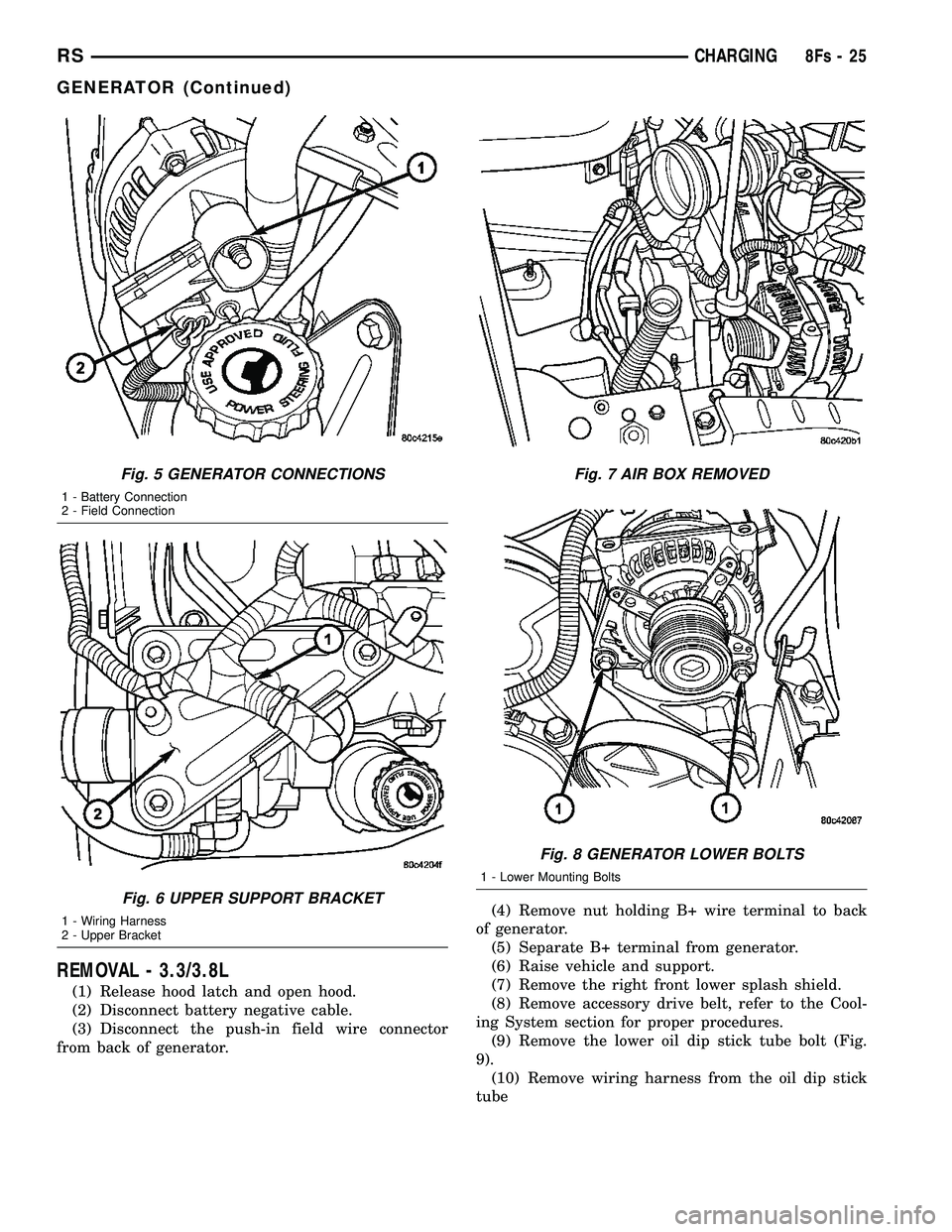
(1) Disconnect the negative battery cable (Fig. 1).
(2) Remove the engine cover (Fig. 2).
(3) Raise vehicle and support.
(4) Turn wheels to the right. Remove the right
front splash shield (Fig. 3). (5) Remove the generator drive belt (Fig. 4).
(6) Lower vehicle.
(7) Disconnect the generator battery connection
(Fig. 5). (8) Disconnect the field connection (Fig. 5).
(9) Relocate the wiring harness on upper generator
bracket (Fig. 6). (10) Remove the Air Cleaner Box (Fig. 7).
(11) Remove the 2 lower mounting Bolts (Fig. 8).
(12) Remove generator.
Fig. 1 BATTERY CONNECTION
Fig. 2 ENGINE COVER
Fig. 3 SPLASH SHIELD
Fig. 4 GENERATOR BELT
8Fs - 24 CHARGINGRS
GENERATOR (Continued)
Page 482 of 2585
REMOVAL - 3.3/3.8L
(1) Release hood latch and open hood.
(2) Disconnect battery negative cable.
(3) Disconnect the push-in field wire connector
from back of generator. (4) Remove nut holding B+ wire terminal to back
of generator. (5) Separate B+ terminal from generator.
(6) Raise vehicle and support.
(7) Remove the right front lower splash shield.
(8) Remove accessory drive belt, refer to the Cool-
ing System section for proper procedures. (9) Remove the lower oil dip stick tube bolt (Fig.
9). (10) Remove wiring harness from the oil dip stick
tube
Fig. 5 GENERATOR CONNECTIONS
1 - Battery Connection
2 - Field Connection
Fig. 6 UPPER SUPPORT BRACKET
1 - Wiring Harness
2 - Upper Bracket
Fig. 7 AIR BOX REMOVED
Fig. 8 GENERATOR LOWER BOLTS
1 - Lower Mounting Bolts
RS CHARGING8Fs-25
GENERATOR (Continued)
Page 483 of 2585
(11) Remove the 3 mounting bolts.
(12) Lower vehicle.
(13) Remove oil dip stick tube from vehicle.
(14) Roll and remove the generator from vehicle
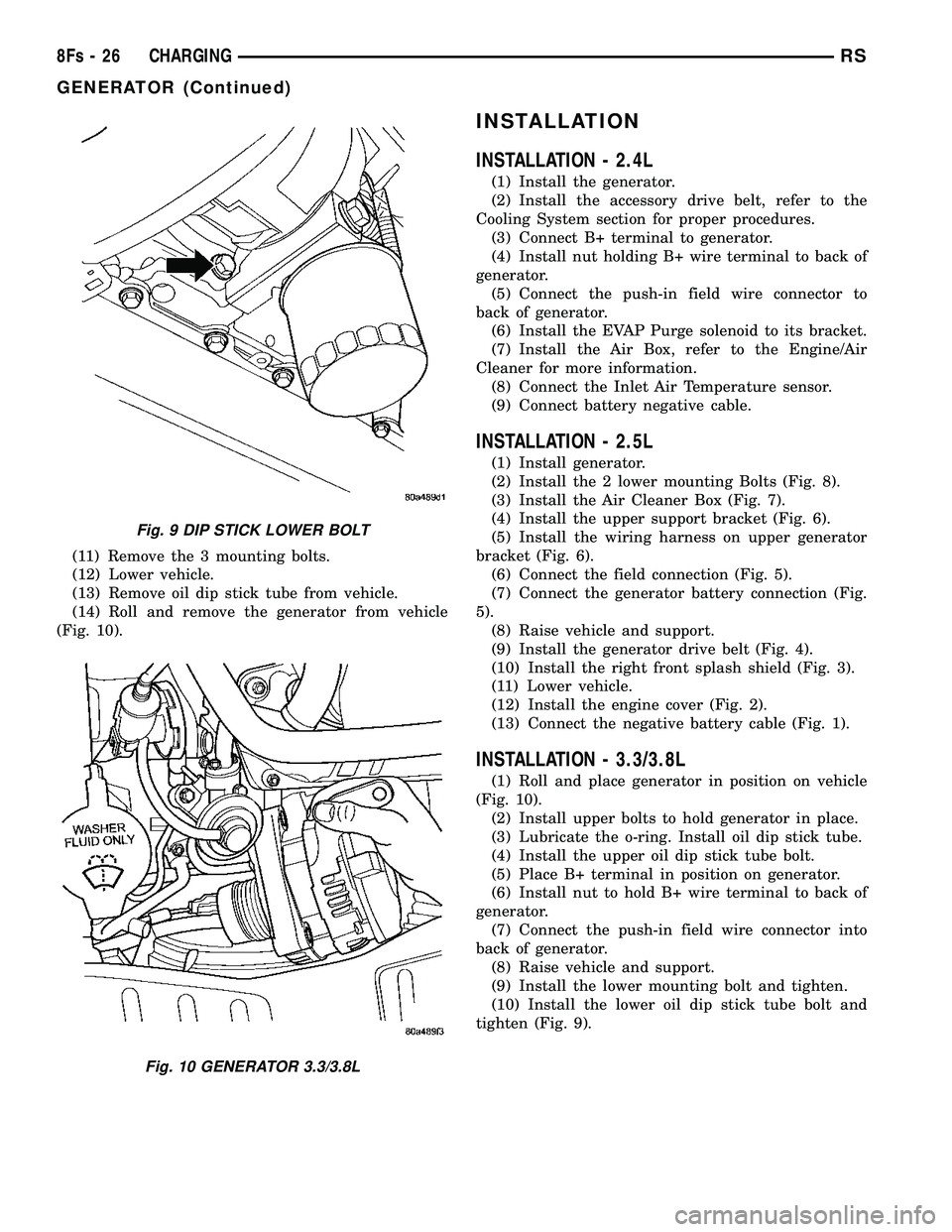
(Fig. 10).
INSTALLATION
INSTALLATION - 2.4L
(1) Install the generator.
(2) Install the accessory drive belt, refer to the
Cooling System section for proper procedures. (3) Connect B+ terminal to generator.
(4) Install nut holding B+ wire terminal to back of
generator. (5) Connect the push-in field wire connector to
back of generator. (6) Install the EVAP Purge solenoid to its bracket.
(7) Install the Air Box, refer to the Engine/Air
Cleaner for more information. (8) Connect the Inlet Air Temperature sensor.
(9) Connect battery negative cable.
INSTALLATION - 2.5L
(1) Install generator.
(2) Install the 2 lower mounting Bolts (Fig. 8).
(3) Install the Air Cleaner Box (Fig. 7).
(4) Install the upper support bracket (Fig. 6).
(5) Install the wiring harness on upper generator
bracket (Fig. 6). (6) Connect the field connection (Fig. 5).
(7) Connect the generator battery connection (Fig.
5). (8) Raise vehicle and support.
(9) Install the generator drive belt (Fig. 4).
(10) Install the right front splash shield (Fig. 3).
(11) Lower vehicle.
(12) Install the engine cover (Fig. 2).
(13) Connect the negative battery cable (Fig. 1).
INSTALLATION - 3.3/3.8L
(1) Roll and place generator in position on vehicle
(Fig. 10). (2) Install upper bolts to hold generator in place.
(3) Lubricate the o-ring. Install oil dip stick tube.
(4) Install the upper oil dip stick tube bolt.
(5) Place B+ terminal in position on generator.
(6) Install nut to hold B+ wire terminal to back of
generator. (7) Connect the push-in field wire connector into
back of generator. (8) Raise vehicle and support.
(9) Install the lower mounting bolt and tighten.
(10) Install the lower oil dip stick tube bolt and
tighten (Fig. 9).
Fig. 9 DIP STICK LOWER BOLT
Fig. 10 GENERATOR 3.3/3.8L
8Fs - 26 CHARGINGRS
GENERATOR (Continued)
Page 484 of 2585

(11) Install accessory drive belt, refer to the Cool-
ing System section for proper procedures. (12) Install the right front lower splash shield.
(13) Lower vehicle.
(14) Install wiring harness to the oil dip stick tube
(15) Connect battery negative cable.
(16) Verify generator output rate.
GENERATOR DECOUPLER
PULLEY
DESCRIPTION
The Generator Decoupler is a one way clutch (Fig.
11). It is attached to the generator and replaces the
standard pulley. It is a non-serviceable item and is to
be replaced as an assembly. It is a dry operation (no
grease or lubricants). The operation of it is not tem-
perature sensitive and has a low sensitivity to elec-
trical load.
OPERATION
The generator decoupler is a one way clutch and
should be replaced as an assembly. It is designed to help reduce belt tension fluctuation, reduce fatigue
loads, improve belt life, reduce hubloads on compo-
nents, and reduce noise.
DIAGNOSIS AND TESTING - GENERATOR DECOUPLER PULLEY
CONDITION VERIFICATION PROCEDURE POSSIBLE
CAUSESCORRECTION
Does not drive generator
(Generator not Charging) 1. Start engine and allow engine to idle. Clutch failure Replace Decoupler
2.Verify generator pulley is rotating.
3. View generator internal fins thru
generator housing.
4. Fins either do not rotate or rotate very
erratic.
5. Rotate decoupler pulley in clockwise
direction then quickly rotate in
counterclockwise direction to see if clutch
engages.
Noise from
generator at engine
shut down. 1. Start engine and allow engine to idle. Defective decoupler
pulley bearing.Replace decoupler
pulley.
2. Shutdown engine and listen to generator.
3. Noise heard just as engine stops.
Sounds like a click.
4. Remove accessory drive belt.
5. Verify rotation in counterclock wise
direction is rough.
Fig. 11 GENERATOR DECOUPLER 3.3/3.8L
RS CHARGING8Fs-27
GENERATOR (Continued)
Page 485 of 2585

REMOVAL
(1) Release hood latch and open hood.
(2) Disconnect battery negative cable.
(3) Raise vehicle and support.
(4) Remove the right front lower splash shield.
(5) Remove accessory drive belt, refer to the Cool-
ing System section for proper procedures (Fig. 12).
(6) Lower vehicle.
(7) Remove the Air Box, refer to the Engine section
for more information. (8) Remove the decoupler pulley cover.
(9) Use Special Tool #8433 (Fig. 14) to loosen the
Generator Decoupler (Fig. 13). (10) Remove the tool.
(11) Remove the Generator Decoupler.
INSTALLATION
(1) Install the Generator Decoupler to the genera-
tor shaft. (2) Use Special Tool #8433 (Fig. 14) to tighten the
Generator Decoupler (Fig. 15). Refer to the torque
chart for the proper torque. (3) Install a new decoupler pulley cover.
(4) Install the Air Box, refer to the Engine section
for more information. (5) Raise vehicle and support.
(6) Install accessory drive belt, refer to the Cooling
System section for proper procedures (Fig. 12). (7) Install the right front lower splash shield.
(8) Lower vehicle.
(9) Connect battery negative cable.
Fig. 12 DRIVE BELT 3.3/3.8L
Fig. 13 DECOUPLER REMOVAL (LITENS)
Fig. 14 SPECIAL TOOL 8433 AND DECOUPLER
8Fs - 28 CHARGINGRS
GENERATOR DECOUPLER PULLEY (Continued)
Page 526 of 2585
INSTRUMENT CLUSTER
TABLE OF CONTENTS
page page
INSTRUMENT CLUSTER
DESCRIPTION..........................1
OPERATION............................1
DIAGNOSIS AND TESTING
DIAGNOSIS AND TESTING - SELF-
DIAGNOSTICS.........................2
DIAGNOSIS AND TESTING - CLUSTER
DIAGNOSIS...........................2REMOVAL.............................10
INSTALLATION.........................10
CLUSTER LENS
REMOVAL.............................10
INSTALLATION.........................10
INSTRUMENT CLUSTER
DESCRIPTION
The instrumentation gauges are contained in a
subdial assembly within the instrument cluster. The
individual gauges are not serviceable. If one of the
cluster gauges becomes faulty, the entire cluster
would require replacement.
The Mechanical Instrument Cluster (MIC) with a
tachometer is equipped with a electronic vacuum flu-
orescent transmission range indicator (PRND3L),
odometer, and trip odometer display.
The MIC without a tachometer is equipped with a
Light Emitting Diode (LED) transmission range indi-
cator (PRND3L) and a vacuum fluorescent odometer
display.
The MIC is equipped with the following warning
lamps.
²Lift Gate Ajar
²Low Fuel Level
²Low Windshield Washer Fluid Level
²Cruise
²Battery Voltage
²Fasten Seat Belt
²Door Ajar
²Coolant Temperature
²Anti-Lock Brake
²Brake
²Oil Pressure
²MIL (Malfunction Indicator Lamp)
²VTSS/SKIS Indicator
²Airbag
²Traction Control
²Autostick
The MIC without a tachometer also has the follow-
ing warning lamps:
²Turns Signals
²High Beam
WATER IN FUEL LAMP - EXPORT
The Water In Fuel Lamp is located in the message
center. When moisture is found within the fuel sys-
tem, the sensor sends a message via the PCI data
bus to the instrument cluster. The MIC illuminates
the bulb in the message center, The sensor is located
underneath the vehicle, directly above the rear axle.
The sensor is housed within the fuel filter/water sep-
arator assembly cover. The sensor is not serviced sep-
arately. If found defective, the entire assembly cover
must be replaced.
OPERATION
Refer to the vehicle Owner's Manual for operation
instructions and conditions for the Instrument Clus-
ter Gauges.
WATER IN FUEL LAMP - EXPORT
The Water In Fuel Sensor is a resistive type
switch. It is calibrated to sense the different resis-
tance between diesel fuel and water. When water
enters the fuel system, it is caught in the bottom of
the fuel filter/water separator assembly, where the
sensor is located. Water has less resistance than die-
sel fuel. The sensor then sends a PCI data bus mes-
sage to the instrument cluster to illuminate the
lamp.
If the lamp is inoperative, perform the self diag-
nostic test on the instrument cluster to check the
lamp operation before continuing diagnosis.
RSINSTRUMENT CLUSTER8J-1
Page 542 of 2585

FRONT FOG LAMP
DIAGNOSIS AND TESTING - FRONT FOG LAMP
When a vehicle experiences problems with the
front fog lamp system, verify the condition of the bat-
tery connections, fuses, charging system, fog lamp
bulbs, wire connectors, relay, high beam switch, and
headlamp switch. Refer to the appropriate wiring
information.
Each vehicle is equipped with various lamp assem-
blies. A good ground is necessary for proper lighting
operation. Grounding is provided by the lamp socket
when it comes in contact with the metal body, or
through a separate ground wire.
When changing lamp bulbs check the socket for
corrosion. If corrosion is present, clean it with a wire
brush.
When it is necessary to remove components to ser-
vice another, it should not be necessary to apply
excessive force or bend a component to remove it.
Before damaging a trim component, verify hidden
fasteners or captured edges are not holding the com-
ponent in place.
FRONT FOG LAMP DIAGNOSIS
CONDITION POSSIBLE CAUSES CORRECTION
FOG LAMPS ARE DIM
WITH ENGINE IDLING
OR IGNITION TURNED
OFF.1. Loose or corroded battery
cables.1. Clean and secure battery cable clamps and
posts.
2. Loose or worn generator drive
belt.2. Adjust or replace generator drive belt.
3. Charging system output too low. 3. Test and repair charging system. Refer to
Electrical, Charging,
4. Battery has insufficient charge. 4. Test battery state-of-charge. Refer to
Electrical, Battery System.
5. Battery is sulfated or shorted. 5. Load test battery. Refer to Electrical, Battery
System.
6. Poor lighting circuit Z349/Z248
ground.6. Test for voltage drop across Z349/248
ground locations. Refer to Electrical, Wiring
Information.
FOG LAMP BULBS
BURN OUT
FREQUENTLY1. Charging system output too
high.1. Test and repair charging system. Refer to
Electrical, Charging.
2. Loose or corroded terminals or
splices in circuit.2. Inspect and repair all connectors and splices.
Refer to Electrical, Wiring Information.
FOG LAMPS ARE DIM
WITH ENGINE
RUNNING ABOVE IDLE1. Charging system output too low. 1. Test and repair charging system. Refer to
Electrical, Charging.
2. Poor lighting circuit Z349/Z248
ground.2. Test for voltage drop across Z349/Z248
ground locations. Refer to Electrical, Wiring
Information.
3. High resistance in fog lamp
circuit.3. Test amperage draw of fog lamp circuit.
Fig. 7 CHMSL ELECTRICAL CONNECTOR
1 - CHMSL UNIT
2 - CHMSL ELECTRICAL CONNECTOR
RSLAMPS/LIGHTING - EXTERIOR8L-7
CENTER HIGH MOUNTED STOP LAMP UNIT (Continued)
Page 546 of 2585

HEADLAMP DIAGNOSIS
CONDITION POSSIBLE CAUSES CORRECTION
HEADLAMPS ARE DIM
WITH ENGINE IDLING
OR IGNITION TURNED
OFF.1. Loose or corroded battery
cables.1. Clean and secure battery cable clamps and
posts.
2. Loose or worn generator drive
belt.2. Adjust or replace generator drive belt.
3. Charging system output too low. 3. Test and repair charging system, refer to
Electrical, Charging
4. Battery has insufficient charge. 4. Test battery state-of-charge, refer to
Electrical, Battery System.
5. Battery is sulfated or shorted. 5. Load test battery, refer to Electrical, Battery
System.
6. Poor lighting circuit Z343/Z344-
ground.6. Test for voltage drop across Z343/Z344-
ground locations, refer to Electrical, Wiring
Diagram Information.
HEADLAMP BULBS
BURN OUT
FREQUENTLY.1. Integrated Power Module (IPM)
not controlling voltage.1. Test and repair Integrated Power Module.
2. Loose or corroded terminals or
splices in circuit.2. Inspect and repair all connectors and splices.
Refer to Electrical, Wiring Information.
HEADLAMPS ARE DIM
WITH ENGINE
RUNNING ABOVE IDLE.1. Charging system output too low. 1. Test and repair charging system, refer to
Electrical, Wiring Information.
2. Poor lighting circuit Z343/Z344-
ground.2. Test for voltage drop across Z343/Z344-
ground locations, refer to Electrical, Wiring
Information.
3. High resistance in headlamp
circuit.3. Test amperage draw of headlamp circuit.
HEADLAMPS FLASH
RANDOMLY1. Poor lighting circuit Z343/Z344-
ground.1. Test for voltage drop across Z343/Z344-
ground locations, refer to Electrical, Wiring
Information.
2. Variable resistance in headlamp
circuit.2. Test amperage draw of headlamp circuit.
3. Loose or corroded terminals or
splices in circuit.3. Inspect and repair all connectors and splices,
refer to Electrical, Wiring Information.
4. Faulty headlamp switch. 4. Replace headlamp switch.
RSLAMPS/LIGHTING - EXTERIOR8L-11
HEADLAMP (Continued)