battery CHRYSLER VOYAGER 2005 Service Manual
[x] Cancel search | Manufacturer: CHRYSLER, Model Year: 2005, Model line: VOYAGER, Model: CHRYSLER VOYAGER 2005Pages: 2339, PDF Size: 59.69 MB
Page 561 of 2339
WARNING: ON VEHICLES EQUIPPED WITH AIR-
BAGS, REFER TO ELECTRICAL, RESTRAINTS
BEFORE ATTEMPTING ANY STEERING WHEEL,
STEERING COLUMN, OR INSTRUMENT PANELCOMPONENT DIAGNOSIS OR SERVICE. FAILURE
TO TAKE THE PROPER PRECAUTIONS COULD
RESULT IN ACCIDENTAL AIRBAG DEPLOYMENT
AND POSSIBLE PERSONAL INJURY.
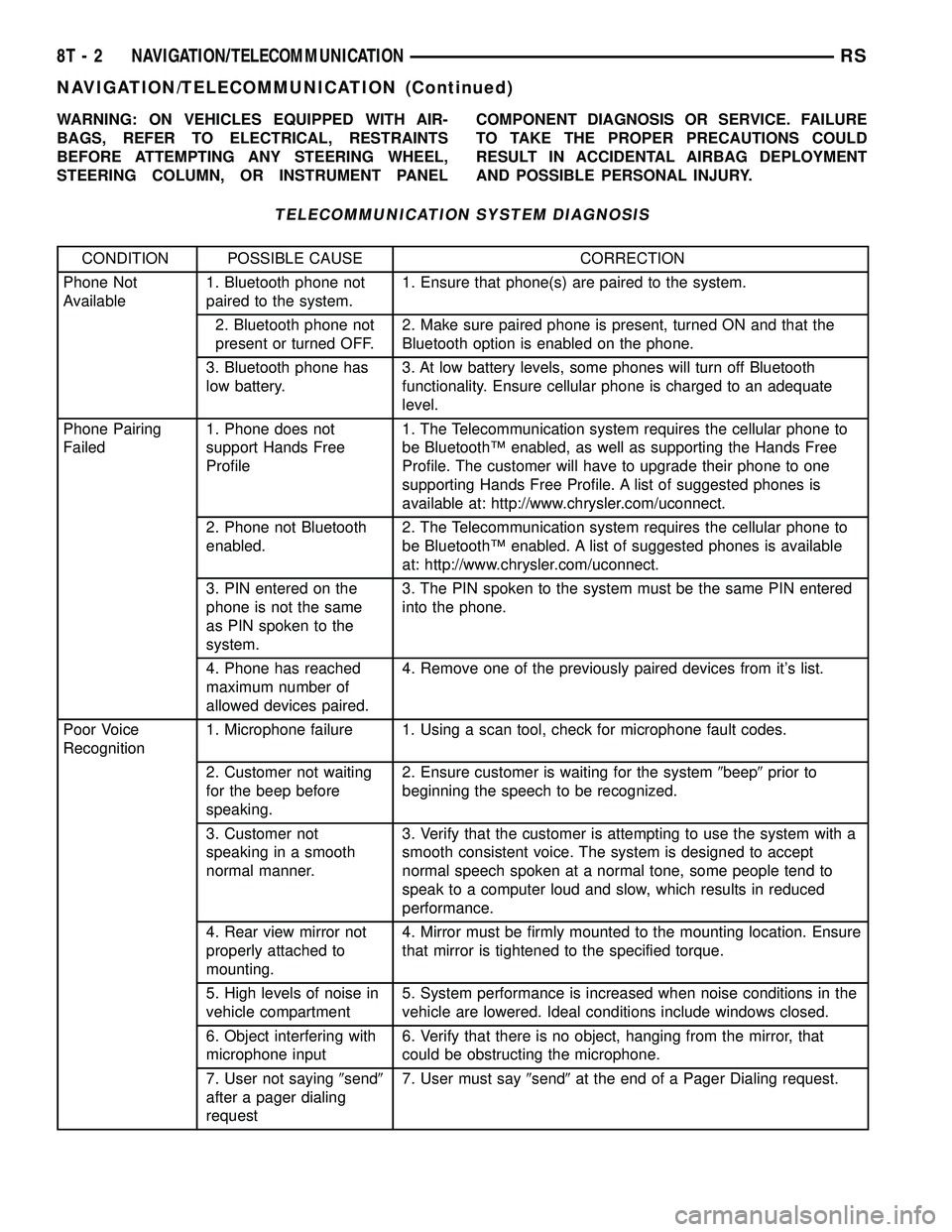
TELECOMMUNICATION SYSTEM DIAGNOSIS
CONDITION POSSIBLE CAUSE CORRECTION
Phone Not
Available1. Bluetooth phone not
paired to the system.1. Ensure that phone(s) are paired to the system.
2. Bluetooth phone not
present or turned OFF.2. Make sure paired phone is present, turned ON and that the
Bluetooth option is enabled on the phone.
3. Bluetooth phone has
low battery.3. At low battery levels, some phones will turn off Bluetooth
functionality. Ensure cellular phone is charged to an adequate
level.
Phone Pairing
Failed1. Phone does not
support Hands Free
Profile1. The Telecommunication system requires the cellular phone to
be BluetoothŸ enabled, as well as supporting the Hands Free
Profile. The customer will have to upgrade their phone to one
supporting Hands Free Profile. A list of suggested phones is
available at: http://www.chrysler.com/uconnect.
2. Phone not Bluetooth
enabled.2. The Telecommunication system requires the cellular phone to
be BluetoothŸ enabled. A list of suggested phones is available
at: http://www.chrysler.com/uconnect.
3. PIN entered on the
phone is not the same
as PIN spoken to the
system.3. The PIN spoken to the system must be the same PIN entered
into the phone.
4. Phone has reached
maximum number of
allowed devices paired.4. Remove one of the previously paired devices from it's list.
Poor Voice
Recognition1. Microphone failure 1. Using a scan tool, check for microphone fault codes.
2. Customer not waiting
for the beep before
speaking.2. Ensure customer is waiting for the system9beep9prior to
beginning the speech to be recognized.
3. Customer not
speaking in a smooth
normal manner.3. Verify that the customer is attempting to use the system with a
smooth consistent voice. The system is designed to accept
normal speech spoken at a normal tone, some people tend to
speak to a computer loud and slow, which results in reduced
performance.
4. Rear view mirror not
properly attached to
mounting.4. Mirror must be firmly mounted to the mounting location. Ensure
that mirror is tightened to the specified torque.
5. High levels of noise in
vehicle compartment5. System performance is increased when noise conditions in the
vehicle are lowered. Ideal conditions include windows closed.
6. Object interfering with
microphone input6. Verify that there is no object, hanging from the mirror, that
could be obstructing the microphone.
7. User not saying9send9
after a pager dialing
request7. User must say9send9at the end of a Pager Dialing request.
8T - 2 NAVIGATION/TELECOMMUNICATIONRS
NAVIGATION/TELECOMMUNICATION (Continued)
Page 562 of 2339
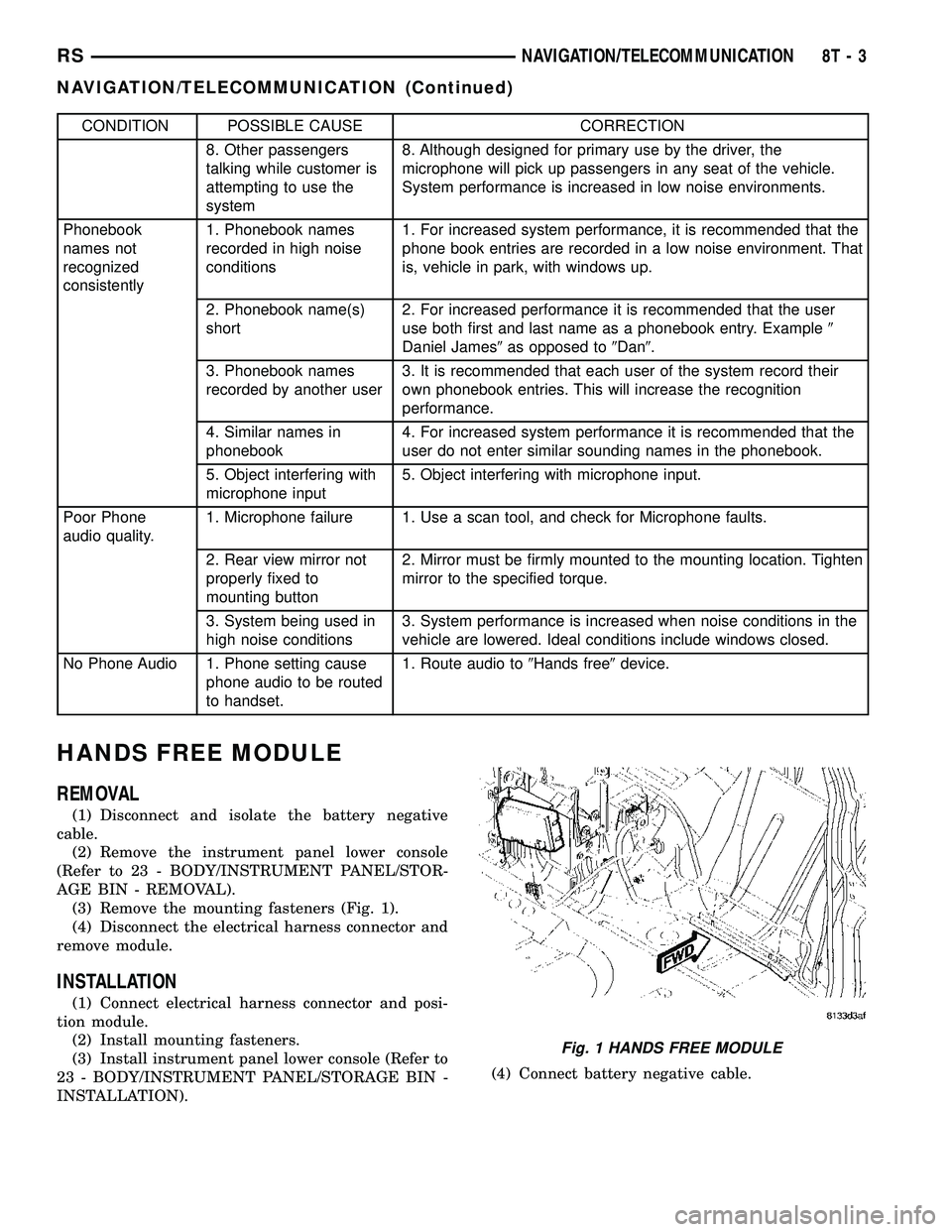
CONDITION POSSIBLE CAUSE CORRECTION
8. Other passengers
talking while customer is
attempting to use the
system8. Although designed for primary use by the driver, the
microphone will pick up passengers in any seat of the vehicle.
System performance is increased in low noise environments.
Phonebook
names not
recognized
consistently1. Phonebook names
recorded in high noise
conditions1. For increased system performance, it is recommended that the
phone book entries are recorded in a low noise environment. That
is, vehicle in park, with windows up.
2. Phonebook name(s)
short2. For increased performance it is recommended that the user
use both first and last name as a phonebook entry. Example9
Daniel James9as opposed to9Dan9.
3. Phonebook names
recorded by another user3. It is recommended that each user of the system record their
own phonebook entries. This will increase the recognition
performance.
4. Similar names in
phonebook4. For increased system performance it is recommended that the
user do not enter similar sounding names in the phonebook.
5. Object interfering with
microphone input5. Object interfering with microphone input.
Poor Phone
audio quality.1. Microphone failure 1. Use a scan tool, and check for Microphone faults.
2. Rear view mirror not
properly fixed to
mounting button2. Mirror must be firmly mounted to the mounting location. Tighten
mirror to the specified torque.
3. System being used in
high noise conditions3. System performance is increased when noise conditions in the
vehicle are lowered. Ideal conditions include windows closed.
No Phone Audio 1. Phone setting cause
phone audio to be routed
to handset.1. Route audio to9Hands free9device.
HANDS FREE MODULE
REMOVAL
(1) Disconnect and isolate the battery negative
cable.
(2) Remove the instrument panel lower console
(Refer to 23 - BODY/INSTRUMENT PANEL/STOR-
AGE BIN - REMOVAL).
(3) Remove the mounting fasteners (Fig. 1).
(4) Disconnect the electrical harness connector and
remove module.
INSTALLATION
(1) Connect electrical harness connector and posi-
tion module.
(2) Install mounting fasteners.
(3) Install instrument panel lower console (Refer to
23 - BODY/INSTRUMENT PANEL/STORAGE BIN -
INSTALLATION).(4) Connect battery negative cable.
Fig. 1 HANDS FREE MODULE
RSNAVIGATION/TELECOMMUNICATION8T-3
NAVIGATION/TELECOMMUNICATION (Continued)
Page 571 of 2339
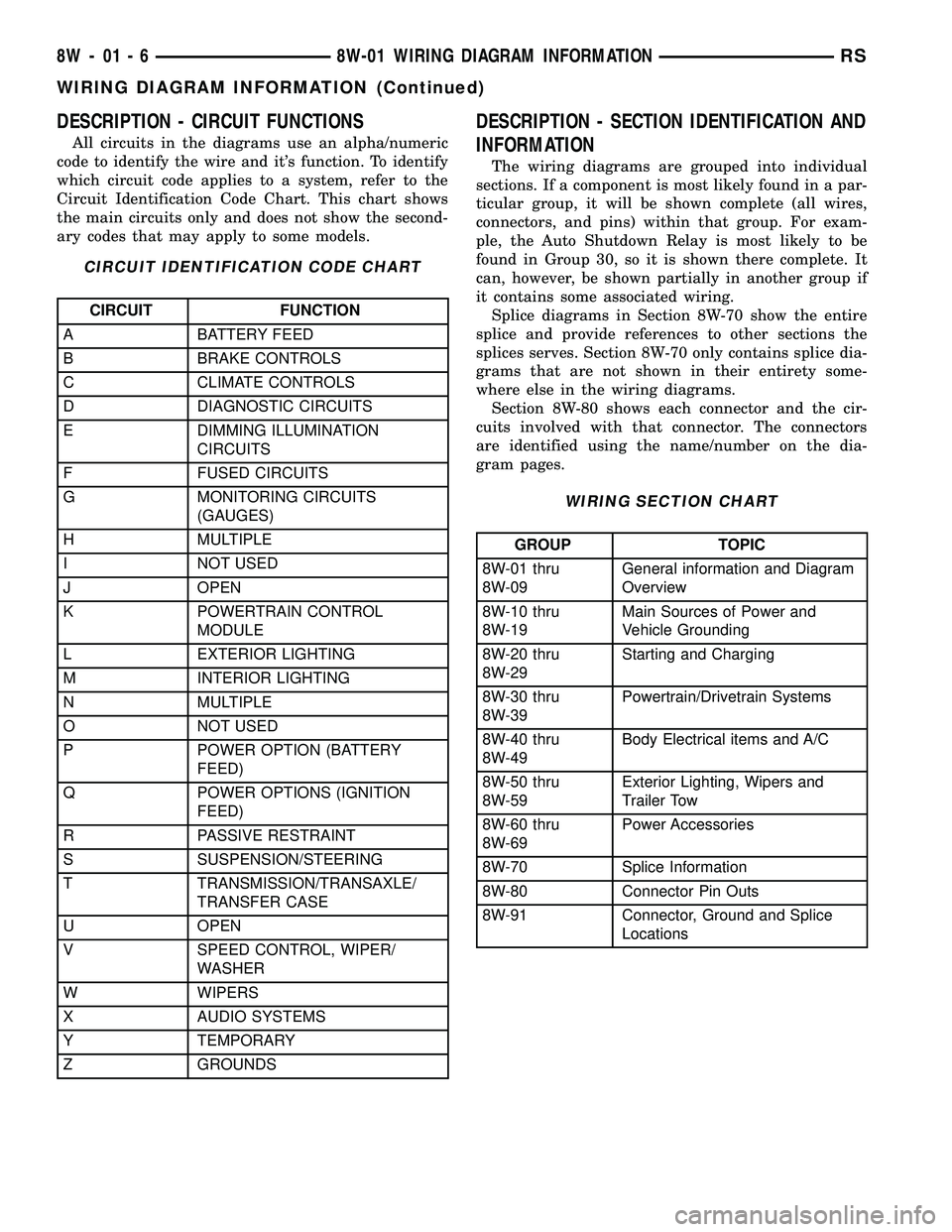
DESCRIPTION - CIRCUIT FUNCTIONS
All circuits in the diagrams use an alpha/numeric
code to identify the wire and it's function. To identify
which circuit code applies to a system, refer to the
Circuit Identification Code Chart. This chart shows
the main circuits only and does not show the second-
ary codes that may apply to some models.
CIRCUIT IDENTIFICATION CODE CHART
CIRCUIT FUNCTION
A BATTERY FEED
B BRAKE CONTROLS
C CLIMATE CONTROLS
D DIAGNOSTIC CIRCUITS
E DIMMING ILLUMINATION
CIRCUITS
F FUSED CIRCUITS
G MONITORING CIRCUITS
(GAUGES)
H MULTIPLE
I NOT USED
J OPEN
K POWERTRAIN CONTROL
MODULE
L EXTERIOR LIGHTING
M INTERIOR LIGHTING
N MULTIPLE
O NOT USED
P POWER OPTION (BATTERY
FEED)
Q POWER OPTIONS (IGNITION
FEED)
R PASSIVE RESTRAINT
S SUSPENSION/STEERING
T TRANSMISSION/TRANSAXLE/
TRANSFER CASE
U OPEN
V SPEED CONTROL, WIPER/
WASHER
W WIPERS
X AUDIO SYSTEMS
Y TEMPORARY
Z GROUNDS
DESCRIPTION - SECTION IDENTIFICATION AND
INFORMATION
The wiring diagrams are grouped into individual
sections. If a component is most likely found in a par-
ticular group, it will be shown complete (all wires,
connectors, and pins) within that group. For exam-
ple, the Auto Shutdown Relay is most likely to be
found in Group 30, so it is shown there complete. It
can, however, be shown partially in another group if
it contains some associated wiring.
Splice diagrams in Section 8W-70 show the entire
splice and provide references to other sections the
splices serves. Section 8W-70 only contains splice dia-
grams that are not shown in their entirety some-
where else in the wiring diagrams.
Section 8W-80 shows each connector and the cir-
cuits involved with that connector. The connectors
are identified using the name/number on the dia-
gram pages.
WIRING SECTION CHART
GROUP TOPIC
8W-01 thru
8W-09General information and Diagram
Overview
8W-10 thru
8W-19Main Sources of Power and
Vehicle Grounding
8W-20 thru
8W-29Starting and Charging
8W-30 thru
8W-39Powertrain/Drivetrain Systems
8W-40 thru
8W-49Body Electrical items and A/C
8W-50 thru
8W-59Exterior Lighting, Wipers and
Trailer Tow
8W-60 thru
8W-69Power Accessories
8W-70 Splice Information
8W-80 Connector Pin Outs
8W-91 Connector, Ground and Splice
Locations
8W - 01 - 6 8W-01 WIRING DIAGRAM INFORMATIONRS
WIRING DIAGRAM INFORMATION (Continued)
Page 572 of 2339

DESCRIPTION - CONNECTOR, GROUND AND
SPLICE INFORMATION
CAUTION: Not all connectors are serviced. Some
connectors are serviced only with a harness. A typ-
ical example might be the Supplemental Restraint
System connectors. Always check parts availability
before attempting a repair.
IDENTIFICATION
In-line connectors are identified by a number, as
follows:
²In-line connectors located in the engine compart-
ment are C100 series numbers
²In-line connectors located in the Instrument
Panel area are C200 series numbers.
²In-line connectors located in the body are C300
series numbers.
²Jumper harness connectors are C400 series
numbers.
²Grounds and ground connectors are identified
with a ªGº and follow the same series numbering as
the in-line connectors.
²Splices are identified with an ªSº and follow the
same series numbering as the in-line connectors.
²Component connectors are identified by the com-
ponent name instead of a number. Multiple connec-
tors on a component use a C1, C2, etc. identifier.
LOCATIONS
Section 8W-91 contains connector/ground/splice
location illustrations. The illustrations contain the
connector name (or number)/ground number/splice
number and component identification. Connector/
ground/splice location charts in section 8W-91 refer-
ence the figure numbers of the illustrations.
The abbreviation T/O is used in the component
location section to indicate a point in which the wir-
ing harness branches out to a component. The abbre-
viation N/S means Not Shown in the illustrations
WARNING
WARNINGS - GENERAL
WARNINGSprovide information to prevent per-
sonal injury and vehicle damage. Below is a list of
general warnings that should be followed any time a
vehicle is being serviced.
WARNING: ALWAYS WEAR SAFETY GLASSES FOR
EYE PROTECTION.
WARNING: USE SAFETY STANDS ANYTIME A PRO-
CEDURE REQUIRES BEING UNDER A VEHICLE.WARNING: BE SURE THAT THE IGNITION SWITCH
ALWAYS IS IN THE OFF POSITION, UNLESS THE
PROCEDURE REQUIRES IT TO BE ON.
WARNING: SET THE PARKING BRAKE WHEN
WORKING ON ANY VEHICLE. AN AUTOMATIC
TRANSMISSION SHOULD BE IN PARK. A MANUAL
TRANSMISSION SHOULD BE IN NEUTRAL.
WARNING: OPERATE THE ENGINE ONLY IN A
WELL-VENTILATED AREA.
WARNING: KEEP AWAY FROM MOVING PARTS
WHEN THE ENGINE IS RUNNING, ESPECIALLY THE
FAN AND BELTS.
WARNING: TO PREVENT SERIOUS BURNS, AVOID
CONTACT WITH HOT PARTS SUCH AS THE RADIA-
TOR, EXHAUST MANIFOLD(S), TAIL PIPE, CATA-
LYTIC CONVERTER AND MUFFLER.
WARNING: DO NOT ALLOW FLAME OR SPARKS
NEAR THE BATTERY. GASES ARE ALWAYS
PRESENT IN AND AROUND THE BATTERY.
WARNING: ALWAYS REMOVE RINGS, WATCHES,
LOOSE HANGING JEWELRY AND AVOID LOOSE
CLOTHING.
DIAGNOSIS AND TESTING - WIRING HARNESS
TROUBLESHOOTING TOOLS
When diagnosing a problem in an electrical circuit
there are several common tools necessary. These tools
are listed and explained below.
²Jumper Wire - This is a test wire used to con-
nect two points of a circuit. It can be used to bypass
an open in a circuit.
WARNING: NEVER USE A JUMPER WIRE ACROSS
A LOAD, SUCH AS A MOTOR, CONNECTED
BETWEEN A BATTERY FEED AND GROUND.
²Voltmeter - Used to check for voltage on a cir-
cuit. Always connect the black lead to a known good
ground and the red lead to the positive side of the
circuit.
CAUTION: Most of the electrical components used
in today's vehicles are Solid State. When checking
voltages in these circuits, use a meter with a 10 -
megohm or greater impedance rating.
RS8W-01 WIRING DIAGRAM INFORMATION8W-01-7
WIRING DIAGRAM INFORMATION (Continued)
Page 574 of 2339

STANDARD PROCEDURE - TESTING OF
VOLTAGE POTENTIAL
(1) Connect the ground lead of a voltmeter to a
known good ground (Fig. 7).
(2) Connect the other lead of the voltmeter to the
selected test point. The vehicle ignition may need to
be turned ON to check voltage. Refer to the appropri-
ate test procedure.
STANDARD PROCEDURE - TESTING FOR
CONTINUITY
(1) Remove the fuse for the circuit being checked
or, disconnect the battery.
(2) Connect one lead of the ohmmeter to one side
of the circuit being tested (Fig. 8).
(3) Connect the other lead to the other end of the
circuit being tested. Low or no resistance means good
continuity.
STANDARD PROCEDURE - TESTING FOR A
SHORT TO GROUND
(1) Remove the fuse and disconnect all items
involved with the fuse.
(2) Connect a test light or a voltmeter across the
terminals of the fuse.
(3) Starting at the fuse block, wiggle the wiring
harness about six to eight inches apart and watch
the voltmeter/test lamp.
(4) If the voltmeter registers voltage or the test
lamp glows, there is a short to ground in that gen-
eral area of the wiring harness.
Fig. 7 TESTING FOR VOLTAGE POTENTIAL
Fig. 8 TESTING FOR CONTINUITY
1 - FUSE REMOVED FROM CIRCUIT
RS8W-01 WIRING DIAGRAM INFORMATION8W-01-9
WIRING DIAGRAM INFORMATION (Continued)
Page 575 of 2339

STANDARD PROCEDURE - TESTING FOR A
SHORT TO GROUND ON FUSES POWERING
SEVERAL LOADS
(1) Refer to the wiring diagrams and disconnect or
isolate all items on the suspected fused circuits.
(2) Replace the blown fuse.
(3) Supply power to the fuse by turning ON the
ignition switch or re-connecting the battery.
(4) Start connecting or energizing the items in the
fuse circuit one at a time. When the fuse blows the
circuit with the short to ground has been isolated.
STANDARD PROCEDURE - TESTING FOR A
VOLTAGE DROP
(1) Connect the positive lead of the voltmeter to
the side of the circuit closest to the battery (Fig. 9).
(2) Connect the other lead of the voltmeter to the
other side of the switch, component or circuit.
(3) Operate the item.
(4) The voltmeter will show the difference in volt-
age between the two points.
SPECIAL TOOLS
WIRING/TERMINAL
Fig. 9 TESTING FOR VOLTAGE DROP
PROBING TOOL PACKAGE 6807
TERMINAL PICK TOOL SET 6680
TERMINAL REMOVING TOOLS 6932 AND 8638
TERMINAL REMOVING TOOL 6934
8W - 01 - 10 8W-01 WIRING DIAGRAM INFORMATIONRS
WIRING DIAGRAM INFORMATION (Continued)
Page 576 of 2339

CONNECTOR
REMOVAL
(1) Disconnect battery.
(2) Release Connector Lock (Fig. 10).
(3) Disconnect the connector being repaired from
its mating half/component.
(4) Remove the dress cover (if applicable) (Fig. 10).
(5) Release the Secondary Terminal Lock, if
required (Fig. 11).
(6) Position the connector locking finger away from
the terminal using the proper special tool. Pull on
the wire to remove the terminal from the connector
(Fig. 12).
INSTALLATION
(1) Insert the removed terminal in the same cavity
on the repair connector.
(2) Repeat steps for each terminal in the connec-
tor, being sure that all wires are inserted into the
proper cavities. For additional connector pin-out
identification, refer to the wiring diagrams.
(3) When the connector is re-assembled, the sec-
ondary terminal lock must be placed in the locked
position to prevent terminal push out.
(4) Replace dress cover (if applicable).
(5) Connect connector to its mating half/compo-
nent.
(6) Connect battery and test all affected systems.
Fig. 10 REMOVAL OF DRESS COVER
1 - DRESS COVER
2 - CONNECTOR LOCK
3 - CONNECTOR
RS8W-01 WIRING DIAGRAM INFORMATION8W-01-11
Page 579 of 2339

DIODE
REMOVAL
(1) Disconnect the battery.
(2) Locate the diode in the harness, and remove
the protective covering.
(3) Remove the diode from the harness, pay atten-
tion to the current flow direction (Fig. 13).
INSTALLATION
(1) Remove the insulation from the wires in the
harness. Only remove enough insulation to solder in
the new diode.
(2) Install the new diode in the harness, making
sure current flow is correct. If necessary, refer to the
appropriate wiring diagram for current flow (Fig. 13).
(3) Solder the connection together using rosin core
type solder only.Do not use acid core solder.
(4) Tape the diode to the harness using electrical
tape. Make sure the diode is completely sealed from
the elements.
(5) Re-connect the battery and test affected sys-
tems.
TERMINAL
REMOVAL
(1) Follow steps for removing terminals described
in the connector removal section.
(2) Cut the wire 6 inches from the back of the con-
nector.
INSTALLATION
(1) Select a wire from the terminal repair kit that
best matches the color and gage of the wire being
repaired.
(2) Cut the repair wire to the proper length and
remove one±half (1/2) inch of insulation.
(3) Splice the repair wire to the wire harness (see
wire splicing procedure).
(4) Insert the repaired wire into the connector.
(5) Install the connector locking wedge, if required,
and reconnect the connector to its mating half/compo-
nent.
(6) Re-tape the wire harness starting at 1±1/2
inches behind the connector and 2 inches past the
repair.
(7) Connect battery and test all affected systems.
Fig. 13 DIODE IDENTIFICATION
1 - CURRENT FLOW
2 - BAND AROUND DIODE INDICATES CURRENT FLOW
3 - DIODE AS SHOWN IN THE DIAGRAMS
8W - 01 - 14 8W-01 WIRING DIAGRAM INFORMATIONRS
Page 582 of 2339
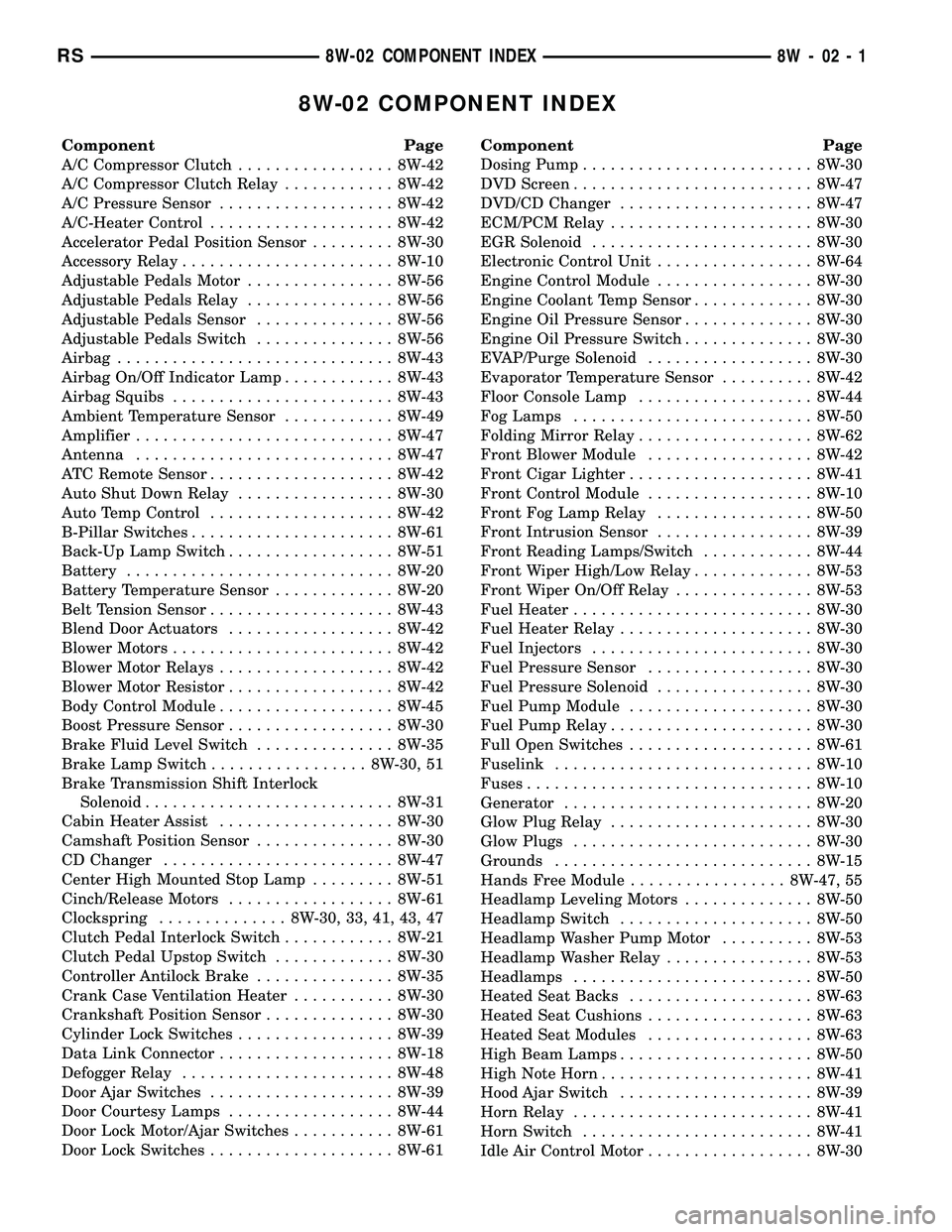
8W-02 COMPONENT INDEX
Component Page
A/C Compressor Clutch................. 8W-42
A/C Compressor Clutch Relay............ 8W-42
A/C Pressure Sensor................... 8W-42
A/C-Heater Control.................... 8W-42
Accelerator Pedal Position Sensor......... 8W-30
Accessory Relay....................... 8W-10
Adjustable Pedals Motor................ 8W-56
Adjustable Pedals Relay................ 8W-56
Adjustable Pedals Sensor............... 8W-56
Adjustable Pedals Switch............... 8W-56
Airbag.............................. 8W-43
Airbag On/Off Indicator Lamp............ 8W-43
Airbag Squibs........................ 8W-43
Ambient Temperature Sensor............ 8W-49
Amplifier............................ 8W-47
Antenna............................ 8W-47
ATC Remote Sensor.................... 8W-42
Auto Shut Down Relay................. 8W-30
Auto Temp Control.................... 8W-42
B-Pillar Switches...................... 8W-61
Back-Up Lamp Switch.................. 8W-51
Battery............................. 8W-20
Battery Temperature Sensor............. 8W-20
Belt Tension Sensor.................... 8W-43
Blend Door Actuators.................. 8W-42
Blower Motors........................ 8W-42
Blower Motor Relays................... 8W-42
Blower Motor Resistor.................. 8W-42
Body Control Module................... 8W-45
Boost Pressure Sensor.................. 8W-30
Brake Fluid Level Switch............... 8W-35
Brake Lamp Switch................. 8W-30, 51
Brake Transmission Shift Interlock
Solenoid........................... 8W-31
Cabin Heater Assist................... 8W-30
Camshaft Position Sensor............... 8W-30
CD Changer......................... 8W-47
Center High Mounted Stop Lamp......... 8W-51
Cinch/Release Motors.................. 8W-61
Clockspring.............. 8W-30, 33, 41, 43, 47
Clutch Pedal Interlock Switch............ 8W-21
Clutch Pedal Upstop Switch............. 8W-30
Controller Antilock Brake............... 8W-35
Crank Case Ventilation Heater........... 8W-30
Crankshaft Position Sensor.............. 8W-30
Cylinder Lock Switches................. 8W-39
Data Link Connector................... 8W-18
Defogger Relay....................... 8W-48
Door Ajar Switches.................... 8W-39
Door Courtesy Lamps.................. 8W-44
Door Lock Motor/Ajar Switches........... 8W-61
Door Lock Switches.................... 8W-61Component Page
Dosing Pump......................... 8W-30
DVD Screen.......................... 8W-47
DVD/CD Changer..................... 8W-47
ECM/PCM Relay...................... 8W-30
EGR Solenoid........................ 8W-30
Electronic Control Unit................. 8W-64
Engine Control Module................. 8W-30
Engine Coolant Temp Sensor............. 8W-30
Engine Oil Pressure Sensor.............. 8W-30
Engine Oil Pressure Switch.............. 8W-30
EVAP/Purge Solenoid.................. 8W-30
Evaporator Temperature Sensor.......... 8W-42
Floor Console Lamp................... 8W-44
Fog Lamps.......................... 8W-50
Folding Mirror Relay................... 8W-62
Front Blower Module.................. 8W-42
Front Cigar Lighter.................... 8W-41
Front Control Module.................. 8W-10
Front Fog Lamp Relay................. 8W-50
Front Intrusion Sensor................. 8W-39
Front Reading Lamps/Switch............ 8W-44
Front Wiper High/Low Relay............. 8W-53
Front Wiper On/Off Relay............... 8W-53
Fuel Heater.......................... 8W-30
Fuel Heater Relay..................... 8W-30
Fuel Injectors........................ 8W-30
Fuel Pressure Sensor.................. 8W-30
Fuel Pressure Solenoid................. 8W-30
Fuel Pump Module.................... 8W-30
Fuel Pump Relay...................... 8W-30
Full Open Switches.................... 8W-61
Fuselink............................ 8W-10
Fuses............................... 8W-10
Generator........................... 8W-20
Glow Plug Relay...................... 8W-30
Glow Plugs.......................... 8W-30
Grounds............................ 8W-15
Hands Free Module................. 8W-47, 55
Headlamp Leveling Motors.............. 8W-50
Headlamp Switch..................... 8W-50
Headlamp Washer Pump Motor.......... 8W-53
Headlamp Washer Relay................ 8W-53
Headlamps.......................... 8W-50
Heated Seat Backs.................... 8W-63
Heated Seat Cushions.................. 8W-63
Heated Seat Modules.................. 8W-63
High Beam Lamps..................... 8W-50
High Note Horn....................... 8W-41
Hood Ajar Switch..................... 8W-39
Horn Relay.......................... 8W-41
Horn Switch......................... 8W-41
Idle Air Control Motor.................. 8W-30
RS8W-02 COMPONENT INDEX8W-02-1
Page 584 of 2339

8W-10 POWER DISTRIBUTION
Component Page
A/C Compressor Clutch...... 8W-10-22, 24, 45, 48
A/C Compressor
Clutch Relay......... 8W-10-22, 24, 44, 45, 48
Accessory Relay............... 8W-10-16, 31, 65
Adjustable Pedals Relay........... 8W-10-47, 60
Adjustable Pedals Switch.......... 8W-10-40, 47
Ambient Temperature Sensor.......... 8W-10-62
Amplifier....................... 8W-10-32, 50
Auto Shut Down Relay............ 8W-10-21, 41
Auto Temp Control.................. 8W-10-40
Back-Up Lamp Switch............... 8W-10-66
Battery............... 8W-10-13, 14, 15, 41, 48
Blower Motor Resistor............ 8W-10-19, 38
Body Control Module....... 8W-10-25, 40, 45, 49,
50, 52, 54, 55, 56, 57, 67, 68
Brake Fluid Level Switch............. 8W-10-65
Brake Lamp Switch........... 8W-10-26, 52, 67
Brake Transmission Shift Interlock
Solenoid........................ 8W-10-63
Cabin Heater Assist........... 8W-10-23, 43, 60
Camshaft Position Sensor............. 8W-10-44
Center High Mounted Stop Lamp....... 8W-10-67
Clockspring........................ 8W-10-61
Clutch Pedal Interlock
Switch.............. 8W-10-18, 37, 54, 55, 61
Controller Antilock
Brake...... 8W-10-18, 25, 36, 37, 50, 56, 62, 67
Crank Case Ventilation Heater......... 8W-10-49
Data Link Connector........... 8W-10-35, 62, 68
Defogger Relay............ 8W-10-19, 20, 39, 64
Driver Heated Seat Module........... 8W-10-50
Driver Power Seat Switch............ 8W-10-50
Driver Power Window Switch....... 8W-10-33, 34
DVD/CD Changer................... 8W-10-40
ECM/PCM Relay................. 8W-10-23, 43
EGR Solenoid...................... 8W-10-44
Engine Control Module . . . 8W-10-18, 23, 24, 37, 43,
44, 48, 62, 67
Floor Console Lamp................. 8W-10-32
Floor Console Power Outlet........ 8W-10-32, 35
Front Blower Module............. 8W-10-19, 38
Front Blower Motor Relay.... 8W-10-18, 19, 38, 64
Front Cigar Lighter.............. 8W-10-16, 32
Front Control Module....... 8W-10-15, 16, 17, 18,
19, 20, 22, 24, 26, 27,
28, 29, 30, 31, 35, 36,
37, 38, 39, 45, 47, 48,
53, 54, 55, 58, 59, 60,
61, 62, 63, 64, 65, 66,
67, 68, 69
Front Fog Lamp Relay......... 8W-10-15, 27, 64
Front Wiper High/Low Relay.... 8W-10-16, 30, 65Component Page
Front Wiper On/Off Relay....... 8W-10-16, 30, 60
Fuel Heater....................... 8W-10-49
Fuel Heater Relay............. 8W-10-24, 48, 65
Fuel Injector No. 1.................. 8W-10-42
Fuel Injector No. 2.................. 8W-10-42
Fuel Injector No. 3.................. 8W-10-42
Fuel Injector No. 4.................. 8W-10-42
Fuel Injector No. 5.................. 8W-10-42
Fuel Injector No. 6.................. 8W-10-42
Fuel Pressure Solenoid............... 8W-10-44
Fuel Pump Module............... 8W-10-22, 45
Fuel Pump Relay............. 8W-10-22, 45, 65
Fuse 1...................... 8W-10-15, 16, 27
Fuse 2...................... 8W-10-15, 28, 29
Fuse 3...................... 8W-10-15, 28, 29
Fuse 4................... 8W-10-15, 16, 17, 30
Fuse 5......................... 8W-10-16, 31
Fuse 6......................... 8W-10-16, 31
Fuse 8......................... 8W-10-17, 35
Fuse 9................ 8W-10-17, 18, 19, 36, 37
Fuse 10........................ 8W-10-19, 38
Fuse 11........................ 8W-10-16, 31
Fuse 12........................ 8W-10-19, 38
Fuse 13........................ 8W-10-20, 39
Fuse 14............ 8W-10-20, 21, 23, 39, 47, 60
Fuse 15......... 8W-10-20, 21, 22, 23, 24, 41, 43
Fuse 16.................. 8W-10-21, 23, 41, 43
Fuse 17............ 8W-10-21, 22, 23, 24, 45, 48
Fuse 18............... 8W-10-22, 24, 25, 45, 48
Fuse 19............... 8W-10-22, 24, 25, 26, 50
Fuse 20........................ 8W-10-25, 50
Fuse 21........................ 8W-10-25, 50
Fuse 22........................ 8W-10-25, 50
Fuse 23..................... 8W-10-25, 54, 55
Fuse 24........................ 8W-10-25, 52
Fuse 26..................... 8W-10-25, 26, 52
Fuse 27........................ 8W-10-26, 52
Fuse 28........................ 8W-10-16, 31
Fuse 30........................ 8W-10-26, 53
Fuse 31........................ 8W-10-26, 53
Fuse 32........................ 8W-10-26, 53
Fuselink....................... 8W-10-13, 14
G100............................. 8W-10-56
G101....................... 8W-10-41, 48, 68
G103............................. 8W-10-68
G300.......................... 8W-10-58, 59
Generator................... 8W-10-13, 14, 44
Glow Plug Relay................. 8W-10-13, 44
Hands Free Module................. 8W-10-40
Headlamp Switch................ 8W-10-29, 63
Headlamp Washer Pump Motor..... 8W-10-26, 53
Headlamp Washer Relay........ 8W-10-26, 53, 64
RS8W-10 POWER DISTRIBUTION8W-10-1