keys CHRYSLER VOYAGER 2020 Owners Manual
[x] Cancel search | Manufacturer: CHRYSLER, Model Year: 2020, Model line: VOYAGER, Model: CHRYSLER VOYAGER 2020Pages: 516, PDF Size: 28.69 MB
Page 4 of 516
2
INTRODUCTION
HOW TO USE THIS MANUAL ................................10
Essential Information .................................. 10
Symbols ........................................................ 10
WARNINGS AND CAUTIONS ...............................10
VEHICLE MODIFICATIONS/ALTERATIONS ........11
GETTING TO KNOW YOUR VEHICLE
VEHICLE USER GUIDE — IF EQUIPPED ...............12
KEYS ......................................................................13
Key Fob......................................................... 13
IGNITION SWITCH .................................................18
Keyless Enter-N-Go — Ignition ..................... 18
REMOTE STARTING SYSTEM — IF EQUIPPED ...19
How To Use Remote Start ........................... 20
Remote Start Cancel Message —
If Equipped ................................................... 20 To Enter Remote Start Mode ...................... 21
To Exit Remote Start Mode Without Driving
The Vehicle .................................................. 21 To Exit Remote Start Mode And Drive The
Vehicle .......................................................... 21 Remote Start Comfort Systems —
If Equipped ................................................... 21 General Information .................................... 22 SENTRY KEY.......................................................... 22
Key Programming ....................................... 23
Replacement Keys....................................... 23
General Information .................................... 23
VEHICLE SECURITY ALARM — IF EQUIPPED ..... 24
To Arm The System ..................................... 24
To Disarm The System ................................ 24
Rearming Of The System............................. 25
DOORS ................................................................... 25
Manual Lock ................................................ 25
Central Lock/Unlock — If Equipped ............ 26
Unlock Doors Automatically On Exit — If
Equipped ...................................................... 27 Keyless Enter-N-Go — Passive Entry........... 27
Manual Sliding Side Door............................ 30
Power Sliding Side Door — If Equipped ...... 30
Hands-Free Sliding Doors — If Equipped.... 32
Child Locks ................................................... 32
DRIVER MEMORY SETTINGS — IF EQUIPPED .. 34
Programming The Memory Feature............ 34
Linking And Unlinking The Key Fob To
Memory ........................................................ 34 Memory Position Recall............................... 35 SEATS ....................................................................35
Manual Adjustment (Front Seats) — If
Equipped ...................................................... 35 Manual Adjustment (Rear Seats) ............... 37
Power Adjustment (Front Seats) —
If Equipped ................................................... 48 Power Adjustment (Rear Seats) —
If Equipped ................................................... 50 Heated Seats ............................................... 53
Ventilated Seats — If Equipped................... 54
Adjustable Armrest (Front Seats) —
If Equipped ................................................... 54 Plastic Grocery Bag Retainer Hooks .......... 54
HEAD RESTRAINTS ..............................................55
Head Restraints — Front Seats................... 55
Head Restraints — Second Row
Quad Seats .................................................. 56 Head Restraints — Second Row Bench...... 56
Head Restraints — Third Row ..................... 57
STEERING WHEEL.................................................58
Tilt/Telescoping Steering Column .............. 58
Heated Steering Wheel — If Equipped ....... 58
20_RU_OM_EN_US_t.book Page 2
Page 6 of 516
4
GETTING TO KNOW YOUR INSTRUMENT PANEL
INSTRUMENT CLUSTER..................................... 125
Instrument Cluster Descriptions ...............126
INSTRUMENT CLUSTER DISPLAY ................... 127
Instrument Cluster Display Location And
Controls ......................................................128 Oil Life Reset ..............................................129
Fuel And Oil Refresh Mode .......................129
KeySense Cluster Messages —
If Equipped .................................................130 Instrument Cluster Display Menu Items ..131
Battery Saver On/Battery Saver Mode
Message — Electrical Load Reduction
Actions — If Equipped ................................138 Instrument Cluster Display Programmable
Features Screen Setup.............................. 139
TRIP COMPUTER ............................................... 140
WARNING LIGHTS AND MESSAGES ............... 141
Red Warning Lights....................................141
Yellow Warning Lights ...............................144
Yellow Indicator Lights...............................147
Green Indicator Lights ...............................148
Blue Indicator Lights ..................................149White Indicator Lights................................149
ONBOARD DIAGNOSTIC SYSTEM — OBD II .... 150
Onboard Diagnostic System (OBD II)
Cybersecurity..............................................150
EMISSIONS INSPECTION AND MAINTENANCE
PROGRAMS ........................................................ 151
SAFETY
SAFETY FEATURES .............................................152 Anti-Lock Brake System (ABS) ................. 152
Electronic Brake Control (EBC) System ... 153
AUXILIARY DRIVING SYSTEMS.........................159 Blind Spot Monitoring (BSM) —
If Equipped ................................................. 159 Forward Collision Warning (FCW) With
Mitigation — If Equipped............................ 164 Tire Pressure Monitoring
System (TPMS) .......................................... 167
OCCUPANT RESTRAINT SYSTEMS .................. 171 Occupant Restraint Systems Features .... 171
Important Safety Precautions ................... 172
Seat Belt Systems ..................................... 172
Supplemental Restraint Systems (SRS)... 184
Child Restraints ......................................... 198
Transporting Pets ...................................... 215
SAFETY TIPS ....................................................... 216 Transporting Passengers .......................... 216Exhaust Gas .............................................. 216
Safety Checks You Should Make Inside
The Vehicle ................................................ 217 Periodic Safety Checks You Should Make
Outside The Vehicle ................................... 218
STARTING AND OPERATING
STARTING THE ENGINE .....................................219 Normal Starting.......................................... 219Cold Weather Operation (Below –22°F
Or −30°C) ................................................. 223 After Starting — Warming Up The
Engine ........................................................ 223 If Engine Fails To Start ............................. 223
To Turn Off The Engine Using ENGINE
START/STOP Button .................................. 223
ENGINE BLOCK HEATER — IF EQUIPPED ....... 224
ENGINE BREAK-IN RECOMMENDATIONS ...... 224
PARK BRAKE...................................................... 225 Electric Park Brake (EPB) ......................... 225
AUTOMATIC TRANSMISSION ........................... 228 Ignition Park Interlock ............................... 229Brake/Transmission Shift Interlock
System........................................................ 229 Nine-Speed Automatic Transmission ...... 230
Gear Ranges .............................................. 230
ACTIVE NOISE CANCELLATION ........................ 234
POWER STEERING............................................. 234
STOP/START SYSTEM — IF EQUIPPED ........... 235
Auto Stop/Start.......................................... 235
Possible Reasons The Engine Does Not
Autostop ..................................................... 235 To Start The Engine While In Auto
Stop/Start .................................................. 236 To Manually Turn Off The Stop/Start
System........................................................ 236 To Manually Turn On The Stop/Start
System........................................................ 237 System Malfunction................................... 237
20_RU_OM_EN_US_t.book Page 4
Page 15 of 516
GETTING TO KNOW YOUR VEHICLE13
Features/Benefits
Pre-installed on your Uconnect touchscreen radio
Enhanced search and browsing capability
Robust NAV application (if equipped)
Add selected topics to a fast-access Favor -
ites category
Icon and symbol glossary
Warranty information
Crucial driver information and assistance:
Operating Instructions
Warranty Information
Fluid Level Standards
Maintenance Schedules
Emergency Procedures
911 Contact and More
TIP:
When viewing a topic, tap the star icon to add it
to your Favorites, for easy access in the future.
KEYS
Key Fob
Your vehicle uses a keyless ignition system. The
ignition system consists of a key fob with
Remote Keyless Entry (RKE) and a START/STOP
push button ignition system. The RKE system
uses a receiver module in the vehicle that
wirelessly links with the key fob.
NOTE:
The key fob may not be found if it is located next
to a mobile phone, laptop or other electronic
device; these devices may block the key fob’s
wireless signal.
This system allows you to lock or unlock the
doors and liftgate, activate the Panic Alarm,
optional power liftgate, left power sliding door,
and right power sliding door from distances up
to approximately 66 ft (20 m) using a key fob.
When any button on the key fob is pushed, or when any signal is being transferred between
the key fob and the vehicle, an LED light on the
key fob will flash as an indicator. The key fob
does not need to be pointed at the vehicle to
activate the system.
NOTE:
The emergency key allows for entry into the
vehicle should the battery in the vehicle or the
key fob become depleted. The emergency key is
also for locking/unlocking the glove compart
-
ment. You can keep the emergency key with you
when valet parking.
2
20_RU_OM_EN_US_t.book Page 13
Page 19 of 516
GETTING TO KNOW YOUR VEHICLE17
Duplication of key fobs may be performed at an
authorized dealer. This procedure consists of
programming a blank key fob to the vehicle
electronics. A blank key fob is one that has
never been programmed.
NOTE:
When having the Sentry Key Immobilizer
System serviced, bring all vehicle keys with you
to an authorized dealer.
KeySense Features — If Equipped
This feature provides the vehicle owner with the
ability to customize vehicle settings that can be
applied to determine the driving experience for
other drivers of the vehicle. The vehicle settings
are protected by a unique 4-digit PIN, which the
vehicle owner creates when accessing the
specific settings for the first time.
KeySense also has additional features that are
always enabled when the specific key is in use
that cannot be set by the vehicle owner. While
this specific key fob is in use, the vehicle will
respond accordingly to the customized vehicle settings and mandatory features. This includes
enhanced driving assistance features,
increased driver alerts, and the locking of
certain optional features.
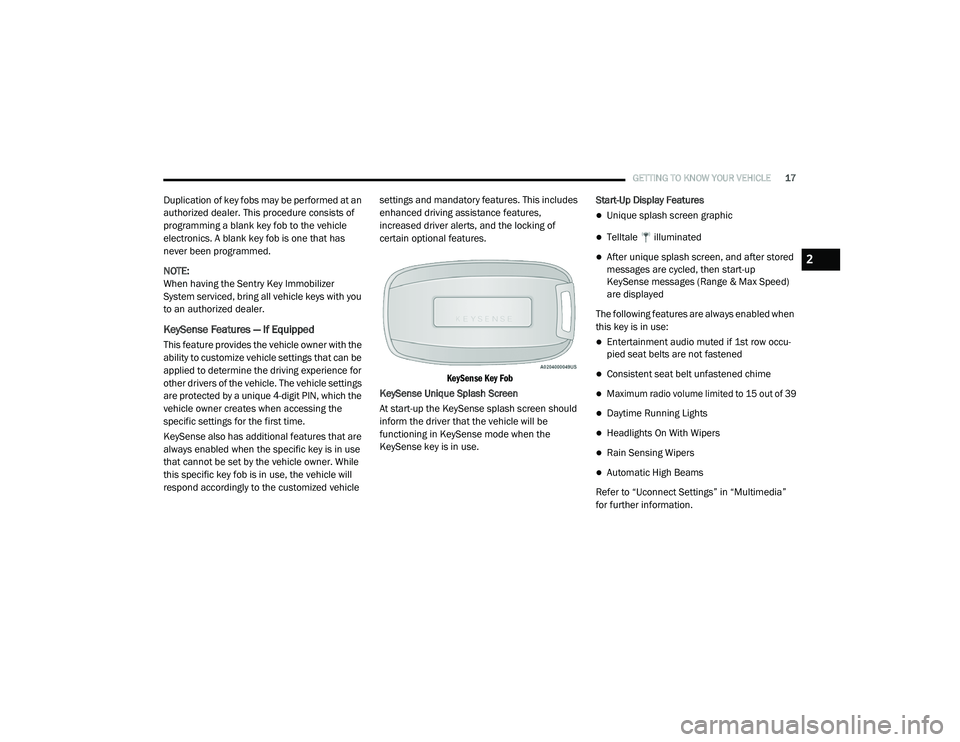
KeySense Key Fob
KeySense Unique Splash Screen
At start-up the KeySense splash screen should
inform the driver that the vehicle will be
functioning in KeySense mode when the
KeySense key is in use. Start-Up Display Features
Unique splash screen graphic
Telltale illuminated
After unique splash screen, and after stored
messages are cycled, then start-up
KeySense messages (Range & Max Speed)
are displayed
The following features are always enabled when
this key is in use:
Entertainment audio muted if 1st row occu -
pied seat belts are not fastened
Consistent seat belt unfastened chime
Maximum radio volume limited to 15 out of 39
Daytime Running Lights
Headlights On With Wipers
Rain Sensing Wipers
Automatic High Beams
Refer to “Uconnect Settings” in “Multimedia”
for further information.
2
20_RU_OM_EN_US_t.book Page 17
Page 25 of 516
GETTING TO KNOW YOUR VEHICLE23
All of the key fobs provided with your new
vehicle have been programmed to the vehicle
electronics.
Key Programming
Key fob programming is performed at an
authorized dealer.
Replacement Keys
NOTE:
Only key fobs that are programmed to the
vehicle electronics can be used to start and
operate the vehicle. Once a key fob is
programmed to a vehicle, it cannot be
programmed to any other vehicle. NOTE:
Duplication of key fobs may be performed at an
authorized dealer. This procedure consists of
programming a blank key fob to the vehicle
electronics. A blank key fob is one that has
never been programmed.
When having the Sentry Key Immobilizer
System serviced, bring all vehicle keys with you
to an authorized dealer.
General Information
The following regulatory statement applies to all
Radio Frequency (RF) devices equipped in this
vehicle:
This device complies with Part 15 of the FCC
Rules and with Innovation, Science and
Economic Development Canada license-exempt
RSS standard(s). Operation is subject to the
following two conditions:
1. This device may not cause harmful
interference, and
2. This device must accept any interference received, including interference that may
cause undesired operation. Le présent appareil est conforme aux CNR
d`Innovation, Science and Economic
Development applicables aux appareils radio
exempts de licence. L'exploitation est autorisée
aux deux conditions suivantes:
1. l'appareil ne doit pas produire de
brouillage, et
2. l'utilisateur de l'appareil doit accepter tout brouillage radioélectrique subi, même si le
brouillage est susceptible d'en compro -
mettre le fonctionnement.
La operación de este equipo está sujeta a las
siguientes dos condiciones:
1. es posible que este equipo o dispositivo no cause interferencia perjudicial y
2. este equipo o dispositivo debe aceptar cualquier interferencia, incluyendo la que
pueda causar su operación no deseada.
NOTE:
Changes or modifications not expressly
approved by the party responsible for compli -
ance could void the user’s authority to operate
the equipment.
CAUTION!
The Sentry Key Immobilizer system is not
compatible with some aftermarket remote
starting systems. Use of these systems may
result in vehicle starting problems and loss of
security protection.
CAUTION!
Always remove the key fobs from the vehicle
and lock all doors when leaving the vehicle
unattended.
2
20_RU_OM_EN_US_t.book Page 23
Page 28 of 516
26GETTING TO KNOW YOUR VEHICLE
(Continued)
If the door lock button is locked (no ribbing is
visible) when you shut the door, the door will
lock. Therefore, make sure the key fob is not
inside the vehicle before closing the door.
NOTE:
The manual door locks will not lock or unlock
the liftgate.Central Lock/Unlock — If Equipped
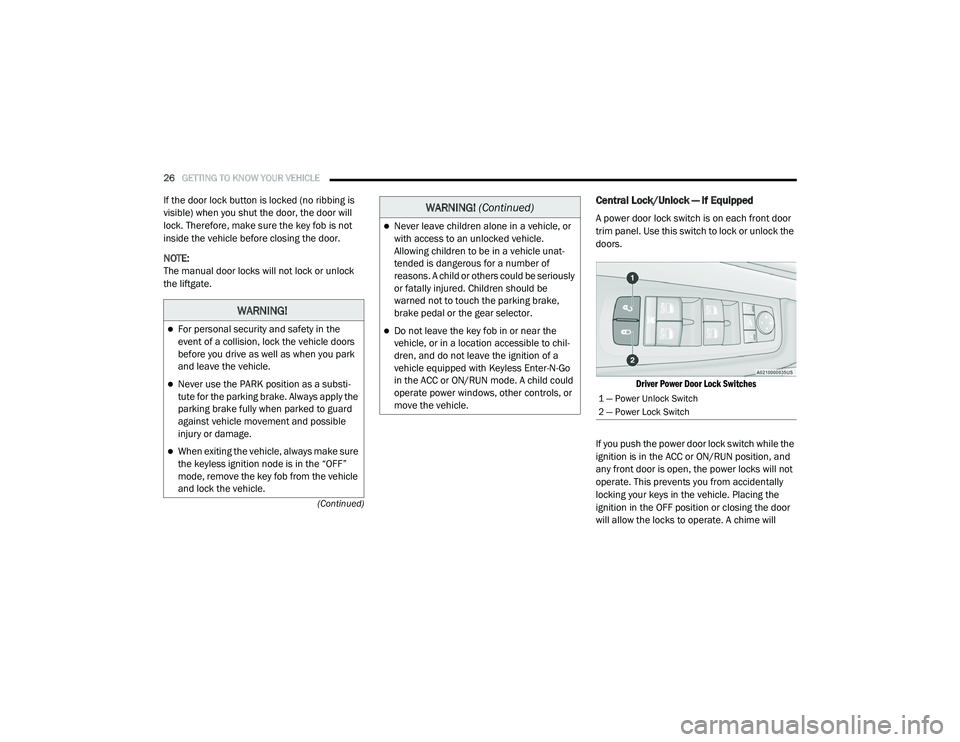
A power door lock switch is on each front door
trim panel. Use this switch to lock or unlock the
doors.
Driver Power Door Lock Switches
If you push the power door lock switch while the
ignition is in the ACC or ON/RUN position, and
any front door is open, the power locks will not
operate. This prevents you from accidentally
locking your keys in the vehicle. Placing the
ignition in the OFF position or closing the door
will allow the locks to operate. A chime will
WARNING!
For personal security and safety in the
event of a collision, lock the vehicle doors
before you drive as well as when you park
and leave the vehicle.
Never use the PARK position as a substi -
tute for the parking brake. Always apply the
parking brake fully when parked to guard
against vehicle movement and possible
injury or damage.
When exiting the vehicle, always make sure
the keyless ignition node is in the “OFF”
mode, remove the key fob from the vehicle
and lock the vehicle.
Never leave children alone in a vehicle, or
with access to an unlocked vehicle.
Allowing children to be in a vehicle unat -
tended is dangerous for a number of
reasons. A child or others could be seriously
or fatally injured. Children should be
warned not to touch the parking brake,
brake pedal or the gear selector.
Do not leave the key fob in or near the
vehicle, or in a location accessible to chil-
dren, and do not leave the ignition of a
vehicle equipped with Keyless Enter-N-Go
in the ACC or ON/RUN mode. A child could
operate power windows, other controls, or
move the vehicle.
WARNING! (Continued)
1 — Power Unlock Switch
2 — Power Lock Switch
20_RU_OM_EN_US_t.book Page 26
Page 132 of 516
130GETTING TO KNOW YOUR INSTRUMENT PANEL
The vehicle will automatically exit the Fuel and Oil
Refresh Mode when conditions have been
satisfied. If the vehicle enters Fuel and Oil
Refresh Mode, due to fuel which has been in the
fuel tank for a long period of time (becoming stale
fuel), the engine will run whenever the vehicle is
operational (no electric only operation) until the
low fuel level warning is activated. It is also
possible to exit the Fuel and Oil Refresh Mode
sooner by adding a minimum of 4 gallons of new
fuel to the vehicle’s fuel tank.
NOTE:
If the vehicle enters Fuel and Oil Refresh Mode
to maintain engine lubrication, adding fuel will
not exit the mode sooner.
If the vehicle enters Fuel and Oil Refresh Mode
to maintain engine lubrication properties, the
engine may run for a period of up to 20 minutes
when fully warm whenever the vehicle is
operational (no electric only operation). If the
vehicle is shut down before conditions to exit
the refresh mode have been satisfied, the
engine may run for additional time on
subsequent trips.NOTE:
Frequent short trips at low ambient tempera
-
ture conditions are more likely to trigger the
lubrication based mode.
KeySense Cluster Messages — If Equipped
When the KeySense key is in use there will be:
Continuous, dedicated telltale
Unique Display Splash Screen
With KeySense in use there will be multiple
associated messages shown in the following
table:
Setting Instrument Cluster Display Message
None – With vehicle ignition ON “KeySense in use. Max vehicle speed set to xx MPH/or km/h”
Max Vehicle Speed
“Max speed reached. KeySense in use” supported by a chime
“Approaching max speed xx MPH/km/h” supported by a chime
Start Up Fuel Alert message “Range to empty xxx miles or km”
Early Low Fuel Alert Message “Fuel Low”
ParkSense “Feature cannot be disabled. KeySense in use”
Blind Spot “Feature cannot be disabled. KeySense in use”
Forward Collision Warning “Feature cannot be disabled. KeySense in use”
20_RU_OM_EN_US_t.book Page 130
Page 140 of 516
138GETTING TO KNOW YOUR INSTRUMENT PANEL
Speed Warning — If Equipped
Push and release the up or down arrow button
until Speed Warning is highlighted in the
instrument cluster display. Push and release the
OK button to enter speed warning. Use the up or
down arrow button to turn the speed warning ON
or OFF, then push and release the OK button to
confirm the selection. If the ON status is selected,
use the up or down arrow button to set the
desired speed, then push the OK button to set
the speed for the speed warning. A speed
warning telltale will illuminate in the instrument
cluster, with a number matching the set speed,
with a pop up message to inform the driver that
the speed warning has been set to the desired
speed. Each time the set speed is exceeded, a
single chime will sound and a pop up warning
message will display. If the set speed is exceeded
more than 2 mph (3 km/h), a continuous chime
will sound for up to 10 seconds, or until the speed
is no longer exceeded. The telltale in the
instrument cluster will also change from white to
yellow, and a pop up warning message will pop up
on the instrument cluster display.
NOTE:
Speed Warning is unavailable while KeySense
is in use.
Battery Saver On/Battery Saver Mode
Message — Electrical Load Reduction
Actions — If Equipped
This vehicle is equipped with an Intelligent
Battery Sensor (IBS) to perform additional
monitoring of the electrical system and status
of the vehicle battery.
In cases when the IBS detects charging system
failure, or the 12 Volt vehicle battery conditions
are deteriorating, electrical load reduction
actions will take place to extend the driving time
and distance of the vehicle. This is done by
reducing power to or turning off non-essential
12 Volt electrical loads. Load reduction will be
functional when the vehicle propulsion system
is active.
The vehicle may not be running depending on
the HV battery SOC or temperature. It will
display a message if there is a risk of battery
depletion to the point where the vehicle may
stall due to lack of electrical supply, or will not
restart after the current drive cycle.
When 12 Volt load reduction is activated, the
message “Battery Saver On” or “Battery Saver
Mode” will appear in the instrument cluster
display. These messages indicate the vehicle battery
has a low state of charge and continues to lose
electrical charge at a rate that the charging
system cannot sustain.
NOTE:
The charging system is independent from
load reduction. The charging system
performs a diagnostic on the charging
system continuously.
If the Battery Charge Warning Light is on it
may indicate a problem with the charging
system. Refer to “Battery Charge Warning
Light” in this chapter for further information.
The electrical loads that may be switched off (if
equipped), and vehicle functions which can be
effected by load reduction:
Heated Seat/Vented Seats/Heated Wheel
Heated/Cooled Cup Holders — If Equipped
Rear Defroster And Heated Mirrors
HVAC System
115 Volts AC Power Inverter System
Audio and Telematics System
20_RU_OM_EN_US_t.book Page 138
Page 150 of 516
148GETTING TO KNOW YOUR INSTRUMENT PANEL
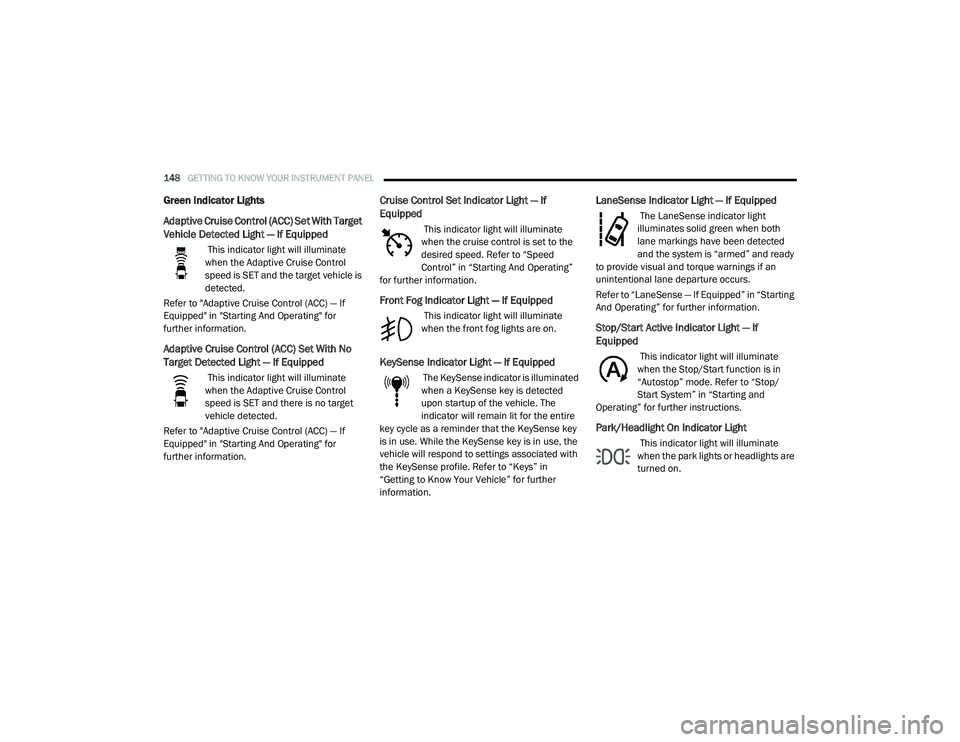
Green Indicator Lights
Adaptive Cruise Control (ACC) Set With Target
Vehicle Detected Light — If Equipped
This indicator light will illuminate
when the Adaptive Cruise Control
speed is SET and the target vehicle is
detected.
Refer to "Adaptive Cruise Control (ACC) — If
Equipped" in "Starting And Operating" for
further information.
Adaptive Cruise Control (ACC) Set With No
Target Detected Light — If Equipped
This indicator light will illuminate
when the Adaptive Cruise Control
speed is SET and there is no target
vehicle detected.
Refer to "Adaptive Cruise Control (ACC) — If
Equipped" in "Starting And Operating" for
further information.
Cruise Control Set Indicator Light — If
Equipped
This indicator light will illuminate
when the cruise control is set to the
desired speed. Refer to “Speed
Control” in “Starting And Operating”
for further information.
Front Fog Indicator Light — If Equipped
This indicator light will illuminate
when the front fog lights are on.
KeySense Indicator Light — If Equipped
The KeySense indicator is illuminated
when a KeySense key is detected
upon startup of the vehicle. The
indicator will remain lit for the entire
key cycle as a reminder that the KeySense key
is in use. While the KeySense key is in use, the
vehicle will respond to settings associated with
the KeySense profile. Refer to “Keys” in
“Getting to Know Your Vehicle” for further
information.
LaneSense Indicator Light — If Equipped
The LaneSense indicator light
illuminates solid green when both
lane markings have been detected
and the system is “armed” and ready
to provide visual and torque warnings if an
unintentional lane departure occurs.
Refer to “LaneSense — If Equipped” in “Starting
And Operating” for further information.
Stop/Start Active Indicator Light — If
Equipped
This indicator light will illuminate
when the Stop/Start function is in
“Autostop” mode. Refer to “Stop/
Start System” in “Starting and
Operating” for further instructions.
Park/Headlight On Indicator Light
This indicator light will illuminate
when the park lights or headlights are
turned on.
20_RU_OM_EN_US_t.book Page 148
Page 165 of 516
SAFETY163
Modes Of Operation
Three selectable modes of operation are
available in the Uconnect System. Refer to
“Uconnect Settings” in “Multimedia” for further
information.
Blind Spot Alert Lights Only — Default Setting
When operating in Blind Spot Alert mode, the
BSM system will provide a visual alert in the
appropriate side view mirror based on a
detected object. However, when the system is
operating in Rear Cross Path (RCP) mode, the
system will respond with both visual and
audible alerts when a detected object is
present. Whenever an audible alert is
requested, the radio is muted.
Blind Spot Alert Lights/Chime
When operating in Blind Spot Alert Lights/
Chime mode, the BSM system will provide a
visual alert in the appropriate side view mirror
based on a detected object. If the turn signal is
then activated, and it corresponds to an alert
present on that side of the vehicle, an audible
chime will also be sounded. Whenever a turn
signal and detected object are present on the
same side at the same time, both the visual and
audible alerts will be issued. In addition to the
audible alert the radio (if on) will also be muted. NOTE:
Whenever an audible alert is requested by the
BSM system, the radio is also muted.
When the system is in RCP, the system shall
respond with both visual and audible alerts
when a detected object is present. Whenever
an audible alert is requested, the radio is also
muted. Turn/hazard signal status is ignored;
the RCP state always requests the chime.
Blind Spot Alert Off
When the BSM system is turned off there will be
no visual or audible alerts from either the BSM
or RCP systems.
NOTE:
The BSM system will store the current oper
-
ating mode when the vehicle is shut off. Each
time the vehicle is started the previously
stored mode will be recalled and used.
The BSM system can work in conjunction with
the Keysense function of the vehicle (if
equipped). Refer to “KeySense Cluster
Messages" in “Getting To Know Your Instru -
ment Panel” for further information.
General Information
The following regulatory statement applies to all
Radio Frequency (RF) devices equipped in this
vehicle:
This device complies with Part 15 of the FCC
Rules and with Innovation, Science and
Economic Development Canada license-exempt
RSS standard(s). Operation is subject to the
following two conditions:
1. This device may not cause harmful
interference, and
2. This device must accept any interference received, including interference that may
cause undesired operation.
Le présent appareil est conforme aux CNR
d`Innovation, Science and Economic
Development applicables aux appareils radio
exempts de licence. L'exploitation est autorisée
aux deux conditions suivantes:
1. l'appareil ne doit pas produire de brouillage, et
2. l'utilisateur de l'appareil doit accepter tout brouillage radioélectrique subi, même si le
brouillage est susceptible d'en compro -
mettre le fonctionnement.
4
20_RU_OM_EN_US_t.book Page 163