radio battery CHRYSLER VOYAGER 2020 Owners Manual
[x] Cancel search | Manufacturer: CHRYSLER, Model Year: 2020, Model line: VOYAGER, Model: CHRYSLER VOYAGER 2020Pages: 516, PDF Size: 28.69 MB
Page 15 of 516
GETTING TO KNOW YOUR VEHICLE13
Features/Benefits
Pre-installed on your Uconnect touchscreen radio
Enhanced search and browsing capability
Robust NAV application (if equipped)
Add selected topics to a fast-access Favor -
ites category
Icon and symbol glossary
Warranty information
Crucial driver information and assistance:
Operating Instructions
Warranty Information
Fluid Level Standards
Maintenance Schedules
Emergency Procedures
911 Contact and More
TIP:
When viewing a topic, tap the star icon to add it
to your Favorites, for easy access in the future.
KEYS
Key Fob
Your vehicle uses a keyless ignition system. The
ignition system consists of a key fob with
Remote Keyless Entry (RKE) and a START/STOP
push button ignition system. The RKE system
uses a receiver module in the vehicle that
wirelessly links with the key fob.
NOTE:
The key fob may not be found if it is located next
to a mobile phone, laptop or other electronic
device; these devices may block the key fob’s
wireless signal.
This system allows you to lock or unlock the
doors and liftgate, activate the Panic Alarm,
optional power liftgate, left power sliding door,
and right power sliding door from distances up
to approximately 66 ft (20 m) using a key fob.
When any button on the key fob is pushed, or when any signal is being transferred between
the key fob and the vehicle, an LED light on the
key fob will flash as an indicator. The key fob
does not need to be pointed at the vehicle to
activate the system.
NOTE:
The emergency key allows for entry into the
vehicle should the battery in the vehicle or the
key fob become depleted. The emergency key is
also for locking/unlocking the glove compart
-
ment. You can keep the emergency key with you
when valet parking.
2
20_RU_OM_EN_US_t.book Page 13
Page 17 of 516
GETTING TO KNOW YOUR VEHICLE15
acknowledge the unlock signal. The illuminated
entry system will be activated.
This feature lets you program the system to
unlock either the driver's side doors or all doors
on the first push of the unlock button on the key
fob. To change the current setting, refer to
“Uconnect Settings” in “Multimedia” for further
information.
NOTE:
Your vehicle is equipped with Passive Entry;
refer to “Keyless Enter-N-Go — Passive Entry” in
this chapter for further information.
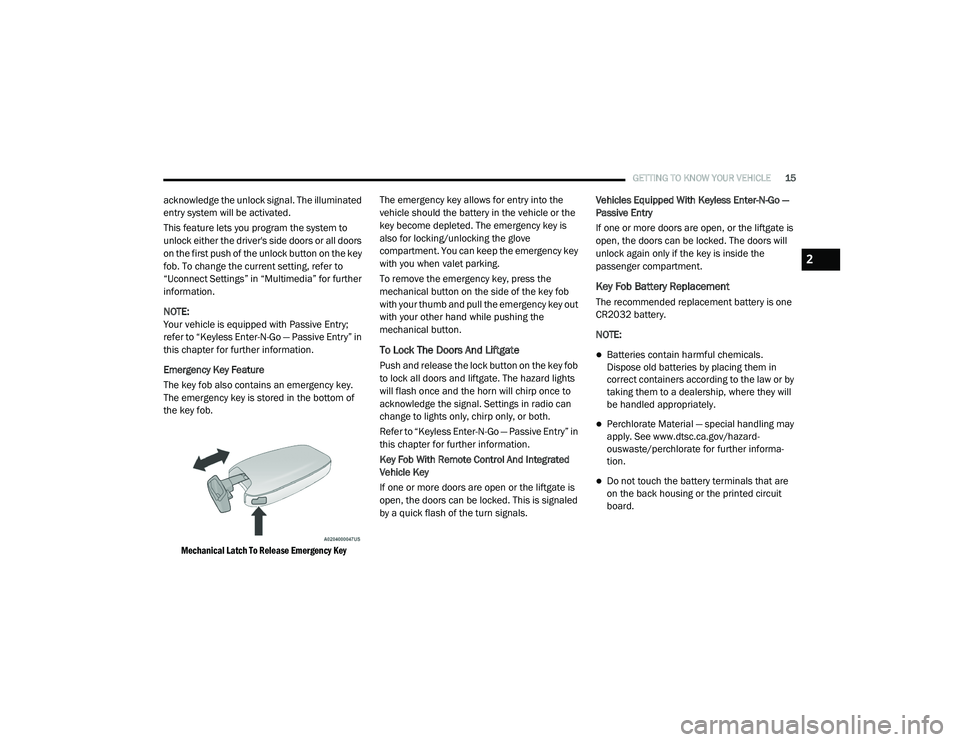
Emergency Key Feature
The key fob also contains an emergency key.
The emergency key is stored in the bottom of
the key fob.
Mechanical Latch To Release Emergency Key
The emergency key allows for entry into the
vehicle should the battery in the vehicle or the
key become depleted. The emergency key is
also for locking/unlocking the glove
compartment. You can keep the emergency key
with you when valet parking.
To remove the emergency key, press the
mechanical button on the side of the key fob
with your thumb and pull the emergency key out
with your other hand while pushing the
mechanical button.
To Lock The Doors And Liftgate
Push and release the lock button on the key fob
to lock all doors and liftgate. The hazard lights
will flash once and the horn will chirp once to
acknowledge the signal. Settings in radio can
change to lights only, chirp only, or both.
Refer to “Keyless Enter-N-Go — Passive Entry” in
this chapter for further information.
Key Fob With Remote Control And Integrated
Vehicle Key
If one or more doors are open or the liftgate is
open, the doors can be locked. This is signaled
by a quick flash of the turn signals.
Vehicles Equipped With Keyless Enter-N-Go —
Passive Entry
If one or more doors are open, or the liftgate is
open, the doors can be locked. The doors will
unlock again only if the key is inside the
passenger compartment.
Key Fob Battery Replacement
The recommended replacement battery is one
CR2032 battery.
NOTE:
Batteries contain harmful chemicals.
Dispose old batteries by placing them in
correct containers according to the law or by
taking them to a dealership, where they will
be handled appropriately.
Perchlorate Material — special handling may
apply. See www.dtsc.ca.gov/hazard
-
ouswaste/perchlorate for further informa -
tion.
Do not touch the battery terminals that are
on the back housing or the printed circuit
board.
2
20_RU_OM_EN_US_t.book Page 15
Page 31 of 516
GETTING TO KNOW YOUR VEHICLE29
release handle is pulled. To select between
“Unlock Driver Door 1st Press” and “Unlock All
Doors 1st Press,” refer to “Uconnect Settings”
in “Multimedia” for further information.
To Lock The Vehicle’s Doors
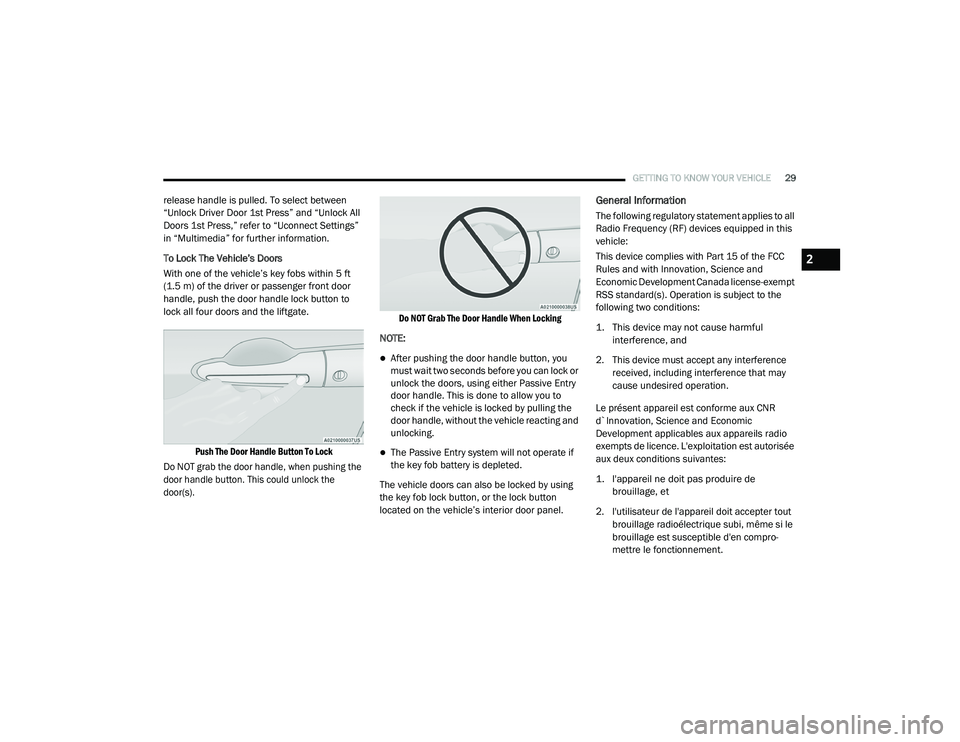
With one of the vehicle’s key fobs within 5 ft
(1.5 m) of the driver or passenger front door
handle, push the door handle lock button to
lock all four doors and the liftgate.
Push The Door Handle Button To Lock
Do NOT grab the door handle, when pushing the
door handle button. This could unlock the
door(s). Do NOT Grab The Door Handle When Locking
NOTE:
After pushing the door handle button, you
must wait two seconds before you can lock or
unlock the doors, using either Passive Entry
door handle. This is done to allow you to
check if the vehicle is locked by pulling the
door handle, without the vehicle reacting and
unlocking.
The Passive Entry system will not operate if
the key fob battery is depleted.
The vehicle doors can also be locked by using
the key fob lock button, or the lock button
located on the vehicle’s interior door panel.
General Information
The following regulatory statement applies to all
Radio Frequency (RF) devices equipped in this
vehicle:
This device complies with Part 15 of the FCC
Rules and with Innovation, Science and
Economic Development Canada license-exempt
RSS standard(s). Operation is subject to the
following two conditions:
1. This device may not cause harmful interference, and
2. This device must accept any interference received, including interference that may
cause undesired operation.
Le présent appareil est conforme aux CNR
d`Innovation, Science and Economic
Development applicables aux appareils radio
exempts de licence. L'exploitation est autorisée
aux deux conditions suivantes:
1. l'appareil ne doit pas produire de brouillage, et
2. l'utilisateur de l'appareil doit accepter tout brouillage radioélectrique subi, même si le
brouillage est susceptible d'en compro -
mettre le fonctionnement.
2
20_RU_OM_EN_US_t.book Page 29
Page 111 of 516
GETTING TO KNOW YOUR VEHICLE109
GARAGE DOOR OPENER — IF EQUIPPED
HomeLink® replaces up to three hand-held
transmitters that operate devices such as
garage door openers, motorized gates, lighting
or home security systems. The HomeLink® unit
is powered by your vehicle’s 12 Volt battery.
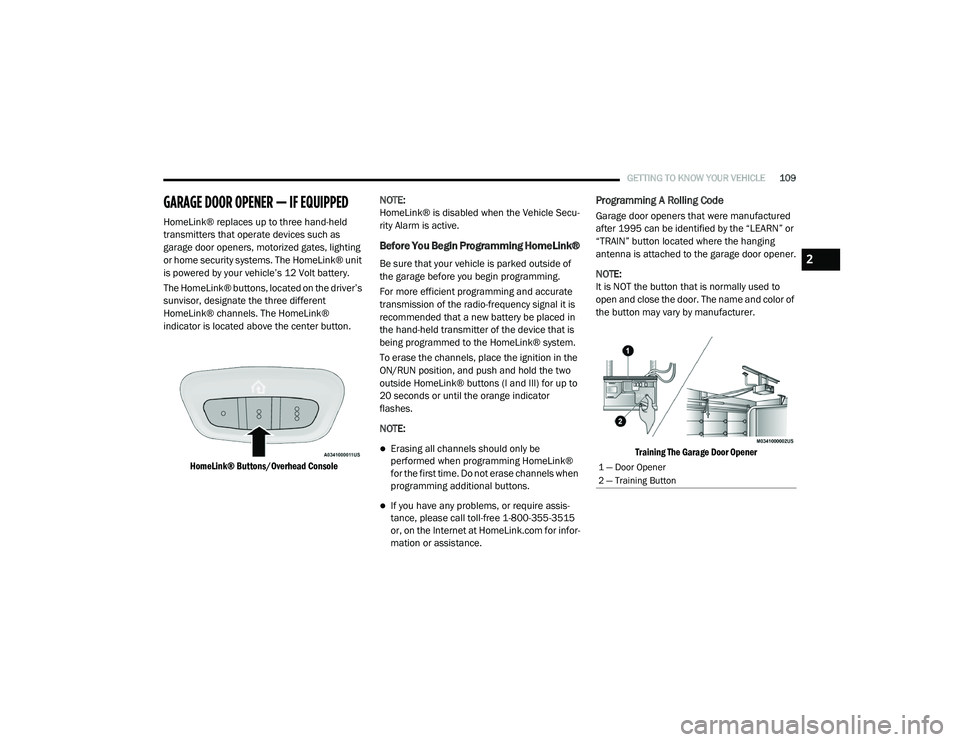
The HomeLink® buttons, located on the driver’s
sunvisor, designate the three different
HomeLink® channels. The HomeLink®
indicator is located above the center button.
HomeLink® Buttons/Overhead Console
NOTE:
HomeLink® is disabled when the Vehicle Secu
-
rity Alarm is active.
Before You Begin Programming HomeLink®
Be sure that your vehicle is parked outside of
the garage before you begin programming.
For more efficient programming and accurate
transmission of the radio-frequency signal it is
recommended that a new battery be placed in
the hand-held transmitter of the device that is
being programmed to the HomeLink® system.
To erase the channels, place the ignition in the
ON/RUN position, and push and hold the two
outside HomeLink® buttons (I and III) for up to
20 seconds or until the orange indicator
flashes.
NOTE:
Erasing all channels should only be
performed when programming HomeLink®
for the first time. Do not erase channels when
programming additional buttons.
If you have any problems, or require assis -
tance, please call toll-free 1-800-355-3515
or, on the Internet at HomeLink.com for infor -
mation or assistance.
Programming A Rolling Code
Garage door openers that were manufactured
after 1995 can be identified by the “LEARN” or
“TRAIN” button located where the hanging
antenna is attached to the garage door opener.
NOTE:
It is NOT the button that is normally used to
open and close the door. The name and color of
the button may vary by manufacturer.
Training The Garage Door Opener
1 — Door Opener
2 — Training Button
2
20_RU_OM_EN_US_t.book Page 109
Page 141 of 516
GETTING TO KNOW YOUR INSTRUMENT PANEL139
Loss of the battery charge may indicate one or
more of the following conditions:
The charging system cannot deliver enough
electrical power to the vehicle system
because the electrical loads are larger than
the capability of charging system. The
charging system is still functioning properly.
Turning on all possible vehicle electrical
loads (e.g. HVAC to max settings, exterior and
interior lights, overloaded power outlets +12
Volts, 150W, USB ports) during certain
driving conditions (city driving, towing,
frequent stopping).
Installing options like additional lights,
upfitter electrical accessories, audio
systems, alarms and similar devices.
Unusual driving cycles (short trips separated
by long parking periods).
The vehicle was parked for an extended
period of time (weeks, months).
The battery was recently replaced and was
not charged completely.
The battery was discharged by an electrical
load left on when the vehicle was parked.
The battery was used for an extended period
with the engine not running to supply radio,
lights, chargers, +12 Volt portable appli-
ances like vacuum cleaners, game consoles
and similar devices.
What to do when an electrical load reduction
action message is present (“Battery Saver On”
or “Battery Saver Mode”)
During a trip:
Reduce power to unnecessary loads if
possible:
Turn off redundant lights (interior or exte -
rior)
Check what may be plugged in to power
outlets +12 Volts, 150W, USB ports
Check HVAC settings (blower, tempera -
ture)
Check the audio settings (volume) After a trip:
Check if any aftermarket equipment was
installed (additional lights, upfitter electrical
accessories, audio systems, alarms) and
review specifications if any (load and Ignition
Off Draw currents).
Evaluate the latest driving cycles (distance,
driving time and parking time).
The vehicle should have service performed if
the message is still present during consecu
-
tive trips and the evaluation of the vehicle
and driving pattern did not help to identify the
cause.
Instrument Cluster Display Programmable
Features Screen Setup
Push the up or down arrow button to scroll
through the Menu Items until the Screen Setup
displays in the instrument cluster display. Push
the OK button to enter Screen Setup. The
Screen Setup feature allows you to change what
information is displayed in the instrument
cluster display as well as the location that
information is displayed.
3
20_RU_OM_EN_US_t.book Page 139
Page 305 of 516
IN CASE OF EMERGENCY303
(Continued)
in the vehicle. The vehicle’s SOS Call system
will attempt to remain connected with the
SOS operator until the SOS operator termi -
nates the connection.
5. The SOS operator may attempt to contact appropriate emergency responders and
provide them with important vehicle
information and GPS coordinates. SOS Call System Limitations
Vehicles sold in Mexico
DO NOT have SOS Call
system capabilities.
SOS or other emergency line operators in
Mexico may not answer or respond to SOS
system calls.
If the SOS Call system detects a malfunction,
any of the following may occur at the time the
malfunction is detected, and at the beginning of
each ignition cycle:
The Rearview Mirror light located between
the ASSIST and SOS buttons will continuously
be illuminated red.
The Device Screen will display the following
message “Vehicle device requires service.
Please contact your dealer.”
An In-Vehicle Audio message will state
“Vehicle device requires service. Please
contact your dealer.”
WARNING!
If anyone in the vehicle could be in danger
(e.g., fire or smoke is visible, dangerous
road conditions or location), do not wait for
voice contact from an Emergency Services
Agent. All occupants should exit the vehicle
immediately and move to a safe location.
Never place anything on or near the
vehicle’s operable network and GPS
antennas. You could prevent operable
network and GPS signal reception, which
can prevent your vehicle from placing an
emergency call. An operable network and
GPS signal reception is required for the SOS
Call system to function properly.
The SOS Call system is embedded into the
vehicle’s electrical system. Do not add
aftermarket electrical equipment to the
vehicle’s electrical system. This may
prevent your vehicle from sending a signal
to initiate an emergency call. To avoid inter -
ference that can cause the SOS Call system
to fail, never add aftermarket equipment
(e.g., two-way mobile radio, CB radio, data
recorder, etc.) to your vehicle’s electrical
system or modify the antennas on your
vehicle. IF YOUR VEHICLE LOSES BATTERY
POWER FOR ANY REASON (INCLUDING
DURING OR AFTER AN ACCIDENT), THE
UCONNECT FEATURES, APPS AND
SERVICES, AMONG OTHERS, WILL NOT
OPERATE.
Modifications to any part of the SOS Call
system could cause the air bag system to
fail when you need it. You could be injured
if the air bag system is not there to help
protect you.
WARNING! (Continued)
6
20_RU_OM_EN_US_t.book Page 303
Page 339 of 516
IN CASE OF EMERGENCY337
JUMP STARTING
If your vehicle has a discharged battery it can be
jump started using a set of jumper cables and a
battery in another vehicle or by using a portable
battery booster pack. Jump starting can be
dangerous if done improperly so please follow
the procedures in this section carefully.
NOTE:
When using a portable battery booster pack
follow the manufacturer’s operating instruc -
tions and precautions.
Preparations For Jump Start
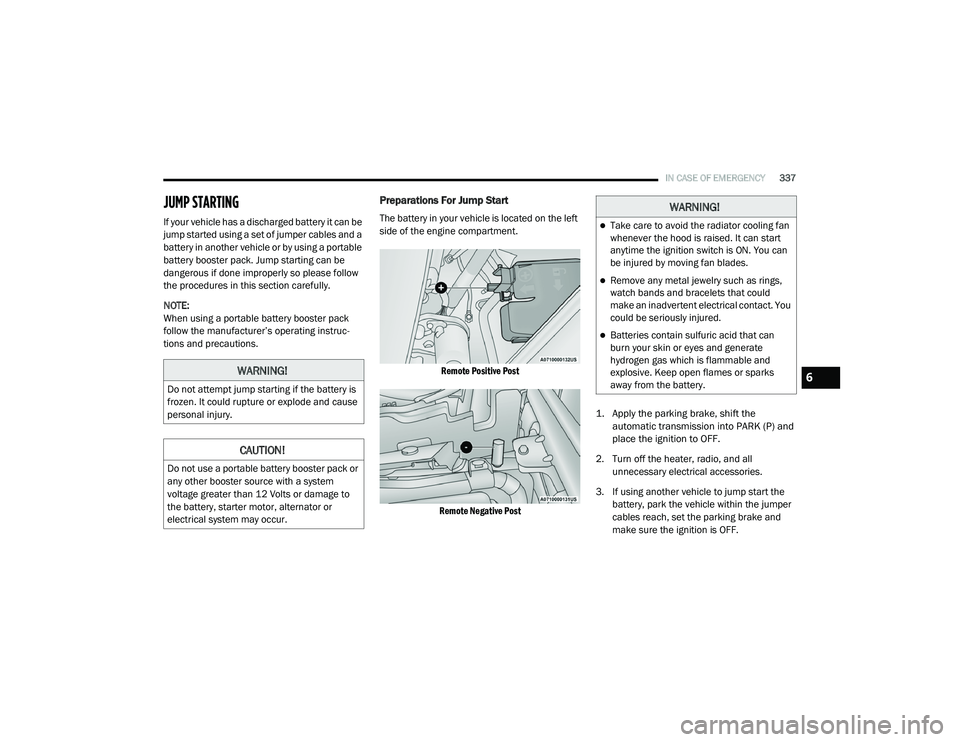
The battery in your vehicle is located on the left
side of the engine compartment.
Remote Positive Post
Remote Negative Post
1. Apply the parking brake, shift the
automatic transmission into PARK (P) and
place the ignition to OFF.
2. Turn off the heater, radio, and all unnecessary electrical accessories.
3. If using another vehicle to jump start the battery, park the vehicle within the jumper
cables reach, set the parking brake and
make sure the ignition is OFF.
WARNING!
Do not attempt jump starting if the battery is
frozen. It could rupture or explode and cause
personal injury.
CAUTION!
Do not use a portable battery booster pack or
any other booster source with a system
voltage greater than 12 Volts or damage to
the battery, starter motor, alternator or
electrical system may occur.
WARNING!
Take care to avoid the radiator cooling fan
whenever the hood is raised. It can start
anytime the ignition switch is ON. You can
be injured by moving fan blades.
Remove any metal jewelry such as rings,
watch bands and bracelets that could
make an inadvertent electrical contact. You
could be seriously injured.
Batteries contain sulfuric acid that can
burn your skin or eyes and generate
hydrogen gas which is flammable and
explosive. Keep open flames or sparks
away from the battery.
6
20_RU_OM_EN_US_t.book Page 337
Page 456 of 516
454MULTIMEDIA
Phone Mode
Overview
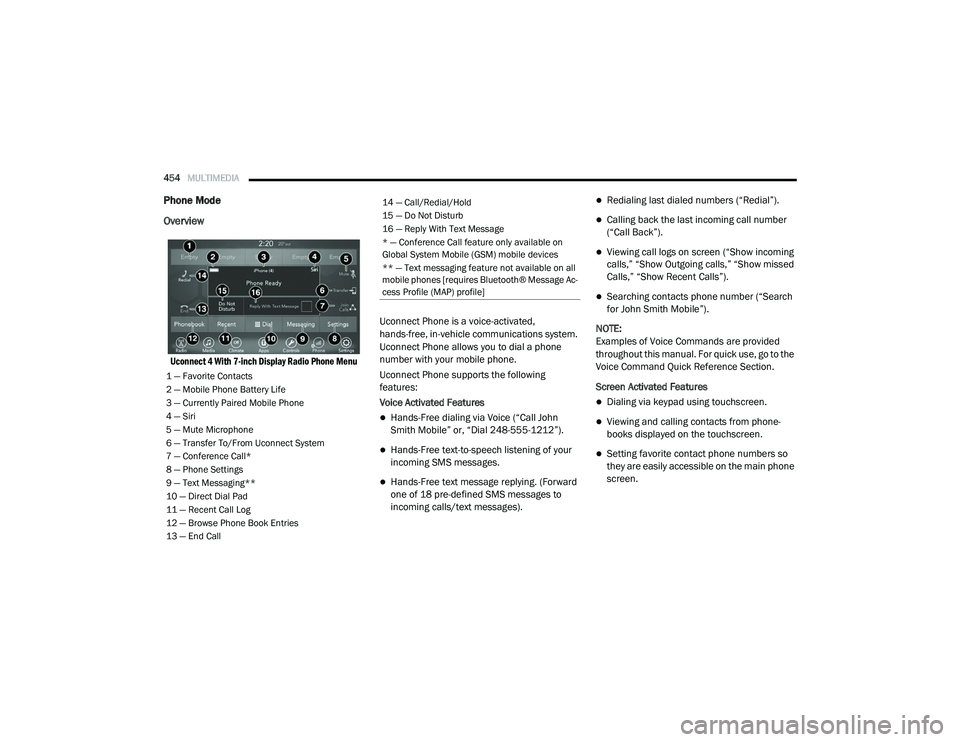
Uconnect 4 With 7-inch Display Radio Phone Menu
Uconnect Phone is a voice-activated,
hands-free, in-vehicle communications system.
Uconnect Phone allows you to dial a phone
number with your mobile phone.
Uconnect Phone supports the following
features:
Voice Activated Features
Hands-Free dialing via Voice (“Call John
Smith Mobile” or, “Dial 248-555-1212”).
Hands-Free text-to-speech listening of your
incoming SMS messages.
Hands-Free text message replying. (Forward
one of 18 pre-defined SMS messages to
incoming calls/text messages).
Redialing last dialed numbers (“Redial”).
Calling back the last incoming call number
(“Call Back”).
Viewing call logs on screen (“Show incoming
calls,” “Show Outgoing calls,” “Show missed
Calls,” “Show Recent Calls”).
Searching contacts phone number (“Search
for John Smith Mobile”).
NOTE:
Examples of Voice Commands are provided
throughout this manual. For quick use, go to the
Voice Command Quick Reference Section.
Screen Activated Features
Dialing via keypad using touchscreen.
Viewing and calling contacts from phone -
books displayed on the touchscreen.
Setting favorite contact phone numbers so
they are easily accessible on the main phone
screen.
1 — Favorite Contacts
2 — Mobile Phone Battery Life
3 — Currently Paired Mobile Phone
4 — Siri
5 — Mute Microphone
6 — Transfer To/From Uconnect System
7 — Conference Call*
8 — Phone Settings
9 — Text Messaging**
10 — Direct Dial Pad
11 — Recent Call Log
12 — Browse Phone Book Entries
13 — End Call
14 — Call/Redial/Hold
15 — Do Not Disturb
16 — Reply With Text Message
* — Conference Call feature only available on
Global System Mobile (GSM) mobile devices
** — Text messaging feature not available on all
mobile phones [requires Bluetooth® Message Ac -
cess Profile (MAP) profile]
20_RU_OM_EN_US_t.book Page 454
Page 505 of 516
503
INDEX
A
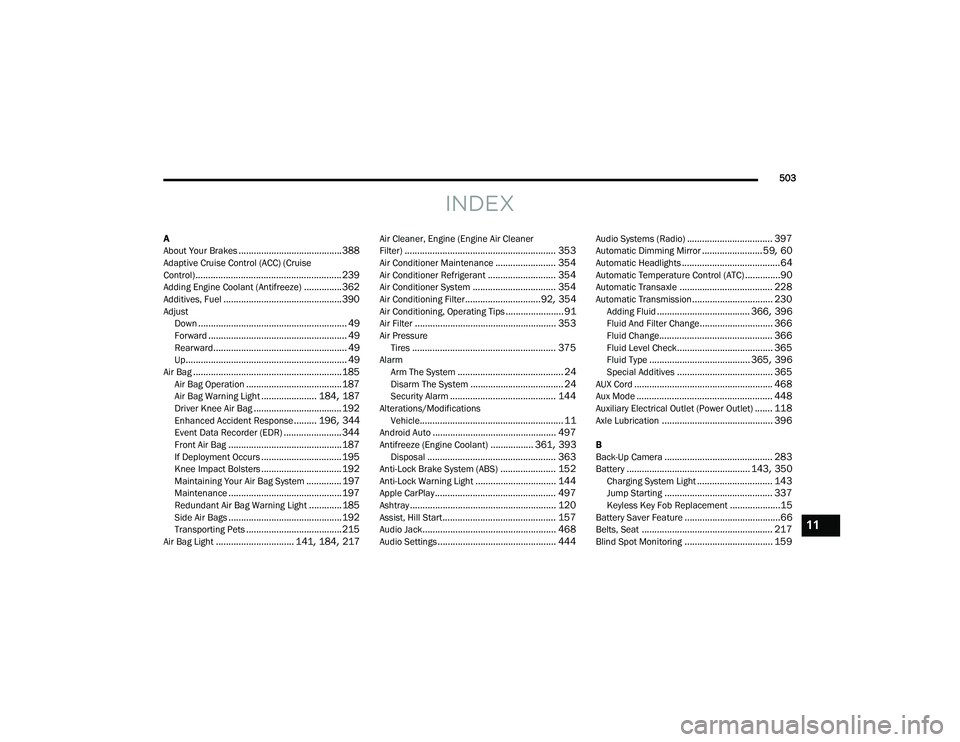
About Your Brakes......................................... 388Adaptive Cruise Control (ACC) (Cruise
Control).......................................................... 239Adding Engine Coolant (Antifreeze)............... 362Additives, Fuel............................................... 390AdjustDown........................................................... 49Forward....................................................... 49Rearward..................................................... 49Up................................................................ 49Air Bag........................................................... 185Air Bag Operation...................................... 187Air Bag Warning Light...................... 184, 187Driver Knee Air Bag................................... 192Enhanced Accident Response......... 196, 344Event Data Recorder (EDR)....................... 344Front Air Bag............................................. 187If Deployment Occurs................................ 195Knee Impact Bolsters................................ 192Maintaining Your Air Bag System.............. 197Maintenance............................................. 197Redundant Air Bag Warning Light.............185Side Air Bags............................................. 192Transporting Pets...................................... 215Air Bag Light............................... 141, 184, 217
Air Cleaner, Engine (Engine Air Cleaner
Filter)............................................................ 353Air Conditioner Maintenance........................ 354Air Conditioner Refrigerant........................... 354Air Conditioner System................................. 354Air Conditioning Filter..............................92, 354Air Conditioning, Operating Tips....................... 91Air Filter........................................................ 353Air PressureTires......................................................... 375AlarmArm The System.......................................... 24Disarm The System..................................... 24Security Alarm.......................................... 144Alterations/ModificationsVehicle......................................................... 11Android Auto................................................. 497Antifreeze (Engine Coolant)................. 361, 393Disposal................................................... 363Anti-Lock Brake System (ABS)...................... 152Anti-Lock Warning Light................................ 144Apple CarPlay................................................ 497Ashtray.......................................................... 120Assist, Hill Start............................................. 157Audio Jack..................................................... 468Audio Settings............................................... 444
Audio Systems (Radio).................................. 397Automatic Dimming Mirror........................59, 60Automatic Headlights.......................................64Automatic Temperature Control (ATC)..............90Automatic Transaxle..................................... 228Automatic Transmission................................ 230Adding Fluid..................................... 366, 396Fluid And Filter Change............................. 366Fluid Change............................................. 366Fluid Level Check...................................... 365Fluid Type........................................ 365, 396Special Additives...................................... 365AUX Cord....................................................... 468Aux Mode...................................................... 448Auxiliary Electrical Outlet (Power Outlet)....... 118Axle Lubrication............................................ 396
B
Back-Up Camera........................................... 283Battery................................................. 143, 350Charging System Light.............................. 143Jump Starting........................................... 337Keyless Key Fob Replacement....................15Battery Saver Feature......................................66Belts, Seat.................................................... 217Blind Spot Monitoring................................... 159
11
20_RU_OM_EN_US_t.book Page 503
Page 510 of 516
508
Loading Vehicle
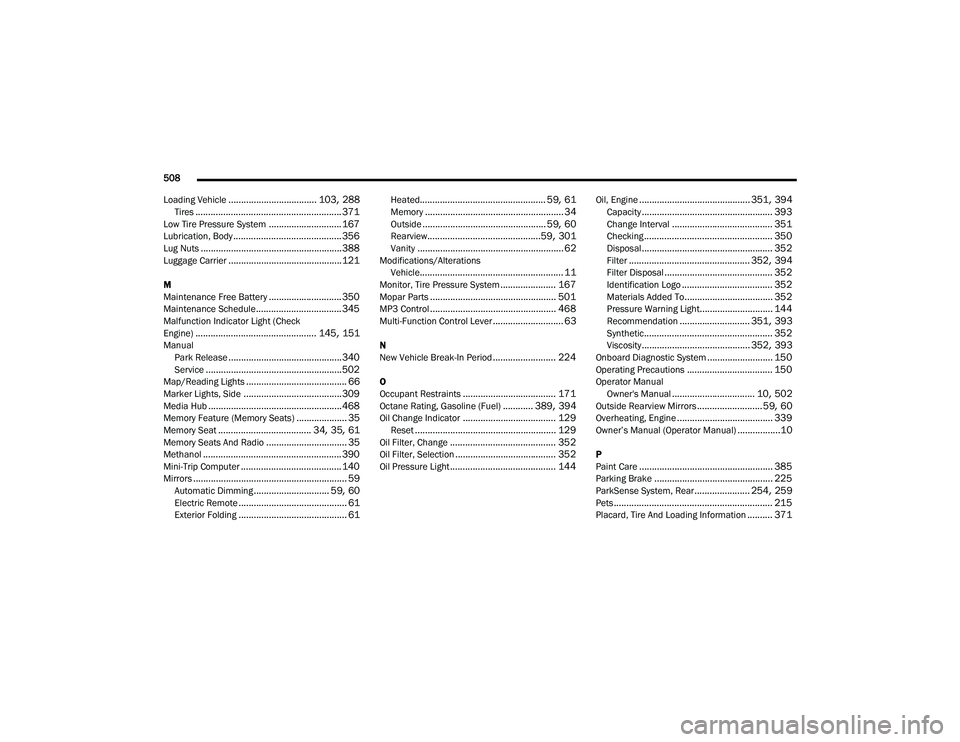
................................... 103, 288Tires.......................................................... 371Low Tire Pressure System............................. 167Lubrication, Body........................................... 356Lug Nuts........................................................ 388Luggage Carrier............................................. 121
M
Maintenance Free Battery............................. 350Maintenance Schedule.................................. 345Malfunction Indicator Light (Check
Engine)................................................ 145, 151Manual Park Release............................................. 340Service...................................................... 502Map/Reading Lights........................................ 66Marker Lights, Side....................................... 309Media Hub..................................................... 468Memory Feature (Memory Seats).................... 35Memory Seat..................................... 34, 35, 61Memory Seats And Radio................................ 35Methanol....................................................... 390Mini-Trip Computer........................................ 140Mirrors............................................................. 59Automatic Dimming.............................. 59, 60Electric Remote........................................... 61Exterior Folding........................................... 61
Heated.................................................. 59, 61Memory....................................................... 34Outside................................................. 59, 60Rearview.............................................59, 301Vanity.......................................................... 62Modifications/AlterationsVehicle......................................................... 11Monitor, Tire Pressure System...................... 167Mopar Parts.................................................. 501MP3 Control.................................................. 468Multi-Function Control Lever............................ 63
N
New Vehicle Break-In Period......................... 224
O
Occupant Restraints..................................... 171Octane Rating, Gasoline (Fuel)............ 389, 394Oil Change Indicator..................................... 129Reset........................................................ 129Oil Filter, Change.......................................... 352Oil Filter, Selection........................................ 352Oil Pressure Light.......................................... 144
Oil, Engine............................................ 351, 394Capacity.................................................... 393Change Interval........................................ 351Checking................................................... 350Disposal.................................................... 352Filter................................................ 352, 394Filter Disposal........................................... 352Identification Logo.................................... 352Materials Added To................................... 352Pressure Warning Light............................. 144Recommendation............................ 351, 393Synthetic................................................... 352Viscosity........................................... 352, 393Onboard Diagnostic System.......................... 150Operating Precautions.................................. 150Operator ManualOwner's Manual................................. 10, 502Outside Rearview Mirrors.......................... 59, 60Overheating, Engine...................................... 339Owner’s Manual (Operator Manual).................10
P
Paint Care..................................................... 385Parking Brake............................................... 225ParkSense System, Rear...................... 254, 259Pets............................................................... 215Placard, Tire And Loading Information.......... 371
20_RU_OM_EN_US_t.book Page 508