bluetooth CHRYSLER VOYAGER 2021 User Guide
[x] Cancel search | Manufacturer: CHRYSLER, Model Year: 2021, Model line: VOYAGER, Model: CHRYSLER VOYAGER 2021Pages: 348, PDF Size: 18.73 MB
Page 177 of 348

MULTIMEDIA175
DISCONNECTING OR DELETING A PHONE OR
AUDIO DEVICE
Uconnect 4 With 7-inch Display
1. Press the Uconnect Phone Pairing or Settings button.
2. Press the Paired Phones/Audio Sources buttons.
3. Press the Settings button located to the right of the device name for a different phone or
audio device than the currently connected
device or press the preferred Connected
Phone from the list.
4. The option’s pop-up will be displayed.
5. Press the Disconnect Device or the Delete Device button on the touchscreen.
6. Press the X to exit out of the Settings screen.
MAKING A PHONE OR AUDIO DEVICE A
FAVORITE
1. On the Paired Phone/Audio Sources screen, press the Settings button located to the right
of the device name for a different phone or
audio device than the currently connected
device or press the preferred “Connected
Phone” from the list.
2. The option’s pop-up will be displayed.
3. Press the Make Favorite button on the touchscreen; you will see the chosen device
move to the top of the list.
4. Press the X to exit out of the Settings screen.
PHONEBOOK DOWNLOAD (AUTOMATIC
PHONEBOOK TRANSFER FROM MOBILE
PHONE) — IF EQUIPPED
If supported by your phone, Uconnect Phone has
the ability to download contact names and number
entries from the mobile phone’s phonebook.
Specific Bluetooth® Phones with Phonebook
Access Profile may support this feature. Your
mobile phone may receive a pop-up asking for
permission for the Uconnect system to access your
messages and contacts. Selecting “Ok” or “Allow”
will sync your contacts with the Uconnect system.
See the Uconnect website,
UconnectPhone.com,
for supported phones.
To call a name from a downloaded mobile
phonebook, follow the procedure in the “Voice
Command” in this section.
Automatic download and update of a
phonebook, if supported, begins as soon as the
Bluetooth® wireless phone connection is made
to the Uconnect Phone, for example, after you
start the vehicle.
A maximum of 5,000 contact names with four
numbers per contact will be downloaded and
updated every time a phone is connected to the
Uconnect Phone.
Depending on the maximum number of entries
downloaded, there may be a short delay before
the latest downloaded names can be used. Until
then, if available, the previously downloaded
phonebook is available for use.
Only the phonebook of the currently connected
mobile phone is accessible.
This downloaded phonebook cannot be edited
or deleted on the Uconnect Phone. These can
only be edited on the mobile phone. The
changes are transferred and updated to
Uconnect Phone on the next phone connection.
5
21_RUV_OM_EN_USC_t.book Page 175
Page 178 of 348
176MULTIMEDIA
MANAGING YOUR FAVORITES — IF EQUIPPED
There are two ways you can add an entry to your
favorites:
1. After loading the mobile phonebook, press
the Favorites button on the touchscreen, and
then press one of the +Add Favorite Contact
buttons that appears on the list.
2. After loading the mobile phonebook, select “Contacts” from the Phone main screen, and
then select the appropriate number. Press the
Down Arrow button or the Settings Gear button
next to the selected number to display the
option’s pop-up. In the pop-up, select “Add to
Favorites”.
NOTE:If the Favorites list is full, you will be asked to
remove an existing favorite.
TO REMOVE A FAVORITE — IF EQUIPPED
1. To remove a Favorite, select “Favorites” from the Phone main screen.
2. Next, select the Down Arrow icon or the Settings Gear icon next to the contact you want
to remove from your favorites. This will bring
up the options for that Favorite contact.
3. Deselect the Star icon to delete the Favorite.
Phone Call Features
The following features can be accessed through
the Uconnect Phone if the feature(s) are available
and supported by Bluetooth® on your mobile
service plan. For example, if your mobile service
plan provides three-way calling, this feature can be
accessed through the Uconnect Phone. Check with
your mobile service provider for the features that
you have.
Listed below are the phone options with Uconnect:
Redial
Dial by pressing in the number
Voice Commands (Dial by Saying a Name, Call
by Saying a Phonebook Name, Redial or Call
Back)
Favorites
Mobile Phonebook
Recent Call Log
SMS Message Viewer
CALL CONTROLS
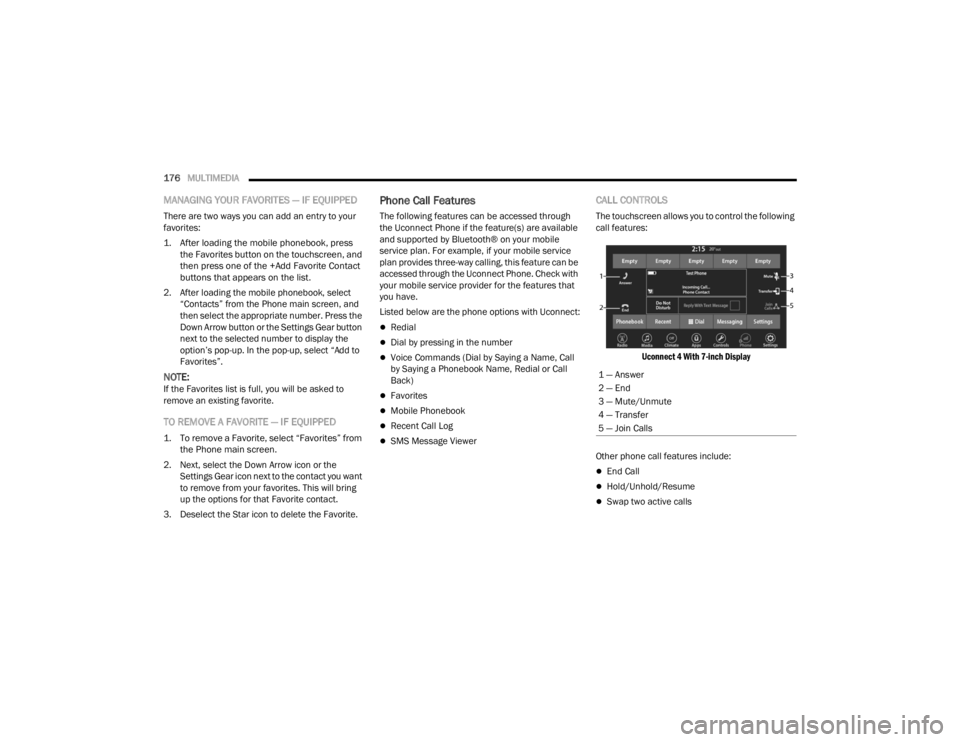
The touchscreen allows you to control the following
call features:
Uconnect 4 With 7-inch Display
Other phone call features include:
End Call
Hold/Unhold/Resume
Swap two active calls
1 — Answer
2 — End
3 — Mute/Unmute
4 — Transfer
5 — Join Calls
21_RUV_OM_EN_USC_t.book Page 176
Page 180 of 348
178MULTIMEDIA
Automatic reply messages can be:
“I am driving right now, I will get back to you
shortly”.
Create a custom auto reply message up to
160 characters.
NOTE:Only the first 25 characters can be seen on the
touchscreen while typing a custom message.
While in Do Not Disturb, Conference Call can be
selected so you can still place a second call
without being interrupted by incoming calls.
NOTE:
Reply with text message is not compatible with
iPhones®.
Auto reply with text message is only available on
phones that support Bluetooth® Message
Access Profile (MAP).
PLACE/RETRIEVE A CALL FROM HOLD
During an active call, press the Hold or Call On Hold
button on the Phone main screen.
MAKING A SECOND CALL WHILE CURRENT
CALL IS IN PROGRESS
You can place a call on hold by pressing the Hold
button on the Phone main screen, then dial a
number from the keypad (if supported by your
mobile phone), recent calls, SMS Inbox or from the
phonebooks.
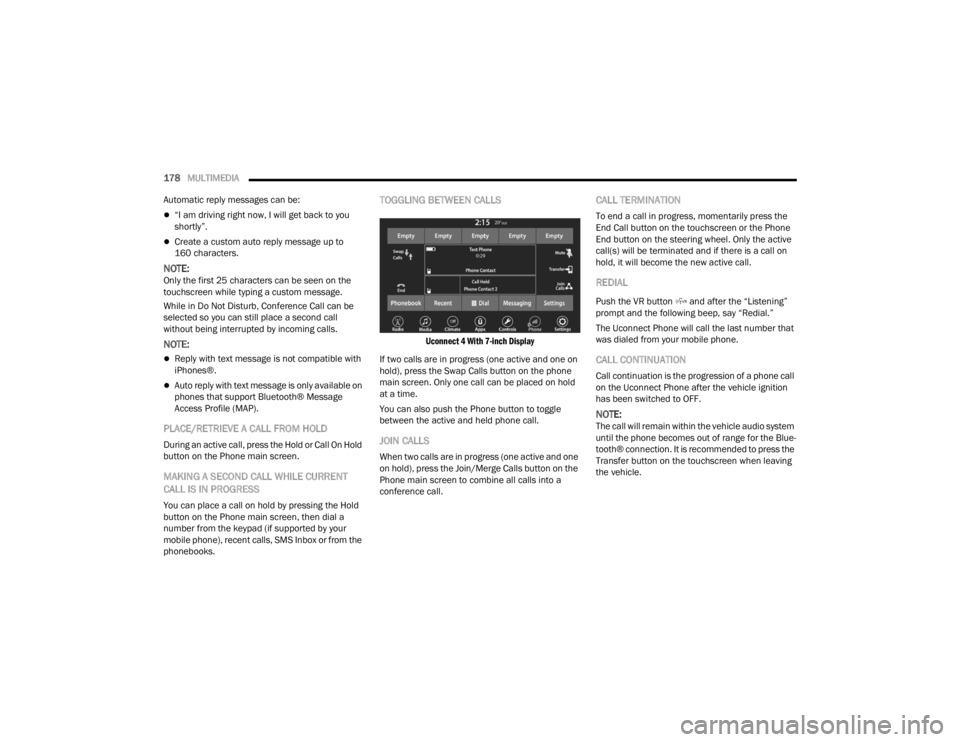
TOGGLING BETWEEN CALLS
Uconnect 4 With 7-inch Display
If two calls are in progress (one active and one on
hold), press the Swap Calls button on the phone
main screen. Only one call can be placed on hold
at a time.
You can also push the Phone button to toggle
between the active and held phone call.
JOIN CALLS
When two calls are in progress (one active and one
on hold), press the Join/Merge Calls button on the
Phone main screen to combine all calls into a
conference call.
CALL TERMINATION
To end a call in progress, momentarily press the
End Call button on the touchscreen or the Phone
End button on the steering wheel. Only the active
call(s) will be terminated and if there is a call on
hold, it will become the new active call.
REDIAL
Push the VR button and after the “Listening”
prompt and the following beep, say “Redial.”
The Uconnect Phone will call the last number that
was dialed from your mobile phone.
CALL CONTINUATION
Call continuation is the progression of a phone call
on the Uconnect Phone after the vehicle ignition
has been switched to OFF.
NOTE:The call will remain within the vehicle audio system
until the phone becomes out of range for the Blue -
tooth® connection. It is recommended to press the
Transfer button on the touchscreen when leaving
the vehicle.
21_RUV_OM_EN_USC_t.book Page 178
Page 182 of 348

180MULTIMEDIA
Push the Phone button and wait for the beep to
say a command. See some examples below:
“ Call John Smith”
“Dial 123 456 7890”
“Redial ” (call previous outgoing phone number)
“Call back ” (call previously answered incoming
phone number)
Did You Know: When providing a Voice Command,
push the Phone button and say “ Call”, then
pronounce the name exactly as it appears in your
phonebook. When a contact has multiple phone
numbers, you can say “ Call John Smith work ”.
Voice Text Reply — If Equipped
Uconnect can announce incoming text messages.
Push the VR button or Phone button and
say:
1. “
Listen
” to have the system read an incoming
text message. (Must have compatible mobile
phone paired to Uconnect system.)
2. “ Reply ” after an incoming text message has
been read.
Listen to the Uconnect prompts. After the
beep, repeat one of the predefined messages
and follow the system prompts.
NOTE:Only use the numbering listed in the provided
table. Otherwise, the system will not transpose the
message. Did You Know:
Your mobile phone must have the
full implementation of the Message Access Profile
(MAP) to take advantage of this feature. For details
about MAP, visit
UconnectPhone.com.
Apple® iPhone® iOS 6 or later supports reading
incoming text messages only. For further
information on how to enable this feature on your
Apple® iPhone®, refer to your iPhone’s® “User
Manual”.
Did You Know: Voice Text Reply is not compatible
with iPhone®, but if your vehicle is equipped with
Siri® Eyes Free, you can use your voice to send a
text message.
Siri® Eyes Free — If Equipped
When used with your Apple® iPhone® connected
to your vehicle via Bluetooth®, Siri lets you use
your voice to send text messages, select media,
place phone calls and much more. Siri uses your
natural language to understand what you mean
and responds back to confirm your requests. The
system is designed to keep your eyes on the road
and your hands on the wheel by letting Siri help you
perform useful tasks.
To enable Siri, push and hold, then release the
Uconnect Voice Recognition (VR) button on the
steering wheel. After you hear a double beep, you
can ask Siri to play podcasts and music, get
directions, read text messages, and many other
useful requests.
PRE-DEFINED VOICE TEXT REPLY
RESPONSES
Yes. Stuck in
traffic. See you later.
No. Start without
me. I’ll be late.
Okay. Where are
you? I will be 5
25, 30, 45,
60> minutes late.
Call me.
Are you there
yet?
I’ll call you later. I need
directions. See you in 5
minutes.
I’m on my way.
Can’t talk right
now.
I’m lost. Thanks.
21_RUV_OM_EN_USC_t.book Page 180
Page 183 of 348
MULTIMEDIA181
BLUETOOTH® COMMUNICATION LINK
Mobile phones may lose connection to the
Uconnect Phone. When this happens, the
connection can generally be re-established by
restarting the mobile phone. Your mobile phone is
recommended to remain in Bluetooth® ON mode.
POWER-UP
After switching the ignition key from OFF to either
the ON/RUN or ACC position, or after a language
change, you must wait at least 15 seconds prior to
using the system
Úpage 331.
ANDROID AUTO™ & APPLE CARPLAY® —
IF EQUIPPED
ANDROID AUTO™
Use this QR code to access your
digital experience.
Android Auto™ is a feature of your
Uconnect system, and your
Android™ 6.0 or higher powered
smartphone with a data plan, that
allows you to project your
smartphone and a number of its apps onto the
touchscreen radio display. Android Auto™ brings
you useful information, and organizes it into simple
cards that appear just when they are needed. Android Auto™ can be used with speech
technology, the steering wheel controls, the knobs
and buttons on your radio faceplate, and the radio
display’s touchscreen to control many of your
apps. To use Android Auto™, perform the following
procedure:
NOTE:Feature availability depends on your carrier and
mobile phone manufacturer. Some Android Auto™
features may or may not be available in every
region and/or language.
1. Download the Android Auto™ app from the
Google Play store on your Android™-powered
smartphone.
2. Connect your Android™-powered smartphone to one of the media USB ports in your vehicle.
If the Android Auto™ app was not downloaded,
the first time you plug your device in the app
begins to download. Your vehicle should be in
PARK the first time you use the app.
NOTE:Be sure to use the factory-provided USB cable that
came with your phone, as aftermarket cables may
not work.
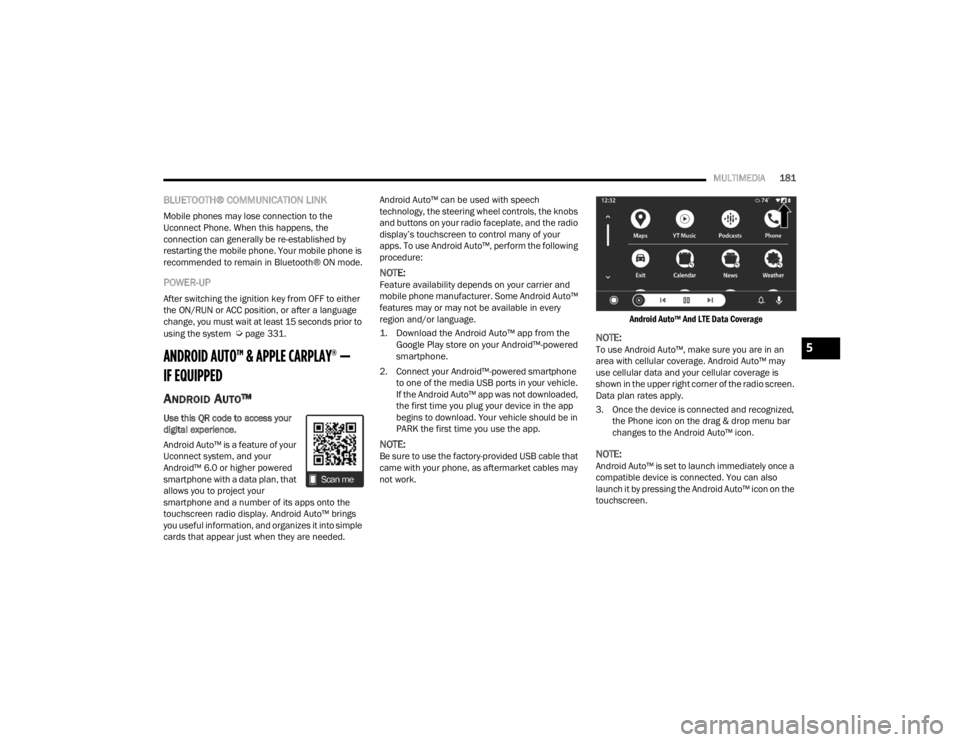
Android Auto™ And LTE Data Coverage
NOTE:To use Android Auto™, make sure you are in an
area with cellular coverage. Android Auto™ may
use cellular data and your cellular coverage is
shown in the upper right corner of the radio screen.
Data plan rates apply.
3. Once the device is connected and recognized,
the Phone icon on the drag & drop menu bar
changes to the Android Auto™ icon.
NOTE:Android Auto™ is set to launch immediately once a
compatible device is connected. You can also
launch it by pressing the Android Auto™ icon on the
touchscreen.
5
21_RUV_OM_EN_USC_t.book Page 181
Page 187 of 348

MULTIMEDIA185
Push and hold the VR button on the steering wheel,
or press and hold the Home button within Apple
CarPlay®, to activate Siri, which recognizes natural
voice commands to use a list of your iPhone’s®
features:
Phone
Music
Messages
Maps — If Equipped
Additional Apps — If Equipped
NOTE:Apple CarPlay® is a trademark of Apple® Inc.
iPhone® is a trademark of Apple® Inc., registered
in the US and other countries. Apple® terms of use
and privacy statements apply.
ANDROID AUTO™ AND APPLE
C
ARPLAY® TIPS AND TRICKS
Android Auto™ And Apple CarPlay® Automatic
Bluetooth® Pairing
After connecting to Android Auto™ or Apple
CarPlay® for the first time and undergoing the
setup procedure, the smartphone pairs to the
Uconnect system via Bluetooth® without any setup
required every time it is within range, if Bluetooth®
is turned on.
NOTE:Apple CarPlay® uses a USB connection while
Android Auto™ uses both USB and Bluetooth®
connections to function. The connected device is
unavailable to other devices when connected
using Android Auto™ or Apple CarPlay®.
Multiple Devices Connecting To The Uconnect
System — If Equipped
It is possible to have multiple devices connected to
the Uconnect system. For example, if using Android
Auto™/Apple CarPlay®, the connected device will
be used to place hands-free phone calls or send
hands-free text messages. However, another
device can also be paired to the Uconnect system,
via Bluetooth®, as an audio source, so the
passenger can stream music.
NOTE:Apple CarPlay® and Android Auto™ can only be
launched from the front and center console USB
ports.
RADIO OPERATION AND MOBILE PHONES
Under certain conditions, the mobile phone being
on in your vehicle can cause erratic or noisy
performance from your radio. This condition may
be lessened or eliminated by repositioning the
mobile phone within the vehicle. This condition is
not harmful to the radio. If your radio performance does not satisfactorily
improve from repositioning the mobile phone, it is
recommended that the volume be turned down or
off during mobile phone operation when not using
the Uconnect system.
REGULATORY AND SAFETY
I
NFORMATION
US/CANADA
Exposure to Radio Frequency Radiation
The radiated output power of the internal wireless
radio is far below the FCC and IC radio frequency
exposure limits. Nevertheless, the wireless radio
will be used in such a manner that the radio is
8 in (20 cm) or further from the human body.
The internal wireless radio operates within
guidelines found in radio frequency safety
standards and recommendations, which reflect
the consensus of the scientific community.
The radio manufacturer believes the internal
wireless radio is safe for use by consumers. The
level of energy emitted is far less than the
electromagnetic energy emitted by wireless
devices such as mobile phones. However, the use
of wireless radios may be restricted in some
situations or environments, such as aboard
airplanes. If you are unsure of restrictions, you are
encouraged to ask for authorization before turning
on the wireless radio
Úpage 331.
5
21_RUV_OM_EN_USC_t.book Page 185
Page 335 of 348

333
Battery Saver Feature
...................................... 55Belts, Seat..................................................... 242Blind Spot Monitoring.................................... 192Bluetooth Connecting To A Particular MobilePhone Or Audio Device After Pairing
..... 174Body Mechanism Lubrication........................ 282B-Pillar Location............................................. 306Brake Assist System...................................... 187Brake Control System, Electronic.................. 187Brake Fluid.................................................... 327Brake System...................................... 289, 322Anti-Lock (ABS).......................................... 322Fluid Check..................................... 289, 327Master Cylinder......................................... 289Parking...................................................... 111Warning Light.............................................. 97Brake/Transmission Interlock....................... 115Brightness, Interior Lights................................ 56Bulb Replacement............................... 299, 301Bulbs, Light................................. 243, 299, 301
C
Camera.......................................................... 127Camera, Rear................................................ 127Capacities, Fluid............................................ 326Caps, FillerFuel........................................................... 129Oil (Engine)................................................ 275Radiator (Coolant Pressure)...................... 288
Car Washes................................................... 319Carbon Monoxide Warning............................ 244CargoVehicle Loading........................................... 82Cargo Area Cover............................................. 82Cargo CompartmentLuggage Carrier........................................... 83Cargo Load Floor.............................................. 82Cargo Tie-Downs.............................................. 82CD................................................................. 168Cellular Phone.............................................. 185Certification Label......................................... 129Chains, Tire................................................... 316Change Oil Indicator........................................ 90Changing A Flat Tire...................................... 249Chart, Tire Sizing........................................... 303Check Engine Light
(Malfunction Indicator Light)......................... 105Checking Your Vehicle For Safety................. 241Checks, Safety.............................................. 241Child Restraint.............................................. 225Child RestraintsBooster Seats........................................... 228Center Seat LATCH................................... 234Child Seat Installation..................... 236, 238How To Stow An unused ALR Seat Belt.... 235Infant And Child Restraints....................... 226Lower Anchors And Tethers For Children......................................... 229Older Children And Child Restraints......... 227
Seating Positions...................................... 229Using The Top Tether Anchorage.............. 239Cigar Lighter.....................................................78Clean Air Gasoline......................................... 324CleaningWheels...................................................... 315Climate Control................................................58Automatic....................................................58Manual........................................................64Rear......................................................62, 68Coat Hook........................................................74Cold Weather Operation................................ 109Compact Spare Tire...................................... 314Computer, Trip/Travel......................................96Contract, Service........................................... 329Controls........................................................ 160Cooling Pressure Cap (Radiator Cap)............ 288Cooling System............................................. 286Adding Coolant (Antifreeze)...................... 287Coolant Level............................................ 288Cooling Capacity....................................... 326Disposal Of Used Coolant......................... 288Drain, Flush, And Refill............................. 286Inspection........................................ 286, 288Points To Remember................................ 288Pressure Cap............................................ 288Radiator Cap............................................. 288Selection Of Coolant (Antifreeze)..... 287, 326Corrosion Protection..................................... 319Cruise Control............................................... 120
11
21_RUV_OM_EN_USC_t.book Page 333
Page 342 of 348

340
Transmission
................................................. 115Automatic........................................ 115, 290Maintenance............................................. 290Transporting Pets.......................................... 242Tread Wear Indicators................................... 311Turn Signals...................................53, 103, 301
U
Uconnect Phone Call Features
.................................. 176Things You Should Know About YourUconnect Phone.................................... 179Uconnect Settings....................................... 18Uconnect 4C/4C Nav With 8.4-Inch
Display........................................................... 142Uconnect Phone.................................. 172, 174Answer Or Ignore An Incoming Call — Call Currently In Progress...................... 177Answer Or Ignore An Incoming Call — No Call Currently In Progress................177Bluetooth Communication Link................. 181Call Continuation....................................... 178Call Controls.............................................. 176Call Termination........................................ 178Cancel Command...................................... 172
Connecting To A Particular Mobile Phone Or Audio Device After Pairing.... 174Help Command......................................... 172Join Calls.................................................. 178Making A Phone Or Audio Device A Favorite............................................. 175Making A Second Call While CurrentCall Is In Progress................................. 178Managing Your Favorites.......................... 176Natural Speech......................................... 172Operation................................................. 171Overview................................................... 170Pair (Link) Uconnect Phone To AMobile Phone....................................... 172Pair A Bluetooth StreamingAudio Device........................................ 174Phonebook Download.............................. 175Place/Retrieve A Call From Hold.............. 178Power-Up.................................................. 181Recent Calls............................................. 177Redial....................................................... 178To Remove A Favorite............................... 176Toggling Between Calls............................. 178Touch-Tone Number Entry........................ 177
Transfer Call To And From Mobile Phone....................................... 179Voice Command....................................... 179Uconnect SettingsCustomer Programmable Features.......18, 22Passive Entry Programming.........................22Uconnect System.......................................... 156Umbrella Holder...............................................72Uniform Tire Quality Grades.......................... 318Unleaded Gasoline........................................ 323Untwisting Procedure, Seat Belt.................... 206USB..................................................................75
V
Vanity Mirrors...................................................48Vehicle Identification Number (VIN).............. 322Vehicle Loading.................................... 129, 306Vehicle Maintenance.................................... 277Vehicle Modifications/Alterations...................... 8Voice Command............................ 47, 182, 184Voice Recognition System (VR)........................47
21_RUV_OM_EN_USC_t.book Page 340