reset CHRYSLER VOYAGER 2021 Owner's Manual
[x] Cancel search | Manufacturer: CHRYSLER, Model Year: 2021, Model line: VOYAGER, Model: CHRYSLER VOYAGER 2021Pages: 348, PDF Size: 18.73 MB
Page 167 of 348

MULTIMEDIA165
Deleting A Preset
A preset can be deleted in the Presets Browse
screen by pressing the Trash Can icon for the
corresponding preset.
Favorites
Press the Favorites button on the Browse screen.
The Favorites menu provides a means to edit the
Favorites list and to configure the Alert Settings,
along with providing a list of Channels currently
airing any of the items in the Favorites list.
You can scroll the Favorites list by pressing the Up
and Down arrows located at the right side of the
screen. Scrolling can also be done by operating the
Tune/Scroll knob as well.
Remove Favorites
Press the Remove Favorites tab at the top of the
screen. Press the Delete All button on the
touchscreen to delete all of the Favorites or press
the Trash Can icon next to the Favorite to be
deleted.
Alert Settings
Press the Alert Settings tab at the top of the
Favorites screen. The Alert Settings menu allows
you to choose from a visual alert or audible and
visual alert when one of your favorites is airing on
any of the SiriusXM® channels. Game Zone
Press the Game Zone button, located at the left of
the Browse screen. This feature provides you with
the ability to select teams, edit the selection, and
set alerts.
On-Air
Press the On-Air tab at the top of the screen. The
On-Air list provides a list of Channels currently
airing any of the items in the Selections list, and
pressing any of the items in the list tunes the radio
to that channel.
Select Team — If Equipped
Press the Select Team button on the touchscreen
to activate the League Scroll list. Press the chosen
league and a scroll list of all teams within the
league will appear, then you can select a team by
pressing the corresponding box. A check mark
appears for all teams that are chosen.
Remove Selection/Trash Can Icon
Press the Remove Selection tab at the top of the
screen. Press the Delete All button on the
touchscreen to delete all of the selections or press
the Trash Can icon next to the selection to be
deleted.
Alert Settings
Press the Alert Setting tab at the top of the screen.
The Alert Settings menu allows you to choose from
“Alert me to on-air games upon start” or “Alert
upon score update” or both when one or more of
your selections is airing on any of the SiriusXM®
channels.
Tune Start
Tune Start begins playing the current song from
the beginning when you tune to a music channel
using one of the 12 presets. This feature occurs
the first time the preset is selected during that
current song.
5
21_RUV_OM_EN_USC_t.book Page 165
Page 168 of 348
166MULTIMEDIA
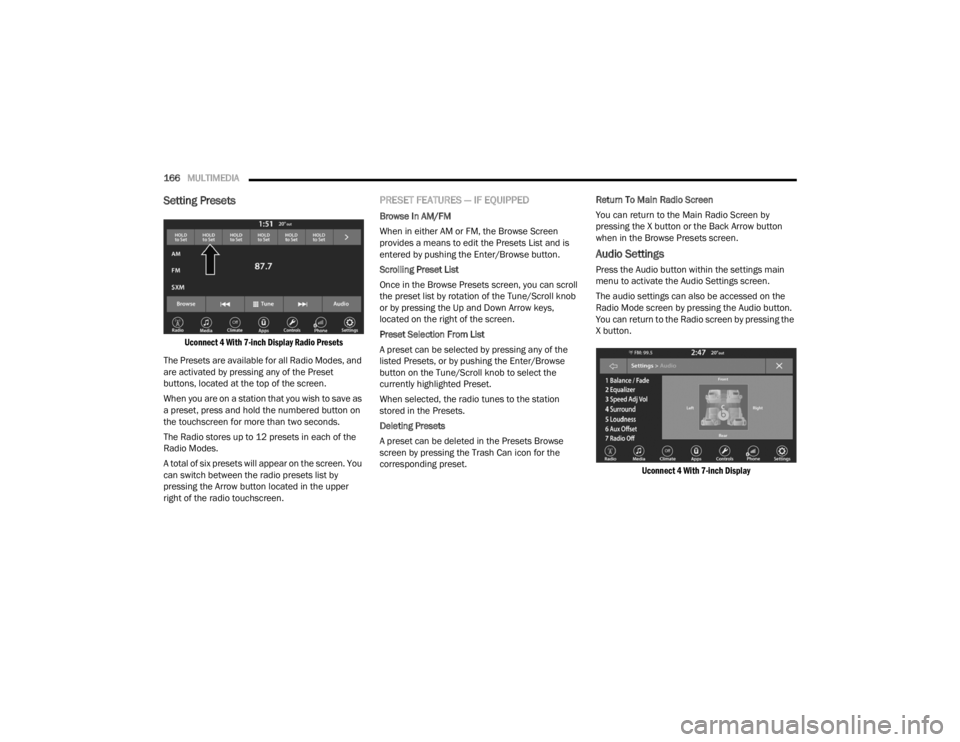
Setting Presets
Uconnect 4 With 7-inch Display Radio Presets
The Presets are available for all Radio Modes, and
are activated by pressing any of the Preset
buttons, located at the top of the screen.
When you are on a station that you wish to save as
a preset, press and hold the numbered button on
the touchscreen for more than two seconds.
The Radio stores up to 12 presets in each of the
Radio Modes.
A total of six presets will appear on the screen. You
can switch between the radio presets list by
pressing the Arrow button located in the upper
right of the radio touchscreen.
PRESET FEATURES — IF EQUIPPED
Browse In AM/FM
When in either AM or FM, the Browse Screen
provides a means to edit the Presets List and is
entered by pushing the Enter/Browse button.
Scrolling Preset List
Once in the Browse Presets screen, you can scroll
the preset list by rotation of the Tune/Scroll knob
or by pressing the Up and Down Arrow keys,
located on the right of the screen.
Preset Selection From List
A preset can be selected by pressing any of the
listed Presets, or by pushing the Enter/Browse
button on the Tune/Scroll knob to select the
currently highlighted Preset.
When selected, the radio tunes to the station
stored in the Presets.
Deleting Presets
A preset can be deleted in the Presets Browse
screen by pressing the Trash Can icon for the
corresponding preset. Return To Main Radio Screen
You can return to the Main Radio Screen by
pressing the X button or the Back Arrow button
when in the Browse Presets screen.
Audio Settings
Press the Audio button within the settings main
menu to activate the Audio Settings screen.
The audio settings can also be accessed on the
Radio Mode screen by pressing the Audio button.
You can return to the Radio screen by pressing the
X button.
Uconnect 4 With 7-inch Display
21_RUV_OM_EN_USC_t.book Page 166
Page 200 of 348
198SAFETY
FCW Limited Warning
If the instrument cluster displays “ACC/FCW
Limited Functionality” or “ACC/FCW Limited
Functionality Clean Front Windshield”
momentarily, there may be a condition that limits
FCW functionality. Although the vehicle is still
drivable under normal conditions, the active
braking may not be fully available. Once the
condition that limited the system performance is
no longer present, the system will return to its full
performance state. If the problem persists, see an
authorized dealer.
Service FCW Warning
If the system turns off, and the instrument cluster
displays:
ACC/FCW Unavailable Service Required
Cruise/FCW Unavailable Service Required
This indicates there is an internal system fault.
Although the vehicle is still drivable under normal
conditions, have the system checked by an
authorized dealer.
Pedestrian Emergency Braking (PEB) —
If Equipped
The Pedestrian Emergency Braking (PEB) is a
subsystem of the FCW system that provides the
driver with audible and visual warnings in the
instrument cluster display, and may apply
automatic braking when it detects a potential
frontal collision with a pedestrian.
If a PEB event begins at a speed below 37 mph
(60 km/h), the system may provide braking to
mitigate the potential collision with a pedestrian. If
the PEB event stops the vehicle completely, the
system will hold the vehicle at a standstill for two
seconds and then release the brakes. When the
system determines a collision with the pedestrian
in front of you is no longer probable, the warning
message will be deactivated.
The minimum speed for PEB activation is 3 mph
(5 km/h). Turning PEB On Or Off
NOTE:The default status of PEB is “On.” This allows the
system to warn you of a possible frontal collision
with the pedestrian.
The PEB button is located in the Uconnect display
in the Controls settings
Úpage 142.
To turn the PEB system off, push the Pedestrian
Emergency Braking button once.
To turn the PEB system back on, push the
Pedestrian Emergency Braking button again.
Changing the PEB status to “Off” deactivates the
system, so no warning or active braking will be
available in case of a possible frontal collision with
the pedestrian.
NOTE:The PEB system will NOT retain the last setting
selected by the driver after ignition shut down. The
system will reset to the default setting when the
vehicle is restarted.
WARNING!
Pedestrian Emergency Braking (PEB) is not
intended to avoid a collision on its own, nor can
PEB detect every type of potential collision with
a pedestrian. The driver has the responsibility to
avoid a collision by controlling the vehicle via
braking and steering. Failure to follow this
warning could lead to serious injury or death.
21_RUV_OM_EN_USC_t.book Page 198
Page 226 of 348
224SAFETY
(Continued)
Cut off battery power to the:
Engine
Electric Motor (if equipped)
Electric power steering
Brake booster
Electric park brake
Automatic transmission gear selector
Horn
Front wiper
Headlamp washer pump
NOTE:After an accident, remember to cycle the ignition to
the STOP (OFF/LOCK) position and remove the key
from the ignition switch to avoid draining the
battery. Carefully check the vehicle for fuel leaks in
the engine compartment and on the ground near
the engine compartment and fuel tank before
resetting the system and starting the engine. If
there are no fuel leaks or damage to the vehicle
electrical devices (e.g. headlights) after an
accident, reset the system by following the
procedure described below. If you have any doubt,
contact an authorized dealer.
Enhanced Accident Response System
Reset Procedure
In order to reset the Enhanced Accident Response
System functions after an event, the ignition switch
must be changed from ignition START or ON/RUN
to ignition OFF. Carefully check the vehicle for fuel
leaks in the engine compartment and on the
ground near the engine compartment and fuel
tank before resetting the system and starting the
engine.
After an accident, if the vehicle will not start after
performing the reset procedure, the vehicle must
be towed to an authorized dealer to be inspected
and to have the Enhanced Accident Response
System reset.
Maintaining Your Air Bag System Event Data Recorder (EDR)
This vehicle is equipped with an event data
recorder (EDR). The main purpose of an EDR is to
record, in certain crash or near crash-like
situations, such as an air bag deployment or hitting
a road obstacle, data that will assist in
understanding how a vehicle’s systems performed.
WARNING!
Modifications to any part of the air bag system
could cause it to fail when you need it. You
could be injured if the air bag system is not
there to protect you. Do not modify the compo-
nents or wiring, including adding any kind of
badges or stickers to the steering wheel hub
trim cover or the upper passenger side of the
instrument panel. Do not modify the front
fascia/bumper, vehicle body structure, or add
aftermarket side steps or running boards.
It is dangerous to try to repair any part of the
air bag system yourself. Be sure to tell anyone
who works on your vehicle that it has an air
bag system.
Do not attempt to modify any part of your air
bag system. The air bag may inflate acciden -
tally or may not function properly if modifica -
tions are made. Take your vehicle to an
authorized dealer for any air bag system
service. If your seat, including your trim cover
and cushion, needs to be serviced in any way
(including removal or loosening/tightening of
seat attachment bolts), take the vehicle to an
authorized dealer. Only manufacturer
approved seat accessories may be used. If it is
necessary to modify the air bag system for
persons with disabilities, contact an autho -
rized dealer.
WARNING!
21_RUV_OM_EN_USC_t.book Page 224
Page 269 of 348

IN CASE OF EMERGENCY267
To Reset The Manual Park Release:
1. Apply firm pressure to the brake pedal while seated in the driver’s seat.
2. Pull the tether strap out again, then release it.
3. Allow the tether to retract with the lever back to its original position.
4. Verify that the transmission is in PARK (P).
5. Confirm that the tether has retracted fully and re-install the access cover. If the
access cover cannot be re-installed,
repeat steps 1 through 4.
FREEING A STUCK VEHICLE
If your vehicle becomes stuck in mud, sand or
snow, it can often be moved using a rocking
motion. Turn the steering wheel right and left to
clear the area around the front wheels. Then shift
back and forth between DRIVE (D) and REVERSE
(R) while gently pressing the accelerator.
NOTE:Shifts between DRIVE and REVERSE can only be
achieved at wheel speeds of 5 mph (8 km/h) or
less. Whenever the transmission remains in
NEUTRAL (N) for more than two seconds, you must
press the brake pedal to engage DRIVE or
REVERSE. Use the least amount of accelerator pedal
pressure that will maintain the rocking motion
without spinning the wheels or racing the engine.
NOTE:Push the ESC OFF switch to place the Electronic
Stability Control (ESC) system in “Partial Off”
mode, before rocking the vehicle
Úpage 188.
Once the vehicle has been freed, push the ESC OFF
switch again to restore “ESC On” mode.
WARNING!
Fast spinning tires can be dangerous. Forces
generated by excessive wheel speeds may
cause damage, or even failure, of the axle and
tires. A tire could explode and injure someone.
Do not spin your vehicle's wheels faster than
30 mph (48 km/h) or for longer than 30
seconds continuously without stopping when
you are stuck and do not let anyone near a
spinning wheel, no matter what the speed.
CAUTION!
Racing the engine or spinning the wheels may
lead to transmission overheating and failure.
Allow the engine to idle with the transmission
in NEUTRAL for at least one minute after every
five rocking-motion cycles. This will minimize
overheating and reduce the risk of transmis -
sion failure during prolonged efforts to free a
stuck vehicle.
When “rocking” a stuck vehicle by shifting
between DRIVE and REVERSE, do not spin the
wheels faster than 15 mph (24 km/h), or
drivetrain damage may result.
Revving the engine or spinning the wheels too
fast may lead to transmission overheating and
failure. It can also damage the tires. Do not
spin the wheels above 30 mph (48 km/h)
while in gear (no transmission shifting occur -
ring).
7
21_RUV_OM_EN_USC_t.book Page 267
Page 273 of 348
271
SERVICING AND MAINTENANCE
SCHEDULED SERVICING
Your vehicle is equipped with an automatic oil
change indicator system. The oil change indicator
system will remind you that it is time to take your
vehicle in for scheduled maintenance.
Based on engine operation conditions, the oil
change indicator message will illuminate. This
means that service is required for your vehicle.
Operating conditions such as frequent short-trips,
trailer tow, extremely hot or cold ambient
temperatures will influence when the “Oil Change
Required” message is displayed. Have your vehicle
serviced as soon as possible, within the next
500 miles (805 km).An authorized dealer will reset the oil change
indicator message after completing the scheduled
oil change. If a scheduled oil change is performed
by someone other than an authorized dealer
Úpage 89.
NOTE:Under no circumstances should oil change
intervals exceed 10,000 miles (16,000 km),
12 months or 350 hours of engine run time,
whichever comes first. The 350 hours of engine
run or idle time is generally only a concern for fleet
customers.
Once A Month Or Before A Long Trip:
Check engine oil level
Check windshield washer fluid level
Check tire pressure and look for unusual wear
or damage. Rotate tires at the first sign of irreg
-
ular wear, even if it occurs before the oil indi -
cator system turns on
Check the fluid levels of the coolant reservoir
and brake master cylinder, fill as needed
Check function of all interior and exterior lights
8
21_RUV_OM_EN_USC_t.book Page 271
Page 292 of 348
290SERVICING AND MAINTENANCE
(Continued)
AUTOMATIC TRANSMISSION
Special Additives
The manufacturer strongly recommends against
using any special additives in the transmission.
Automatic Transmission Fluid (ATF) is an
engineered product and its performance may be
impaired by supplemental additives. Therefore, do
not add any fluid additives to the transmission.
Avoid using transmission sealers as they may
adversely affect seals.
Fluid Level Check
The fluid level is preset at the factory and does not
require adjustment under normal operating
conditions. Routine fluid level checks are not
required; therefore the transmission has no
dipstick. An authorized dealer can check your
transmission fluid level using special service tools. If you notice fluid leakage or transmission
malfunction, visit an authorized dealer
immediately to have the transmission fluid level
checked. Operating the vehicle with an improper
fluid level can cause severe transmission damage.
Fluid And Filter Changes
Under normal operating conditions, the fluid
installed at the factory will provide satisfactory
lubrication for the life of the vehicle.
Routine fluid and filter changes are not required.
However, change the fluid and filter if the fluid
becomes contaminated (with water, etc.), or if the
transmission is disassembled for any reason.
Selection Of Lubricant
It is important to use the proper transmission fluid
to ensure optimum transmission performance and
life. Use only the manufacturer specified
transmission fluid
Úpage 327. It is important to
maintain the transmission fluid at the correct level
using the recommended fluid.
NOTE:No chemical flushes should be used in any trans -
mission; only the approved lubricant should be
used.
FUSES
General Information
CAUTION!
Do not use chemical flushes in your
transmission as the chemicals can damage your
transmission components. Such damage is not
covered by the New Vehicle Limited Warranty.
CAUTION!
If a transmission fluid leak occurs, visit an
authorized dealer immediately. Severe
transmission damage may occur. An authorized
dealer has the proper tools to adjust the fluid
level accurately.
CAUTION!
Using a transmission fluid other than
manufacturer recommended fluid may cause
deterioration in transmission shift quality and/or
torque converter shudder
Úpage 327.
WARNING!
When replacing a blown fuse, always use an
appropriate replacement fuse with the same
amp rating as the original fuse. Never replace
a fuse with another fuse of higher amp rating.
Never replace a blown fuse with metal wires or
any other material. Do not place a fuse inside
a circuit breaker cavity or vice versa. Failure to
use proper fuses may result in serious
personal injury, fire and/or property damage.
Before replacing a fuse, make sure that the
ignition is off and that all the other services
are switched off and/or disengaged.
21_RUV_OM_EN_USC_t.book Page 290
Page 336 of 348

334
Cruise Light
................................................... 103Customer Assistance..................................... 328Cybersecurity................................................. 141
D
Daytime Running Lights................................... 53Dealer Service............................................... 277Defroster, Windshield.................................... 242De-Icer, Remote Start...................................... 19Delay (Intermittent) Wipers.............................. 57Deleting A Phone........................................... 175Diagnostic System, Onboard......................... 104Dimmer Switch Headlight..................................................... 53DipsticksOil (Engine)................................................ 276Disable Vehicle Towing.................................. 268Disc Drive...................................................... 168Disconnecting................................................ 175DisposalAntifreeze (Engine Coolant)....................... 288Disturb........................................................... 177Door Ajar................................................... 98, 99Door Ajar Light.......................................... 98, 99Drag & Drop................................................... 158Driver Memory Presets.................................. 166Driver’s Seat Back Tilt..................................... 28DrivingThrough Flowing, Rising, Or Shallow Standing Water
........................ 140
E
Electric Brake Control System....................... 187Anti-Lock Brake System............................ 186Traction Control System........................... 191Electric Parking Brake................................... 111Electric Remote Mirrors................................... 49Electronic Stability Control (ESC).................. 188Electronic Throttle Control Warning Light......... 98Emergency Braking....................................... 198Emergency Gas Can Refueling...................... 264Emergency, In Case OfHazard Warning Flasher........................... 245Jacking............................................ 249, 251Jump Starting........................................... 262Overheating.............................................. 265Towing...................................................... 268Emission Control System Maintenance........ 105Engine........................................................... 275Air Cleaner................................................ 278Block Heater............................................. 110Break-In Recommendations..................... 110Checking Oil Level.................................... 276Compartment........................................... 275Compartment Identification...................... 275Coolant (Antifreeze).................................. 326Cooling..................................................... 286Exhaust Gas Caution................................ 244Fails To Start............................................ 109Flooded, Starting...................................... 109Fuel Requirements................................... 323
Oil.................................................... 277, 326Oil Filler Cap............................................. 275Oil Filter.................................................... 278Oil Selection..................................... 277, 326Oil Synthetic.............................................. 278Overheating.............................................. 265Starting..................................................... 106Enhanced Accident Response
Feature................................................ 223, 270Ethanol.......................................................... 324Exhaust Gas Cautions................................... 244Exhaust System................................... 244, 285Exterior Lighting..................................... 53, 301Exterior Lights...................... 53, 243, 299, 301
F
FiltersAir Cleaner
................................................ 278Air Conditioning................................. 70, 280Engine Oil........................................ 278, 326Engine Oil Disposal................................... 278FlashersHazard Warning........................................ 245Turn Signals..................... 53, 103, 243, 301Flash-To-Pass............................................ 53, 54Flat Tire Changing.......................249, 301, 313Flat Tire Stowage........................ 256, 301, 313Flooded Engine Starting................................ 109Fluid Capacities............................................ 326Fluid Leaks.................................................... 243
21_RUV_OM_EN_USC_t.book Page 334
Page 339 of 348

337
Modifications/Alterations Vehicle
.......................................................... 8Monitor, Tire Pressure System....................... 199Mopar Parts................................................... 330MP3 Control.................................................... 75Multi-Function Control Lever............................ 53
N
New Vehicle Break-In Period.......................... 110
O
Occupant Restraints...................................... 202Octane Rating, Gasoline (Fuel)............ 323, 326Oil Change Indicator........................................ 90Reset........................................................... 90Oil Filter, Change........................................... 278Oil Filter, Selection......................................... 278Oil Pressure Light............................................ 99Oil, Engine........................................... 277, 326Capacity.................................................... 326Checking................................................... 276Dipstick..................................................... 276Disposal.................................................... 278Filter................................................ 278, 326Filter Disposal........................................... 278Identification Logo..................................... 278Materials Added To................................... 278Pressure Warning Light............................... 99Recommendation............................ 277, 326Synthetic................................................... 278
Viscosity................................................... 326Onboard Diagnostic System.......................... 104Operating Precautions.................................. 104Operator ManualOwner's Manual........................................ 331Outside Rearview Mirrors................................ 48Overheating, Engine...................................... 265
P
Paint Care..................................................... 319Pair (Link) Uconnect Phone To A
Mobile Phone
b
........................................ 172Parking Brake............................................... 111ParkSense System, Rear.............................. 122Passive Entry................................................... 22Personalized Main Menu Bar........................ 158Pets.............................................................. 242Phone Mode................................................. 170Placard, Tire And Loading Information.......... 306PowerBrakes...................................................... 322Mirrors......................................................... 49Outlet (Auxiliary Electrical Outlet)................ 76Seats........................................................... 41Steering.................................................... 118Power SeatsDown........................................................... 41Forward....................................................... 41Rearward..................................................... 41Up................................................................ 41
Power Sliding DoorOn / Off Switch.....................................24, 81Pregnant Women And Seat Belts.................. 210Preparation For Jacking................................ 249Presets.......................................................... 166PretensionersSeat Belts................................................. 210
R
Radial Ply Tires.............................................. 310Radiator Cap (Coolant Pressure Cap)............ 288RadioPresets..................................................... 166Radio Controls.............................................. 160Radio Mode................................................... 160Radio Operation................................... 160, 185Radio Remote Controls................................. 159Rear Air Conditioning................................ 62, 68Rear Cross Path............................................ 194Rear ParkSense System................................ 122Rear Seat Removal..........................................30Rear View.........................................................48Reclining Front Seats.......................................29Recreational Towing...................................... 138Reformulated Gasoline................................. 324Refrigerant.................................................... 280Release, Hood..................................................80Reminder, Lights On........................................53Reminder, Seat Belt...................................... 203
11
21_RUV_OM_EN_USC_t.book Page 337
Page 341 of 348

339
Spare Tire Changing
...................................... 249Spare Tire Stowage....................................... 256Spare Tires........................ 250, 313, 314, 315Specifications Oil.............................................................. 326Speed ControlCancel....................................................... 122Resume..................................................... 122Starting................................................... 16, 106Button......................................................... 15Cold Weather............................................ 109Engine Fails To Start................................. 109Remote....................................................... 16Starting And Operating.................................. 106Starting Procedures....................................... 106Steering......................................................... 118Tilt Column.................................................. 27Wheel, Heated............................................. 27Wheel, Tilt................................................... 27Steering Wheel Audio Controls...................... 159Steering Wheel Mounted Sound System.......159Store Radio Presets....................................... 166Stow ‘n Go (Fold In Floor) Seats....................... 37Stuck, Freeing............................................... 267Sunglasses Storage......................................... 71Supplemental Restraint System – Air Bag..... 214Sway Control, Trailer...................................... 191Symbol Glossary................................................ 8Synthetic Engine Oil....................................... 278System, Remote Starting................................. 16
T
Telescoping Steering Column.......................... 27Temperature Control, Automatic (ATC)............. 69Tie Down Hooks, Cargo.................................... 82Tilt Steering Column........................................ 27Time DelayHeadlight..................................................... 53Tire And Loading Information Placard........... 306Tire Markings................................................ 302Tire Safety Information................................. 301Tire Service Kit.............................................. 257Tire Stowage................................................. 256Tires......................... 243, 309, 313, 314, 318Aging (Life Of Tires).................................. 312Air Pressure.............................................. 309Chains...................................................... 316Changing.................................................. 249Compact Spare......................................... 314General Information............... 309, 313, 314High Speed............................................... 310Inflation Pressure..................................... 310Jacking............................................ 249, 251Life Of Tires.............................................. 312Load Capacity........................................... 306Pressure Monitoring System(TPMS)................................. 91, 101, 199Quality Grading......................................... 318Radial....................................................... 310Replacement............................................ 312Rotation.................................................... 317
Safety.............................................. 301, 309Sizes......................................................... 303Snow Tires................................................ 313Spare Tires................... 250, 313, 314, 315Spinning................................................... 311Trailer Towing........................................... 136Tread Wear Indicators.............................. 311Wheel Nut Torque..................................... 322To Open Hood..................................................80Tongue Weight/Trailer Weight...................... 134Towing........................................................... 130Disabled Vehicle....................................... 268Guide........................................................ 132Recreational............................................. 138Weight...................................................... 132Towing Behind A Motorhome........................ 138Traction......................................................... 139Traction Control............................................ 191Trailer Sway Control (TSC)............................. 191Trailer Towing................................................ 130Hitches..................................................... 132Minimum Requirements........................... 135Tips........................................................... 137Trailer And Tongue Weight........................ 134Wiring....................................................... 136Trailer Towing Guide..................................... 132Trailer Weight................................................ 132TransaxleAutomatic................................................. 113Operation.................................................. 113
11
21_RUV_OM_EN_USC_t.book Page 339