phone CHRYSLER VOYAGER 2022 Owners Manual
[x] Cancel search | Manufacturer: CHRYSLER, Model Year: 2022, Model line: VOYAGER, Model: CHRYSLER VOYAGER 2022Pages: 316, PDF Size: 17.41 MB
Page 2 of 316
The driver’s primary responsibility is the safe operation of the vehicle. Driving while distracted can result in loss of vehicle control, resulting in
an accident and personal injury. FCA US LLC strongly recommends that the driver use extreme caution when using any device or feature that
may take their attention off the road. Use of any electrical devices, such as cellular telephones, computers, portable radios, vehicle navigation
or other devices, by the driver while the vehicle is moving is dangerous and could lead to a serious accident. Texting while driving is also
dangerous and should never be done while the vehicle is moving. If you find yourself unable to devote your full attention to vehicle operation,
pull off the road to a safe location and stop your vehicle. Some states or provinces prohibit the use of cellular telephones or texting while
driving. It is always the driver’s responsibility to comply with all local laws.
This Owner’s Manual has been prepared to help you get acquainted with your new Chrysler brand vehicle and to provide a convenient
reference source for common questions.
Not all features shown in this manual may apply to your vehicle. For additional information, visit mopar.com/om (U.S.), owners.mopar.ca
(Canada) or your local Chrysler brand dealer.
DRIVING AND ALCOHOL
Drunk driving is one of the most frequent causes of accidents. Your driving ability can be seriously impaired with blood alcohol levels far
below the legal minimum. If you are drinking, don’t drive. Ride with a designated non-drinking driver, call a cab, a rideshare, a friend, or use
public transportation.
WARNING
Driving after drinking can lead to an accident. Your perceptions are less sharp, your reflexes are slower and your judgment is impaired
when you have been drinking. Never drink and then drive.
WARNING: Operating, servicing and maintaining a passenger vehicle or off-highway motor vehicle can
expose you to chemicals including engine exhaust, carbon monoxide, phthalates, and lead, which are known to
the State of California to cause cancer and birth defects or other reproductive harm. To minimize exposure,
avoid breathing exhaust, do not idle the engine except as necessary, service your vehicle in a well-ventilated area
and wear gloves or wash your hands frequently when servicing your vehicle. For more information go to
www.P65Warnings.ca.gov/passenger-vehicle.
This Owner’s Manual illustrates and describes the operation of features and equipment that are either standard or optional on this vehicle.
This manual may also include a description of features and equipment that are no longer available or were not ordered on this vehicle. Please
disregard any features and equipment described in this manual that are not on this vehicle. FCA US LLC reserves the right to make changes in
design and specifications, and/or make additions to or improvements to its products without imposing any obligation upon itself to install them
on products previously manufactured.
With respect to any vehicles sold in Canada, the name FCA US LLC shall be deemed to be deleted and the name FCA Canada Inc. used in
substitution therefore.
This Owner’s Manual is intended to familiarize you with the important features of your vehicle. Your most up-to-date Owner’s Manual, Navigation/
Uconnect manuals and Warranty Booklet can be found by visiting the website on the back cover.
U.S. Residents: If you are the first registered retail owner of your vehicle, you may obtain a complimentary printed copy of the Warranty
Booklet by calling 1-800-247-9753 or by contacting your dealer. Replacement kits can be purchased by visiting www.techauthority.com.
Canadian Residents: If you are the first registered retail owner of your vehicle, you may obtain a complimentary printed copy of the Warranty
Booklet or purchase a replacement kit by calling 1-800-387-1143 or by contacting your dealer.
Page 6 of 316
4
STARTING AND OPERATING
STARTING THE ENGINE ....................................... 104
Normal Starting ............................................. 104
AutoPark ........................................................ 105Cold Weather Operation
(Below –22°F Or −30°C) ............................ 107
After Starting — Warming Up The Engine..... 107
If Engine Fails To Start ................................. 107To Turn Off The Engine Using ENGINE
START/STOP Button ...................................... 108
ENGINE BLOCK HEATER — IF EQUIPPED .......... 108
ENGINE BREAK-IN RECOMMENDATIONS ......... 108
PARKING BRAKE ................................................. 109
Electric Park Brake (EPB) ............................. 109
AUTOMATIC TRANSMISSION.............................. 111
Ignition Park Interlock ................................... 112Brake/Transmission Shift Interlock (BTSI)
System ........................................................... 1139-Speed Automatic Transmission ............... 113
Gear Ranges .................................................. 113
ACTIVE NOISE CANCELLATION .......................... 116
POWER STEERING ............................................... 116 STOP/START SYSTEM — IF EQUIPPED ............. 117
Autostop Mode .............................................. 117
Possible Reasons The Engine Does Not
Autostop......................................................... 117
To Start The Engine While In Auto
Stop/Start ...................................................... 118
To Manually Turn Off The
Stop/Start System......................................... 118
To Manually Turn On The Stop/Start
System ........................................................... 119
System Malfunction ...................................... 119
CRUISE CONTROL SYSTEMS —
IF EQUIPPED ........................................................ 119
Cruise Control ................................................ 119
PARKSENSE REAR PARK ASSIST —
IF EQUIPPED ....................................................... 121
ParkSense Sensors ....................................... 122
ParkSense Warning Display ......................... 122
ParkSense Display ........................................ 122Enabling And Disabling ParkSense .............. 125Service The ParkSense Rear Park
Assist System ................................................ 125Cleaning The ParkSense System ................. 125
ParkSense System Usage Precautions........ 125
PARKVIEW REAR BACK UP CAMERA............... 126
REFUELING THE VEHICLE ................................... 127
VEHICLE LOADING .............................................. 128 Certification Label ......................................... 128 TRAILER TOWING ................................................ 129
Common Towing Definitions......................... 130
Trailer Hitch Classification............................ 131
Trailer Towing Weights
(Maximum Trailer Weight Ratings)............... 132
Vehicle Loading Chart ................................... 132
Trailer And Tongue Weight .......................... 134
Towing Requirements .................................. 134Towing Tips ................................................... 136
RECREATIONAL TOWING
(BEHIND MOTORHOME) ...................................... 137
Towing This Vehicle Behind Another
Vehicle ........................................................... 137
DRIVING TIPS ....................................................... 138
Driving On Slippery Surfaces ........................ 138Driving Through Water .................................. 138
MULTIMEDIA
UCONNECT SYSTEMS .......................................... 140
CYBERSECURITY .................................................. 140
UCONNECT SETTINGS ......................................... 141
Customer Programmable Features ............. 141
RADIO OPERATION AND MOBILE PHONES...... 157
Regulatory And Safety Information .............. 157
22_RUVG_OM_EN_USC_t.book Page 4
Page 14 of 316
12
GETTING TO KNOW YOUR VEHICLE
KEYS
KEY FOB
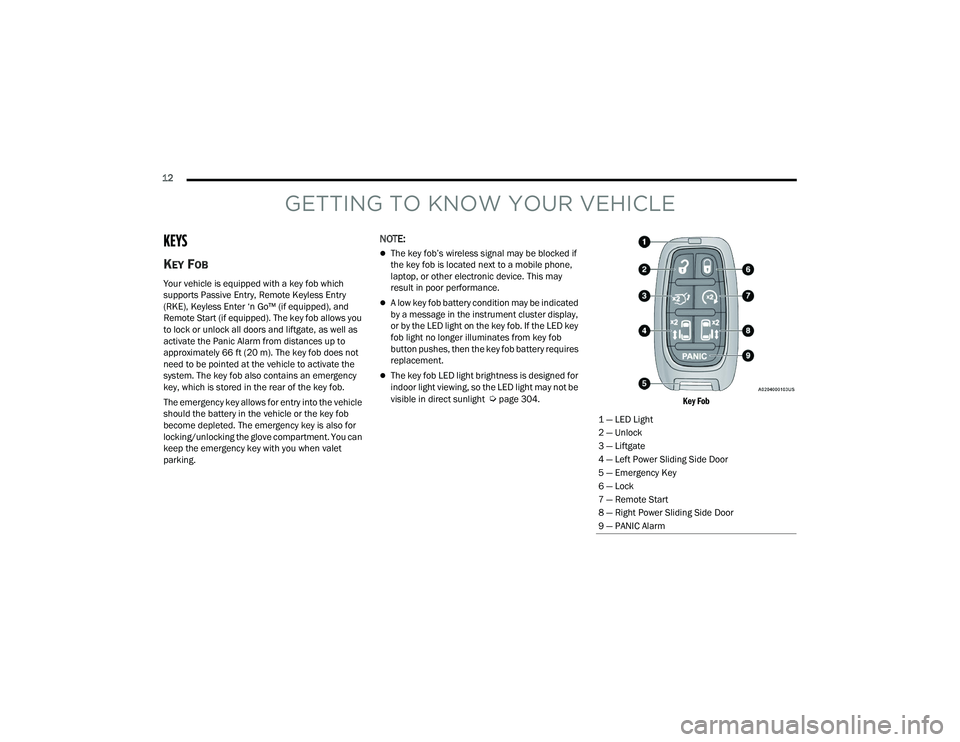
Your vehicle is equipped with a key fob which
supports Passive Entry, Remote Keyless Entry
(RKE), Keyless Enter ‘n Go™ (if equipped), and
Remote Start (if equipped). The key fob allows you
to lock or unlock all doors and liftgate, as well as
activate the Panic Alarm from distances up to
approximately 66 ft (20 m). The key fob does not need to be pointed at the vehicle to activate the
system. The key fob also contains an emergency
key, which is stored in the rear of the key fob.
The emergency key allows for entry into the vehicle
should the battery in the vehicle or the key fob
become depleted. The emergency key is also for
locking/unlocking the glove compartment. You can
keep the emergency key with you when valet
parking.
NOTE:
The key fob’s wireless signal may be blocked if
the key fob is located next to a mobile phone,
laptop, or other electronic device. This may
result in poor performance.
A low key fob battery condition may be indicated
by a message in the instrument cluster display,
or by the LED light on the key fob. If the LED key
fob light no longer illuminates from key fob
button pushes, then the key fob battery requires
replacement.
The key fob LED light brightness is designed for
indoor light viewing, so the LED light may not be
visible in direct sunlight
Úpage 304.
Key Fob
1 — LED Light
2 — Unlock
3 — Liftgate
4 — Left Power Sliding Side Door
5 — Emergency Key
6 — Lock
7 — Remote Start
8 — Right Power Sliding Side Door
9 — PANIC Alarm
22_RUVG_OM_EN_USC_t.book Page 12
Page 18 of 316
16GETTING TO KNOW YOUR VEHICLE
(Continued)
The push button ignition can be placed in the
following modes:
OFF
The engine is stopped
Some electrical devices
(e.g. power locks, alarm, etc.) are still available
ACC
The engine is stopped
Some electrical devices are available
(e.g. power windows)
ON/RUN
Driving position
All electrical devices are available
(e.g. climate controls, etc.)
START
The engine will start
(when foot is on the brake pedal)
The engine only runs in the ON/RUN ignition
position or from a Remote Start request.
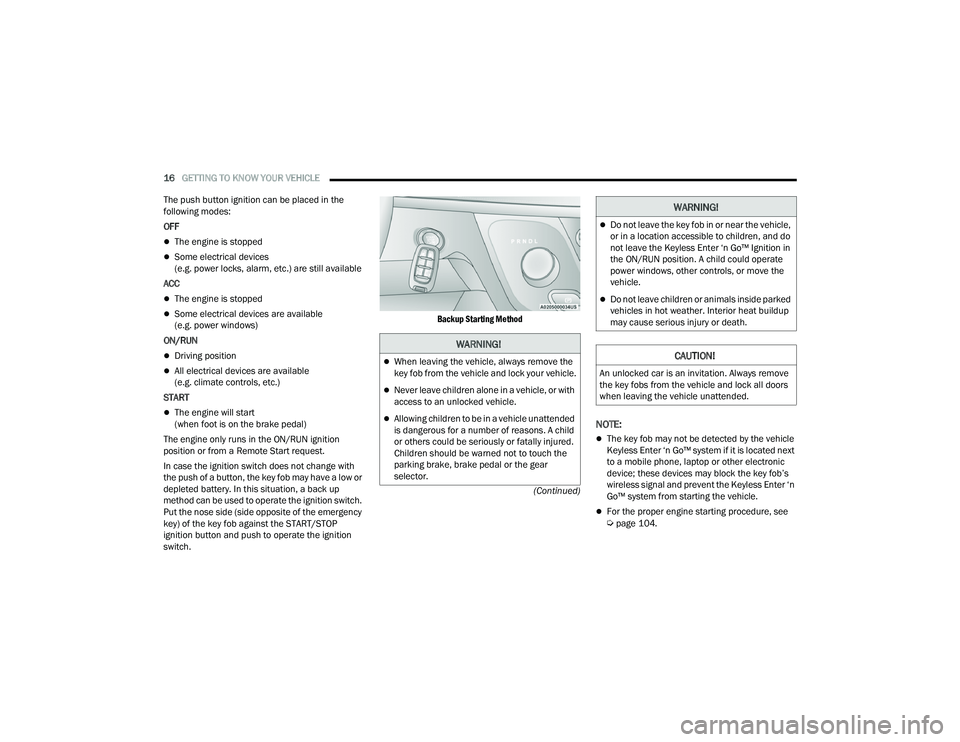
In case the ignition switch does not change with
the push of a button, the key fob may have a low or
depleted battery. In this situation, a back up
method can be used to operate the ignition switch.
Put the nose side (side opposite of the emergency
key) of the key fob against the START/STOP
ignition button and push to operate the ignition
switch.
Backup Starting Method
NOTE:
The key fob may not be detected by the vehicle
Keyless Enter ‘n Go™ system if it is located next
to a mobile phone, laptop or other electronic
device; these devices may block the key fob’s
wireless signal and prevent the Keyless Enter ‘n
Go™ system from starting the vehicle.
For the proper engine starting procedure, see Úpage 104.
WARNING!
When leaving the vehicle, always remove the
key fob from the vehicle and lock your vehicle.
Never leave children alone in a vehicle, or with
access to an unlocked vehicle.
Allowing children to be in a vehicle unattended
is dangerous for a number of reasons. A child
or others could be seriously or fatally injured.
Children should be warned not to touch the
parking brake, brake pedal or the gear
selector.
Do not leave the key fob in or near the vehicle,
or in a location accessible to children, and do
not leave the Keyless Enter ‘n Go™ Ignition in
the ON/RUN position. A child could operate
power windows, other controls, or move the
vehicle.
Do not leave children or animals inside parked
vehicles in hot weather. Interior heat buildup
may cause serious injury or death.
CAUTION!
An unlocked car is an invitation. Always remove
the key fobs from the vehicle and lock all doors
when leaving the vehicle unattended.
WARNING!
22_RUVG_OM_EN_USC_t.book Page 16
Page 23 of 316
GETTING TO KNOW YOUR VEHICLE21
POWER DOOR LOCKS — IF EQUIPPED
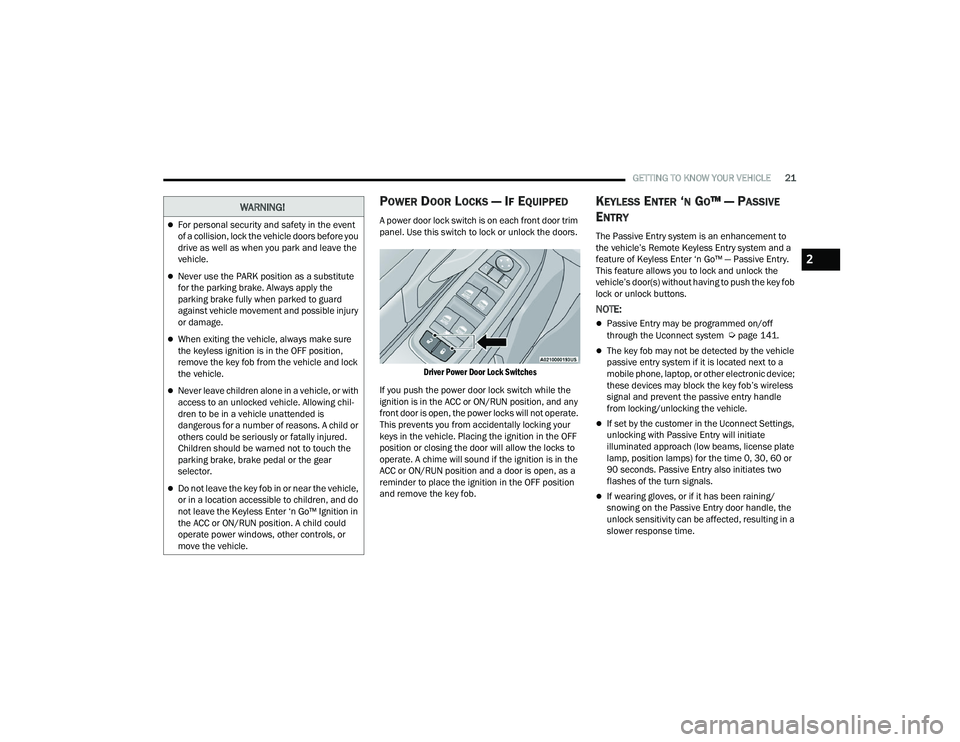
A power door lock switch is on each front door trim
panel. Use this switch to lock or unlock the doors.
Driver Power Door Lock Switches
If you push the power door lock switch while the
ignition is in the ACC or ON/RUN position, and any
front door is open, the power locks will not operate.
This prevents you from accidentally locking your
keys in the vehicle. Placing the ignition in the OFF
position or closing the door will allow the locks to
operate. A chime will sound if the ignition is in the
ACC or ON/RUN position and a door is open, as a
reminder to place the ignition in the OFF position
and remove the key fob.
KEYLESS ENTER ‘N GO™ — PASSIVE
E
NTRY
The Passive Entry system is an enhancement to
the vehicle’s Remote Keyless Entry system and a
feature of Keyless Enter ‘n Go™ — Passive Entry.
This feature allows you to lock and unlock the
vehicle’s door(s) without having to push the key fob
lock or unlock buttons.
NOTE:
Passive Entry may be programmed on/off
through the Uconnect system Úpage 141.
The key fob may not be detected by the vehicle
passive entry system if it is located next to a
mobile phone, laptop, or other electronic device;
these devices may block the key fob’s wireless
signal and prevent the passive entry handle
from locking/unlocking the vehicle.
If set by the customer in the Uconnect Settings,
unlocking with Passive Entry will initiate
illuminated approach (low beams, license plate
lamp, position lamps) for the time 0, 30, 60 or
90 seconds. Passive Entry also initiates two
flashes of the turn signals.
If wearing gloves, or if it has been raining/
snowing on the Passive Entry door handle, the
unlock sensitivity can be affected, resulting in a
slower response time.
WARNING!
For personal security and safety in the event
of a collision, lock the vehicle doors before you
drive as well as when you park and leave the
vehicle.
Never use the PARK position as a substitute
for the parking brake. Always apply the
parking brake fully when parked to guard
against vehicle movement and possible injury
or damage.
When exiting the vehicle, always make sure
the keyless ignition is in the OFF position,
remove the key fob from the vehicle and lock
the vehicle.
Never leave children alone in a vehicle, or with
access to an unlocked vehicle. Allowing chil -
dren to be in a vehicle unattended is
dangerous for a number of reasons. A child or
others could be seriously or fatally injured.
Children should be warned not to touch the
parking brake, brake pedal or the gear
selector.
Do not leave the key fob in or near the vehicle,
or in a location accessible to children, and do
not leave the Keyless Enter ‘n Go™ Ignition in
the ACC or ON/RUN position. A child could
operate power windows, other controls, or
move the vehicle.
2
22_RUVG_OM_EN_USC_t.book Page 21
Page 49 of 316
GETTING TO KNOW YOUR VEHICLE47
Adjustment Button
UCONNECT VOICE RECOGNITION
INTRODUCING VOICE RECOGNITION
Start using Uconnect Voice Recognition (VR) with
these helpful quick tips. It provides the key Voice
Commands and tips you need to know to control
your system.
BASIC VOICE COMMANDS
The basic Voice Commands below can be given at
any point while using your Uconnect system.
Push the VR button . After the beep, say:
“ Cancel ” to stop a current voice session.
“Help ” to hear a list of suggested Voice
Commands.
“ Repeat ” to listen to the system prompts again.
Notice the visual cues that inform you of your Voice
Recognition system’s status.
GET STARTED
The VR button is used to activate /deactivate
your Voice Recognition system.
Helpful hints for using Voice Recognition:
Reduce background noise. Wind noise and
passenger conversations are examples of noise
that may impact recognition.
Speak clearly at a normal pace and volume
while facing straight ahead.
Each time you give a Voice Command, first push
the VR button, wait until after the beep, then say
your Voice Command. You can also say the
vehicle “Wake Up” word and state your
command.
A passenger can press the VR button shortcut
on the radio status bar to also issue a
command.
You can interrupt the help message or system
prompts by pushing the VR button and saying a
Voice Command or saying the vehicle’s “Wake
Up” word and saying a command from the
current category.
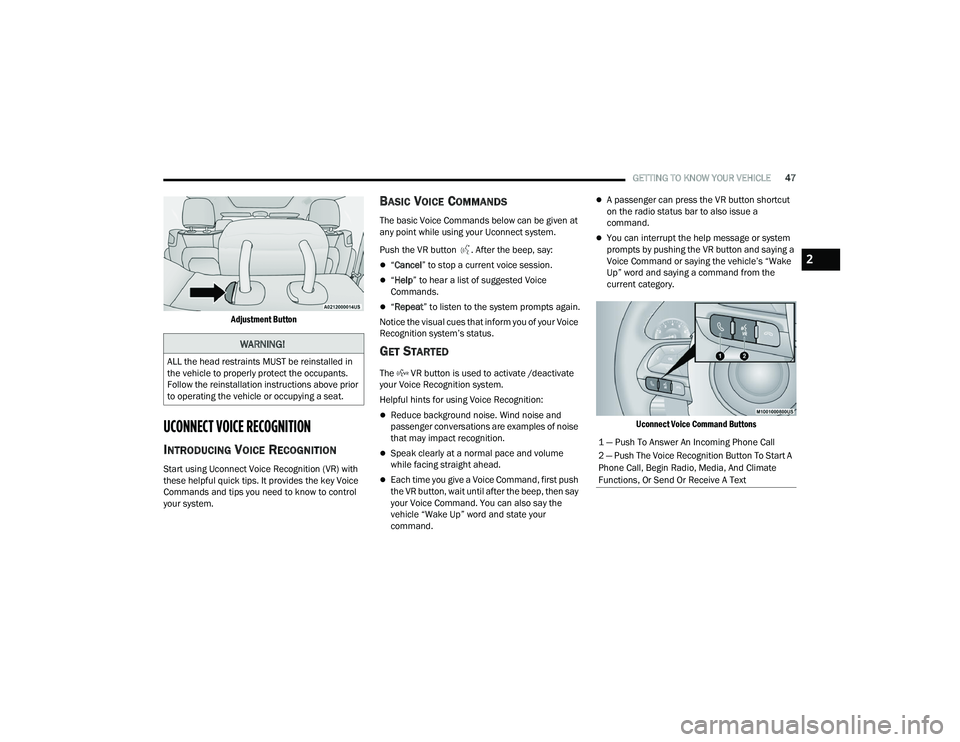
Uconnect Voice Command Buttons
WARNING!
ALL the head restraints MUST be reinstalled in
the vehicle to properly protect the occupants.
Follow the reinstallation instructions above prior
to operating the vehicle or occupying a seat.
1 — Push To Answer An Incoming Phone Call
2 — Push The Voice Recognition Button To Start A
Phone Call, Begin Radio, Media, And Climate
Functions, Or Send Or Receive A Text
2
22_RUVG_OM_EN_USC_t.book Page 47
Page 72 of 316
70GETTING TO KNOW YOUR VEHICLE
NOTE:Two devices can be plugged in at the same time,
and both ports will provide charging capabilities.
Only one port can transfer data to the system at a
time. A pop-up will appear and allow you to select
the device transferring data.
For example, if a device is plugged into the Type A
USB port and another device is plugged into the
Type C USB port, a message will appear and allow
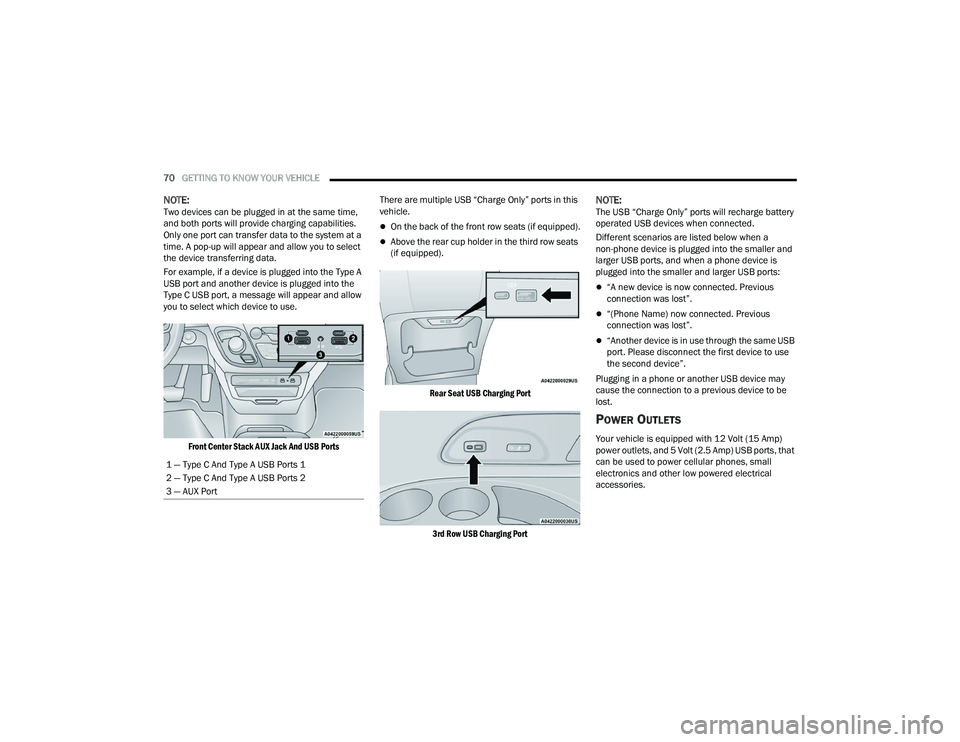
you to select which device to use.
Front Center Stack AUX Jack And USB Ports
There are multiple USB “Charge Only” ports in this
vehicle.
On the back of the front row seats (if equipped).
Above the rear cup holder in the third row seats
(if equipped).
Rear Seat USB Charging Port
3rd Row USB Charging Port
NOTE:The USB “Charge Only” ports will recharge battery
operated USB devices when connected.
Different scenarios are listed below when a
non-phone device is plugged into the smaller and
larger USB ports, and when a phone device is
plugged into the smaller and larger USB ports:
“A new device is now connected. Previous
connection was lost”.
“(Phone Name) now connected. Previous
connection was lost”.
“Another device is in use through the same USB
port. Please disconnect the first device to use
the second device”.
Plugging in a phone or another USB device may
cause the connection to a previous device to be
lost.
POWER OUTLETS
Your vehicle is equipped with 12 Volt (15 Amp)
power outlets, and 5 Volt (2.5 Amp) USB ports, that
can be used to power cellular phones, small
electronics and other low powered electrical
accessories.
1 — Type C And Type A USB Ports 1
2 — Type C And Type A USB Ports 2
3 — AUX Port
22_RUVG_OM_EN_USC_t.book Page 70
Page 74 of 316
72GETTING TO KNOW YOUR VEHICLE
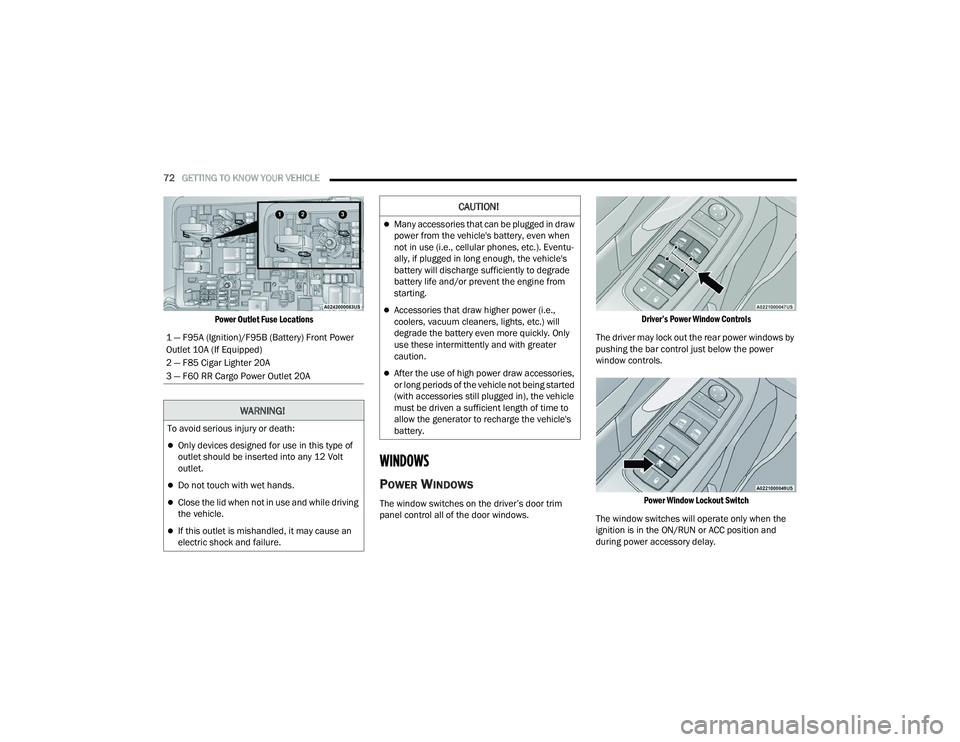
Power Outlet Fuse Locations
WINDOWS
POWER WINDOWS
The window switches on the driver’s door trim
panel control all of the door windows.
Driver’s Power Window Controls
The driver may lock out the rear power windows by
pushing the bar control just below the power
window controls.
Power Window Lockout Switch
The window switches will operate only when the
ignition is in the ON/RUN or ACC position and
during power accessory delay.
1 — F95A (Ignition)/F95B (Battery) Front Power
Outlet 10A (If Equipped)
2 — F85 Cigar Lighter 20A
3 — F60 RR Cargo Power Outlet 20A
WARNING!
To avoid serious injury or death:
Only devices designed for use in this type of
outlet should be inserted into any 12 Volt
outlet.
Do not touch with wet hands.
Close the lid when not in use and while driving
the vehicle.
If this outlet is mishandled, it may cause an
electric shock and failure.
CAUTION!
Many accessories that can be plugged in draw
power from the vehicle's battery, even when
not in use (i.e., cellular phones, etc.). Eventu
-
ally, if plugged in long enough, the vehicle's
battery will discharge sufficiently to degrade
battery life and/or prevent the engine from
starting.
Accessories that draw higher power (i.e.,
coolers, vacuum cleaners, lights, etc.) will
degrade the battery even more quickly. Only
use these intermittently and with greater
caution.
After the use of high power draw accessories,
or long periods of the vehicle not being started
(with accessories still plugged in), the vehicle
must be driven a sufficient length of time to
allow the generator to recharge the vehicle's
battery.
22_RUVG_OM_EN_USC_t.book Page 72
Page 118 of 316
116STARTING AND OPERATING
In the event of a momentary problem, the
transmission can be reset to regain all forward
gears by performing the following steps:
1. Stop the vehicle.
2. Shift the transmission into PARK, if possible. If not, shift the transmission to NEUTRAL.
3. Push and hold the ignition switch until the engine turns off.
4. Wait approximately 30 seconds.
5. Restart the engine.
6. Shift into the desired gear range. If the problem is no longer detected, the
transmission will return to normal operation.
NOTE:Even if the transmission can be reset, we
recommend that you visit an authorized dealer at
your earliest possible convenience. An authorized
dealer has diagnostic equipment to assess the
condition of your transmission. If the transmission
cannot be reset, authorized dealer service is
required.
Torque Converter Clutch
A feature designed to improve fuel economy has
been included in the automatic transmission on
your vehicle. A clutch within the torque converter
engages automatically at calibrated speeds. This
may result in a slightly different feeling or response
during normal operation in the upper gears. When
the vehicle speed drops or during some
accelerations, the clutch automatically
disengages.
NOTE:The torque converter clutch will not engage until
the engine and/or transmission is warm (usually
after 1 to 3 miles [2 to 5 km] of driving). Because
the engine speed is higher when the torque
converter clutch is not engaged, it may seem as if
the transmission is not shifting properly when the
vehicle is cold. This is normal. The torque converter
clutch will function normally once the powertrain is
sufficiently warm.
ACTIVE NOISE CANCELLATION
Your vehicle is equipped with an Active Noise
Cancellation system. This system is designed to
address exhaust and engine noise. The system
relies on four microphones embedded in the
headliner, which monitor exhaust and engine
noise, and assists an onboard frequency
generator, which creates counteracting sound
waves in the audio system’s speakers. This helps
keep the vehicle quiet at idle and during drive.
POWER STEERING
The electric power steering system will provide
increased vehicle response and ease of
maneuverability. The power steering system
adapts to different driving conditions.
WARNING!
Continued operation with reduced assist could
pose a safety risk to yourself and others. Service
should be obtained as soon as possible.
22_RUVG_OM_EN_USC_t.book Page 116
Page 142 of 316
140
MULTIMEDIA
UCONNECT SYSTEMS
For detailed information about your Uconnect 5
With 7-inch Display or Uconnect 5/5 NAV With
10.1-inch Display system, refer to your Uconnect
Owner’s Manual Supplement.
NOTE:Uconnect screen images are for illustration
purposes only and may not reflect exact software
for your vehicle.
CYBERSECURITY
Your vehicle may be a connected vehicle and may
be equipped with both wired and wireless
networks. These networks allow your vehicle to
send and receive information. This information
allows systems and features in your vehicle to
function properly.
Your vehicle may be equipped with certain security
features to reduce the risk of unauthorized and
unlawful access to vehicle systems and wireless
communications. Vehicle software technology
continues to evolve over time and FCA US LLC,
working with its suppliers, evaluates and takes
appropriate steps as needed. Similar to a
computer or other devices, your vehicle may
require software updates to improve the usability and performance of your systems or to reduce the
potential risk of unauthorized and unlawful access
to your vehicle systems.
The risk of unauthorized and unlawful access to
your vehicle systems may still exist, even if the
most recent version of vehicle software (such as
Uconnect software) is installed.
NOTE:
FCA US LLC or your dealer may contact you
directly regarding software updates.
To help further improve vehicle security and
minimize the potential risk of a security breach,
vehicle owners should:
Routinely check www.driveuconnect.com
(US Residents) or www.driveuconnect.ca
(Canadian Residents) to learn about avail -
able Uconnect software updates.
Only connect and use trusted media
devices (e.g. personal mobile phones,
USBs, CDs).
Privacy of any wireless and wired communications
cannot be assured. Third parties may unlawfully
intercept information and private communications
without your consent
Úpage 102.
WARNING!
It is not possible to know or to predict all of the
possible outcomes if your vehicle’s systems
are breached. It may be possible that vehicle
systems, including safety related systems,
could be impaired or a loss of vehicle control
could occur that may result in an accident
involving serious injury or death.
ONLY insert trusted devices/components into
your vehicle. Media of unknown origin could
possibly contain malicious software, and if
installed in your vehicle, it may increase the
possibility for vehicle systems to be breached.
As always, if you experience unusual vehicle
behavior, take your vehicle to your nearest
authorized dealer immediately.
22_RUVG_OM_EN_USC_t.book Page 140