Led Citroen BERLINGO 2012 2.G Owner's Guide
[x] Cancel search | Manufacturer: CITROEN, Model Year: 2012, Model line: BERLINGO, Model: Citroen BERLINGO 2012 2.GPages: 208, PDF Size: 6.67 MB
Page 121 of 208
11 9
QUICK HEL
P
7
Snow screen
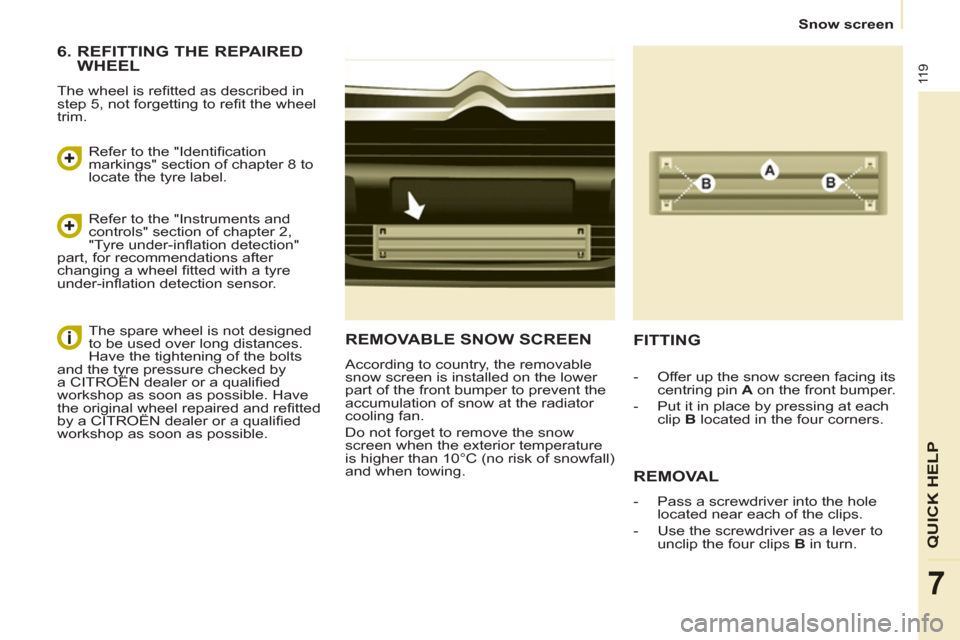
REMOVABLE SNOW SCREEN
According to country, the removable
snow screen is installed on the lower
part of the front bumper to prevent the
accumulation of snow at the radiator
cooling fan.
Do not forget to remove the snow
screen when the exterior temperature
is higher than 10°C (no risk of snowfall)
and when towing.
FITTING
REMOVAL
- Pass a screwdriver into the hole
located near each of the clips.
- Use the screwdriver as a lever to
unclip the four clips B
in turn.
- Offer up the snow screen facing its
centring pin A
on the front bumper.
- Put it in place by pressing at each
clip B
located in the four corners.
6. REFITTING THE REPAIRED
WHEEL
The wheel is refi tted as described in
step 5, not forgetting to refi t the wheel
trim.
Refer to the "Identifi cation
markings" section of chapter 8 to
locate the tyre label.
Refer to the "Instruments and
controls" section of chapter 2,
"Tyre under-infl ation detection"
part, for recommendations after
changing a wheel fi tted with a tyre
under-infl ation detection sensor.
The spare wheel is not designed
to be used over long distances.
Have the tightening of the bolts
and the tyre pressure checked by
a CITROËN dealer or a qualifi ed
workshop as soon as possible. Have
the original wheel repaired and refi tted
by a CITROËN dealer or a qualifi ed
workshop as soon as possible.
Page 122 of 208
120
Changing a bulb
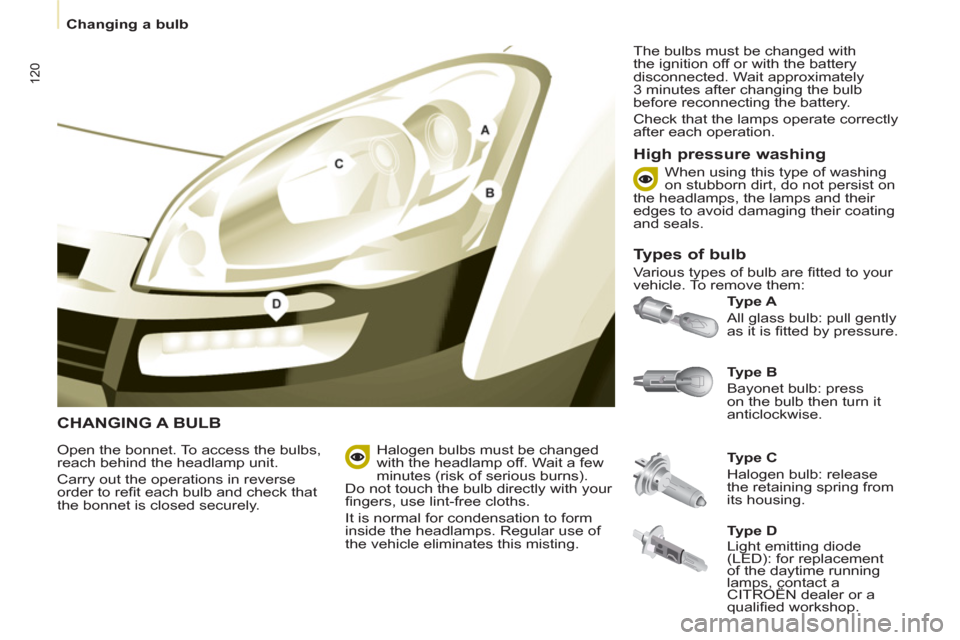
CHANGING A BULB
Ty p e B
Bayonet bulb: press
on the bulb then turn it
anticlockwise.
Ty p e A
All glass bulb: pull gently
as it is fi tted by pressure.
Open the bonnet. To access the bulbs,
reach behind the headlamp unit.
Carry out the operations in reverse
order to refi t each bulb and check that
the bonnet is closed securely.
Ty p e C
Halogen bulb: release
the retaining spring from
its housing.
Halogen bulbs must be changed
with the headlamp off. Wait a few
minutes (risk of serious burns).
Do not touch the bulb directly with your
fi ngers, use lint-free cloths.
It is normal for condensation to form
inside the headlamps. Regular use of
the vehicle eliminates this misting. The bulbs must be changed with
the ignition off or with the battery
disconnected. Wait approximately
3 minutes after changing the bulb
before reconnecting the battery.
Check that the lamps operate correctly
after each operation.
High pressure washing
Types of bulb
Various types of bulb are fi tted to your
vehicle. To remove them: When using this type of washing
on stubborn dirt, do not persist on
the headlamps, the lamps and their
edges to avoid damaging their coating
and seals.
Ty p e D
Light emitting diode
(LED): for replacement
of the daytime running
lamps, contact a
CITROËN dealer or a
qualifi ed workshop.
Page 124 of 208
122
Changing a bulb
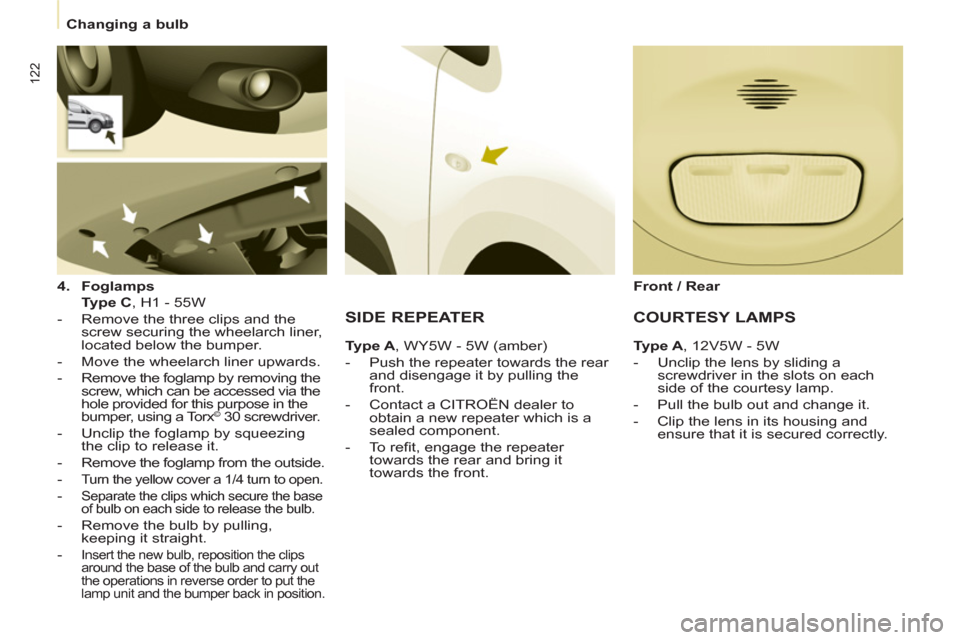
4.
Foglamps
Type C
, H1 - 55W
- Remove the three clips and the
screw securing the wheelarch liner,
located below the bumper.
- Move the wheelarch liner upwards.
- Remove the foglamp by removing the
screw, which can be accessed via the
hole provided for this purpose in the
bumper, using a Torx
© 30 screwdriver.
- Unclip the foglamp by squeezing
the clip to release it.
- Remove the foglamp from the outside.
-
Turn the yellow cover a 1/4 turn to open.
- Separate the clips which secure the base
of bulb on each side to release the bulb.
- Remove the bulb by pulling,
keeping it straight.
-
Insert the new bulb, reposition the clips
around the base of the bulb and carry out
the operations in reverse order to put the
lamp unit and the bumper back in position.
SIDE REPEATER
Ty p e A
, WY5W - 5W (amber)
- Push the repeater towards the rear
and disengage it by pulling the
front.
- Contact a CITROËN dealer to
obtain a new repeater which is a
sealed component.
- To refi t, engage the repeater
towards the rear and bring it
towards the front.
Front / Rear
COURTESY LAMPS
Type A
, 12V5W - 5W
- Unclip the lens by sliding a
screwdriver in the slots on each
side of the courtesy lamp.
- Pull the bulb out and change it.
- Clip the lens in its housing and
ensure that it is secured correctly.
Page 127 of 208
125
QUICK HEL
P
7
Changing a fuse
CHANGING A FUSE
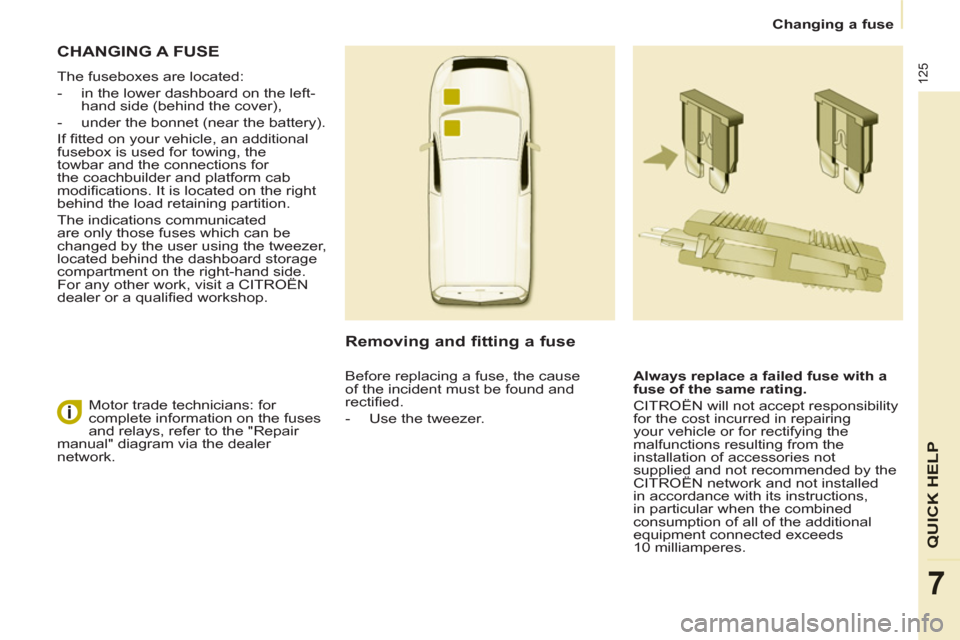
The fuseboxes are located:
- in the lower dashboard on the left-
hand side (behind the cover),
- under the bonnet (near the battery).
If fi tted on your vehicle, an additional
fusebox is used for towing, the
towbar and the connections for
the coachbuilder and platform cab
modifi cations. It is located on the right
behind the load retaining partition.
The indications communicated
are only those fuses which can be
changed by the user using the tweezer,
located behind the dashboard storage
compartment on the right-hand side.
For any other work, visit a CITROËN
dealer or a qualifi ed workshop.
Removing and fitting a fuse
Always replace a failed fuse with a
fuse of the same rating.
CITROËN will not accept responsibility
for the cost incurred in repairing
your vehicle or for rectifying the
malfunctions resulting from the
installation of accessories not
supplied and not recommended by the
CITROËN network and not installed
in accordance with its instructions,
in particular when the combined
consumption of all of the additional
equipment connected exceeds
10 milliamperes. Motor trade technicians: for
complete information on the fuses
and relays, refer to the "Repair
manual" diagram via the dealer
network. Before replacing a fuse, the cause
of the incident must be found and
rectifi ed.
- Use the tweezer.
Page 130 of 208
128
Changing a fuse
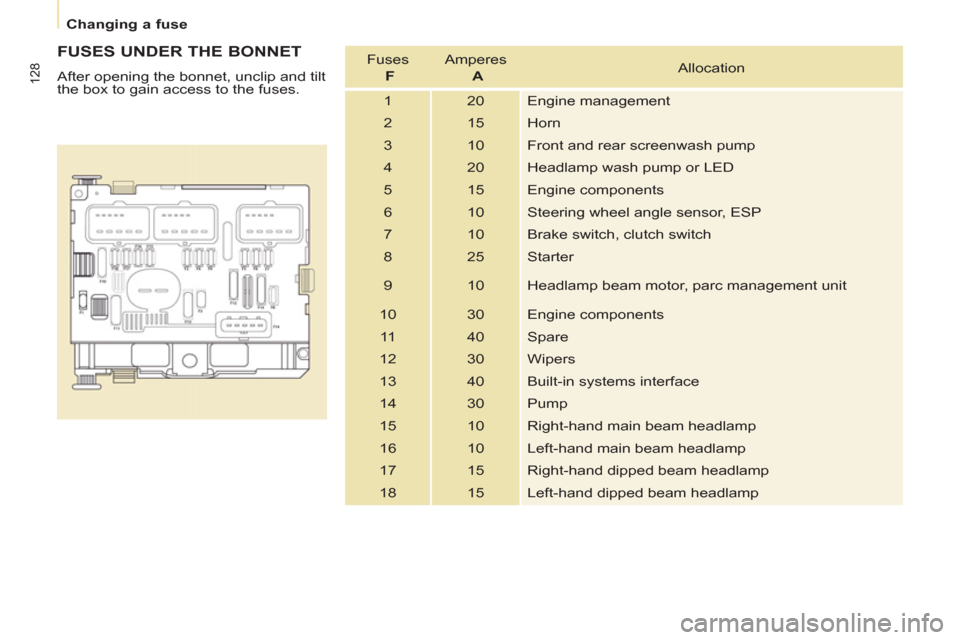
FUSES UNDER THE BONNET
After opening the bonnet, unclip and tilt
the box to gain access to the fuses. Fuses
F
Amperes
A
Allocation
1 20 Engine management
2 15 Horn
3 10 Front and rear screenwash pump
4 20 Headlamp wash pump or LED
5 15 Engine components
6 10 Steering wheel angle sensor, ESP
7 10 Brake switch, clutch switch
8 25 Starter
9 10 Headlamp beam motor, parc management unit
10 30 Engine components
11 40 Spare
12 30 Wipers
13 40 Built-in systems interface
14 30 Pump
15 10 Right-hand main beam headlamp
16 10 Left-hand main beam headlamp
17 15 Right-hand dipped beam headlamp
18 15 Left-hand dipped beam headlamp
Page 139 of 208
137
TECHNICAL DAT
A
8
Weights
WEIGHTS AND TOWED LOADS (KG)
General points
The GTW and towed load values
indicated are valid up to a maximum
altitude of 1000 metres; the towed load
mentioned must be reduced by 10%
for each additional 1000 metres.
The speed of a towing vehicle must not
exceed 50 mph (80 km/h) (comply with
the legislation in force in your country).
With load trransfer, the braked towed
weight can be increased, on condition
that the equivalent of this load is
removed from the vehicle so that the
GTW is not exceeded. Warning: towing
with a lightly loaded towing vehicle
may have an adverse effect on its road
holding. High ambient temperatures may result
in a reduction in the performance
of the vehicle in order to protect the
engine; when the ambient temperature
is higher than 37 °C, limit the towed
weight.
The kerb weight is equal to the weight
without load + driver (75 kg) + fuel tank
fi lled to 90%. For more information, refer to your
registration certifi cate.
In each country, it is imperative that
the towed loads authorised by local
legislation are complied with. To fi nd
out your vehicle's towing capacities
and its gross train weight, consult a
CITROËN dealer.
Page 142 of 208
9.2
EMERGENCY OR ASSISTANCE CALL
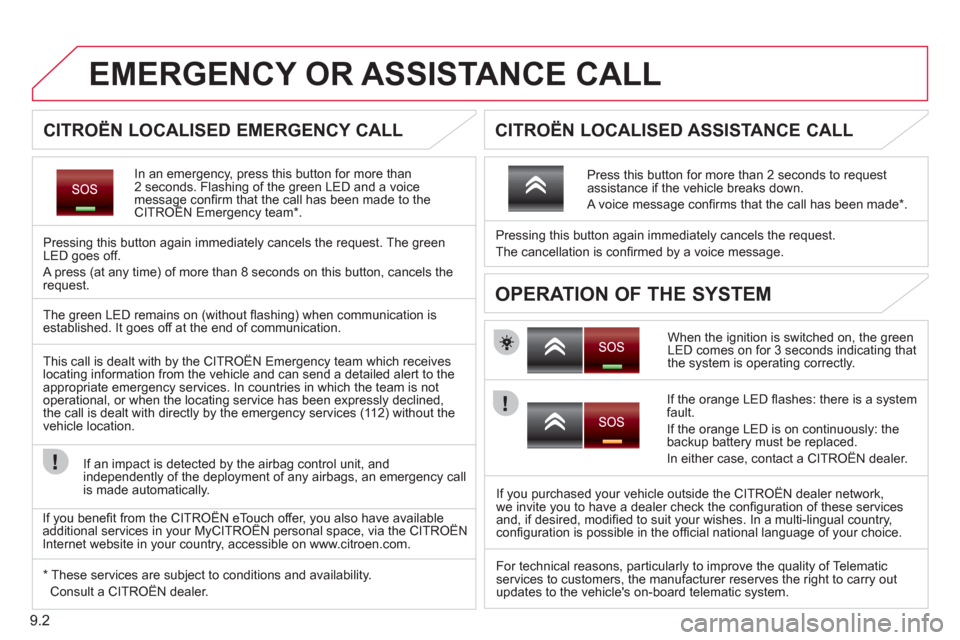
In an emergency, press this button for more than2 seconds. Flashing of the green LED and a voice message confi rm that the call has been made to the CITROËN Emergency team * .gg
Pressing this button again immediately cancels the request. The green LED goes off.
A press
(at any time) of more than 8 seconds on this button, cancels the
request.
When the ignition is switched on, the green
LED comes on for 3 seconds indicating that
the system is operating correctly. Pressin
g this button again immediately cancels the request.
The cancellation is confi rmed b
y a voice message.
Press this button for more than 2 seconds to request
assistance if the vehicle breaks down.
A voice message confi rms that the call has been made *
.
OPERATION OF THE SYSTEM
The green LED remains on (without fl ashing) when communication is established. It goes off at the end of communication.
This call is dealt with b
y the CITROÀN Emergency team which receiveslocating information from the vehicle and can send a detailed alert to theappropriate emergency services. In countries in which the team is not
operational, or when the locating service has been expressly declined,
the call is dealt with directly by the emergency services (11 2) without the
vehicle location.
I
f an impact is detected by the airbag control unit, and
independently of the deployment of any airbags, an emergency call
is made automatically.
*
These services are subject to conditions and availability.
Consult a CITROÀN dealer.
If the oran
ge LED fl ashes: there is a system
fault.
If the oran
ge LED is on continuously: the backup battery must be replaced.
In either case, contact a CITRO
ËN dealer.
If you purchased your vehicle outside the CITRO
ËN dealer network,
we invite you to have a dealer check the confi guration of these services
and, if desired, modifi ed to suit your wishes. In a multi-lingual country,confi guration is possible in the offi cial national language of your choice.
For technical reasons, particularl
y to improve the quality of Telematic services to customers, the manufacturer reserves the right to carry out
updates to the vehicle's on-board telematic system.
CITROËN LOCALISED EMERGENCY CALL
CITROËN LOCALISED ASSISTANCE CALL
If you benefi t from the CITROËN eTouch offer, you also have availableadditional services in your MyCITROËN personal space, via the CITROËNy,y
Internet website in your country, accessible on www.citroen.com.
Page 146 of 208
03
9.6
GENERAL OPERATION
For a detailed global view of the menus available, refer to the"Screen menu map" section.
Press the M
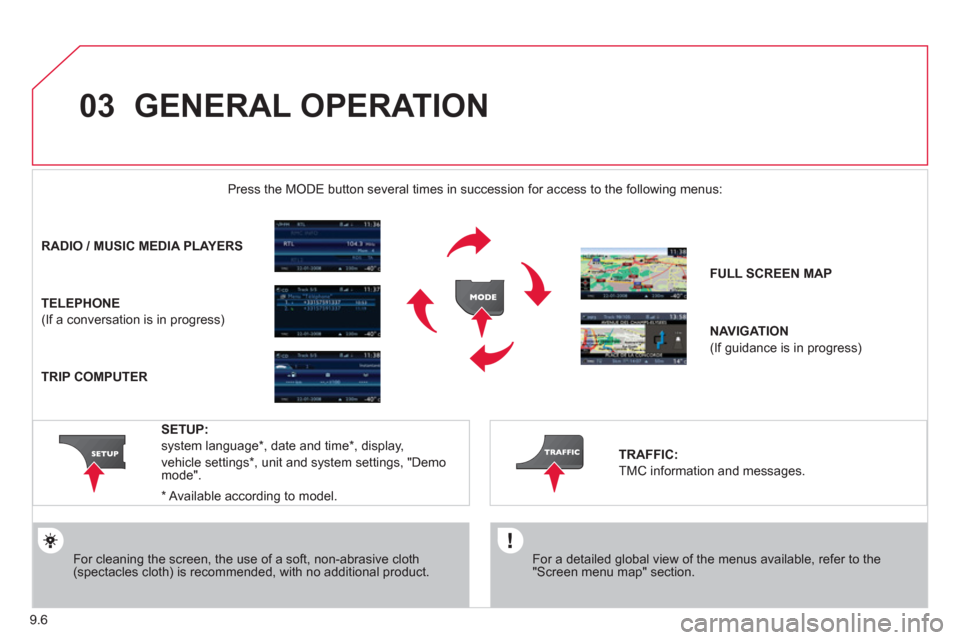
ODE button several times in succession for access to the following menus:
For cleaning the screen, the use of a soft, non-abrasive cloth (spectacles cloth) is recommended, with no additional product.
RADIO/ MUSIC MEDIA PLAYERS
TELEPHONE
(If a conversation is in progress)
FULL SCREEN MA
P
NAVIGATION
(If guidance is in progress)
SETUP:
system language *
, date and time *
, display,
vehicle settings
* , unit and system settings, "Demo mode".
TRAFFIC:
TMC information and messages.
*
Available accordin
g to model.
TRIP COMPUTER
Page 156 of 208
04
5
6
3 2 1
4
9.16
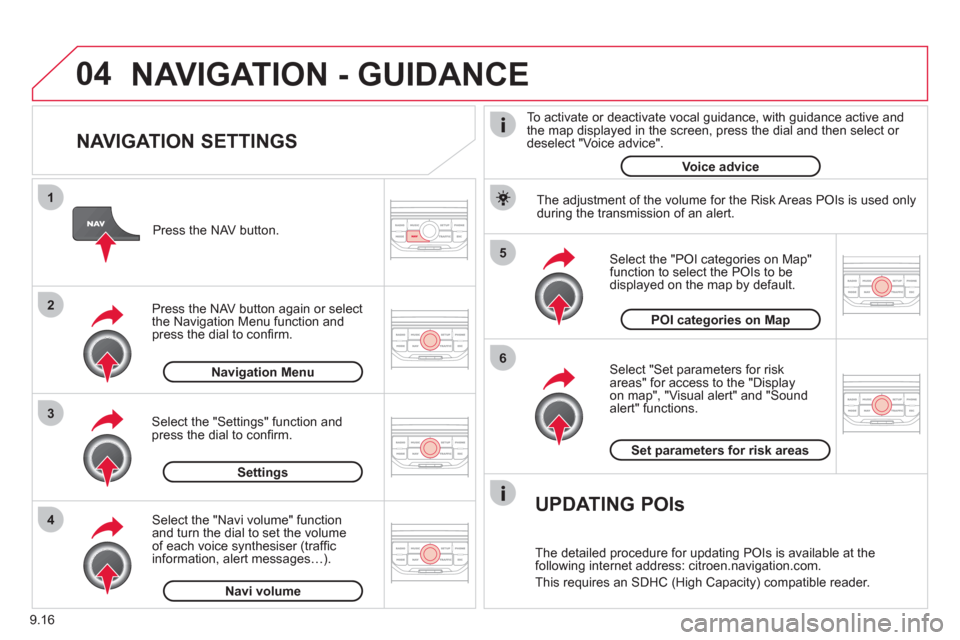
NAVIGATION SETTINGS
Select "Set parameters for risk
areas" for access to the "Display
on map", "Visual alert" and "Soundalert" functions.
Select the "POI categories on Map"function to select the POIs to be
displayed on the map by default. Pr
ess the NAV button.
Press the NAV button a
gain or select
the Navigation Menu function and
press the dial to confi rm.
Select the "Settings" function andpress the dial to confi rm.
POI categories on Map
Settin
gsSet parameters for risk area
s
Navigation Menu
NAVIGATION - GUIDANCE
Select the "Navi volume" function and turn the dial to set the volume
of each voice synthesiser (traffi c
information, alert messagesÖ).
Navi volum
e
The adjustment of the volume for the Risk Areas POIs is used only
during the transmission of an alert.
UPDATING POIs
The detailed procedure for updating POIs is available at the
following internet address: citroen.navigation.com.
This requires an SDHC
(High Capacity) compatible reader.
To activate or deactivate vocal
guidance, with guidance active and
the map displayed in the screen, press the dial and then select or deselect "Voice advice".
Voice advice
Page 167 of 208
10
1
9.27
TRIP COMPUTER
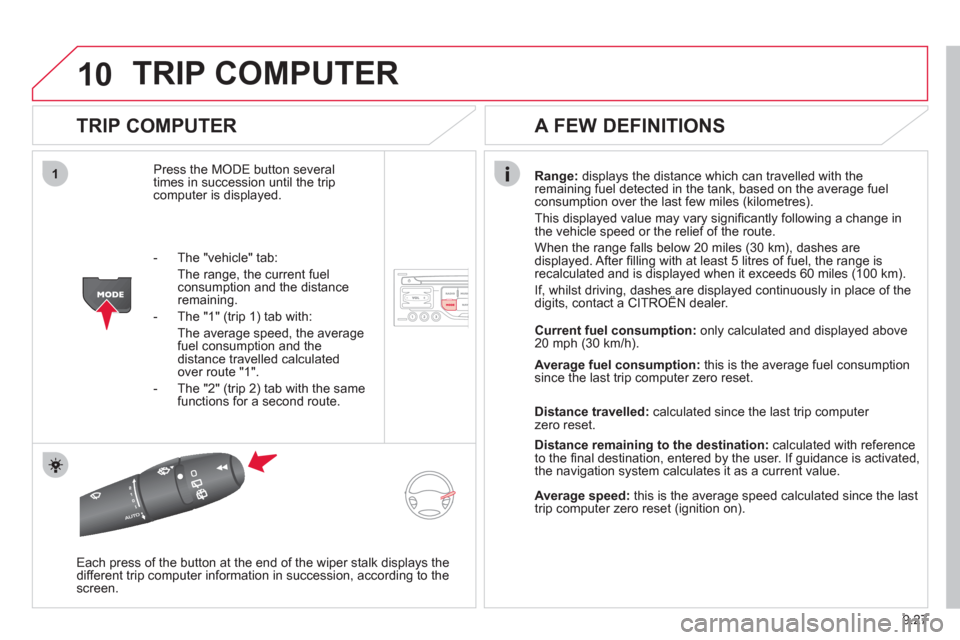
TRIP COMPUTER
Press the MODE button several
times in succession until the tripcomputer is displayed.Ran
ge: displays the distance which can travelled with the
remaining fuel detected in the tank, based on the average fuel consumption over the last few miles (kilometres).
This displa
yed value may vary signifi cantly following a change in
the vehicle speed or the relief of the route.
When the ran
ge falls below 20 miles (30 km), dashes are
displayed. After fi lling with at least 5 litres of fuel, the range is
recalculated and is displayed when it exceeds 60 miles (100 km).
If, whilst driving, dashes are displayed continuously in place of the digits, contact a CITROÀN dealer.,g, p
Each press of the button at the end of the wiper stalk displays the
different trip computer information in succession, according to the screen.
A FEW DEFINITIONS
- The "vehicle" tab:
The ran
ge, the current fuelconsumption and the distance remaining.
- The "1"
(trip 1) tab with:
The average speed, the average fuel consumption and the distance travelled calculatedover route "1".
- The "2"
(trip 2) tab with the same functions for a second route. Current fuel consum
ption:only calculated and displayed above
20 mph (30 km/h).
Avera
ge fuel consumption:this is the average fuel consumption since the last trip computer zero reset.
Distance travelled:calculated since the last trip computer zero reset.
Distance remaining to the destination:calculated with referenceto the fi nal destination, entered by the user. If guidance is activated,
the navigation system calculates it as a current value.
Average speed:this is the average speed calculated since the last
trip computer zero reset (ignition on).