navigation Citroen BERLINGO 2015 2.G User Guide
[x] Cancel search | Manufacturer: CITROEN, Model Year: 2015, Model line: BERLINGO, Model: Citroen BERLINGO 2015 2.GPages: 266, PDF Size: 10.47 MB
Page 184 of 266
182
Berlingo-2-VU_en_Chap10a_SMEGplus_ed01-2015
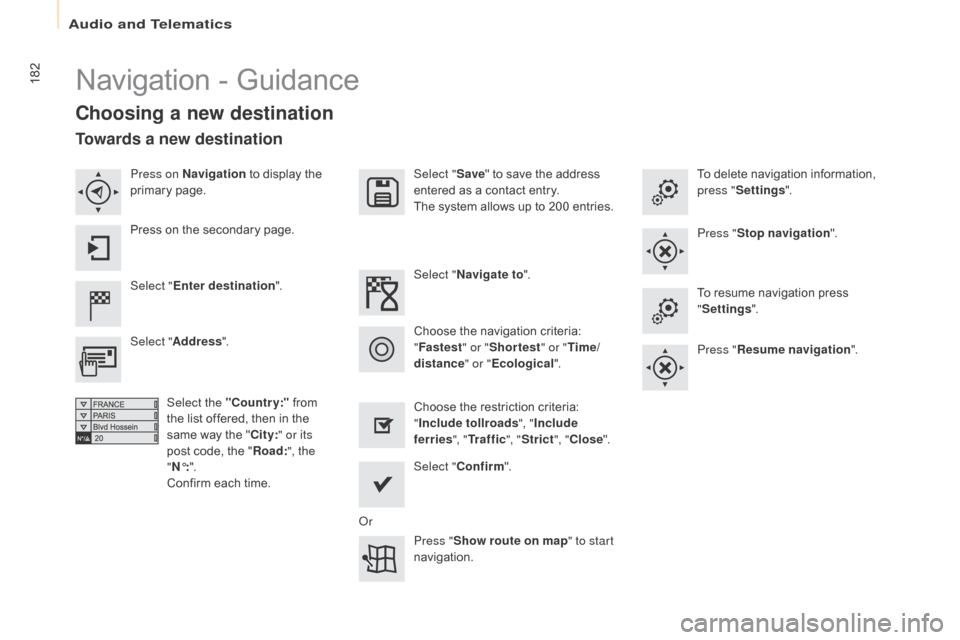
Navigation - Guidance
Choosing a new destination
Select "Enter destination ". Select "
Save" to save the address
entered as a contact entry.
The system allows up to 200 entries.
Select " Confirm ".
Press " Show route on map " to start
navigation.
Select "
Address ".
Select the "Country:" from
the list offered, then in the
same way the " City:" or its
post code, the " Road:", the
"
n°: ".
C
onfirm each time. Select "n
avigate to
".
Choose the restriction criteria:
" Include tollroads ", "Include
ferries ", "Tr a f f i c ", "Strict ", "Close ".
Choose the navigation criteria:
"
Fastest " or "Shortest " or "Time/
distance " or "Ecological". To delete navigation information,
press "
Settings ".
Press " Stop navigation ".
To resume navigation press
" Settings ".
Press " Resume navigation ".
Press on
n
a
vigation
to display the
primary page.
Press on the secondary page.
Towards a new destination
or
Audio and Telematics
Page 185 of 266
183
Berlingo-2-VU_en_Chap10a_SMEGplus_ed01-2015
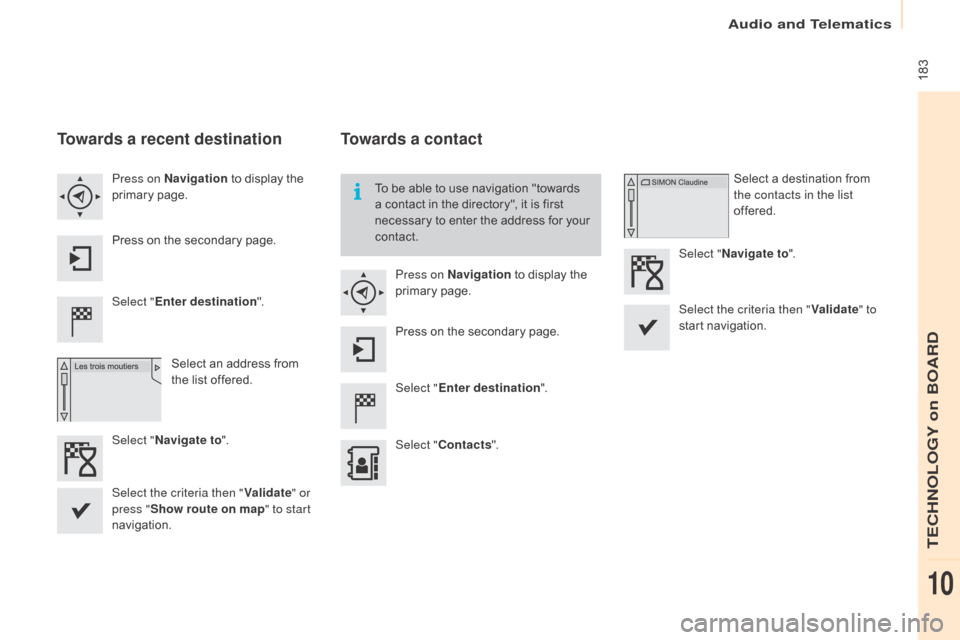
Towards a recent destination
Select "Enter destination ".
Select an address from
the list offered.
Press on
n
a
vigation
to display the
primary page.
Press on the secondary page.
Select "
n
avigate to ".
Towards a contact
Select "Enter destination ".
Select " Contacts ".
Press on
n
a
vigation
to display the
primary page.
Press on the secondary page. Select a destination from
the contacts in the list
offered.
Select "
n
avigate to
".
Select the criteria then " Validate" to
start navigation.
To be able to use navigation "towards
a contact in the directory", it is first
necessary to enter the address for your
contact.
Select the criteria then " Validate" or
press " Show route on map " to start
navigation.
Audio and Telematics
TECHnOLOGY on BOARD
10
Page 186 of 266
184
Berlingo-2-VU_en_Chap10a_SMEGplus_ed01-2015
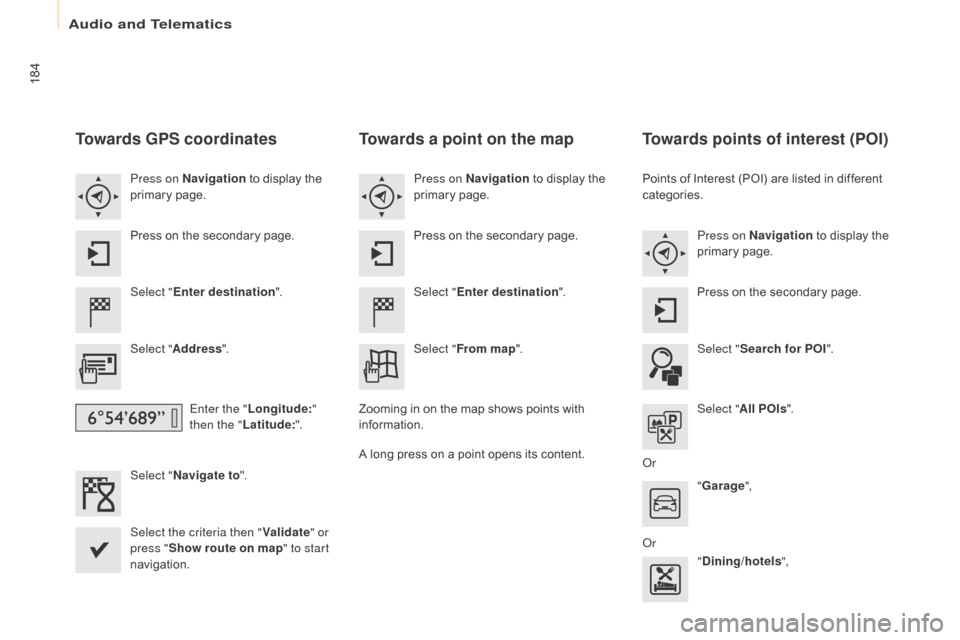
Towards GPS coordinates
Select "Enter destination ".
Select " Address ".
Enter the " Longitude: "
then the " Latitude: ".
Select "
n
avigate to ".
Select the criteria then " Validate" or
press " Show route on map " to start
navigation. Press on n
a
vigation
to display the
primary page.
Press on the secondary page.
Towards a point on the map
Select " Enter destination ".
Select " From map ".
Press on
n
a
vigation
to display the
primary page.
Press on the secondary page.
Zooming in on the map shows points with
information.
A long press on a point opens its content.
Towards points of interest (POI)
Points of Interest (POI) are listed in different
categories. Press on
n
a
vigation to display the
primary page.
Press on the secondary page.
Select " Search for POI ".
Select " All POIs ".
o
r "Garage ",
o
r "Dining/hotels ",
Audio and Telematics
Page 187 of 266
185
Berlingo-2-VU_en_Chap10a_SMEGplus_ed01-2015
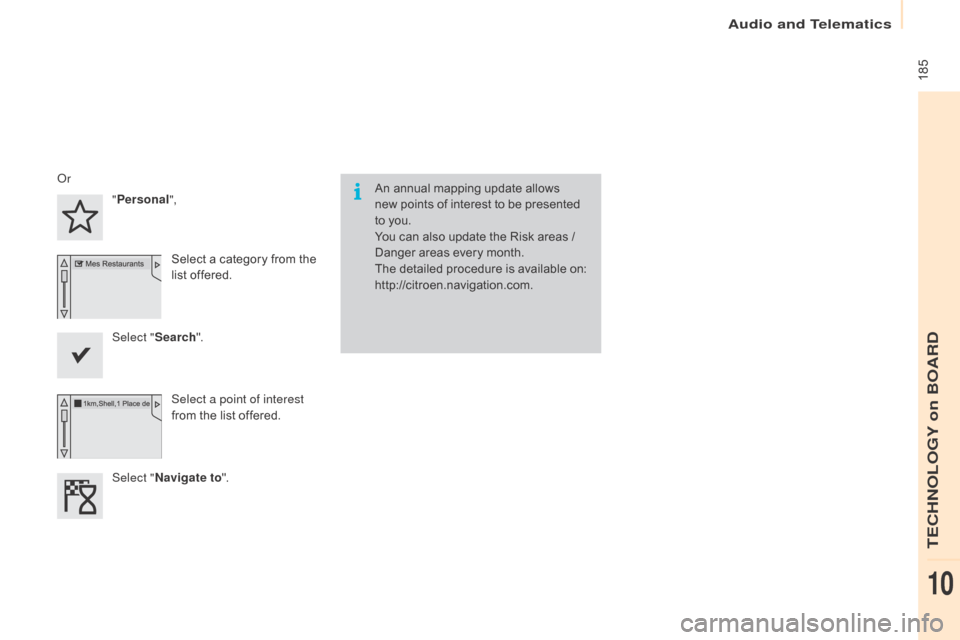
An annual mapping update allows
new points of interest to be presented
to you.
You can also update the Risk areas /
Danger areas every month.
The detailed procedure is available on:
http://citroen.navigation.com.o
r
"Personal",
Select a category from the
list offered.
Select " Search".
Select a point of interest
from the list offered.
Select "
n
avigate to ".
audio and Telematics
TECHnoLoGY on boaRd
10
Page 188 of 266
186
Berlingo-2-VU_en_Chap10a_SMEGplus_ed01-2015
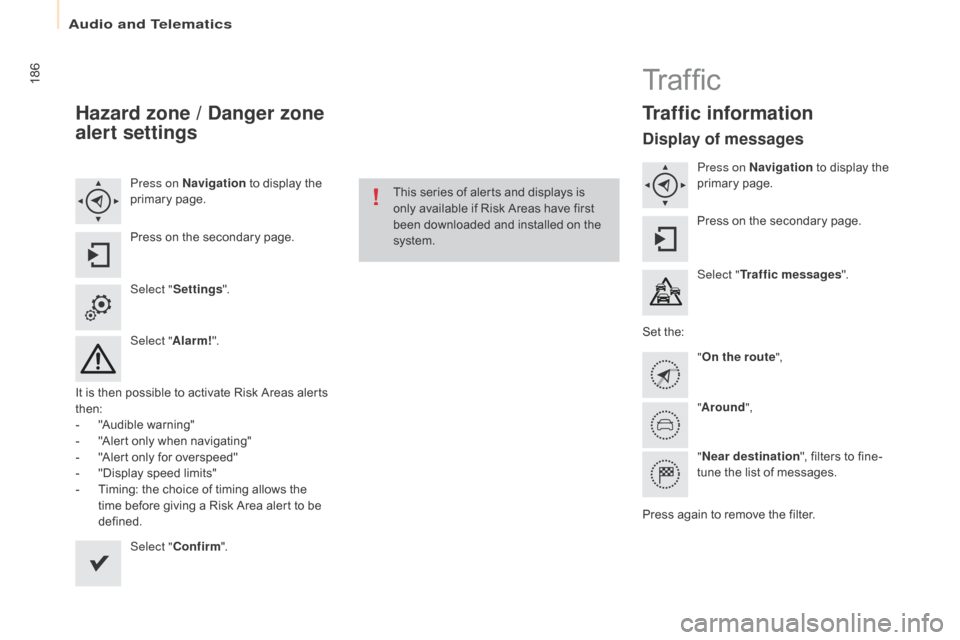
Hazard zone / Danger zone
alert settings
Press on navigation to display the
primary page.
Press on the secondary page.
Select " Settings ".
Select " Alarm!".
It is then possible to activate Risk Areas alerts
then:
-
"
Audible warning"
-
"
Alert only when navigating"
-
"
Alert only for overspeed"
-
"
Display speed limits"
-
T
iming: the choice of timing allows the
time before giving a Risk Area alert to be
defined.
Select " Confirm ". This series of alerts and displays is
only available if Risk Areas have first
been downloaded and installed on the
system.
Tr a f fi c
Traffic information
Display of messages
Press on na
vigation to display the
primary page.
Press on the secondary page.
Select " Traffic messages ".
Set the: "On the route ",
" Around ",
"
ne
ar destination ", filters to fine-
tune the list of messages.
Press again to remove the filter.
Audio and Telematics
Page 189 of 266
187
Berlingo-2-VU_en_Chap10a_SMEGplus_ed01-2015
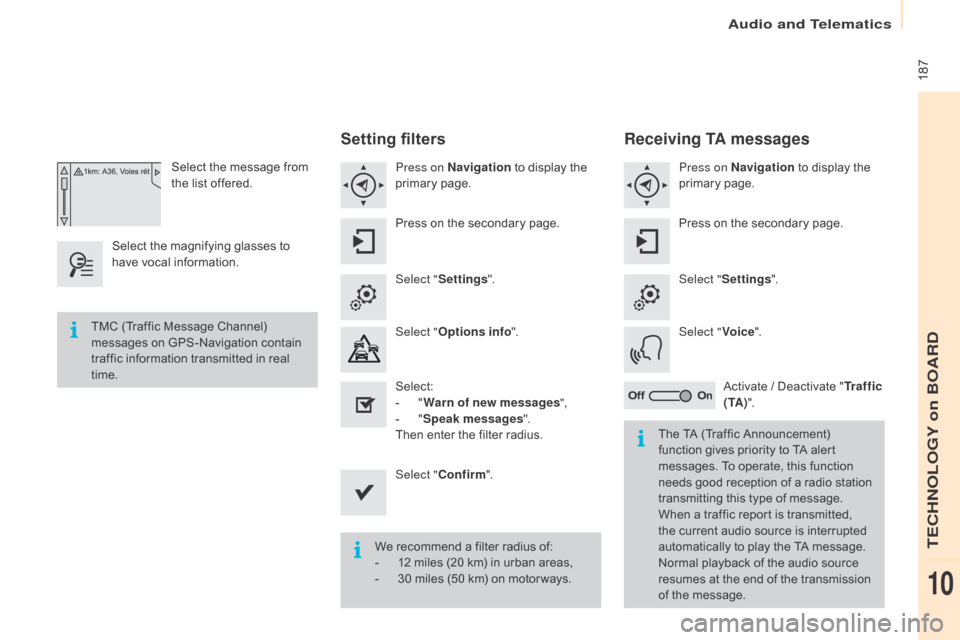
Select the message from
the list offered.
Select the magnifying glasses to
have vocal information.
Setting filters
Press on na vigation to display the
primary page.
Press on the secondary page.
Select " Settings ".
Select " Options info ".
Select:
-
" W
arn of new messages ",
-
" S
peak messages ".
Then enter the filter radius.
Select " Confirm ".
We recommend a filter radius of:
-
1
2 miles (20 km) in urban areas,
-
3
0 miles (50 km) on motor ways.
TMC (Traffic Message Channel)
messages on GPS-Navigation contain
traffic information transmitted in real
time.
The TA (Traffic Announcement)
function gives priority to TA alert
messages. To operate, this function
needs good reception of a radio station
transmitting this type of message.
When a traffic report is transmitted,
the current audio source is interrupted
automatically to play the TA message.
Normal playback of the audio source
resumes at the end of the transmission
of the message.
Receiving TA messages
Press on navigation to display the
primary page.
Press on the secondary page.
Select " Settings ".
Select " Voice".
Activate / Deactivate " Tr a f f i c
( TA ) ".
audio and Telematics
TECHnoLoGY on boaRd
10
Page 226 of 266
224
Berlingo-2-VU_en_Chap10a_SMEGplus_ed01-2015
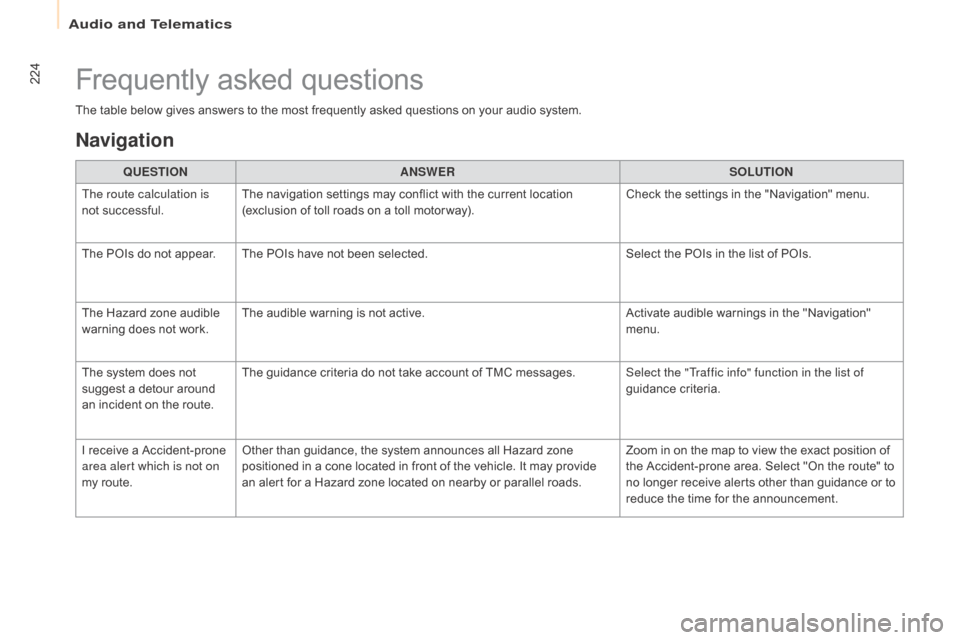
The table below gives answers to the most frequently asked questions on your audio system.QUESTIO
nAnSW
ERSOLUTIO
n
T
he route calculation is
not successful. The navigation settings may conflict with the current location
(exclusion of toll roads on a toll motor way). Check the settings in the "Navigation" menu.
The POIs do not appear. The POIs have not been selected. Select the POIs in the list of POIs.
The Hazard zone audible
warning does not work. The audible warning is not active.
Activate audible warnings in the "Navigation"
menu.
The system does not
suggest a detour around
an incident on the route. The guidance criteria do not take account of TMC messages.
Select the "Traffic info" function in the list of
guidance criteria.
I receive a Accident-prone
area alert which is not on
my route. Other than guidance, the system announces all Hazard zone
positioned in a cone located in front of the vehicle. It may provide
an alert for a Hazard zone located on nearby or parallel roads. Zoom in on the map to view the exact position of
the Accident-prone area. Select "On the route" to
no longer receive alerts other than guidance or to
reduce the time for the announcement.
Frequently asked questions
navigation
Audio and Telematics