Driving CITROEN BERLINGO 2023 Owner's Manual
[x] Cancel search | Manufacturer: CITROEN, Model Year: 2023, Model line: BERLINGO, Model: CITROEN BERLINGO 2023Pages: 324, PDF Size: 9.41 MB
Page 32 of 324
30
Instruments
To deactivate/activate a function, select "OFF"
or "ON".
Configuring a function
Access to additional information on the function
Confirm
Return to the previous page or confirm
Menus
Press the touch screen with three fingers
to show all of the menu buttons.
For more information about the menus,
refer to the sections describing the audio
and telematics systems.
Radio/Media
Navigation (Depending on equipment)
Driving or Vehicle (Depending on
equipment)
Activation, deactivation and settings for certain
functions.
The functions are organised in 2 tabs: " Driving
functions" and "Vehicle settings".
Telephone
Applications Display of available connected services.
Energy (with CITROËN Connect Nav)
Access the specific Electric functions
(energy flow, consumption statistics, deferred
charge) organised in the corresponding 3 tabs.
or
Settings
Main settings for the audio system and
touch
screen.
Audio system on/off Volume adjustment/mute
Upper bar
Certain information is displayed permanently in
the upper bar of the touch screen:
–
T
ime and outside temperature (a blue warning
lamp appears if there is a risk of ice).
–
Reminder of information from the
RadioMedia
and Telephone menus and
navigation instructions (depending on
equipment).
–
Notifications.
– Access to the Settings.
Energy menu
This menu is only available with CITROËN
Connect Nav .
Depending on version, this is accessible either:
– directly, by pressing the button near the
touch screen.
– via the Applications menu.
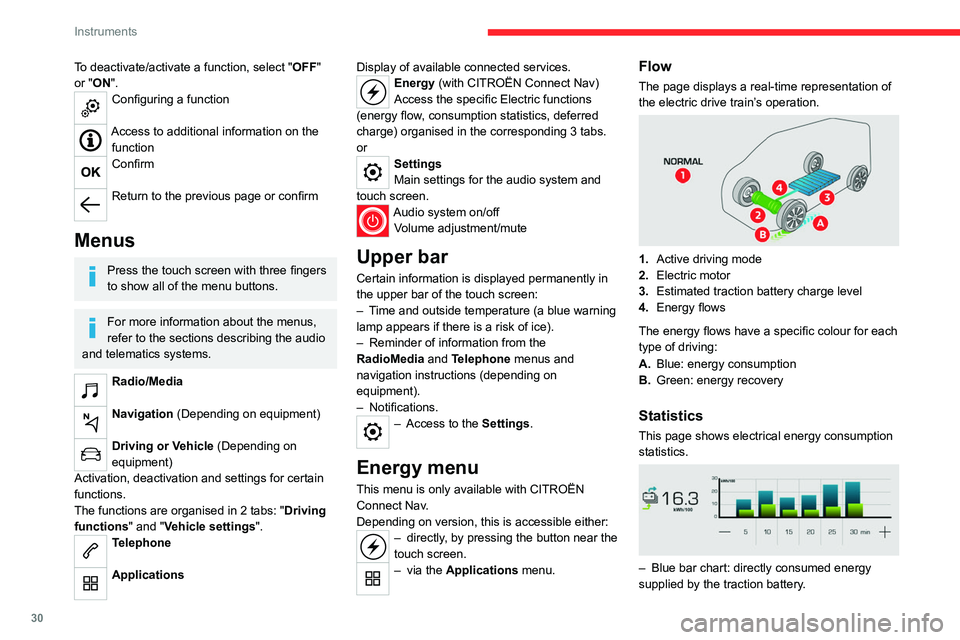
Flow
The page displays a real-time representation of
the electric drive train’s operation.
1.Active driving mode
2. Electric motor
3. Estimated traction battery charge level
4. Energy flows
The energy flows have a specific colour for each
type of driving:
A. Blue: energy consumption
B. Green: energy recovery
Statistics
This page shows electrical energy consumption
statistics.
– Blue bar chart: directly consumed energy
supplied by the traction battery .
Page 35 of 324
33
Access
2
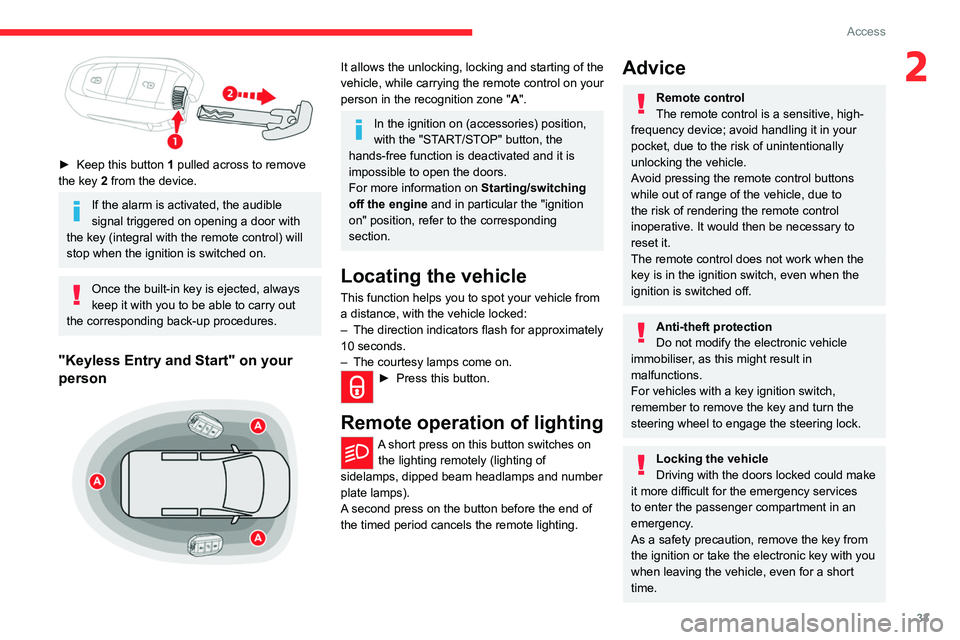
► Keep this button 1 pulled across to remove
the key 2 from the device.
If the alarm is activated, the audible
signal triggered on opening a door with
the key (integral with the remote control) will
stop when the ignition is switched on.
Once the built-in key is ejected, always
keep it with you to be able to carry out
the corresponding back-up procedures.
"Keyless Entry and Start" on your
person
It allows the unlocking, locking and starting of the
vehicle, while carrying the remote control on your
person in the recognition zone " A".
In the ignition on (accessories) position,
with the "START/STOP" button, the
hands-free function is deactivated and it is
impossible to open the doors.
For more information on Starting/switching
off the engine and in particular the "ignition
on" position, refer to the corresponding
section.
Locating the vehicle
This function helps you to spot your vehicle from
a distance, with the vehicle locked:
–
The direction indicators flash for approximately
10 seconds.
–
The courtesy lamps come on.
► Press this button.
Remote operation of lighting
A short press on this button switches on
the lighting remotely (lighting of
sidelamps, dipped beam headlamps and number
plate lamps).
A second press on the button before the end of
the timed period cancels the remote lighting.
Advice
Remote control
The remote control is a sensitive, high-
frequency device; avoid handling it in your
pocket, due to the risk of unintentionally
unlocking the vehicle.
Avoid pressing the remote control buttons
while out of range of the vehicle, due to
the risk of rendering the remote control
inoperative. It would then be necessary to
reset it.
The remote control does not work
when the
key is in the ignition switch, even when the
ignition is switched off.
Anti-theft protection
Do not modify the electronic vehicle
immobiliser, as this might result in
malfunctions.
For vehicles with a key ignition switch,
remember to remove the key and turn the
steering wheel to engage the steering lock.
Locking the vehicle
Driving with the doors locked could make
it more difficult for the emergency services
to enter the passenger compartment in an
emergency.
As a safety precaution, remove the key from
the ignition or take the electronic key with you
when leaving the vehicle, even for a short
time.
Page 39 of 324
37
Access
2► Pull the side-hinged door handle or raise the
tailgate.
With an opening rear screen in the
tailgate
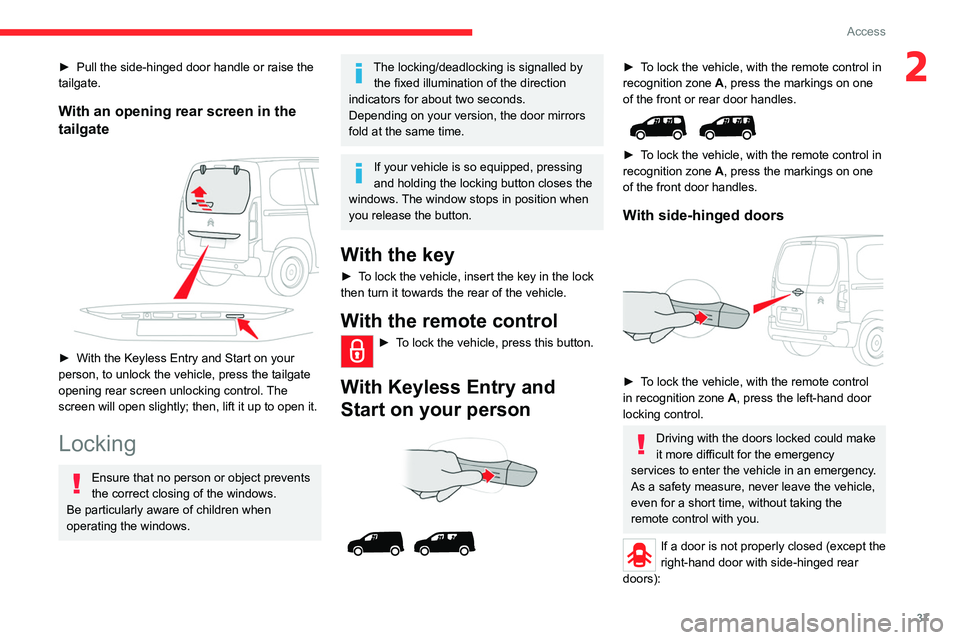
► With the Keyless Entry and Start on your
person, to unlock the vehicle, press the tailgate
opening rear screen unlocking control.
The
screen will open slightly; then, lift it up to open it.
Locking
Ensure that no person or object prevents
the correct closing of the windows.
Be particularly aware of children when
operating the windows.
The locking/deadlocking is signalled by the fixed illumination of the direction
indicators for about two seconds.
Depending on your version, the door mirrors
fold at the same time.
If your vehicle is so equipped, pressing
and holding the locking button closes the
windows. The window stops in position when
you release the button.
With the key
► To lock the vehicle, insert the key in the lock
then turn it towards the rear of the vehicle.
With the remote control
► To lock the vehicle, press this button.
With Keyless Entry and
Start on your person
► To lock the vehicle, with the remote control in
recognition zone A, press the markings on one
of the front or rear door handles.
► To lock the vehicle, with the remote control in
recognition zone A, press the markings on one
of the front door handles.
With side-hinged doors
► To lock the vehicle, with the remote control
in recognition zone A, press the left-hand door
locking control.
Driving with the doors locked could make
it more difficult for the emergency
services to enter the vehicle in an emergency.
As a safety measure, never leave the vehicle,
even for a short time, without taking the
remote control with you.
If a door is not properly closed (except the
right-hand door with side-hinged rear
doors):
Page 43 of 324

41
Access
2Risk of explosion or leaking of
inflammable liquid or gas!
Do not use in/store in/place in an environment
where the temperature is extremely high or
where the pressure is extremely low due to
very high altitude.
Do not try to burn, crush or cut a used battery.
Reinitialising the remote
control
Following replacement of the battery or in
the event of a fault, it may be necessary to
reinitialise the remote control.
Without Keyless Entry and Start
► Switch the ignition off.
► T urn the key to position 2 (Ignition on) .
►
Immediately press the closed padlock button
for a few seconds. ►
Switch off the ignition and remove the key
from the ignition switch.
The remote control is now fully operational
again.
► Insert the mechanical key (incorporated into
the remote control) into the lock to open the
vehicle.
►
Place the electronic key against the back-up
reader on the steering column and hold it there
until the ignition is switched on.
►
W
ith a manual gearbox, place the gear lever
in neutral then fully depress the clutch pedal.
►
W
ith an automatic gearbox, while in mode
P, depress the brake pedal.
►
Switch on the ignition by pressing the
"
START/STOP" button.
If the fault persists after reinitialisation, contact a
CITROËN dealer or a qualified workshop without
delay.
Central locking / unlocking
This function enables the doors to be locked or unlocked simultaneously from inside the vehicle.
When locking/deadlocking from the
outside
When the vehicle is locked or deadlocked
from the outside, the indicator lamp flashes
and the button is deactivated.
►
After normal locking, pull one of the
interior door controls to unlock the vehicle.
►
After deadlocking, you must use the
remote control, the "Keyless Entry and
Start" system or the built-in key to unlock the
vehicle.
Manual mode
► Press this button to lock / unlock the
vehicle.
Driving with the doors locked could make
it difficult for the emergency services to
enter the vehicle in an emergency.
Page 44 of 324
42
Access
If one of the doors is open, the central
locking from the inside does not function.
This is signalled by a mechanical noise from
the locks.
If the boot is open, only the locking of the
other doors is carried out. The indicator lamp
in the button remains off.
When locking from inside, the door
mirrors do not fold.
The indicator lamp also goes off when unlocking one or more accesses.
Automatic mode
This is the automatic central locking of the
vehicle when driving, also called anti-intrusion
security.
For more information on Anti-intrusion
security, refer to the corresponding section.
Locking/unlocking the
loading area
This button is unavailable if the vehicle has been locked or deadlocked from
outside (using the key, remote control or
Keyless Entry and Start, depending on
equipment) or if any of the doors are still
open.
For more information on the Key, and, in
particular, on programming selective
locking for the loading area, refer to the
corresponding section.
Manual mode
► With complete unlocking activated,
press this button to lock (indicator lamp
comes on)/unlock (indicator lamp goes off) the
vehicle
.
►
With selective unlocking activated, press this
button to lock (indicator lamp comes on)/unlock
(indicator lamp goes off) the loading area
.
Driving with the doors locked could make
it more difficult for the emergency
services to enter the vehicle in an emergency.
The indicator lamp goes off when unlocking one or more doors of the
loading area.
With the ignition off and the vehicle fully
locked, the indicator lamp goes off for energy
economy reasons.
Automatic mode
The loading area is always locked when driving.
To deactivate this automatic locking, go to a CITROËN dealer or a qualified
workshop.
Anti-intrusion security
This system allows automatic simultaneous
locking of the doors and boot as soon as the
speed of the vehicle exceeds 6 mph (10 km/h).
Operation
If one of the doors or the boot is open, the
automatic central locking does not take place.
This is signalled by the sound of the locks rebounding, accompanied by illumination
of this warning lamp in the instrument panel, an
audible signal and the display of an alert
message.
Page 45 of 324
43
Access
2Activation/Deactivation
You can activate or deactivate this function
permanently.
►
With the ignition on, press the central locking
button until an audible signal is triggered and
a corresponding message of confirmation is
displayed.
The state of the system stays in the memory
when the ignition is switched off.
Driving with the doors locked may render
access by the emergency services to the
interior difficult in an emergency.
Carrying long or voluminous objects
If you want to drive with the boot open,
you should press the central locking button
to lock the doors. Otherwise, every time the
speed of the vehicle exceeds 6 mph (10
km/h), the locks will rebound and the alerts
mentioned above will appear.
Pressing the central locking button unlocks
the vehicle.
Above 6 mph (10 km/h), this unlocking is
temporary.
Side-hinged doors
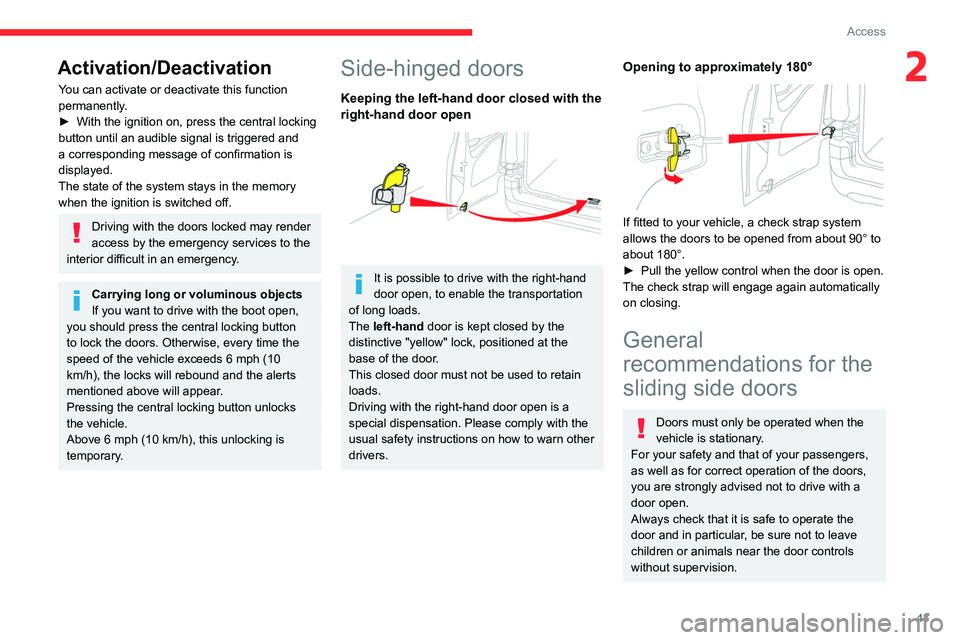
Keeping the left-hand door closed with the
right-hand door open
It is possible to drive with the right-hand
door open, to enable the transportation
of long loads.
The left-hand door is kept closed by the
distinctive "yellow" lock, positioned at the
base of the door.
This closed door must not be used to retain
loads.
Driving with the right-hand door open is a
special dispensation. Please comply with the
usual safety instructions on how to warn other
drivers.
Opening to approximately 180°
If fitted to your vehicle, a check strap system
allows the doors to be opened from about 90° to
about 180°.
►
Pull the yellow control when the door is open.
The check strap will engage again automatically
on closing.
General
recommendations for the
sliding side doors
Doors must only be operated when the
vehicle is stationary.
For your safety and that of your passengers,
as well as for correct operation of the doors,
you are strongly advised not to drive with a
door open.
Always check that it is safe to operate the
door and in particular, be sure not to leave
children or animals near the door controls
without supervision.
Page 47 of 324
45
Access
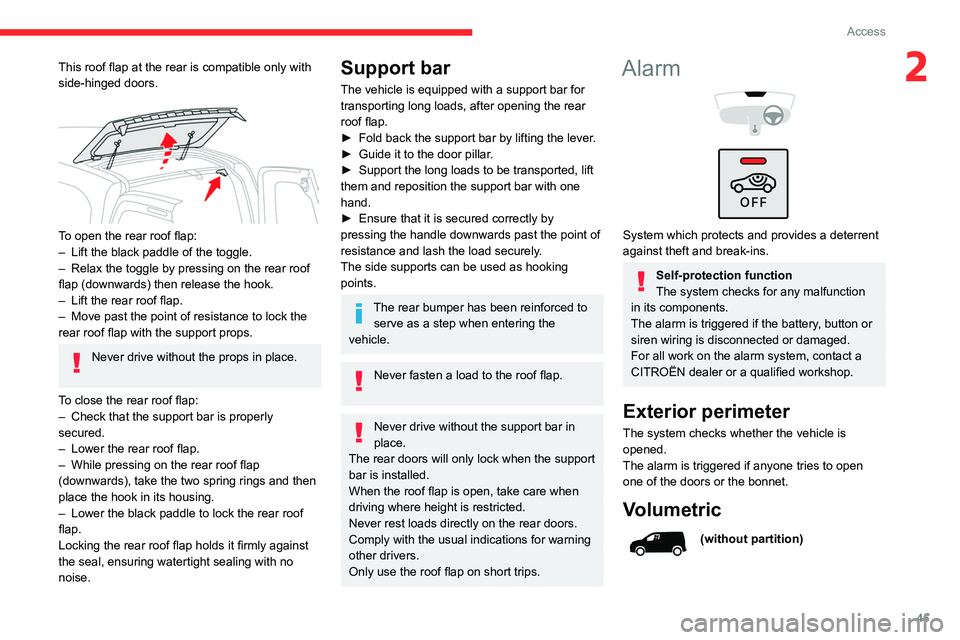
2This roof flap at the rear is compatible only with
side-hinged doors.
To open the rear roof flap:
– Lift the black paddle of the toggle.
–
Relax the toggle by pressing on the rear roof
flap (downwards) then release the hook.
–
Lift the rear roof flap.
–
Move past the point of resistance to lock the
rear roof flap with the support props.
Never drive without the props in place.
To close the rear roof flap:
–
Check that the support bar is properly
secured.
–
Lower the rear roof flap.
–
While pressing on the rear roof flap
(downwards), take the two spring rings and then
place the hook in its housing.
–
Lower the black paddle to lock the rear roof
flap.
Locking the rear roof flap holds it firmly against
the seal, ensuring watertight sealing with no
noise.
Support bar
The vehicle is equipped with a support bar for
transporting long loads, after opening the rear
roof flap.
►
Fold back the support bar by lifting the lever
.
►
Guide it to the door pillar
.
►
Support the long loads to be transported, lift
them and reposition the support bar with one
hand.
►
Ensure that it is secured correctly by
pressing the handle downwards past the point of
resistance and lash the load securely
.
The side supports can be used as hooking
points.
The rear bumper has been reinforced to serve as a step when entering the
vehicle.
Never fasten a load to the roof flap.
Never drive without the support bar in
place.
The rear doors will only lock when the support
bar is installed.
When the roof flap is open, take care when
driving where height is restricted.
Never rest loads directly on the rear doors.
Comply with the usual indications for warning
other drivers.
Only use the roof flap on short trips.
Alarm
System which protects and provides a deterrent
against theft and break-ins.
Self-protection function
The system checks for any malfunction
in its components.
The alarm is triggered if the battery, button or
siren wiring is disconnected or damaged.
For all work on the alarm system, contact a
CITROËN dealer or a qualified workshop.
Exterior perimeter
The system checks whether the vehicle is
opened.
The alarm is triggered if anyone tries to open
one of the doors or the bonnet.
Volumetric
(without partition)
Page 52 of 324

50
Ease of use and comfort
General
recommendations for the
seats
For safety reasons, seat adjustments
must only be made when the vehicle is
stationary.
Folding or unfolding the seat backrests
must only be done with the vehicle
stationary.
Before moving the seat backwards,
ensure that there is no person or object
that might prevent the full travel of the seat.
There is a risk of trapping or pinching
passengers if present in the rear seats or of
jamming the seat if large objects are placed
on the floor behind the seat.
Do not place hard or heavy objects on
the backrests forming a table. They could
become dangerous projectiles in the event of
sudden braking or a collision.
–
Do not remove a head restraint without
stowing it; secure it to a support inside the
vehicle.
–
Check that the seat belts remain accessible
to the passenger and easy to fasten.
–
Passengers must never take their seat
without adjusting and fastening their seat belt.
– In row 3, be careful not to leave your feet
under the row 2 seat while it is being tilted.
–
When a row 3 seat is in the fully folded
position, ensure that the strap is correctly
hooked to the
Top Tether fixing of the row 2
backrest: risk of unexpected tipping of the
seat.
Before carrying out the manoeuvres,
check that nothing and no one is
obstructing the moving elements and their
locking.
To avoid sudden folding, take care to hold the
backrest and support it until it is horizontal.
Never put your hand underneath the seat
cushion to guide the seat downwards or
upwards, you could get your fingers trapped.
Place your hand on the grip/strap (depending
on equipment) at the top of the seat cushion.
Please note: an incorrectly latched
backrest compromises the safety of
passengers in the event of sudden braking or
an impact.
The contents of the boot may be thrown
forward - risk of severe injury!
Front seats
Correct driving position
Before taking to the road and to make the most
of the ergonomic layout of the instruments and
controls, carry out these adjustments in the
following order:
–
head restraint height.
–
seat backrest angle.
–
seat cushion height.
–
longitudinal seat position.
–
steering wheel height and reach.
–
rear view mirror and door mirrors.
Once these adjustments have been
made, check that the instrument panel
can be viewed correctly from your driving
position.
Page 60 of 324

58
Ease of use and comfort
Access to row 3
► Using the row 2 seat grip, fold the backrest.
► T o reposition it, tilt the backrest backwards
until it locks into place.
Labels in row 3
While driving, it is prohibited to have a
passenger seated next to a seat in the fully
folded position.
If you want to load luggage onto the row 3
backrests while in the table position, the row 2
seats must also be folded down.
Longitudinal adjustment
XL
► Raise the control and slide the seat forwards
or backwards.
Table position
Placing the backrest in the table position ►
Lower the head restraint as far as it will go.
► Operate control
1 to fold the backrest onto
the seat cushion.
Repositioning the backrest
►
Unlock it by pulling control 1
.
►
Return it to its initial position
►
Check that the assembly is anchored
properly
.
Fully folded position
XL
Placing the seat in the fully folded position
►
Place the backrest in the table position.
Page 63 of 324

61
Ease of use and comfort
3In the event of sharp deceleration,
objects placed in the central storage
compartment of the roof may be transformed
into projectiles.
Rear storage compartment
This compartment is accessible from the rear
seats and from the vehicle's boot.
It has a capacity of 60 litres and the
maximum
permitted load is
10 kg.
► To open it from the rear seats, slide the rear
storage compartment shutters.
► To open it from the vehicle’s boot, place your
thumb on the boot recess then pull the handle.
Open the rear storage compartment with
care, to prevent any objects stored inside
from falling out.
Light ambience
The light ambience settings are changed via
the
Driving/Vehicle touch screen menu.
Blind
Opening/Closing
► Press and hold the button; the blind opens/
closes, stopping when the button is released.
If the blind becomes trapped while
moving, reverse its movement. To do
this, press the relevant control.
When pressing the button to open/close the
blind, the driver must ensure that nothing and
no one might interfere with its movement.
The driver must ensure that passengers use
the blind correctly.
Pay particular attention to children when
operating the blind.
12 V accessory socket(s)
► Plug in a 12 V accessory (with a maximum
rated power of 120 W) using a suitable adapter.
Observe the maximum power rating to
avoid damaging the accessory.
The connection of an electrical device not approved by CITROËN, such as a
USB charger, may adversely affect the
operation of vehicle electrical systems,
causing faults such as poor radio reception or
interference with displays in the screens.