tow Citroen BERLINGO MULTISPACE RHD 2017 2.G Service Manual
[x] Cancel search | Manufacturer: CITROEN, Model Year: 2017, Model line: BERLINGO MULTISPACE RHD, Model: Citroen BERLINGO MULTISPACE RHD 2017 2.GPages: 292, PDF Size: 10.19 MB
Page 181 of 292

179
Berlingo2VP_en_Chap08_Aide-rapide_ed02-2016Berlingo2VP_en_Chap08_Aide-rapide_ed02-2016
REMOVABLE SNOW SCREEN
(
BLANKING COVER )
According to country, the removable
snow screen is installed on the lower
part of the front bumper to prevent the
accumulation of snow at the radiator
cooling
fan.
Fitting Removal
- Offer up the snow screen facing its
centring pin A on the front bumper.
-
Put it in place by pressing at each
clip
B located in the four corners.
Do not forget to remove the
snow screen when the exterior
temperature is higher than 10°C
(no
risk
of
snowfall)
and
when
towing. -
Pass a screwdriver into the hole
located
near each of the clips.
-
Use the screwdriver as a lever to
unclip the four clips
B in turn.
QUICK HELP
8
Snow screen
Page 186 of 292

184
Berlingo2VP_en_Chap08_Aide-rapide_ed02-2016Berlingo2VP_en_Chap08_Aide-rapide_ed02-2016
Side repeater
Type A, WY5W - 5W (amber)
-
Push the repeater towards the rear
and disengage it by pullin
g the
front.
-
Contact a CITROËN dealer to
obtain a new repeater which is a
sealed
component.
-
T
o refit, engage the repeater
towards the rear and bring it
towards
the front.
Courtesy lamps
Type A, 12V5W - 5W
-
Unclip the lens by sliding a
screwdriver in the slots on each
side
of the courtesy lamp.
-
Pull
the bulb out and change it.
-
Clip the lens in its housing and
ensure
that it is secured correctly.
Front / Rear
Changing a bulb
Page 187 of 292
185
Berlingo2VP_en_Chap08_Aide-rapide_ed02-2016Berlingo2VP_en_Chap08_Aide-rapide_ed02-2016
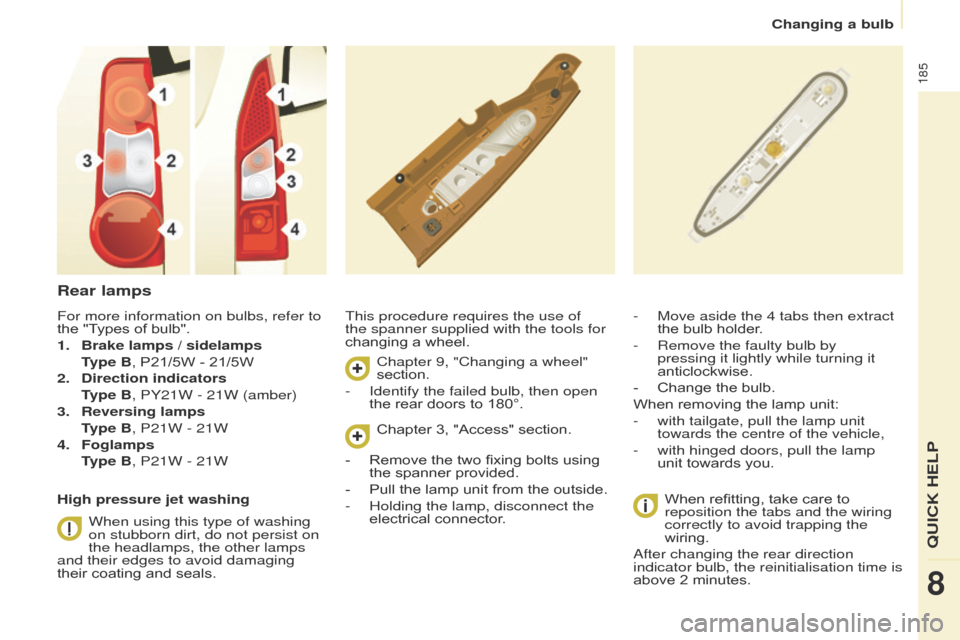
Rear lamps
This procedure requires the use of
the spanner supplied with the tools for
changing a wheel.
When
refitting, take care to
reposition the tabs and the wiring
correctly to avoid trapping the
wiring.
After changing the rear direction
indicator bulb, the reinitialisation time is
above
2 minutes.
-
Move aside the 4 tabs then extract
the
bulb holder.
-
Remove the faulty bulb by
pressing it lightly while turning it
anticlockwise.
-
Change
the bulb.
When
removing the lamp unit:
-
with tailgate, pull the lamp unit
towards the centre of the vehicle,
-
with hinged doors, pull the lamp
unit
towards you.
For more information on bulbs, refer to
the
"Types
of
bulb".
1.
Brake lamps / sidelamps
T
ype B,
P21/5W
-
21/5W
2.
Direction indicators
T
ype B, PY21W - 21W (amber)
3.
Reversing lamps
T
ype B, P21W - 21W
4.
Foglamps
T
ype B, P21W - 21W
High pressure jet washing When using this type of washing
on stubborn dirt, do not persist on
the headlamps, the other lamps
and their edges to avoid damaging
their
coating
and
seals. Chapter 9, "Changing a wheel"
section.
-
Identify the failed bulb, then open
the
rear doors to 180°.
Chapter
3, "Access" section.
-
Remove
the two fixing bolts using
the
spanner provided.
-
Pull
the lamp unit from the outside.
-
Holding the lamp, disconnect the
electrical
connector.
QUICK HELP
8
Changing a bulb
Page 194 of 292

192
Berlingo2VP_en_Chap08_Aide-rapide_ed02-2016Berlingo2VP_en_Chap08_Aide-rapide_ed02-2016
Without lifting (4 wheels on the
road)
You should always use a towing arm.
BEING TOWED
This procedure involves the use of
the towing eye supplied with the tools
for
changing a wheel.
From the front
- Unclip the cover by pressing the
bottom part.
-
Fully screw in the removable
towing eye.
From the rear
- Unclip the cover using a coin or the
flat part of the towing eye,
-
Fully screw in the removable
towing eye. When towing with the engine
switched
off, there is no braking or
steering
assistance.
Lifting (only 2 wheels on the
road)
It is preferable to raise the vehicle
using
professional lifting equipment.Vehicles fitted with a manual
gearbox (Diesel version)
In
the case of vehicles fitted with
a manual gearbox, the gear lever
must be in neutral, failure to observe
this special condition may result in
damage
to transmission and braking
components and the absence of
braking
assistance when the engine is
started
again.
Section
8,
"Changing
a
wheel".
Having your vehicle towed
Page 199 of 292

197
Berlingo2VP_en_Chap09_Caract-technique_ed02-2016Berlingo2VP_en_Chap09_Caract-technique_ed02-2016
ENGINE CHARACTERISTICS
The engine characteristics (capacity,
maximum power, maximum power
speed, fuel, CO
2 emissions...) for your vehicle are given in the registration
certificate.
These characteristics correspond
to the values type-approved
on a test bed, under conditions
defined
in
European legislation
(Directive 1999/99/EC).
For more information, refer to the
manufacturer's website or sales
brochure
for
the
model. Contact
a
CITROËN
dealer or a qualified
workshop.
WEIGHTS AND TOWED LOADS
These values, expressed in kg, can be found on the manufacturer's VIN plate
or
label.
The maximum weights and towed
loads for your vehicle can be found on
the
vehicle's registration certificate.
The
kerb weight is equal to the weight
without
load + driver (75 kg) + fuel tank
filled
to 90%.
The GTW and towed load values
indicated are valid up to a maximum
altitude
of 1000 metres.
The
value of
the towed load mentioned must be
reduced by 10 % for each additional
1000
metres.
With
load transfer, the braked trailer
weight can be increased, on condition
that the equivalent of this load is
removed from the vehicle so that the
GTW
is not exceeded. High ambient temperatures
may result in a reduction in the
performance of the vehicle in
order
to protect the engine. When the
ambient temperature is higher than
37 °C,
limit the towed weight.
Towing with a lightly loaded
vehicle can adversely affect road
holding.
Towing
a trailer increases braking
distances.
When towing, the maximum permitted
speed is reduced (comply with the
legislation
in force in the country).
The recommended nose weight is
the downward force on the towball
(removable
with or without tools).
GVW: gross vehicle weight, the
maximum
authorised weight.
GTW: gross train weight, the maximum
weight
for vehicle plus trailer.
The location of the manufacturer's
plate is given in chapter 9,
"Identification
markings" section.
In each country, it is imperative that
the maximum towed loads authorised
by local legislation are complied
with.
T
o find out your vehicle's towing
capacities and its gross train weight,
consult
a CITROËN dealer.
TECHNICAL DATA
9
Weights
Page 213 of 292
2 11
Berlingo2VP_en_Chap10a_SMEGplus_ed02-2016
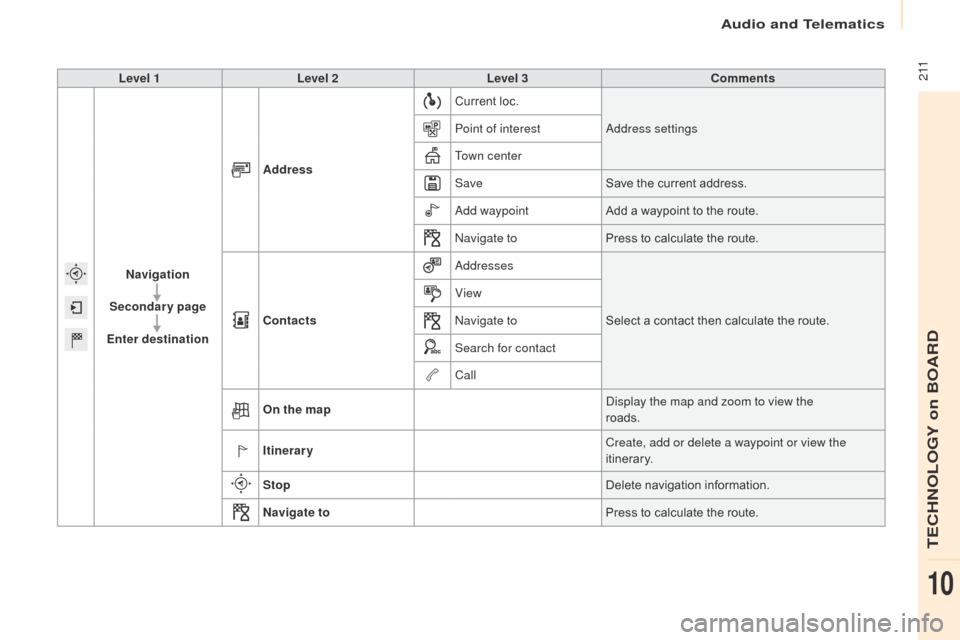
Level 1Level 2 Level 3 Comments
Navigation
Secondary page
Enter destination Address
Current
loc.
Address settings
Point of interest
Town center
Save Save
the current address.
Add waypoint Add
a waypoint to the route.
Navigate to Press
to calculate the route.
Contacts Addresses
Select
a contact then calculate the route.
View
Navigate to
Search for contact
Call
On the map Display the map and zoom to view the
roads.
Itinerary Create, add or delete a waypoint or view the
itinerary.
Stop Delete
n
avigation
i
nformation.
Navigate to Press
to calculate the route.
Audio and Telematics
TECHNOLOGY on BOARD
10
Page 218 of 292
216
Berlingo2VP_en_Chap10a_SMEGplus_ed02-2016
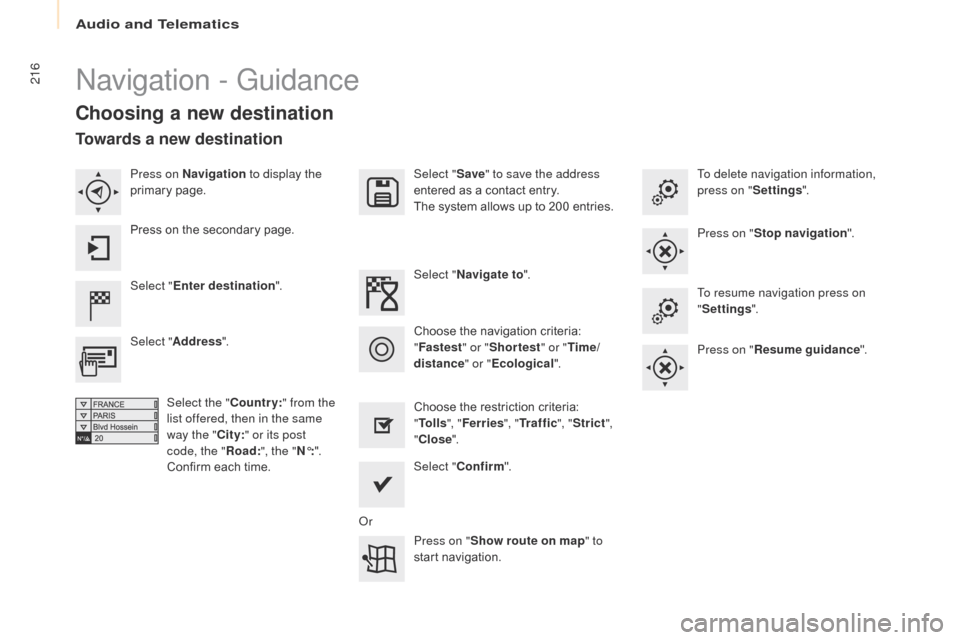
Navigation - Guidance
Choosing a new destination
Select "Enter destination ". Select "
Save" to save the address
entered as a contact entry.
The system allows up to 200 entries.
Select " Confirm ".
Press on " Show route on map " to
start
n
avigation.
Select "
Address ".
Select the " Country:" from the
list offered, then in the same
way the " City:" or its post
code, the " Road:", the " N°:".
Confirm
each time. Select "
Navigate to ".
Choose the restriction criteria:
"T
o l l s", "Ferries ", "Tr a f f i c ", "Strict ",
" Close ".
Choose
the navigation criteria:
"F
astest" or "Shortest " or "Time/
distance " or "Ecological". To delete navigation information,
press on "
Settings".
Press on " Stop navigation ".
To resume navigation press on
" Settings ".
Press on " Resume guidance ".
Press on Navigation
to display the
primary
pag
e.
Press on the secondary page.
Towards a new destination
Or
Audio and Telematics
Page 219 of 292
217
Berlingo2VP_en_Chap10a_SMEGplus_ed02-2016
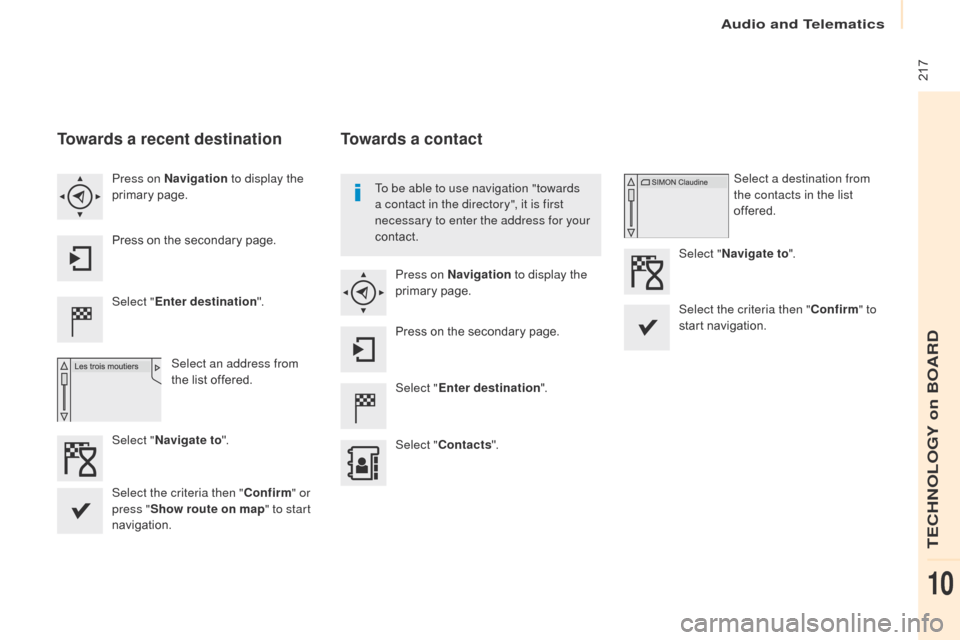
Towards a recent destination
Select "Enter destination ".
Select an address from
the
list offered.
Press on Navigation
to display the
primary
pag
e.
Press on the secondary page.
Select " Navigate to ".
Towards a contact
Select "Enter destination ".
Select " Contacts ".
Press on Navigation
to display the
primary
pag
e.
Press on the secondary page. Select a destination from
the contacts in the list
offered.
Select " Navigate to ".
Select the criteria then " Confirm" to
start
n
avigation.
To be able to use navigation "towards
a contact in the directory", it is first
necessary to enter the address for your
contact.
Select the criteria then " Confirm" or
press " Show route on map " to start
navigation.
Audio and Telematics
TECHNOLOGY on BOARD
10
Page 220 of 292
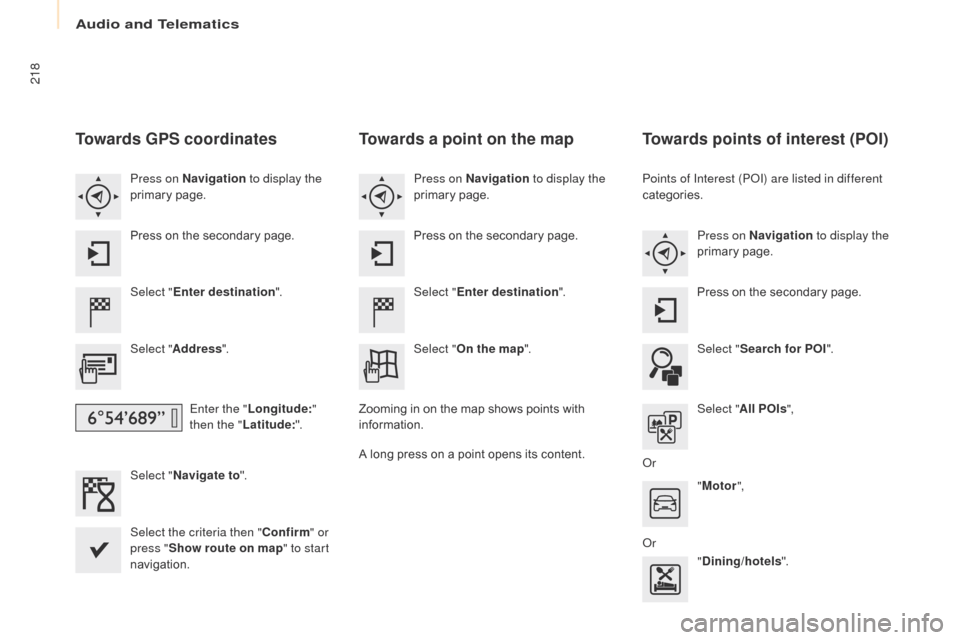
218
Berlingo2VP_en_Chap10a_SMEGplus_ed02-2016
Towards GPS coordinates
Select "Enter destination ".
Select " Address ".
Enter the " Longitude: "
then the " Latitude: ".
Select " Navigate to ".
Select the criteria then " Confirm" or
press " Show route on map " to start
navigation. Press on Navigation to display the
primary
pag
e.
Press on the secondary page.
Towards a point on the map
Select "
Enter destination ".
Select " On the map ".
Press on Navigation
to display the
primary
pag
e.
Press on the secondary page.
Zooming
in on the map shows points with
i
nformation.
A
long
press on a point opens its content.
Towards points of interest (POI)
Points of Interest (POI) are listed in different
categories.Press on Navigation to display the
primary
pag
e.
Press
on the secondary page.
Select " Search for POI ".
Select " All POIs ",
Or "Motor ",
Or "Dining/hotels ".
Audio and Telematics