audio CITROEN C CROSSER 2010 User Guide
[x] Cancel search | Manufacturer: CITROEN, Model Year: 2010, Model line: C CROSSER, Model: CITROEN C CROSSER 2010Pages: 217, PDF Size: 6.48 MB
Page 170 of 217
XI
!
174
A U D I O a n d T E L E M A T I C S
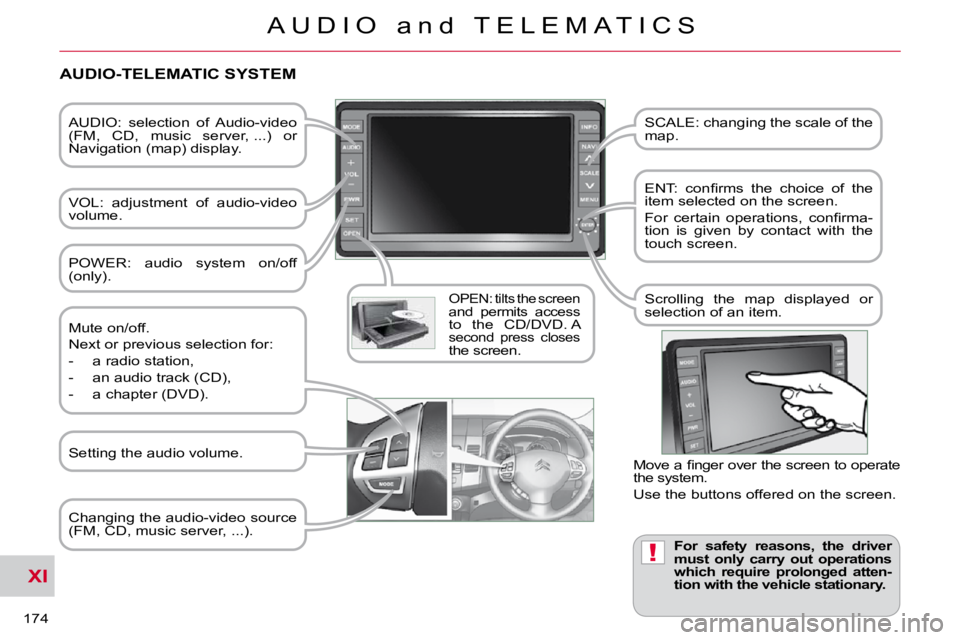
AUDIO: selection of Audio-video
(FM, CD, music server, ...) or
Navigation (map) display.
VOL: adjustment of audio-video
volume.
OPEN: tilts the screen and permits access to the CD/DVD. A second press closes the screen. SCALE: changing the scale of the
map.
ENT: confi rms the choice of the
item selected on the screen.
For certain operations, confi rma-
tion is given by contact with the
touch screen.
Scrolling the map displayed or
selection of an item.
For safety reasons, the driver
must only carry out operations
which require prolonged atten-
tion with the vehicle stationary.
AUDIO-TELEMATIC SYSTEM
Changing the audio-video source
(FM, CD, music server, ...).
Mute on/off.
Next or previous selection for:
- a radio station,
- an audio track (CD),
- a chapter (DVD).
Move a fi nger over the screen to operate
the system.
Use the buttons offered on the screen.
POWER: audio system on/off
(only).
Setting the audio volume.
Page 171 of 217
XI
175
A U D I O a n d T E L E M A T I C S
DESCRIPTION OF THE CONTROLS - MENUS
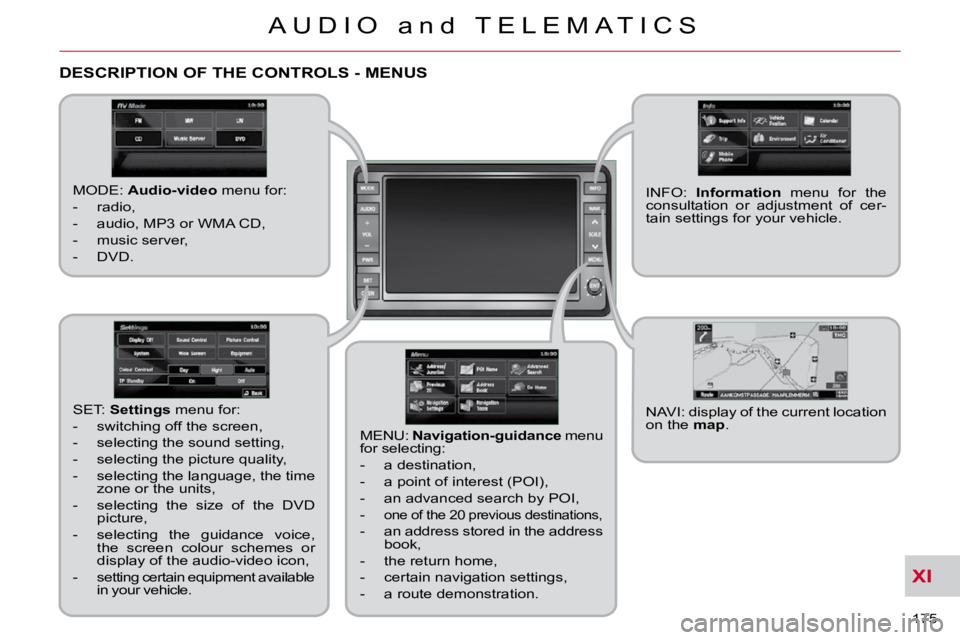
MODE: Audio-video menu for:
- radio,
- audio, MP3 or WMA CD,
- music server,
- DVD.
MENU: Navigation-guidance menu
for selecting:
- a destination,
- a point of interest (POI),
- an advanced search by POI,
-
one of the 20 previous destinations,
- an address stored in the address book,
- the return home,
- certain navigation settings,
- a route demonstration. NAVI: display of the current location
on the
map .
SET:
Settings menu for:
- switching off the screen,
- selecting the sound setting,
- selecting the picture quality,
- selecting the language, the time zone or the units,
- selecting the size of the DVD picture,
- selecting the guidance voice, the screen colour schemes or
display of the audio-video icon,
- setting certain equipment available in your vehicle. INFO:
Information menu for the
consultation or adjustment of cer-
tain settings for your vehicle.
Page 182 of 217

XI
186
A U D I O a n d T E L E M A T I C S
AUDIO-VIDEO
What is RDS? RDS station following Traffi c information function
Your radio automatically checks
and selects the best frequency
for the radio station to which it is
tuned (if the station broadcasts on sev-
eral transmitters or frequencies).
The frequency of a radio station covers
approximately 30 miles (50 km). The
change from one frequency to another
explains the loss of reception during a
journey.
If the station to which you are listening
does not have several frequencies in
the region in which you are currently lo-
cated, you can deactivate the automatic
frequency following.
Radio Data System (RDS) func-
tion on the FM waveband permits:
- tuning to the same station while travelling through different regions
(if the transmitters of this station
cover the area through which you
are travelling),
- temporary tuning to traffi c informa- tion announcements,
- display of the name of the station, etc...
Most FM stations use RDS.
These stations transmit non-audible
data in addition to their programmes.
The data transmitted in this way allows
you access to various functions, mainly
displaying of the name of the station,
temporary tuning to traffi c information
announcements or automatic station
following.
RDS allows you to continue listening to
the same station by means of the fre-
quency following. However, in certain
conditions, this RDS frequency following
cannot be provided throughout the coun-
try. Radio stations do not cover the whole
country, which explains the loss of recep-
tion of the station during a journey. The Traffic Program (TP) function
permits automatic and temporary
switching to an FM station broad-
casting traffi c information.
The radio station or the source that you
are listening to at this point is paused.
Once the traffi c information has ended,
the system switches back to the radio
station or the source that you were lis-
tening to initially.
Regional following mode Some stations are organised in
a network.
In different regions, they broad-
cast different or shared programmes
depending on the time of day.
You can follow:
- a regional station only,
- the entire network, with the possibility that you will be listening to a different
programme. Programme types
Some stations offer the option
of listening to a themed type of
programme as a priority, select-
ed from the list available below:
NEWS, AFFAIRS, INFOS, SPORT,
EDUCATE, DRAMA, CULTURE,
SCIENCE, VARIED, POP M, ROCK
M,
EASY M, LIGHT M, CLASSICS, OTHER M,
WEATHER, FINANCE, CHILDREN,
SOCIAL, RELIGION, PHONE IN, TRAVEL, LEISURE, JAZZ, COUNTRY, NATION M,
OLDIES, FOLK M, DOCUMENT.
Page 186 of 217
XI
190
A U D I O a n d T E L E M A T I C S
CD player
Your Audio-Telematic system allows
you to listen to audio CDs (CDDA, CD-
Text, CD-R/RW) or MP3 and WMA CDs.
Playing an audio CD Switching off the engine or removing
the CD during recording will result in the
tracks being faulty.
The operation of the navigation system
may slow down during recording.
The recording speed may be slower
than 4x due to the processing load on
the equipment or the condition of the
audio CD.
If jumps or other errors occur, return to
the beginning of the track and start the
recording again.
Even if there is no gap between the
tracks on the CD, a brief silence be-
tween tracks is stored on the hard disk. What is the Gracenote CDDB?
Copyright
Your Audio equipment may allow you
to listen to music which is usually pro-
tected by copyright in accordance with
current national and international stan-
dards. Please consult these standards
and comply with them.
Recording onto the music server
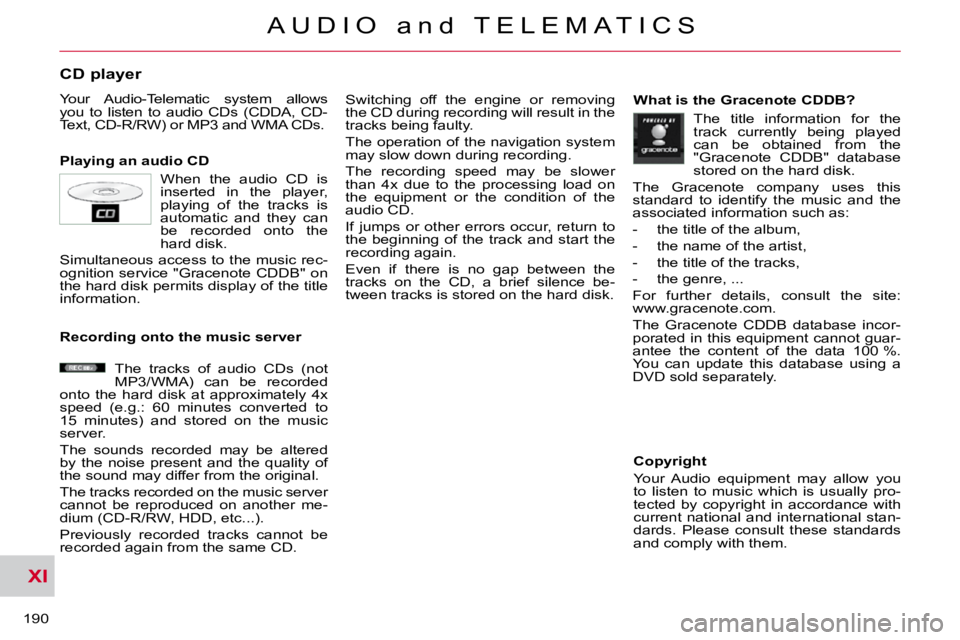
When the audio CD is
inserted in the player,
playing of the tracks is
automatic and they can
be recorded onto the
hard disk.
Simultaneous access to the music rec-
ognition service "Gracenote CDDB" on
the hard disk permits display of the title
information.
The tracks of audio CDs (not
MP3/WMA) can be recorded
onto the hard disk at approximately 4x
speed (e.g.: 60 minutes converted to
15 minutes) and stored on the music
server.
The sounds recorded may be altered
by the noise present and the quality of
the sound may differ from the original.
The tracks recorded on the music server
cannot be reproduced on another me-
dium (CD-R/RW, HDD, etc...).
Previously recorded tracks cannot be
recorded again from the same CD. The title information for the
track currently being played
can be obtained from the
"Gracenote CDDB" database
stored on the hard disk.
The Gracenote company uses this
standard to identify the music and the
associated information such as:
- the title of the album,
- the name of the artist,
- the title of the tracks,
- the genre, ...
For further details, consult the site:
www.gracenote.com.
The Gracenote CDDB database incor-
porated in this equipment cannot guar-
antee the content of the data 100 %.
You can update this database using a
DVD sold separately.
Page 192 of 217

XI
196
A U D I O a n d T E L E M A T I C S
General notes on the Music Server
What is the music server?
Your Audio-Telematic system allows
you to copy audio CDs onto a music
server, up to 2,500 songs on a 10 Gb
hard disk.
The tracks on audio CDs (not MP3 or
WMA) can be recorded onto the hard
disk at approximately 4x speed and
stored on the music server.
Refer to the "Recording a CD" section.
The music server then allows you to
manage groups and lists of tracks. "Original" group, number 01: "Original Playlist" l
ists:
"My Best" group, number 02:
"New Group" group for the user,
numbers 03 to 99: "My Favorites" list:
"My Frequency" list:
"User Playlist" list:
This is the location of
the original playlist cre-
ated automatically (not manual) when a
track of an audio CD is recorded.
It is not possible to change its name or
delete it.
You can record up to 9999 playlists in
this group.
This is the location of the
playlists, etc... created
automatically from the information read
on the music server.
It is not possible to change its name or
delete it.
The groups "My Favorites" and "My
Frequency" are stored here.
This is the location of
the user's playlists.
You can record up to 9999 playlists in
this group.
The group can be created, renamed or
deleted. These are original play
lists created automatical-
ly (not manual) when an
audio CD is recorded.
The lists and the artists can be renamed
or deleted. The genres can also be set.
This is the location of a
playlist of tracks selected
by the user from the original list.
If you delete a track from the original
list, it will be deleted from the user list.
The list and the artist can be renamed
or deleted.
It is possible to add tracks or change
their order.
This is the location of
the playlists used most
frequently from the original list.
It is not possible to add tracks or change
their order. This is the location for
storing your favourite
tracks.
They can be deleted from the list and
the order in which they are played can
be changed.
Page 196 of 217

XI
A U D I O a n d T E L E M A T I C S
General notes on MP3/WMA CDs
Playing an MP3/WMA CD When the MP3/WMA CD is
inserted in the player, play-
ing of the tracks is automatic.
The tracks cannot be recorded
onto the music server.
You can play CDs with up to 8 levels,
255 folders and 400 fi les maximum.
Copyright
Your Audio equipment may allow you
to listen to music which is usually pro-
tected by copyright in accordance with
current national and international stan-
dards. Please consult these standards
and comply with them.
Acceptance of the fi les
Some blank CDs may not be played
by your equipment (quality, recording
speed...).
When you burn a CD-R or CD-RW,
select the ISO 9660 level 1.2 or Joliet
burning standard.
To obtain the best acoustic quality pos-
sible, select the lowest burning speed.
The MPEG1 and MPEG2 standards
are accepted.
Transmission speeds between 32 and
320 kbits/s and scans between 16 kHz
and 48 kHz are accepted.
To display the title information (the
name of the artist, the title of the album,
etc...), the information contained in the
ID3 Tags or the WMA Tags must be in-
cluded in the MP3/WMA fi les burned
onto the disc.
What is the MP3/WMA fi le format?
MP3 is the abbreviation of MPEG-1
Audio Layer 3 and MPG is the abbrevia-
tion of Motion Pictures Experts Group, a
digital video data compression standard
used on media such as video CDs.
The MP3 compression reduces the
number of bytes in a song by eliminating
the long sound waves in the range of fre-
quencies which are imperceptible to the
human ear, so producing high quality au-
dio fi les with a low volume of data.
This compression divides the size of
the content of a conventional audio CD
by approximately 10, which means that
the content of 10 audio CDs can be
recorded onto a single CD-R or CD-RW.
WMA is the abbreviation of Windows
Media Audio, another audio data com-
pression standard offered by Microsoft.
It can be used to create and save audio
fi les at a compression rate higher than
that of the MP3 format.
Windows Media and Microsoft Corpo-
ration are trademarks registered in the
United States and/or other countries.
Page 200 of 217

XI
!
204
A U D I O a n d T E L E M A T I C S
DVD MODE
The DVD button is only active if the
player contains a DVD. Press Open to return the screen to the
vertical position. For safety reasons, the video is
not displayed while driving, how-
ever the audio can be played.
To display the picture and watch
a DVD, park the vehicle in a safe
place.
K. To display the DVD title menu.
L. To scroll up or down through the
chapters.
Press and hold for fast backwards or forwards play.
M. To scroll up or down through the titles.
N. To enter a title or chapter number.
O. To change the angle.
P. To change the language of the sub-
titles.
Q. To change the language.
R. To select a chapter or title or specify
a number.
A. This icon is displayed when the opera-
tion requested cannot be carried out.
B. The number of the chapter currently
being played is displayed.
C. The number of the title currently
being played is displayed.
D. Symbols display the current status
of the player.
E. The playing time is displayed.
F. To resume normal play when play is
paused or during slow-motion play.
G. To stop play temporarily.
H. To stop play. Press the screen to
access the menu.
I. For slow-motion play.
J. To play the previously selected zone
on the disc.
Information displayed in DVD mode
Page 202 of 217
XI
206
A U D I O a n d T E L E M A T I C S
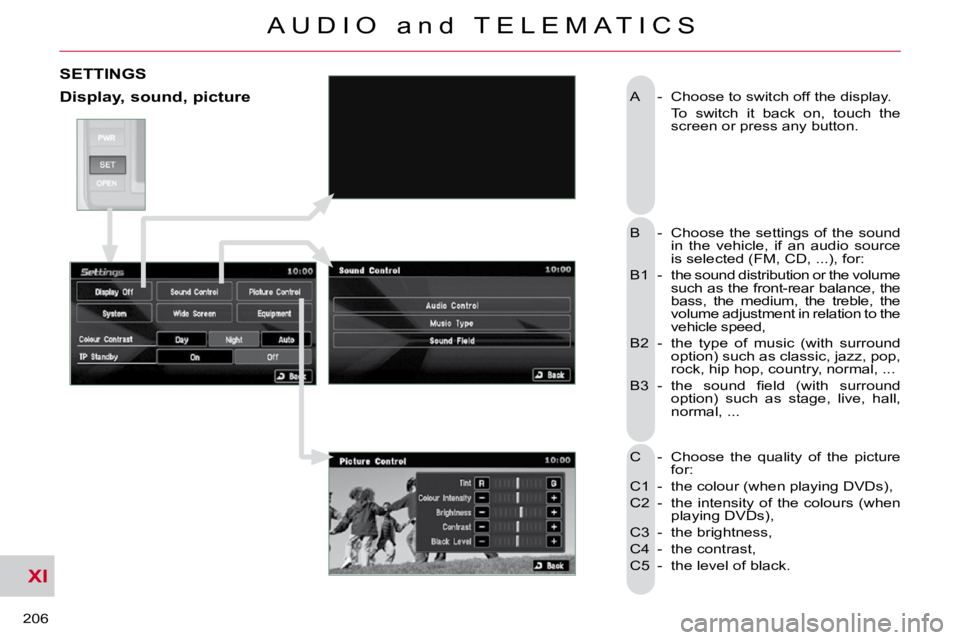
A - Choose to switch off the display.
To switch it back on, touch the screen or press any button.
B - Choose the settings of the sound in the vehicle, if an audio source
is selected (FM, CD, ...), for:
B1 - the sound distribution or the volume such as the front-rear balance, the
bass, the medium, the treble, the
volume adjustment in relation to the
vehicle speed,
B2 - the type of music (with surround option) such as classic, jazz, pop,
rock, hip hop, country, normal, ...
B3 - the sound fi eld (with surround option) such as stage, live, hall,
normal, ...
C - Choose the quality of the picture for:
C1 - the colour (when playing DVDs),
C2 - the intensity of the colours (when playing DVDs),
C3 - the brightness,
C4 - the contrast,
C5 - the level of black.
SETTINGS
Display, sound, picture
Page 203 of 217
XI
207
A U D I O a n d T E L E M A T I C S
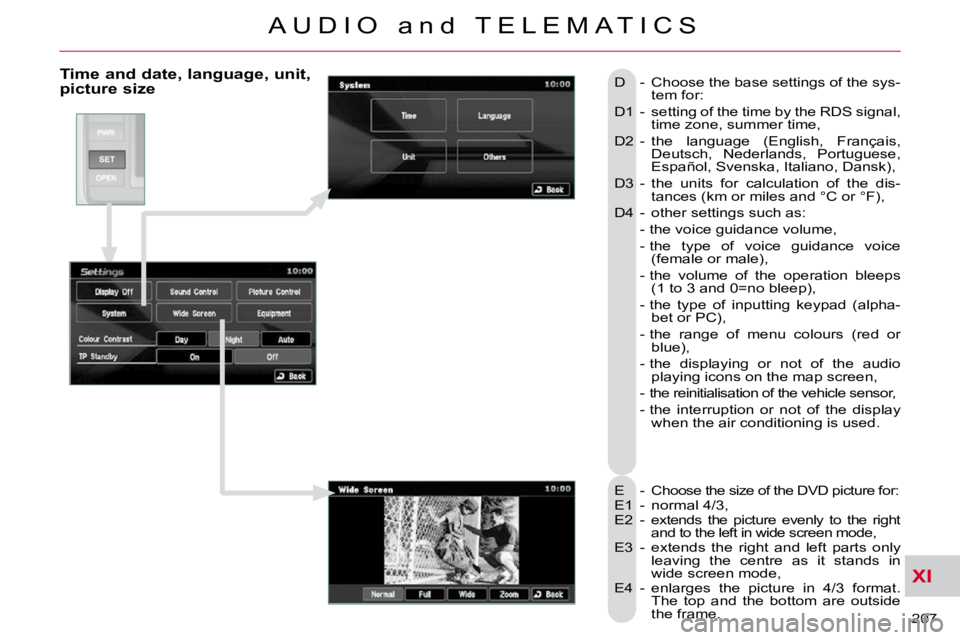
Time and date, language, unit, picture size
E - Choose the size of the DVD picture for:
E1 - normal 4/3,
E2 - extends the picture evenly to the right and to the left in wide screen mode,
E3 - extends the right and left parts only leaving the centre as it stands in
wide screen mode,
E4 - enlarges the picture in 4/3 format. The top and the bottom are outside
the frame.
D - Choose the base settings of the sys-
tem for:
D1 - setting of the time by the RDS signal, time zone, summer time,
D2 - the language (English, Français, Deutsch, Nederlands, Portuguese,
Español, Svenska, Italiano, Dansk),
D3 - the units for calculation of the dis- tances (km or miles and °C or °F),
D4 - other settings such as:
- the voice guidance volume,
- the type of voice guidance voice (female or male),
- the volume of the operation bleeps (1 to 3 and 0=no bleep),
- the type of inputting keypad (alpha- bet or PC),
- the range of menu colours (red or blue),
- the displaying or not of the audio playing icons on the map screen,
- the reinitialisation of the vehicle sensor,
- the interruption or not of the display when the air conditioning is used.
Page 208 of 217
XI
212
A U D I O a n d T E L E M A T I C S
What is the Bluetooth®
hands-free telephone with voice
recognition?
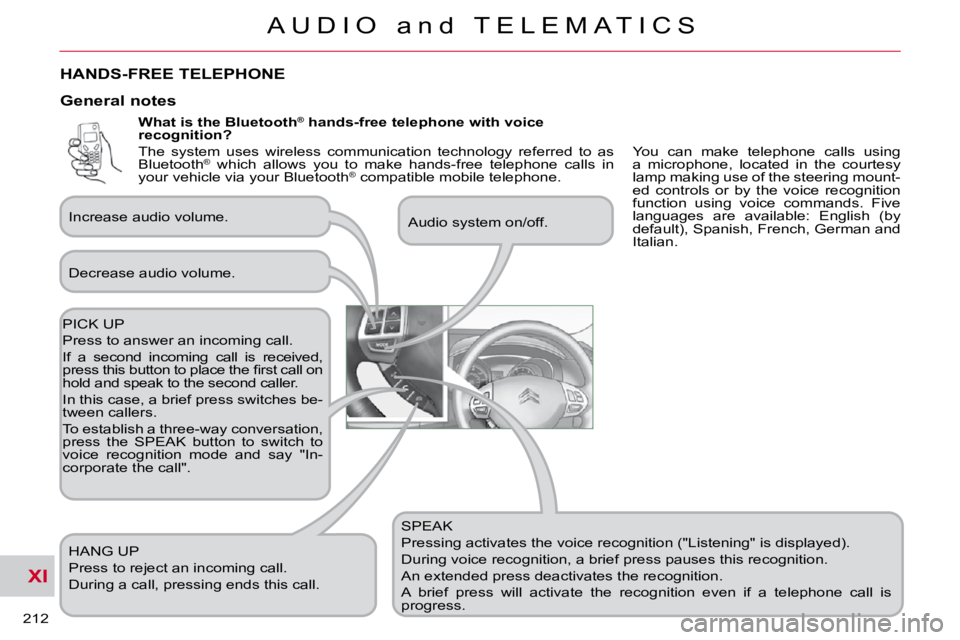
SPEAK
Pressing activates the voice recognition ("Listening" is displayed).
During voice recognition, a brief press pauses this recognition.
An extended press deactivates the recognition.
A brief press will activate the recognition even if a telep hone call is
progress. Audio system on/off.
PICK UP
Press to answer an incoming call.
If a second incoming call is received,
press this button to place the fi rst call on
hold and speak to the second caller.
In this case, a brief press switches be-
tween callers.
To establish a three-way conversation,
press the SPEAK button to switch to
voice recognition mode and say "In-
corporate the call". HANG UP
Press to reject an incoming call.
During a call, pressing ends this call.
General notes
Decrease audio volume.
Increase audio volume.
HANDS-FREE TELEPHONE
You can make telephone calls using
a microphone, located in the courtesy
lamp making use of the steering mount-
ed controls or by the voice recognition
function using voice commands. Five
languages are available: English (by
default), Spanish, French, German and
Italian.
The system uses wireless communication technology referred to as
Bluetooth
®
which allows you to make hands-free telephone calls in
your vehicle via your Bluetooth ®
compatible mobile telephone.