phone Citroen C ZERO 2015 1.G Owner's Manual
[x] Cancel search | Manufacturer: CITROEN, Model Year: 2015, Model line: C ZERO, Model: Citroen C ZERO 2015 1.GPages: 176, PDF Size: 5.21 MB
Page 123 of 176
121
C-zero_en_Chap08_info-pratiques_ed01-2014
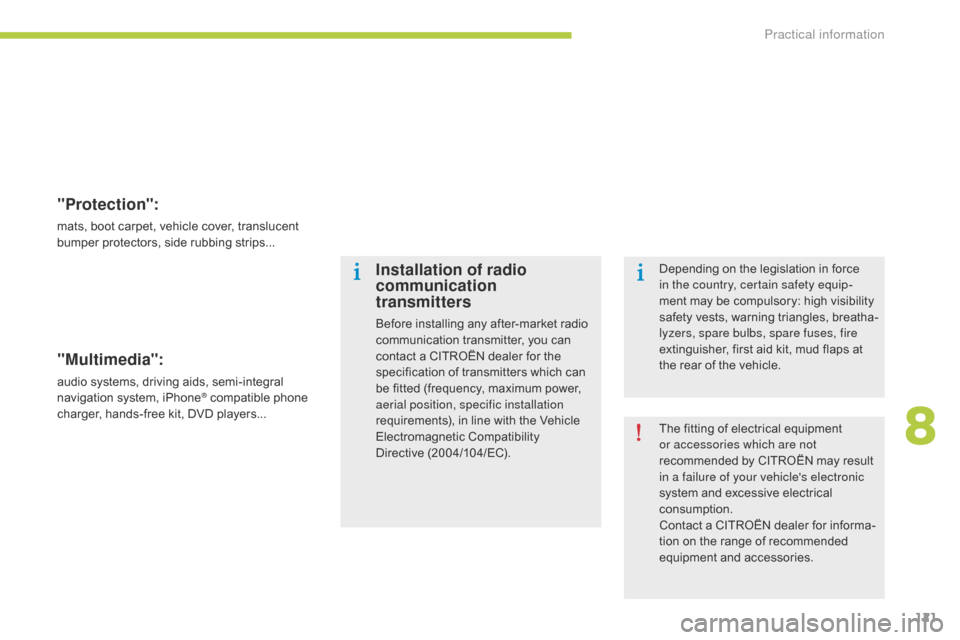
"Protection":
mats, boot carpet, vehicle cover, translucent
bumper protectors, side rubbing strips...
"Multimedia":
audio systems, driving aids, semi-integral
navigation system, iPhone® compatible phone
charger, hands-free kit, DVD players...
Installation of radio
communication
transmitters
Before installing any after-market radio
communication transmitter, you can
contact a CITROËN dealer for the
specification of transmitters which can
be fitted (frequency, maximum power,
aerial position, specific installation
requirements), in line with the Vehicle
Electromagnetic Compatibility
Directive
(
2004/104/EC). The fitting of electrical equipment
or accessories which are not
recommended by CITROËN may result
in a failure of your vehicle's electronic
system and excessive electrical
consumption.
Contact a CITROËN dealer for informa-
tion on the range of recommended
equipment and accessories. Depending on the legislation in force
in the country, certain safety equip
-
ment may be compulsory: high visibility
safety vests, warning triangles, breatha-
lyzers, spare bulbs, spare fuses, fire
extinguisher, first aid kit, mud flaps at
the rear of the vehicle.
8
Practical information
Page 137 of 176

135
C-Zero_en_Chap11b_RDE2_ed01-2014
Audio system / Bluetooth®
01 First steps
For safety reasons, the driver must only carry out
operations which require prolonged attention while the
vehicle is stationary.
When the engine is switched off and to prevent
discharging of the battery, the system switches off after
activation of the energy economy mode.
CONTENTS
02
Radio
03
Audio
04
Using the telephone
05
Audio settings
06
Configuration
07
Screen menu maps
Frequently asked questions p.
p.
p.
p.
p.
p.
p.
p.
136
137
140
146
152
153
154
155
After a battery disconnection, a code has to be entered
for operation of the radio.
A maximum of five attempts are possible. For the last two
attempts, a 15 minutes wait is imposed between each
attempt.
Refer to the end of this document to find the label
indicating this code:
Page 138 of 176
01
136
C-Zero_en_Chap11b_RDE2_ed01-2014
FIRST STEPS
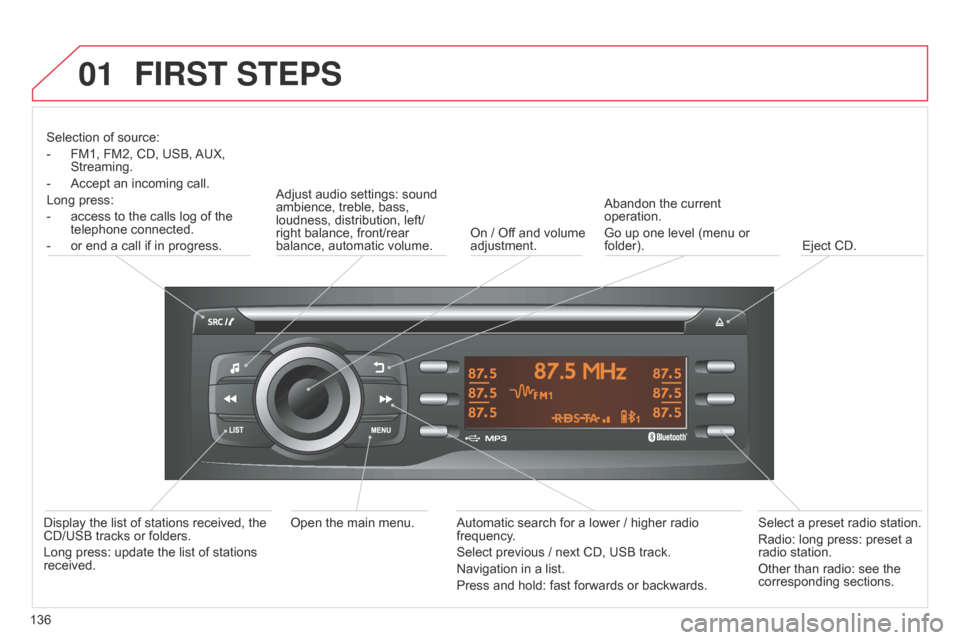
Selection of source:
-
FM1, FM2, CD, USB, AUX,
Streaming.
-
Accept an incoming call.
Long press:
-
access to the calls log of the
telephone connected.
-
or end a call if in progress. Adjust audio settings: sound
ambience, treble, bass,
loudness, distribution, left/
right balance, front/rear
balance, automatic volume.
On / Off and volume
adjustment.Abandon the current
operation.
Go up one level (menu or
folder).
Eject CD.
Select a preset radio station.
Radio: long press: preset a
radio station.
Other than radio: see the
corresponding sections.
Automatic search for a lower / higher radio
frequency
.
Select previous / next CD, USB track.
Navigation in a list.
Press and hold: fast forwards or backwards.
Open the main menu.
Display the list of stations received, the
CD/USB tracks or folders.
Long press: update the list of stations
received.
Page 147 of 176
03
145
C-Zero_en_Chap11b_RDE2_ed01-2014
Streaming - Playing audio files via Bluetooth
Depending on the compatibility of the phoneConnect the telephone: see the "USING THE
TELEPHONE" section.
Streaming allows music files on a telephone to be heard via the
vehicle's speakers.
The telephone must support the appropriate Bluetooth
® profiles
(profiles A2DP / AVRCP).
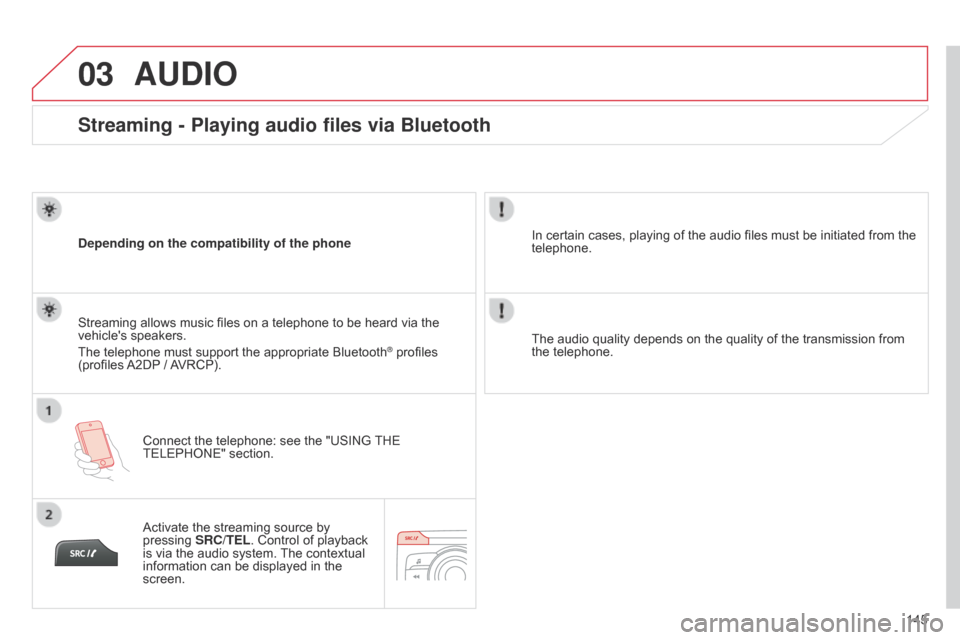
Activate the streaming source by
pressing SRC/TEL. Control of playback
is via the audio system. The contextual
information can be displayed in the
screen. In certain cases, playing of the audio files must be initiated from the
telephone.
The audio quality depends on the quality of the transmission from
the telephone.
AUDIO
Page 148 of 176
04
146
C-Zero_en_Chap11b_RDE2_ed01-2014
USING THE TELEPHONE
Pairing a Bluetooth telephone / First connection
The services offered depend on the network, the SIM card and the compatibility of the Bluetooth telephone used.
Consult your telephone's manual and your operator to find out which services are available to you.
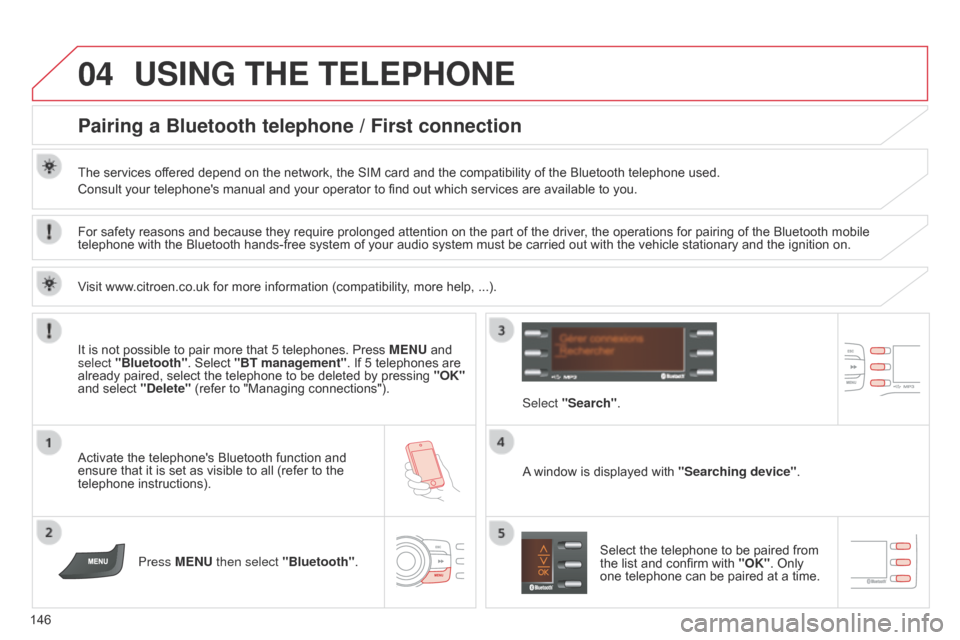
Activate the telephone's Bluetooth function and
ensure that it is set as visible to all (refer to the
telephone instructions).Press MENU then select "Bluetooth". A window is displayed with
"Searching device".
Select the telephone to be paired from
the list and confirm with "OK". Only
one telephone can be paired at a time.
Select "Search"
.
For safety reasons and because they require prolonged attention on the part of the driver
, the operations for pairing of the Bluetooth mobile
telephone with the Bluetooth hands-free system of your audio system must be carried out with the vehicle stationary and the ignition on.
It is not possible to pair more that 5 telephones. Press MENU and
select "Bluetooth". Select "BT management". If 5 telephones are
already paired, select the telephone to be deleted by pressing "OK"
and select "Delete" (refer to "Managing connections").
Visit www.citroen.co.uk for more information (compatibility, more help, ...).
Page 149 of 176
04
147
C-Zero_en_Chap11b_RDE2_ed01-2014
USING THE TELEPHONE
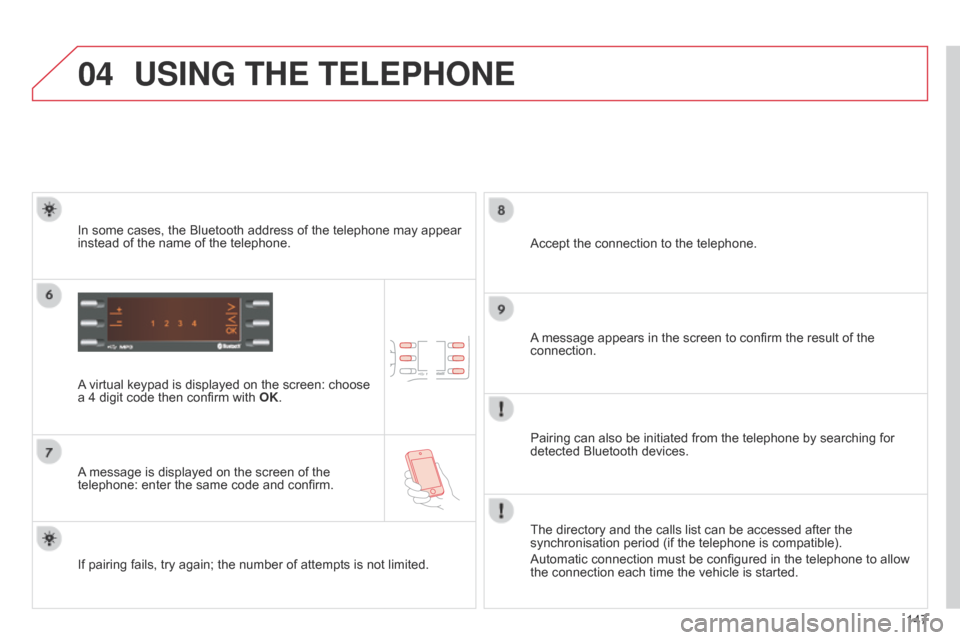
A virtual keypad is displayed on the screen: choose
a 4 digit code then confirm with OK.
A message is displayed on the screen of the
telephone: enter the same code and confirm. A message appears in the screen to confirm the result of the
connection.
Pairing can also be initiated from the telephone by searching for
detected Bluetooth devices. Accept the connection to the telephone.
If pairing fails, try again; the number of attempts is not limited. The directory and the calls list can be accessed after the
synchronisation period (if the telephone is compatible).
Automatic connection must be configured in the telephone to allow
the connection each time the vehicle is started.
In some cases, the Bluetooth address of the telephone may appear
instead of the name of the telephone.
Page 150 of 176
04
148
C-Zero_en_Chap11b_RDE2_ed01-2014
USING THE TELEPHONE
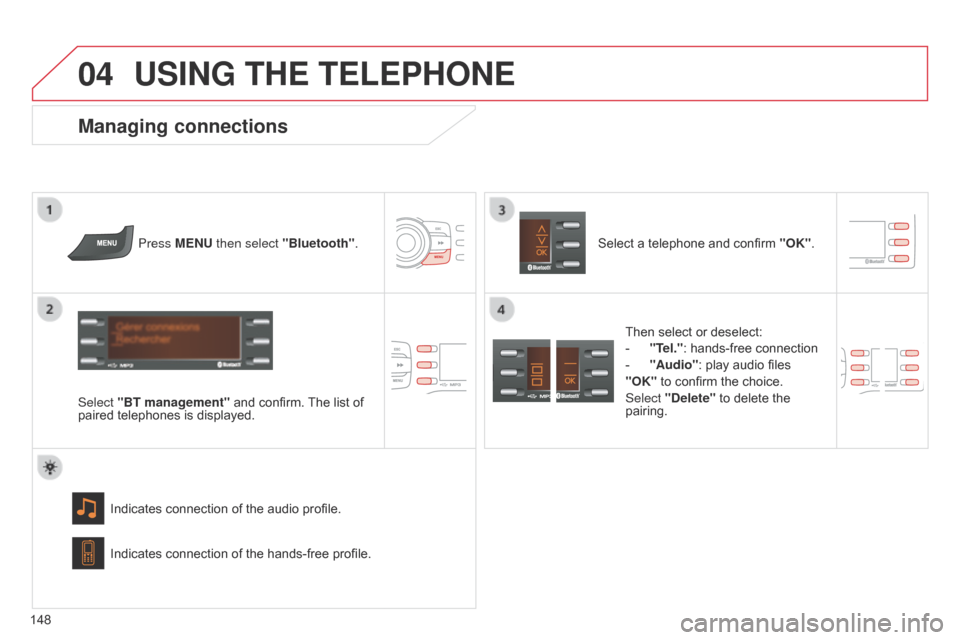
Press MENU then select "Bluetooth".
Select "BT management" and confirm. The list of
paired telephones is displayed.
Indicates connection of the audio profile.
Managing connections
Select a telephone and confirm "OK".
Indicates connection of the hands-free profile. Then select or deselect:
-
"T
el.": hands-free connection
-
"Audio": play audio files
"OK"
to confirm the choice.
Select "Delete" to delete the
pairing.
Page 151 of 176

04
149
C-Zero_en_Chap11b_RDE2_ed01-2014
USING THE TELEPHONE
Make along press on SRC/TEL to
display the calls list.
In the list of calls, select the number and choose
"Missed calls", "Dialed calls" or "Answered
calls". Previous or next page in the calls list.
"OK" starts the call.
Making a call - Recently called numbers*
Navigation in the calls list.
The calls list includes the calls sent from and by from the vehicle via
the connected telephone.
It is possible to make a call directly from the telephone; stop the
vehicle as a safety measure.
* Depending on the compatibility of the telephone.
For access to the calls list, it is also possible to press
MENU, select
"Telephone", then select "Call", and finally select "Calls list".
Page 152 of 176

04
150
C-Zero_en_Chap11b_RDE2_ed01-2014
USING THE TELEPHONE
Press MENU, select "Telephone".
Select Call then "Directory" . An incoming call is announced by a ring and a superimposed display
in the screen.
Select the desired number and confirm.
"OK" to start the call. Press SRC/TEL or select "YES" to
accept the call,
or
select "NO" to reject the call.
Making a call - From the directory
Receiving a call
A long press on ESC or on SRC/TEL
also rejects an incoming call.
Page 153 of 176

04
151
C-Zero_en_Chap11b_RDE2_ed01-2014
USING THE TELEPHONE
Hang upIn the contextual menu:
-
select "Combined mode"
to
transfer the call to the telephone.
-
select "Combined mode"
to
transfer the call to the vehicle.
In the contextual menu:
-
select "Micro OFF"
to switch off
the microphone.
-
select "Micro OFF"
to switch the
microphone on again.
In certain cases, the combined mode has to activated from the
telephone.
The Bluetooth connection will be restored automatically if the ignition
has been switched off, then on again (depending on the compatibility
of the telephone).
Managing calls
A long press on SRC/TEL also ends
the call. In the contextual menu, select "Hang
up" to end the call. Secret - Mute
(so that the caller cannot hear)
Combined mode
(to leave the vehicle without ending the call)