phone CITROEN C-ZERO DAG 2017 Handbook (in English)
[x] Cancel search | Manufacturer: CITROEN, Model Year: 2017, Model line: C-ZERO DAG, Model: CITROEN C-ZERO DAG 2017Pages: 174, PDF Size: 4.56 MB
Page 41 of 174

39
C-Zero_en_Chap03_ergonomie-et-confort_ed01-2016
12 V accessory socket
F To connect a 12 V accessory (max power: 120 W), lift the cover and connect a
suitable adaptor.
Mats
To prevent any risk of jamming under
the pedals:
-
o
nly use mats suited to the fixings
already present in the vehicle; it is
imperative that these fixings are
used.
-
n
ever fit one mat on top of another.
When removing the mat on the driver's side,
move back the seat as far as possible and
remove the fixings.
When refitting, position the mat correctly on the
pins and clip the fixings. Check that the mat is
secured firmly.
The sun visors fold for wards, and to the side
when they are unhooked.
They are fitted with a vanity mirror and a ticket
h o l d e r.
Sun visor
The connection of an electrical device
not approved by CITROËN, such as a
USB charger, may adversely affect the
operation of vehicle electrical systems,
causing faults such as poor telephone
reception or inter ference with displays
in the screens.
3
Ease of use and comfort
Page 147 of 174
145
C-Zero_en_Chap10a_RDE2_ed01-2016
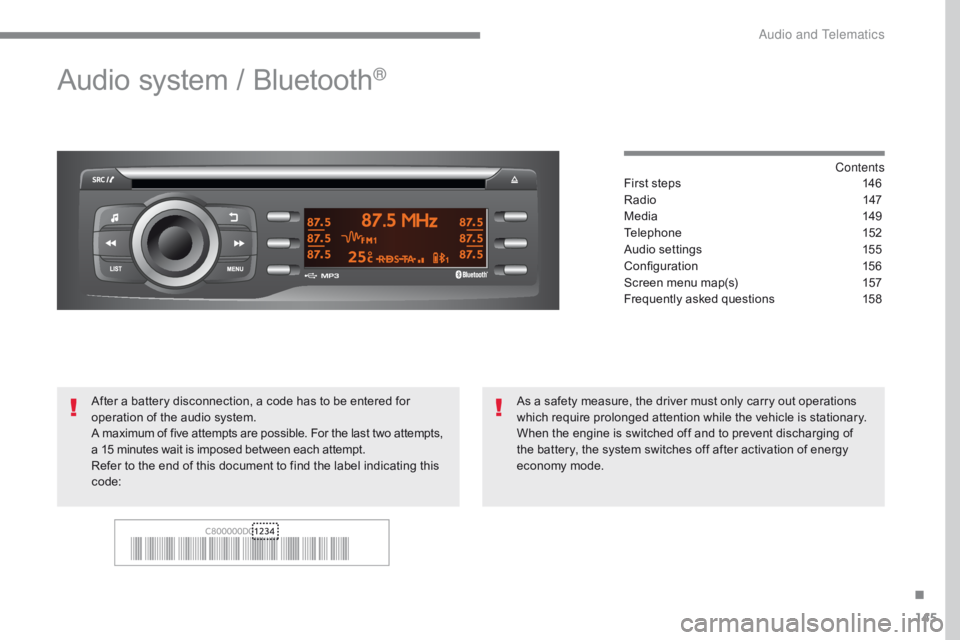
Audio system / Bluetooth®
Contents
First steps
1 46
Radio
14
7
Media
1
49
Telephone
1
52
Audio settings
1
55
Configuration
1
56
Screen menu map(s)
1
57
Frequently asked questions
1
58
As a safety measure, the driver must only carry out operations
which require prolonged attention while the vehicle is stationary.
When the engine is switched off and to prevent discharging of
the battery, the system switches off after activation of energy
economy mode.
After a battery disconnection, a code has to be entered for
operation of the audio system.
A maximum of five attempts are possible. For the last two
attempts,
a 15 minutes wait is imposed between each attempt.
Refer to the end of this document to find the label indicating this
code:
.
Audio and Telematics
Page 148 of 174
146
C-Zero_en_Chap10a_RDE2_ed01-2016
First steps
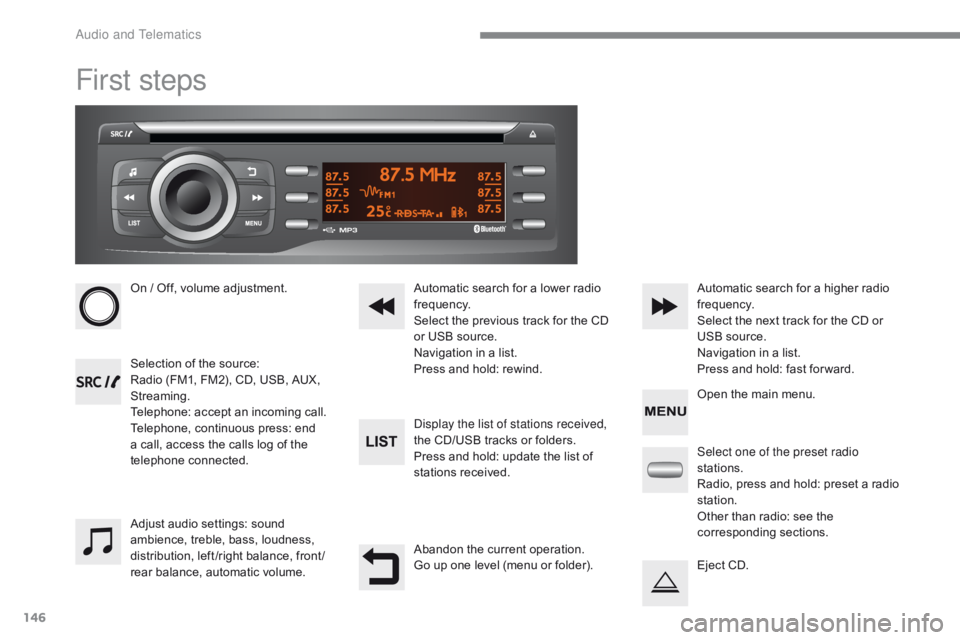
On / Off, volume adjustment.
Selection of the source:
Radio (FM1, FM2), CD, USB, AUX,
Streaming.
Telephone: accept an incoming call.
Telephone, continuous press: end
a call, access the calls log of the
telephone connected.Display the list of stations received,
the CD/USB tracks or folders.
Press and hold: update the list of
stations received. Automatic search for a lower radio
frequency.
Select the previous track for the CD
or USB source.
Navigation in a list.
Press and hold: rewind.Automatic search for a higher radio
frequency.
Select the next track for the CD or
USB source.
Navigation in a list.
Press and hold: fast for ward.
Adjust audio settings: sound
ambience, treble, bass, loudness,
distribution, left /right balance, front /
rear balance, automatic volume. Abandon the current operation.
Go up one level (menu or folder).Select one of the preset radio
stations.
Radio, press and hold: preset a radio
station.
Other than radio: see the
corresponding sections.
Eject CD. Open the main menu.
Audio and Telematics
Page 153 of 174
151
C-Zero_en_Chap10a_RDE2_ed01-2016
Use only USB memory sticks formatted to
FAT32 (File Allocation Table).The use of genuine Apple
® USB cables
is recommended to ensure correct
operation.
On a single disc, the CD player can read up
to 255 MP3 files spread over 8 folder levels
with a maximum of 192 folders. However, it is
recommended that this be kept to 2 levels so
as to limit the time taken to access and play
the CD.
During play, the folder structure is not
observed.
Do not connect a hard disk or USB device other
than audio players to the USB port. This may
cause damage to your installation.
To protect the system, do not use a
USB hub.
Bluetooth® audio streaming
Streaming allows music files on a telephone to
be heard via the vehicle's speakers.
Connect the telephone: see the " Telephone"
section.
In the " Bluetooth : Audio" menu, select the
telephone to connect.
The audio system connects automatically to a
newly paired telephone.
The control of common tracks is possible
via the audio system control buttons and
the steering mounted controls**. Contextual
information can be displayed in the screen. Activate the streaming source by
pressing the SRC/TEL
* button.
The audio quality depends on the quality of the
transmission from the telephone.
*
I
n certain cases, the playing of audio files
must be initiated from the telephone.
** If the telephone supports the function.
Connecting Apple® players
Connect the Apple® player to the USB port
using a suitable cable (not supplied).
Play starts automatically.
Management of the device is via the audio
system controls.
The classifications available are those on the
portable player connected (artists / albums /
genres / playlists / audiobooks / podcasts).
The software version of the audio system may
not be compatible with the generation of your
Apple
® player..
.
Audio and Telematics
Page 154 of 174

152
C-Zero_en_Chap10a_RDE2_ed01-2016
Telephone
Pairing a Bluetooth® telephone
For safety reasons and because they
require prolonged attention on the part
of the driver, the operations for pairing
of the Bluetooth mobile telephone
with the Bluetooth hands-free system
of your audio system must be carried
out with the vehicle stationary and the
ignition on.
Visit www.citroen.co.uk for more information
(compatibility, more help, etc.).
Activate the telephone's Bluetooth function and
ensure that it is set as visible to all (refer to the
telephone instructions). Press the MENU button. The services available depend on
the network, the SIM card and the
compatibility of the Bluetooth telephone
used.
Consult your telephone's manual and
your operator to find out which services
are available to you.
Only one telephone can be paired at a time. A message is displayed on the screen of the
telephone: enter the same code and confirm.
If pairing fails, try again; the number of
attempts is not limited.
A message appears on the screen to confirm
the result of the connection.
Pairing can also be initiated from the
telephone by searching for detected
Bluetooth devices.
The directory and the calls list can be
accessed after the synchronisation
period (if the telephone is compatible).
Automatic connection must be
configured in the telephone to allow
the connection each time the vehicle is
started.
Select "Bluetooth"
. Select the telephone to be paired
from the list. A virtual keypad is displayed on the
screen: choose a 4 digit code.
Select " Search". A window is displayed with "
Searching
device ".
In some cases, the Bluetooth address of the
telephone may appear instead of the name of
the telephone. Confirm with "OK"
. Confirm with "OK"
.
Audio and Telematics
Page 155 of 174

153
C-Zero_en_Chap10a_RDE2_ed01-2016
Press the MENU button.
Press the MENU button.
Managing connections Making a call
From the directory
Select "Bluetooth".
Select "Telephone".
Select "Call" .
Select "Directory" .
"Delete"
to delete the pairing.
Select or deselect:
-
"
Te l ."
: hands-free connection
-
"A
u d i o"
: play audio files
Indicates connection of the audio
profile.
Indicates connection of the hands-
free profile. Select "BT management" and
confirm. The list of paired telephones
is displayed.
In the list, select a telephone to pair.
Confirm with "OK" . "OK"
to confirm the choice.
Select the desired number.
Confirm with "OK" to start the call.
It is not possible to pair more than
5 telephones. Press MENU
and
select "Bluetooth" . Select "BT
management" . If 5 telephones are
already paired, select the telephone to
delete by pressing "OK" and selecting
"Delete" .
.
Audio and Telematics
Page 156 of 174

154
C-Zero_en_Chap10a_RDE2_ed01-2016
Receiving a call
An incoming call is announced by a ring and a
superimposed display in the screen.
For access to the calls list, it is also
possible to press MENU , select
"Telephone" , then select "Call" , and
finally select "Calls list" .
The calls list includes the calls sent
from and by from the vehicle via the
connected telephone.
It is possible to make a call directly from
the telephone; stop the vehicle as a
safety measure.
Making a call
Recently called numbers*
In the list of calls, select the number
and choose "Missed calls", "Dialed
calls" or "Answered calls" .
Press and hold SRC/TEL
to display
the calls list.
Press SRC/TEL.
on SRC/TEL also rejects an
incoming call.
or
or
or
Scroll through the calls list.
Confirm with "OK"
. "OK"
starts the call.
Press one of these buttons to go to
the previous or next page in the list.
*
D
epending on the compatibility of the
telephone. select "
YES" to accept the call,
select "NO" to reject the call.
Pressing and holding the back
button,
Audio and Telematics
Page 157 of 174

155
C-Zero_en_Chap10a_RDE2_ed01-2016
Managing calls
In the contextual menu, select "Hang
up" to end the call.
Select " Micro OFF " to switch off the
microphone. Select
"Combined mode " to transfer
the call to the telephone. Press ¯ to display the audio settings
menu.
Press ¯ to go to the next setting.
Select " Micro OFF " to switch the
microphone on again. Select
"Combined mode"
to transfer
the call to the vehicle.
In the contextual menu: From the contextual menu:
In certain cases, the combined mode has
to activated from the telephone.
The Bluetooth connection will be
restored automatically if the ignition
has been switched off, then on again
(depending on the compatibility of the
telephone). The distribution, or spatialisation of sound,
is an audio process which allows the
sound quality to be improved according to
the setting chosen, corresponding to the
position of the listeners in the vehicle.
Hang up
Secret - MuteCombined mode
Pressing and holding on SRC/TEL
also ends the call.
(so that the caller cannot hear) (to leave the vehicle without ending the call)
The settings available are:
-
A
MBIANCE: BASS, TREBLE and
LOUDNESS.
-
B
ALANCE (left /right balance), FADER
(front/rear balance).
-
S
OUND DIST. (driver or passenger).
-
A
UTO VOLUME.
The AMBIANCE, TREBLE and BASS
audio settings are different and
independent for each sound source.
Audio settings
.
Audio and Telematics
Page 159 of 174

157
C-Zero_en_Chap10a_RDE2_ed01-2016
Screen menu map(s)
3
3
3
3
3
3
3
3
3
3
3
3
3
3
3
4
4
4
Directory
Scrolling textDeutsch
Italiano Español
Português
Русский
Celsius English
Nederlands Français
Português-Brasil
Türkçe
Fahrenheit
Calls list
Missed calls
Dialed calls
Answered calls
Radio Telephone
Bluetooth
Config.
RDS
TXT
Write freq.
Media
Normal
Random all TA Call
BT management
Unit
Search
Displaying Language
Version
System
Phone status
11
1
1
22
2
2
2
2
2
2
2
2
2
2
2
1
2
2
MENU
Random
Repeat
TA2
2
2
.
Audio and Telematics
Page 162 of 174

160
C-Zero_en_Chap10a_RDE2_ed01-2016
QUESTIONANSWER SOLUTION
The CD is ejected
automatically or is not
played by the player. The CD is inserted upside down, is unplayable, does not contain any
audio data or contains an audio format which the player cannot play.
The CD is protected by an anti-pirating protection system which is
not recognised by the audio equipment. -
C
heck that the CD is inserted in the player the
right way up.
-
C
heck the condition of the CD: the CD cannot
be played if it is too damaged.
-
C
heck the content in the case of a recorded
CD: consult the advice in the "Audio" section.
-
T
he audio equipment's CD player does not
play DVDs.
-
D
ue to their quality level, certain writeable
CDs will not be played by the audio system.
The CD player sound is
p o o r. The CD used is scratched or of poor quality.
Insert good quality CDs and store them in suitable
conditions.
The audio settings (bass, treble, ambience) are unsuitable. Set the treble or bass level to 0, without selecting
an ambience.
The Bluetooth connection
is cut. The battery of the peripheral may not be sufficiently charged. Recharge the battery of the peripheral device.
The message "USB device
error" is displayed on the
screen. The USB memory stick is not recognised.
Use only USB memory sticks formatted to FAT 32
(28 -bit file allocation table).
A telephone connects
automatically,
disconnecting another
telephone. Automatic connection overrides manual connection.
Modify the telephone settings to remove
automatic connection.
Audio and Telematics