Time Citroen C1 2012 1.G User Guide
[x] Cancel search | Manufacturer: CITROEN, Model Year: 2012, Model line: C1, Model: Citroen C1 2012 1.GPages: 140, PDF Size: 4.24 MB
Page 70 of 140

68Practical information
) Disconnect the connector. )
Remove the rubber cap C.)
Push the side of the tongue D.)
Remove the bulb holder and change thebulb. )
Refit the bulb holder, the tongue then the
rubber cap.
If
you encounter any difficulties, contact a CITROËN dealer or a qualified workshop.
LED daytime running lamps
For the replacement of these lamps, contact aCITROËN dealer or qualified workshop.
Front foglamps
For replacement of these bulbs, contact a CITROËN dealer or a qualified workshop.
)Turn the bulb holder Bone quar ter of a turnand remove it.)Turn the bulb one quar ter of a turn.)Remove the bulb and change it.
If you encounter any difficulties, contact aCITROËN dealer or a qualified workshop.
2. Direction indicators(PY 21 W amber)3. Dipped / Main beam headlamps(H4 - 60/55W)
Page 75 of 140
9
73 Practical information
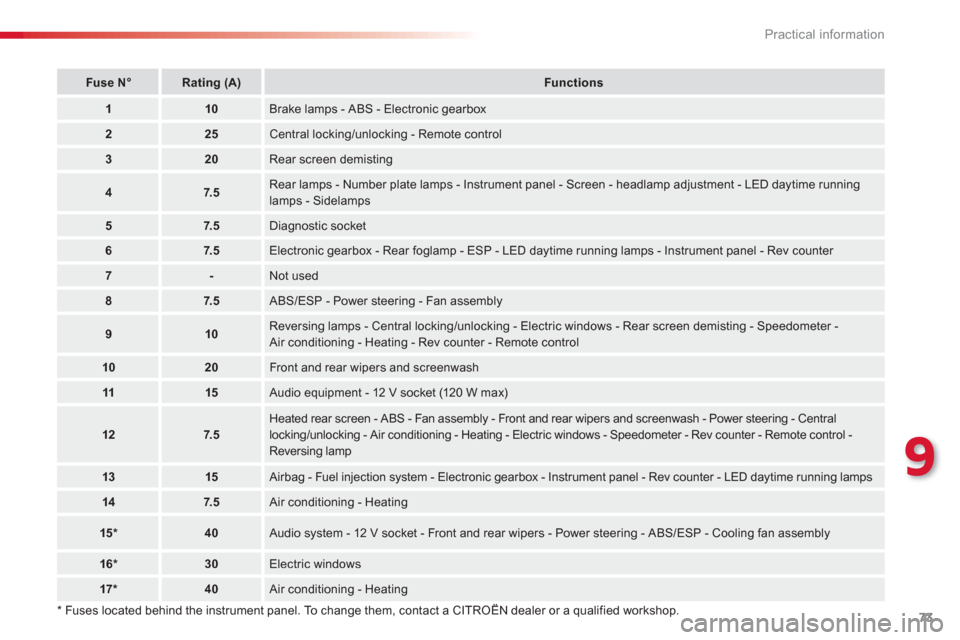
*
Fuses located behind the instrument panel. To change them, contact a CITROËN dealer or a qualified workshop.
FuseN°Rating(A)Functions
110Brake lamps - ABS - Electronic gearbox
225Central locking/unlocking - Remote control
320Rear screen demisting
47.5Rear lamps - Number plate lamps - Instrument panel - Screen - headlamp adjustment - LED daytime runninglamps - Sidelamps
57.5Diagnostic socket
67.5Electronic gearbox - Rear foglamp - ESP - LED daytime running lamps - Instrument panel - Rev counter
7-Not used
87.5
ABS/ESP - Power steering - Fan assembly
910Reversing lamps - Central locking/unlocking - Electric windows - Rear screen demisting - Speedometer -Air conditioning - Heating - Rev counter - Remote control
1020Front and rear wipers and screenwash
1115
Audio equipment - 12 V socket (120 W max)
127.5
Heated rear screen - ABS - Fan assembly - Front and rear wipers and screenwash - Power steering - Central
locking/unlocking - Air conditioning - Heating - Electric windows - Speedometer - Rev counter - Remote control -Reversing lamp
1315
Airbag - Fuel injection system - Electronic gearbox - Instrument panel - Rev counter - LED daytime running lamps
147.5 Air conditioning - Heating
15 *40
Audio system - 12 V socket - Front and rear wipers - Power steering - ABS/ESP - Cooling fan assembly
16 * 30Electric windows
17 *40
Air conditioning - Heating
Page 77 of 140
9
75 Practical information
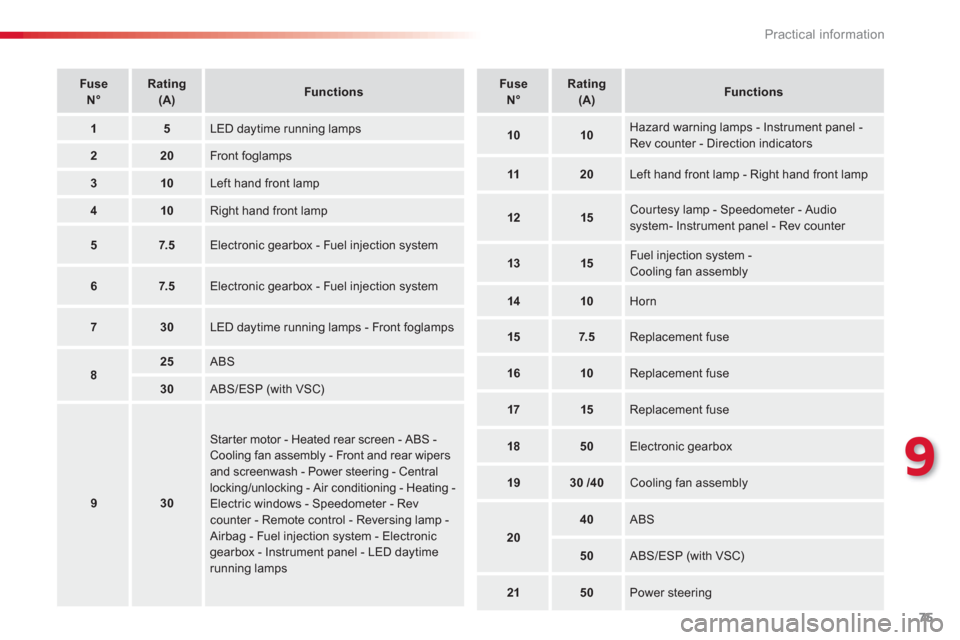
FuseN°Rating(A)Functions
15 LED daytime running lamps
220 Front foglamps
310
Left hand front lamp
410
Right hand front lamp
57.5
Electronic gearbox - Fuel injection system
67.5 Electronic gearbox - Fuel injection system
730
LED daytime running lamps - Front foglamps
825
ABS
30
ABS/ESP (with VSC)
930
Star ter motor - Heated rear screen - ABS -Cooling fan assembly - Front and rear wipersand screenwash - Power steering - Central locking/unlocking - Air conditioning - Heating -Electric windows - Speedometer - Revcounter - Remote control - Reversing lamp -
Airbag - Fuel injection system - Electronic gearbox - Instrument panel - LED daytime running lamps
FuseN°Rating(A)Functions
1010
Hazard warning lamps - Instrument panel -Rev counter - Direction indicators
1120
Left hand front lamp - Right hand front lamp
1215 Courtesy lamp - Speedometer - Audiosystem- Instrument panel - Rev counter
1315
Fuel injection system -Cooling fan assembly
1410
Horn
157.5
Replacement fuse
1610
Replacement fuse
1715
Replacement fuse
1850
Electronic gearbox
1930/40 Cooling fan assembly
20
40 ABS
50 ABS/ESP (with VSC)
2150 Power steering
Page 84 of 140
82Practical information
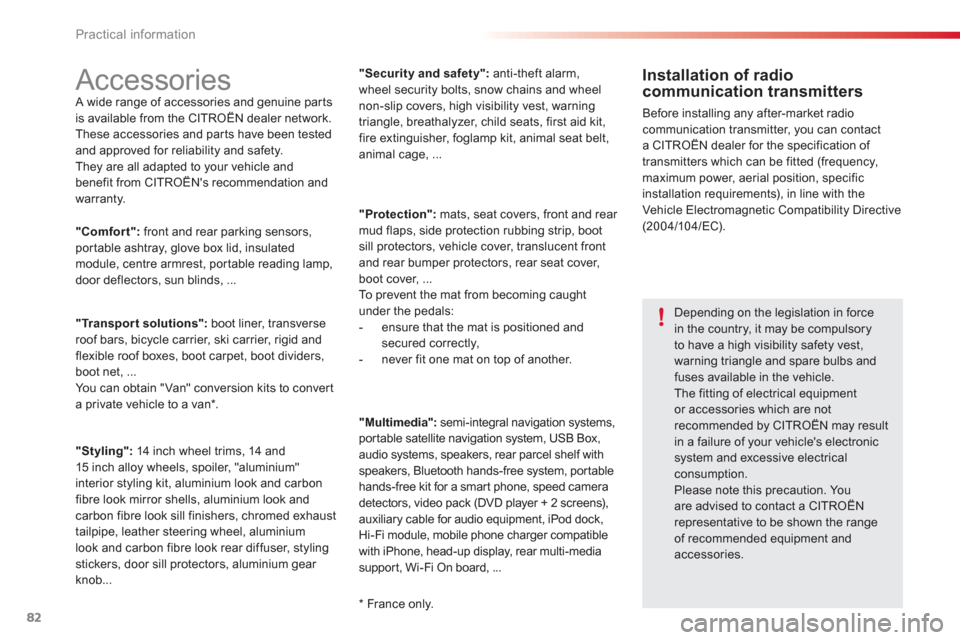
Accessories A wide range of accessories and genuine par ts
is available from the CITROËN dealer network.
These accessories and par ts have been tested
and approved for reliability and safety.
The
y are all adapted to your vehicle and
benefit from CITROËN's recommendation and
warranty.
Installation of radio communication transmitters
Before installing any after-market radiocommunication transmitter, you can contact
a CITROËN dealer for the specification of
transmitters which can be fitted (frequency, maximum power, aerial position, specific
installation requirements), in line with theVehicle Electromagnetic Compatibility Directive (2004/10 4/EC).
*
France only.
"Comfort":front and rear parking sensors,portable ashtray, glove box lid, insulatedmodule, centre armrest, portable reading lamp,
door deflectors, sun blinds, ...
"Transport solutions":boot liner, transverse roof bars, bicycle carrier, ski carrier, rigid and flexible roof boxes, boot carpet, boot dividers,
boot net, ...
Y
ou can obtain "Van" conversion kits to converta private vehicle to a van * .
"Styling":14 inch wheel trims, 14 and15 inch alloy wheels, spoiler, "aluminium"
interior styling kit, aluminium look and carbon
fibre look mirror shells, aluminium look and carbon fibre look sill finishers, chromed exhaust
tailpipe, leather steering wheel, aluminium
look and carbon fibre look rear diffuser, stylingstickers, door sill protectors, aluminium gear
knob... "Securit
y and safety":anti-theft alarm,
wheel security bolts, snow chains and wheelnon-slip covers, high visibility vest, warningtriangle, breathalyzer, child seats, first aid kit,fire extinguisher, foglamp kit, animal seat belt,
animal cage, ...
"Protection"
: mats, seat covers, front and rear
mud flaps, side protection rubbing strip, boot
sill protectors, vehicle cover, translucent front
an
d rear bumper protectors, rear seat cover, boot cover, ...
To prevent the mat from becoming caught under the pedals:
- ensure that the mat is positioned andsecured correctly,
- never fit one mat on top of another.
"Multimedia"
: semi-integral navigation systems,
portable satellite navigation system, USB Box,
audio systems, speakers, rear parcel shelf with
speakers, Bluetooth hands-free system, portable
hands-free kit for a smar t phone, speed camera
detectors, video pack
(DVD player + 2 screens),
auxiliary cable for audio equipment, iPod dock, Hi-Fi module, mobile phone charger compatible
with iPhone, head-up display, rear multi-media
suppor t, Wi-Fi On board, ...
Depending on the legislation in force in the country, it may be compulsoryto have a high visibility safety vest, warning triangle and spare bulbs and fuses available in the vehicle. The fitting of electrical equipmentor accessories which are notrecommended by CITROËN may result
in a failure of your vehicle's electronic system and excessive electrical consumption.Please note this precaution. Youare advised to contact a CITROËN representative to be shown the rangeof recommended equipment andaccessories.
Page 90 of 140
88Checks
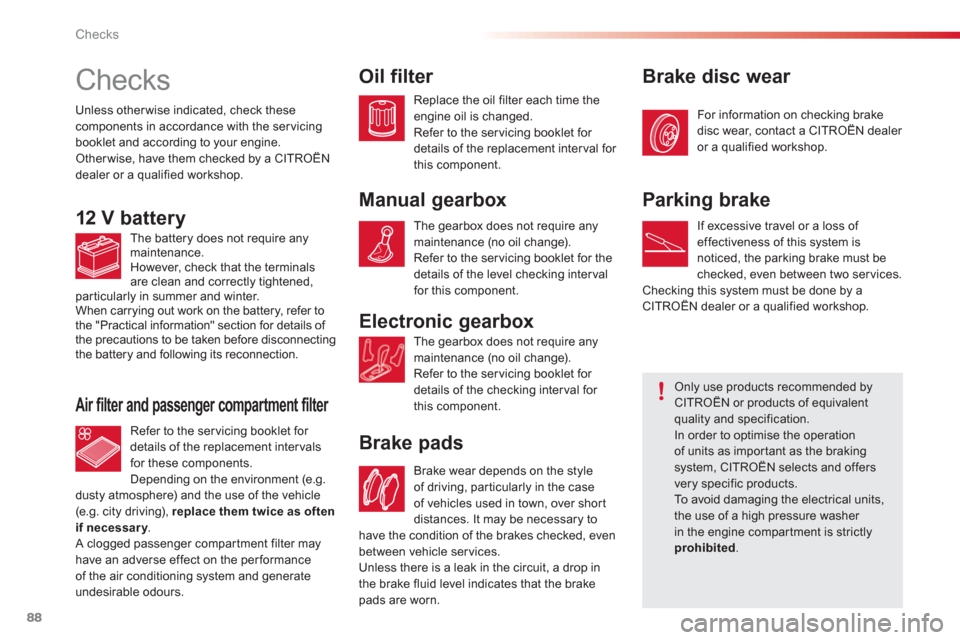
Checks
Electronic gearbox
Brake pads
Unless other wise indicated, check thesecomponents in accordance with the servicingbooklet and according to your engine.
Other wise, have them checked by a CITROËN
dealer or a qualified workshop.
12 V battery
Oil filter
Manual gearbox
Only use products recommended byCITROËN or products of equivalent quality and specification.
In order to optimise the operation of units as impor tant as the brakingsystem, CITROËN selects and offers very specific products. To avoid damaging the electrical units, the use of a high pressure washer in the engine compar tment is strictlyprohibited.
Air filter and passenger compartment filter
Brake disc wear
Parkin
g brake
The battery does not require any
maintenance.
However, check that the terminals
are clean and correctly tightened,
particularly in summer and winter.
When carrying out work on the battery, refer to
the "Practical information" section for details of
the precautions to be taken before disconnecting
the battery and following its reconnection.
Re
fer to the ser vicing booklet for
details of the replacement intervals
for these components.
Dependin
g on the environment (e.g.
dusty atmosphere) and the use of the vehicle (e.g. city driving), replace them twice as often if necessary.y A clogged passenger compar tment filter mayhave an adverse effect on the performance
of the air conditioning system and generate undesirable odours.
Replace the oil
filter each time theengine oil is changed.
Refer to the ser vicing booklet for
details of the replacement inter val for
this component.
The gearbox does not require any maintenance (no oil change).
Refer to the ser vicing booklet for the
details of the level checking intervalfor this component.
The
gearbox does not require any maintenance (no oil change).
Refer to the servicing booklet for
details of the checking inter val for
this component.
Brake wear depends on the st
yle
of driving, par ticularly in the case
of vehicles used in town, over shor t
distances. It ma
y be necessary to
have the condition of the brakes checked
, even between vehicle services.
Unless there is a leak in the circuit, a drop in
the brake fluid level indicates that the brake pads are worn. For information on checkin
g brake
disc wear, contact a CITROËN dealer
or a qualified workshop.
I
f excessive travel or a loss of effectiveness of this system is
noticed, the parking brake must be checked, even between two services.
Checking this system must be done by a CITROËN dealer or a qualified workshop.
Page 100 of 140
03
98
AUDIO
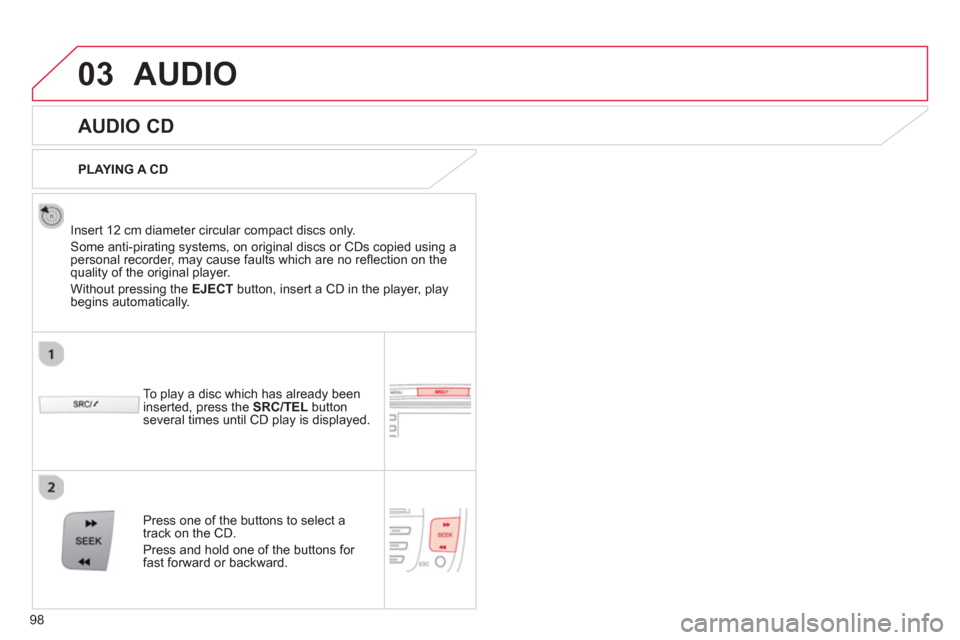
AUDIO CD
Insert 12 cm diameter circular compact discs only.
Some anti-piratin
g systems, on original discs or CDs copied using apersonal recorder, may cause faults which are no refl ection on thequality of the original player.
Without pressing the EJECT
button, insert a CD in the player, playbegins automatically.
To pla
y a disc which has already been
inserted, press the SRC/TEL
button several times until CD play is displayed.
Pr
ess one of the buttons to select a
track on the CD.
Pr
ess and hold one of the buttons for fast forward or backward.
PLAYING A CD
Page 101 of 140
03
99
AUDIO
CD, USB
INFORMATION AND ADVICE
On a single disc, the CD player can read up to 255 MP3 fi les spread
over 8 folder levels with a maximum of 192 folders. However, it is
recommended that this be kept to 2 levels so as to limit the time taken
to access and play the CD.
Durin
g play, the folder structure is not observed.
In order to be able to pla
y a recorded CDR or CDRW, when recordingit is preferable to select standards ISO 9660 level 1.2 or Joliet.
If the disc is recorded in another format, it ma
y not be played correctly.
It is recommended that the same recording standard is always usedfor an individual disc, with as low a speed as possible (4x maximum)for optimum sound quality.
In the particular case o
f a multi-session CD, the Joliet standard is
recommended.
Do not connect a hard disk or U
SB device other than audio players to
the USB port. This may cause damage to your installation.
The audio s
ystem will only play fi les with ".mp3", ".wma" and ".wav" on
a CD and can play fi les with ".ogg" extension only on USB.
A high compression rate can adversely affect sound quality.
The pla
ylists accepted on CD, MP3, iPod and USB connection are
types ".m3u" and ".wpl".
The number of fi les reco
gnised is limited to 5 000 in 500 folders on a maximum of 8 levels.
Page 102 of 140
03
VOLMENUSRC/
LISTESCSEEK +
_MP3
100
CD, USB
AUDIO
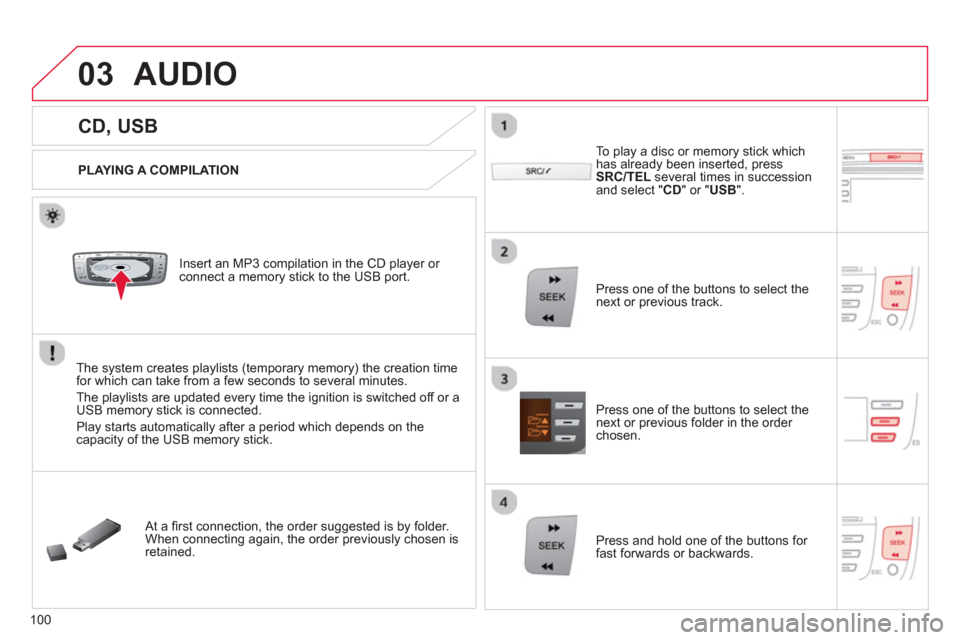
PLAYING A COMPILATION
Insert an MP3 compilation in the CD pla
yer or connect a memory stick to the USB port.
The system creates playlists
(temporary memory) the creation timefor which can take from a few seconds to several minutes.
The pla
ylists are updated every time the ignition is switched off or aUSB memory stick is connected.
Pla
y starts automatically after a period which depends on the capacity of the USB memory stick.
At a fi rst connection, the order suggested is by folder.When connecting again, the order previously chosen is retained.
To pla
y a disc or memory stick whichhas already been inserted, press
SRC/TELseveral times in succession and select " CD " or " USB".
Press one of the buttons to select the next or previous track.
Pr
ess one of the buttons to select the next or previous folder in the order chosen.
Pr
ess and hold one of the buttons for
fast forwards or backwards.
Page 104 of 140
03
102
AUDIO
APPLE ®
PLAYERS or MOBILE PLAYER
Do not connect a device to both the USB port and the JACK socket at the same time.
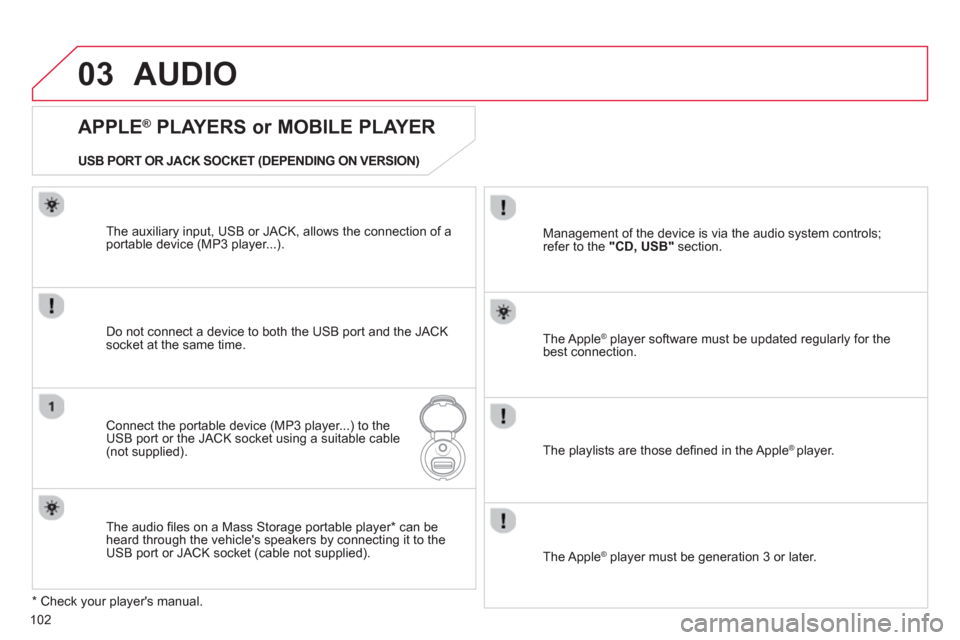
Connect the portable device (MP3 player...) to theUSB port or the JACK socket using a suitable cable(not supplied). The Apple
® player software must be updated regularly for the®
best connection.
The pla
ylists are those defi ned in the Apple ® player.
*
Check your player's manual. The auxiliar
y input, USB or JACK, allows the connection of a
portable device (MP3 player...).
USB PORT OR JACK SOCKET
(DEPENDING ON VERSION)
Mana
gement of the device is via the audio system controls;
refer to the "CD, USB"section.
The audio fi les on a Mass Stora
ge portable player * can be heard through the vehicle's speakers by connecting it to the USB port or JACK socket (cable not supplied).
The Apple ® player must be generation 3 or later.
®
Page 106 of 140
04
104
USING THE TELEPHONE
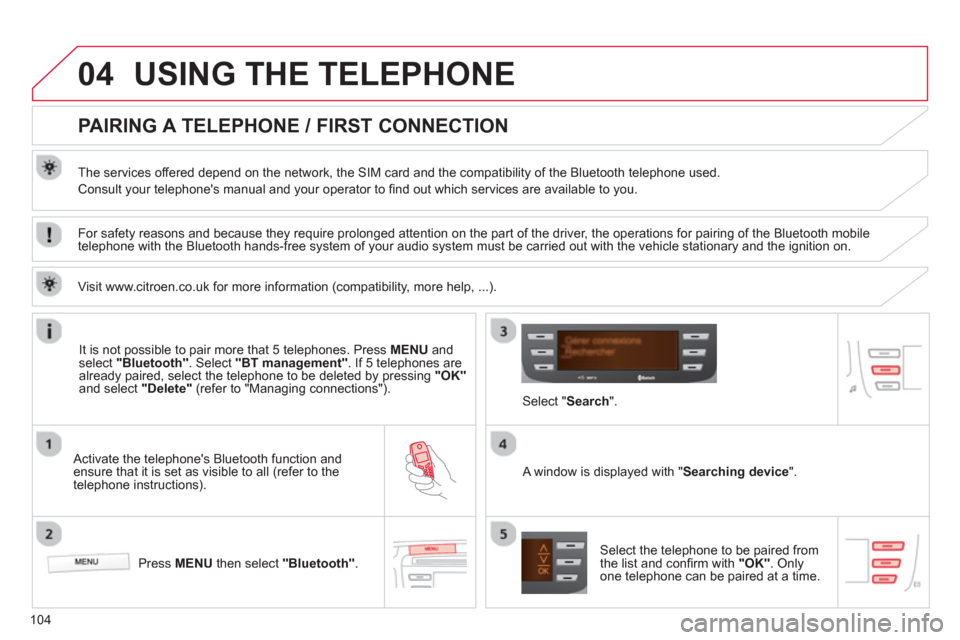
PAIRING A TELEPHONE / FIRST CONNECTION
The services offered depend on the network, the SIM card and the compatibility of the Bluetooth telephone used.
Consult your telephone's manual and your operator to fi nd out which services are available to you.
Activate the telephone's Bluetooth function andensure that it is set as visible to all (refer to the
telephone instructions).
Press MENU
then select "Bluetooth".
A window is displayed with " Searching device".
Select the telephone to be paired from
the list and confi rm with "OK". Onlyone telephone can be paired at a time.
Select " Search".
For safety reasons and because they require prolonged attention on the part of the driver, the operations for pairing of the Bluetooth mobile
telephone with the Bluetooth hands-free system of your audio system must be carried out with the vehicle stationary and the ignition on.
It is not possible to pair more that 5 telephones. Press MENUand select "Bluetooth"
. Select "BT management"
. If 5 telephones are
already paired, select the telephone to be deleted by pressing "OK"and select "Delete"
(refer to "Managing connections").
Visit www.citroen.co.uk
for more information (compatibility, more help, ...).