change time CITROEN C1 2017 User Guide
[x] Cancel search | Manufacturer: CITROEN, Model Year: 2017, Model line: C1, Model: CITROEN C1 2017Pages: 269, PDF Size: 7.63 MB
Page 199 of 269
197
C1_en_Chap10a_ Autoradio-Toyota-tactile-1_ed01-2016
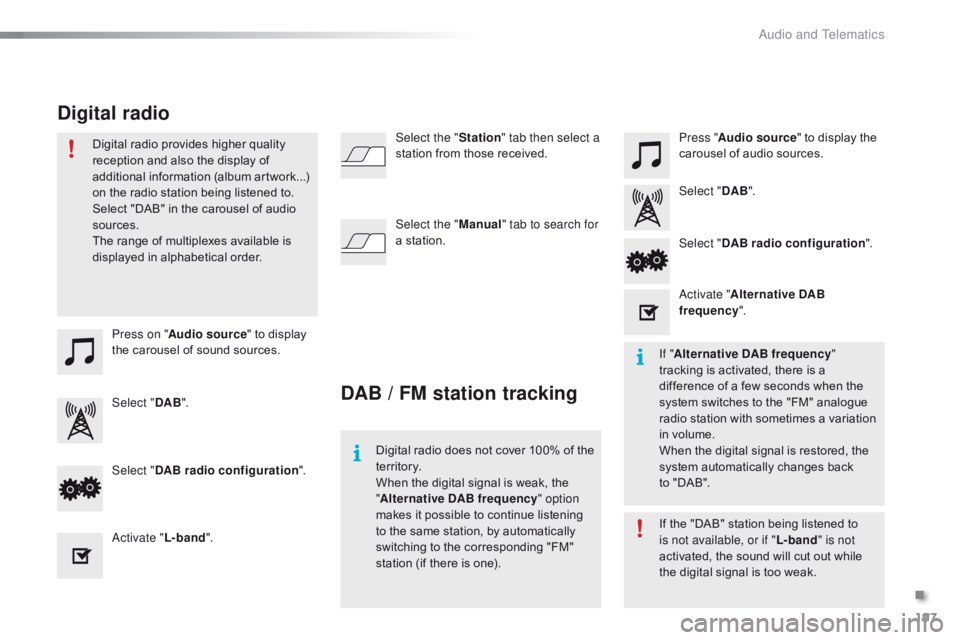
Press on "Audio source " to display t
he carousel of sound sources. Press "
Audio source " to display the
c
arousel of audio sources.
Select " DAB". Select "
DAB".
Select " DAB radio configuration ".
Activate " L-band". Select "
DAB radio configuration ".
Activate " Alternative DAB
frequency ".
Select the "
Station" tab then select a
station from those received.
Select the " Manual" tab to search for
a station.
Digital radio provides higher quality
r
eception and also the display of
a
dditional
in
formation
(
album
ar
twork...)
o
n
the radio station being listened to.
S
elect "DAB" in the carousel of audio
s
ources.
The range of multiplexes available is
d
isplayed in alphabetical order.
Digital radio does not cover 100% of the
t
e r r i to r y.
When
the digital signal is weak, the
"A
lternative DAB frequency" option
makes
it possible to continue listening
t
o the same station, by automatically
s
witching to the corresponding "FM"
s
tation (if there is one).If
the "DAB" station being listened to
i
s not available, or if "L-band" is not
activated,
the sound will cut out while
t
he digital signal is too weak.
If "
Alternative DAB frequency "
tracking
is activated, there is a
d
ifference of a few seconds when the
s
ystem switches to the "FM" analogue
r
adio station with sometimes a variation
i
n volume.
When
the digital signal is restored, the
s
ystem automatically changes back
t
o "DAB".
DAB / FM station tracking
Digital radio
.
Audio and Telematics
Page 225 of 269
223
C1_en_Chap10a_ Autoradio-Toyota-tactile-1_ed01-2016
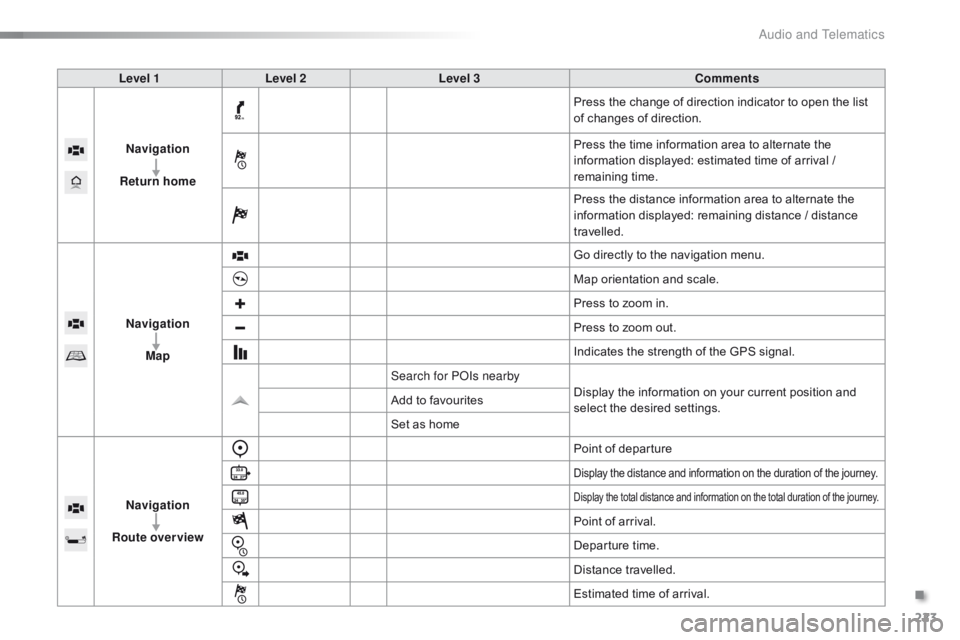
Level 1Level 2 Level 3 Comments
Navigation
Return home Press
the change of direction indicator to open the list
o
f changes of direction.
Press
the time information area to alternate the
i
nformation displayed: estimated time of arrival /
r
emaining
t
ime.
Press
the distance information area to alternate the
i
nformation displayed: remaining distance / distance
t
ravelled.
Navigation Map Go
directly to the navigation menu.
Map
orientation and scale.
Press
to zoom in.
Press
to zoom out.
Indicates
the strength of the GPS signal.
Search for POIs nearby Display
the information on your current position and
s
elect the desired settings.
Add
to favourites
Set
as home
Navigation
Route overview Point
of departure
Display the distance and information on the duration of the journey.
Display the total distance and information on the total duration of the journey.
Point of arrival.
D eparture
t
ime.
Distance
t
ravelled.
Estimated
time of arrival.
.
Audio and Telematics
Page 227 of 269
225
C1_en_Chap10a_ Autoradio-Toyota-tactile-1_ed01-2016
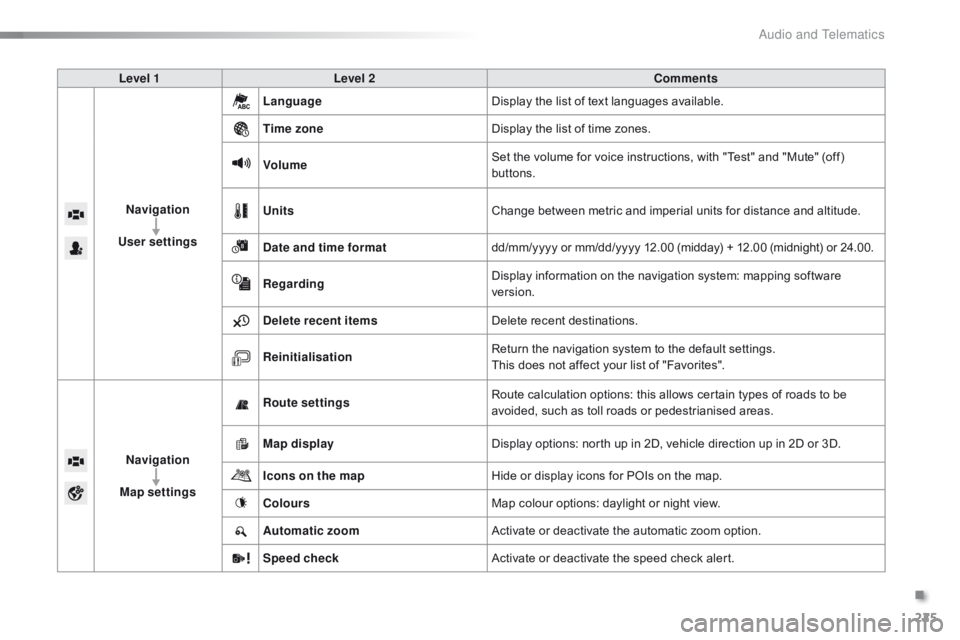
Level 1Level 2 Comments
Navigation
User settings Language
Display
the list of text languages available.
Time zone Display
the list of time zones.
Volume Set
the volume for voice instructions, with "Test" and "Mute" (off)
b
uttons.
Units Change
between metric and imperial units for distance and altitude.
Date and time format dd/mm/yyyy
or mm/dd/yyyy 12.00 (midday) + 12.00 (midnight) or 24.00.
Regarding Display
information on the navigation system: mapping software
ve
rsion.
Delete recent items Delete
recent destinations.
Reinitialisation Return
the navigation system to the default settings.
This
does not affect your list of "Favorites".
Navigation
Map settings Route settings
Route
calculation options: this allows certain types of roads to be
a
voided, such as toll roads or pedestrianised areas.
Map display Display
options: north up in 2D, vehicle direction up in 2D or 3D.
Icons on the map Hide
or display icons for POIs on the map.
Colours Map
colour options: daylight or night view.
Automatic zoom Activate
or deactivate the automatic zoom option.
Speed check Activate
or deactivate the speed check alert.
.
Audio and Telematics
Page 236 of 269
234
C1_en_Chap10a_ Autoradio-Toyota-tactile-1_ed01-2016
Settings, configuration
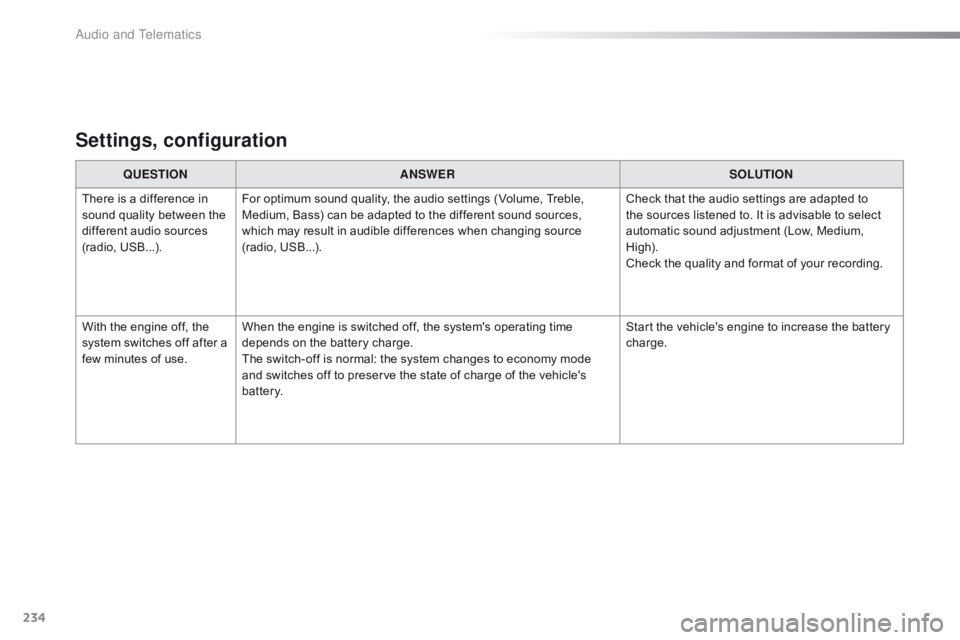
QUESTIONANSWER SOLUTION
There
is a difference in
s
ound
quality between the
d
ifferent audio sources
(
radio,
U
SB...). For
optimum sound quality, the audio settings (Volume, Treble,
M
edium, Bass) can be adapted to the different sound sources,
w
hich may result in audible differences when changing source
(
radio,
U
SB...). Check
that the audio settings are adapted to
t
he sources listened to. It is advisable to select
a
utomatic sound adjustment (Low, Medium,
Hig
h).
Check
the quality and format of your recording.
With
the engine off, the
s
ystem
switches off after a
f
ew
minutes of use. When
the engine is switched off, the system's operating time
d
epends on the battery charge.
The
switch-off is normal: the system changes to economy mode
a
nd switches off to preserve the state of charge of the vehicle's
b
attery. Start
the vehicle's engine to increase the battery
c
harge.
Audio and Telematics
Page 246 of 269
244
C1_en_Chap10b_ Autoradio-Toyota-2_ed01-2016
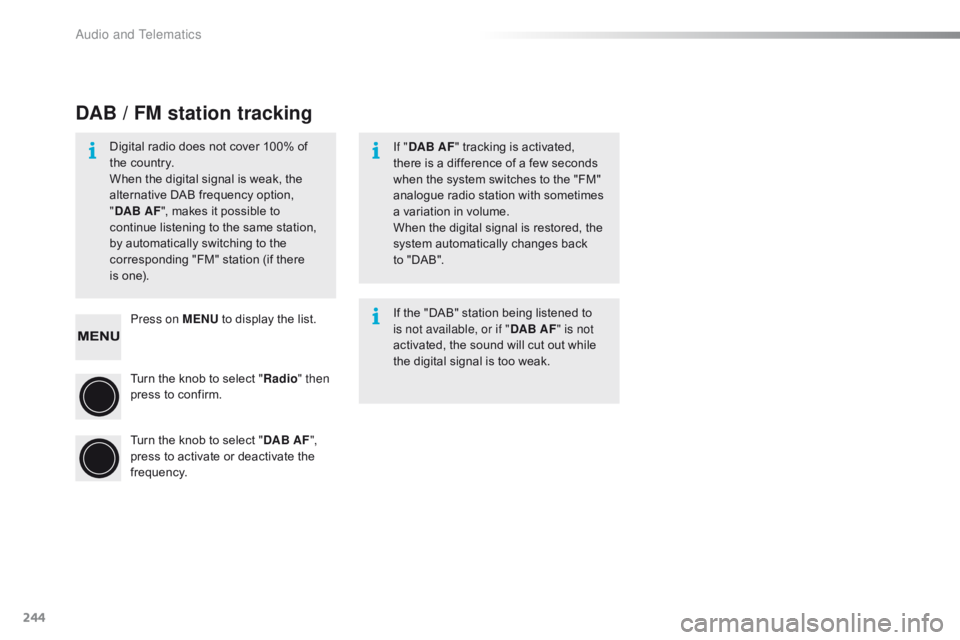
Press on MENU to display the list.
Turn the knob to select "Radio " then
press
to confirm.
Turn
the knob to select "DAB AF ",
press
to activate or deactivate the
f
requency.
DAB / FM station tracking
Digital radio does not cover 100% of the country.
When
the digital signal is weak, the
a
lternative DAB frequency option,
"D
AB AF ",
makes it possible to
c
ontinue listening to the same station,
b
y automatically switching to the
c
orresponding "FM" station (if there
is
one). If "
DAB AF "
tracking is activated,
t
here is a difference of a few seconds
w
hen the system switches to the "FM"
a
nalogue radio station with sometimes
a
variation in volume.
When
the digital signal is restored, the
s
ystem automatically changes back
t
o "DAB".
If
the "DAB" station being listened to
i
s not available, or if "DAB AF" is not
activated,
the sound will cut out while
t
he digital signal is too weak.
Audio and Telematics
Page 256 of 269
254
C1_en_Chap10b_ Autoradio-Toyota-2_ed01-2016
Settings, configuration
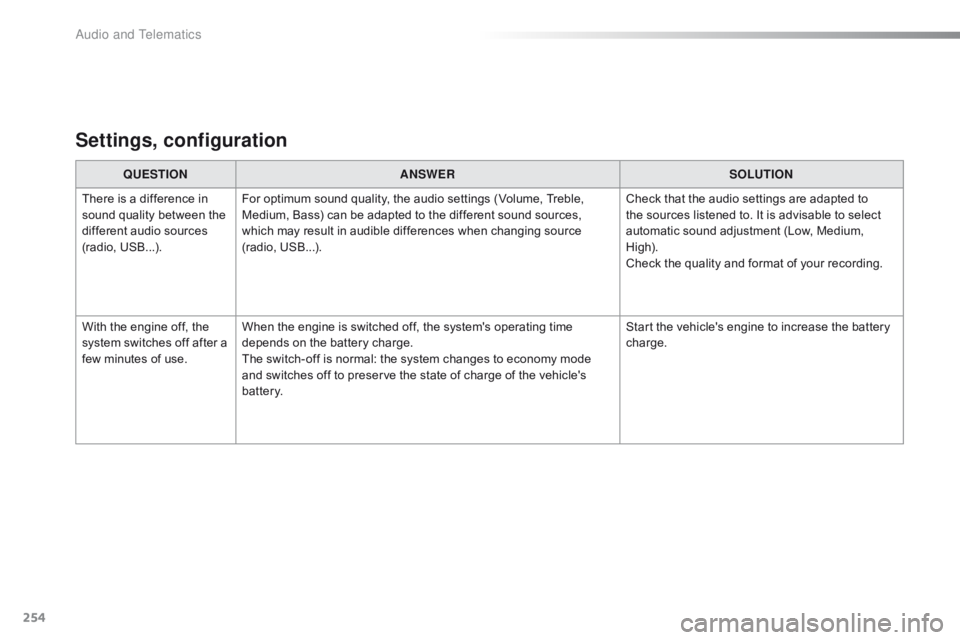
QUESTIONANSWER SOLUTION
There
is a difference in
s
ound
quality between the
d
ifferent audio sources
(
radio,
U
SB...). For
optimum sound quality, the audio settings (Volume, Treble,
M
edium, Bass) can be adapted to the different sound sources,
w
hich may result in audible differences when changing source
(
radio,
U
SB...). Check
that the audio settings are adapted to
t
he sources listened to. It is advisable to select
a
utomatic sound adjustment (Low, Medium,
Hig
h).
Check
the quality and format of your recording.
With
the engine off, the
s
ystem
switches off after a
f
ew
minutes of use. When
the engine is switched off, the system's operating time
d
epends on the battery charge.
The
switch-off is normal: the system changes to economy mode
a
nd switches off to preserve the state of charge of the vehicle's
b
attery. Start
the vehicle's engine to increase the battery
c
harge.
Audio and Telematics