light CITROEN C1 2017 Owner's Guide
[x] Cancel search | Manufacturer: CITROEN, Model Year: 2017, Model line: C1, Model: CITROEN C1 2017Pages: 269, PDF Size: 7.63 MB
Page 144 of 269

142
C1_en_Chap07_info-pratiques_ed01-2016
Accessories
A wide range of accessories and genuine parts is available from the CITROËN dealer network.
T hese accessories and parts are all suitable for your vehicle and benefit from CITROËN's recommendation and warranty.
"Transport solutions":
boot carpet, boot liner,
transverse
roof bars, bicycle carrier, ski carrier,
r
oof boxes, boot dividers, ...
"Styling":
rear diffuser, aluminium gear knob,
a
lloy wheels, exterior expressive stickers,
c
hrome mirror shells, door sill finishers, ...
"Comfort" :
door deflectors, insulated module,
s
un blinds, scented air freshener, portable
a
shtray, coat hanger fitted to head restraint,
r
eading lamp, front and rear parking sensors,
c
entre armrest, cigarette lighter, ..."Security and safety":
anti-theft alarm,
v
ehicle tracking system, snow chains, wheel
n
on-slip covers, wheel security bolts, child
s
eats, first aid kit, warning triangle, high
v
isibility vest, breathalyzer, fire extinguisher,
p
et seat belt, foglamp kit, seat belt cutter/glass
h
ammer,
...
"
Protection":
mats, mud flaps, vehicle cover,
s
eat covers, side protective mouldings, bumper
p
rotectors,
...
T
o prevent the mat from becoming caught
u
nder the pedals:
-
e
nsure that the mat is secured correctly,
-
n
ever fit one mat on top of another."Multimedia":
audio
system, speaker, semi-
integral
navigation systems, hands-free kit,
d
riving assistance systems, 230 V socket, rear
m
ulti-media support, DVD players, portable
s
atellite navigation system, smartphone
s
upport, digital radio, ...
Practical information
Page 154 of 269
152
C1_en_Chap07_info-pratiques_ed01-2016
ETG gearbox
The ETG gearbox does not require any maintenance (no oil change).
Refer
to the manufacturer's service
s
chedule for information on when this
u
nit should be checked.
Brake
wear depends on the style
o
f driving, particularly in the case
o
f vehicles used in town, over short
d
istances. It may be necessary to
Brake pads
For information on checking brake disc wear, contact a CITROËN dealer
o
r a qualified workshop.
Brake disc wearOnly use products recommended by CITROËN or products of equivalent
q
uality
an
d
sp
ecification.
In
order to optimise the operation of
u
nits as important as those in the
b
raking system, CITROËN selects and
o
ffers very specific products.
After
washing the vehicle, dampness,
o
r in wintry conditions, ice can form
o
n the brake discs and pads: braking
e
fficiency may be reduced. Make light
b
rake applications to dry and defrost
t
he brakes.
Parking brake
If excessive travel or a loss of effectiveness of this system is
n
oticed, the parking brake must be
c
hecked,
e
ven
b
etween
t
wo services.
Checking
this system must be done by a
C
ITROËN
dealer or a qualified workshop.
have
the
condition
of
the
brakes
checked,
even
b
etween
v
ehicle
s
ervices.
Unless
there
is
a
leak
in
the
circuit,
a
drop
in
t
he
brake
fluid
level
indicates
that
the
brake
p
ads
are
worn. To
avoid damaging the electrical units,
n
ever use a high pressure jet wash in
t
he engine compartment.
Practical information
Page 165 of 269
163
C1_en_Chap08_en-cas-pannes_ed01-2016
Changing a bulb
Front lamps
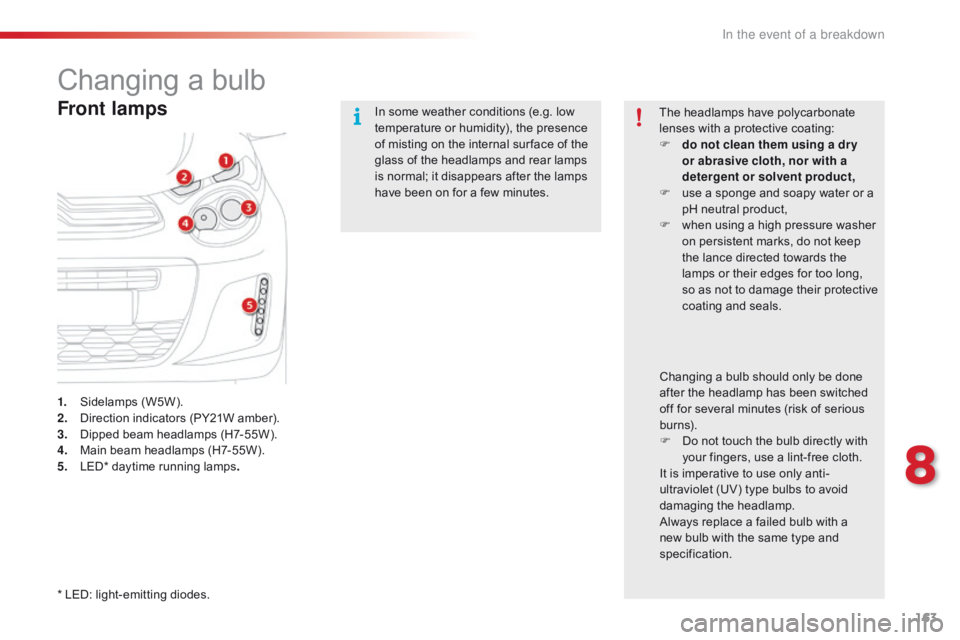
1. Sidelamps (W5W).
2. D irection indicators (PY21W amber).
3.
D
ipped beam headlamps (H7-55W).
4.
M
ain beam headlamps (H7-55W).
5.
L
ED* daytime running lamps. In
some weather conditions (e.g. low
t
emperature or humidity), the presence
o
f misting on the internal sur face of the
g
lass of the headlamps and rear lamps
i
s normal; it disappears after the lamps
h
ave been on for a few minutes.
The headlamps have polycarbonate
l
enses with a protective coating:
F
d
o not clean them using a dr y
or abrasive cloth, nor with a
detergent or solvent product,
F
u
se a sponge and soapy water or a
p
H neutral product,
F
w
hen using a high pressure washer
o
n persistent marks, do not keep
t
he lance directed towards the
l
amps or their edges for too long,
s
o as not to damage their protective
c
oating
a
nd
sea
ls.
Changing a bulb should only be done a
fter the headlamp has been switched o
ff for several minutes (risk of serious
b
urns).
F
D
o not touch the bulb directly with
y
our fingers, use a lint-free cloth.
It
is imperative to use only anti-
ultraviolet
(UV) type bulbs to avoid
d
amaging
t
he
h
eadlamp.
Always
replace a failed bulb with a
n
ew bulb with the same type and
s
pecification.
*
LED: light-emitting diodes.
8
In the event of a breakdown
Page 174 of 269
172
C1_en_Chap08_en-cas-pannes_ed01-2016
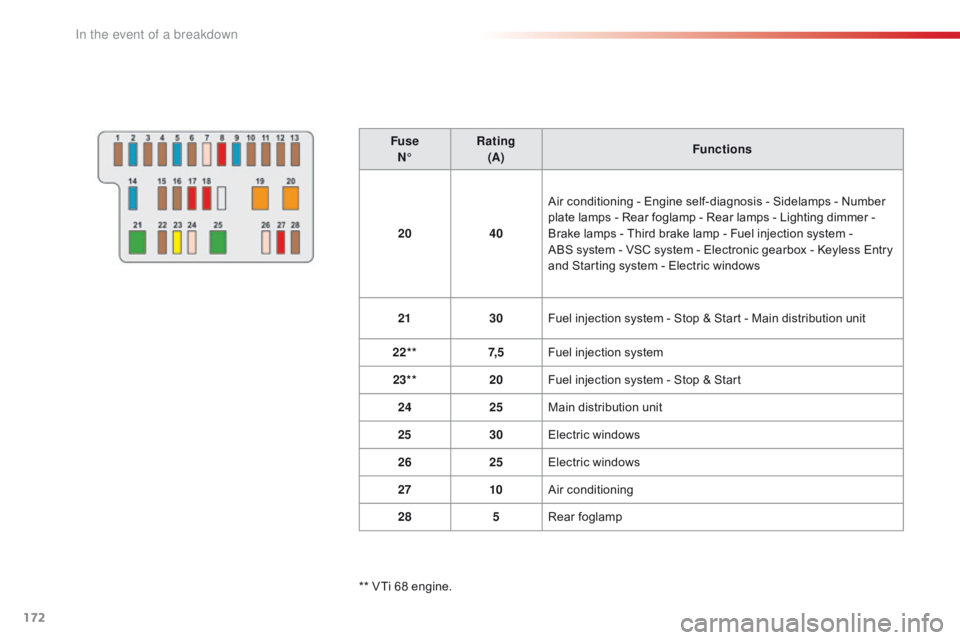
FuseN° Rating
(A) Functions
20 40Air
conditioning - Engine self-diagnosis - Sidelamps - Number
p
late lamps - Rear foglamp - Rear lamps - Lighting dimmer -
B
rake lamps - Third brake lamp - Fuel injection system -
A
BS system - VSC system - Electronic gearbox - Keyless Entry
a
nd Starting system - Electric windows
21 30Fuel
injection system - Stop & Start - Main distribution unit
22** 7, 5Fuel
injection system
23** 20Fuel
injection system - Stop & Start
24 25Main
distribution unit
25 30Electric
windows
26 25Electric
windows
27 10Air
c
onditioning
28 5Rear
fo
glamp
**
VTi 68 engine.
In the event of a breakdown
Page 188 of 269

186
C1_en_Chap10a_ Autoradio-Toyota-tactile-1_ed01-2016
In the event of prolonged exposure to sunlight and very hot conditions, the
s
ystem may go into stand-by (screen
a
nd sound completely off) for at least
5 m
inutes.
Return
to normal operation takes
p
lace when the temperature in the
p
assenger
c
ompartment
d
rops.
First steps
In ACC mode or when starting the vehicle, the system comes on.
Use
the button at bottom right of the screen for
a
ccess to the main menus.
A
second press returns the system to the last
s
ource activated, then press the virtual buttons
i
n the screen.
Audio and Telematics
Page 227 of 269
225
C1_en_Chap10a_ Autoradio-Toyota-tactile-1_ed01-2016
Level 1Level 2 Comments
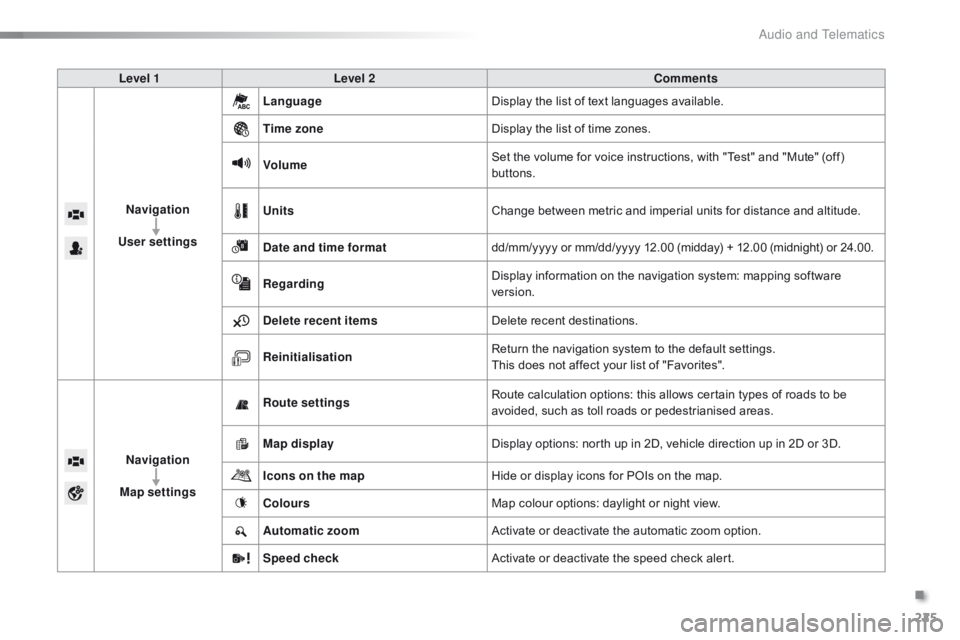
Navigation
User settings Language
Display
the list of text languages available.
Time zone Display
the list of time zones.
Volume Set
the volume for voice instructions, with "Test" and "Mute" (off)
b
uttons.
Units Change
between metric and imperial units for distance and altitude.
Date and time format dd/mm/yyyy
or mm/dd/yyyy 12.00 (midday) + 12.00 (midnight) or 24.00.
Regarding Display
information on the navigation system: mapping software
ve
rsion.
Delete recent items Delete
recent destinations.
Reinitialisation Return
the navigation system to the default settings.
This
does not affect your list of "Favorites".
Navigation
Map settings Route settings
Route
calculation options: this allows certain types of roads to be
a
voided, such as toll roads or pedestrianised areas.
Map display Display
options: north up in 2D, vehicle direction up in 2D or 3D.
Icons on the map Hide
or display icons for POIs on the map.
Colours Map
colour options: daylight or night view.
Automatic zoom Activate
or deactivate the automatic zoom option.
Speed check Activate
or deactivate the speed check alert.
.
Audio and Telematics
Page 257 of 269

255
C1_en_Chap11_index-alpha_ed01-2016
ABS .......................................................107, 10 8
Accessories .............................. ....................142
Access
to rear seats (3 -door)
.........................47
A
ctive City Brake
........................................... 11
0
Adjusting
s
eats
................................................ 46
A
djusting the air distribution
.............. 5
4, 55, 58
Adjusting
the air flow
.......................... 5
4, 55, 58
Adjusting
the temperature
................. 5
4, 55, 57
Adjusting
the time
.....................................2
9, 30
Advice
on care and maintenance
.................15
2
Advice
on driving
..............................
..............70
Airbags
...............
..................................... 18,
1
18
Airbags,
c
urtain
..................................... 12
1,
12
2
Airbags,
front......................................... 118, 122
Airbags,
la
teral
...................................... 12
0,
12
2
Air
c
onditioning
...............................
............9, 53
Air
conditioning, automatic
.............................57
A
ir
c
onditioning,
m
anual
................................. 55
A
ir
in
take/recirculation
..............................5
6, 58
Air vents
..............................
............................52
Anti-lock
braking system (ABS)
............10
7,
10
8
Audible
w
arning
............................................ 10
6
Audio
streaming (Bluetooth)
................. 2
01, 246
Audio
system
...............................
..................235
Auxiliary
......................................... 6
5, 198, 245Cable,
audio
..........................................1
98, 245
Capacity,
fuel tank
..............................
..........13 8
CD
..............................
...................................19 9
Central
locking
................................... 3
2, 34, 38
Changing
a bu
lb
............................................16
3
Changing
a f
use
............................................16
8
Changing
a wheel
...............................
..........15 8
Changing
a wiper blade
................................14
4
Changing
the electronic key battery
...............37
C
hanging the remote control battery
..............33
C
hecking the levels
................................1
4 8 -15 0
Checking
tyre pressures (using the kit)
........15
6
Checks
...............
...................................147,
15
2
Children
...............................
....117, 119, 123 -127
Child
lock
...............................
........................137
Child
seats,
general
................
................................123 -125
Child
seats, conventional
..............................12
9
Child
seats, ISOFIX
......................................13
3
Closing
the boot
...............................
...............39
Closing
the doors
...............................
.............35DAB
(Digital Audio Broadcasting) -
Digital
r
adio
.........................................1
96, 243
Daytime
running lamps
...........................9
9, 163
Deactivating
t
he
p
assenger
a
irbag.................................. 11 9
Demisting/defrosting,
f
ront
.............................60
D
emisting/defrosting,
r
ear
..............................61
D
imensions
..............................
.....................183
Dipstick
................
..........................................148
Direction
i
ndicators
.......................1
03, 164, 166
Display screen, instrument
pan
el
...............................
............13
Door
pockets
...................................................63
D
oors
..............................................................
.38
Driving
e
conomically......................................... 9
Dynamic
stability control
(DSC)
....................................... 1
7, 24, 107-109
Battery
...............................
.............151,
17
7-179
Battery,
c
harging
...............................
............179
Battery,
electronic key
.................................... 37
B
attery, remote control
...................................33
A
CD
B
Clutch ............................................................ 1 51
Connection, iPhone ...................................... 2
12
Connection,
M
irrorLink
................................. 2
16
Control,
emergency boot release
...................40
C
ontrol stalk, lighting
...................................... 98
C
ontrol stalk, wipers
..................................... 10
4
Courtesy
lamp
...............................
..................62
Cup
holder
...............................
........................63
Bluetooth (
telephone) ............................2
04,
247
Bonnet ...............
............................................ 146
Boot
........
......................................................... 39
Brake
d
iscs/pads ........................................... 152
Brake
lamps
...............................
................... 166
Bulbs
(
changing)
...............................
............ 163
.
Alphabetical index
Page 259 of 269
257
C1_en_Chap11_index-alpha_ed01-2016
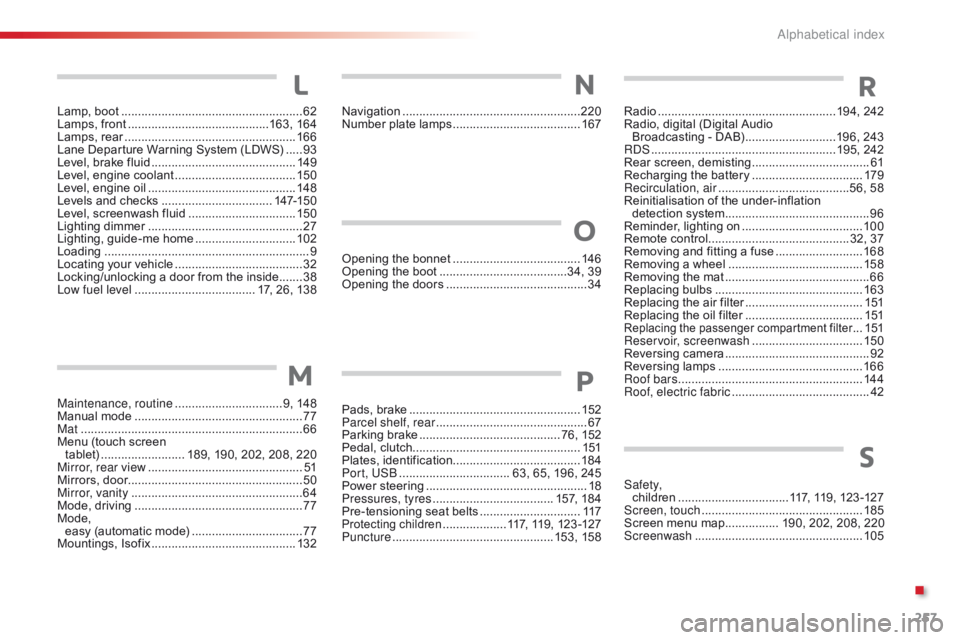
Lamp, boot ......................................................62
Lamps, front .......................................... 16
3, 16 4
Lamps,
re
ar
...............................
....................166
Lane
Departure Warning System (LDWS)
.....93
L
evel, brake fluid
........................................... 14
9
Level,
engine coolant
.................................... 15
0
Level,
engine oil
...............................
.............148
Levels
and checks
..............................
...147-150
Level,
screenwash fluid
................................15
0
Lighting
dimmer
..............................
................27
Lighting,
guide-me home
..............................10
2
Loading
..............................
............................... 9
Locating
your vehicle
...................................... 32
L
ocking/unlocking a door from the inside.......38
Low fuel level
..............................
...... 17, 26, 138
Maintenance, routine
................................ 9
, 148
Manual
m
ode
.................................................. 77
M
at
.......
........................................................... 66
Menu
(touch screen
tablet)
...............
.......... 189, 190, 202, 208, 220
Mirror, rear view
.............................................. 51
M
irrors, door.................................................... 50
Mirror, vanity
..............................
.....................64
Mode,
driving
..............................
....................77
Mode,
easy
(automatic mode)
.................................77
M
ountings,
I
sofix
...............................
............132
L
M
Navigation ............................... ......................220
Number plate lamps ...................................... 16
7Radio ...............
......................................194, 242
Radio, digital (Digital Audio
Broadcasting
- DAB)
...........................1
96, 243
RDS
................
.......................................195, 242
Rear
s
creen,
d
emisting
...................................61
R
echarging the battery
.................................17
9
Recirculation, air
...............................
........56, 58
Reinitialisation
of the under-inflation
detection
system
...........................................96
R
eminder, lighting on
....................................10
0
Remote
control
..........................................3
2, 37
Removing
and fitting a fuse
..........................16
8
Removing
a wheel
..............................
..........15 8
Removing
the mat
...............................
............66
Replacing
bu
lbs
..............................
..............163
Replacing
the air filter
...................................1
51
Replacing
the oil filter
...................................1
51
Replacing the p assenger c ompartment f ilter ...151
Reservoir, screenwash ................................. 15
0
Reversing
c
amera
...............................
............ 92
Reversing
lam
ps
........................................... 16
6
Roof bars
....................................................... 14
4
Roof, electric fabric
......................................... 42
O
pening
the
bonnet
......................................
14
6
Opening
the
boot
..............................
........34,
39
Opening
the
doors
...............................
...........
34
Pads,
b
rake
................................................... 15
2
Parcel shelf, rear
............................................. 67
P
arking
brake
.......................................... 7
6,
152
Pedal,
clutch.................................................. 151
Plates,
id
entification ...................................... 18 4
Port, USB
................................. 6
3,
65,
196,
245
Power
s
teering
................................................ 18
P
ressures, tyres
.................................... 1
57,
184
Pre-tensioning
seat
belts
.............................. 11
7
Protecting children ...................1 17, 119, 123 -127
Puncture ................ ................................ 153, 15
8
O
P
NR
S
Safety, children .................................1 17, 119, 123 -127
Screen, touch
...............................
.................185
Screen
menu map
................ 1
90, 202, 208, 220
Screenwash
..............................
....................105
.
Alphabetical index