audio CITROEN C1 2019 Workshop Manual
[x] Cancel search | Manufacturer: CITROEN, Model Year: 2019, Model line: C1, Model: CITROEN C1 2019Pages: 269, PDF Size: 7.63 MB
Page 226 of 269
224
C1_en_Chap10a_ Autoradio-Toyota-tactile-1_ed01-2016
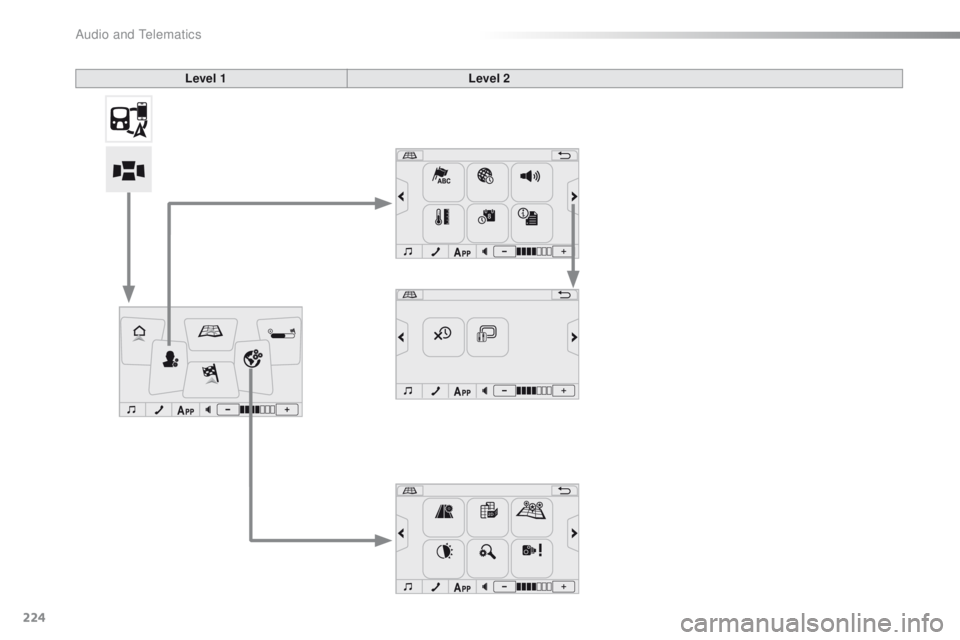
Level 1Level 2
Audio and Telematics
Page 227 of 269
225
C1_en_Chap10a_ Autoradio-Toyota-tactile-1_ed01-2016
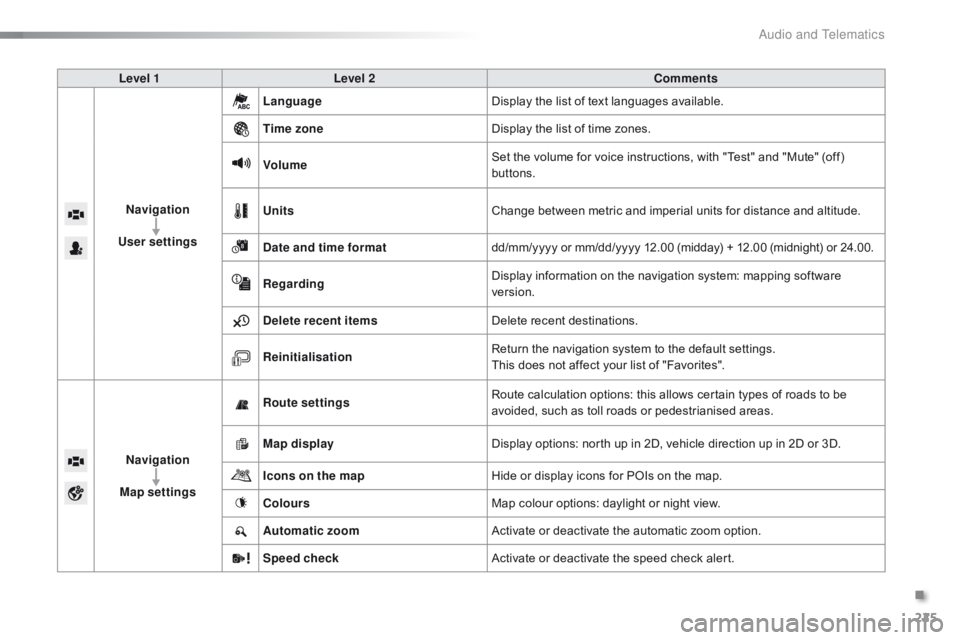
Level 1Level 2 Comments
Navigation
User settings Language
Display
the list of text languages available.
Time zone Display
the list of time zones.
Volume Set
the volume for voice instructions, with "Test" and "Mute" (off)
b
uttons.
Units Change
between metric and imperial units for distance and altitude.
Date and time format dd/mm/yyyy
or mm/dd/yyyy 12.00 (midday) + 12.00 (midnight) or 24.00.
Regarding Display
information on the navigation system: mapping software
ve
rsion.
Delete recent items Delete
recent destinations.
Reinitialisation Return
the navigation system to the default settings.
This
does not affect your list of "Favorites".
Navigation
Map settings Route settings
Route
calculation options: this allows certain types of roads to be
a
voided, such as toll roads or pedestrianised areas.
Map display Display
options: north up in 2D, vehicle direction up in 2D or 3D.
Icons on the map Hide
or display icons for POIs on the map.
Colours Map
colour options: daylight or night view.
Automatic zoom Activate
or deactivate the automatic zoom option.
Speed check Activate
or deactivate the speed check alert.
.
Audio and Telematics
Page 228 of 269
98765
43210
S
N
NE4400923212132
EW
226
C1_en_Chap10a_ Autoradio-Toyota-tactile-1_ed01-2016
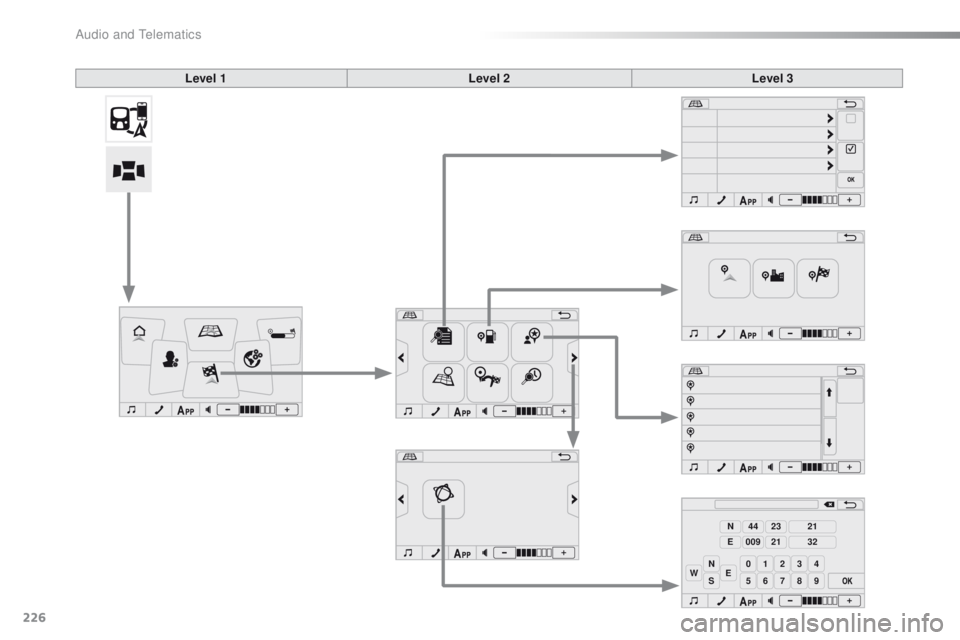
Level 1Level 2Level 3
Audio and Telematics
Page 229 of 269
227
C1_en_Chap10a_ Autoradio-Toyota-tactile-1_ed01-2016
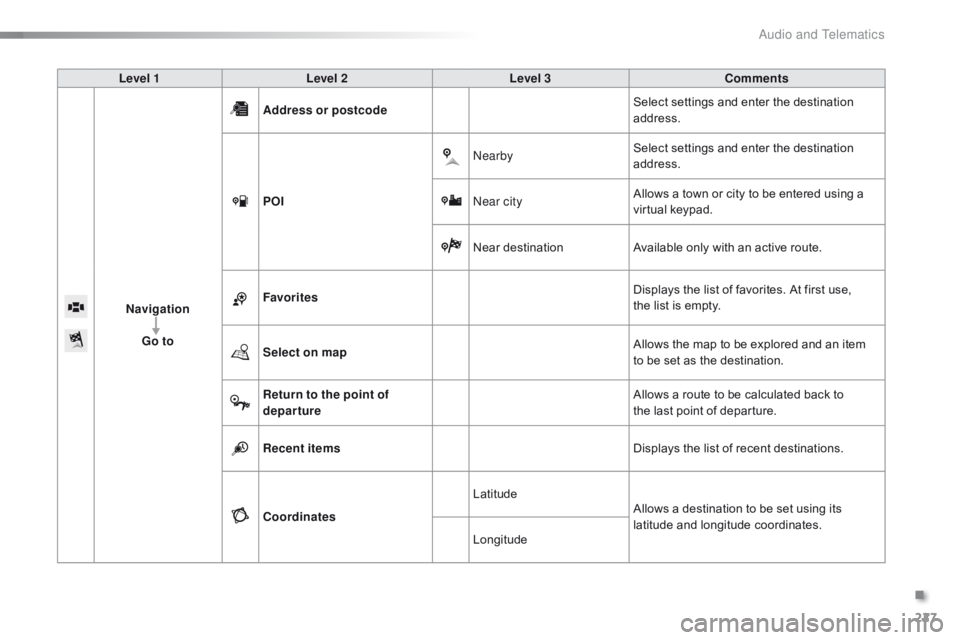
Level 1Level 2 Level 3 Comments
Navigation Go to Address or postcode
Select
settings and enter the destination
a
ddress.
POI Nearby
Select
settings and enter the destination
a
ddress.
Near city Allows
a town or city to be entered using a
v
irtual
k
eypad.
Near
d
estinationAvailable
only with an active route.
Favorites Displays
the list of favorites. At first use,
t
he list is empty.
Select on map Allows
the map to be explored and an item
t
o be set as the destination.
Return to the point of
departure Allows
a route to be calculated back to
t
he last point of departure.
Recent items Displays
the list of recent destinations.
Coordinates Latitude
Allows
a destination to be set using its
la
titude
an
d
l
ongitude
c
oordinates.
Longitude
.
Audio and Telematics
Page 230 of 269
228
C1_en_Chap10a_ Autoradio-Toyota-tactile-1_ed01-2016
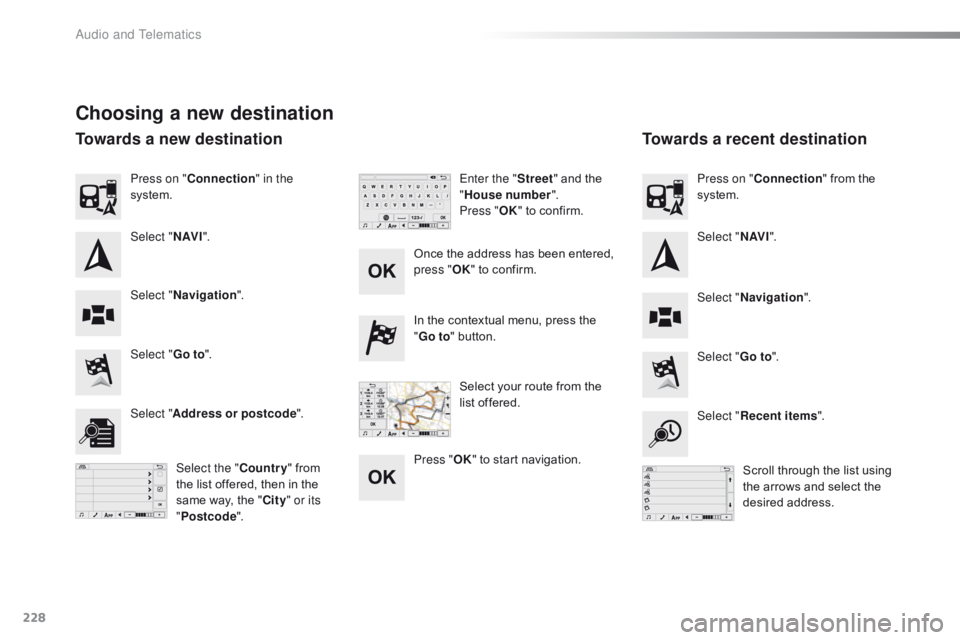
Choosing a new destination
Select "Go to".
Select "Go to".
In
the contextual menu, press the
"
G
o to
" button.
Select " Address or postcode ".
Select "Recent items ".
Select the " Country"
from
t
he list offered, then in the
s
ame way, the "City " or its
" Postcode ". Scroll
through the list using
t
he arrows and select the
de
sired
a
ddress.
Once
the address has been entered,
p
ress "
OK" to confirm.
Press " OK"
to start navigation.
Enter the "
Street" and the
"
H
ouse number
".
Press " OK" to confirm.
Select your route from the
l
ist offered.
Press on "
Connection " in the
system.
Select " N AV I". Select "N AV I".
Press on "
Connection " from the
s
ystem.
Select " Navigation ".
Select "Navigation ".
Towards a new destination Towards a recent destination
Audio and Telematics
Page 231 of 269
229
C1_en_Chap10a_ Autoradio-Toyota-tactile-1_ed01-2016
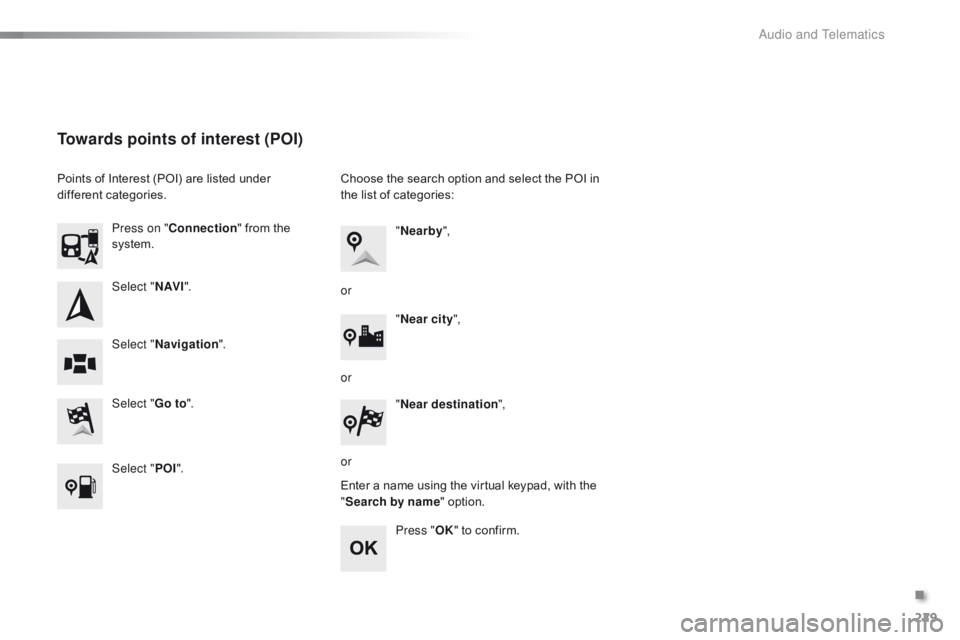
Select "N AV I".
Select " Go to".
Press on "
Connection " from the
s
ystem.
Select " Navigation ".
Towards points of interest (POI)
Points of Interest (POI) are listed under d
ifferent c ategories.
Select " POI". Choose
the search option and select the POI in t
he list of categories:
Enter
a name using the virtual keypad, with the
"S
earch by name" option.
Press " OK"
to confirm.
"
Nearby ",
" Near city ",
or
or
or "
Near destination ",
.
Audio and Telematics
Page 232 of 269
9876543210SN
NE4400923212132EW
230
C1_en_Chap10a_ Autoradio-Toyota-tactile-1_ed01-2016
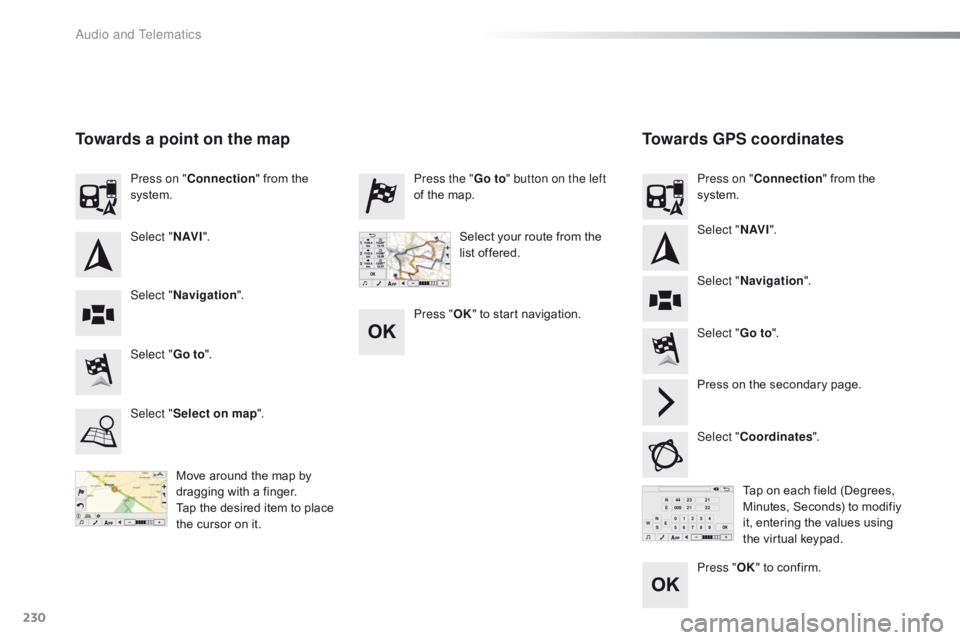
Towards GPS coordinates
Towards a point on the map
Move around the map by d
ragging with a finger.
Tap
the desired item to place
t
he cursor on it. Tap
on each field (Degrees,
M
inutes, Seconds) to modifiy
i
t, entering the values using
t
he virtual keypad.
Select "
Go to".
Select " Go to". Press the "
Go to" button on the left
of the map.
Press on the secondary page.
Select " Coordinates ".
Select "
Select on map ". Press on "
Connection " from the
s
ystem.
Press on "
Connection " from the
s
ystem.
Select "Navigation ".
Select " Navigation ".
Select "
N AV I". Select "
N AV I".
Select your route from the
l
ist offered.
Press " OK" to start navigation.
Press "OK"
to confirm.
Audio and Telematics
Page 233 of 269
231
C1_en_Chap10a_ Autoradio-Toyota-tactile-1_ed01-2016
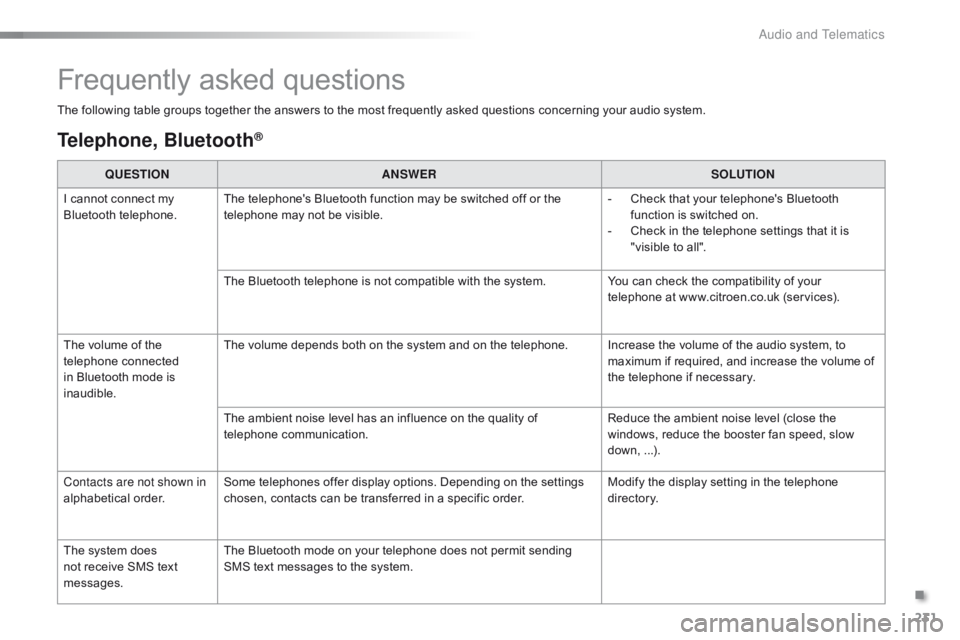
Frequently asked questions
The following table groups together the answers to the most frequently asked questions concerning your audio system.
Telephone, Bluetooth®
QUESTIONANSWER SOLUTION
I
cannot connect my
B
luetooth
t
elephone. The
telephone's Bluetooth function may be switched off or the
t
elephone may not be visible. -
C
heck that your telephone's Bluetooth
f
unction is switched on.
-
C
heck in the telephone settings that it is
"
visible to all".
The
Bluetooth telephone is not compatible with the system.You
can check the compatibility of your
t
elephone at www.citroen.co.uk (services).
The
volume of the
t
elephone
c
onnected
i
n
Bluetooth mode is
ina
udible. The
volume depends both on the system and on the telephone. Increase the volume of the audio system, to
m
aximum if required, and increase the volume of
t
he telephone if necessary.
The
ambient noise level has an influence on the quality of
t
elephone
c
ommunication. Reduce
the ambient noise level (close the
w
indows, reduce the booster fan speed, slow
d
own,
...
).
Contacts are not shown in
alphabetical
o
rder. Some
telephones offer display options. Depending on the settings
c
hosen, contacts can be transferred in a specific order.Modify
the display setting in the telephone
d
i r e c to r y.
The
system does
n
ot
receive SMS text
m
essages. The
Bluetooth mode on your telephone does not permit sending
S
MS text messages to the system.
.
Audio and Telematics
Page 234 of 269
232
C1_en_Chap10a_ Autoradio-Toyota-tactile-1_ed01-2016
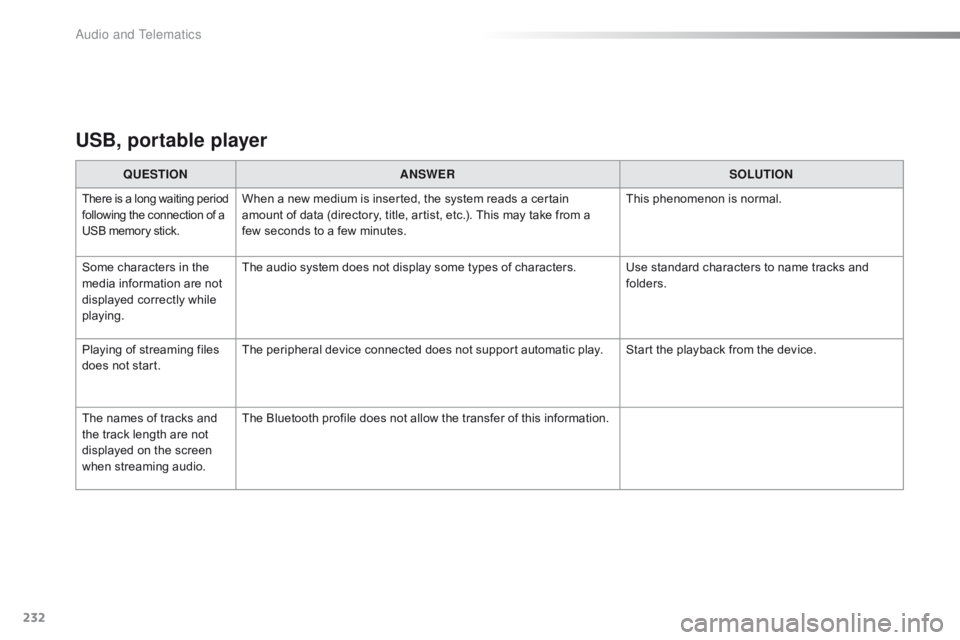
USB, portable player
QUESTIONANSWER SOLUTION
There is a long waiting p eriod f
ollowing the connection of a U
SB memory stick.When a new medium is inserted, the system reads a certain amount of data (directory, title, artist, etc.). This may take from a
f
ew seconds to a few minutes. This
phenomenon is normal.
Some
characters
in
the
m
edia
information
are
not
d
isplayed
correctly
while
p
laying. The
audio system does not display some types of characters. Use standard characters to name tracks and
f
olders.
Playing
of
streaming
files
d
oes
not
start. The
peripheral device connected does not support automatic play. Start the playback from the device.
The
names
of
tracks
and
t
he
track
length
are
not
d
isplayed
on
the
screen
w
hen
s
treaming
a
udio. The
Bluetooth profile does not allow the transfer of this information.
Audio and Telematics
Page 235 of 269
233
C1_en_Chap10a_ Autoradio-Toyota-tactile-1_ed01-2016
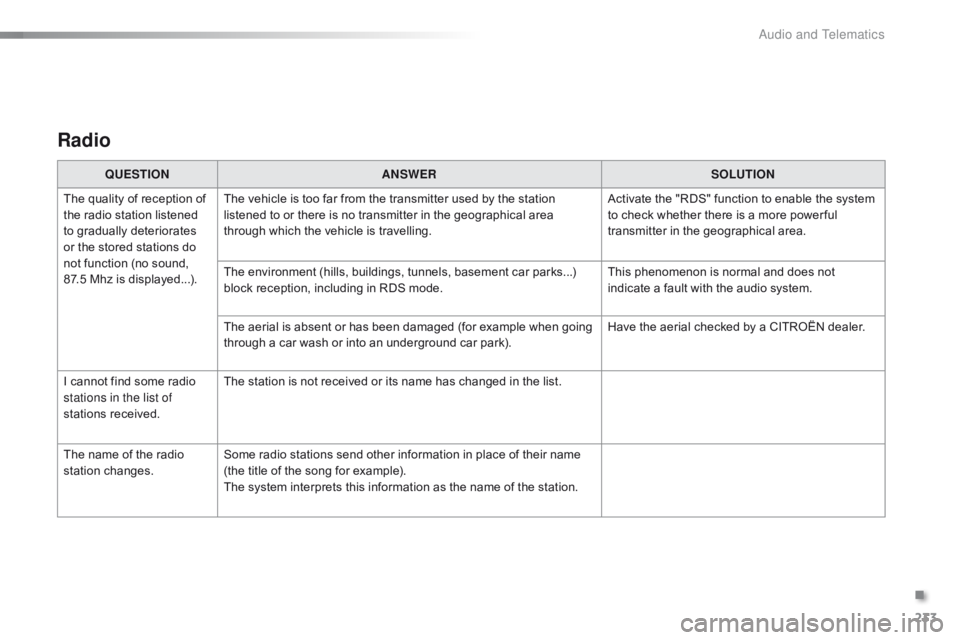
Radio
QUESTIONANSWER SOLUTION
The
quality of reception of
t
he
radio station listened
t
o
gradually deteriorates
o
r
the
stored stations do
n
ot
function (no sound,
87
.5 Mhz is displayed...). The
vehicle is too far from the transmitter used by the station
l
istened to or there is no transmitter in the geographical area
t
hrough which the vehicle is travelling.Activate
the "RDS" function to enable the system
t
o check whether there is a more power ful
t
ransmitter in the geographical area.
The
environment (hills, buildings, tunnels, basement car parks...)
b
lock reception, including in RDS mode.This
phenomenon is normal and does not
i
ndicate a fault with the audio system.
The
aerial is absent or has been damaged (for example when going
t
hrough a car wash or into an underground car park).Have
the aerial checked by a CITROËN dealer.
I
cannot find some radio
s
tations in the list of
stations
r
eceived. The
station is not received or its name has changed in the list.
The
name of the radio
s
tation
c
hanges. Some
radio stations send other information in place of their name
(
the title of the song for example).
The
system interprets this information as the name of the station.
.
Audio and Telematics