radio CITROEN C3 2007 User Guide
[x] Cancel search | Manufacturer: CITROEN, Model Year: 2007, Model line: C3, Model: CITROEN C3 2007Pages: 201, PDF Size: 6.64 MB
Page 147 of 201

5
NOTES ON RADIO RECEPTIONYour radio will be subject to certain phenom-ena that are not encountered by domestic systems.The reception of AM and FM signals may suf fer from inter ference, which is caused by the nature and propagation of the signals and does not refl ect on the quality of your radio installation.In AM, the reception may be affected when passing under power lines or bridges, or when travelling through tunnels.In FM mode, the reception may be affected by the distance from the station transmit-ter, the refl ecting of signals of f obstacles (mountains, hills, tower blocks) and radio blackspots (no coverage from the station transmitter).
S ELECTION OF RADIO SOURCEPress button D to select the source.You can also do this by means of control 5at the steering wheel.
S E L EC T I O N O F FR EQ U E N C I E S A N D MEMORY BANKSPress button E successively to go through the memor y banks FM1, FM 2 and FM 3, fo r t he FM waveband, and t he m em o r y banks MW/LW, for the AM waveband.
R A D I O S O U R C E
M ANUAL SEARCHManual seearch is via buttons J or M.By keeping button J or M pressed, you will be able to scroll through the waveband. Scrolling will stop as soon as you release the button. The radio will remain tuned to the frequency that is displayed.
T UNING SENSITIVITYAutomat ic searc hes c an be c ar r ied out according to two levels of sensitivity :To capture the most power ful transmit-ters, choose the local search mode “LO” (default option).To capture the weakest or most distant transmitters, choose the sensitive search mode “DX”.Search for a station is done fi rst in “LO” (loc al) sensitivit y, then in “DX” (dist ant) sensitivity.To commence a search in sensitivity “DX” (distant) immediately , press twice in succes-sion on one of the buttons K or N.
Page 148 of 201

6
MANUAL PRE -SETTINGSelect the waveband and memor y bank required using button E.Select a station using either automatic or manual search.Keep pressing for more than two seconds on one of the pre-selection buttons 1 to 6on the keypad P.The sound momentarily cuts off, then returns to its previous level to confi rm that it has memorised the station.
R A D I O S O U R C E
A UTOMATIC MEMORISATION OF TRANS -MITTERS (AUTOSTORE FUNCTION )In FM, if you hold down button E for more than two seconds, your radio will automati-cally memorise the 6 strongest stations on the FM3 memory bank.The display shows “FM AST”.The radio memorises the 6 strongest trans-mit ters, deleting the 6 previously memo -rised.After the memorisation, the radio goes directly to memory 1 of memory bank FM3.
Note :If the traf f ic infor mation f unc tion has b e e n a c t i vat e d (s e e R D S SYST E M), the stations of fering this facility will be memorised as priority.If it is unable to memorise any new sta-tions, the system will retain the previously memorised stations.If the system is unable to fi nd 6 stations, the unf illed memor y slots will remain free.
Page 149 of 201

7
USING THE RDS ( RADIO DATA SYSTEM ) FUNCTION ON FMUSING THE RDS ( R RDS (R
The majority of FM radio stations use the RDS system. The radio in your vehicle has this system,.The RDS system enables these stations to transmit non-audible data in addition to the broadcasting of their programmes. The data provides access to various functions described in this chapter, such as: display of the station name, intermittent traffi c informa-tion fl ashes or automatic scanning of stations. This enables you to continue listening to your chosen radio station, regardless of the different frequencies it uses in the regions through which you are travelling.
SCANNING OF RDS STATIONSYour radio keeps the best possible recep-tion by c ontinuously looks for any other frequencies on which the selected radio station is broadcast, automatically choosing the frequency of fering the best reception (if the station broadcasts on more than one transmitter or frequency.
R D S S Y S T E M
A CTIVATION /DEACTIVATION OF THE RDS FUNCTIONSThe RDS functions can be accessed via the following two menus :Main menu (press button O).AUDIO menu (press button L).To activate/deactivate the RDS functions on the display C :
1. Press button O.2. Select the AUDIO icon using buttons Jor M.3. Confi rm your choice with a press on button L.4. Select the sub-menu for the FM wave-band, via buttons J or M. Confi rm your choice with a press on button L.5. Select scanning for RDS stations, via buttons J or M.6. Validate your choice with a press on button L.7. Using control L, select /deselect to acti-vate/deactivate the function.8. Validate your choice by selecting “OK” on the display.
Page 150 of 201
8
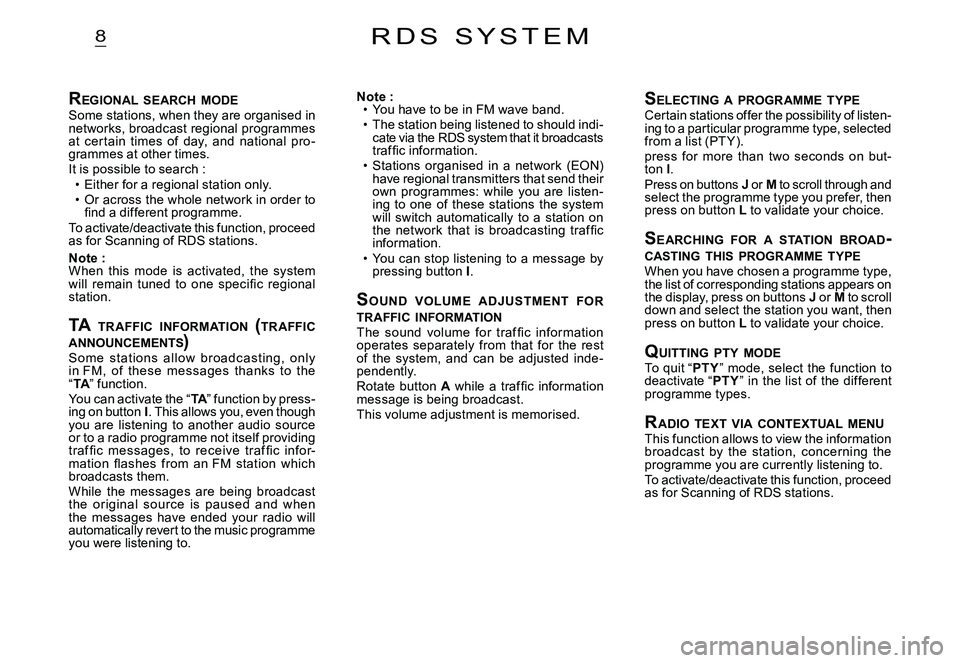
REGIONAL SEARCH MODESome stations, when they are organised in networks, broadcast regional programmes at cer tain times of day, and national pro-grammes at other times.It is possible to search :Either for a regional station only.Or across the whole network in order to fi nd a different programme.To activate/deactivate this function, proceed as for Scanning of RDS stations.
Note :When this mode is activated, the system will remain tuned to one specifi c regional station.
TA TR AFFIC INFORMATION (TR AFFIC ANNOUNCEMENTS )TA TR AFFIC INFOR INFOR
Some st ations allow broadc asting, only in FM, of these messages thanks to the “TA” function.TATAYou can activate the “TA” function by press-TATAing on button I. This allows you, even though you are listening to another audio source or to a radio programme not itself providing traf fi c messages, to receive traf fi c infor-mation fl ashes from an FM station which broadcasts them.While the messages are being broadcast the or iginal sourc e is paused and when the messages have ended your radio will automatically revert to the music programme you were listening to.
Page 151 of 201

9
SELECTING CD SOURCEAfter inserting a CD, with the printed side facing upwards, the player will start playing the CD automatically.To c h a n g e m a n u a l l y t o C D s o u r c e (CD already inserted), press button D until you obtain the source you require.You can also do this by means of control 5at the steering wheel.
EJECTING A CDPress button B to eject the CD, the audio system will automatically switch to radio source.I f t h e C D i s n o t r e m o v e d w i t h i n 10 t o 15 seconds of being ejected, it will auto -matically be taken back into the CD player, although it will not be played.
S ELECTING A TRACKPress button K once to play the next track.Press button N once to return to the beginning of the track currently being played, press a second time to go back to the start of the previous track.Press the buttons successively to skip several tracks at a time.This can also be done via the control G. As the list of tracks is displayed on the screen, select the desired track using buttons J or M, then validate using button L.You can also do this via the controls 2 and 3at the steering wheel.
C D S O U R C E
F AST FORWARD AND RAPID REVERSE WITH ACCELERATED SOUNDTo move swiftly through the CD, press and keep pressed button K or KN, respectively for fast for ward or rapid reverse with acceler-ated sound.Play resumes as normal when the button is released.
M ENUThis menu allows activation/deactivation of two options :Playback of the fi rst 7 seconds (approx.) of each track of the CD.Random playback of the CD tracks.This can be accessed in two ways :Either by pressing button O and proceed-ing as for Search of Stations RDS – for screen C, the sub-menu corresponds to the Audio Preferences.Or, provided you are in CD source, by pressing onbutton L. You can then access the Audio menu (for screen C only).
Note :If one of these options is active, it remains active for CD changer source.
Page 157 of 201
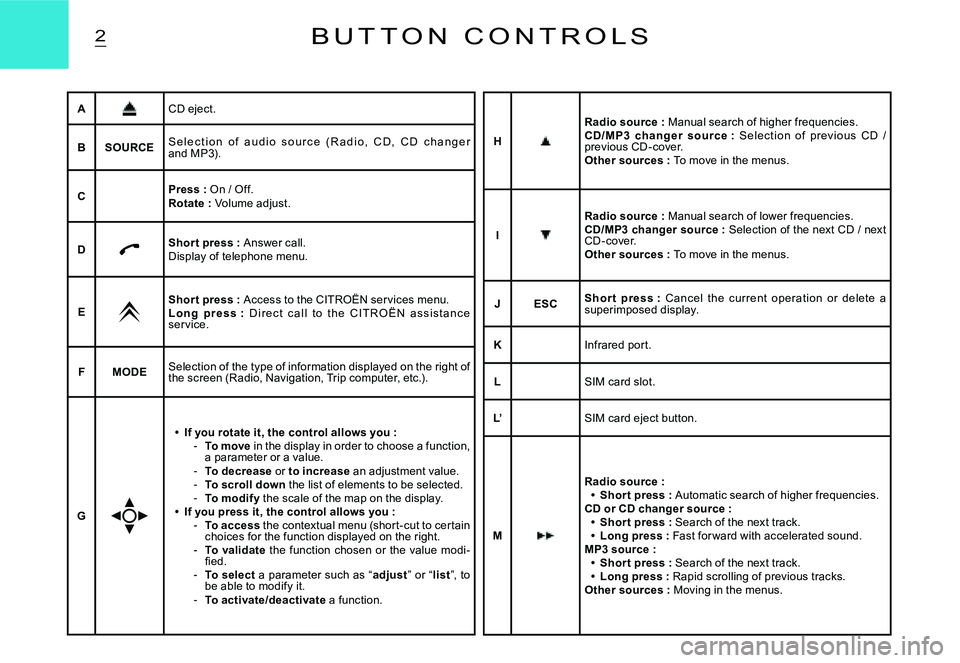
2B U T T O N C O N T R O L S
ACD eject.
BSOURCES e l e c t i o n o f a u d i o s o u r c e ( R a d i o , C D , C D c h a n g e r and MP3).
CPress : On / Off.Rotate : Volume adjust.
DShor t press : Answer call.Display of telephone menu.
EShor t press : Access to the CITROËN ser vices menu.L o n g p r e s s : D i r e c t c a l l t o t h e C I T R O Ë N a s s i s t a n c e ser vice.
FMODESelection of the type of information displayed on the right of the screen (Radio, Navigation, Trip computer, etc.) .
G
If you rotate it, the control allows you :To move in the display in order to choose a function, a parameter or a value.To decrease or to increase an adjustment value.To scroll down the list of elements to be selected.To modif y the scale of the map on the display.If you press it, the control allows you :To access the contextual menu (shor t-cut to cer tain choices for the function displayed on the right.To validate the function chosen or the value modi-fi ed.To select a parameter such as “adjust” or “list”, to be able to modify it.To activate/deactivate a function.
Page 158 of 201

3B U T T O N C O N T R O L S
Buttons H, I, M and N allow you, in “Select - Move on Map”, to move respectively up or down, right or left on the map.
N
Radio source :Shor t press : Automatic search of lower frequencies.CD and CD changer source :Shor t press : Search of previous track.Long press : Rapid reverse with accelerated sound.MP3 source :Shor t press : Search of previous track.Long press : Rapid scrolling of previous tracks.Other sources : Moving in the menus.
Page 159 of 201
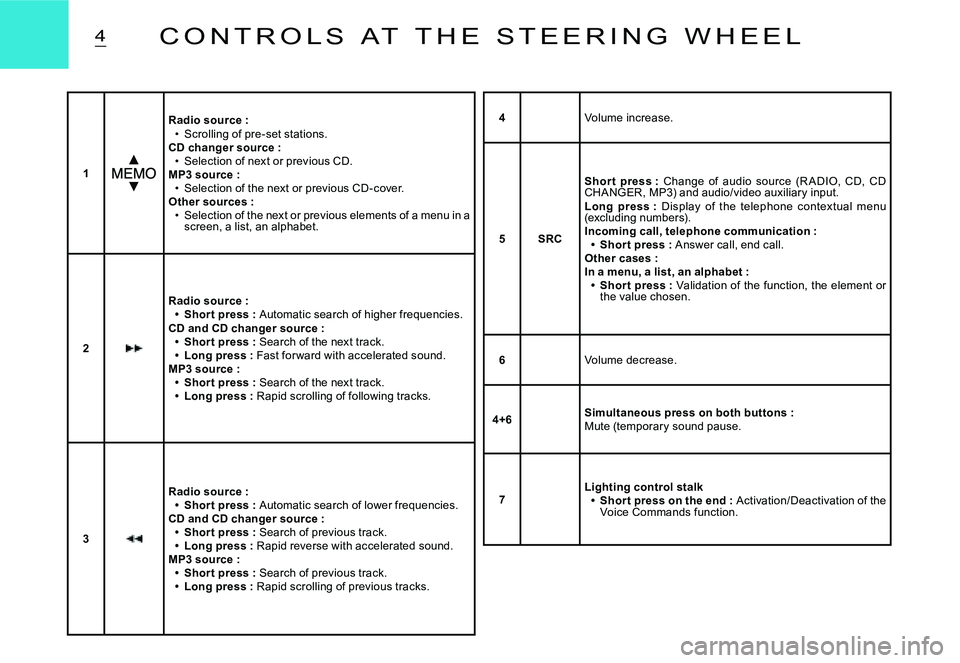
4C O N T R O L S A T T H E S T E E R I N G W H E E L
1
Radio source :Scrolling of pre-set stations.CD changer source :Selection of next or previous CD.MP3 source :Selection of the next or previous CD-cover.Other sources :Selection of the next or previous elements of a menu in a screen, a list, an alphabet.
Page 164 of 201
AUDAUD 1. c
AUD 1. d
AUD 1. a
AUD 1. b
ODB 1
ODB 2ODB 2. b
ODB 1. c
ODB 2. a
ODBODBODBODBODBODB
ODB
8
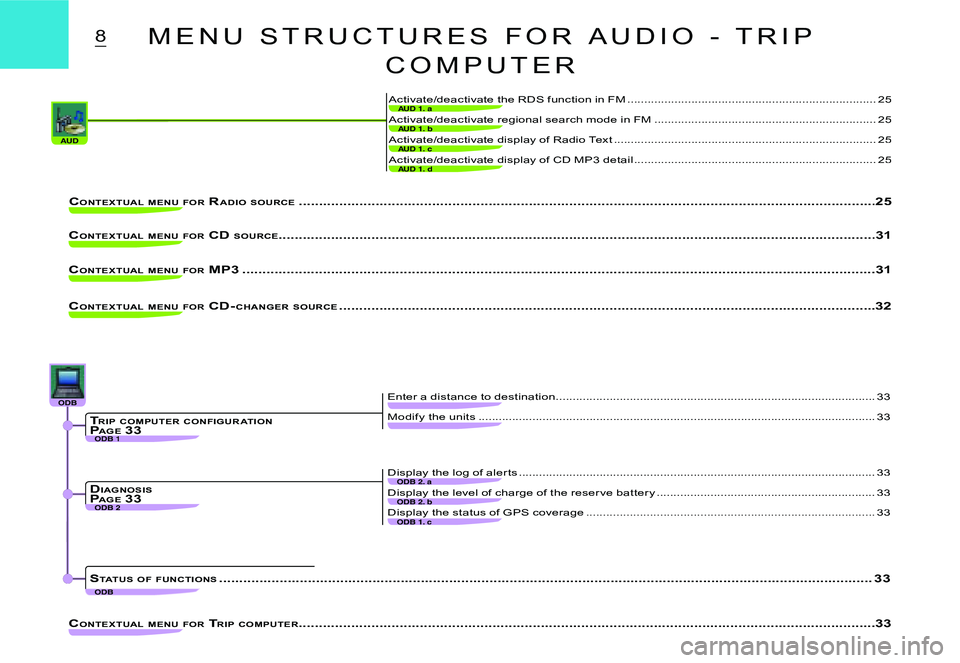
Activate/deactivate display of Radio Text ..............................................................................25
Activate/deactivate display of CD MP3 detail ........................................................................25
Activate/deactivate the RDS function in FM .................................................. ........................25
Activate/deactivate regional search mode in FM .................................................. ................25
CONTEXTUAL MENU FOR RADIO SOURCE .................................................. ................................................... ..........................................25
CONTEXTUAL MENU FOR CD SOURCE................................................... .................................................................................................31
CONTEXTUAL MENU FOR MP3 .................................................. ................................................... ........................................................31
CONTEXTUAL MENU FOR CD- CHANGER SOURCE .................................................. ................................................... ................................32
CONTEXTUAL MENU FOR TRIP COMPUTER .................................................. ................................................... ..........................................33
Modify the units ..................................................................................................... .................33
Enter a distance to destination ...............................................................................................33
Display the level of charge of the reser ve batter y .................................................. ...............33
Display the status of GPS coverage .................................................. ....................................33
Display the log of aler ts ..................................................................................................... .....33
TRIP COMPUTER CONFIGUR ATIONP AGE 33
DIAGNOSISPAGE 33
STATUS OF FUNCTIONS .................................................. ................................................... .............................................................33
M E N U S T R U C T U R E S F O R A U D I O - T R I P
C O M P U T E R
Page 168 of 201
12V O I C E C O M M A N D S
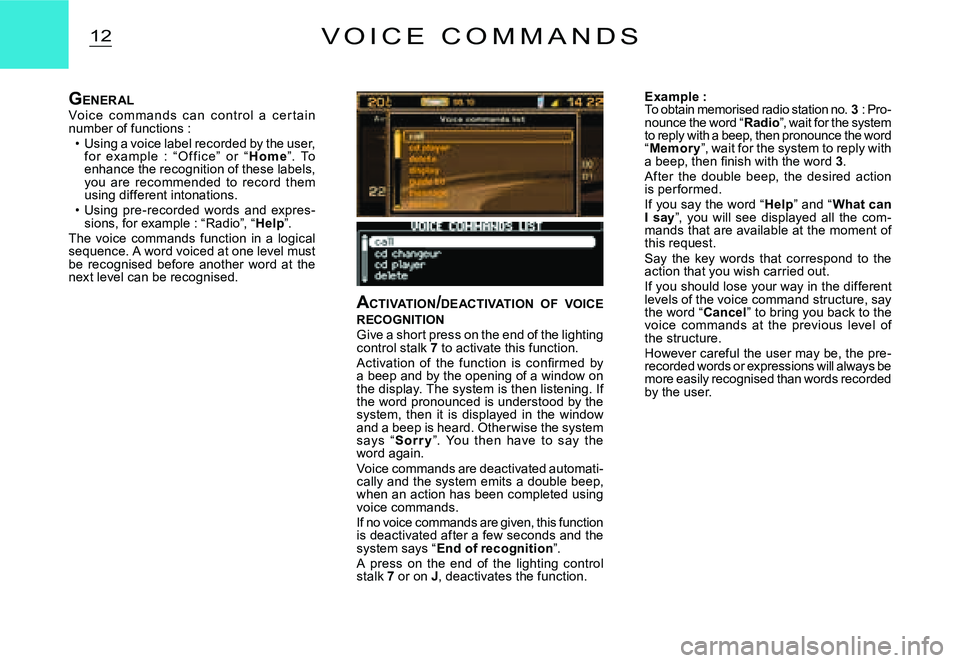
ACTIVATION /DEACTIVATION OF VOICE RECOGNITIONGive a short press on the end of the lighting control stalk 7 to activate this function.Activation of the function is confi rmed by a beep and by the opening of a window on the display. The system is then listening. If the word pronounced is understood by the system, then it is displayed in the window and a beep is heard. Other wise the system says “Sor r y”. You then have to say the word again.Voice commands are deactivated automati-cally and the system emits a double beep, when an action has been completed using voice commands.If no voice commands are given, this function is deactivated after a few seconds and the system says “End of recognition”.A press on the end of the lighting control stalk 7 or on J, deactivates the function.
Example :To obtain memorised radio station no. 3 : Pro-nounce the word “Radio”, wait for the system to reply with a beep, then pronounce the word “Memor y”, wait for the system to reply with a beep, then fi nish with the word 3.After the double beep, the desired action is per formed.If you say the word “Help” and “What can I say”, you will see displayed all the com-mands that are available at the moment of this request.Say the key words that correspond to the action that you wish carried out.If you should lose your way in the different levels of the voice command structure, say the word “Cancel” to bring you back to the voice commands at the previous level of the structure.However careful the user may be, the pre-recorded words or expressions will always be more easily recognised than words recorded by the user.
GENERALVo ic e c o m m ands c an c o nt r o l a c er t ain number of functions :Using a voice label recorded by the user, for example : “ O f f ic e” or “H o m e”. To enhance the recognition of these labels, you are recommended to record them using different intonations.Using pre-recorded words and expres-sions, for example : “Radio”, “Help”.The voice commands function in a logical sequence. A word voiced at one level must be recognised before another word at the next level can be recognised.