tow CITROEN C3 2007 Owner's Manual
[x] Cancel search | Manufacturer: CITROEN, Model Year: 2007, Model line: C3, Model: CITROEN C3 2007Pages: 201, PDF Size: 6.64 MB
Page 171 of 201
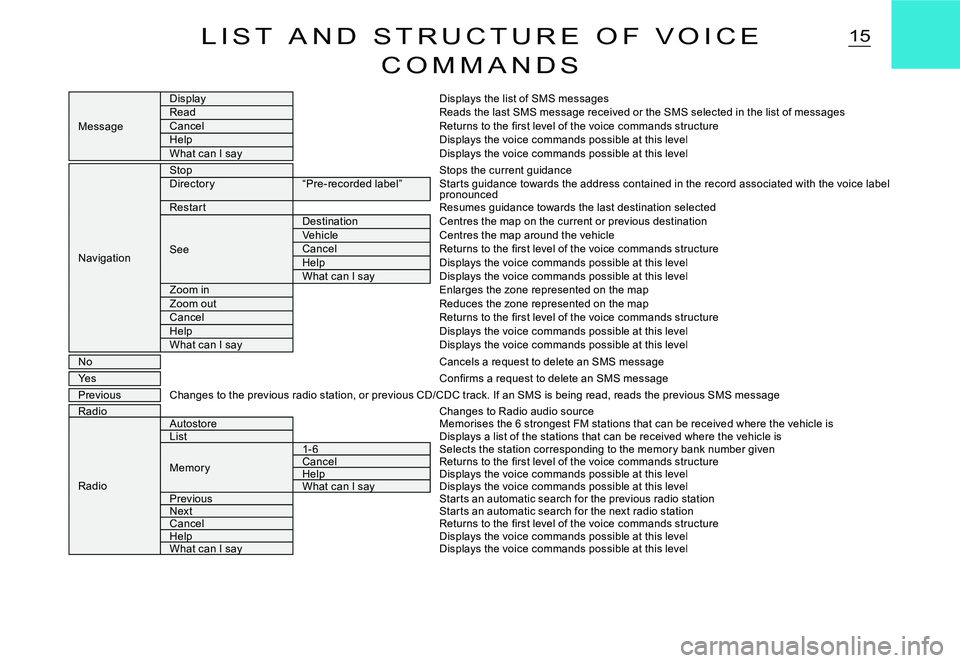
15L I S T A N D S T R U C T U R E O F V O I C E
C O M M A N D S
Message
DisplayDisplays the list of SMS messagesReadReads the last SMS message received or the SMS selected in the list of messagesCancelReturns to the fi rst level of the voice commands structureHelpDisplays the voice commands possible at this levelWhat can I sayDisplays the voice commands possible at this level
Navigation
StopStops the current guidanceDirector y“Pre-recorded label”Star ts guidance towards the address contained in the r ecord associated with the voice label pronouncedRestar tResumes guidance towards the last destination selecte d
See
DestinationCentres the map on the current or previous destinationVehicleCentres the map around the vehicleCancelReturns to the fi rst level of the voice commands structureHelpDisplays the voice commands possible at this levelWhat can I sayDisplays the voice commands possible at this levelZoom inEnlarges the zone represented on the mapZoom outReduces the zone represented on the mapCancelReturns to the fi rst level of the voice commands structureHelpDisplays the voice commands possible at this levelWhat can I sayDisplays the voice commands possible at this level
NoCancels a request to delete an SMS message
YesConfi rms a request to delete an SMS message
PreviousChanges to the previous radio station, or previous CD/C DC track. If an SMS is being read, reads the previous SMS messageRadioChanges to Radio audio source
Radio
AutostoreMemorises the 6 strongest FM stations that can be rece ived where the vehicle isListDisplays a list of the stations that can be received where the vehicle is
Memor y
1- 6Selects the station corresponding to the memor y bank n umber givenCancelReturns to the fi rst level of the voice commands structureHelpHelpDisplays the voice commands possible at this levelWhat can I sayWhat can I sayDisplays the voice commands possible at this levelPreviousStar ts an automatic search for the previous radio stati onNextStar ts an automatic search for the next radio stationCancelReturns to the fi rst level of the voice commands structureHelpHelpDisplays the voice commands possible at this levelWhat can I sayWhat can I sayDisplays the voice commands possible at this level
Page 173 of 201
NAV
17N A V I G A T I O N – T R A F F I C I N F O R M A T I O N
When navigation is to be used for the fi rst time, or when the batter y has been disconnected for any reason, the naviga-tion system has to be initialised. For this operation the vehicle must be parked outdoors so that it can pick up satellite signals. Turn the ignition to position M (see vehicle Handbook) and leave for at least fi fteen minutes.
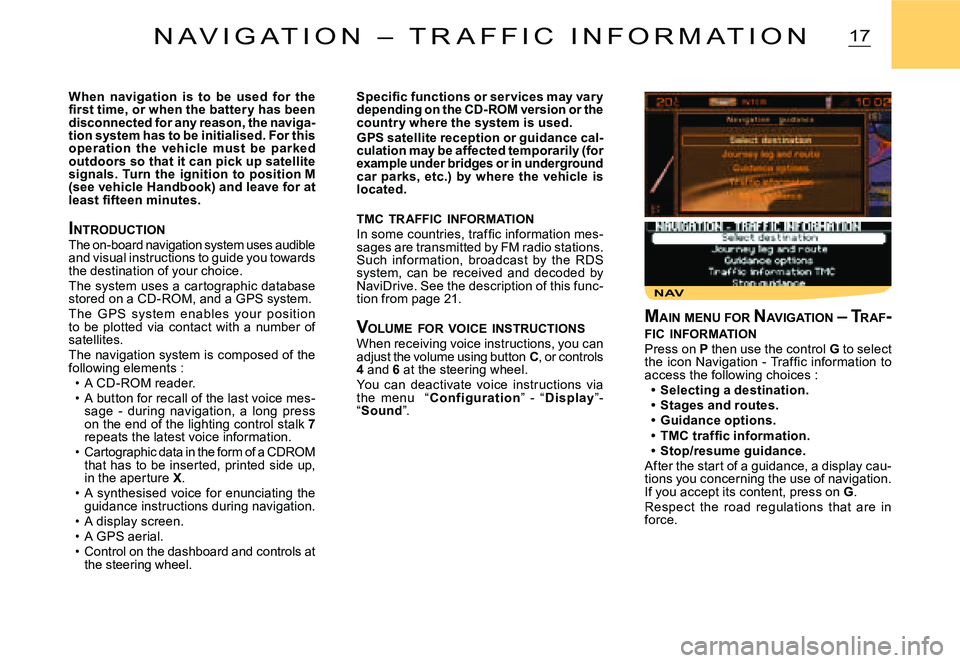
INTRODUCTIONThe on-board navigation system uses audible and visual instructions to guide you towards the destination of your choice.The system uses a cartographic database stored on a CD-ROM, and a GPS system.The G PS system enables your position to be plotted via contact with a number of satellites.The navigation system is composed of the following elements :A CD-ROM reader.A button for recall of the last voice mes-sage - during navigation, a long press on the end of the lighting control stalk 7repeats the latest voice information.Cartographic data in the form of a CDROM that has to be inserted, printed side up, in the aperture X.A synthesised voice for enunciating the guidance instructions during navigation.A display screen.A GPS aerial.Control on the dashboard and controls at the steering wheel.
Page 174 of 201
8
123
7658
123
7
5
64
18
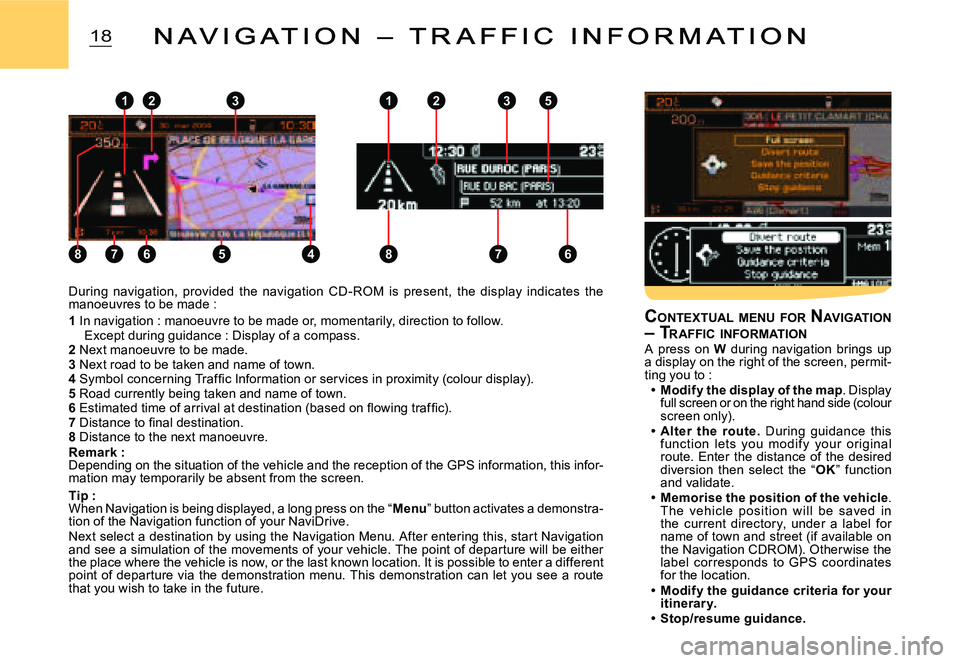
During navigation, provided the navigation CD - ROM is present, the display indicates the manoeuvres to be made :
1 In navigation : manoeuvre to be made or, momentarily, direction to follow. Except during guidance : Display of a compass.2 Next manoeuvre to be made.3 Next road to be taken and name of town.4 Symbol concerning Traffi c Information or services in proximity (colour display).5 Road currently being taken and name of town.6 Estimated time of arrival at destination (based on fl owing traffi c).7 Distance to fi nal destination.8 Distance to the next manoeuvre.Remark :Depending on the situation of the vehicle and the r eception of the GPS information, this infor-mation may temporarily be absent from the screen.
Tip :When Navigation is being displayed, a long press on the “Menu” button activates a demonstra-tion of the Navigation function of your NaviDrive.Next select a destination by using the Navigation Me nu. After entering this, start Navigation and see a simulation of the movements of your vehicle . The point of departure will be either the place where the vehicle is now, or the last known location. It is possible to enter a different point of departure via the demonstration menu. This demonstration can let you see a route that you wish to take in the future.
N A V I G A T I O N – T R A F F I C I N F O R M A T I O NN A V I G A T I O N – T R A F F I C I N F O R M A T I O N
CONTEXTUAL MENU FOR NAVIGATION – TRAFFIC INFORMATIONA press on W during navigation brings up a display on the right of the screen, permit-ting you to :Modify the display of the map. Display full screen or on the right hand side (colour screen only).Alter the route. During guidance this function lets you modif y your or iginal route. Enter the distance of the desired diversion then select the “OK” function and validate.Memorise the position of the vehicle. The vehic le position will be saved in the current director y, under a label for name of town and street (if available on the Navigation CDROM). Other wise the label corresponds to GPS coordinates for the location.Modify the guidance criteria for your itinerar y.Stop/resume guidance.
Page 175 of 201
NAV 1NAV 1. a
19N A V I G A T I O N – T R A F F I C I N F O R M A T I O N
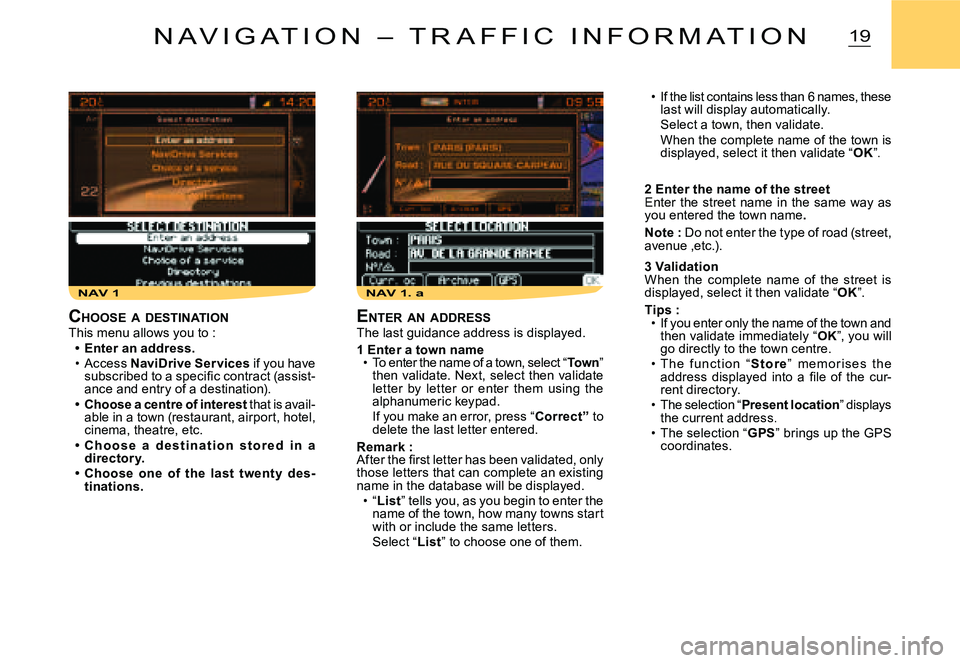
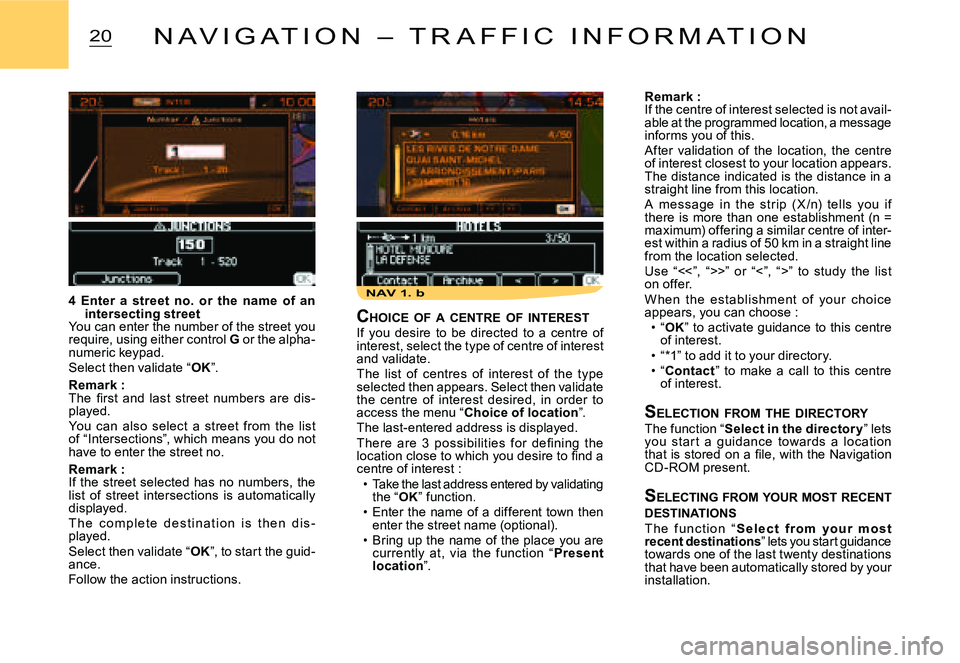
If the list contains less than 6 names, these last will display automatically.Select a town, then validate.When the complete name of the town is displayed, select it then validate “OK”.
2 Enter the name of the streetEnter the street name in the same way as you entered the town name.
Note : Do not enter the type of road (street, avenue ,etc.).
3 ValidationWhen the complete name of the street is displayed, select it then validate “OK”.
Tips :If you enter only the name of the town and then validate immediately “OK”, you will go directly to the town centre.T he f unc t i o n “S t o r e” m e m o r i s e s t he address displayed into a fi le of the cur-rent directory.The selection “Present location” displays the current address.The selection “GPS” brings up the GPS coordinates.
Page 176 of 201
NAV 1. b
20N A V I G A T I O N – T R A F F I C I N F O R M A T I O N
Remark :If the centre of interest selected is not avail-able at the programmed location, a message informs you of this.After validation of the location, the centre of interest closest to your location appears. The distance indicated is the distance in a straight line from this location.A message in the str ip ( X /n) tells you if there is more than one establishment (n = maximum) offering a similar centre of inter-est within a radius of 50 km in a straight line from the location selected.Use “<<”, “>>” or “<”, “>” to study the list on offer.W hen the est ablishment of your choic e appears, you can choose :“OK” to activate guidance to this centre of interest.“*1” to add it to your directory.“Contact” to make a call to this centre of interest.
SELECTION FROM THE DIRECTORYThe function “Select in the director y” lets you star t a guidance towards a loc ation that is stored on a fi le, with the Navigation CD-ROM present.
S ELECTING FROM YOUR MOST RECENT DESTINATIONST h e f u n c t i o n “S e l e c t f r o m yo u r m o s t recent destinations” lets you start guidance towards one of the last twenty destinations that have been automatically stored by your installation.
Page 181 of 201
25R A D I O S O U R C E
NOTES ON RADIO RECEPTIONYour Navidrive system will be subject to phenomena not encountered by your equip-ment you have at home. The reception of AM and FM signals may suffer from interference, which is caused by the nature and propaga-tion of the signals and does not refl ect on the quality of your radio installation.In AM, the reception may be affected when passing under power lines or bridges, or when travelling through tunnels.In FM mode, the reception may be affected by the distance from the station transmitter, the refl ecting of signals off obstacles (mountains, hills, tower blocks) and radio blackspots (no coverage from the station transmitter).
S E L EC T I O N O F FR EQ U E N C I E S A N D MEMORY BANKSB y r e p e a t e d p r e s s e s o n b u t t o n R, t h e NaviDrive changes successively between the memor y banks FM1, FM2 and FMast, corresponding to FM frequencies, and to the memor y bank MW/LW, corresponding to AM frequencies.
M ANUAL SEARCHA short press on one of the buttons H or I, will respectively increase or decrease the displayed frequency.By keeping button H or I pressed, you will be able to scroll through the waveband. Scrolling stops as soon as a station is found. NaviDrive remains tuned to the frequency displayed.
M ANUAL PRE -SETTINGSelect the waveband and memor y bank required using button R.Select a station using either automatic or manual search.Keep pressing for more than two seconds on one of the pre-selection buttons 1 to 6on the keypad W.A window opens on the screen, the station is memorised as it is displayed on the memory number you have given it.
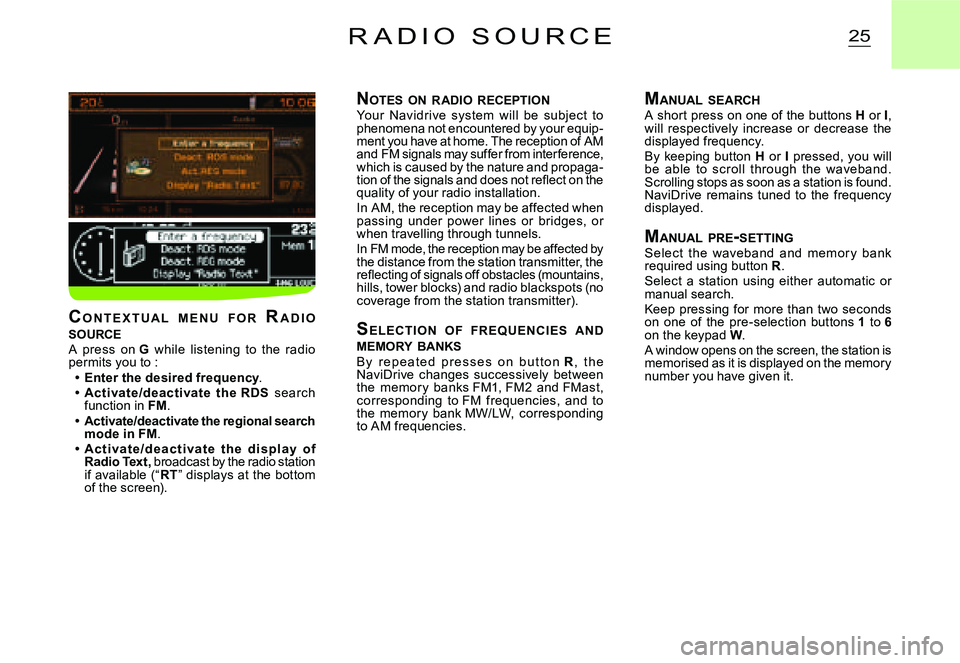
C O N T E X T U A L M E N U F O R RA D I O SOURCEA press on G while listening to the radio permits you to :Enter the desired frequency.Ac tivate/deac tivate the RDS search function in FM.Activate/deactivate the regional search mode in FM.Ac t i va t e /d e a c t i va t e t h e d i s p l ay o f Radio Text, broadcast by the radio station if available (“RT” displays at the bottom of the screen).
Page 190 of 201
REP 1REP 2
34D I R E C T O R Y
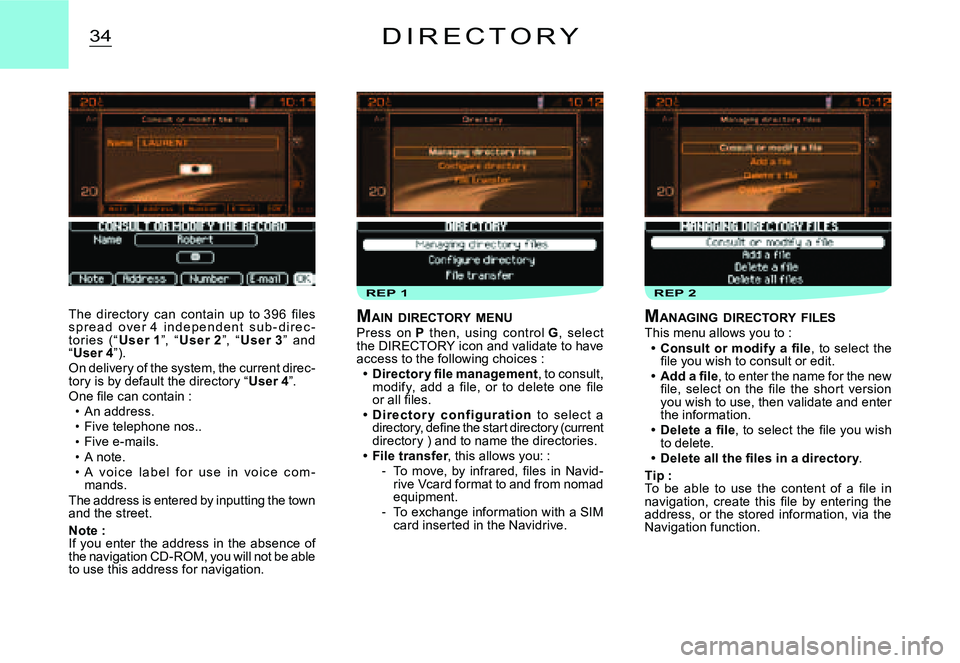
The director y can contain up to 396 fi les s p r e a d o v e r 4 i n d e p e n d e n t s u b - d i r e c -tor ies (“User 1”, “User 2”, “User 3” and “User 4”).On delivery of the system, the current direc-tory is by default the directory “User 4”.One fi le can contain :An address.Five telephone nos..Five e-mails.A note.A v o i c e l a b e l f o r u s e i n v o i c e c o m -mands.The address is entered by inputting the town and the street.
Note :If you enter the address in the absence of the navigation CD-ROM, you will not be able to use this address for navigation.
Page 199 of 201
43M A P
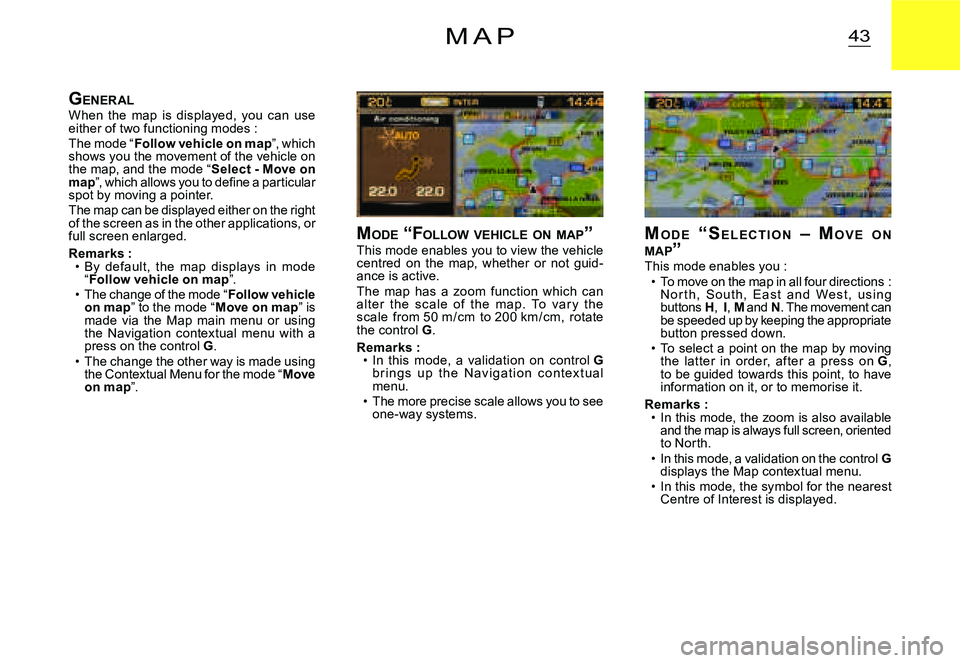
MO D E “ S E L E C T I O N – MO V E O N MAP ”This mode enables you :To move on the map in all four directions : N o r t h, S o u t h, E a s t a n d We s t , u s i n g buttons H, I, M and N. The movement can be speeded up by keeping the appropriate button pressed down.To select a point on the map by moving the lat ter in order, af ter a press on G, to be guided towards this point, to have information on it, or to memorise it.
Remarks :In this mode, the zoom is also available and the map is always full screen, oriented to North.In this mode, a validation on the control Gdisplays the Map contextual menu.In this mode, the symbol for the nearest Centre of Interest is displayed.