display Citroen C3 2008 1.G User Guide
[x] Cancel search | Manufacturer: CITROEN, Model Year: 2008, Model line: C3, Model: Citroen C3 2008 1.GPages: 184, PDF Size: 6.14 MB
Page 20 of 184
D
A
C
B
E
EDCB
AE
37
II
M U L T I F U N C T I O N D I S P L A YD I S P L A Y A
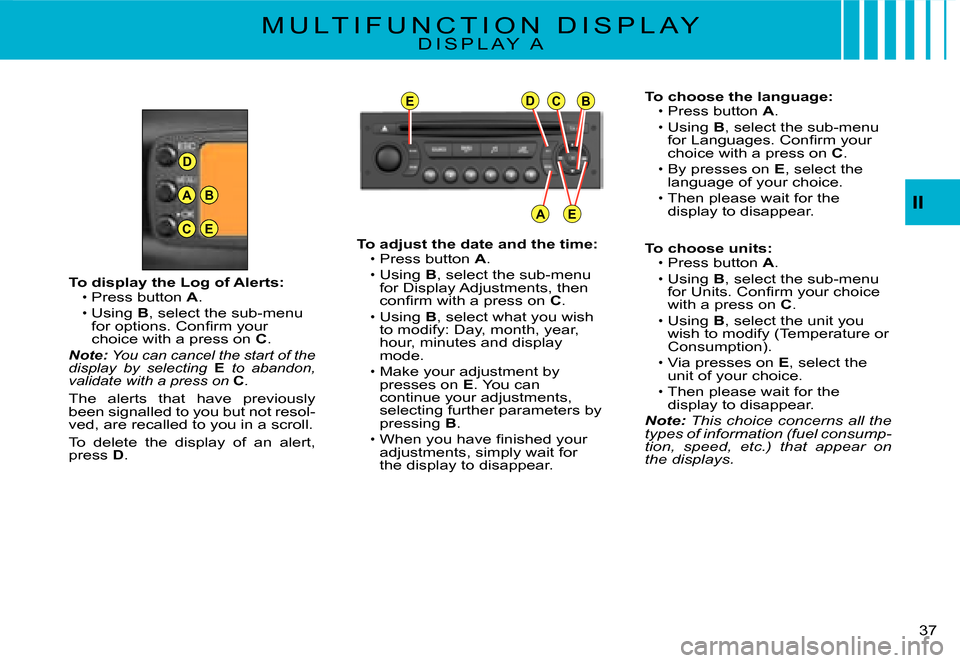
To choose the language:Press button A.
Using B, select the sub-menu for Languages. Confi rm your choice with a press on C.By presses on E, select the language of your choice.
Then please wait for the display to disappear.
To choose units:Press button A.Using B, select the sub-menu for Units. Confi rm your choice with a press on C.
Using B, select the unit you wish to modify (Temperature or Consumption).
Via presses on E, select the unit of your choice.Then please wait for the display to disappear.Note: This choice concerns all the types of information (fuel consump-tion, speed, etc.) that appear on the displays.
Page 21 of 184
EDCB
AE
231
38
II
M U L T I F U N C T I O N D I S P L A YD I S P L A Y C
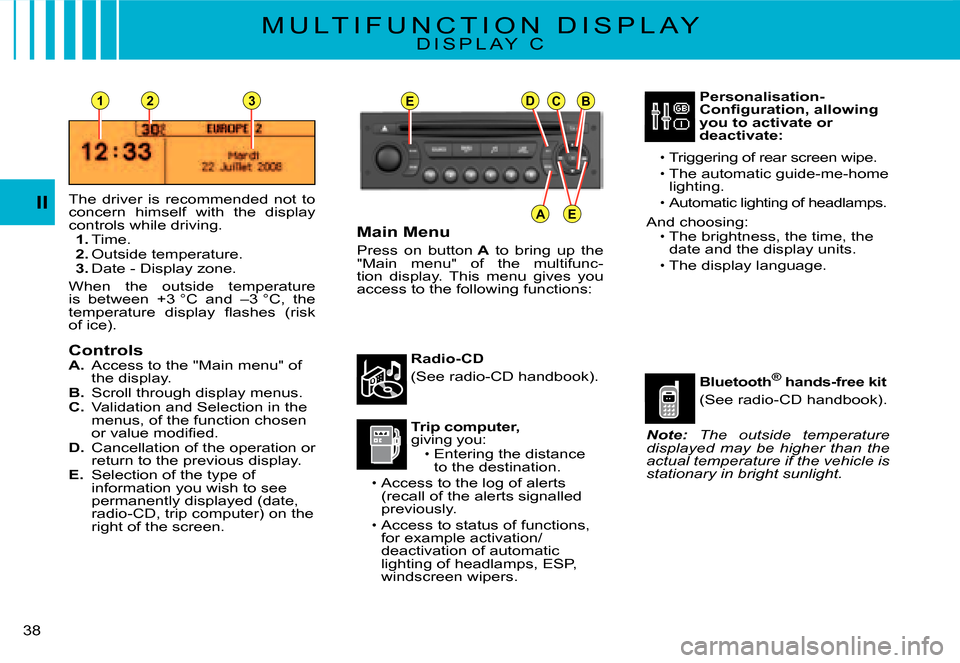
The driver is recommended not to concern himself with the display controls while driving.1. Time.2. Outside temperature.3. Date - Display zone.
When the outside temperature is between +3 °C and –3 °C, the temperature display fl ashes (risk of ice).
ControlsA. Access to the "Main menu" of the display.B. Scroll through display menus.C. Validation and Selection in the menus, of the function chosen or value modifi ed.D. Cancellation of the operation or return to the previous display.E. Selection of the type of information you wish to see permanently displayed (date, radio-CD, trip computer) on the right of the screen.
Main Menu
Press on button A to bring up the "Main menu" of the multifunc-tion display. This menu gives you access to the following functions:
Radio-CD
(See radio-CD handbook).
Trip computer,giving you:Entering the distance to the destination.Access to the log of alerts (recall of the alerts signalled previously.
Access to status of functions, for example activation/deactivation of automatic lighting of headlamps, ESP, windscreen wipers.
Page 22 of 184
39
II
M U L T I F U N C T I O N D I S P L A YD I S P L A Y C
Trip computer
To enter the distance to be tra-velled on the trip computer:Press button A.
Use B to select the icon "Trip computer", then confi rm with a press on C.Select entry of distance using B. Confi rm your choice with a press on C.
To choose the distance, select the fi gure you wish to modify by using B, then confi rm with a press on C.
Use B to adjust the value, then validate by pressing C.Validate "OK" on the screen.
To access the trip computer's log of alerts:Press button A.
Use B to select the icon "Trip computer", then confi rm with a press on C.Select the log of alerts.
When the list displays, use Bto scroll through it.
Press D to return to the permanent display.
To access the status of functions: proceed in a similar manner.
Page 23 of 184
EDCB
AE
40
II
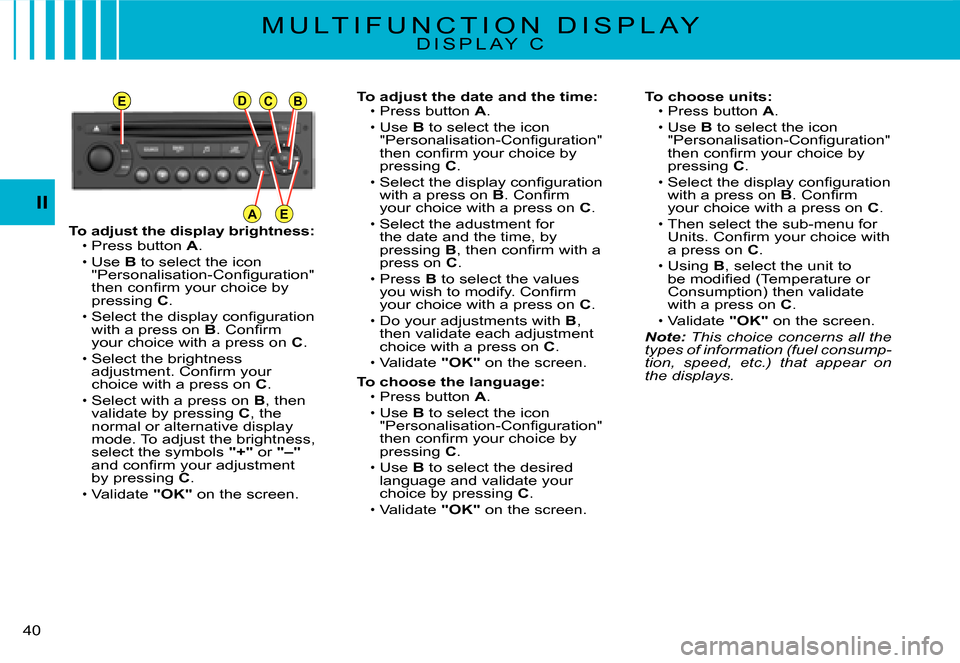
To adjust the display brightness:Press button A.Use B to select the icon "Personalisation-Confi guration" then confi rm your choice by pressing C.
Select the display confi guration with a press on B. Confi rm your choice with a press on C.
Select the brightness adjustment. Confi rm your choice with a press on C.Select with a press on B, then validate by pressing C, the normal or alternative display mode. To adjust the brightness, select the symbols "+" or "–"and confi rm your adjustment by pressing C.
Validate "OK" on the screen.
Page 24 of 184
41
II
T R I P C O M P U T E R
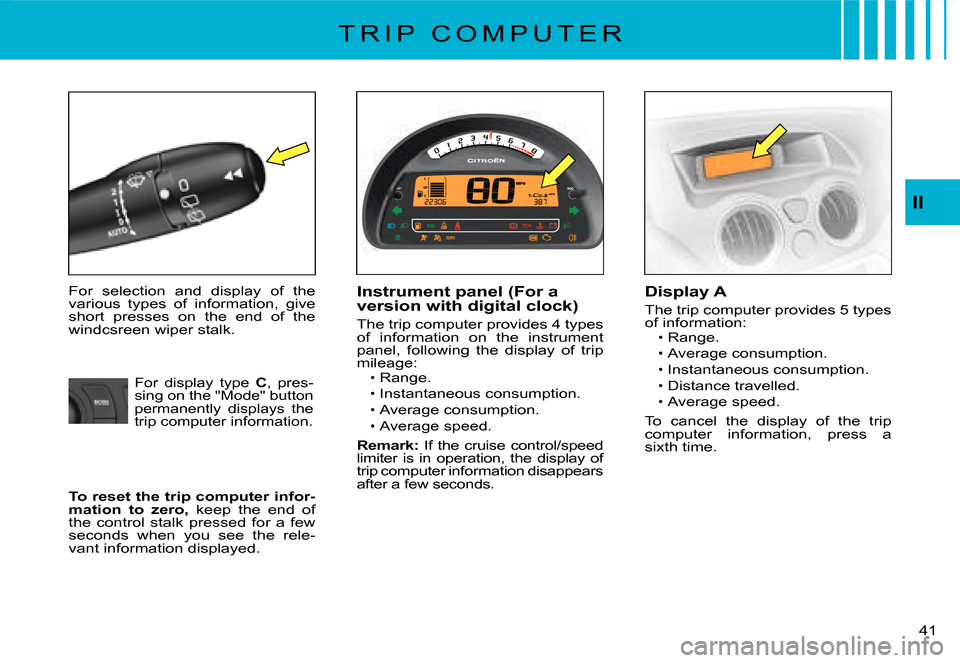
For selection and display of the various types of information, give short presses on the end of the windcsreen wiper stalk.
Instrument panel (For a version with digital clock)
The trip computer provides 4 types of information on the instrument panel, following the display of trip mileage:Range.
Instantaneous consumption.
Average consumption.Average speed.
Remark: If the cruise control/speed limiter is in operation, the display of trip computer information disappears after a few seconds.
Page 25 of 184
42
II
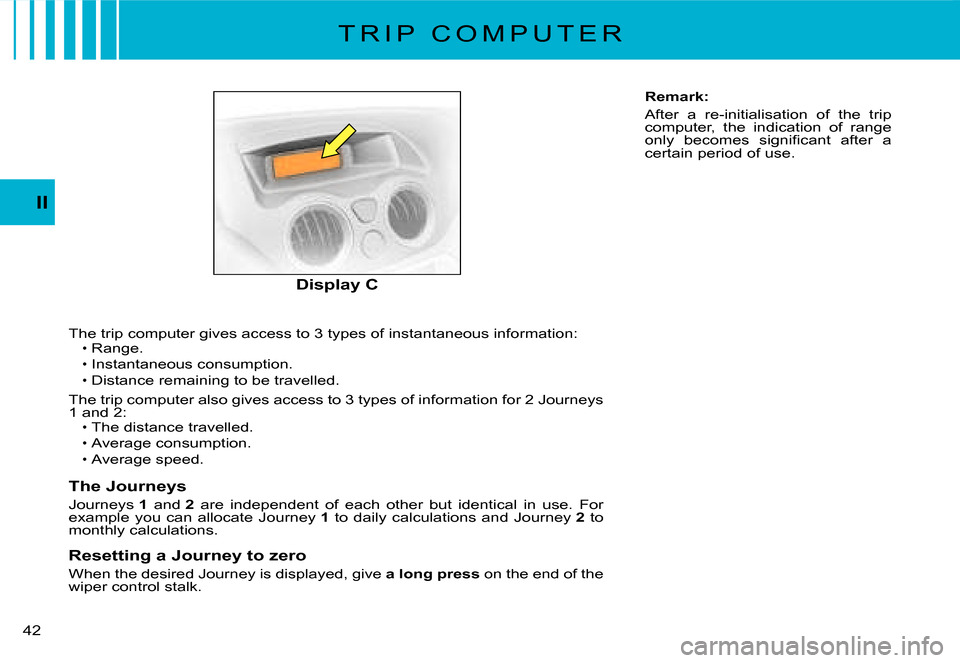
The trip computer gives access to 3 types of instantaneous information:Range.
Instantaneous consumption.Distance remaining to be travelled.
The trip computer also gives access to 3 types of information for 2 Journeys 1 and 2:The distance travelled.
Average consumption.
Average speed.
The Journeys
Journeys 1 and 2 are independent of each other but identical in use. For example you can allocate Journey 1 to daily calculations and Journey 2 to monthly calculations.
Resetting a Journey to zero
When the desired Journey is displayed, give a long press on the end of the wiper control stalk.
Page 26 of 184
43
II
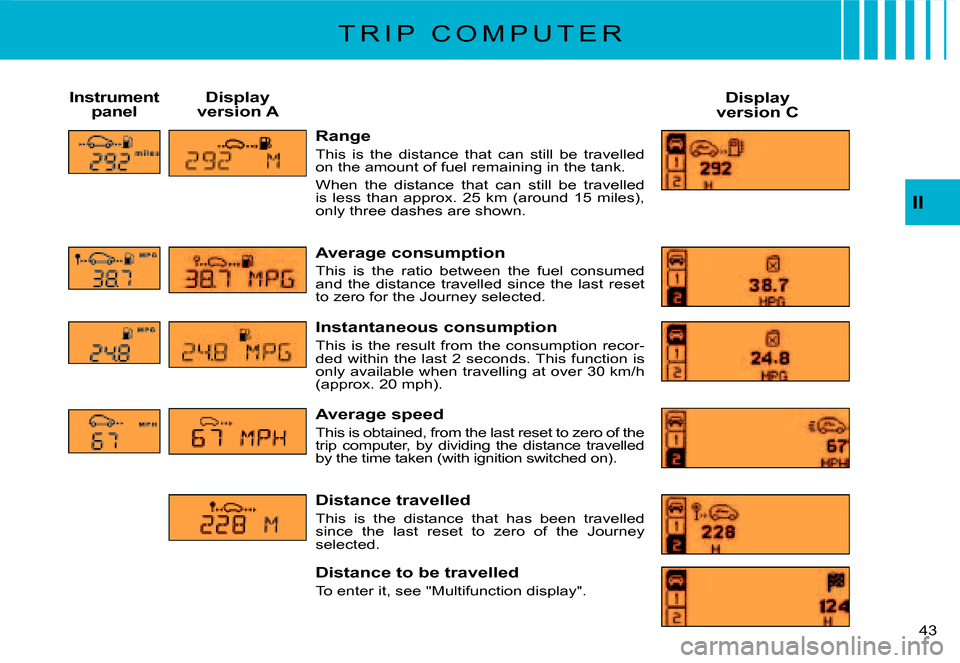
Range
This is the distance that can still be travelled on the amount of fuel remaining in the tank.
When the distance that can still be travelled is less than approx. 25 km (around 15 miles), only three dashes are shown.
Average consumption
This is the ratio between the fuel consumed and the distance travelled since the last reset to zero for the Journey selected.
Instantaneous consumption
This is the result from the consumption recor-ded within the last 2 seconds. This function is only available when travelling at over 30 km/h (approx. 20 mph).
Average speed
This is obtained, from the last reset to zero of the trip computer, by dividing the distance travelled by the time taken (with ignition switched on).
Distance travelled
This is the distance that has been travelled since the last reset to zero of the Journey selected.
Distance to be travelled
To enter it, see "Multifunction display".
Instrument panelDisplay version ADisplay version C
T R I P C O M P U T E R
Page 28 of 184
A
45
II
S I G N A L L I N G
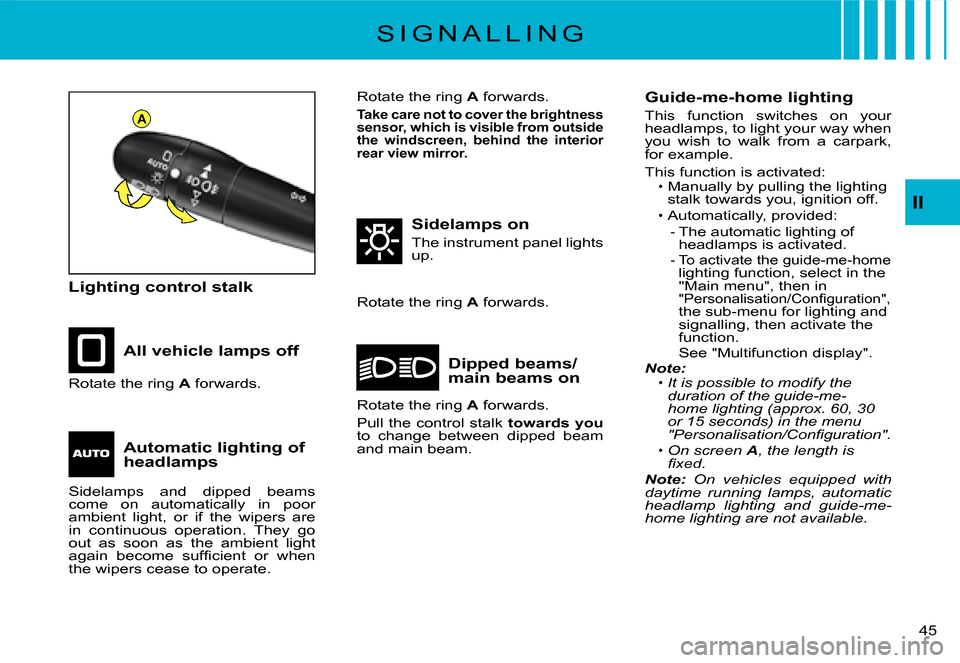
Lighting control stalk
All vehicle lamps off
Sidelamps on
The instrument panel lights up.
Dipped beams/main beams onRotate the ring A forwards.
Rotate the ring A forwards.
Sidelamps and dipped beams come on automatically in poor ambient light, or if the wipers are in continuous operation. They go out as soon as the ambient light again become suffi cient or when the wipers cease to operate.
Guide-me-home lighting
This function switches on your headlamps, to light your way when you wish to walk from a carpark, for example.
This function is activated:Manually by pulling the lighting stalk towards you, ignition off.
Automatically, provided:The automatic lighting of headlamps is activated.To activate the guide-me-homelighting function, select in the "Main menu", then in "Personalisation/Confi guration",the sub-menu for lighting and signalling, then activate the function.See "Multifunction display".Note:It is possible to modify the duration of the guide-me-home lighting (approx. 60, 30 or 15 seconds) in the menu "Personalisation/Confi guration".
On screen A, the length is fi xed.Note: On vehicles equipped with daytime running lamps, automatic headlamp lighting and guide-me-home lighting are not available.
Page 33 of 184
II
D A S H B O A R D A D J U S T M E N T S
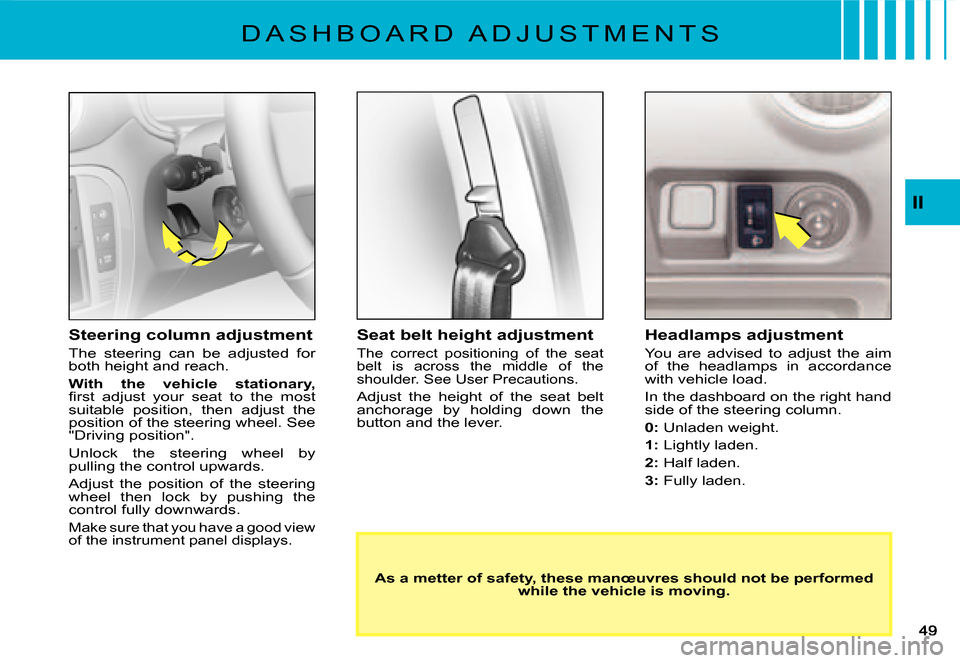
Seat belt height adjustment
The correct positioning of the seat belt is across the middle of the shoulder. See User Precautions.
Adjust the height of the seat belt anchorage by holding down the button and the lever.
Headlamps adjustment
You are advised to adjust the aim of the headlamps in accordance with vehicle load.
In the dashboard on the right hand side of the steering column.
0: Unladen weight.
1: Lightly laden.
2: Half laden.
3: Fully laden.
As a metter of safety, these manœuvres should not be performed while the vehicle is moving.
Steering column adjustment
The steering can be adjusted for both height and reach.
With the vehicle stationary,fi rst adjust your seat to the most suitable position, then adjust the position of the steering wheel. See "Driving position".
Unlock the steering wheel by pulling the control upwards.
Adjust the position of the steering wheel then lock by pushing the control fully downwards.
Make sure that you have a good view of the instrument panel displays.
Page 44 of 184
60
II
E L E C T R O N I C G E A R B O X S Y S T E MA U T O M A T I C M O D E
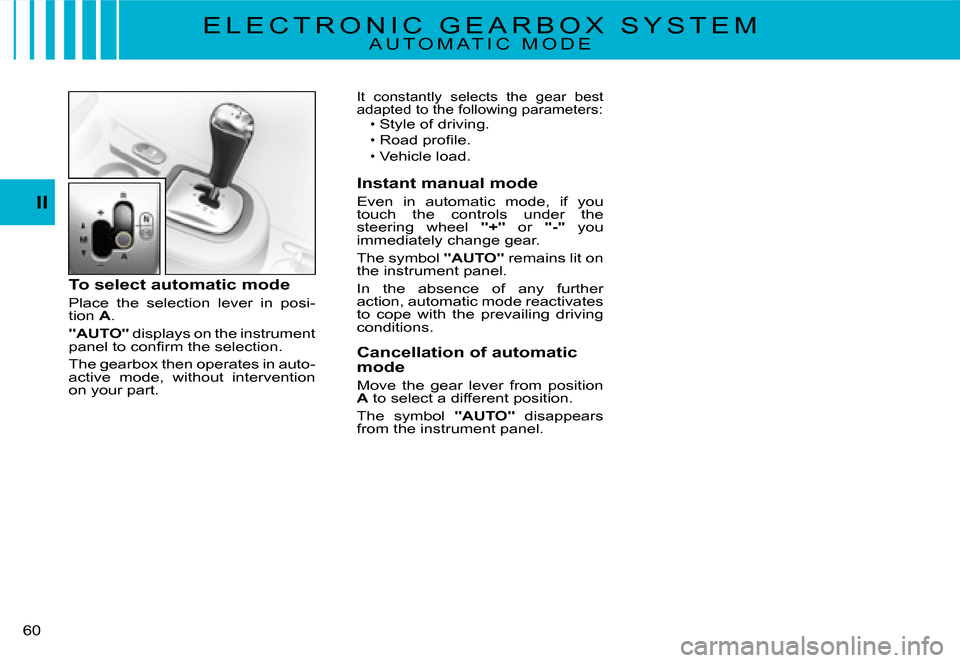
To select automatic mode
Place the selection lever in posi-tion A.
"AUTO" displays on the instrument panel to confi rm the selection.
The gearbox then operates in auto-active mode, without intervention on your part.
It constantly selects the gear best adapted to the following parameters:Style of driving.
Road profi le.Vehicle load.
Instant manual mode
Even in automatic mode, if you touch the controls under the steering wheel "+" or "-" you immediately change gear.
The symbol "AUTO" remains lit on the instrument panel.
In the absence of any further action, automatic mode reactivates to cope with the prevailing driving conditions.
Cancellation of automatic mode
Move the gear lever from position A to select a different position.
The symbol "AUTO" disappears from the instrument panel.