trip computer Citroen C3 2008 1.G User Guide
[x] Cancel search | Manufacturer: CITROEN, Model Year: 2008, Model line: C3, Model: Citroen C3 2008 1.GPages: 184, PDF Size: 6.14 MB
Page 54 of 184
A
B
1
4
3
2
70
II
C R U I S E C O N T R O L
Cruise control must only be used where the traffi c conditions permit driving at a constant speed.
Do not use it on congested roads or when the weather or the road conditions are poor.
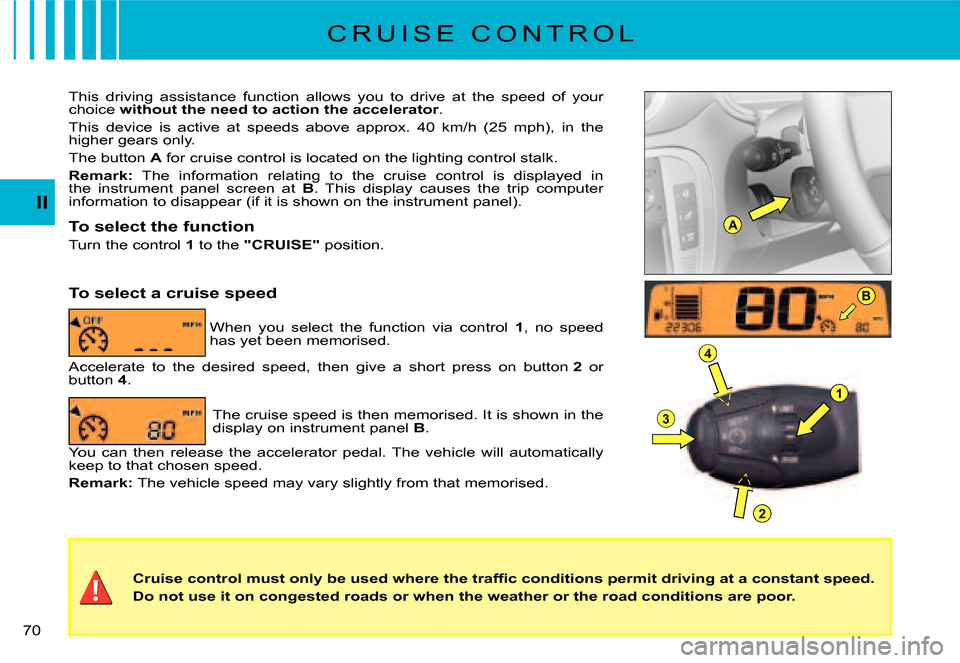
This driving assistance function allows you to drive at the spee d of your choice without the need to action the accelerator.
This device is active at speeds above approx. 40 km/h (25 mph), in the higher gears only.
The button A for cruise control is located on the lighting control stalk.
Remark: The information relating to the cruise control is displayed in the instrument panel screen at B. This display causes the trip computer information to disappear (if it is shown on the instrument panel).
To select the function
Turn the control 1 to the "CRUISE" position.
When you select the function via control 1, no speed has yet been memorised.
To select a cruise speed
Accelerate to the desired speed, then give a short press on butt on 2 or button 4.
The cruise speed is then memorised. It is shown in the display on instrument panel B.
You can then release the accelerator pedal. The vehicle will automatically keep to that chosen speed.
Remark: The vehicle speed may vary slightly from that memorised.
Page 56 of 184
A
1
4
3
2
B
72
II
S P E E D L I M I T E R
This driving assistance function enables you to select a maximum speed that you wish not to exceed. This must be greater than 30 km/h (approx. 20 mph).
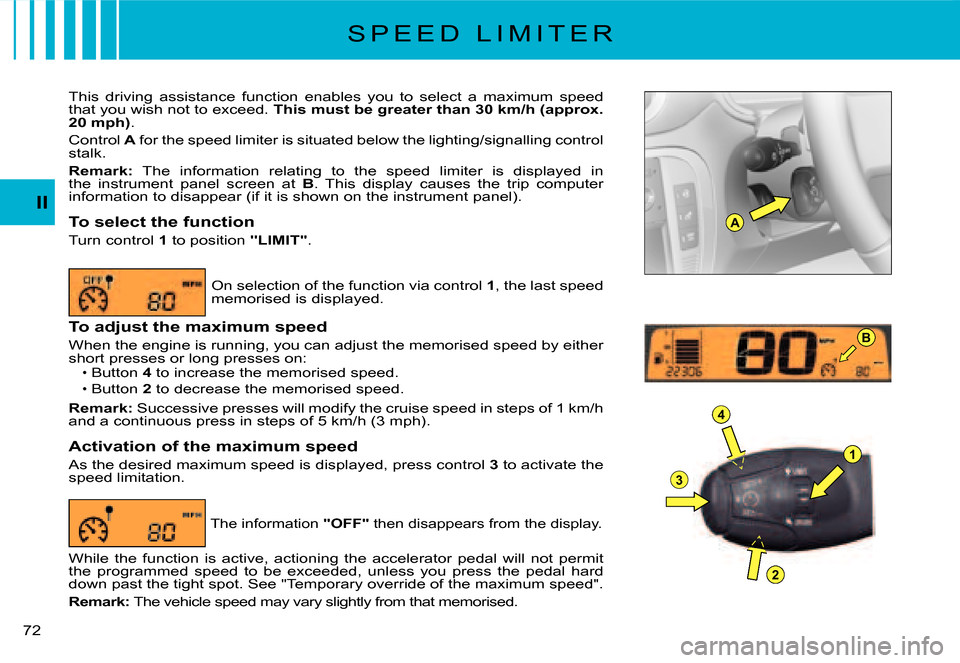
Control A for the speed limiter is situated below the lighting/signalling control stalk.
Remark: The information relating to the speed limiter is displayed in the instrument panel screen at B. This display causes the trip computer information to disappear (if it is shown on the instrument panel).
To select the function
Turn control 1 to position "LIMIT".
On selection of the function via control 1, the last speed memorised is displayed.
To adjust the maximum speed
When the engine is running, you can adjust the memorised spee d by either short presses or long presses on:Button 4 to increase the memorised speed.
Button 2 to decrease the memorised speed.
Remark: Successive presses will modify the cruise speed in steps of 1 km/h and a continuous press in steps of 5 km/h (3 mph).
Activation of the maximum speed
As the desired maximum speed is displayed, press control 3 to activate the speed limitation.
Page 135 of 184
2B U T T O N C O N T R O L S
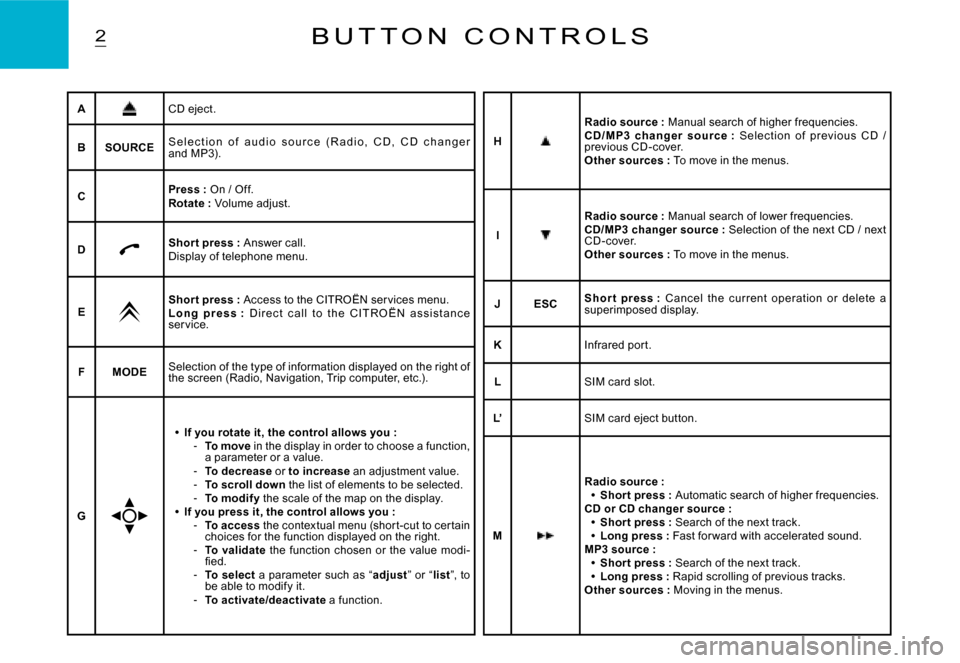
ACD eject.
BSOURCES e l e c t i o n o f a u d i o s o u r c e ( R a d i o , C D , C D c h a n g e r and MP3).
CPress : On / Off.Rotate : Volume adjust.
DShor t press : Answer call.Display of telephone menu.
EShor t press : Access to the CITROËN ser vices menu.L o n g p r e s s : D i r e c t c a l l t o t h e C I T R O Ë N a s s i s t a n c e ser vice.
FMODESelection of the type of information displayed on the right of the screen (Radio, Navigation, Trip computer, etc.) .
G
If you rotate it, the control allows you :To move in the display in order to choose a function, a parameter or a value.To decrease or to increase an adjustment value.To scroll down the list of elements to be selected.To modif y the scale of the map on the display.If you press it, the control allows you :To access the contextual menu (shor t-cut to cer tain choices for the function displayed on the right.To validate the function chosen or the value modi-fi ed.To select a parameter such as “adjust” or “list”, to be able to modify it.To activate/deactivate a function.
Page 142 of 184
AUDAUD 1. c
AUD 1. d
AUD 1. a
AUD 1. b
ODB 1
ODB 2ODB 2. b
ODB 1. c
ODB 2. a
ODBODBODBODBODBODB
ODB
8
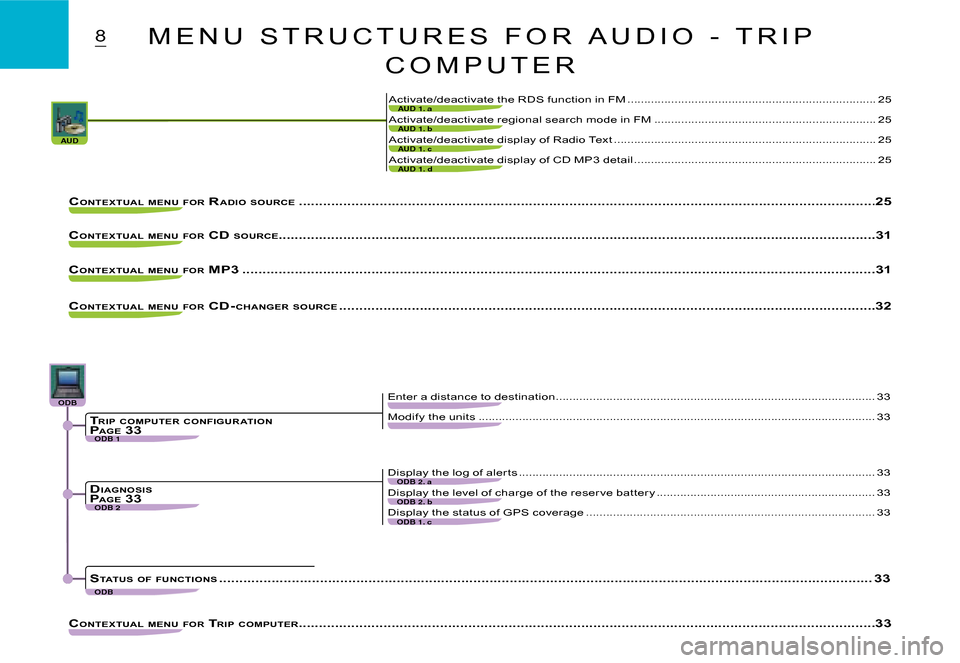
Activate/deactivate display of Radio Text ..............................................................................25
Activate/deactivate display of CD MP3 detail ........................................................................25
Activate/deactivate the RDS function in FM .................................................. ........................25
Activate/deactivate regional search mode in FM .................................................. ................25
CONTEXTUAL MENU FOR RADIO SOURCE .................................................. ................................................... ..........................................25
CONTEXTUAL MENU FOR CD SOURCE................................................... .................................................................................................31
CONTEXTUAL MENU FOR MP3 .................................................. ................................................... ........................................................31
CONTEXTUAL MENU FOR CD- CHANGER SOURCE .................................................. ................................................... ................................32
CONTEXTUAL MENU FOR TRIP COMPUTER .................................................. ................................................... ..........................................33
Modify the units ..................................................................................................... .................33
Enter a distance to destination ...............................................................................................33
Display the level of charge of the reser ve batter y .................................................. ...............33
Display the status of GPS coverage .................................................. ....................................33
Display the log of aler ts ..................................................................................................... .....33
TRIP COMPUTER CONFIGUR ATIONP AGE 33
DIAGNOSISPAGE 33
STATUS OF FUNCTIONS .................................................. ................................................... .............................................................33
M E N U S T R U C T U R E S F O R A U D I O - T R I P
C O M P U T E R
Page 147 of 184
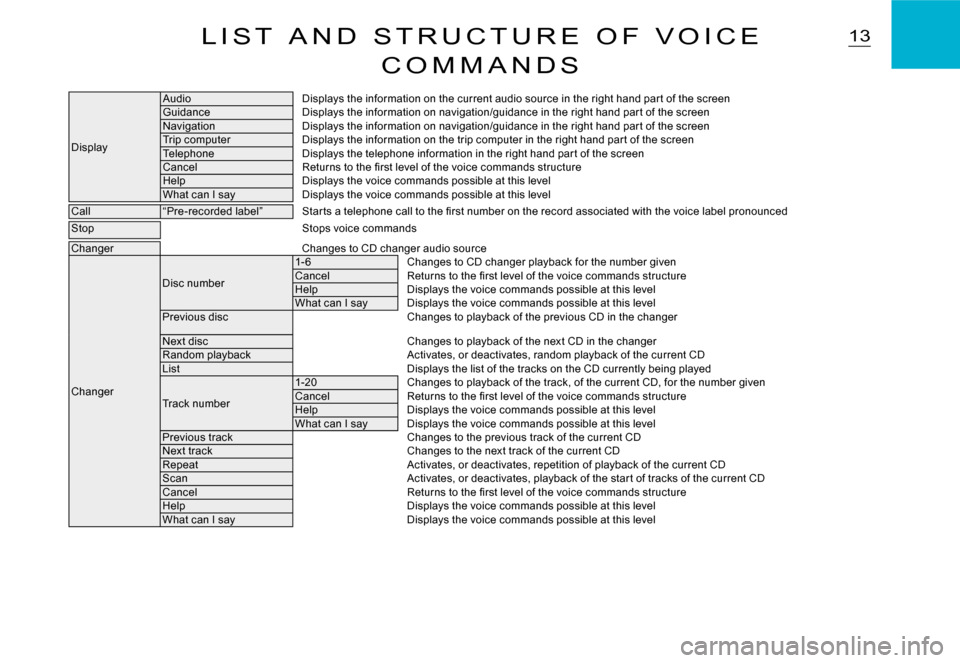
13L I S T A N D S T R U C T U R E O F V O I C E
C O M M A N D S
Display
AudioDisplays the information on the current audio source in the right hand par t of the screenGuidanceDisplays the information on navigation/guidance in the right hand par t of the screenNavigationDisplays the information on navigation/guidance in the right hand par t of the screenTrip computerDisplays the information on the trip computer in the right hand par t of the screenTelephoneDisplays the telephone information in the right hand par t of the screenCancelReturns to the fi rst level of the voice commands stru ctureHelpDisplays the voice commands possible at this levelWhat can I sayDisplays the voice commands possible at this level
Call“Pre-recorded label”Star ts a telephone call to the fi rst number on the record associated with the voice label pronounced
StopStops voice commands
ChangerChanges to CD changer audio source
Changer
Disc number
1- 6Changes to CD changer playback for the number givenCancelReturns to the fi rst level of the voice commands stru ctureHelpDisplays the voice commands possible at this levelWhat can I sayDisplays the voice commands possible at this levelPrevious discChanges to playback of the previous CD in the changer
Next discChanges to playback of the next CD in the changerRandom playbackActivates, or deactivates, random playback of the curr ent CDListDisplays the list of the tracks on the CD currently being played
Track number
1-20Changes to playback of the track, of the current CD, for the number givenCancelReturns to the fi rst level of the voice commands structureHelpDisplays the voice commands possible at this levelWhat can I sayDisplays the voice commands possible at this levelPrevious trackChanges to the previous track of the current CDNext trackChanges to the next track of the current CDRepeatActivates, or deactivates, repetition of playback of the current CDScanActivates, or deactivates, playback of the star t of tracks of the current CDCancelReturns to the fi rst level of the voice commands stru ctureHelpDisplays the voice commands possible at this levelWhat can I sayDisplays the voice commands possible at this level