ignition Citroen C3 2012 2.G User Guide
[x] Cancel search | Manufacturer: CITROEN, Model Year: 2012, Model line: C3, Model: Citroen C3 2012 2.GPages: 252, PDF Size: 8.11 MB
Page 37 of 252
1
35
MONITORING
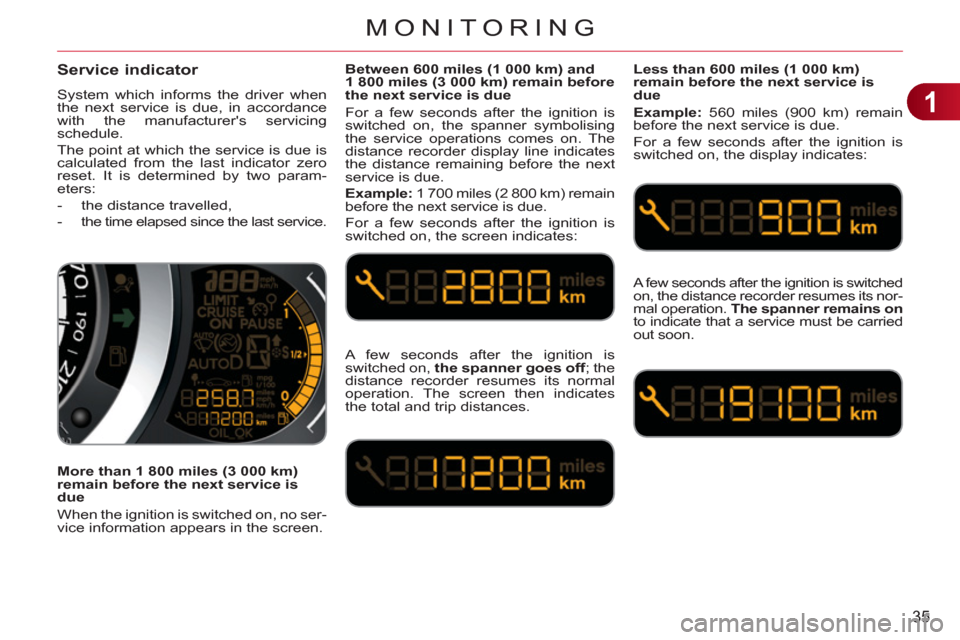
Service indicator
System which informs the driver when
the next service is due, in accordance
with the manufacturer's servicing
schedule.
The point at which the service is due is
calculated from the last indicator zero
reset. It is determined by two param-
eters:
- the distance travelled,
- the time elapsed since the last service.
Between 600 miles (1 000 km) and
1 800 miles (3 000 km) remain before
the next service is due
For a few seconds after the ignition is
switched on, the spanner symbolising
the service operations comes on. The
distance recorder display line indicates
the distance remaining before the next
service is due.
Example:
1 700 miles (2 800 km) remain
before the next service is due.
For a few seconds after the ignition is
switched on, the screen indicates:
Less than 600 miles (1 000 km)
remain before the next service is
due
Example:
560 miles (900 km) remain
before the next service is due.
For a few seconds after the ignition is
switched on, the display indicates:
A few seconds after the ignition is
switched on, the spanner goes off
; the
distance recorder resumes its normal
operation. The screen then indicates
the total and trip distances.
A few seconds after the ignition is switched on, the distance recorder resumes its nor-
mal operation. The spanner remains on
to indicate that a service must be carried
out soon.
More than 1 800 miles (3 000 km)
remain before the next service is
due
When the ignition is switched on, no ser-
vice information appears in the screen.
Page 38 of 252
1
36
MONITORING
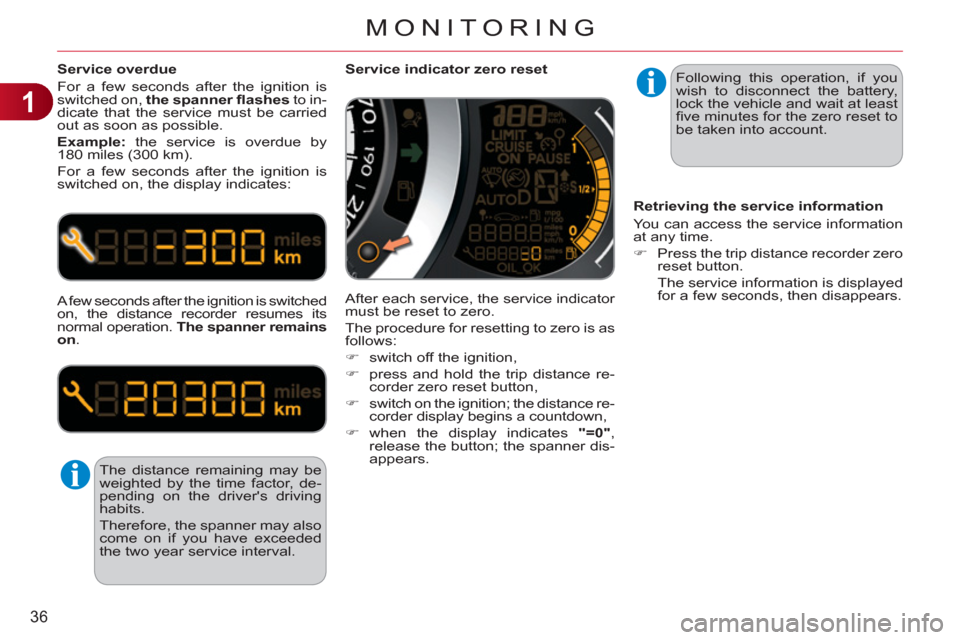
Service overdue
For a few seconds after the ignition is
switched on, the spanner fl ashes
to in-
dicate that the service must be carried
out as soon as possible.
Example:
the service is overdue by
180 miles (300 km).
For a few seconds after the ignition is
switched on, the display indicates:
A few seconds after the ignition is switched
on, the distance recorder resumes its
normal operation. The spanner remains
on
.
The distance remaining may be
weighted by the time factor, de-
pending on the driver's driving
habits.
Therefore, the spanner may also
come on if you have exceeded
the two year service interval.
Service indicator zero reset
After each service, the service indicator
must be reset to zero.
The procedure for resetting to zero is as
follows:
)
switch off the ignition,
)
press and hold the trip distance re-
corder zero reset button,
)
switch on the ignition; the distance re-
corder display begins a countdown,
)
when the display indicates "=0"
,
release the button; the spanner dis-
appears.
Retrieving the service information
You can access the service information
at any time.
)
Press the trip distance recorder zero
reset button.
The service information is displayed
for a few seconds, then disappears.
Following this operation, if you
wish to disconnect the battery,
lock the vehicle and wait at least
fi ve minutes for the zero reset to
be taken into account.
Page 39 of 252
1
MONITORING
The level shown will only be
correct if the vehicle is on level
ground and the engine has been
off for more than 30 minutes.
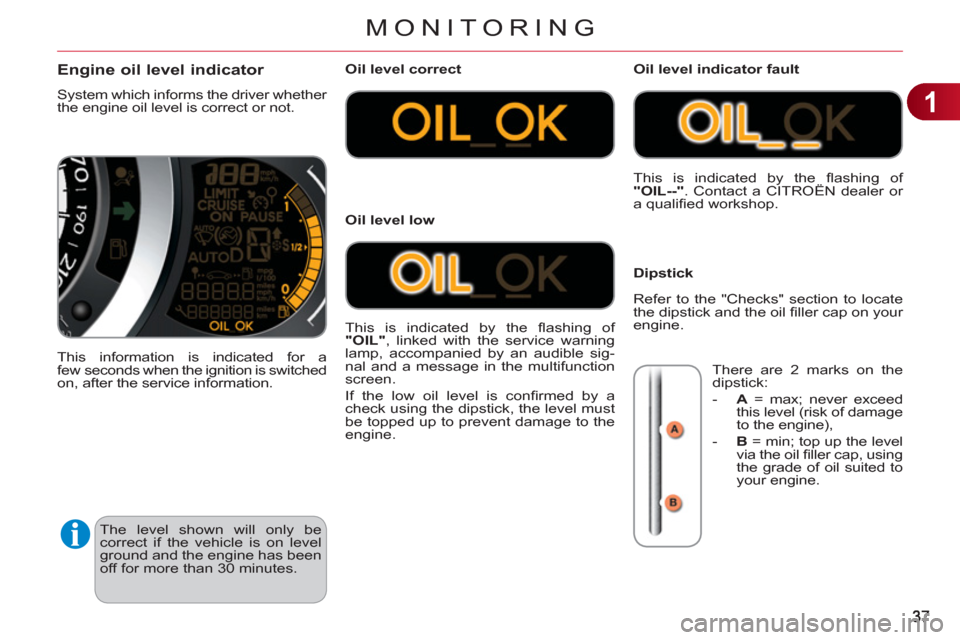
Engine oil level indicator
System which informs the driver whether
the engine oil level is correct or not.
This information is indicated for a
few seconds when the ignition is switched
on, after the service information.
Oil level correct
This is indicated by the fl ashing of
"OIL"
, linked with the service warning
lamp, accompanied by an audible sig-
nal and a message in the multifunction
screen.
If the low oil level is confi rmed by a
check using the dipstick, the level must
be topped up to prevent damage to the
engine.
Oil level low This is indicated by the fl ashing of
"OIL--"
. Contact a CITROËN dealer or
a qualifi ed workshop.
Oil level indicator fault
Dipstick
There are 2 marks on the
dipstick:
- A
= max; never exceed
this level (risk of damage
to the engine),
- B
= min; top up the level
via the oil fi ller cap, using
the grade of oil suited to
your engine.
Refer to the "Checks" section to locate
the dipstick and the oil fi ller cap on your
engine.
Page 40 of 252
1
38
MONITORING
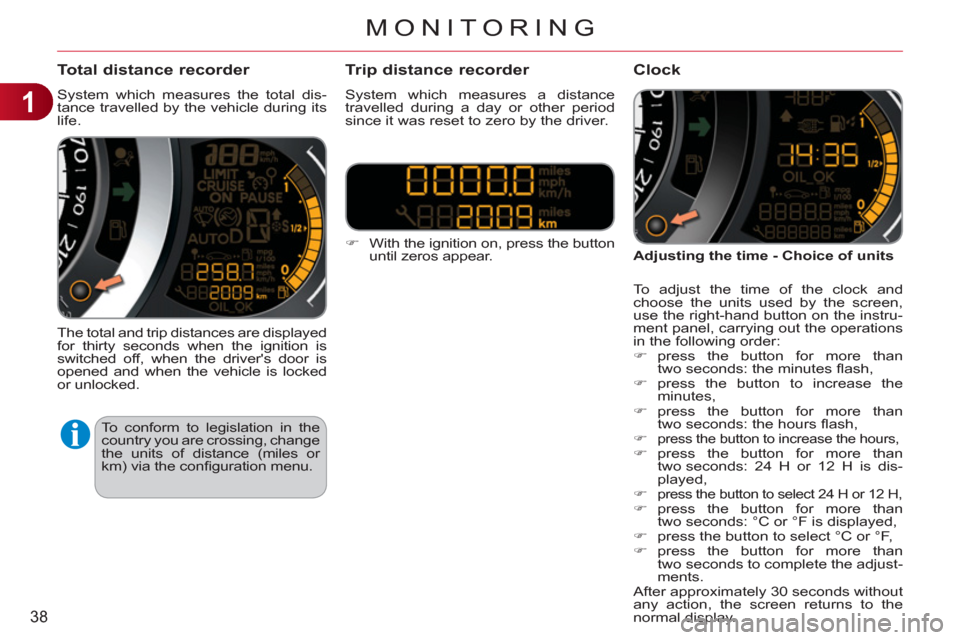
Total distance recorder
System which measures the total dis-
tance travelled by the vehicle during its
life.
The total and trip distances are displayed
for thirty seconds when the ignition is
switched off, when the driver's door is
opened and when the vehicle is locked
or unlocked.
)
With the ignition on, press the button
until zeros appear.
Tr ip distance recorder
System which measures a distance
travelled during a day or other period
since it was reset to zero by the driver.
Clock
Adjusting the time - Choice of units
To adjust the time of the clock and
choose the units used by the screen,
use the right-hand button on the instru-
ment panel, carrying out the operations
in the following order:
)
press the button for more than
two seconds: the minutes fl ash,
)
press the button to increase the
minutes,
)
press the button for more than
two seconds: the hours fl ash,
)
press the button to increase the hours,
)
press the button for more than
two seconds: 24 H or 12 H is dis-
played,
)
press the button to select 24 H or 12 H,
)
press the button for more than
two seconds: °C or °F is displayed,
)
press the button to select °C or °F,
)
press the button for more than
two seconds to complete the adjust-
ments.
After approximately 30 seconds without
any action, the screen returns to the
normal display.
To conform to legislation in the
country you are crossing, change
the units of distance (miles or
km) via the confi guration menu.
Page 44 of 252

1
42
MONITORING
A few definitions…
Range
(miles or km)
This indicates the distance
which can still be travelled
with the fuel remaining in the tank in
relation to the average fuel consump-
tion over the last few miles (kilometres)
travelled.
Current fuel consumption
(mpg or l/100 km or km/l)
This is the average fuel con-
sumption during the last few
seconds.
Average fuel consumption
(mpg or l/100 km or km/l)
This is the average fuel con-
sumption since the last trip
computer zero reset.
Average speed
(mph or km/h)
This is the average speed calcu-
lated since the last trip computer
zero reset (ignition on).
Distance travelled
(miles or km)
This indicates the distance
travelled since the last trip
computer zero reset.
This value may vary following a
change in the style of driving or
the relief, resulting in a signifi -
cant change in the current fuel
consumption.
If dashes are displayed continu-
ously while driving in place of the
digits, contact a CITROËN dealer
or a qualifi ed workshop. This function is only displayed
from 20 mph (30 km/h).
When the range falls below 20 miles
(30 km), dashes are displayed. After fi ll-
ing with at least 5 litres of fuel, the range
is recalculated and is displayed when it
exceeds 60 miles (100 km).
Distance remaining to
destination
(miles or km)
This is the distance remaining
to be travelled to the fi nal destination. It
can be entered by the user.
If the distance is not entered, dashes
are displayed in place of the digits.
Stop & Start time counter
(minutes/seconds or hours/minutes)
If your vehicle is fi tted with Stop &
Start, a time counter calculates the
time spent in STOP mode during a journey.
It resets to zero every time the ignition
is switched on with the key.
Page 64 of 252
3
62
COMFORT
MIRRORS
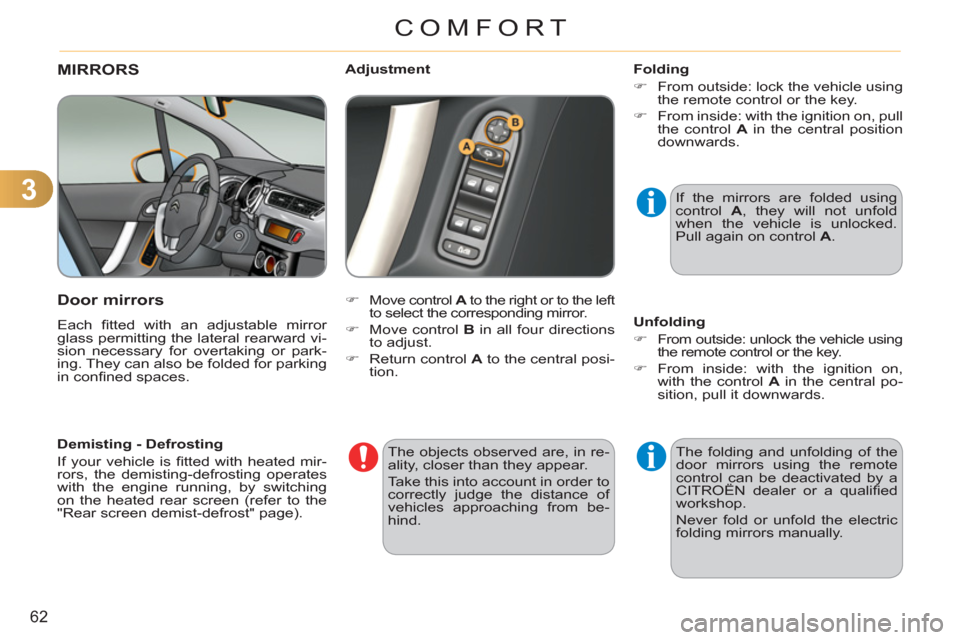
Door mirrors
Each fi tted with an adjustable mirror
glass permitting the lateral rearward vi-
sion necessary for overtaking or park-
ing. They can also be folded for parking
in confi ned spaces.
)
Move control A
to the right or to the left
to select the corresponding mirror.
)
Move control B
in all four directions
to adjust.
)
Return control A
to the central posi-
tion.
Adjustment
Folding
)
From outside: lock the vehicle using
the remote control or the key.
)
From inside: with the ignition on, pull
the control A
in the central position
downwards.
Unfolding
)
From outside: unlock the vehicle using
the remote control or the key.
)
From inside: with the ignition on,
with the control A
in the central po-
sition, pull it downwards. If the mirrors are folded using
control A
, they will not unfold
when the vehicle is unlocked.
Pull again on control A
.
The folding and unfolding of the
door mirrors using the remote
control can be deactivated by a
CITROËN dealer or a qualifi ed
workshop.
Never fold or unfold the electric
folding mirrors manually.
The objects observed are, in re-
ality, closer than they appear.
Take this into account in order to
correctly judge the distance of
vehicles approaching from be-
hind.
Demisting - Defrosting
If your vehicle is fi tted with heated mir-
rors, the demisting-defrosting operates
with the engine running, by switching
on the heated rear screen (refer to the
"Rear screen demist-defrost" page).
Page 67 of 252
4
65
ACCESS
Anti-theft protection
Electronic engine immobiliser
The key contains an electronic chip
which has a special code. When the
ignition is switched on, this code must
be recognised in order for starting to be
possible.
This electronic engine immobiliser locks
the engine management system a few
minutes after the ignition is switched off
and prevents starting of the engine by
anyone who does not have the key.
In the event of a fault, you
are informed by illumina-
tion of this warning lamp,
an audible signal and a message in the
screen.
In this case, your vehicle will not start;
contact a CITROËN dealer as soon as
possible.
Keep safely the label attached to the
keys given to you on acquisition of the
vehicle.
Ignition switch
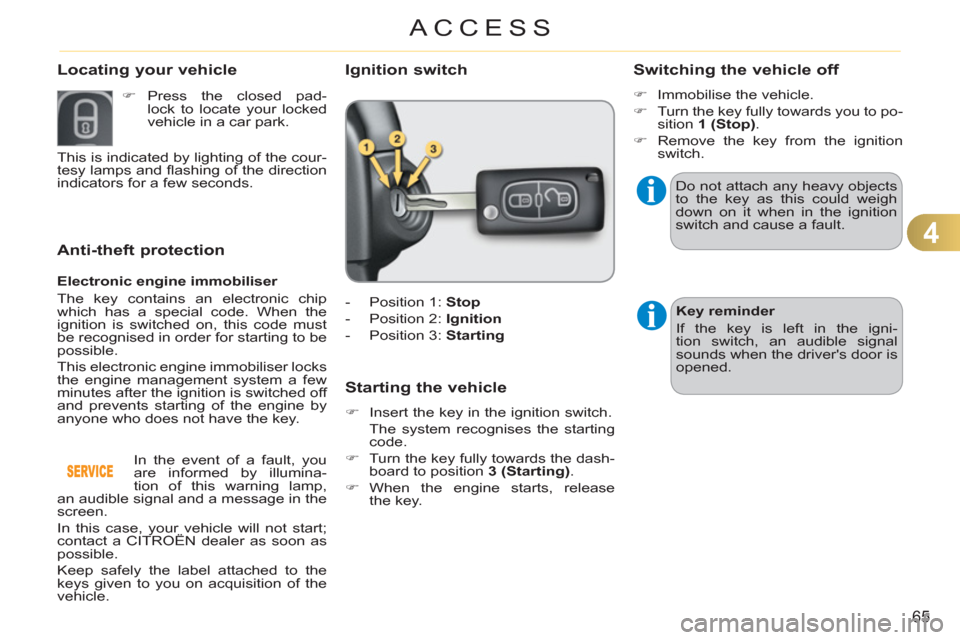
- Position 1: Stop
- Position 2: Ignition
- Position 3: Starting
Starting the vehicle
)
Insert the key in the ignition switch.
The system recognises the starting
code.
)
Turn the key fully towards the dash-
board to position 3 (Starting)
.
)
When the engine starts, release
the key.
Switching the vehicle off
)
Immobilise the vehicle.
)
Turn the key fully towards you to po-
sition 1 (Stop)
.
)
Remove the key from the ignition
switch.
Do not attach any heavy objects
to the key as this could weigh
down on it when in the ignition
switch and cause a fault.
Key reminder
If the key is left in the igni-
tion switch, an audible signal
sounds when the driver's door is
opened.
Locating your vehicle
)
Press the closed pad-
lock to locate your locked
vehicle in a car park.
This is indicated by lighting of the cour-
tesy lamps and fl ashing of the direction
indicators for a few seconds.
Page 68 of 252
4
66
ACCESS
Remote control problem
Following disconnection of the vehicle
battery, replacement of the remote con-
trol battery or in the event of a remote
control malfunction, you can no longer
unlock, lock or locate your vehicle.
)
First of all, use the key in the lock to
unlock or lock your vehicle.
)
Then, reinitialise the remote
control.
If the problem persists, contact a
CITROËN dealer as soon as possible.
Reinitialisation
)
Switch off the ignition.
)
Turn the key to position 2 (Ignition
on)
.
)
Press the closed padlock immedi-
ately for a few seconds.
)
Switch off the ignition and remove
the key from the ignition switch.
The remote control is fully operational
again.
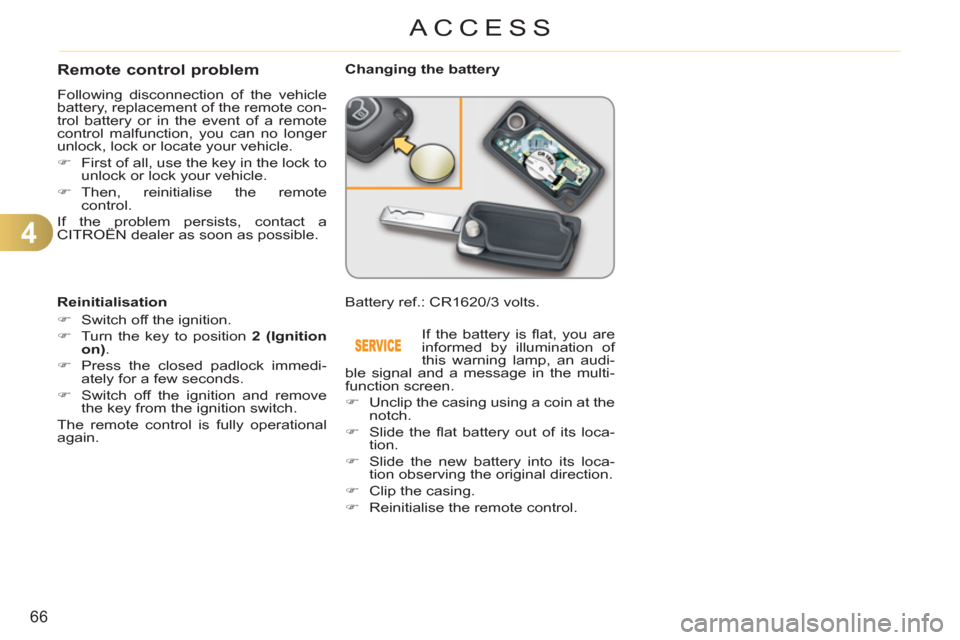
Changing the battery
Battery ref.: CR1620/3 volts.
If the battery is fl at, you are
informed by illumination of
this warning lamp, an audi-
ble signal and a message in the multi-
function screen.
)
Unclip the casing using a coin at the
notch.
)
Slide the fl at battery out of its loca-
tion.
)
Slide the new battery into its loca-
tion observing the original direction.
)
Clip the casing.
)
Reinitialise the remote control.
Page 69 of 252
4
67
ACCESS
Lost keys
Visit a CITROËN dealer with the vehicle's registration document, your per-
sonal identifi cation documents and if possible the key code label.
The CITROËN dealer will be able to fi nd the key code and the transponder
code required to order a new key.
Do not throw the remote con-
trol batteries away, they contain
metals which are harmful to the
environment.
Take them to an approved col-
lection point.
Remote control
The high frequency remote control is a sensitive system; do not operate it
while it is in your pocket as there is a possibility that it may unlock the ve-
hicle, without you being aware of it.
Do not repeatedly press the buttons of your remote control out of range and
out of sight of your vehicle. You run the risk of stopping it from working and
the remote control would have to be reinitialised.
The remote control does not operate when the key is in the ignition switch,
even when the ignition is switched off, except for reinitialisation.
Locking the vehicle
Driving with the doors locked may make access to the passenger compart-
ment by the emergency services more diffi cult in an emergency.
As a safety precaution (with children on board), remove the key from the
ignition switch when you leave the vehicle, even for a short time.
Anti-theft protection
Do not make any modifi cations to the electronic engine immobiliser system;
this could cause malfunctions.
When purchasing a second-hand vehicle
Have the pairing of all of the keys in your possession checked by a
CITROËN dealer, to ensure that only your keys can be used to open and
start the vehicle.
Page 70 of 252

4
ACCESS
WINDOW CONTROLS
System which opens or closes a window
manually or automatically. It is fi tted with
a system which provides protection if an
obstacle is detected on the one-touch
models and a deactivation system to pre-
vent misuse of the rear switches on all
models.
1.
Driver's electric window switch.
2.
Passenger's electric window switch.
3.
Rear right electric window switch.
4.
Rear left electric window switch.
5.
Deactivating the rear electric win-
dow and door switches.
Electric windows
)
Press or pull the switch.
The window stops as soon
as the switch is released.
The electric window switches
remain operational for approxi-
mately 45 seconds after the igni-
tion is switched off or until a front
door is opened.
During this period of 45 sec-
onds, if you open a door while
opening a window, the window
stops. The ignition must then be
switched on again to operate the
windows.
One-touch electric windows
There are two methods
of operation:
- manual mode
)
Press or pull the switch gently.
The window stops as soon as the
switch is released.
- automatic mode
)
Press or pull the switch fully. The
window opens or closes completely
when the switch is released.
)
Pressing the switch again stops
the movement of the window.
Safety anti-pinch
The one-touch front electric windows
are fi tted with a safety anti-pinch func-
tion.
When the window rises and meets an
obstacle, it stops and partially lowers
again.
In the event of unwanted open-
ing of the window on closing
(for example in the presence of
frost):
)
press the switch beyond the
point of resistance and then
release it: the window opens
completely,
)
then pull it immediately with-
out passing the point of resis-
tance until the window closes
completely,
)
continue to hold the switch for
approximately one second af-
ter the window has closed.
The safety anti-pinch func-
tion is not active during these
operations.