Service Citroen C3 2012 2.G Owner's Guide
[x] Cancel search | Manufacturer: CITROEN, Model Year: 2012, Model line: C3, Model: Citroen C3 2012 2.GPages: 252, PDF Size: 8.11 MB
Page 203 of 252
201
08
1
2
3
4
BLUETOOTH TELEPHONE
*
The services available depend on the network, the SIM card and thecompatibility of the Bluetooth telephone used. Check the telephone
manual and with your network provider for details of the servicesavailable to you.
PAIRING A TELEPHONE/
FIRST CONNECTION
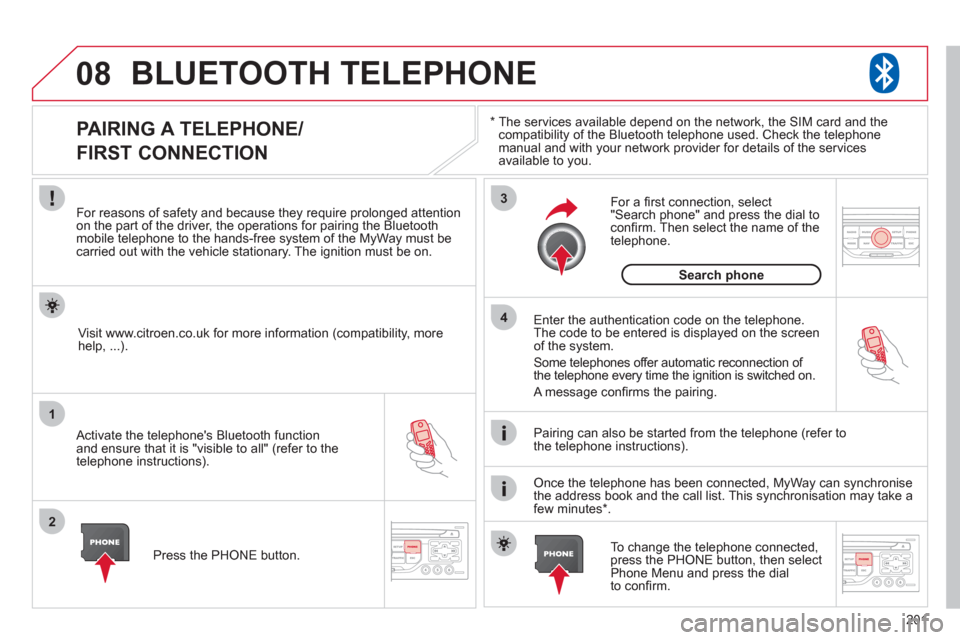
For reasons of safety and because they require prolonged attentionon the part of the driver, the operations for pairing the Bluetooth mobile telephone to the hands-free system of the MyWay must be carried out with the vehicle stationary. The ignition must be on.
Activate the telephone's Bluetooth
function
and ensure that it is "visible to all" (refer to the
telephone instructions). Enter the authentication code on the tele
phone.
The code to be entered is displayed on the screen
of the system.
Some telephones offer automatic reconnection o
f
the telephone every time the ignition is switched on.
A messa
ge confi rms the pairing.
To change the telephone connected, press the PHONE button, then select Phone Menu and press the dial
to confi rm.
Once the telephone has been connected, MyWay can synchronise
the address book and the call list. This synchronisation may take a few minutes * . Pairin
g can also be started from the telephone (refer to
the telephone instructions). Visit www.citroen.co.uk
for more information (compatibility, more
help, ...).
Press the PH
ONE button.
For a
fi rst connection, select"Search phone" and press the dial to confi rm. Then select the name of thetelephone.
Search
phone
Page 204 of 252
202
08
1
2
2
1
*
The services available depend on the network, the SIM card and the compatibility of the Bluetooth telephone used. Check the telephone manual and with your network provider for details of the services
available to you.
BLUETOOTH TELEPHONE
CONNECTING A TELEPHONE
For reasons of safety and because they require prolonged attention
on the part of the driver, the operations for pairing the Bluetooth
mobile telephone to the hands-free system of the MyWay must becarried out with the vehicle stationary. The ignition must be on.
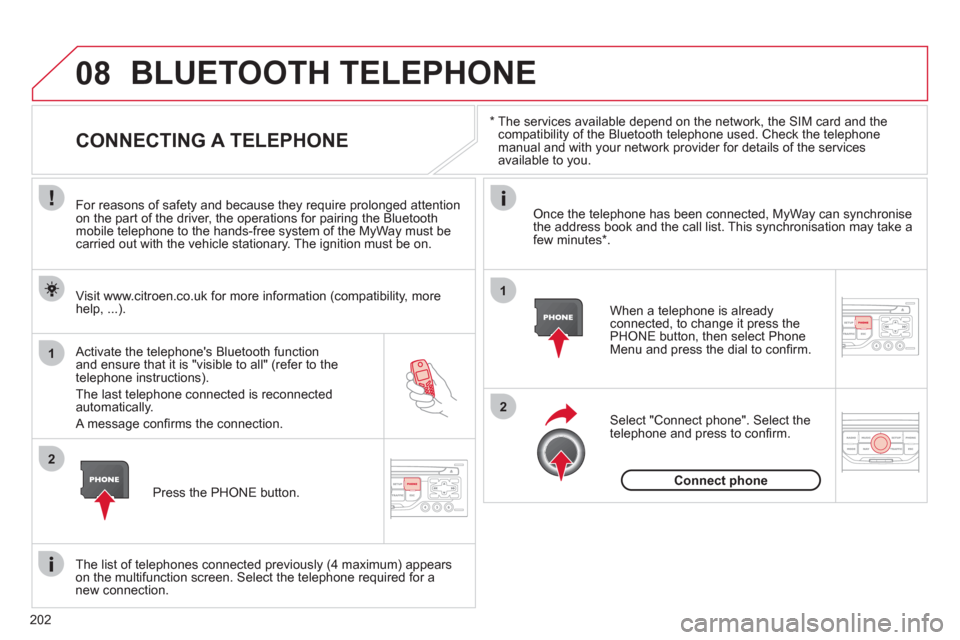
Activate the tele
phone's Bluetooth function and ensure that it is "visible to all" (refer to the
telephone instructions).
The last telephone connected is reconnected automatically.
A messa
ge confi rms the connection. When a telephone is alread
yconnected, to change it press the
PHONE button, then select PhoneMenu and press the dial to confi rm.
Once the telephone has been connected, MyWay can synchronise
the address book and the call list. This synchronisation may take afew minutes * .
The list o
f telephones connected previously (4 maximum) appearson the multifunction screen. Select the telephone required for a
new connection. Visit www.citroen.co.uk
for more information (compatibility, more
help, ...).
Press the PH
ONE button.Select "Connect
phone". Select the
telephone and press to confi rm.
Connect
phone
Page 225 of 252
223
06
1
2
3
4
5
6
7
8
9
MENU
OK
For safety reasons and because they require prolonged attentionon the part of the driver, the operations for pairing of the Bluetooth mobile telephone with the Bluetooth hands-free system of your
audio equipment must be carried out with the vehicle stationary
and the ignition on.
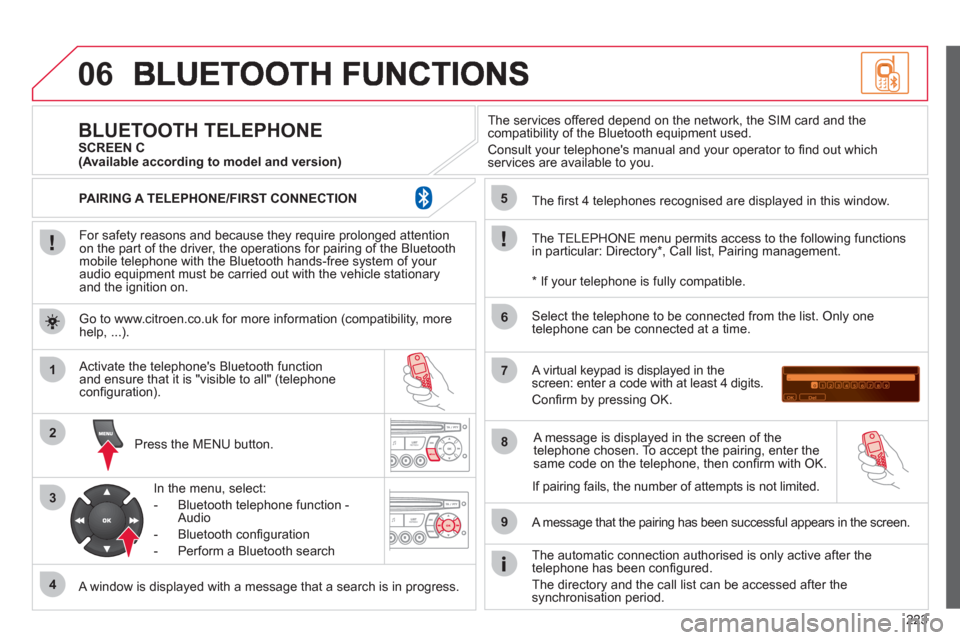
Pr
ess the MENU button.
A window is displayed with a message that a search is in progress.
Activate the telephone's Bluetooth
function
and ensure that it is "visible to all" (telephone confi guration).
In the menu, select:
- Bluetooth telephone
function -
Audio
- Bluetooth confi
guration
- P
erform a Bluetooth search
The services o
ffered depend on the network, the SIM card and thecompatibility of the Bluetooth equipment used.
Consult your telephone's manual and your operator to fi nd out which
services are available to you.
BLUETOOTH TELEPHONE SCREEN C
The TELEPH
ONE menu permits access to the following functions
in particular: Directory * , Call list, Pairing management.
The
fi rst 4 telephones recognised are displayed in this window.
A virtual ke
ypad is displayed in thescreen: enter a code with at least 4 digits.
Confi rm by pressing OK.
A messa
ge that the pairing has been successful appears in the screen.
Select the telephone to be connected from the list. Only one
telephone can be connected at a time.
A messa
ge is displayed in the screen of the
telephone chosen. To accept the pairing, enter the same code on the telephone, then confi rm with OK.
The automatic connection authorised is onl
y active after the
telephone has been confi gured.
The directory and the call list can be accessed a
fter thesynchronisation period.
(Available according to model and version)
*
If your telephone is fully compatible.
I
f pairing fails, the number of attempts is not limited. Go to www.citroen.co.uk for more information
(compatibility, more help, ...).
PAIRING A TELEPHONE/FIR
ST CONNECTION
Page 243 of 252
241
ALPHABETICAL INDEX
R Resetting the trip recorder ............ 38
Rev counter ............................ 23, 24
Reversing lamp .......................... 148
Risk areas (update) .................... 194
Routine checks ................... 134, 135
Running out of fuel (Diesel) ........ 130
S Safety
for children ..........92-100, 105, 107
Scented air freshener ................... 58
Screen, colour 16/9 ...... 48, 184, 205
Screen,
monochrome ............ 216, 228, 230
Screen, multifunction
(with audio equipment) ... 43, 45, 48
Screen-wash reservoir ............... 133
Screen menu map ...... 205, 228, 230
Screenwash ................................. 82
Screenwash fluid level ............... 133
Seat, rear bench ........................... 61
Seat adjustment ........................... 59
Seat belts ........................... 104, 105
Seats, rear .................................... 61
Serial number, vehicle ................ 177
Service indicator ........................... 35
Servicing ...................................... 21
Setting
the clock ............. 38, 204, 226, 227
Short-cut menus ................. 185, 186
Sidelamps .................... 77, 146, 148
Side repeater .............................. 146
Spare wheel ............................... 141
Speakers (fitting) ........................ 164
Speed limiter .............................. 123
Speedometer .......................... 23, 24 P Paint colour code ....................... 177
Parcel shelf, rear .......................... 91
Parking brake ..................... 110, 135
Parking sensors, rear ................. 127
Particle emission filter ........ 134, 135
Passenger compartment filter ...... 134
Player, CD MP3 ................. 199, 219
Port, USB ..................... 88, 220, 222
Priming the fuel system .............. 130
Protecting
children ................92-100, 105, 107
Puncture ..................................... 136
R Radio .................................. 197, 217
Radio pre-equipment .................. 164
Rear foglamp ........................ 78, 148
Rear screen (demisting) ............... 57
Recharging the battery ............... 159
Reduction of electrical load ........ 159
Regeneration of the particle
emissions filter ......................... 135
Reinitialising the electric windows .... 69
Reinitialising the remote control ..... 66
Remote control ....................... 64, 67
Removing a wheel ...................... 143
Removing the mat ........................ 89
Repair kit, puncture .................... 136
Replacing bulbs ...................145-150
Replacing fuses ...................151-157
Replacing the air filter ................ 134
Replacing the oil filter ................. 134
Replacing the passenger
compartment filter .................... 134
Replacing wiper blades ........ 83, 160
Resetting the service indicator ..... 36 L Locating your vehicle ................... 65
Locking from the inside ................ 71
Low fuel level ............................... 74
LPG ............................................ 170
M Main beam ........................... 77, 146
Maintenance ................................. 21
Markings,
identification ............................. 177
Mat ............................................... 89
Menu, main ................................ 216
Mirror, rear view ........................... 63
Mirrors, door ................................. 62
Misfuel prevention ........................ 76
Motorway function
(direction indicators) ................. 101
Mountings for ISOFIX
seats ..................................... 97, 99
MP3 CD .............................. 199, 219
Music media players .................. 198
MyWay ..........................48, 181-212
N Navigation .................................. 187
Number plate lamps ................... 148
O Oil filter ....................................... 134
Oil level ................................ 37, 133
Opening the bonnet .................... 130
Opening the boot .................... 64, 73
Opening the doors .................. 64, 70
Opening the fuel filler flap ............ 74
Operation indicator
lamps .....................................25-34