eco Citroen C3 2012 2.G Owner's Guide
[x] Cancel search | Manufacturer: CITROEN, Model Year: 2012, Model line: C3, Model: Citroen C3 2012 2.GPages: 252, PDF Size: 8.11 MB
Page 69 of 252
4
67
ACCESS
Lost keys
Visit a CITROËN dealer with the vehicle's registration document, your per-
sonal identifi cation documents and if possible the key code label.
The CITROËN dealer will be able to fi nd the key code and the transponder
code required to order a new key.
Do not throw the remote con-
trol batteries away, they contain
metals which are harmful to the
environment.
Take them to an approved col-
lection point.
Remote control
The high frequency remote control is a sensitive system; do not operate it
while it is in your pocket as there is a possibility that it may unlock the ve-
hicle, without you being aware of it.
Do not repeatedly press the buttons of your remote control out of range and
out of sight of your vehicle. You run the risk of stopping it from working and
the remote control would have to be reinitialised.
The remote control does not operate when the key is in the ignition switch,
even when the ignition is switched off, except for reinitialisation.
Locking the vehicle
Driving with the doors locked may make access to the passenger compart-
ment by the emergency services more diffi cult in an emergency.
As a safety precaution (with children on board), remove the key from the
ignition switch when you leave the vehicle, even for a short time.
Anti-theft protection
Do not make any modifi cations to the electronic engine immobiliser system;
this could cause malfunctions.
When purchasing a second-hand vehicle
Have the pairing of all of the keys in your possession checked by a
CITROËN dealer, to ensure that only your keys can be used to open and
start the vehicle.
Page 70 of 252

4
ACCESS
WINDOW CONTROLS
System which opens or closes a window
manually or automatically. It is fi tted with
a system which provides protection if an
obstacle is detected on the one-touch
models and a deactivation system to pre-
vent misuse of the rear switches on all
models.
1.
Driver's electric window switch.
2.
Passenger's electric window switch.
3.
Rear right electric window switch.
4.
Rear left electric window switch.
5.
Deactivating the rear electric win-
dow and door switches.
Electric windows
)
Press or pull the switch.
The window stops as soon
as the switch is released.
The electric window switches
remain operational for approxi-
mately 45 seconds after the igni-
tion is switched off or until a front
door is opened.
During this period of 45 sec-
onds, if you open a door while
opening a window, the window
stops. The ignition must then be
switched on again to operate the
windows.
One-touch electric windows
There are two methods
of operation:
- manual mode
)
Press or pull the switch gently.
The window stops as soon as the
switch is released.
- automatic mode
)
Press or pull the switch fully. The
window opens or closes completely
when the switch is released.
)
Pressing the switch again stops
the movement of the window.
Safety anti-pinch
The one-touch front electric windows
are fi tted with a safety anti-pinch func-
tion.
When the window rises and meets an
obstacle, it stops and partially lowers
again.
In the event of unwanted open-
ing of the window on closing
(for example in the presence of
frost):
)
press the switch beyond the
point of resistance and then
release it: the window opens
completely,
)
then pull it immediately with-
out passing the point of resis-
tance until the window closes
completely,
)
continue to hold the switch for
approximately one second af-
ter the window has closed.
The safety anti-pinch func-
tion is not active during these
operations.
Page 71 of 252
4
69
ACCESS
Deactivating the rear window and
door switches
)
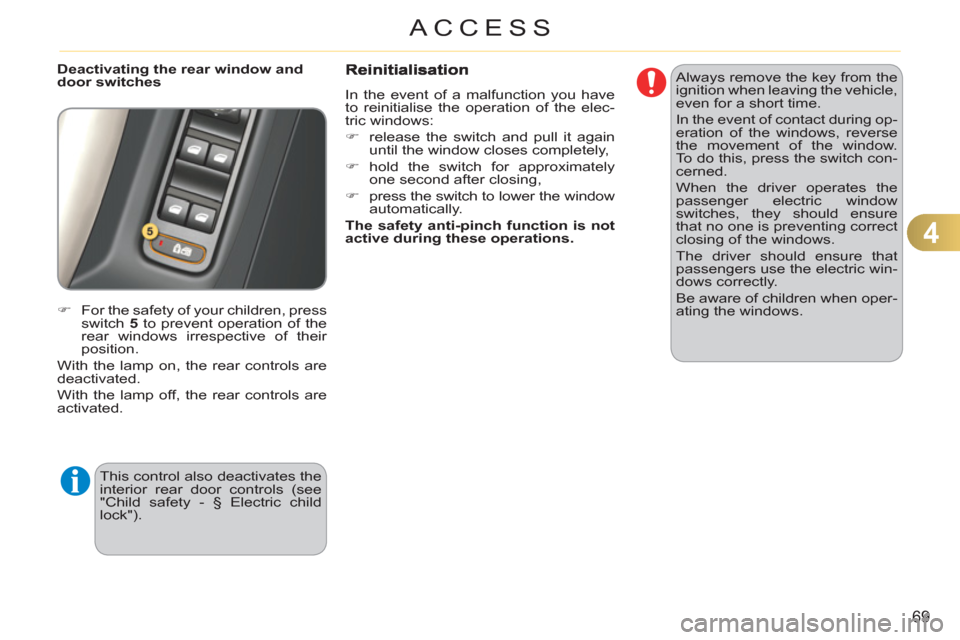
For the safety of your children, press
switch 5
to prevent operation of the
rear windows irrespective of their
position.
With the lamp on, the rear controls are
deactivated.
With the lamp off, the rear controls are
activated.
This control also deactivates the
interior rear door controls (see
"Child safety - § Electric child
lock").
In the event of a malfunction you have
to reinitialise the operation of the elec-
tric windows:
)
release the switch and pull it again
until the window closes completely,
)
hold the switch for approximately
one second after closing,
)
press the switch to lower the window
automatically.
The safety anti-pinch function is not
active during these operations.
Always remove the key from the
ignition when leaving the vehicle,
even for a short time.
In the event of contact during op-
eration of the windows, reverse
the movement of the window.
To do this, press the switch con-
cerned.
When the driver operates the
passenger electric window
switches, they should ensure
that no one is preventing correct
closing of the windows.
The driver should ensure that
passengers use the electric win-
dows correctly.
Be aware of children when oper-
ating the windows.
Page 72 of 252
4
70
ACCESS
DOORS
Opening
From outside
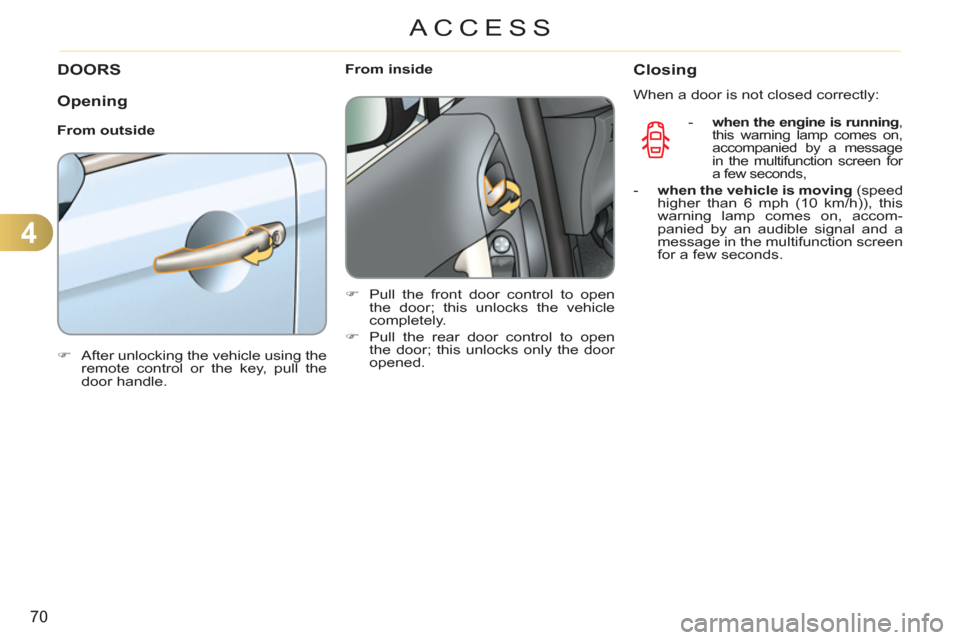
)
After unlocking the vehicle using the
remote control or the key, pull the
door handle.
From inside
)
Pull the front door control to open
the door; this unlocks the vehicle
completely.
)
Pull the rear door control to open
the door; this unlocks only the door
opened.
Closing
When a door is not closed correctly:
-
when the engine is running
,
this warning lamp comes on,
accompanied by a message
in the multifunction screen for
a few seconds,
- when the vehicle is moving
(speed
higher than 6 mph (10 km/h)), this
warning lamp comes on, accom-
panied by an audible signal and a
message in the multifunction screen
for a few seconds.
Page 73 of 252
4
71
ACCESS
Manual centralised control
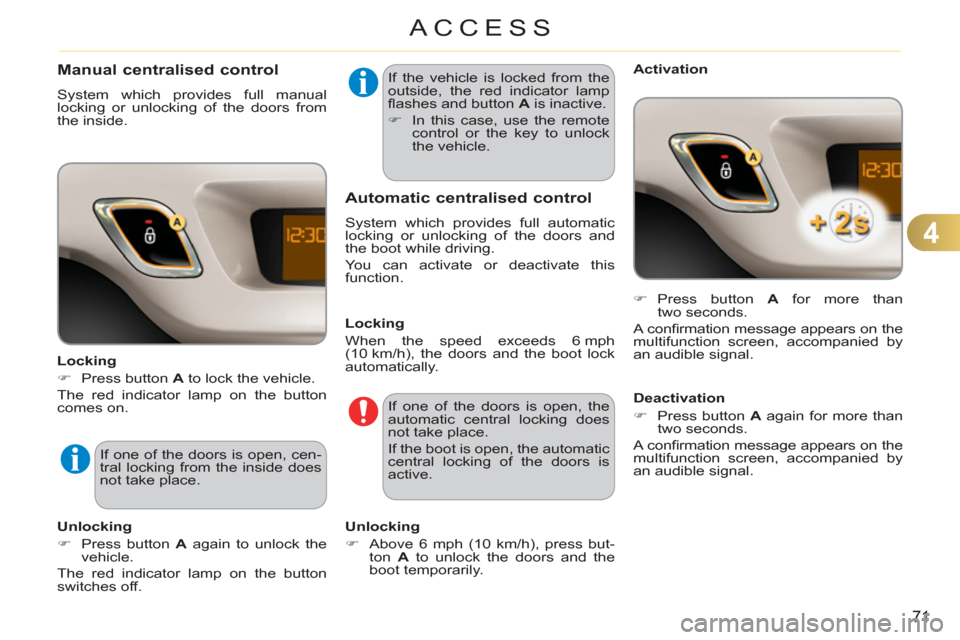
System which provides full manual
locking or unlocking of the doors from
the inside.
Locking
)
Press button A
to lock the vehicle.
The red indicator lamp on the button
comes on.
If one of the doors is open, cen-
tral locking from the inside does
not take place.
Unlocking
)
Press button A
again to unlock the
vehicle.
The red indicator lamp on the button
switches off. If the vehicle is locked from the
outside, the red indicator lamp
fl ashes and button A
is inactive.
)
In this case, use the remote
control or the key to unlock
the vehicle.
Automatic centralised control
System which provides full automatic
locking or unlocking of the doors and
the boot while driving.
You can activate or deactivate this
function.
Locking
When the speed exceeds 6 mph
(10 km/h), the doors and the boot lock
automatically.
If one of the doors is open, the
automatic central locking does
not take place.
If the boot is open, the automatic
central locking of the doors is
active.
Unlocking
)
Above 6 mph (10 km/h), press but-
ton A
to unlock the doors and the
boot temporarily.
Activation
)
Press button A
for more than
two seconds.
A confi rmation message appears on the
multifunction screen, accompanied by
an audible signal.
Deactivation
)
Press button A
again for more than
two seconds.
A confi rmation message appears on the
multifunction screen, accompanied by
an audible signal.
Page 75 of 252
4
73
ACCESS
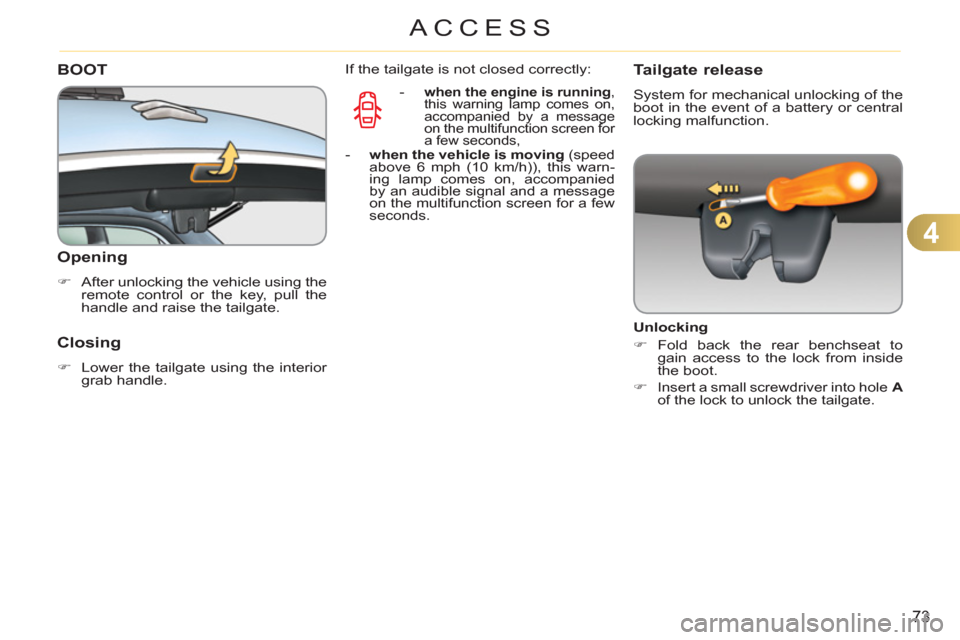
BOOT
Openin
g
)
After unlocking the vehicle using the
remote control or the key, pull the
handle and raise the tailgate.
Closing
)
Lower the tailgate using the interior
grab handle.
-
when the engine is running
,
this warning lamp comes on,
accompanied by a message
on the multifunction screen for
a few seconds,
- when the vehicle is moving
(speed
above 6 mph (10 km/h)), this warn-
ing lamp comes on, accompanied
by an audible signal and a message
on the multifunction screen for a few
seconds.
Tailgate release
System for mechanical unlocking of the
boot in the event of a battery or central
locking malfunction.
Unlocking
)
Fold back the rear benchseat to
gain access to the lock from inside
the boot.
)
Insert a small screwdriver into hole A
of the lock to unlock the tailgate.
If the tailgate is not closed correctly:
Page 78 of 252
4
76
ACCESS
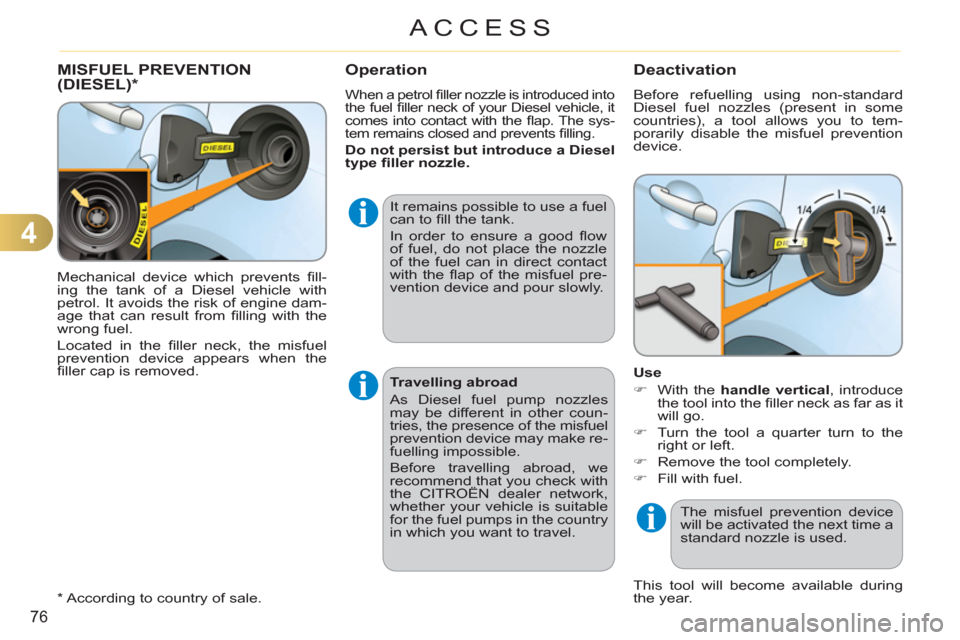
Mechanical device which prevents fi ll-
ing the tank of a Diesel vehicle with
petrol. It avoids the risk of engine dam-
age that can result from fi lling with the
wrong fuel.
Located in the fi ller neck, the misfuel
prevention device appears when the
fi ller cap is removed.
MISFUEL PREVENTION(DIESEL)
*Operation
When a petrol fi ller nozzle is introduced into
the fuel fi ller neck of your Diesel vehicle, it
comes into contact with the fl ap. The sys-
tem remains closed and prevents fi lling.
Do not persist but introduce a Diesel
type fi ller nozzle.
It remains possible to use a fuel
can to fi ll the tank.
In order to ensure a good fl ow
of fuel, do not place the nozzle
of the fuel can in direct contact
with the fl ap of the misfuel pre-
vention device and pour slowly.
This tool will become available during
the year.
*
According to country of sale.
Travelling abroad
As Diesel fuel pump nozzles
may be different in other coun-
tries, the presence of the misfuel
prevention device may make re-
fuelling impossible.
Before travelling abroad, we
recommend that you check with
the CITROËN dealer network,
whether your vehicle is suitable
for the fuel pumps in the country
in which you want to travel.
Deactivation
Before refuelling using non-standard
Diesel fuel nozzles (present in some
countries), a tool allows you to tem-
porarily disable the misfuel prevention
device.
Use
)
With the handle vertical, introduce
the tool into the fi ller neck as far as it
will go.
)
Turn the tool a quarter turn to the
right or left.
)
Remove the tool completely.
)
Fill with fuel.
The misfuel prevention device
will be activated the next time a
standard nozzle is used.
Page 80 of 252
5
78
VISIBILITY
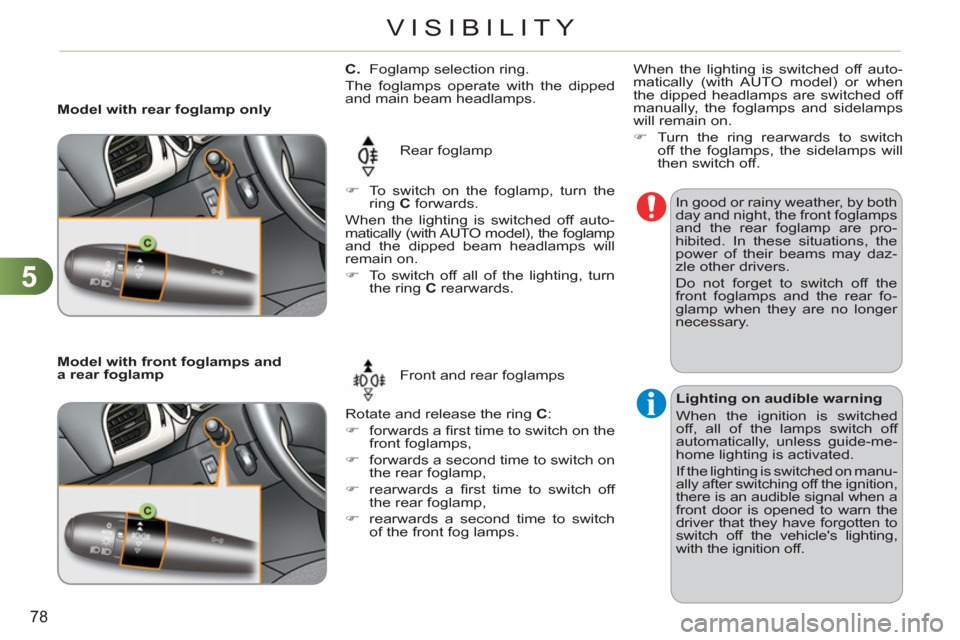
C.
Foglamp selection ring.
The foglamps operate with the dipped
and main beam headlamps.
Rear foglamp
Rotate and release the ring C
:
)
forwards a fi rst time to switch on the
front foglamps,
)
forwards a second time to switch on
the rear foglamp,
)
rearwards a fi rst time to switch off
the rear foglamp,
)
rearwards a second time to switch
of the front fog lamps.
Model with rear foglamp only
)
To switch on the foglamp, turn the
ring C
forwards.
When the lighting is switched off auto-
matically (with AUTO model), the foglamp
and the dipped beam headlamps will
remain on.
)
To switch off all of the lighting, turn
the ring C
rearwards.
Model with front foglamps and
a rear foglamp
Front and rear foglamps In good or rainy weather, by both
day and night, the front foglamps
and the rear foglamp are pro-
hibited. In these situations, the
power of their beams may daz-
zle other drivers.
Do not forget to switch off the
front foglamps and the rear fo-
glamp when they are no longer
necessary.
Lighting on audible warning
When the ignition is switched
off, all of the lamps switch off
automatically, unless guide-me-
home lighting is activated.
If the lighting is switched on manu-
ally after switching off the ignition,
there is an audible signal when a
front door is opened to warn the
driver that they have forgotten to
switch off the vehicle's lighting,
with the ignition off.
When the lighting is switched off auto-
matically (with AUTO model) or when
the dipped headlamps are switched off
manually, the foglamps and sidelamps
will remain on.
)
Turn the ring rearwards to switch
off the foglamps, the sidelamps will
then switch off.
Page 82 of 252
5
80
VISIBILITY
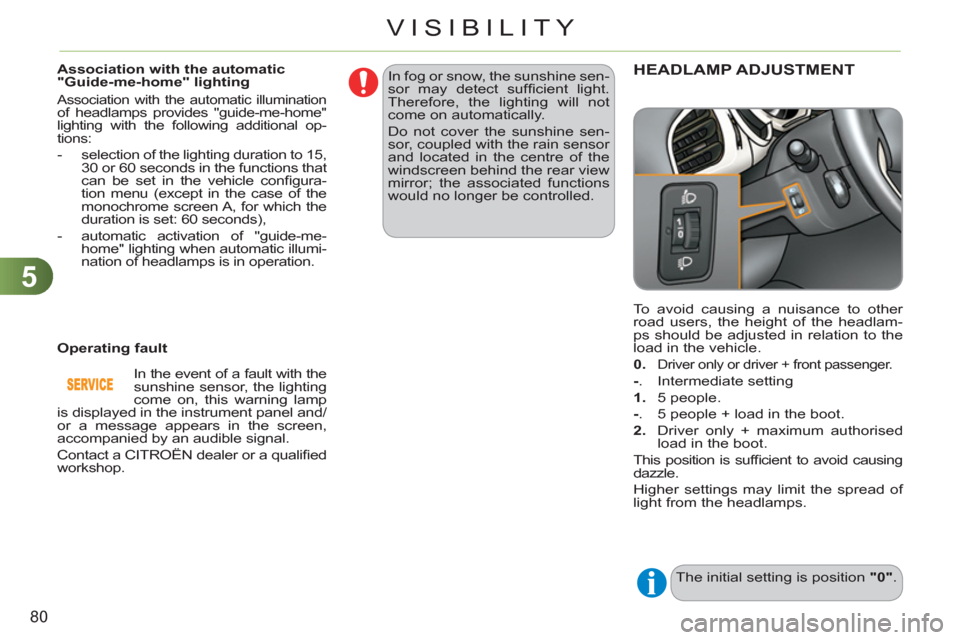
To avoid causing a nuisance to other
road users, the height of the headlam-
ps should be adjusted in relation to the
load in the vehicle.
0
.
Driver only or driver + front passenger.
-
. Intermediate setting
1.
5 people.
-
. 5 people + load in the boot.
2.
Driver only + maximum authorised
load in the boot.
This position is suffi cient to avoid causing
dazzle.
Higher settings may limit the spread of
light from the headlamps.
The initial setting is position "0"
.
HEADLAMP ADJUSTMENT
Association with the automatic
"Guide-me-home" lighting
Association with the automatic illumination of headlamps provides "guide-me-home"
lighting with the following additional op-
tions:
- selection of the lighting duration to 15,
30 or 60 seconds in the functions that
can be set in the vehicle confi gura-
tion menu (except in the case of the
monochrome screen A, for which the
duration is set: 60 seconds),
- automatic activation of "guide-me-
home" lighting when automatic illumi-
nation of headlamps is in operation.
Operating fault In fog or snow, the sunshine sen-
sor may detect suffi cient light.
Therefore, the lighting will not
come on automatically.
Do not cover the sunshine sen-
sor, coupled with the rain sensor
and located in the centre of the
windscreen behind the rear view
mirror; the associated functions
would no longer be controlled.
In the event of a fault with the
sunshine sensor, the lighting
come on, this warning lamp
is displayed in the instrument panel and/
or a message appears in the screen,
accompanied by an audible signal.
Contact a CITROËN dealer or a qualifi ed
workshop.
Page 86 of 252
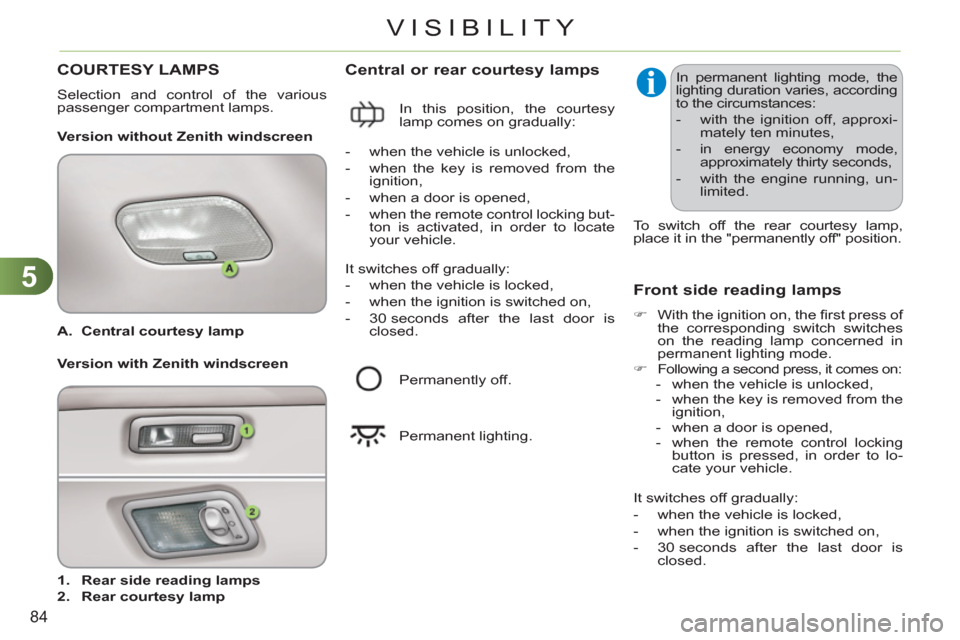
5
84
VISIBILITY
A.
Central courtesy lamp
1.
Rear side reading lamps
2.
Rear courtesy lamp
Central or rear courtesy lamps
Version without Zenith windscreen
Front side reading lamps
)
With the ignition on, the fi rst press of
the corresponding switch switches
on the reading lamp concerned in
permanent lighting mode.
)
Following a second press, it comes on:
- when the vehicle is unlocked,
- when the key is removed from the
ignition,
- when a door is opened,
- when the remote control locking
button is pressed, in order to lo-
cate your vehicle.
In permanent lighting mode, the
lighting duration varies, according
to the circumstances:
- with the ignition off, approxi-
mately ten minutes,
- in energy economy mode,
approximately thirty seconds,
- with the engine running, un-
limited.
Version with Zenith windscreen In this position, the courtesy
lamp comes on gradually:
- when the vehicle is unlocked,
- when the key is removed from the
ignition,
- when a door is opened,
- when the remote control locking but-
ton is activated, in order to locate
your vehicle.
It switches off gradually:
- when the vehicle is locked,
- when the ignition is switched on,
- 30 seconds after the last door is
closed.
Permanently off.
Permanent lighting.
It switches off gradually:
- when the vehicle is locked,
- when the ignition is switched on,
- 30 seconds after the last door is
closed.
To switch off the rear courtesy lamp,
place it in the "permanently off" position.
COURTESY LAMPS
Selection and control of the various
passenger compartment lamps.